mirror GENESIS G90 2018 Owner's Manual
[x] Cancel search | Manufacturer: GENESIS, Model Year: 2018, Model line: G90, Model: GENESIS G90 2018Pages: 519, PDF Size: 19.52 MB
Page 15 of 519
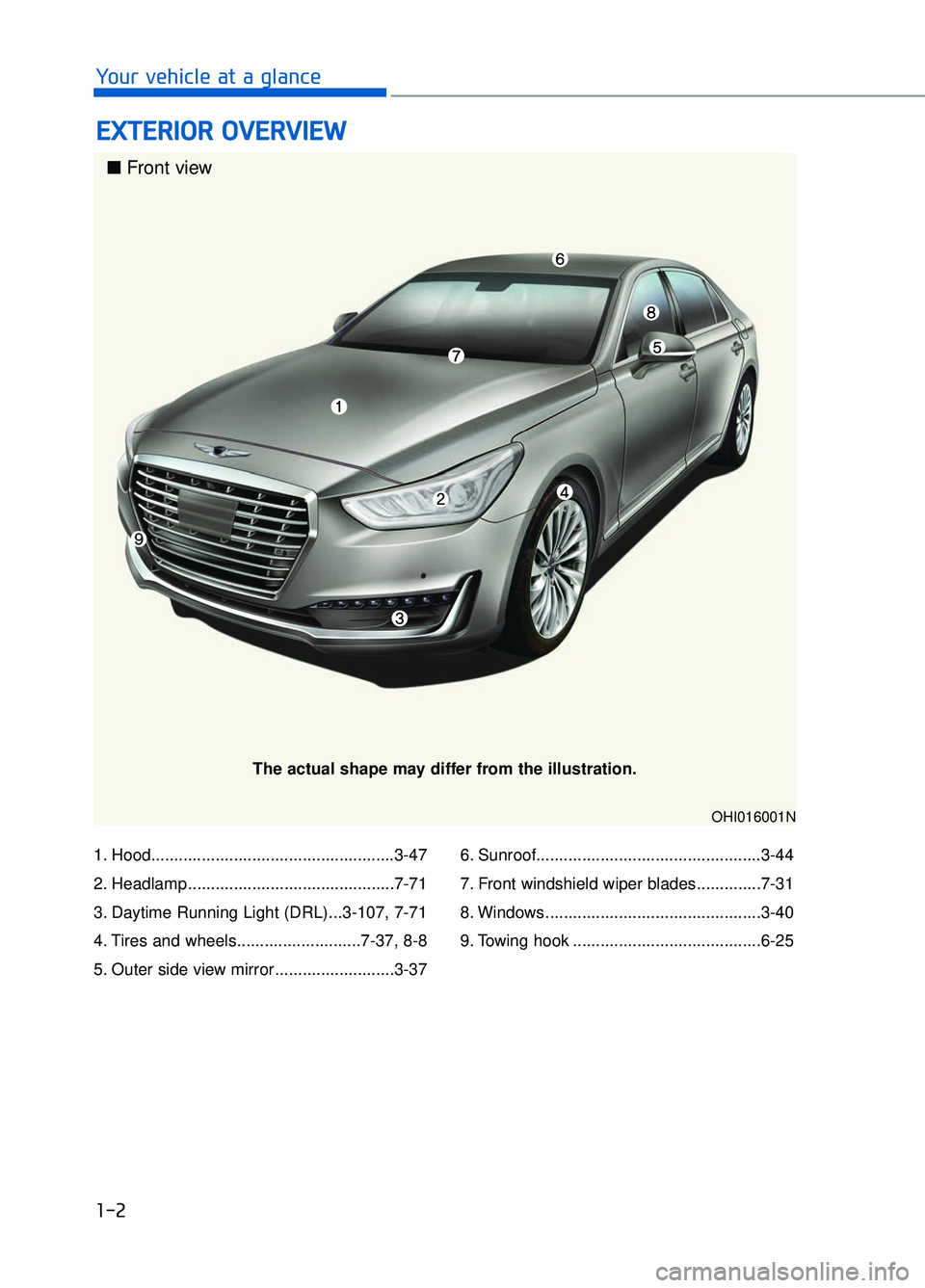
1. Hood.....................................................3-47
2. Headlamp .............................................7-71
3. Daytime Running Light (DRL)...3-107, 7-71
4. Tires and wheels...........................7-37, 8-8
5. Outer side view mirror ..........................3-376. Sunroof.................................................3-44
7. Front windshield wiper blades..............7-31
8. Windows ...............................................3-40
9. Towing hook .........................................6-25
E E
X
X T
TE
ER
R I
IO
O R
R
O
O V
VE
ER
R V
V I
IE
E W
W
1-2
Your vehicle at a glance
OHI016001N
■ Front view
The actual shape may differ from the illustration.
Page 17 of 519
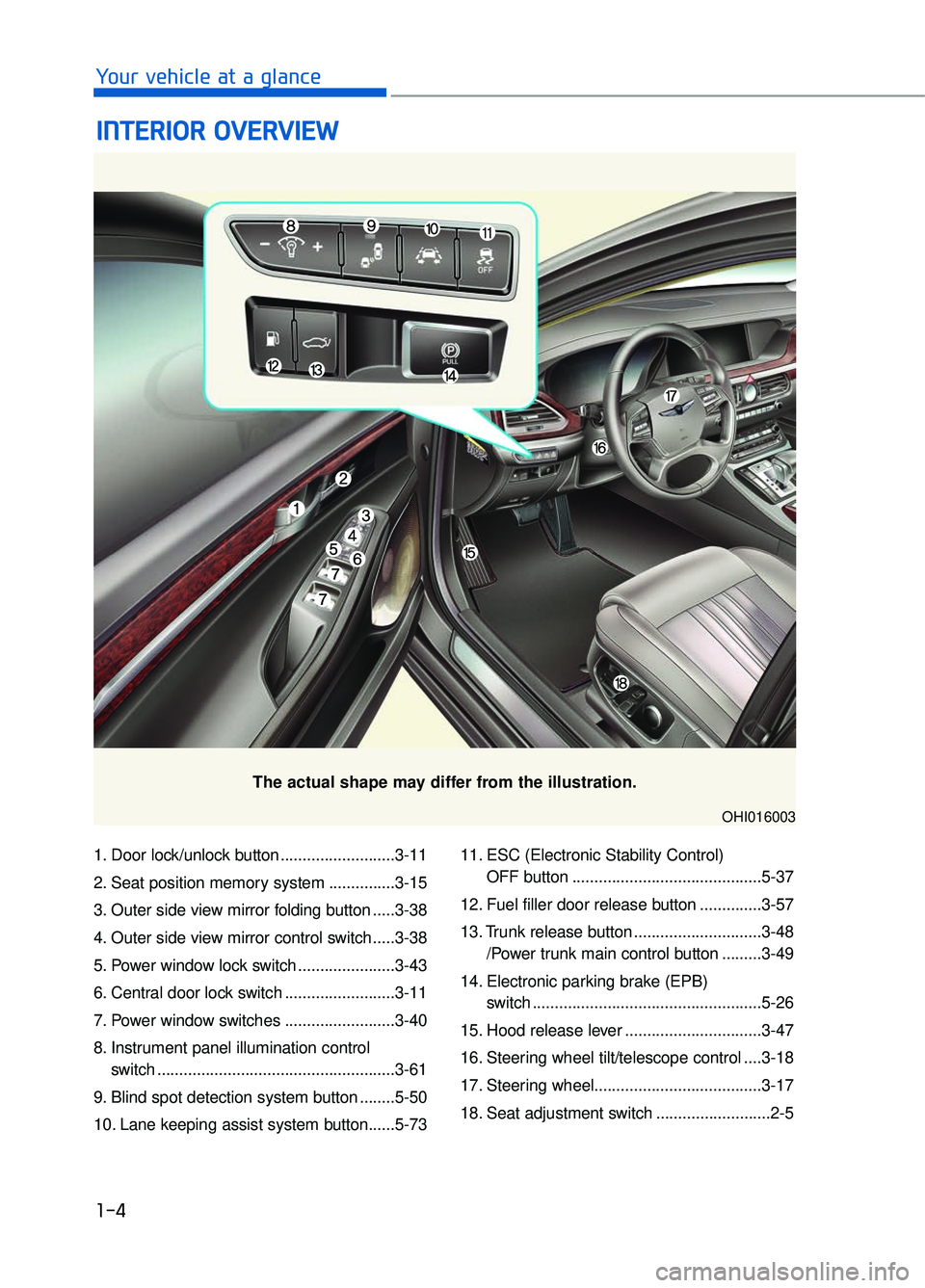
1. Door lock/unlock button ..........................3-11
2. Seat position memory system ...............3-15
3. Outer side view mirror folding button .....3-38
4. Outer side view mirror control switch .....3-38
5. Power window lock switch ......................3-43
6. Central door lock switch .........................3-11
7. Power window switches .........................3-40
8. Instrument panel illumination control switch ......................................................3-61
9. Blind spot detection system button ........5-50
10. Lane keeping assist system button......5-73 11. ESC (Electronic Stability Control)
OFF button ...........................................5-37
12. Fuel filler door release button ..............3-57
13. Trunk release button .............................3-48 /Power trunk main control button .........3-49
14. Electronic parking brake (EPB) switch ....................................................5-26
15. Hood release lever ...............................3-47
16. Steering wheel tilt/telescope control ....3-18
17. Steering wheel......................................3-17
18. Seat adjustment switch ..........................2-5
I I N
N T
TE
ER
R I
IO
O R
R
O
O V
VE
ER
R V
V I
IE
E W
W
1-4
Your vehicle at a glance
The actual shape may differ from the illustration.
OHI016003
Page 80 of 519

2-60
Safety system of your vehicle
The purpose of the SRS is to provide
the vehicle's driver and front passen-
gers with additional protection than
that offered by the seat belt system
alone. The SRS uses sensors to
gather information about the driver’s
and front passenger's seat belt
usage and impact severity.
The seat belt buckle sensors deter-
mine if the driver and front passen-
ger's seat belts are fastened. These
sensors provide the ability to control
the SRS deployment based on
whether or not the seat belts are fas-
tened, and how severe the impact is.
The advanced SRS offers the ability
to control the air bag inflation within
two levels. A first stage level is pro-
vided for moderate-severity impacts.
A second stage level is provided for
more severe impacts.
According to the impact severity, and
seat belt usage, the SRS Control
Module (SRSCM) controls the air
bag inflation. Failure to properly wear
seat belts can increase the risk or
severity of injury in an accident. To reduce the risk of serious
injury or death from an inflating
front air bags, take the following
precautions:
Seat belts must be worn at all
times to help keep occupants
positioned properly.
Move your seat as far back as possible from front air bags,
while still maintaining control
of the vehicle.
Never lean against the door or center console.
Do not allow the front passen- ger to place their feet or legs
on the dashboard.
No objects (such as crash pad cover, cellular phone holder,
cup holder, perfume or stick-
ers) should be placed over or
near the air bag modules on
the steering wheel, instrument
panel, windshield glass, and
the front passenger's panel
above the glove box. Such
objects could cause harm if
the vehicle is in a crash
severe enough to cause the
air bags to deploy.
Do not attach any objects on front windshield and inside
mirror.
WARNING
Page 103 of 519

Accessing Your Vehicle ...............................................................3-4
Smart Key ........................................................................\
..............................3-4
Door Locks ........................................................................\
............3-9
Outside the Vehicle ........................................................................\
.............3-9
Inside the Vehicle........................................................................\
...............3-11
Auto Door Lock/Unlock Features .........................................................3-13
Child-Protector Rear Door locks ...........................................................3-13
Theft-Alarm System ..................................................................3-14
Seat Position Memory System .................................................3-15
Easy Access Function........................................................................\
.......3-16
Steering Wheel ........................................................................\
...3-17
Motor-Driven Power Steering (MDPS) ................................................3-17
Tilt Steering / Telescope Steering ........................................................3-18
Heated Steering Wheel ........................................................................\
....3-18
Horn ........................................................................\
......................................3-19
Mirrors ........................................................................\
.................3-20
Inside Rearview Mirror ........................................................................\
.....3-20
Side View Mirrors ........................................................................\
..............3-37
Reverse Parking Aid Function ................................................................3-39
Windows ........................................................................\
..............3-40
Sunroof ........................................................................\
................3-44
Sunroof opening and closing.................................................\
.................3-45
Tilting the Sunroof ........................................................................\
............3-45
Sunshade........................................................................\
..............................3-46
Resetting the Sunroof ........................................................................\
......3-46
Hood ........................................................................\
.....................3-47
Opening the Hood ........................................................................\
.............3-47
Closing the Hood........................................................................\
................3-47
Trunk ........................................................................\
....................3-48
Non-Powered Trunk ........................................................................\
.........3-48
Power Trunk........................................................................\
........................3-49
Emergency Trunk Safety Release .........................................................3-53
3
C Co
on
nv
ve
e n
n i
ie
e n
n t
t
f
f e
e a
at
tu
u r
re
e s
s
o
o f
f
y
y o
o u
ur
r
v
v e
e h
h i
ic
c l
le
e
Page 105 of 519
C
Co
on
nv
ve
e n
n i
ie
e n
n t
t
f
f e
e a
at
tu
u r
re
e s
s
o
o f
f
y
y o
o u
ur
r
v
v e
e h
h i
ic
c l
le
e
Automatic Climate Control System ........................................3-122
Automatic Heating and Air Conditioning ...........................................3-123
Manual Heating and Air Conditioning ................................................3-124
System Operation ........................................................................\
............3-134
System Maintenance ........................................................................\
......3-135
Windshield Defrosting and Defogging ..................................3-137
Climate Control Additional Features .....................................3-140
Clean Air ........................................................................\
............................3-140
Automatic Ventilation ........................................................................\
.....3-140
Sunroof Inside Air Recirculation..........................................................3-140
DIS Navigation System Monitor ...........................................................3-140
Storage Compartment..............................................................3-142
Center Console Storage ........................................................................\
.3-142
Rear Console Storage........................................................................\
.....3-142
Glove Box.......................................................................\
............................3-143
Sunglass Holder ........................................................................\
...............3-143
Cellular Phone Holder........................................................................\
.....3-145
Wireless Cellular Phone Charging System ........................................3-145
Interior Features ......................................................................3-\
146
Cup Holder........................................................................\
.........................3-146
Sunvisor ........................................................................\
.............................3-147
Rear Vanity Mirror ........................................................................\
..........3-147
Power Outlet ........................................................................\
.....................3-148
USB Charger ........................................................................\
.....................3-149
Clock ........................................................................\
...................................3-149
Clothes Hanger........................................................................\
.................3-150
Bag Hanger ........................................................................\
.......................3-151
Floor Mat Anchor(s) ........................................................................\
.......3-151
Rear Curtain ........................................................................\
......................3-152
Rear Door Window Curtain ...................................................................3-153\
Luggage Net Holder ........................................................................\
........3-154
3
Page 106 of 519
Smart Key
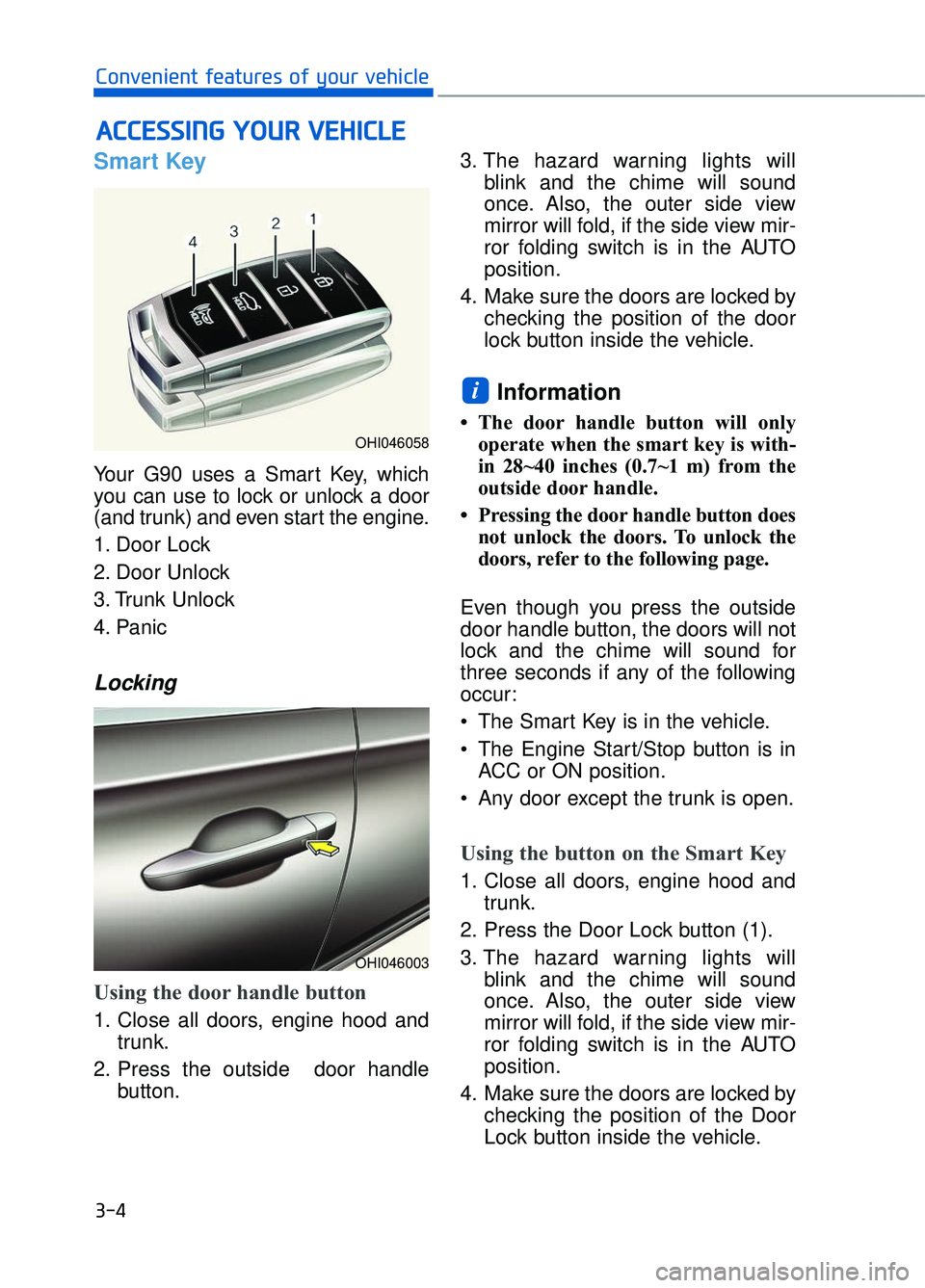
Your G90 uses a Smart Key, which
you can use to lock or unlock a door
(and trunk) and even start the engine.
1. Door Lock
2. Door Unlock
3. Trunk Unlock
4. Panic
Locking
Using the door handle button
1. Close all doors, engine hood andtrunk.
2. Press the outside door handle button. 3. The hazard warning lights will
blink and the chime will sound
once. Also, the outer side view
mirror will fold, if the side view mir-
ror folding switch is in the AUTO
position.
4. Make sure the doors are locked by checking the position of the door
lock button inside the vehicle.
Information
• The door handle button will onlyoperate when the smart key is with-
in 28~40 inches (0.7~1 m) from the
outside door handle.
• Pressing the door handle button does not unlock the doors. To unlock the
doors, refer to the following page.
Even though you press the outside
door handle button, the doors will not
lock and the chime will sound for
three seconds if any of the following
occur:
• The Smart Key is in the vehicle.
The Engine Start/Stop button is in ACC or ON position.
Any door except the trunk is open.
Using the button on the Smart Key
1. Close all doors, engine hood and trunk.
2. Press the Door Lock button (1).
3. The hazard warning lights will blink and the chime will sound
once. Also, the outer side view
mirror will fold, if the side view mir-
ror folding switch is in the AUTO
position.
4. Make sure the doors are locked by checking the position of the Door
Lock button inside the vehicle.
i
A AC
CC
CE
E S
SS
SI
IN
N G
G
Y
Y O
O U
UR
R
V
V E
EH
H I
IC
C L
LE
E
3-4
Convenient features of your vehicle
OHI046058
OHI046003
Page 107 of 519
Unlocking
Using the door handle
1. Carry the Smart Key.
2. Put your hand in the outside doorhandle.
3. The driver's door will unlock. If you put your hand in the outside door
handle again within 4 seconds,
then all doors will unlock.
The hazard warning lights will blink two times. Also, the outer
side view mirror will unfold, if the
side view mirror folding switch is in
the AUTO position.
Using the button on the Smart Key
1. Carry the Smart Key.
2. Press the Door Unlock button (2).
3. The driver's door will unlock. If you press the Door Unlock button (2)
on the Smart Key again within 4
seconds, then all doors will
unlock.
The hazard warning lights will blink two times. Also, the outer
side view mirror will unfold, if the
side view mirror folding switch is in
the AUTO position.
Information
• The door handle unlocking will only operate when the smart key is with-
in 28~40 inches (0.7~1 m) from the
outside door handle and other peo-
ple can also open the doors.
• You can change the system to the central door unlock mode in the User
Settings menu of the LCD display to
unlock all the doors when you press
the unlock button one time.
• After unlocking the doors, the doors will lock automatically after 30 sec-
onds unless a door is opened.
Information
• The doors may unlock if the innersensor of the outer door handle is
recognized while washing your car
or due to heavy rain. However, the
doors are automatically locked in 30
seconds unless a door is opened
after they are unlocked.
• The doors may not unlock if you put your hands in the inside of the outer
door handle with gloves on.
• The doors may not unlock if sud- denly approach the door and put
your hands in the inside of the outer
door handle.
Trunk Unlocking
To open:
1. Carry the smart key.
2. Either press the trunk handle but- ton or press and hold the Trunk
Unlock button (3) on the smart key
for more than one second.
3. The hazard warning lights will blink two times.
Once the trunk is opened and then
closed, the trunk will lock automati-
cally.
i
i
03
3-5
Do not leave the Smart Key in
your vehicle with unsupervised
children. Unattended children
could press the Engine Start/
Stop button and may operate
power windows or other con-
trols, or even make the vehicle
move, which could result in
serious injury or death.
WARNING
Page 117 of 519

3-15
03
The Seat Position Memory System is
provided to store and recall the fol-
lowing memory settings with a sim-
ple button operation.
1) Driver's seat position- Seat/Steering wheel/Outer sideview mirror position
- Instrument panel illumination inten- sity
- Head-Up Display (HUD) position, brightness, and angle (if equipped)
2) Passenger/Rear seat position - Seat position
Information
• If the battery is disconnected, thememory settings will be erased.
• If the Seat Position Memory System does not operate normally, have the
system checked by an authorized
retailer of Genesis Branded prod-
ucts.
Storing memory positions
1. Move the shift lever into P (Park) while the Engine Start/Stop button
is in the ON position.
2. Adjust the driver's seat position, outer side view mirror position,
steering wheel position, instru-
ment panel illumination intensity
and head-up display height/bright-
ness to the desired position.
3. Press the SET button. The system will beep once and notify you
"Press button to save settings"on
the LCD display.
4. Press one of the memory buttons (1 or 2) within 4 seconds. The sys-
tem will beep twice when the mem-
ory has been successfully stored.
5.
"Driver 1 (or 2) settings saved" will
appear on the LCD display.
i
S SE
E A
A T
T
P
P O
O S
SI
IT
T I
IO
O N
N
M
M E
EM
M O
OR
RY
Y
S
S Y
Y S
ST
T E
EM
M
OHI046057L
■ Driver’s seat
OHI046043
■Passenger/Rear seat
Never attempt to operate the
seat position memory system
while the vehicle is moving.
This could result in loss of con-
trol, and an accident causing
death, serious injury, or property
damage.
WARNING
OHI046178L/OHI046179L
Page 118 of 519

3-16
Convenient features of your vehicle
Information
Only the driver's seat position memo-
ry appears on the LCD display.
Recalling memory positions
1. Move the shift lever into P (Park)while the Engine Start/Stop button
is in the ON position.
2. Press the desired memory button (1 or 2). The system will beep once,
and then the driver's seat position,
outer side view mirror position,
steering wheel position, instrument
panel illumination intensity and
head-up display height/brightness
will automatically adjust to the stored
positions.
3.
"Driver 1(or 2) settings is applied"
will appear on the LCD display.
Information
• While recalling the "1" memory posi-tion, pressing the SET or 1 button
temporarily stops the adjustment of
the recalled memory position.
Pressing the 2 button recalls the "2"
memory position.
• While recalling the "2" memory posi- tion, pressing the SET or 2 button
temporarily stops the adjustment of
the recalled memory position.
Pressing the 1 button recalls the "1"
memory position.
• While recalling the stored positions, pressing one of the control buttons
for the driver's seat, outside rearview
mirror, steering wheel, instrument
panel illumination or head-up display
will cause the movement of that com-
ponent to stop and move in the direc-
tion that the control button is pressed.
Easy Access Function
When exiting the vehicle, the steering
wheel will move away from the driver
and the driver seat will move rear-
ward when the engine is turned off
and door is opened. When entering
the vehicle, the steering wheel will
move toward the driver and the driver
seat will move forward when the
Engine Start/Stop button is pressed
to the ACC position.
You can activate or deactivate the
Driver easy access function from the
User Settings mode on the LCD dis-
play. For more information, refer to
"LCD Display" in this chapter.
The front passenger’s seat or a rear
passenger’s seat moves backward
for his/her convenience, when a cor-
responding door is opened with the
DOOR button in the ON position.
i
i
OHI046176L/OHI046177L
Page 122 of 519
3-20
Convenient features of your vehicle
M
MI
IR
R R
RO
O R
RS
S
Inside Rearview Mirror
Before you start driving, adjust the
rearview mirror to the center on the
view through the rear window.
When cleaning the mirror, use a
paper towel or similar material
dampened with glass cleaner. Do
not spray glass cleaner directly on
the mirror as that may cause the
liquid cleaner to enter the mirror
housing.
Electric chromic mirror (ECM) with
HomeLink®system, compass and
Genesis Connected Service (Blue Link
®) (for U.S.A)
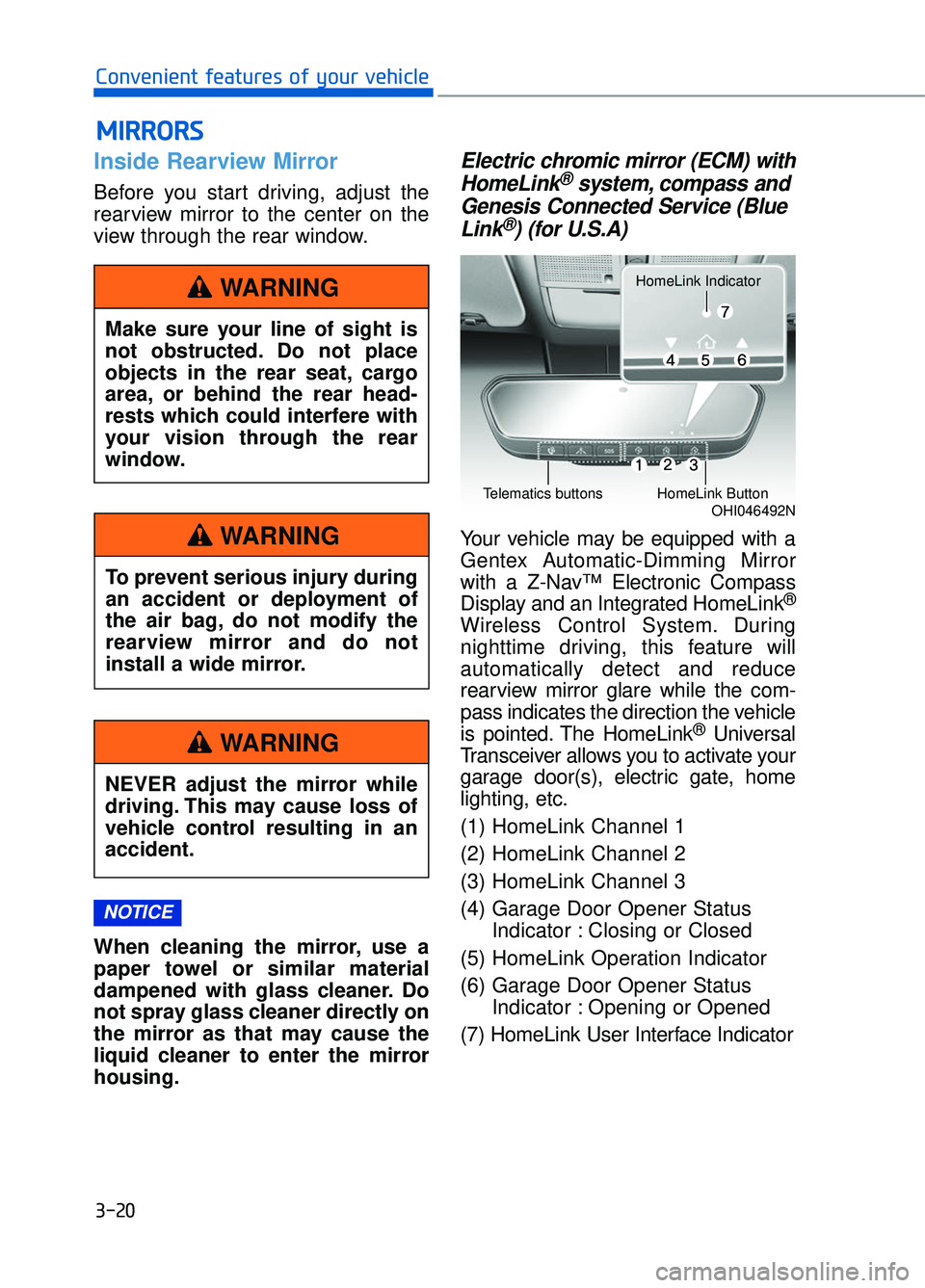
Your vehicle may be equipped with a
Gentex Automatic-Dimming Mirror
with a Z-Nav™ Electronic Compass
Display and an Integrated HomeLink
®
Wireless Control System. During
nighttime driving, this feature will
automatically detect and reduce
rearview mirror glare while the com-
pass indicates the direction the vehicle
is pointed. The HomeLink
®Universal
Transceiver allows you to activate your
garage door(s), electric gate, home
lighting, etc.
(1) HomeLink Channel 1
(2) HomeLink Channel 2
(3) HomeLink Channel 3
(4) Garage Door Opener Status Indicator : Closing or Closed
(5) HomeLink Operation Indicator
(6) Garage Door Opener Status Indicator : Opening or Opened
(7) HomeLink User Interface Indicator
NOTICE
Make sure your line of sight is
not obstructed. Do not place
objects in the rear seat, cargo
area, or behind the rear head-
rests which could interfere with
your vision through the rear
window.
WARNING
To prevent serious injury during
an accident or deployment of
the air bag, do not modify the
rearview mirror and do not
install a wide mirror.
WARNING
NEVER adjust the mirror while
driving. This may cause loss of
vehicle control resulting in an
accident.
WARNING
OHI046492NTelematics buttonsHomeLink Button
HomeLink Indicator