air conditioning GENESIS G90 2021 User Guide
[x] Cancel search | Manufacturer: GENESIS, Model Year: 2021, Model line: G90, Model: GENESIS G90 2021Pages: 538, PDF Size: 13.02 MB
Page 228 of 538

3-127
03
WINDSHIELD DEFROSTING AND DEFOGGING
• For maximum defrost perform-
ance, set the temperature control
knob to the highest temperature
setting (rotated all the way to the
right) and the fan speed control to
the highest setting.
• If warm air to the floor is desired
while defrosting or defogging, set the
mode to the floor-defrost position.
• Before driving, clear all snow and
ice from the windshield, rear win-
dow, side view mirrors, and all side
windows.
• Clear all snow and ice from the
hood and air inlet in the cowl grill to
improve heater and defroster effi-
ciency and to reduce the probability
of fogging up the inside of the wind-
shield.
If the engine temperature is still
cold after starting, then a brief
engine warm up period may be
required for the vented air flow to
become warm or hot.
To defog inside windshield
1. Set the fan speed to the desired
position.
2. Select desired temperature.
3. Press the defroster button ( ).
4. Fresh mode will be selected auto-
matically. Additionally, the air con-
ditioning will automatically operate
according to the detected ambient
temperature.
Check to make sure the air condi-
tioning is ON. If the air conditioning
button LED is not illuminated, press
the air conditioning (A/C) button
once to turn the air conditioner ON.
Check to make sure the air intake
control is in Fresh mode.
NOTICE
Windshield heating
Do not use the or posi-
tion during cooling operation in
extremely humid weather. The
difference between the temper-
ature of the outside air and that
of the windshield could cause
the outer surface of the wind-
shield to fog up, causing loss of
visibility could cause an acci-
dent resulting in serious injury
or death. In this case, set the
mode selection knob or button
to the position and fan
speed control knob or button to
a lower speed.
WARNING
OHI049334N
Page 229 of 538
3-128
Convenient features of your vehicle
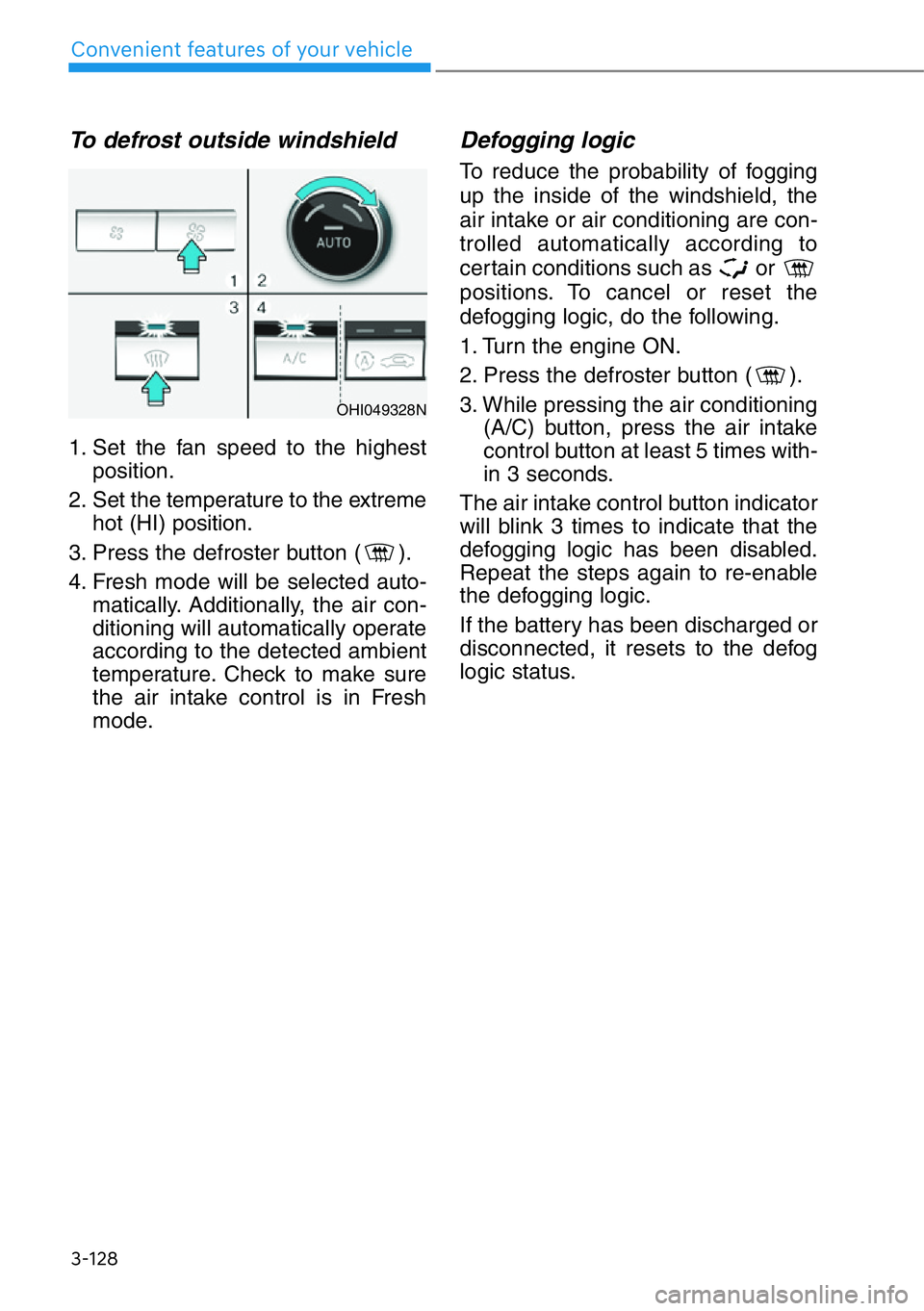
To defrost outside windshield
1. Set the fan speed to the highest
position.
2. Set the temperature to the extreme
hot (HI) position.
3. Press the defroster button ( ).
4. Fresh mode will be selected auto-
matically. Additionally, the air con-
ditioning will automatically operate
according to the detected ambient
temperature. Check to make sure
the air intake control is in Fresh
mode.
Defogging logic
To reduce the probability of fogging
up the inside of the windshield, the
air intake or air conditioning are con-
trolled automatically according to
certain conditions such as or
positions. To cancel or reset the
defogging logic, do the following.
1. Turn the engine ON.
2. Press the defroster button ( ).
3. While pressing the air conditioning
(A/C) button, press the air intake
control button at least 5 times with-
in 3 seconds.
The air intake control button indicator
will blink 3 times to indicate that the
defogging logic has been disabled.
Repeat the steps again to re-enable
the defogging logic.
If the battery has been discharged or
disconnected, it resets to the defog
logic status.
OHI049328N
Page 230 of 538

3-129
03
CLIMATE CONTROL ADDITIONAL FEATURES
Auto Defogging System
Auto defogging helps reduce the pos-
sibility of fogging up the inside of the
windshield by automatically sensing
the moisture on inside the windshield.
The auto defogging system operates
when the climate control system is on.
Information
The auto defogging system may not
operate normally, when the outside
temperature is below 14 °F (-10 °C).
When the Auto Defogging
System operates, the indi-
cator will illuminate.
If a high amount of humidity is
detected in the vehicle, the Auto
Defogging System will be enabled.
The following steps will be performed
automatically:
Step 1) The A/C button will turn ON.
Step 2) The air intake control will
change to Fresh mode under
low outside temperature.
Step 3) The mode will be changed to
defrost to direct airflow to the
windshield.
Step 4) The fan speed will be set to
MAX.If the air conditioning is off or recircu-
lation mode is manually selected
while Auto Defogging System is ON,
the Auto Defogging System Indicator
will blink 3 times to signal that the
manual operation has been can-
celed.
To cancel or activate the Auto
Defogging System
Climate control system
• To cancel the auto defogging
system
1. Press the Engine Start/Stop but-
ton to the ON or START position.
2. Press the front defroster button for
approximately 3 seconds.
3. The front defroster button LED will
blink 3 times and then ADS OFF
will illuminate on the climate control
information screen when the auto
defogging system is canceled.
• To reactivate the auto defogging
system
1. Press the Engine Start/Stop but-
ton to the ON or START position.
2. Press the front defroster button for
approximately 3 seconds.
3. The front defroster button LED will
blink 6 times and then ADS OFF
will turn off on the climate control
information screen when the auto
defogging system is reactivated.
i
OHI048309
Page 231 of 538
3-130
Convenient features of your vehicle
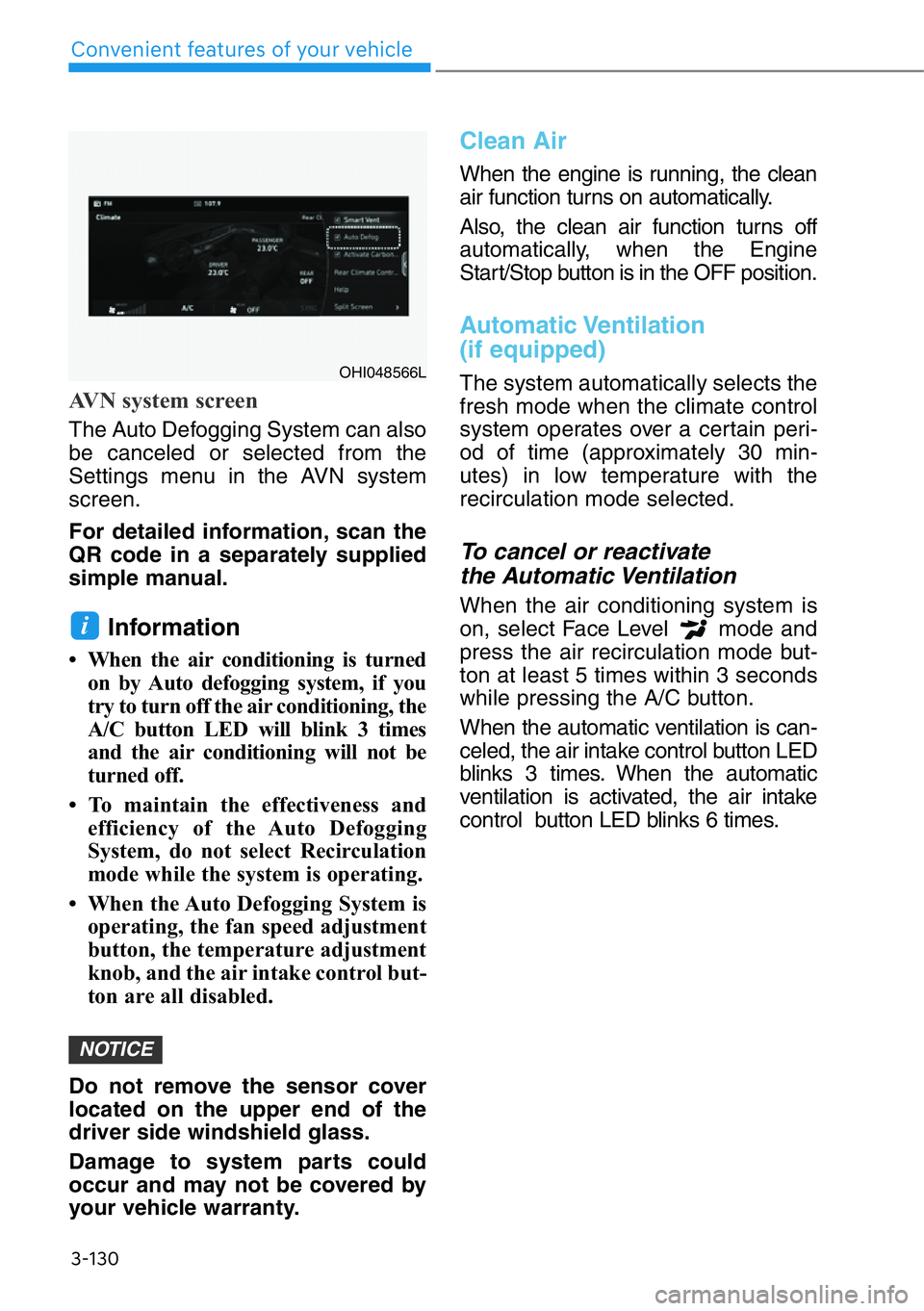
AVN system screen
The Auto Defogging System can also
be canceled or selected from the
Settings menu in the AVN system
screen.
For detailed information, scan the
QR code in a separately supplied
simple manual.
Information
• When the air conditioning is turned
on by Auto defogging system, if you
try to turn off the air conditioning, the
A/C button LED will blink 3 times
and the air conditioning will not be
turned off.
• To maintain the effectiveness and
efficiency of the Auto Defogging
System, do not select Recirculation
mode while the system is operating.
• When the Auto Defogging System is
operating, the fan speed adjustment
button, the temperature adjustment
knob, and the air intake control but-
ton are all disabled.
Do not remove the sensor cover
located on the upper end of the
driver side windshield glass.
Damage to system parts could
occur and may not be covered by
your vehicle warranty.
Clean Air
When the engine is running, the clean
air function turns on automatically.
Also, the clean air function turns off
automatically, when the Engine
Start/Stop button is in the OFF position.
Automatic Ventilation
(if equipped)
The system automatically selects the
fresh mode when the climate control
system operates over a certain peri-
od of time (approximately 30 min-
utes) in low temperature with the
recirculation mode selected.
To cancel or reactivate
the Automatic Ventilation
When the air conditioning system is
on, select Face Level mode and
press the air recirculation mode but-
ton at least 5 times within 3 seconds
while pressing the A/C button.
When the automatic ventilation is can-
celed, the air intake control button LED
blinks 3 times. When the automatic
ventilation is activated, the air intake
control button LED blinks 6 times.
NOTICE
i
OHI048566L
Page 419 of 538
6-5
06
Information
An inappropriately disposed
battery can be harmful to the
environment and human
health. Dispose of the battery
according to your local law(s)
or regulations.
To prevent damage to your vehi-
cle:
• Only use a 12-volt power supply
(battery or jumper system) to
jump start your vehicle.
• Do not attempt to jump start
your vehicle by push-starting.
Jump starting procedure
Information
Your vehicle has a battery in the trunk
compartment, but when you jump
start your vehicle, use the jumper ter-
minal in the engine compartment.
1. Position the vehicles close enough
that the jumper cables will reach,
but do not allow the vehicles to
touch.
2. Avoid fans or any moving parts in
the engine compartment at all
times, even when the vehicles are
turned off.
3. Turn off all electrical devices such
as radios, lights, air conditioning,
etc. Put the vehicles in P (Park)
and set the parking brakes. Turn
both vehicles OFF.
4. Open the engine hood.5. Open the small service cover with
a screwdriver.
6. Remove the engine compartment
fuse box cover.
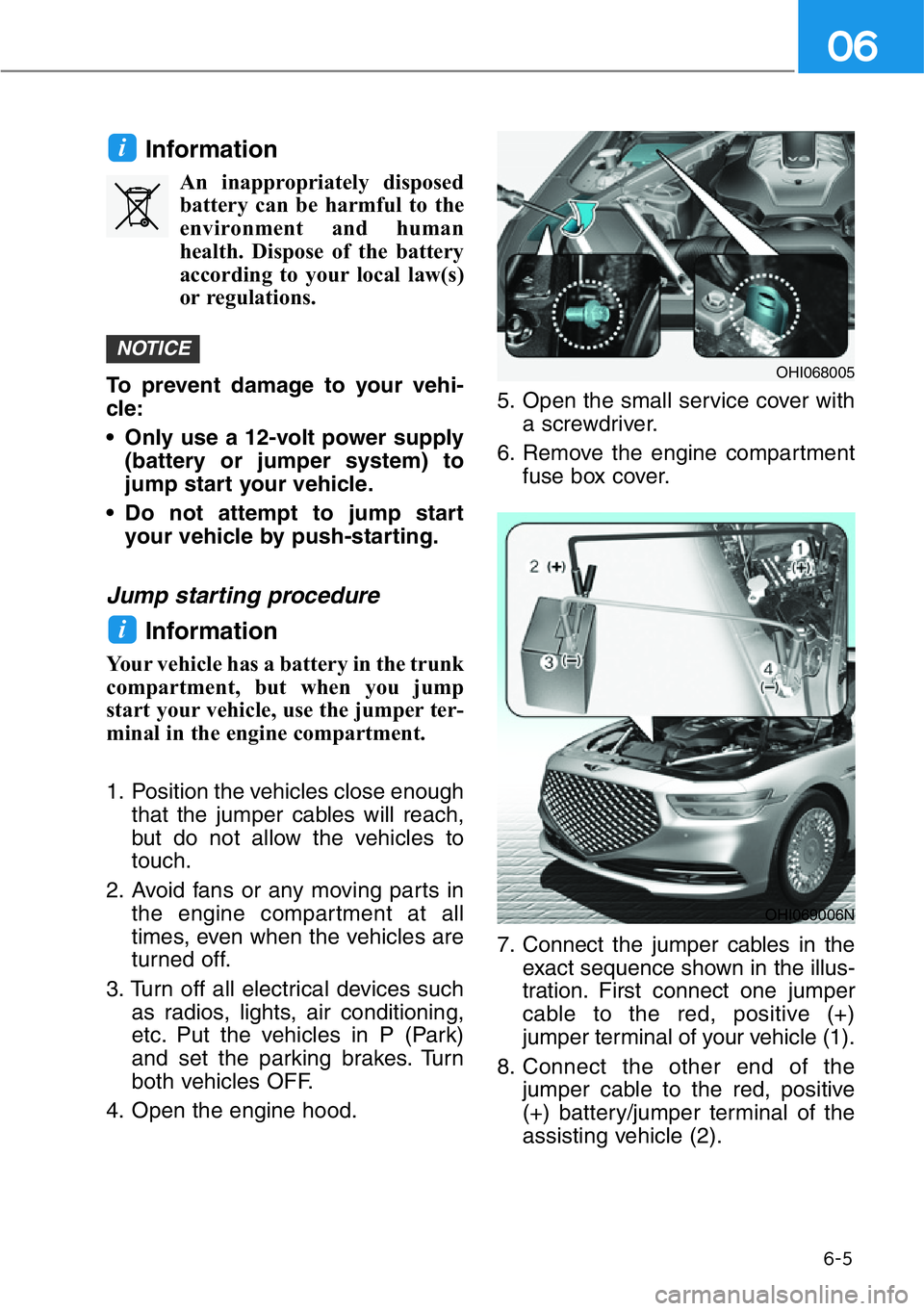
7. Connect the jumper cables in the
exact sequence shown in the illus-
tration. First connect one jumper
cable to the red, positive (+)
jumper terminal of your vehicle (1).
8. Connect the other end of the
jumper cable to the red, positive
(+) battery/jumper terminal of the
assisting vehicle (2).
i
NOTICE
i
OHI069006N
OHI068005
Page 421 of 538

6-7
06
If your temperature gauge indicates
overheating, you experience a loss
of power, or hear loud pinging or
knocking, the engine may be over-
heating. If this happens, you should:
1. Pull off the road and stop as soon
as it is safe to do so.
2. Shift the gear to P (Park) and set
the parking brake. If the air condi-
tioning is ON, turn it OFF.
3. If engine coolant is running out
under the vehicle or steam is com-
ing out from the hood, stop the
engine. Do not open the hood until
the coolant has stopped running
or the steaming has stopped. If
there is no visible loss of engine
coolant and no steam, leave the
engine running and check to be
sure the engine cooling fan is
operating. If the fan is not running,
turn the engine off.4. Check for coolant leaking from the
radiator, hoses or under the vehi-
cle. (If the air conditioning had
been in use, it is normal for cold
water to be draining from it when
you stop.)
5. If engine coolant is leaking out,
stop the engine immediately and
call the nearest authorized retailer
of Genesis Branded products for
assistance.
IF THE ENGINE OVERHEATS
While the engine is
running, keep hands,
clothing and tools
away from the moving
parts such as the
cooling fan and drive
belt to prevent seri-
ous injury.
WARNING
Page 447 of 538
7-7
07
Owner Maintenance Schedule
When you stop for fuel:
• Check the engine oil level.
• Check the coolant level in the
engine coolant reservoir.
• Check the windshield washer fluid
level.
• Check the tire for low or under-
inflated tires.
While operating your vehicle:
• Note any changes in the sound of
the exhaust or any smell of exhaust
fumes in the vehicle.
• Check for vibrations in the steering
wheel. Notice if there is any
increased steering effort or loose-
ness in the steering wheel, or
change in its straight-ahead posi-
tion.
• Notice if your vehicle constantly
turns slightly or "pulls" to one side
when traveling on smooth, level
road.
• When stopping, listen and check
for unusual sounds, pulling to one
side, increased brake pedal travel
or "hard-to-push" brake pedal.
• If any slipping or changes in the
operation of your transmission
occurs, check the transmission
fluid level.
• Check the automatic transmission
P (Park) function.
• Check the parking brake.
• Check for fluid leaks under your
vehicle (water dripping from the air
conditioning system during or after
use is normal).
At least monthly:
• Check coolant level in the engine
coolant reservoir.
• Check the operation of all exterior
lights, including the brake lights,
turn signals and hazard warning
flashers.
• Check the inflation pressures of all
tires including the spare for tires
that are worn, show uneven wear,
or are damaged.
• Check for loose wheel lug nuts. Be careful when checking your
engine coolant level when the
engine is hot. This may result in
coolant being blown out of the
opening and cause serious
burns and other injuries.
WARNING
Page 448 of 538

7-8
Maintenance
At least twice a year:
(i.e., every Spring and Autumn)
• Check radiator, heater and air con-
ditioning hoses for leaks or dam-
age.
• Check windshield washer spray
and wiper operation. Clean wiper
blades with a clean cloth damp-
ened with washer fluid.
• Check headlamp alignment.
• Check muffler, exhaust pipes,
shields and clamps.
• Check the seat belts for wear and
function.
At least once a year:
• Clean body and door drain holes.
• Lubricate door hinges and hood
hinges.
• Lubricate door and hood locks and
latches.
• Lubricate door rubber weather
strips.
• Lubricate door checker.
• Check the air conditioning system.
• Inspect and lubricate automatic
transmission linkage and controls.
• Clean the battery and terminals.
• Check the brake fluid level.Follow Normal Maintenance Schedule
if the vehicle is usually operated where
none of the following conditions apply.
If any of the following conditions apply,
you must follow the Maintenance
Under Severe Usage Conditions.
• Repeated driving short distance of
less than 5 miles (8 km) in normal
temperature or less than 10miles
(16 km) in freezing temperature
• Extensive engine idling or low
speed driving for long distances
• Driving on rough, dusty, muddy,
unpaved, graveled or salt-spread
roads
• Driving in areas using salt or other
corrosive materials or in very cold
weather
• Driving in heavy dust conditions
• Driving in heavy traffic area
• Driving on uphill, downhill, or
mountain road repeatedly
• Towing a trailer or using a camper,
or roof rack
• Driving as a patrol car, taxi, other
commercial use of vehicle towing
• Frequently driving in stop-and-go
condition
For additional information or assis-
tance see an authorized retailer of
Genesis Branded products.
SCHEDULED MAINTENANCE
SERVICE
Page 461 of 538
7-21
07
Brake Hoses and Lines
Visually check for proper installation,
chafing, cracks, deterioration and
any leakage. Replace any deteriorat-
ed or damaged parts immediately.
Brake Fluid
Check the brake fluid level in the
brake fluid reservoir. The level should
be between the MIN and the MAX
marks on the side of the reservoir.
Use only hydraulic brake fluid con-
forming to DOT 4 specification.
Brake Transmission Fluid
Check the pads for excessive wear,
discs for run out and wear, and
calipers for fluid leakage.
Exhaust Pipe and Muffler
Visually inspect the exhaust pipes,
muffler and hangers for cracks, dete-
rioration, or damage. Start the
engine and listen carefully for any
exhaust gas leakage. Tighten con-
nections or replace parts as neces-
sary.
Suspension Mounting Bolts
Check the suspension connections
for looseness or damage. Retighten
to the specified torque.
Steering Gear Box, Linkage &
Boots/Lower Arm Ball Joint
With the vehicle stopped and the
engine off, check for excessive free-
play in the steering wheel. Check the
linkage for bends or damage. Check
the dust boots and ball joints for
deterioration, cracks, or damage.
Replace any damaged parts.
Drive Shafts and Boots
Check the drive shafts, boots and
clamps for cracks, deterioration, or
damage. Replace any damaged
parts and, if necessary, repack the
grease.
Air Conditioning Refrigerant
Check the air conditioning lines and
connections for leakage and dam-
age.
Page 486 of 538

7-46
Maintenance
Temperature - A, B & C
The temperature grades are A (the
highest), B and C representing the
tire’s resistance to the generation of
heat and its ability to dissipate heat
when tested under controlled condi-
tions on a specified indoor laboratory
test wheel.
Sustained high temperature can
cause the material of the tire to
degenerate and reduce tire life, and
excessive temperature can lead to
sudden tire failure. Grade C
responds to a level of performance
which all passenger car tires must
meet under the Federal Motor
Vehicle Safety Standard No. 109.
Grades B and A represent higher
levels of performance on the labora-
tory test wheel than the minimum
required by law.
Tire Terminology and
Definitions
Air Pressure
The amount of air inside the tire
pressing outward on the tire. Air
pressure is expressed in pounds per
square inch (psi) or kilopascal (kPa).
Accessory Weight
This means the combined weight of
optional accessories. Some exam-
ples of optional accessories are
automatic transmission, power
seats, and air conditioning.
Aspect Ratio
The relationship of a tire's height to
its width.
Belt
A rubber coated layer of cords that is
located between the plies and the
tread. Cords may be made from steel
or other reinforcing materials.
Bead
The tire bead contains steel wires
wrapped by steel cords that hold the
tire onto the rim.
Bias Ply Tire
A pneumatic tire in which the plies
are laid at alternate angles less than
90 degrees to the centerline of the
tread. The temperature grade for this
tire is established for a tire that
is properly inflated and not
overloaded. Excessive speed,
under-inflation, over-inflation,
or excessive loading, either
separately or in combination,
can cause heat build-up and
possible sudden tire failure.
This may cause loss of vehicle
control resulting in an accident.
WARNING