manual GENESIS G90 2021 Quick Reference Guide
[x] Cancel search | Manufacturer: GENESIS, Model Year: 2021, Model line: G90, Model: GENESIS G90 2021Pages: 31, PDF Size: 8.91 MB
Page 17 of 31
Quick Reference Guide I 2827 I Quick Reference Guide
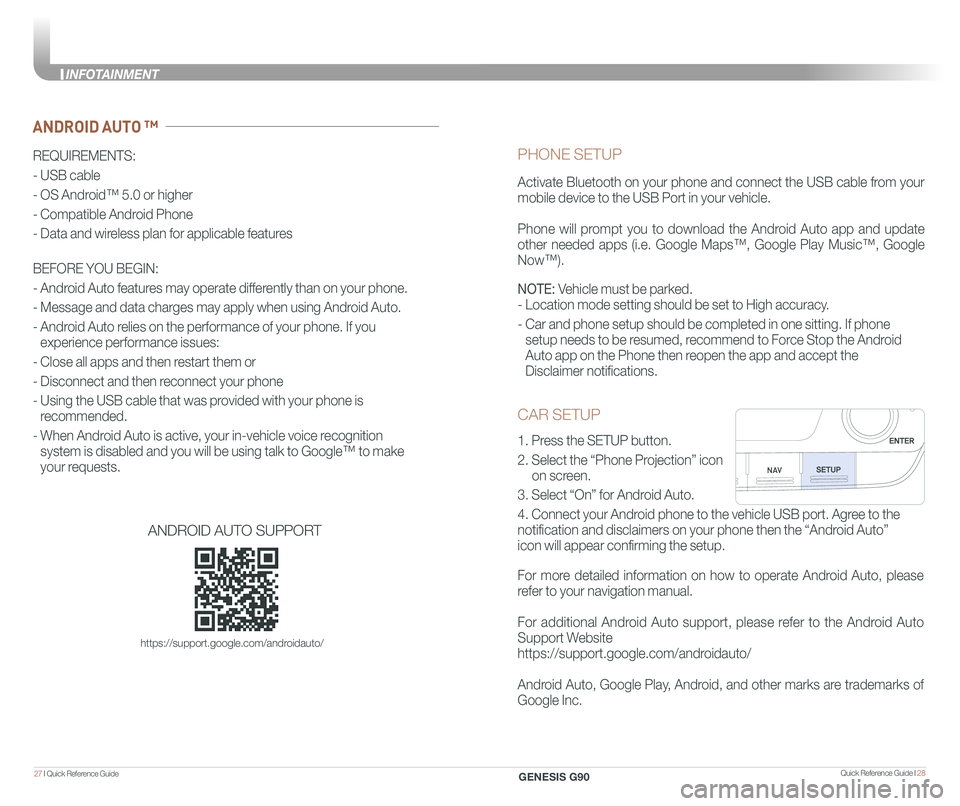
CAR SETUP
1. Press the SETUP button.
2. Select the “Phone Projection” icon
on screen.
3. Select “On” for Android Auto.
4. Connect your Android phone to the vehicle USB port. Agree to the
notification and disclaimers on your phone then the “Android Auto”
icon will appear confirming the setup.
For more detailed information on how to operate Android Auto, please
refer to your navigation manual.
For additional Android Auto support, please refer to the Android Auto
Support Website
https://support.google.com/androidauto/
Android Auto, Google Play, Android, and other marks are trademarks of
Google Inc.
PHONE SETUP
Activate Bluetooth on your phone and connect the USB cable from your
mobile device to the USB Port in your vehicle.
Phone will prompt you to download the Android Auto app and update
other needed apps (i.e. Google Maps™, Google Play Music™, Google
Now™).
NOTE: Vehicle must be parked.
- Location mode setting should be set to High accuracy.
- Car and phone setup should be completed in one sitting. If phone
setup needs to be resumed, recommend to Force Stop the Android
Auto app on the Phone then reopen the app and accept the
Disclaimer notifications.
ANDROID AUTO ™
REQUIREMENTS:
- USB cable
- OS Android™ 5.0 or higher
- Compatible Android Phone
- Data and wireless plan for applicable features
BEFORE YOU BEGIN:
- Android Auto features may operate differently than on your phone.
- Message and data charges may apply when using Android Auto.
- Android Auto relies on the performance of your phone. If you
experience performance issues:
- Close all apps and then restart them or
- Disconnect and then reconnect your phone
- Using the USB cable that was provided with your phone is
recommended.
- When Android Auto is active, your in-vehicle voice recognition
system is disabled and you will be using talk to Google™ to make
your requests.
ANDROID AUTO SUPPORT
https://support.google.com/androidauto/
GENESIS G90
INFOTAINMENT
Page 20 of 31
Quick Reference Guide I 3433 I Quick Reference Guide
GENESIS
GENESIS23
1
To Answer a Call: • Press the button on the steering wheel.
To Reject a Call: • Press the button on the steering wheel.
To Adjust Ring Volume:
• Scroll the VOLUME wheel on the steering wheel.
To Transfer a Call to the Phone (Private call on handset – do not use while driving): • Press and hold the button on the steering wheel until the audio system transfers a call to the phone.
To Finish a Call: • Press the button on the steering wheel.
In the following situations you or the other party may have difficulty
hearing each other:
1. When the Bluetooth® volume is too high. High level volume may
result in distortion and echo.
2. When driving on a rough road, high speeds and / or with the window open.
3. When the air conditioning vents are facing the microphone.
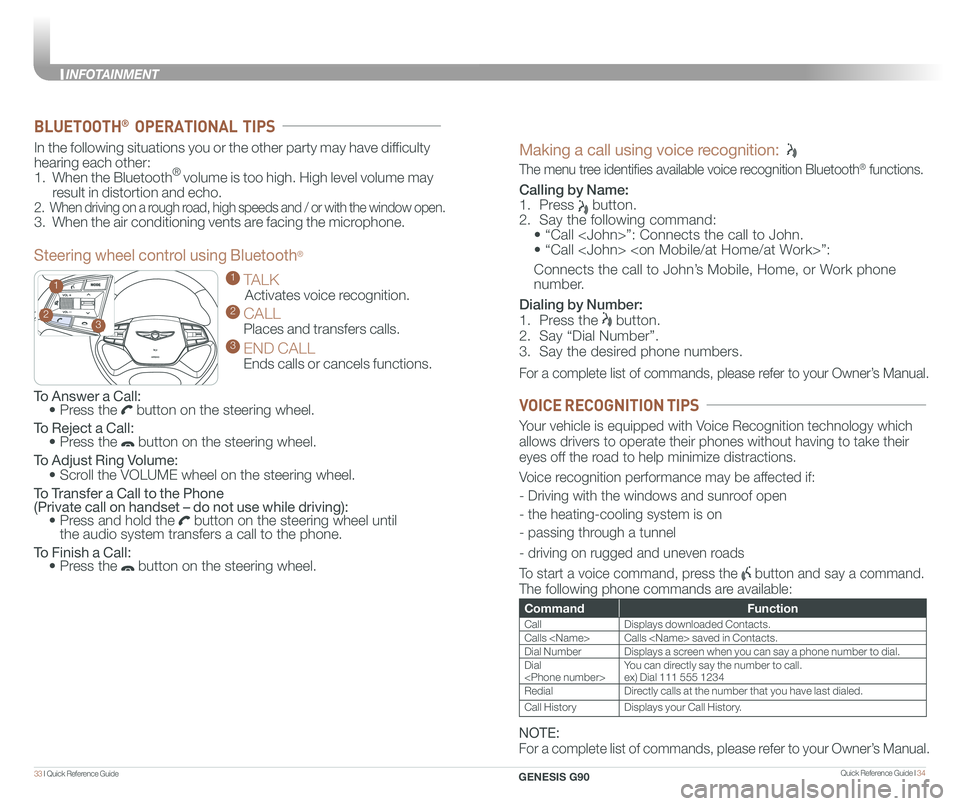
Steering wheel control using Bluetooth®
1 TALK
Activates voice recognition.
2 CALL
Places and transfers calls.
3 END CALL
Ends calls or cancels functions.
BLUETOOTH® OPERATIONAL TIPS
Making a call using voice recognition:
The menu tree identifies available voice recognition Bluetooth® functions.
Calling by Name:
1. Press button.
2. Say the following command:
• “Call
• “ Call
Connects the call to John’s Mobile, Home, or Work phone
number.
Dialing by Number:
1. Press the button.
2. Say “Dial Number”.
3. Say the desired phone numbers.
For a complete list of commands, please refer to your Owner’s Manual.
CommandFunction
CallDisplays downloaded Contacts.
Calls
Dial NumberDisplays a screen when you can say a phone number to dial.
Dial
RedialDirectly calls at the number that you have last dialed.
Call HistoryDisplays your Call History.
Your vehicle is equipped with Voice Recognition technology which
allows drivers to operate their phones without having to take their
eyes off the road to help minimize distractions.
Voice recognition performance may be affected if:
- Driving with the windows and sunroof open
- the heating-cooling system is on
- passing through a tunnel
- driving on rugged and uneven roads
To start a voice command, press the button and say a command.
The following phone commands are available:
VOICE RECOGNITION TIPS
NOTE:
For a complete list of commands, please refer to your Owner’s Manual.
GENESIS G90
INFOTAINMENT
Page 21 of 31
Quick Reference Guide I 3635 I Quick Reference Guide
BLUETOOTH® PHONE PAIRING
NOTE: Vehicle must be parked to complete the pairing process.
Please refer to your Owner’s Manual for further information.
1. Press the call/answer button on the steering wheel.
2. Within the Bluetooth® pairing screen in your Bluetooth® device,
search and select the name of the vehicle.
The default vehicle name is “GENESIS G90”.
3. Verify the passkey and proceed with pairing from your
Bluetooth® device.
The default passkey is “0000”.
4. The system will confirm the device has been successfully paired.
GENESIS
GENESIS
AUDIO MODE
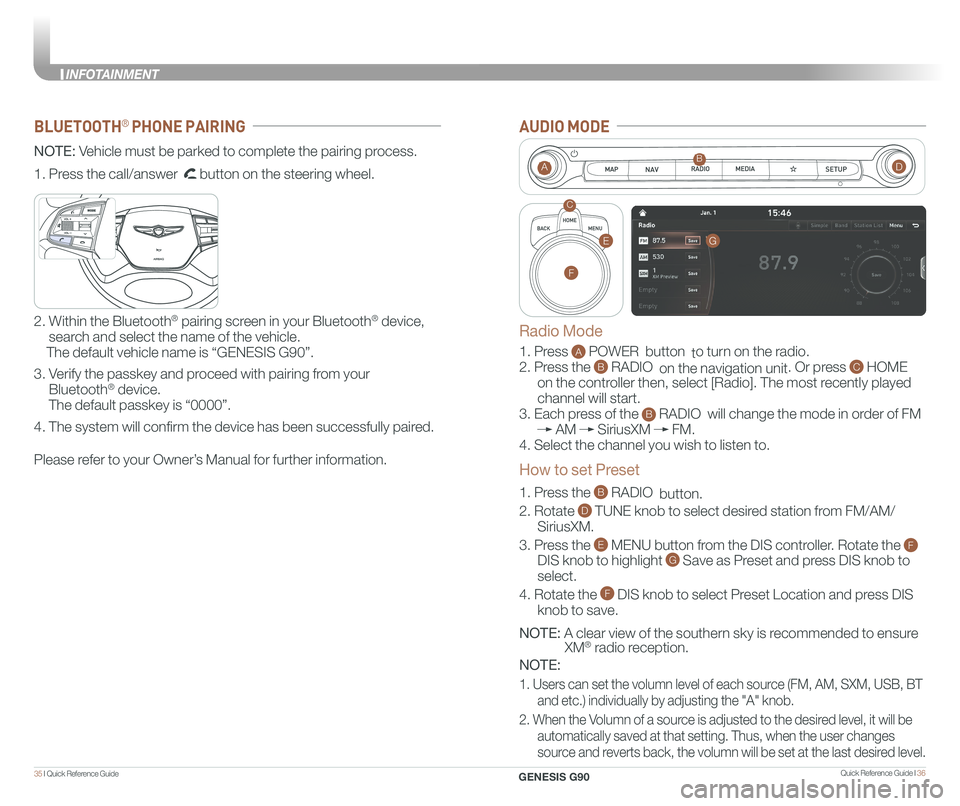
1. Press A POWER button to turn on the radio.
2. Press the B RADIO on the navigation unit. Or press C HOME
on the controller then, select [Radio]. The most recently played
channel will start.
3. Each press of the B RADIO will change the mode in order of FM
AM SiriusXM FM.
4. Select the channel you wish to listen to.
1. Press the B RADIO button.
2. Rotate D TUNE knob to select desired station from FM/AM/
SiriusXM.
3. Press the E MENU button from the DIS controller. Rotate the F
DIS knob to highlight G Save as Preset and press DIS knob to
select.
4. Rotate the F DIS knob to select Preset Location and press DIS
knob to save.
NOTE: A clear view of the southern sky is recommended to ensure
XM® radio reception.
NOTE:
1. Users can set the volumn level of each source (FM, AM, SXM, USB, BT
and etc.) individually by adjusting the "A" knob.
2. When the Volumn of a source is adjusted to the desired level, it will be
automatically saved at that setting. Thus, when the user changes
source and reverts back, the volumn will be set at the last desired level.
AB
C
Radio Mode
How to set Preset
G
F
E
D
GENESIS G90
INFOTAINMENT
Page 24 of 31
Quick Reference Guide I 4241 I Quick Reference Guide
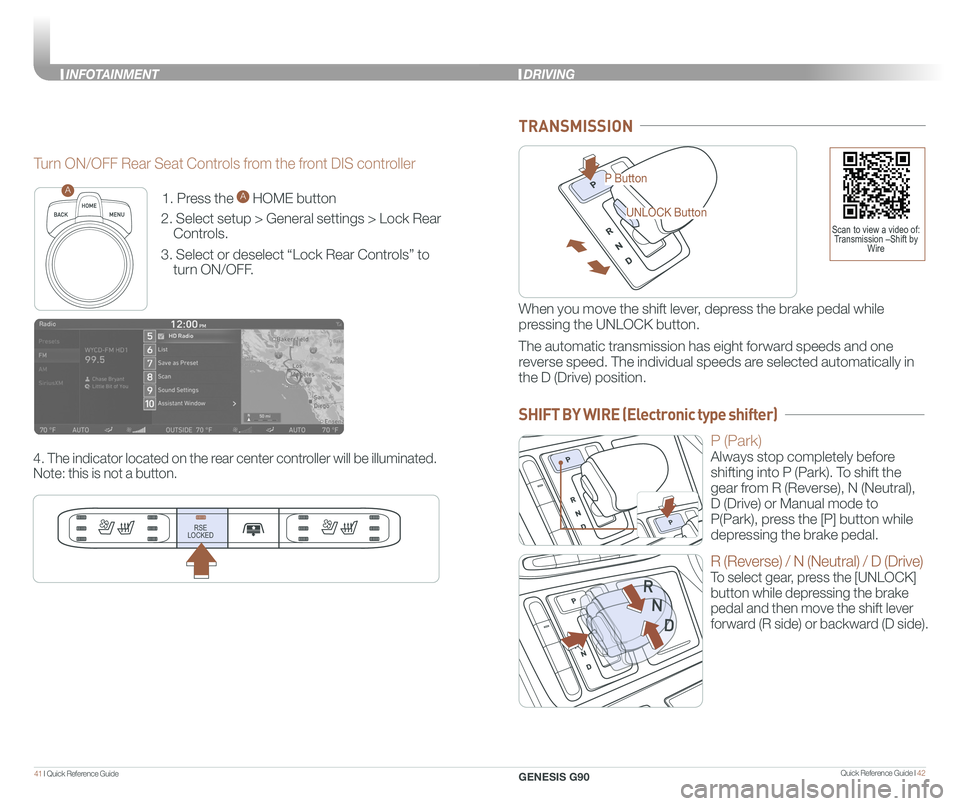
1. Press the A HOME button
2. Select setup > General settings > Lock Rear
Controls.
3. Select or deselect “Lock Rear Controls” to
turn ON/OFF.
4. The indicator located on the rear center controller will be illuminated.
Note: this is not a button.
RSE
LOCKED
A
Turn ON/OFF Rear Seat Controls from the front DIS controller
P Button
UNLOCK Button
TRANSMISSION
When you move the shift lever, depress the brake pedal while
pressing the UNLOCK button.
The automatic transmission has eight forward speeds and one
reverse speed. The individual speeds are selected automatically in
the D (Drive) position.
P (Park)
Always stop completely before
shifting into P (Park). To shift the
gear from R (Reverse), N (Neutral),
D (Drive) or Manual mode to
P(Park), press the [P] button while
depressing the brake pedal.
R (Reverse) / N (Neutral) / D (Drive)
To select gear, press the [UNLOCK]
button while depressing the brake
pedal and then move the shift lever
forward (R side) or backward (D side).
Scan to view a video of: Transmission –Shift by Wire
DRIVING
SHIFT BY WIRE (Electronic type shifter)
GENESIS G90
INFOTAINMENT
Page 25 of 31
![GENESIS G90 2021 Quick Reference Guide Quick Reference Guide I 4443 I Quick Reference Guide
AIRBAG
GENESIS
PADDLE SHIFTER (Manual Mode)
The paddle shifter is available
when the shift lever is in the D
(Drive) position.
Press the [+] or](/img/46/35621/w960_35621-24.png "GENESIS G90 2021 Quick Reference Guide Quick Reference Guide I 4443 I Quick Reference Guide
AIRBAG
GENESIS
PADDLE SHIFTER (Manual Mode)
The paddle shifter is available
when the shift lever is in the D
(Drive) position.
Press the [+] or")
Quick Reference Guide I 4443 I Quick Reference Guide
AIRBAG
GENESIS
PADDLE SHIFTER (Manual Mode)
The paddle shifter is available
when the shift lever is in the D
(Drive) position.
Press the [+] or [-] paddle
shifter once to shift up or
down one gear.
Press (-) to
downshift
Press (+) to
upshift
AIRBAG
GENESIS
AIRBAG
GENESIS
NOTE:
To disengage Manual mode (and engage Auto mode), press and
hold [+] paddle shifter.
Lane Keeping
Assist detects
lane markers on
the road, and
assists the
driver's steering
to help keep the
vehicle
between the lanes. LKA will not
operate properly if the lane line is
not clear, sharp bend in the road,
or in heavy fog.
To activate, press the Lane Safety
Button with the Engine Start/Stop
button in the ON position. LKA
operates only when the vehicle
speed is between 40 mph and
110 mph.
Forward Collision-Avoidance Assist is
designed to help detect and monitor the
vehicle ahead or help detect a pedestrian
or cyclist in the roadway through camera
recognition and radar signals to warn the
driver that a collision is imminent, and if
necessary, apply emergency braking.
FORWARD COLLISION-AVOIDANCE ASSIST (FCA)
LANE KEEPING ASSIST (LKA)
NOTE: LKA settings can be activated
from the settings menu on the AVN
screen by the following procedure:
1. Set the Engine Start/Stop button to
the ON or START position.
2. Select 'Setup → Vehicle Settings →
Driver Assistance → Lane Safety →
Lane Keeping Assist in the AVN
system screen.
3. Select Lane Keeping Assist, Lane
Departure Warning, or OFF.
Scan to view a video of:Lane Keep Assist (LKA)
NOTE: Warning Timing, Warning Volume, and Haptic Warning
levels are all adjustable. Please refer to your Owner’s Manual for
further information.
Forward Collision-Avoidance Assist can be activated from the Settings
menu in the AVN system screen by following the procedure:
1. Set the Engine Start/Stop button to the ON or START position.
2. Select ‘Setup → Vehicle Settings → Driver Assistance → Forward
Safety → Active Assist / Warning Only / Off’ in the AVN system screen.
ELECTRONIC STABILITY CONTROL (ESC)
The ESC system is an electronic
system designed to help the driver
maintain vehicle control under
adverse conditions.
Press to turn ESC on or off.
NOTE: When lane change is occurred without turn signal, LKA will try to
keep the lane with warning sound.
Warning sound can be adjustable in USM, if it is felt loud or whispery.
GENESIS G90
DRIVING
Page 26 of 31
Quick Reference Guide I 4645 I Quick Reference Guide
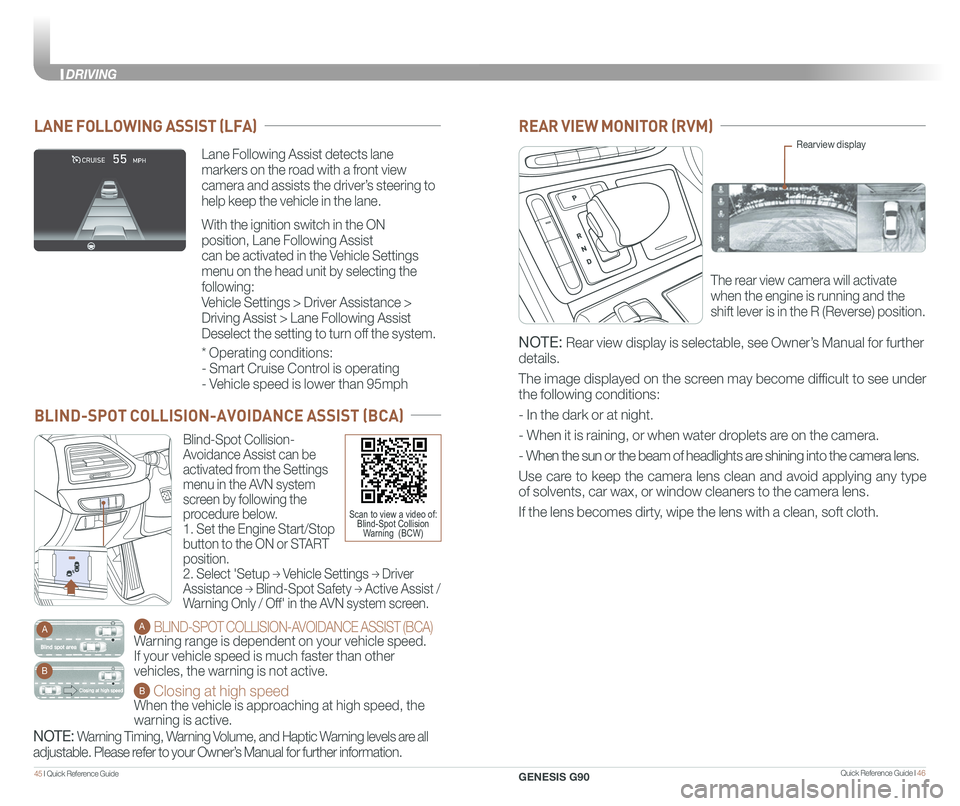
Blind-Spot Collision-
Avoidance Assist can be
activated from the Settings
menu in the AVN system
screen by following the
procedure below.
1. Set the Engine Start/Stop
button to the ON or START
position.
2. Select 'Setup → Vehicle Settings → Driver
Assistance → Blind-Spot Safety → Active Assist /
Warning Only / Off' in the AVN system screen.
A BLIND-SPOT COLLISION-AVOIDANCE ASSIST (BCA)
Warning range is dependent on your vehicle speed.
If your vehicle speed is much faster than other
vehicles, the warning is not active.
B Closing at high speed
When the vehicle is approaching at high speed, the
warning is active.
A
B
BLIND-SPOT COLLISION-AVOIDANCE ASSIST (BCA)
Scan to view a video of:Blind-Spot CollisionWarning (BCW)
REAR VIEW MONITOR (RVM)
The rear view camera will activate
when the engine is running and the
shift lever is in the R (Reverse) position.
Rearview display
NOTE: Rear view display is selectable, see Owner’s Manual for further
details.
The image displayed on the screen may become difficult to see under
the following conditions:
- In the dark or at night.
- When it is raining, or when water droplets are on the camera.
- When the sun or the beam of headlights are shining into the camera lens.
Use care to keep the camera lens clean and avoid applying any type
of solvents, car wax, or window cleaners to the camera lens.
If the lens becomes dirty, wipe the lens with a clean, soft cloth.
NOTE: Warning Timing, Warning Volume, and Haptic Warning levels are all
adjustable. Please refer to your Owner’s Manual for further information.
Lane Following Assist detects lane
markers on the road with a front view
camera and assists the driver’s steering to
help keep the vehicle in the lane.
With the ignition switch in the ON
position, Lane Following Assist
can be activated in the Vehicle Settings
menu on the head unit by selecting the
following:
Vehicle Settings > Driver Assistance >
Driving Assist > Lane Following Assist
Deselect the setting to turn off the system.
LANE FOLLOWING ASSIST (LFA)
* Operating conditions:
- Smart Cruise Control is operating
- Vehicle speed is lower than 95mph
GENESIS G90
DRIVING
Page 29 of 31
Quick Reference Guide I 5251 I Quick Reference Guide
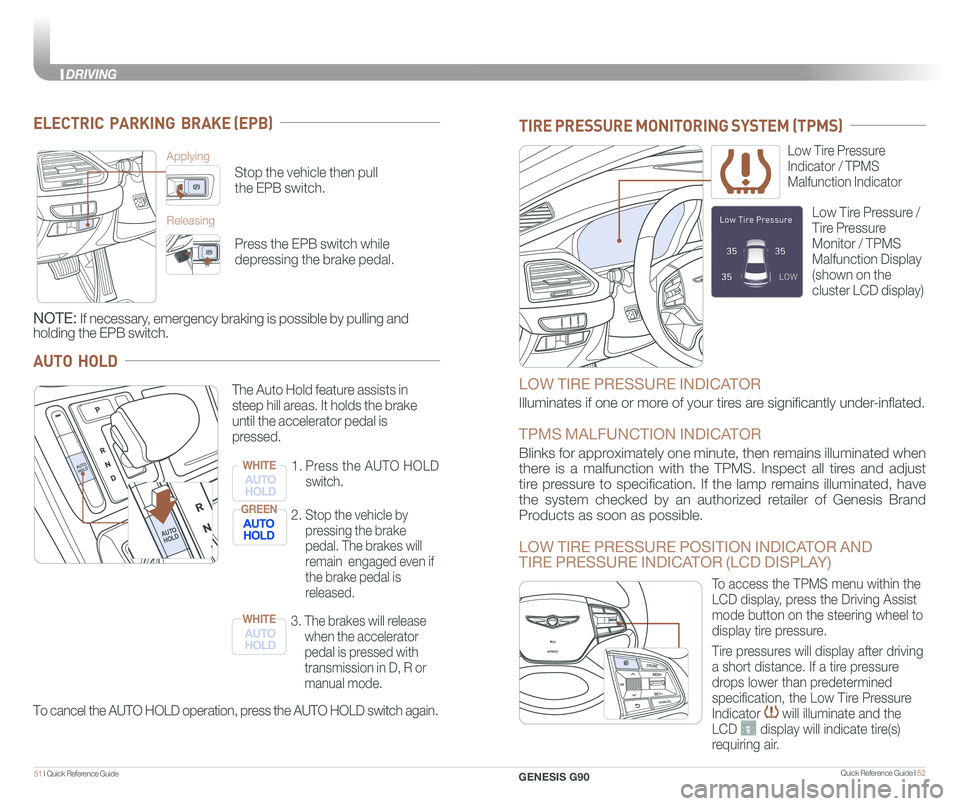
ELECTRIC PARKING BRAKE (EPB)
Stop the vehicle then pull
the EPB switch.
Applying
Releasing
Press the EPB switch while
depressing the brake pedal.
NOTE: If necessary, emergency braking is possible by pulling and
holding the EPB switch.
AUTO HOLD
To cancel the AUTO HOLD operation, press the AUTO HOLD switch again.
The Auto Hold feature assists in
steep hill areas. It holds the brake
until the accelerator pedal is
pressed.
1.
Press the AUTO HOLD
switch.
WHITE
2. Stop the vehicle by
pressing the brake
pedal. The brakes will
remain engaged even if
the brake pedal is
released.
GREEN
3. The brakes will release
when the accelerator
pedal is pressed with
transmission in D, R or
manual mode.
WHITE
MAP
N AVMAPN AVMAPN AVMAPN AV
LOW TIRE PRESSURE INDICATOR
Illuminates if one or more of your tires are significantly under-inflated.
TPMS MALFUNCTION INDICATOR
Blinks for approximately one minute, then remains illuminated when
there is a malfunction with the TPMS. Inspect all tires and adjust
tire pressure to specification. If the lamp remains illuminated, have
the system checked by an authorized retailer of Genesis Brand
Products as soon as possible.
LOW TIRE PRESSURE POSITION INDICATOR AND
TIRE PRESSURE INDICATOR (LCD DISPLAY)
Low Tire Pressure
Indicator / TPMS
Malfunction Indicator
Low Tire Pressure /
Tire Pressure
Monitor / TPMS
Malfunction Display
(shown on the
cluster LCD display)
TIRE PRESSURE MONITORING SYSTEM (TPMS)
GENESIS
GENESIS
To access the TPMS menu within the
LCD display, press the Driving Assist
mode button on the steering wheel to
display tire pressure.
Tire pressures will display after driving
a short distance. If a tire pressure
drops lower than predetermined
specification, the Low Tire Pressure
Indicator will illuminate and the
LCD display will indicate tire(s)
requiring air.
AUTO
HOLDAUTO
HOLD
AUTO
HOLDAUTO
HOLD
GENESIS G90
DRIVING
Page 31 of 31
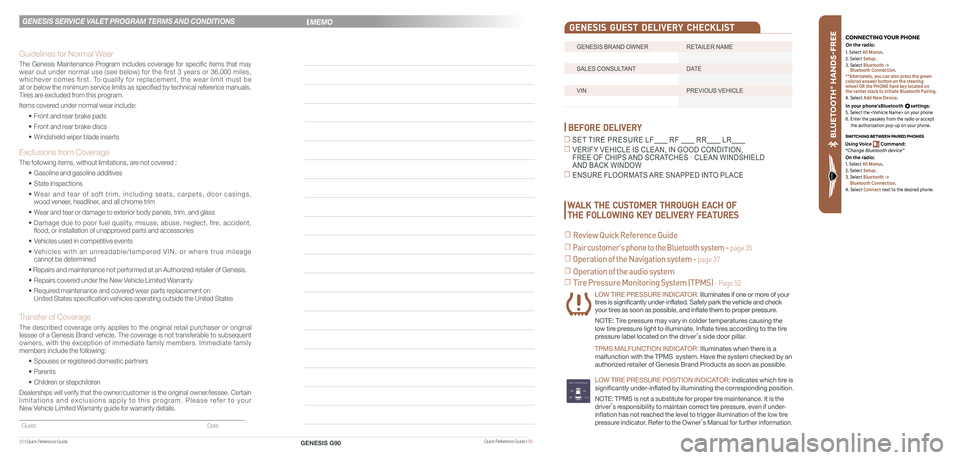
BLU ETO OTH
®
SWIT CHING BETWEEN P AIRED PHONES
On the r adio:
CONNE CTING \fOUR PHONEOn the r adio:
U sing Voic e Command:
“Change Blue too th de vice”1. Select All Menus.
2. Select Setup.
3. Select Bluetooth ->
Bluetooth Connection.
**Alternately, you can also press the green
colored answer button on the steering
wheel OR the PHONE hard key located on
the center stack to initiate Bluetooth Pairing.
4. Select Add New Device.
In your phone’sBluetooth settings:
5. Select the
6. Enter the passkey from the radio or accept
the authorization pop-up on your phone.
1. Select All Menus.
2. Select Setup.
3. Select Bluetooth ->
Bluetooth Connection.
4. Select Connect next to the desired phone.
BEFORE DELIVERY
☐ SET TIRE PRESURE LF RF RR LR
☐ VERIFY VEHICLE IS CLEAN, IN GOOD CONDITION, FREE OF CHIPS AND SCRATCHES · CLEAN WINDSHIELD AND BACK WINDOW
☐ ENSURE FLOORMATS ARE SNAPPED INTO PLACE
☐ Tire Pressure Monitoring System (TPMS) - Page 52
LOW TIRE PRESSURE INDICATOR: Illuminates if one or more of your tires is significantly under-inflated. Safely park the vehicle and check your tires as soon as possible, and inflate them to proper pressure.
NOTE: Tire pressure may vary in colder temperatures causing the
low tire pressure light to illuminate. Inflate tires according to the tire
pressure label located on the driver’s side door pillar.
TPMS MALFUNCTION INDICATOR: Illuminates when there is a
malfunction with the TPMS system. Have the system checked by an
authorized retailer of Genesis Brand Products as soon as possible.
LOW TIRE PRESSURE POSITION INDICATOR: lndicates which tire is
significantly under-inflated by illuminating the corresponding position.
NOTE: TPMS is not a substitute for proper tire maintenance. It is the
driver’s responsibility to maintain correct tire pressure, even if under-
inflation has not reached the level to trigger illumination of the low tire
pressure indicator. Refer to the Owner’s Manual for further information.
WALK THE CUSTOMER THROUGH EACH OF
THE FOLLOWING KEY DELIVERY FEATURES
☐ Review Quick Reference Guide
☐ Pair customer's phone to the Bluetooth system - page 35
☐ Operation of the Navigation system - page 37
☐ Operation of the audio system
Quick Reference Guide I 56GENESIS G9055 I Quick Reference Guide
GENESIS SERVICE VALET PROGRAM TERMS AND CONDITIONS
Guidelines for Normal Wear
The Genesis Maintenance Program includes coverage for specific items that may wear out under normal use (see below) for the first 3 years or 36,000 miles, whichever comes first. To qualify for replacement, the wear limit must be at or below the minimum service limits as specified by technical reference manuals. Tires are excluded from this program.
Items covered under normal wear include:
• Front and rear brake pads
• Front and rear brake discs
• Windshield wiper blade inserts
Exclusions from Coverage
The following items, without limitations, are not covered :
• Gasoline and gasoline additives
• State inspections
• Wear and tear of soft trim, including seats, carpets, door casings, wood veneer, headliner, and all chrome trim
• Wear and tear or damage to exterior body panels, trim, and glass
• Damage due to poor fuel quality, misuse, abuse, neglect, fire, accident, flood, or installation of unapproved parts and accessories
• Vehicles used in competitive events
• Vehicles with an unreadable/tampered VIN, or where true mileage cannot be determined
• Repairs and maintenance not performed at an Authorized retailer of Genesis.
• Repairs covered under the New Vehicle Limited Warranty
• Required maintenance and covered wear parts replacement on United States specification vehicles operating outside the United States\
Transfer of Coverage
The described coverage only applies to the original retail purchaser or original lessee of a Genesis Brand vehicle. The coverage is not transferable to s\
ubsequent owners, with the exception of immediate family members. Immediate family members include the following:
• Spouses or registered domestic partners
• Parents
• Children or stepchildren
Dealerships will verify that the owner/customer is the original owner/le\
ssee. Certain limitations and exclusions apply to this program. Please refer to your New Vehicle Limited Warranty guide for warranty details.
Guest Date
MEMO
GENESIS BRAND OWNER RETAILER NAME
SALES CONSULTANT DATE
VIN PREVIOUS VEHICLE
GENESIS GUEST DELIVERY CHECKLIST