seats GENESIS GV80 2021 Owner's Guide
[x] Cancel search | Manufacturer: GENESIS, Model Year: 2021, Model line: GV80, Model: GENESIS GV80 2021Pages: 632, PDF Size: 9.37 MB
Page 104 of 632
03
3-75
SRS Care
The SRS is virtually maintenance-free
and there are no parts you can safely
service by yourself. If the SRS air bag
warning light does not illuminate when
the Engine Start/Stop button is in the
ON position, or continuously remains
on, we recommend that the system be
immediately inspected by an authorized
retailer of Genesis Branded products.
Any work on the SRS system, such as
removing, installing, repairing, or any
work on the steering wheel, the front
passenger’s panel, front seats and roof
rails be performed by an authorized
retailer of Genesis Branded products.
Improper handling of the SRS system
may result in serious personal injury. WARNING
To reduce the risk of serious injury or
death take the following precautions:
• Do not attempt to modify or
disconnect the SRS components or
wiring, including the addition of any
kind of badges to the pad covers or
modifications to the body structure.
• Do not place objects over or near
the air bag modules on the steering
wheel, instrument panel, and the
front passenger’s panel above the
glove box.
• Clean the air bag pad covers with
a soft cloth moistened with plain
water. Solvents or cleaners could
adversely affect the air bag covers
and proper deployment of the
system.
• Always have inflated air bags
replaced by an authorized retailer of
Genesis Branded products.
• If components of the air bag system
must be discarded, or if the vehicle
must be scrapped, certain safety
precautions must be observed.
Consult an authorized retailer of
Genesis Branded products for the
necessary information. Failure to
follow these precautions could
increase the risk of personal injury.
Page 105 of 632
Safety System
3 -76
Additional Safety Precautions
Passengers should not move out of
or change seats while the vehicle is
moving. A passenger who is not wearing
a seat belt during a crash or emergency
stop can be thrown against the inside of
the vehicle, against other occupants, or
be ejected from the vehicle.
Do not use any accessories on seat
belts. Devices claiming to improve
occupant comfort or reposition the seat
belt can reduce the protection provided
by the seat belt and increase the chance
of serious injury in a crash.
Do not modify the front seats.
Modification of the front seats could
interfere with the operation of the
supplemental restraint system sensing
components or side air bags.
Do not place items under the front
seats. Placing items under the front seats
could interfere with the operation of the
supplemental restraint system sensing
components and wiring harnesses.
Do not cause impact to the doors.
Impact to the doors when the Engine
Start/Stop button is in the ON or START
position may cause the air bags to
inflate.
Modifications to accommodate
disabilities. If you require modification
to your vehicle to accommodate a
disability, contact Genesis Customer
Care at 844 340-9741.
Adding equipment to or modifying
your air bag equipped vehicle
If you modify your vehicle by changing
your vehicle’s frame, bumper system,
front end or side sheet metal or ride
height, this may affect the operation of
your vehicle’s air bag system.
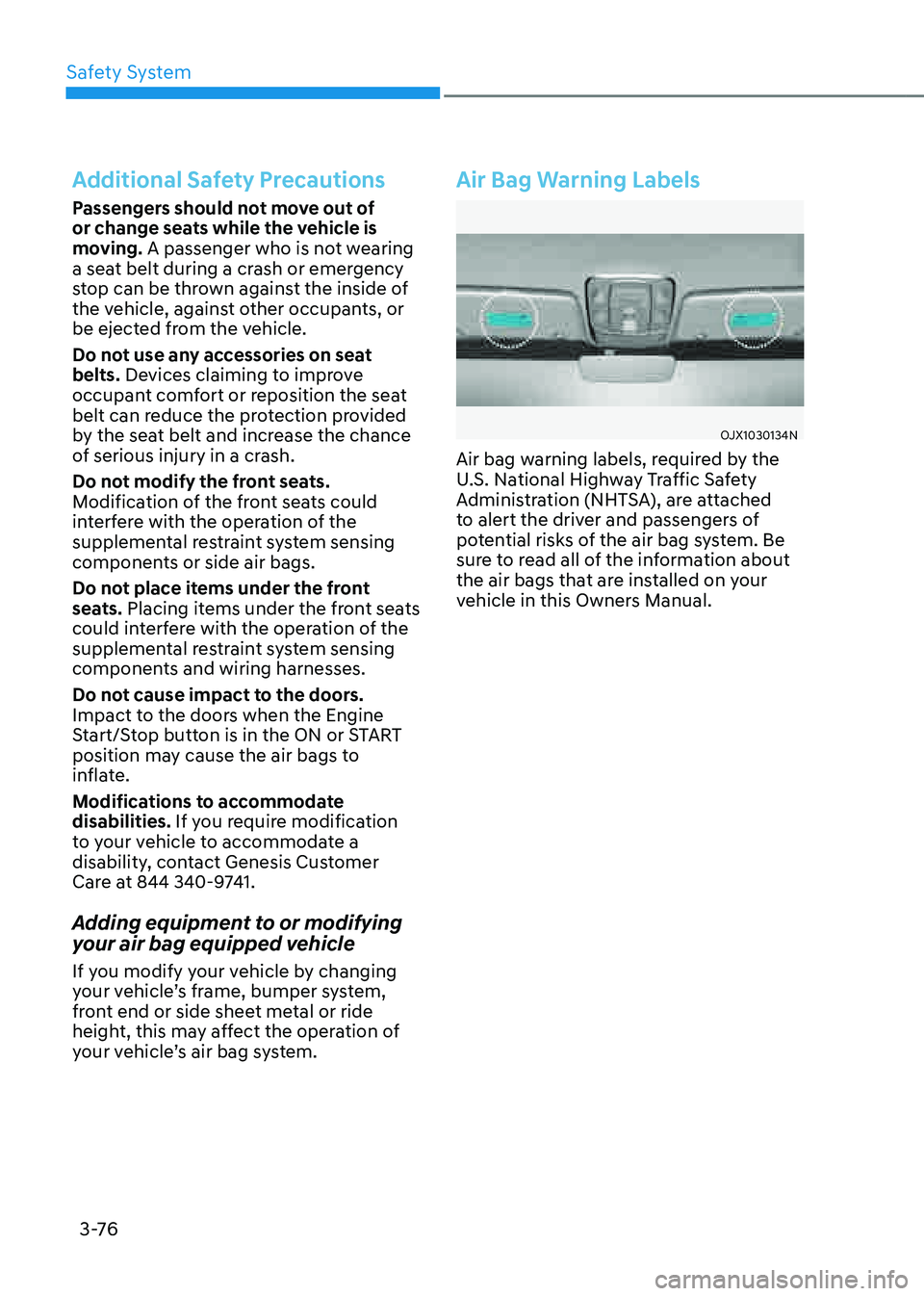
Air Bag Warning Labels
OJX1030134NOJX1030134N
Air bag warning labels, required by the
U.S. National Highway Traffic Safety
Administration (NHTSA), are attached
to alert the driver and passengers of
potential risks of the air bag system. Be
sure to read all of the information about
the air bags that are installed on your
vehicle in this Owners Manual.
Page 179 of 632
05
5-37
NOTICE
• While Integrated Memory System
is being reset, if the resetting
and notification sound stops
incompletely, restart the resetting
procedure again.
• Make sure that there is no objects
around the driver’s seat in advance
of resetting the Integrated Memory
System.
Seat Easy Access
Seat easy access will move the driver’s
seat and steering wheel automatically as
follows:
• Exiting the vehicle:
The driver’s seat, steering wheel and
seat bolster will move as follows when
the Engine Start/Stop button is in the
OFF position with the gear in P (Park)
and the driver’s door open.
-Driver seat: Moves rearward
depending on the distance selected
from the Settings menu in the
infotainment system.
-Steering wheel: Moves upward
-Seat bolster (if equipped): Adjusted
to the default position.
However, the driver’s seat may not
move rearward if there is not enough
space between the driver’s seat and
the rear seats.
Also, on a regular basis, the steering
wheel will also move forward to adjust
its location by itself.
• Entering the vehicle:
The driver’s seat, steering wheel and
seat bolster will move as follows
when the Engine Start/Stop button
is pressed to the ACC, ON or START
position or while carrying the smart
key, the driver’s door is closed with
the Engine Start/Stop button in the
OFF position.
- Driver seat: Moves back to its
original position.
-Steering wheel: Moves back to its
original position.
-Seat bolster (if equipped): Adjusted
to the default position.
• You can set the Seat Easy Access
function from the Settings menu
in the infotainment system screen.
Select:
-Driver seat
Setup → Vehicle Settings → Seat →
Seating Easy Access → Driver Seat
Easy Access → Normal/Extended/Off
-Steering wheel
Setup → Vehicle Settings → Seat
→ Seating Easy Access → Steering
wheel easy access
See additional information in
supplied Infotainment Manual.
Page 222 of 632

Convenient Features
5-80
Front lamps
OJX1050201NOJX1050201N
Front map lamp ():
Touch either icons to turn the map lamp
on or off. This light produces a spot
beam for convenient use as a map lamp
at night or as a personal lamp for the
driver and the front passenger.
Door lamp (
):
The front or rear room lamps come on
when the front or rear doors are opened.
When doors are unlocked by the smart
key, the front and rear lamps come on
for approximately 30 seconds as long as
any door is not opened. The front and
rear room lamps go out gradually after
approximately 30 seconds when the
door is closed. However, if the Engine
Start/Stop button is in the ON position
or all doors are locked, the front and rear
lamps will turn off. If a door is opened
with the Engine Start/Stop button in
the ACC position or the OFF position,
the front and rear lamps will stay on for
about 5 minutes.
Room lamp (
)
Press the button to turn ON the room
lamp for the front/rear seats.
Rear lamps
Page 234 of 632
Convenient Features
5-92
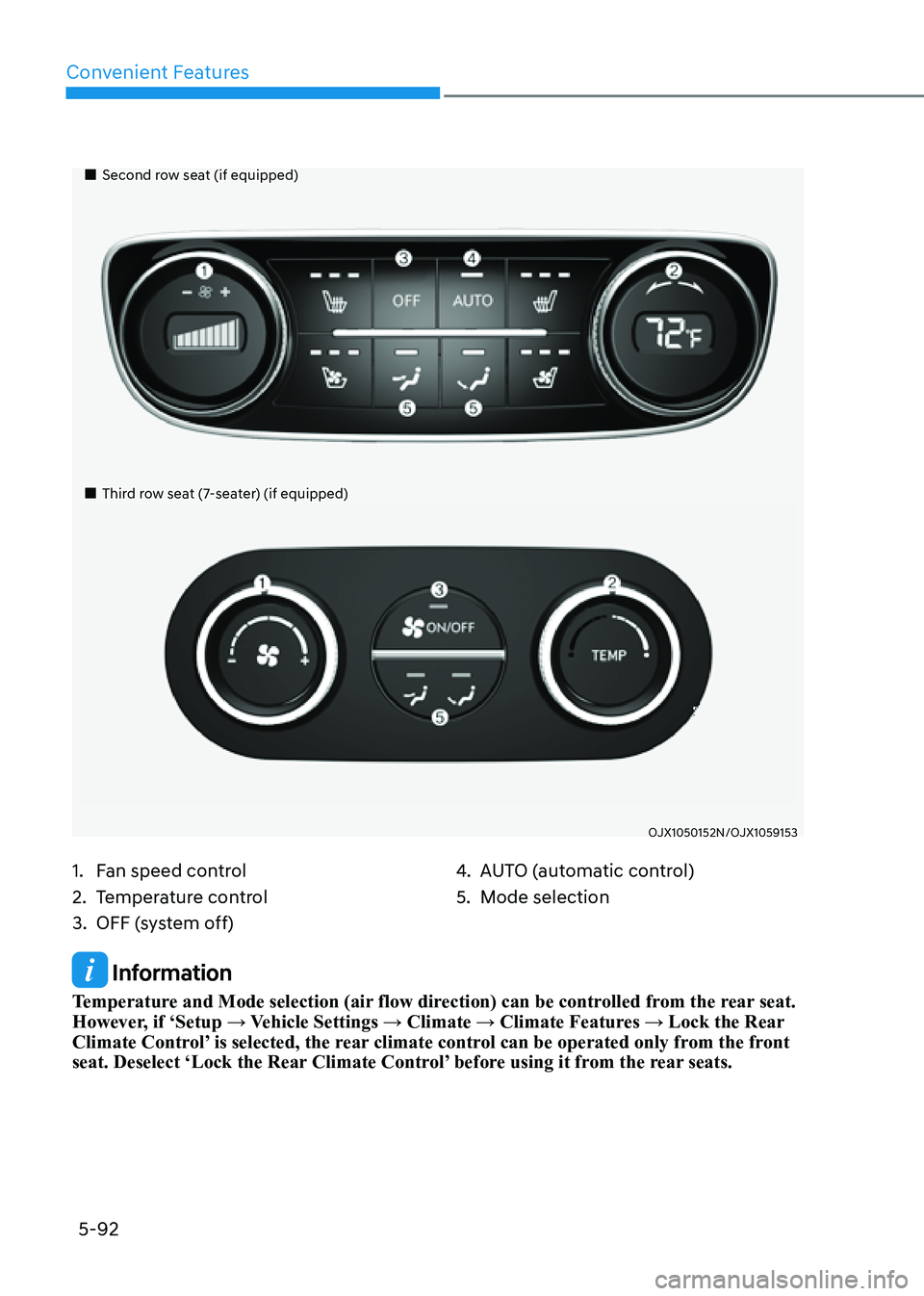
Information
Temperature and Mode selection (air flow direction) can be controlled from the rear seat.
However, if ‘Setup → Vehicle Settings → Climate → Climate Features → Lock the Rear
Climate Control’ is selected, the rear climate control can be operated only from the front
seat. Deselect ‘Lock the Rear Climate Control’ before using it from the rear seats.
Page 348 of 632

Driving Your Vehicle
6 -76
Certification label
OBH059070OBH059070
The certification label is located on the
driver's door sill at the center pillar and
shows the maximum allowable weight of
the fully loaded vehicle. This is called the
GVWR (Gross Vehicle Weight Rating). The
GVWR includes the weight of the vehicle,
all occupants, fuel and cargo.
This label also tells you the maximum
weight that can be supported by the
front and rear axles, called Gross Axle
Weight Rating (GAWR).
The total weight of the vehicle, including
all occupants, accessories, cargo, and
trailer tongue load must not exceed the
Gross Vehicle Weight Rating (GVWR) or
the Gross Axle Weight Rating (GAWR).
To find out the actual loads on your front
and rear axles, you need to go to a weigh
station and weigh your vehicle. Be sure
to spread out your load equally on both
sides of the centerline.
WARNING
Overloading
• Never exceed the GVWR for your
vehicle, the GAWR for either the front
or rear axle and vehicle capacity
weight. Exceeding these ratings
can affect your vehicle's handling
and braking ability, and cause an
accident.
• Do not overload your vehicle.
Overloading your vehicle can cause
heat buildup in your vehicle's tires
and possible tire failure, increased
stopping distances and poor vehicle
handling-all of which may result in a
crash.
NOTICE
Overloading your vehicle may cause
damage. Repairs would not be covered
by your warranty. Do not overload your
vehicle.
WARNING
If you carry items inside your vehicle
(e.g., suitcases, tools, packages, or
anything else), they are moving as fast
as the vehicle. If you have to stop or
turn quickly, or if there is a crash, the
items will keep going and can cause
an injury if they strike the driver or a
passenger.
• Put items in the cargo area of your
vehicle. Try to spread the weight
evenly.
• Do not stack items, like suitcases,
inside the vehicle above the tops of
the seats.
• Do not leave an unsecured child
restraint in your vehicle.
• When you carry something inside the
vehicle, secure it.
Page 579 of 632

Maintenance
9-38
Temperature - A, B & C
The temperature grades are A (the
highest), B and C representing the
tire’s resistance to the generation
of heat and its ability to dissipate
heat when tested under controlled
conditions on a specified indoor
laboratory test wheel.
Sustained high temperature can
cause the material of the tire to
degenerate and reduce tire life,
and excessive temperature can
lead to sudden tire failure. Grades
B and A represent higher levels of
performance on the laboratory test
wheel than the minimum required
by law.
WARNING
The temperature grade for this tire is
established for a tire that is properly
inflated and not overloaded.
Excessive speed, under-inflation,
over-inflation, or excessive loading,
either separately or in combination,
can cause heat build-up and
possible sudden tire failure. This
may cause loss of vehicle control
resulting in an accident.
Tire Terminology and Definitions
Air pressure
The amount of air inside the tire
pressing outward on the tire. Air
pressure is expressed in pounds per
square inch (psi) or kilopascal (kPa).
Accessory weight
This means the combined weight
of optional accessories. Some
examples of optional accessories
are automatic transmission, power
seats, and air conditioning.
Aspect ratio
The relationship of a tire’s height to
its width.
Belt
A rubber coated layer of cords that
is located between the plies and the
tread. Cords may be made from steel
or other reinforcing materials.
Bead
The tire bead contains steel wires
wrapped by steel cords that hold the
tire onto the rim.
Page 613 of 632

Maintenance
9-72
Interior Care
Interior general precautions
Prevent caustic solutions such as
perfume and cosmetic oil, from
contacting the interior parts because
they may cause damage or discoloration.
If they do contact the interior parts,
wipe them off immediately. See the
instructions for the proper way to clean
vinyl.
NOTICE
• Never allow water or other liquids
to come in contact with electrical/
electronic components inside the
vehicle as this may damage them.
• When cleaning leather products
(steering wheel, seats etc.), use
neutral detergents or low alcohol
content solutions. If you use high
alcohol content solutions or acid/
alkaline detergents, the color of the
leather may fade or the surface may
get stripped off.
Cleaning the upholstery and interior
trim
Vinyl (if equipped)
Remove dust and loose dirt from vinyl
with a whisk broom or vacuum cleaner.
Clean vinyl surfaces with a vinyl cleaner.
Fabric (if equipped)
Remove dust and loose dirt from
fabric with a whisk broom or vacuum
cleaner. Clean with a mild soap solution
recommended for upholstery or carpets.
Remove fresh spots immediately with
a fabric spot cleaner. If fresh spots do
not receive immediate attention, the
fabric can be stained and its color can be
affected. Also, its fire-resistant properties
can be reduced if the material is not
properly maintained.
NOTICE
Using anything but recommended
cleaners and procedures may affect the
fabric’s appearance and fire-resistant
properties.
Page 614 of 632

09
9-73
Leather (if equipped)
• Features of seat leather
-Leather is made from the outer skin
of an animal, which goes through a
special process to be available for
use. Since it is a natural product,
each part differs in thickness or
density.
Wrinkles may appear as a natural
result of stretching and shrinking
depending on the temperature and
humidity.
-The seat is made of stretchable
fabric to improve comfort.
-The parts contacting the body are
curved and the side supporting
area is high which provides driving
comfort and stability.
-Wrinkles may appear naturally
from usage. It is not a fault of the
products.
NOTICE
• Wrinkles or abrasions which appear
naturally from usage are not covered
by warranty.
• Belts with metallic accessories,
zippers or keys inside the back
pocket may damage the seat fabric.
• Make sure not to wet the seat. It may
change the nature of natural leather.
• Jeans or clothes which could bleach
may contaminate the surface of the
seat covering fabric.
• Caring for the leather seats
-Vacuum the seat periodically to
remove dust and sand on the seat. It
will prevent abrasion or damage of
the leather and maintain its quality.
-Wipe the natural leather seat cover
often with dry or soft cloth.
-Use of proper leather protector may
prevent abrasion of the cover and
helps maintain the color. Be sure to
read the instructions and consult
a specialist when using leather
coating or protective agent.
-Light colored (beige, cream beige)
leather is easily contaminated and
the stain is noticeable. Clean the
seats frequently.
-Avoid wiping with wet cloth. It may
cause the surface to crack.
• Cleaning the leather seats
-Remove all contaminations
instantly. Refer to instructions below
for removal of each contaminant.
-Cosmetic products (sunscreen,
foundation, etc.)
Apply cleansing cream on a cloth
and wipe the contaminated spot.
Wipe off the cream with a wet cloth
and remove water with a dry cloth.
-Beverages (coffee, soft drink, etc.)
Apply a small amount of neutral
detergent and wipe until
contaminations do not smear.
Page 630 of 632

Index
I-12
Seats ........................................................................\
...............................................3-3
Air Ventilation Seats
........................................................................\
...............3-29
Front Seats
........................................................................\
.................................3-8
Head Restraint
........................................................................\
.........................3-22
Rear Occupant Alert (ROA)
........................................................................\
....3-31
Rear Seats
........................................................................\
................................3-13
Safety Precautions
........................................................................\
.....................3-7
Seat Warmers
........................................................................\
...........................3-27
Semi Active Engine Mount
........................................................................\
..........6-56
Smart Cruise Control (SCC)
........................................................................\
........7-69
System Display and Control ........................................................................\
.... 7-76
System Malfunction and Limitations
..............................................................7-81
System operation
........................................................................\
.....................7-75
System Settings
........................................................................\
.......................7-70
Smart Posture Care System
........................................................................\
.........5-38
Special Driving Conditions
........................................................................\
.........6-57
Driving at Night
........................................................................\
......................6-58
Driving in Flooded Areas
........................................................................\
........6-59
Driving in the Rain
........................................................................\
..................6-58
Hazardous Driving Conditions
........................................................................\
6-57
Highway Driving
........................................................................\
.....................6-59
Reducing the Risk of a Rollover
.....................................................................6-59
Rocking the Vehicle
........................................................................\
................6-57
Smooth Cornering
........................................................................\
...................6-57
Steering Wheel
........................................................................\
.............................5-39
Electric Power Steering (EPS)
........................................................................\
5-39
Heated Steering Wheel
........................................................................\
............5-42
Horn ........................................................................\
......................................... 5-41
Tilt / Telescopic Steering
........................................................................\
.........5-40
Storage Compartment
........................................................................\
................5-112
Center Console Storage
........................................................................\
.........5-112
Glove Box
........................................................................\
.............................5-112
Storage Tray (7-seater)
........................................................................\
..........5-113
Sunglass Holder
........................................................................\
....................5-113
Surround View Monitor (SVM)
........................................................................\
7-112
System Malfunction and Limitations
............................................................7-114
System Operation
........................................................................\
..................7-114
System Settings
........................................................................\
.....................7-113