air conditioning GENESIS GV80 2021 Owner's Manual
[x] Cancel search | Manufacturer: GENESIS, Model Year: 2021, Model line: GV80, Model: GENESIS GV80 2021Pages: 632, PDF Size: 9.37 MB
Page 13 of 632
 ........................................................................\
..................2-2
Exteri")
2. Vehicle Information,
Consumer Information and
Reporting Safety Defects
Exterior Overview (I) ........................................................................\
..................2-2
Exterior Overview (II)
........................................................................\
.................2-3
Interior Overview (I)
........................................................................\
..................2-4
Instrument Panel Overview (I)
........................................................................\
.2-5
Instrument Panel Overview (III)
.......................................................................2-6
Engine Compartment
........................................................................\
................2-7
Dimensions
........................................................................\
................................2-8
Engine
........................................................................\
........................................2-8
Bulb Wattage
........................................................................\
.............................2-9
Tires and Wheels
........................................................................\
......................2-10
Air Conditioning System
........................................................................\
...........2-11
Vehicle Weight and Luggage Volume
.............................................................2-11
Recommended Lubricants and Capacities
....................................................2-12Recommended SAE Viscosity Number .....................................................................2-13
Vehicle Identification Number (VIN) ..............................................................2-14
Vehicle Certification Label
........................................................................\
......2-14
Tire Specification and Pressure Label
............................................................2-14
Engine Number
........................................................................\
........................2-15
Air Conditioner Compressor Label
.................................................................2-15
Consumer Information
........................................................................\
............2-16
Reporting Safety Defects
........................................................................\
........2-17
Vehicle Information, Consumer Information and Reporting Safety Defects
2
Page 23 of 632

02
2-11
ItemsWeight of volume Classification
Refrigerant 5-seater
21~23 oz. (600~650 g)
R-1234yf
7-seater 29.9~31.7 oz. (850~900 g)
Compressor
lubricant 5-seater
3.1~3.8 oz. (90~110 g)
PAG
7-seater 6.3~7.0 oz. (180~200 g)
Contact an authorized retailer of Genesis Branded products dealer for more details.
VEHICLE WEIGHT AND LUGGAGE VOLUME
Gross vehicle weight
Items 5-seater 7-seater
2.5L T-GDI 2WD
5776 lbs. (2620 kg) 6162 lbs. (2795 kg)
AWD 5930 lbs. (2690 kg) 6294 lbs. (2855 kg)
3.5L T-GDI AWD6107 lbs. (2770 kg) 6526 lbs. (2960 kg)
Luggage volume
Items 5-seater 7-seater
SAE Min.
34.9 cu ft. (990 ℓ) 34.9 cu ft. (990 ℓ)
Max. 84.0 cu ft. (2380 ℓ) 84.0 cu ft. (2380 ℓ)
Min : Behind rear seat to upper edge of the seat back.
Max : Behind front seat to roof.
AIR CONDITIONING SYSTEM
Page 59 of 632
Safety System
3-30
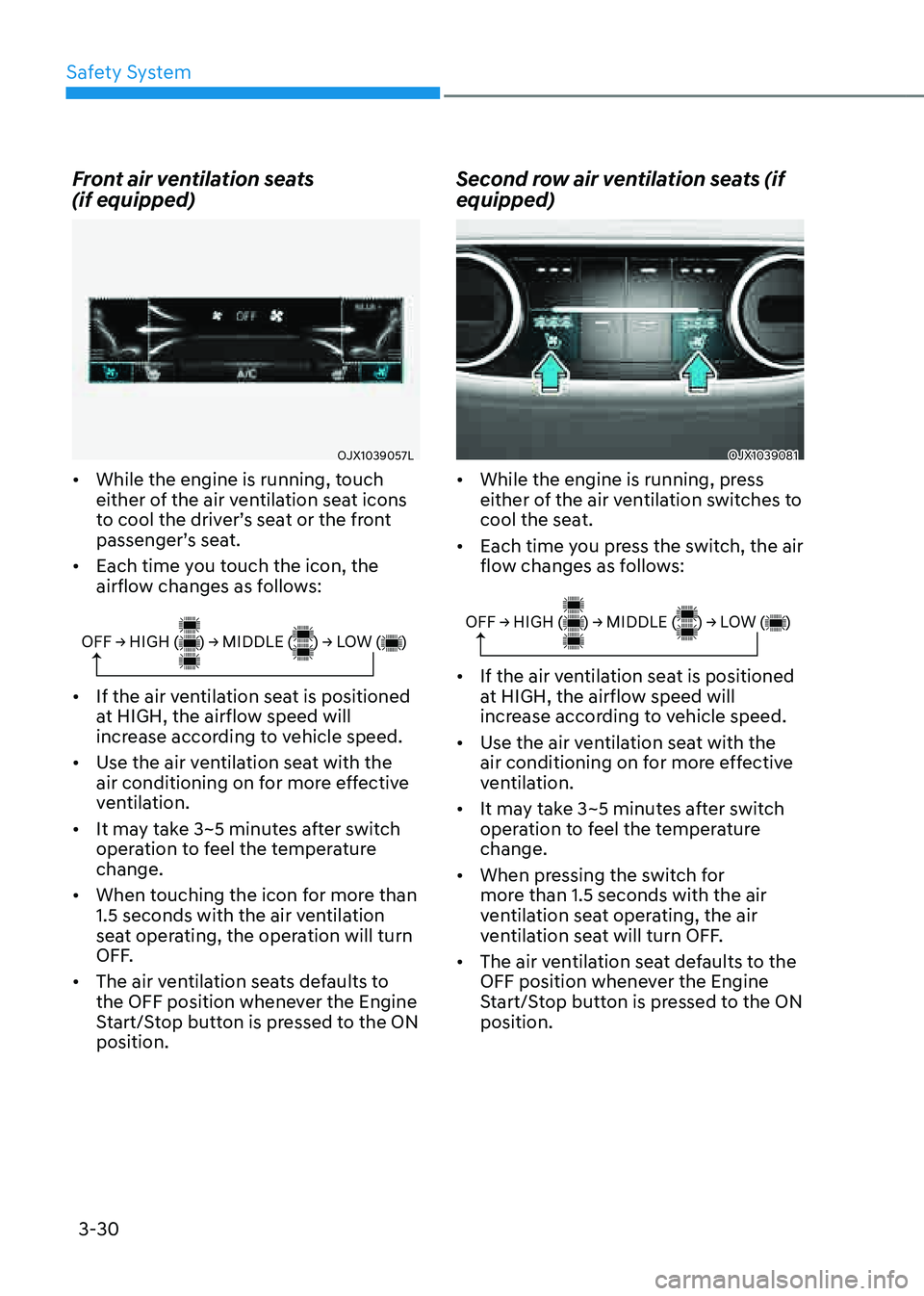
Front air ventilation seats
(if equipped)
OJX1039057LOJX1039057L
• While the engine is running, touch
either of the air ventilation seat icons
to cool the driver’s seat or the front
passenger’s seat.
• Each time you touch the icon, the
airflow changes as follows:
OFF → HIGH ( ) → MIDDLE ( ) → LOW ( )
• If the air ventilation seat is positioned
at HIGH, the airflow speed will
increase according to vehicle speed.
• Use the air ventilation seat with the
air conditioning on for more effective
ventilation.
• It may take 3~5 minutes after switch
operation to feel the temperature
change.
• When touching the icon for more than
1.5 seconds with the air ventilation
seat operating, the operation will turn
OFF.
• The air ventilation seats defaults to
the OFF position whenever the Engine
Start/Stop button is pressed to the ON
position.
Second row air ventilation seats (if
equipped)
OJX1039081OJX1039081
• While the engine is running, press
either of the air ventilation switches to
cool the seat.
• Each time you press the switch, the air
flow changes as follows:
OFF → HIGH ( ) → MIDDLE ( ) → LOW ( )
• If the air ventilation seat is positioned
at HIGH, the airflow speed will
increase according to vehicle speed.
• Use the air ventilation seat with the
air conditioning on for more effective
ventilation.
• It may take 3~5 minutes after switch
operation to feel the temperature
change.
• When pressing the switch for
more than 1.5 seconds with the air
ventilation seat operating, the air
ventilation seat will turn OFF.
• The air ventilation seat defaults to the
OFF position whenever the Engine
Start/Stop button is pressed to the ON
position.
Page 166 of 632
Convenient Features
5-24
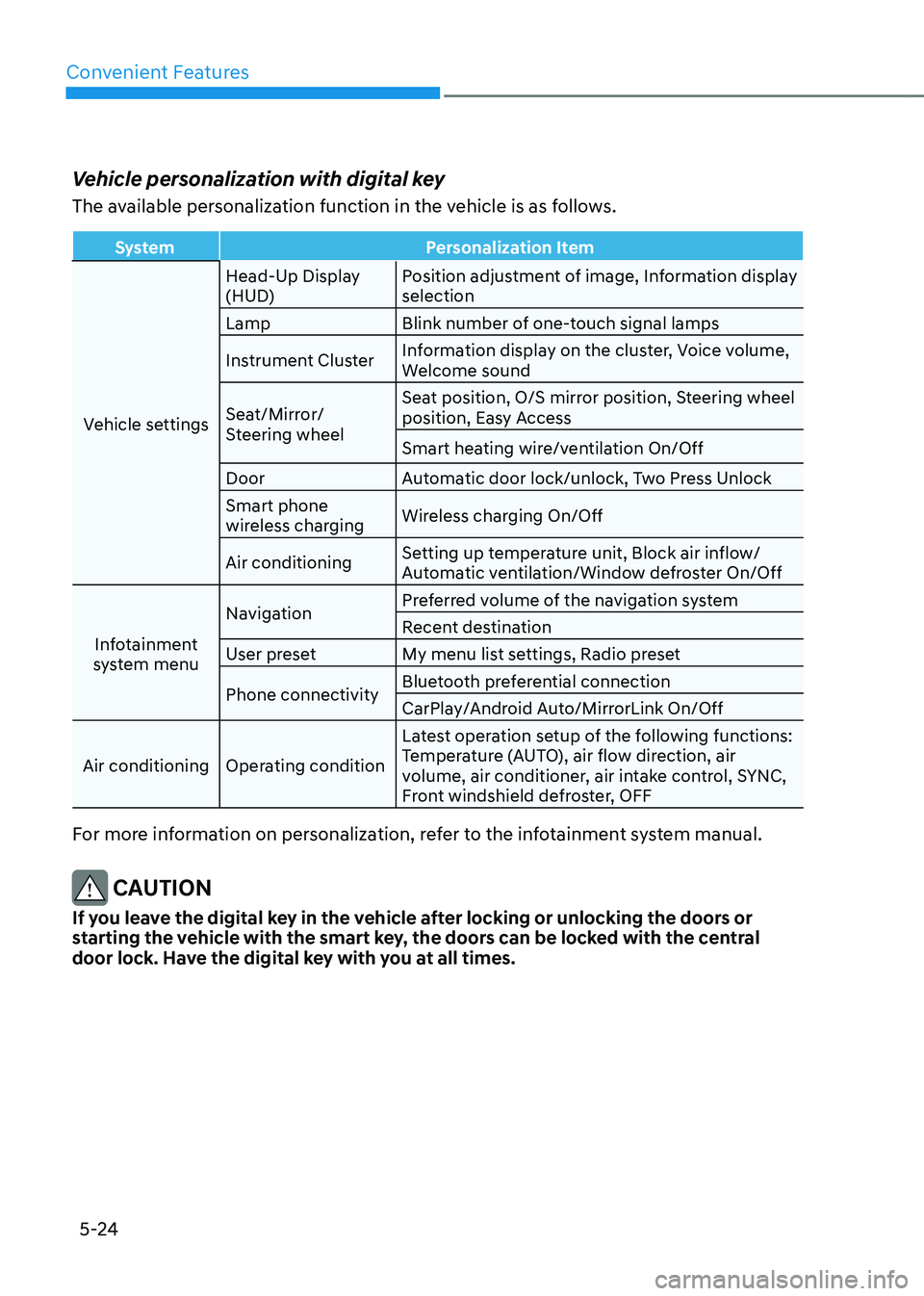
Vehicle personalization with digital key
The available personalization function in the vehicle is as follows.
SystemPersonalization Item
Vehicle settings Head-Up Display
(HUD)
Position adjustment of image, Information display
selection
Lamp Blink number of one-touch signal lamps
Instrument Cluster Information display on the cluster, Voice volume,
Welcome sound
Seat/Mirror/
Steering wheel Seat position, O/S mirror position, Steering wheel
position, Easy Access
Smart heating wire/ventilation On/Off
Door Automatic door lock/unlock, Two Press Unlock
Smart phone
wireless charging Wireless charging On/Off
Air conditioning Setting up temperature unit, Block air inflow/
Automatic ventilation/Window defroster On/Off
Infotainment
system menu Navigation
Preferred volume of the navigation system
Recent destination
User preset My menu list settings, Radio preset
Phone connectivity Bluetooth preferential connection
CarPlay/Android Auto/MirrorLink On/Off
Air conditioning Operating condition Latest operation setup of the following functions:
Temperature (AUTO), air flow direction, air
volume, air conditioner, air intake control, SYNC,
Front windshield defroster, OFF
For more information on personalization, refer to the infotainment system manual.
CAUTION
If you leave the digital key in the vehicle after locking or unlocking the doors or
starting the vehicle with the smart key, the doors can be locked with the central
door lock. Have the digital key with you at all times.
Page 230 of 632
Convenient Features
5-88
NOTICE
• When washing the vehicle, set the
wiper switch in the OFF position to
stop the auto wiper operation. The
wiper may operate and be damaged
if the switch is set in the AUTO mode
while washing the vehicle.
• Do not remove the sensor cover
located on the upper end of the
passenger side windshield glass.
Damage to system components
could occur and may not be covered
by your vehicle warranty.
• Because of using a photo sensor,
temporary malfunction could occur
according to sudden ambient light
change made by stone and dust
while driving.
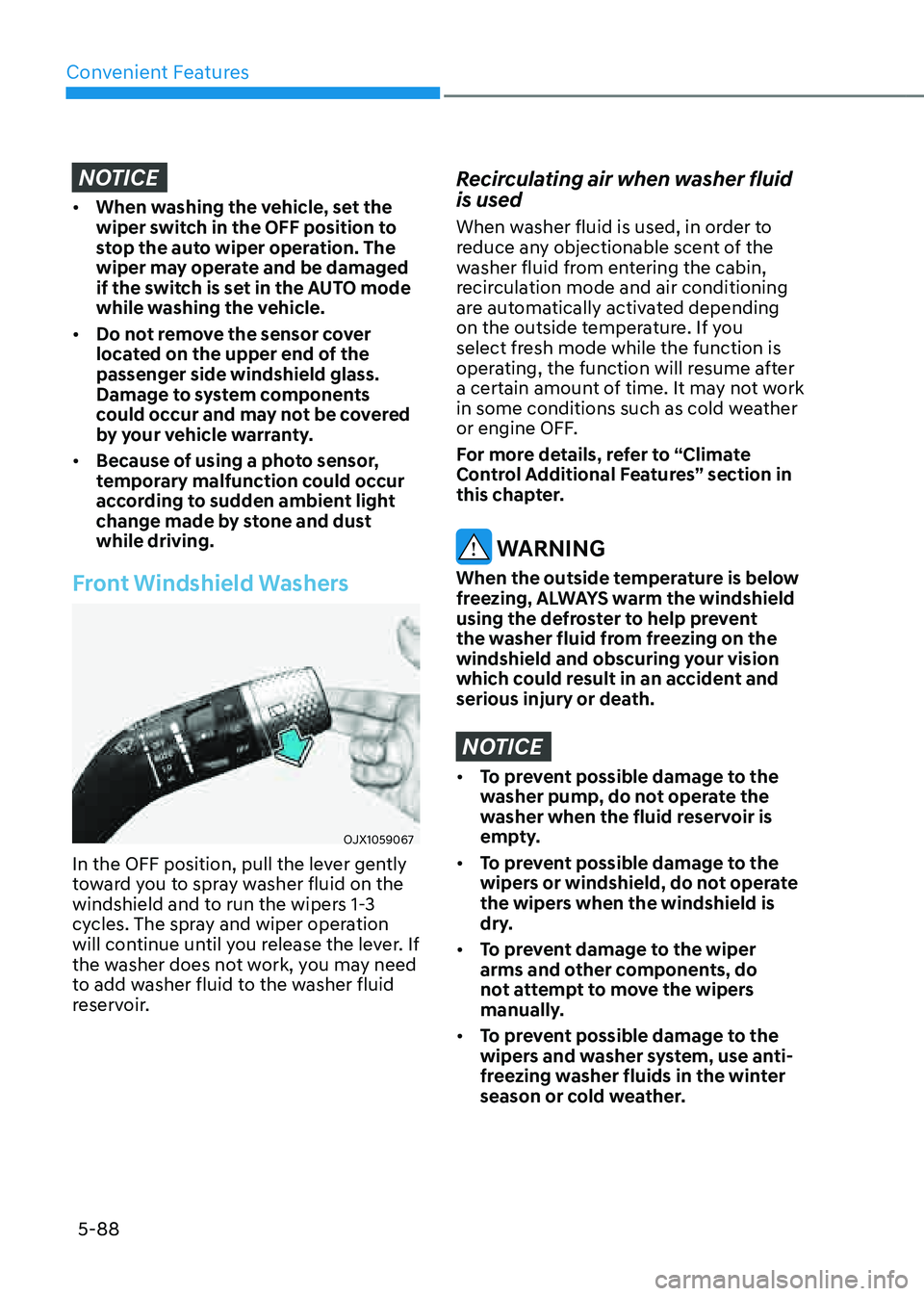
Front Windshield Washers
OJX1059067OJX1059067
In the OFF position, pull the lever gently
toward you to spray washer fluid on the
windshield and to run the wipers 1-3
cycles. The spray and wiper operation
will continue until you release the lever. If
the washer does not work, you may need
to add washer fluid to the washer fluid
reservoir.
Recirculating air when washer fluid
is used
When washer fluid is used, in order to
reduce any objectionable scent of the
washer fluid from entering the cabin,
recirculation mode and air conditioning
are automatically activated depending
on the outside temperature. If you
select fresh mode while the function is
operating, the function will resume after
a certain amount of time. It may not work
in some conditions such as cold weather
or engine OFF.
For more details, refer to “Climate
Control Additional Features” section in
this chapter.
WARNING
When the outside temperature is below
freezing, ALWAYS warm the windshield
using the defroster to help prevent
the washer fluid from freezing on the
windshield and obscuring your vision
which could result in an accident and
serious injury or death.
NOTICE
• To prevent possible damage to the
washer pump, do not operate the
washer when the fluid reservoir is
empty.
• To prevent possible damage to the
wipers or windshield, do not operate
the wipers when the windshield is
dry.
• To prevent damage to the wiper
arms and other components, do
not attempt to move the wipers
manually.
• To prevent possible damage to the
wipers and washer system, use anti-
freezing washer fluids in the winter
season or cold weather.
Page 235 of 632
05
5-93
Automatic Temperature Control
Mode
The Automatic Climate Control System
is controlled by setting the desired
temperature.
1. Press the AUTO button.
The mode selection, fan speed,
air intake and air-conditioning will
be controlled automatically by the
temperature setting you select.
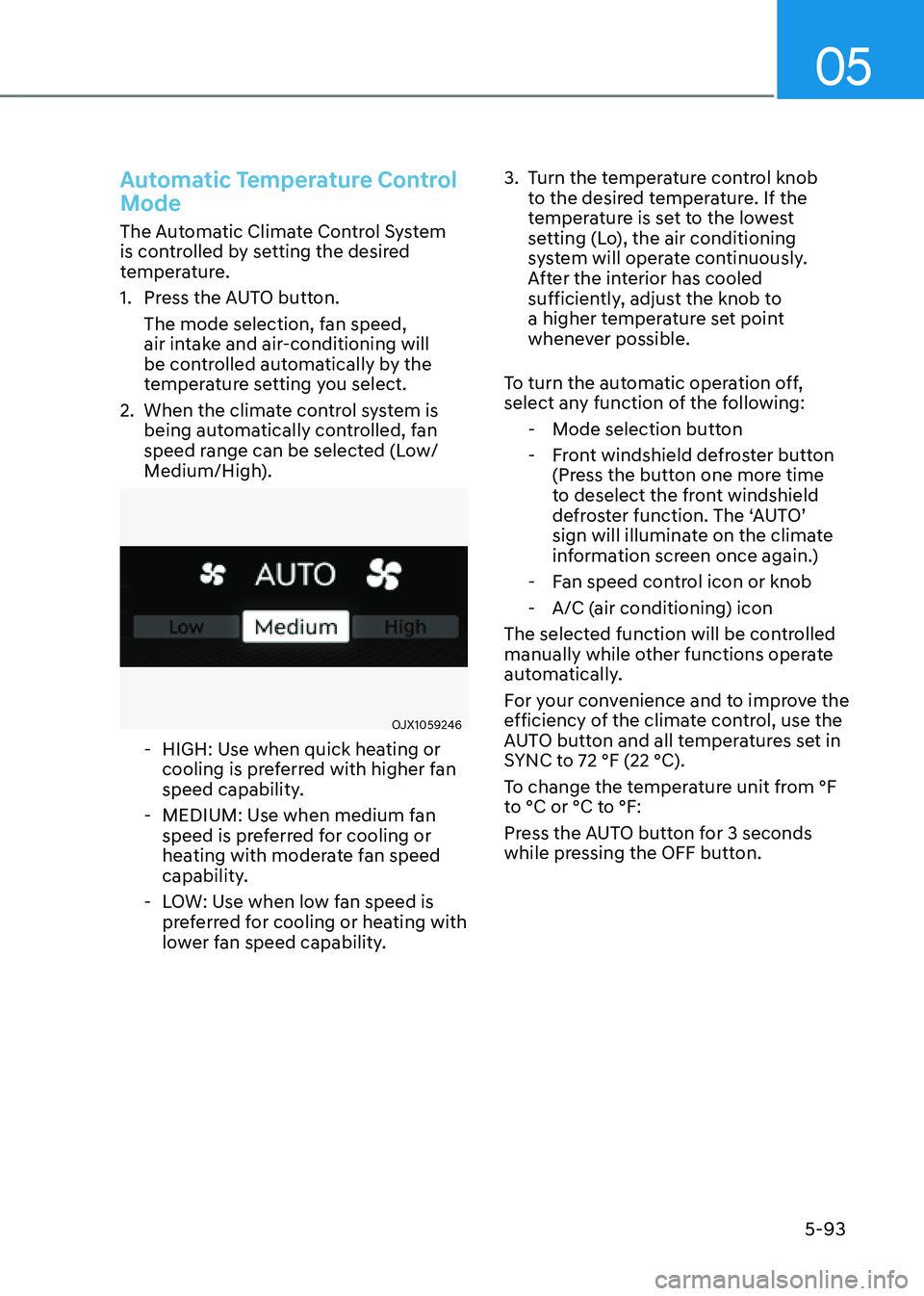
2. When the climate control system is
being automatically controlled, fan
speed range can be selected (Low/
Medium/High).
OJX1059246OJX1059246
-HIGH: Use when quick heating or
cooling is preferred with higher fan
speed capability.
-MEDIUM: Use when medium fan
speed is preferred for cooling or
heating with moderate fan speed
capability.
-LOW: Use when low fan speed is
preferred for cooling or heating with
lower fan speed capability.
3. Turn the temperature control knob
to the desired temperature. If the
temperature is set to the lowest
setting (Lo), the air conditioning
system will operate continuously.
After the interior has cooled
sufficiently, adjust the knob to
a higher temperature set point
whenever possible.
To turn the automatic operation off,
select any function of the following:
- Mode selection button
-Front windshield defroster button
(Press the button one more time
to deselect the front windshield
defroster function. The ‘AUTO’
sign will illuminate on the climate
information screen once again.)
-Fan speed control icon or knob
-A/C (air conditioning) icon
The selected function will be controlled
manually while other functions operate
automatically.
For your convenience and to improve the
efficiency of the climate control, use the
AUTO button and all temperatures set in
SYNC to 72 °F (22 °C).
To change the temperature unit from °F
to °C or °C to °F:
Press the AUTO button for 3 seconds
while pressing the OFF button.
Page 236 of 632
Convenient Features
5-94
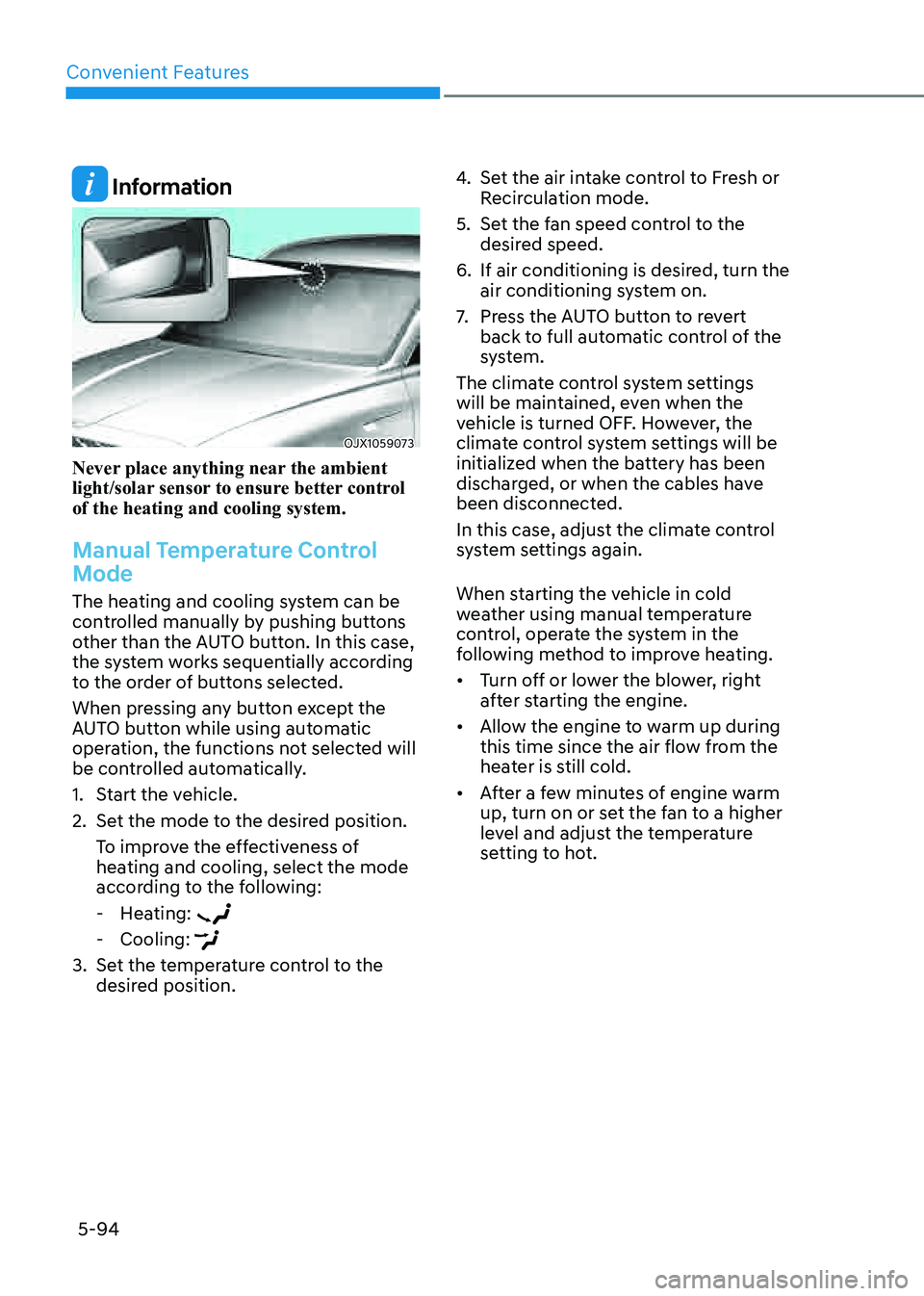
Information
OJX1059073OJX1059073
Never place anything near the ambient
light/solar sensor to ensure better control
of the heating and cooling system.
Manual Temperature Control
Mode
The heating and cooling system can be
controlled manually by pushing buttons
other than the AUTO button. In this case,
the system works sequentially according
to the order of buttons selected.
When pressing any button except the
AUTO button while using automatic
operation, the functions not selected will
be controlled automatically.
1. Start the vehicle.
2. Set the mode to the desired position.
To improve the effectiveness of
heating and cooling, select the mode
according to the following:
-Heating:
-Cooling:
3. Set the temperature control to the
desired position.
4. Set the air intake control to Fresh or
Recirculation mode.
5. Set the fan speed control to the
desired speed.
6. If air conditioning is desired, turn the
air conditioning system on.
7. Press the AUTO button to revert
back to full automatic control of the
system.
The climate control system settings
will be maintained, even when the
vehicle is turned OFF. However, the
climate control system settings will be
initialized when the battery has been
discharged, or when the cables have
been disconnected.
In this case, adjust the climate control
system settings again.
When starting the vehicle in cold
weather using manual temperature
control, operate the system in the
following method to improve heating.
• Turn off or lower the blower, right
after starting the engine.
• Allow the engine to warm up during
this time since the air flow from the
heater is still cold.
• After a few minutes of engine warm
up, turn on or set the fan to a higher
level and adjust the temperature
setting to hot.
Page 240 of 632
Convenient Features
5-98
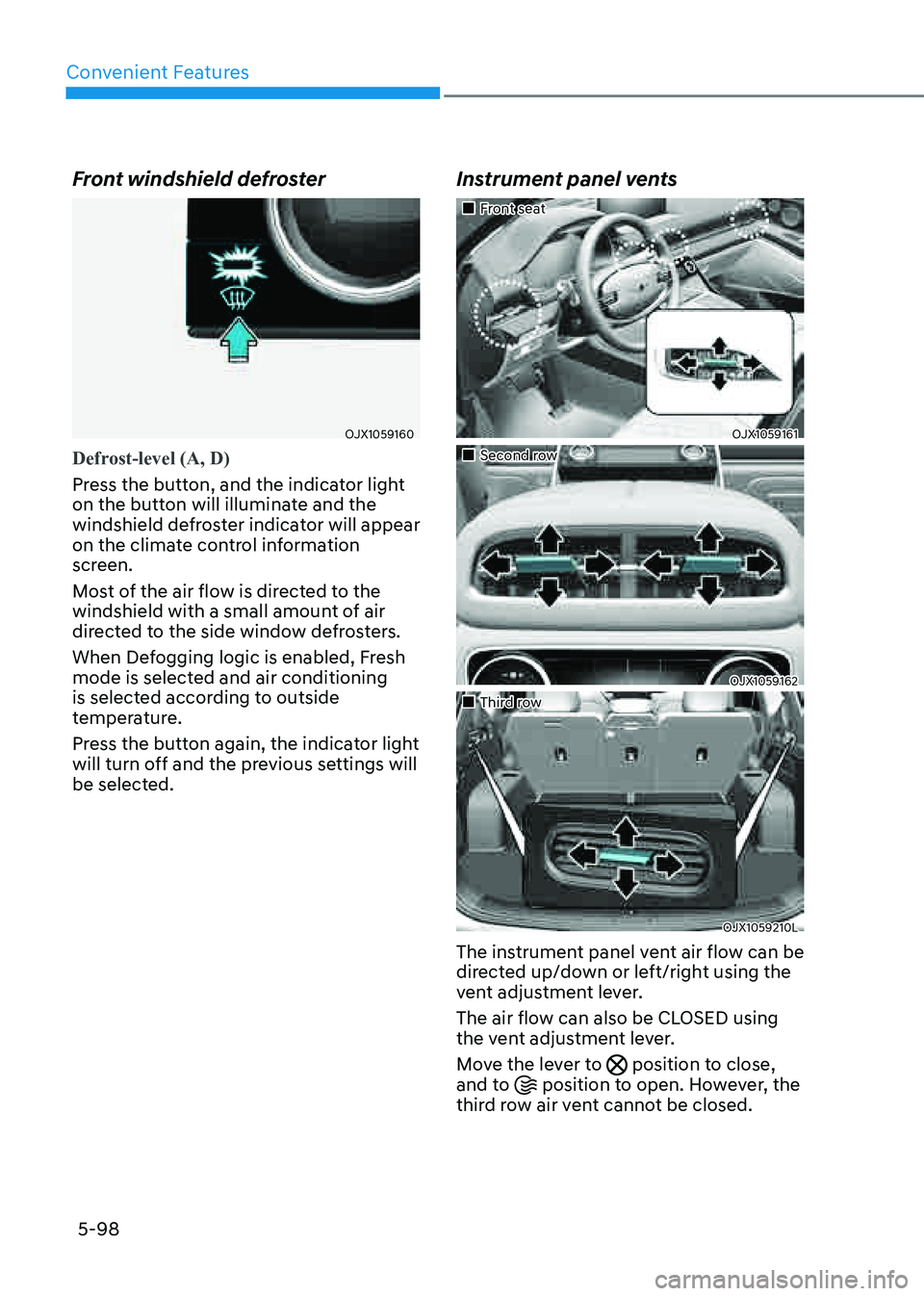
Front windshield defroster
OJX1059160OJX1059160
Defrost-level (A, D)
Press the button, and the indicator light
on the button will illuminate and the
windshield defroster indicator will appear
on the climate control information
screen.
Most of the air flow is directed to the
windshield with a small amount of air
directed to the side window defrosters.
When Defogging logic is enabled, Fresh
mode is selected and air conditioning
is selected according to outside
temperature.
Press the button again, the indicator light
will turn off and the previous settings will
be selected.
Instrument panel vents
Page 242 of 632

Convenient Features
5-100
Air intake control
OJX1059168OJX1059168
The air intake control button is used to
select either Fresh mode (outside air) or
Recirculation mode (cabin air).
Recirculation mode
When Recirculation mode
is selected, air from the
passenger compartment will
be recirculated through the
system and heated or cooled
according to the function
selected.
Fresh mode
When Fresh mode is selected,
air enters the vehicle from
outside and is heated or
cooled according to the
function selected.
Information
Operating the system primarily in Fresh
mode is recommended. Use Recirculation
mode temporarily only when needed.
Prolonged operation of the heater in
Recirculation mode and without the air
conditioning ON can cause fogging of the
windshield. In addition, prolonged use of
the air conditioning ON in Recirculation
mode may result in excessively dry,
dehumidified air in the cabin and may
promote formation of musty vent odor due
to stagnant air.
WARNING
• Continued use of the climate control
system operation in Recirculation
mode for a prolonged period of
time may cause drowsiness to the
occupants in the cabin. This may lead
to loss of vehicle control which may
lead to an accident.
• Continued use of the climate control
system operation in Recirculation
mode with the air conditioning OFF
may allow humidity to increase
inside the cabin. This may cause
condensation to accumulate on the
windshield and obscure visibility.
• Do not sleep in your vehicle or
remain parked in your vehicle with
the windows up and either the
heater or the air conditioning ON for
prolonged periods of time. Doing so
may increase the levels of carbon
dioxide in the cabin which may lead
to serious injury or death.
Page 245 of 632
05
5-103
Air conditioning
Your Genesis Branded Vehicle air
conditioning system is filled with
R-1234yf refrigerant.
1. Start the vehicle.
2. Press the air conditioning button.
3. Set the mode to the Face Level mode.
4. Set the air intake control to
Recirculation mode temporarily to
allow the cabin to cool quickly. When
the desired temperature in the cabin
is reached, change the air intake
control back to Fresh mode.
5. Adjust the fan speed control and
temperature control to maintain
maximum comfort.
When maximum cooling is desired, set
the temperature control to the lowest
position, then set the fan speed control
to the highest setting.
NOTICE
When using the air conditioning system,
monitor the engine temperature gauge
closely while driving up hills or in heavy
traffic when outside temperatures are
high. Air conditioning system operation
when climbing a steep grade or in
high outside ambient temperatures
can cause engine overheating.
Continue to use the fan, but turn the air
conditioning system off if the engine
temperature gauge indicates engine
overheating. Air conditioning system operation tips
• If the vehicle has been parked in
direct sunlight during hot weather,
open the windows for a short time
to let the hot air inside the vehicle
escape.
• After sufficient cooling has been
achieved, switch back from
Recirculation mode to Fresh mode.
• To help reduce moisture inside of
the windows on rainy or humid
days, decrease the humidity inside
the vehicle by operating the air
conditioning system with the windows
and sunroof closed.
• Use the air conditioning system
every month only for a few minutes
to ensure maximum system
performance.
• If you operate air conditioner
excessively, the difference between
the temperature of the outside air and
that of the windshield could cause
the outer surface of the windshield to
fog up, causing loss of visibility. In this
case, set the mode selection to the
position and fan speed control to the
lowest speed.