seat GENESIS GV80 2021 Quick Reference Guide
[x] Cancel search | Manufacturer: GENESIS, Model Year: 2021, Model line: GV80, Model: GENESIS GV80 2021Pages: 25, PDF Size: 8.8 MB
Page 3 of 25
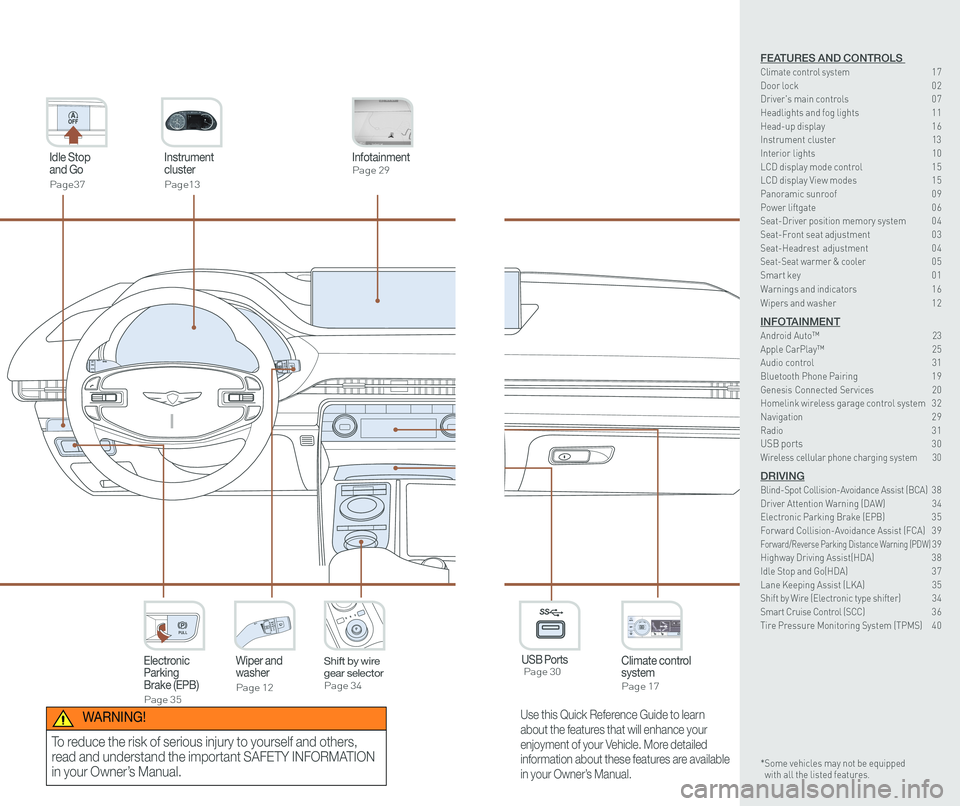
Instrument cluster
Page13
Idle Stop and Go
Page37
InfotainmentPage 29
Climate control systemPage 17
3rd ONWiper and washer
Page 12
Electronic Parking Brake (EPB)
Page 35
PULL
PULL
Shift by wire gear selectorPage 34
P
USB Ports Page 30
P
AC 115V
Max 150WAC 115V
Max 150W
SS
Use this Quick Reference Guide to learn
about the features that will enhance your
enjoyment of your Vehicle. More detailed
information about these features are available
in your Owner’s Manual.
WARNING!
To reduce the risk of serious injury to yourself and others,
read and understand the important SAFETY INFORMATION
in your Owner’s Manual.
FEATURES AND CONTROLS Climate control system 17Door lock 0 2Driver's main controls 0 7
Headlights and fog lights 1 1Head-up display 1 6Instrument cluster 13Interior lights 10LCD display mode control 1 5 LCD display View modes 1 5 Panoramic sunroof 0 9 Power liftgate 0 6Seat-Driver position memory system 0 4Seat-Front seat adjustment 0 3Seat-Headrest adjustment 0 4 Seat-Seat warmer & cooler 05Smart key 0 1
Warnings and indicators 1 6
Wipers and washer 1 2
INFOTAINMENTAndroid Auto™ \
23Apple CarPlay™ 25Audio control 31Bluetooth Phone Pairing 1 9Genesis Connected Services 20Homelink wireless garage control system 3 2 Navigation 2 9Radio 3 1USB ports 30Wireless cellular phone charging system 30
DRIVINGBlind-Spot Collision-Avoidance Assist (BCA) 3 8Driver Attention Warning (DAW) 34Electronic Parking Brake (EPB) 3 5Forward Collision-Avoidance Assist (FCA) 3 9Forward/Reverse Parking Distance Warning (PDW) 39Highway Driving Assist(HDA) 3 8Idle Stop and Go(HDA) 3 7Lane Keeping Assist (LKA) 35Shift by Wire (Electronic type shifter) 34Smart Cruise Control (SCC) 3 6Tire Pressure Monitoring System (TPMS) 4 0
* Some vehicles may not be equipped with all the listed features.
Page 5 of 25
Quick Reference Guide I 0403 I Quick Reference Guide
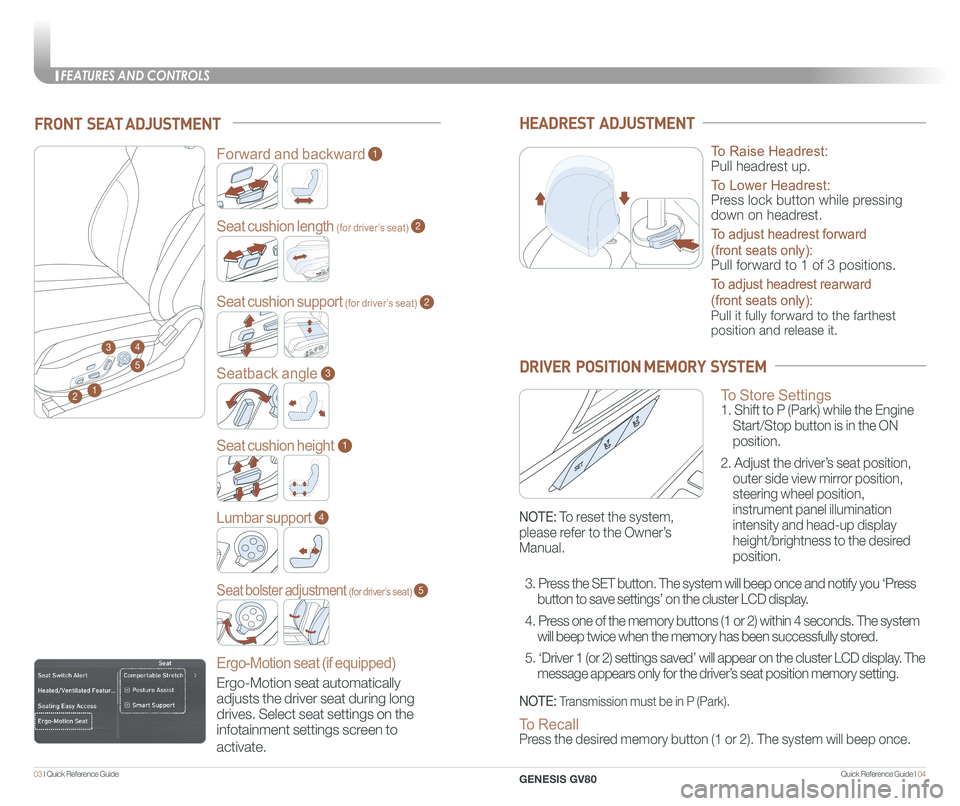
FRONT SEAT ADJUSTMENT
2
Forward and backward1
Seat cushion length (for driver’s seat)
Seat cushion support (for driver’s seat)
2
2
Seatback angle3
Seat cushion height1
Lumbar support
Ergo-Motion seat (if equipped)
4
Seat bolster adjustment (for driver’s seat)5
1
34
5
HEADREST ADJUSTMENT
To Raise Headrest:
Pull headrest up.
To Lower Headrest:
Press lock button while pressing
down on headrest.
To adjust headrest forward
(front seats only):
Pull forward to 1 of 3 positions.
To adjust headrest rearward
(front seats only):
Pull it fully forward to the farthest
position and release it.
To Store Settings 1. Shift to P (Park) while the Engine
Start/Stop button is in the ON
position.
2. Adjust the driver’s seat position,
outer side view mirror position,
steering wheel position,
instrument panel illumination
intensity and head-up display
height/brightness to the desired
position.
DRIVER POSITION MEMORY SYSTEM
NOTE: Transmission must be in P (Park).
NOTE: To reset the system,
please refer to the Owner’s
Manual.
To Recall Press the desired memory button (1 or 2). The system will beep once.
3. Press the SET button. The system will beep once and notify you ‘Press
button to save settings’ on the cluster LCD display.
4. Press one of the memory buttons (1 or 2) within 4 seconds. The system
will beep twice when the memory has been successfully stored.
5. ‘Driver 1 (or 2) settings saved’ will appear on the cluster L\
CD display. The
message appears only for the driver’s seat position memory setting. Ergo-Motion seat automatically
adjusts the driver seat during long
drives. Select seat settings on the
infotainment settings screen to
activate.
FEATURES AND CONTROLS
GENESIS GV80
Page 6 of 25
Quick Reference Guide I 0605 I Quick Reference Guide
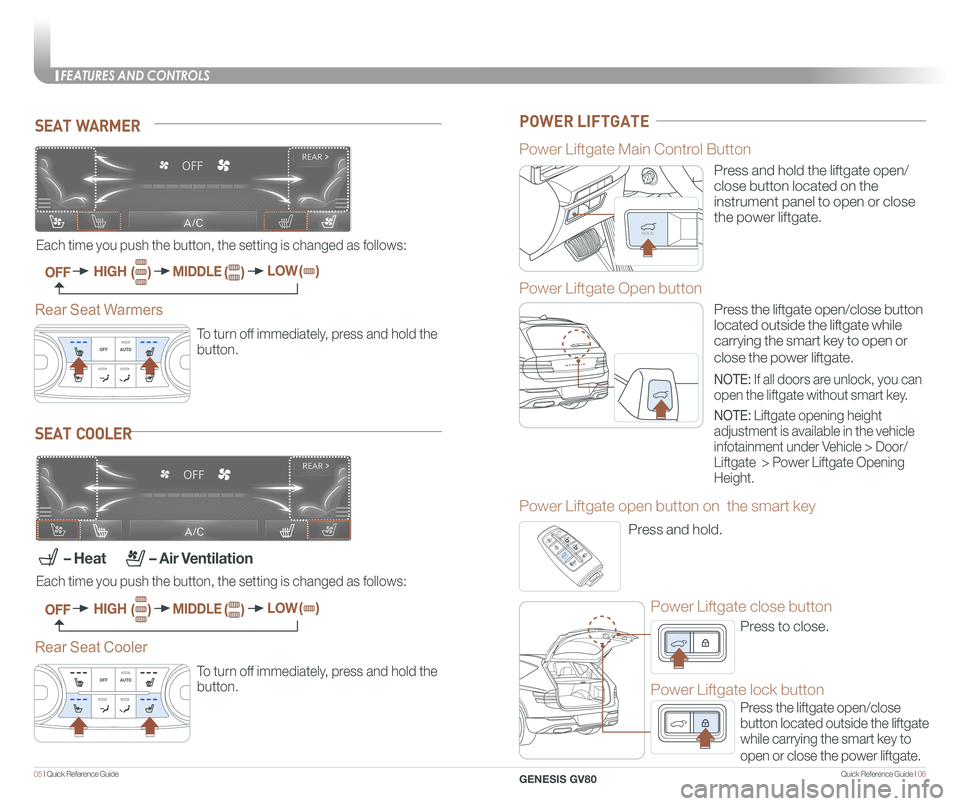
SEAT WARMER
To turn off immediately, press and hold the
button.
To turn off immediately, press and hold the
button.
SEAT COOLER
Each time you push the button, the setting is changed as follows:
– Heat – Air Ventilation
Each time you push the button, the setting is changed as follows:
OFF
OFF
HIGH
HIGH
( )
( )
( )
( )
( )
( )
MIDDLE
MIDDLE
LOW
LOW
Rear Seat Warmers
Rear Seat Cooler
G E N E S I S
Power Liftgate Main Control Button
Power Liftgate Open button
Power Liftgate open button on the smart key
Power Liftgate close button
Power Liftgate lock button
PULL
G E N E S I S
POWER LIFTGATE
Press and hold the liftgate open/
close button located on the
instrument panel to open or close
the power liftgate.
Press the liftgate open/close button
located outside the liftgate while
carrying the smart key to open or
close the power liftgate.
Press and hold.
Press to close.
Press the liftgate open/close
button located outside the liftgate
while carrying the smart key to
open or close the power liftgate.
PULL
G E N E S I S
G E N E S I S
G E N E S I S
PP
NOTE: If all doors are unlock, you can
open the liftgate without smart key.
NOTE: Liftgate opening height
adjustment is available in the vehicle
infotainment under Vehicle > Door/
Liftgate > Power Liftgate Opening
Height.
FEATURES AND CONTROLS
GENESIS GV80
Page 11 of 25
Quick Reference Guide I 1615 I Quick Reference Guide
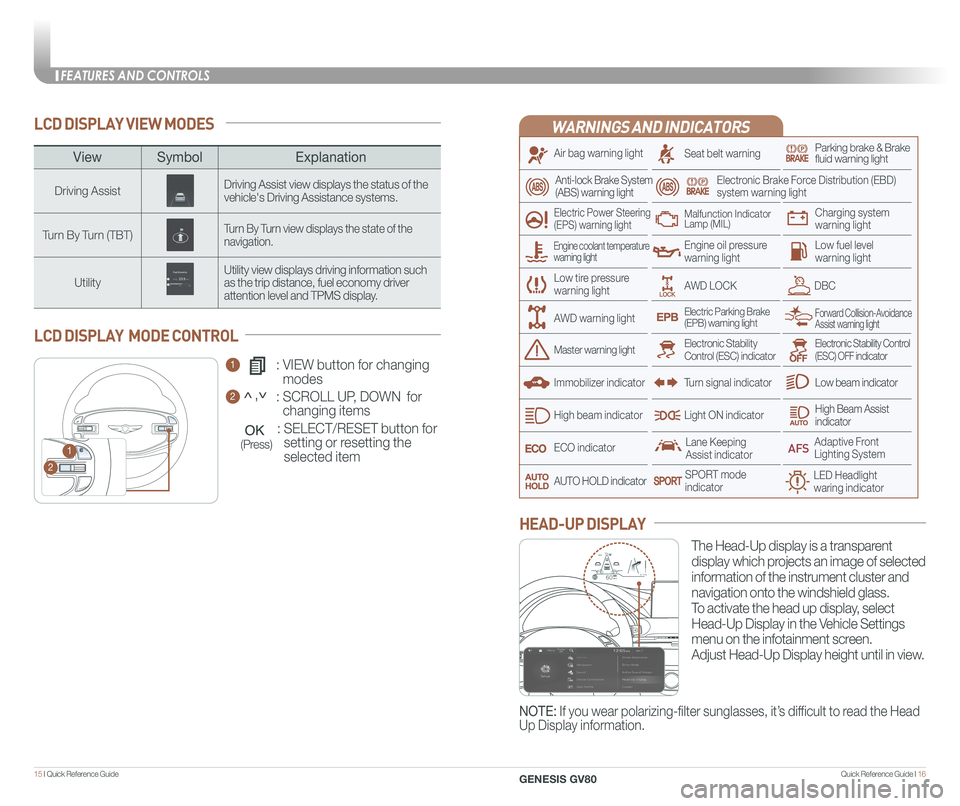
LCD DISPLAY VIEW MODES
1 : VIEW button for changing
modes
2 : SCROLL UP, DOWN for
changing items
: SELECT/RESET button for
setting or resetting the
selected item
LCD DISPLAY MODE CONTROL
1
2
(Press)
WARNINGS AND INDICATORS
Air bag warning light
Electric Power Steering (EPS) warning light
Seat belt warningParking brake & Brake fluid warning light
Electronic Brake Force Distribution (EBD) system warning light
Low tire pressurewarning light
Low fuel level warning light
Low beam indicator
High Beam Assist indicatorLight ON indicator
ECO indicator
SPORT modeindicator
Anti-lock Brake System(ABS) warning light
High beam indicator
Electronic Stability Control (ESC) indicatorMaster warning light
Forward Collision-Avoidance Assist warning lightElectric Parking Brake(EPB) warning light
Engine oil pressure warning light
AWD LOCKDBC
Charging system warning light
Immobilizer indicator
Malfunction IndicatorLamp (MIL)
Electronic Stability Control (ESC) OFF indicator
Lane Keeping Assist indicator
LED Headlight waring indicator
Adaptive Front Lighting System
AUTO HOLD indicator
Turn signal indicator
The Head-Up display is a transparent
display which projects an image of selected
information of the instrument cluster and
navigation onto the windshield glass.
To activate the head up display, select
Head-Up Display in the Vehicle Settings
menu on the infotainment screen.
Adjust Head-Up Display height until in view.
HEAD-UP DISPLAY
Engine coolant temperature warning light
AWD warning light
NOTE: If you wear polarizing-filter sunglasses, it’s difficult to read the Head
Up Display information.
HDA
MPH60
600.1mi60
ViewSymbol Explanation
Driving AssistDriving Assist view displays the status of the vehicle's Driving Assistance systems.
Turn By Turn (TBT)Turn By Turn view displays the state of the navigation.
UtilityUtility view displays driving information such as the trip distance, fuel economy driver attention level and TPMS display.
<,<
FEATURES AND CONTROLS
GENESIS GV80
Page 12 of 25
Quick Reference Guide I 1817 I Quick Reference Guide
3rd ON
-+
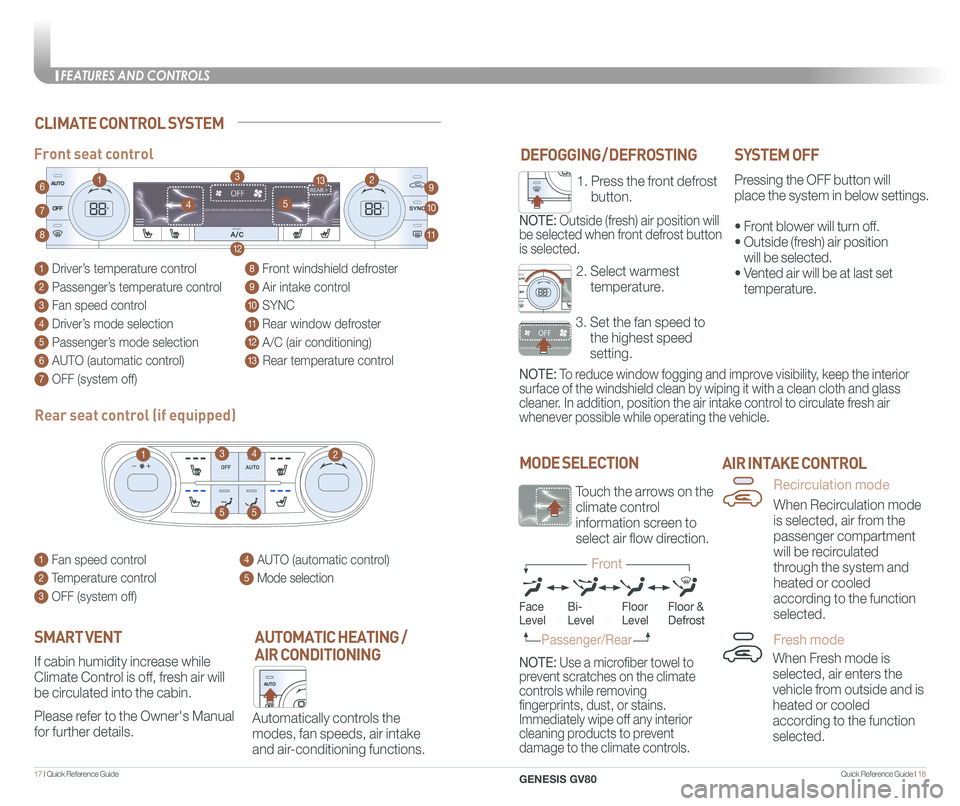
DEFOGGING / DEFROSTINGSYSTEM OFF
Pressing the OFF button will
place the system in below settings.
• Front blower will turn off.
• Outside (fresh) air position
will be selected.
• Vented air will be at last set
temperature.
Front seat control
MODE SELECTION
NOTE: To reduce window fogging and improve visibility, keep the interior
surface of the windshield clean by wiping it with a clean cloth and glas\
s
cleaner. In addition, position the air intake control to circulate fresh air
whenever possible while operating the vehicle.
NOTE: Use a microfiber towel to
prevent scratches on the climate
controls while removing
fingerprints, dust, or stains.
Immediately wipe off any interior
cleaning products to prevent
damage to the climate controls.
AIR INTAKE CONTROL
Automatically controls the
modes, fan speeds, air intake
and air-conditioning functions.
AUTOMATIC HEATING /
AIR CONDITIONING
Rear seat control (if equipped)
If cabin humidity increase while
Climate Control is off, fresh air will
be circulated into the cabin.
Please refer to the Owner's Manual
for further details.
SMART VENT
When Fresh mode is
selected, air enters the
vehicle from outside and is
heated or cooled
according to the function
selected.
When Recirculation mode
is selected, air from the
passenger compartment
will be recirculated
through the system and
heated or cooled
according to the function
selected.
CLIMATE CONTROL SYSTEM
3. Set the fan speed to
the highest speed
setting.
2. Select warmest
temperature.
1. Press the front defrost
button.
NOTE: Outside (fresh) air position will
be selected when front defrost button
is selected.
FaceLevelFloorLevelFloor &Defrost
Passenger/Rear
Recirculation mode
Fresh mode
Front
Bi-Level
1 Driver’s temperature control
2 Passenger’s temperature control
3 Fan speed control
4 Driver’s mode selection
5 Passenger’s mode selection
6 AUTO (automatic control)
7 OFF (system off)
8 Front windshield defroster
9 Air intake control
10 SYNC
11 Rear window defroster
12 A/C (air conditioning)
13 Rear temperature control
1 Fan speed control
2 Temperature control
3 OFF (system off)
4 AUTO (automatic control)
5 Mode selection
10
9
8
12
7
11
4
4
63
2
5
55
13
13
12
Touch the arrows on the
climate control
information screen to
select air flow direction.
FEATURES AND CONTROLS
GENESIS GV80
Page 22 of 25
Quick Reference Guide I 3837 I Quick Reference Guide
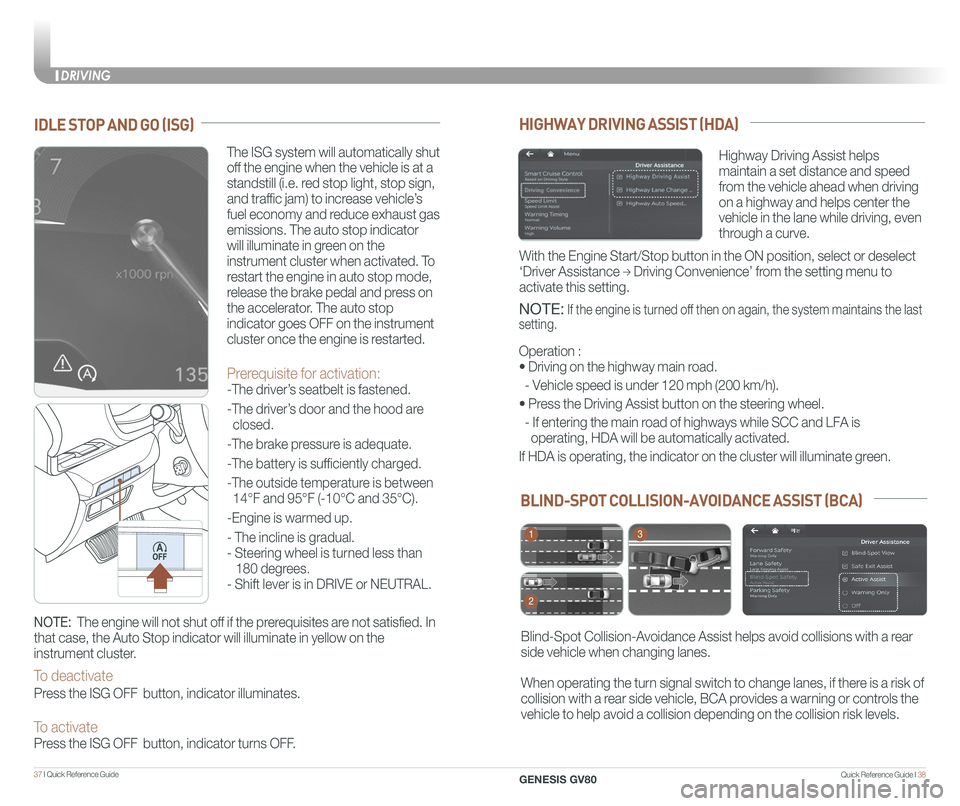
BLIND-SPOT COLLISION-AVOIDANCE ASSIST (BCA)
Blind-Spot Collision-Avoidance Assist helps avoid collisions with a rear
side vehicle when changing lanes.
When operating the turn signal switch to change lanes, if there is a risk of
collision with a rear side vehicle, BCA provides a warning or controls the
vehicle to help avoid a collision depending on the collision risk levels\
.
1
2
3
HIGHWAY DRIVING ASSIST (HDA)
Highway Driving Assist helps
maintain a set distance and speed
from the vehicle ahead when driving
on a highway and helps center the
vehicle in the lane while driving, even
through a curve.
NOTE: If the engine is turned off then on again, the system maintains the last
setting.
Operation :
• Driving on the highway main road.
- Vehicle speed is under 120 mph (200 km/h).
• Press the Driving Assist button on the steering wheel.
- If entering the main road of highways while SCC and LFA is
operating, HDA will be automatically activated.
If HDA is operating, the indicator on the cluster will illuminate green.\
With the Engine Start/Stop button in the ON position, select or deselect \
‘Driver Assistance → Driving Convenience’ from the setting menu to
activate this setting.
IDLE STOP AND GO (ISG)
The ISG system will automatically shut
off the engine when the vehicle is at a
standstill (i.e. red stop light, stop sign,
and traffic jam) to increase vehicle’s
fuel economy and reduce exhaust gas
emissions. The auto stop indicator
will illuminate in green on the
instrument cluster when activated. To
restart the engine in auto stop mode,
release the brake pedal and press on
the accelerator. The auto stop
indicator goes OFF on the instrument
cluster once the engine is restarted.
Prerequisite for activation:
-The driver’s seatbelt is fastened.
-The driver’s door and the hood are
closed.
-The brake pressure is adequate.
-The battery is sufficiently charged.
-The outside temperature is between
14°F and 95°F (-10°C and 35°C).
-Engine is warmed up.
- The incline is gradual.
- Steering wheel is turned less than
180 degrees.
- Shift lever is in DRIVE or NEUTRAL.
NOTE: The engine will not shut off if the prerequisites are not satisfied. In
that case, the Auto Stop indicator will illuminate in yellow on the
instrument cluster.
To deactivate
Press the ISG OFF button, indicator illuminates.
To activate Press the ISG OFF button, indicator turns OFF.
DRIVING
GENESIS GV80
Page 25 of 25
43 I Quick Reference Guide
GENESIS BRAND OWNER RETAILER NAME
SALES CONSULTANT DATE
VIN PREVIOUS VEHICLE
GENESIS GUEST DELIVERY CHECKLIST
BEFORE DELIVERY
☐ SET TIRE PRESSURE LF RF RR LR
☐ VERIFY VEHICLE IS CLEAN, IN GOOD CONDITION, FREE OF CHIPS AND SCRATCHES · CLEAN WINDSHIELD AND BACK WINDOW
☐ ENSURE FLOORMATS ARE SNAPPED INTO PLACE
Quick Reference Guide I 44
GENESIS SERVICE VALET PROGRAM TERMS AND CONDITIONS
GENESIS GV80
WALK THE CUSTOMER THROUGH EACH OF
THE FOLLOWING KEY DELIVERY FEATURES
☐ REVIEW QUICK REFERENCE GUIDE
☐ PAIR CUSTOMER'S PHONE TO THE BLUETOOTH SYSTEM
☐ OPERATION OF THE NAVIGATION SYSTEM - page 29
☐ REVIEW AND TEAR OFF VOICE COMMAND / QUICK TIP CARD
☐ OPERATION OF THE AUDIO SYSTEM
NOTES
Guest Date
Exclusions from Coverage
The following items, without limitations, are not covered :
• Gasoline and gasoline additives
• State inspections
• Wear and tear of soft trim, including seats, carpets, door casings, wood veneer, headliner, and all chrome trim
• Wear and tear or damage to exterior body panels, trim, and glass
• Damage due to poor fuel quality, misuse, abuse, neglect, fire, accident, flood, or installation of unapproved parts and accessories
• Vehicles used in competitive events
• Vehicles with an unreadable/tampered VIN, or where true mileage cannot be determined
• Repairs and maintenance not performed at at an Authorized retailer of Genesis.
• Repairs covered under the New Vehicle Limited Warranty
• Required maintenance and covered wear parts replacement on United States specification vehicles operating outside the United States\
Transfer of Coverage
The described coverage only applies to the original retail purchaser or original lessee of a Genesis Brand vehicle. The coverage is not transferable to s\
ubsequent owners, with the exception of immediate family members. Immediate family members include the following:
• Spouses or registered domestic partners
• Parents
• Children or stepchildren
Dealerships will verify that the owner/customer is the original owner/le\
ssee. Certain limitations and exclusions apply to this program. Please refer to your New Vehicle Limited Warranty guide for warranty details.
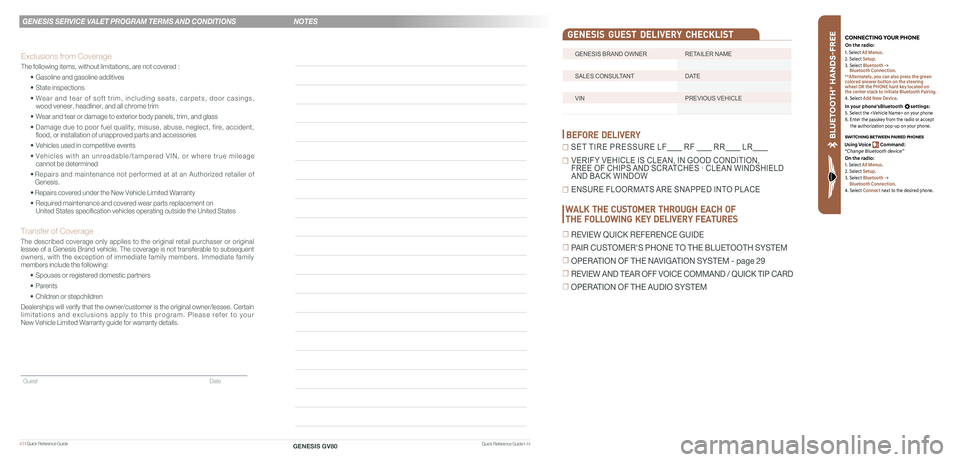
BLU ETO OTH
®
SWIT CHING BETWEEN P AIRED PHONES
On the r adio:
CONNE CTING \fOUR PHONEOn the r adio:
U sing Voic e Command:
“Change Blue too th de vice”1. Select All Menus.
2. Select Setup.
3. Select Bluetooth ->
Bluetooth Connection.
**Alternately, you can also press the green
colored answer button on the steering
wheel OR the PHONE hard key located on
the center stack to initiate Bluetooth Pairing.
4. Select Add New Device.
In your phone’sBluetooth settings:
5. Select the
6. Enter the passkey from the radio or accept
the authorization pop-up on your phone.
1. Select All Menus.
2. Select Setup.
3. Select Bluetooth ->
Bluetooth Connection.
4. Select Connect next to the desired phone.