remote start GMC ACADIA 2007 User Guide
[x] Cancel search | Manufacturer: GMC, Model Year: 2007, Model line: ACADIA, Model: GMC ACADIA 2007Pages: 554, PDF Size: 2.76 MB
Page 218 of 554
If the airbag readiness light stays on after you
start the vehicle or comes on when you are driving,
your airbag system may not work properly.
Have your vehicle serviced right away.
{CAUTION:
If the airbag readiness light stays on after
you start your vehicle, it means the airbag
system may not be working properly. The
airbags in your vehicle may not inate in
a crash, or they could even inate without
a crash. To help avoid injury to yourself
or others, have your vehicle serviced right
away if the airbag readiness light stays
on after you start your vehicle.
The airbag readiness light should ash for a
few seconds when you turn the ignition key to ON.
If the light does not come on then, have it xed
so it will be ready to warn you if there is a problem.
Passenger Airbag Status Indicator
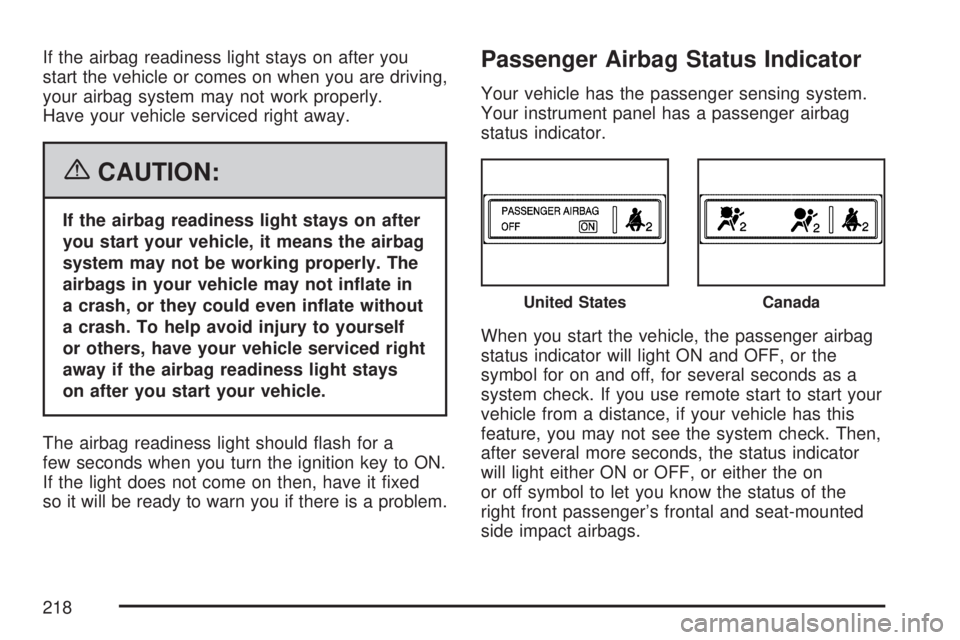
Your vehicle has the passenger sensing system.
Your instrument panel has a passenger airbag
status indicator.
When you start the vehicle, the passenger airbag
status indicator will light ON and OFF, or the
symbol for on and off, for several seconds as a
system check. If you use remote start to start your
vehicle from a distance, if your vehicle has this
feature, you may not see the system check. Then,
after several more seconds, the status indicator
will light either ON or OFF, or either the on
or off symbol to let you know the status of the
right front passenger’s frontal and seat-mounted
side impact airbags.
United StatesCanada
218
Page 242 of 554
PARK ASSIST
To access this display, the vehicle must be in
PARK (P). If your vehicle has the Ultrasonic Rear
Parking Assist (URPA) system, press the trip
odometer reset stem until PARK ASSIST displays.
This display allows the system to be turned on
or off. Once in this display, press and hold the
trip odometer reset stem to select between ON
or OFF. If you choose ON, the system will
be turned on. If you choose OFF, the system will
be turned off. The URPA system automatically
turns back on after each vehicle start. When the
URPA system is turned off and the vehicle is
shifted out of PARK (P), the DIC will display the
PARK ASSIST OFF message as a reminder
that the system has been turned off. SeeDIC
Warnings and Messages on page 244and
Ultrasonic Rear Parking Assist (URPA) on
page 194for more information.
RELEARN TIRE POSITIONS
To access this display, the vehicle must be in
PARK (P). After rotating the tires or after replacing
a tire or sensor, the Tire Pressure Monitor
(TPM) system must re-learn the tire positions.
To re-learn the tire positions, seeTire Pressure
Monitor System on page 444. SeeTire Inspection
and Rotation on page 448andDIC Warnings
and Messages on page 244for more information.
RELEARN REMOTE KEY
To access this display, the vehicle must be in
PARK (P). This display allows you to match
Remote Keyless Entry (RKE) transmitters to your
vehicle. To match an RKE transmitter to your
vehicle, do the following:
1. Press the trip odometer reset stem until
RELEARN REMOTE KEY displays.
2. Press and hold the trip odometer reset stem
until REMOTE KEY LEARNING ACTIVE is
displayed.
242
Page 249 of 554
OIL PRESSURE LOW STOP ENGINE
Notice:If you drive your vehicle while
the engine oil pressure is low, severe engine
damage may occur. If a low oil pressure
warning appears on the Driver Information
Center (DIC), stop the vehicle as soon as
possible. Do not drive the vehicle until the
cause of the low oil pressure is corrected. See
Engine Oil on page 397for more information.
This message displays if low oil pressure
levels occur. Stop the vehicle as soon as safely
possible and do not operate it until the cause
of the low oil pressure has been corrected.
Check the oil as soon as possible and have
your vehicle serviced by your dealer/retailer.
SeeEngine Oil on page 397.
PARK ASSIST OFF
If your vehicle has the Ultrasonic Rear Parking
Assist (URPA) system, after the vehicle has
been started and shifted out of PARK (P),
this message displays to remind the driver
that the URPA system has been turned off.Press the set/reset button or the trip odometer
reset stem to acknowledge this message and
clear it from the DIC display. To turn the URPA
system back on, seeUltrasonic Rear Parking
Assist (URPA) on page 194.
PASSENGER DOOR OPEN
This message displays and a chime sounds if
the passenger’s door is not fully closed and
the vehicle is in a drive gear. Stop and turn off
the vehicle, check the door for obstructions,
and close the door again. Check to see if the
message still appears on the DIC.
REMOTE KEY LEARNING ACTIVE
This message displays while you are matching
a Remote Keyless Entry (RKE) transmitter to
your vehicle. See “Matching Transmitter(s) to
Your Vehicle” underRemote Keyless Entry (RKE)
System Operation on page 100andDIC
Operation and Displays (With DIC Buttons) on
page 233orDIC Operation and Displays (Without
DIC Buttons) on page 239for more information.
249
Page 250 of 554
REPLACE BATTERY IN REMOTE KEY
This message displays if a Remote Keyless
Entry (RKE) transmitter battery is low. The battery
needs to be replaced in the transmitter. See
“Battery Replacement” underRemote Keyless
Entry (RKE) System Operation on page 100.
RIGHT REAR DOOR OPEN
This message displays and a chime sounds if the
passenger’s side rear door is not fully closed
and the vehicle is in a drive gear. Stop and turn
off the vehicle, check the door for obstructions,
and close the door again. Check to see if the
message still appears on the DIC.
SERVICE A/C (Air Conditioning)
SYSTEM
This message displays when the electronic
sensors that control the air conditioning and
heating systems are no longer working. Have
the climate control system serviced by your
dealer/retailer if you notice a drop in heating
and air conditioning efficiency.
SERVICE AIR BAG
This message displays if there is a problem with
the airbag system. Have your dealer/retailer
inspect the system for problems. SeeAirbag
Readiness Light on page 217andAirbag System
on page 76for more information.
SERVICE ALL WHEEL DRIVE
If your vehicle has the All-Wheel Drive (AWD)
system, this message displays if there is a problem
with this system. If this message appears, stop
as soon as possible and turn off the vehicle.
Restart the vehicle after 30 seconds and check for
the message on the DIC display. If the message
is still displayed or appears again when you
begin driving, the AWD system needs service.
See your dealer/retailer.
250
Page 263 of 554
ON:The driver’s seat and outside mirrors will
automatically move to the stored driving position
when the unlock button on the Remote Keyless
Entry (RKE) transmitter is pressed. See “Relearn
Remote Key” underDIC Operation and Displays
(With DIC Buttons) on page 233orDIC Operation
and Displays (Without DIC Buttons) on page 239
for more information on matching transmitters
to driver ID numbers.
NO CHANGE:No change will be made to this
feature. The current setting will remain.
Choose one of the available settings and press
the set/reset button while it is displayed on the
DIC to select it.
REMOTE START
If your vehicle has this feature, it allows you to
turn the remote start off or on. The remote
start feature allows you to start the engine from
outside of the vehicle using the Remote Keyless
Entry (RKE) transmitter. See “Remote Vehicle
Start” underRemote Keyless Entry (RKE) System
Operation on page 100for more information.
Press the customization button until REMOTE
START appears on the DIC display. Press
the set/reset button once to access thesettings for this feature. Then press the
customization button to scroll through the
following settings:
OFF:The remote start feature will be disabled.
ON (default):The remote start feature will
be enabled.
NO CHANGE:No change will be made to this
feature. The current setting will remain.
Choose one of the available settings and press
the set/reset button while it is displayed on the
DIC to select it.
FACTORY SETTINGS
This feature allows you to set all of the
customization features back to their factory
default settings.
Press the customization button until FACTORY
SETTINGS appears on the DIC display. Press the
set/reset button once to access the settings for
this feature. Then press the customization button
to scroll through the following settings:
RESTORE ALL (default):The customization
features will be set to their factory default settings.
DO NOT RESTORE:The customization features
will not be set to their factory default settings.
263
Page 290 of 554
O(Power):Press this knob to turn the radio on
or off. Turn this knob clockwise or counterclockwise
to increase or decrease the volume. Press and hold
the knob for more than two seconds to turn off the
entire radio and Rear Seat Entertainment (RSE)
system and to start the parental control feature.
Parental control prevents the rear seat occupant
from operating the Rear Seat Audio (RSA) system
or remote control.
A lock symbol appears next to the clock display.
The parental control feature remains on until
you press and hold this button for more than
two seconds again, or until the driver turns the
ignition off and exits the vehicle.
f(Tune):Turn this knob to change tracks on
a CD or DVD, to manually tune a radio station,
or to change clock or date settings, while in
the clock or date setting mode. See the information
given earlier in this section specic to the radio,
CD, and the DVD. Also, seeSetting the Time
on page 266, for setting the clock and date.
©SEEK (Previous Track/Chapter):Press this
button to return to the start of the current track
or chapter. Press this button again to go to
the previous track or chapter. This button might
not work when the DVD is playing the copyright
information or the previews.
SEEK
¨(Next Track/Chapter):Press this button
to go to the next track or chapter. This button
might not work when the DVD is playing the
copyright information or the previews.
sREV (Reverse):Press this button to quickly
reverse the CD or DVD, at ve times the normal
speed. The radio displays the elapsed time while in
fast reverse. To stop fast reversing, press this
button again. This button might not work when the
DVD is playing the copyright information or the
previews.
\FWD (Fast Forward):Press this button to
fast forward the CD or DVD. The radio displays the
elapsed time and fast forwards ve times the
normal speed. To stop fast forwarding, press this
button again. This button might not work when
the DVD is playing the copyright information or the
previews.
290
Page 291 of 554
Z(Eject):Press this button to eject a CD or
DVD. If a CD or DVD is ejected, but not removed,
the player automatically pulls it back in after
15 seconds.
If loading and reading of a CD cannot be
completed, because of an unknown format, etc.,
and the disc fails to eject, press and hold the
CD eject button for more than ve seconds to
force the disc to eject.
DVD-V (Video) Display Buttons
Once a DVD-V is inserted, the radio display menu
shows several tag options for DVD playing.
Press the pushbuttons located under any desired
tag option during DVD playback. See the tag
options listed below for more information.
The rear seat passenger can navigate the DVD-V
menus and controls through the remote control.
See “Remote Control”, underRear Seat
Entertainment System on page 311for more
information. The Video Screen automatically
turns on when the DVD-V is inserted into the
DVD slot.
r/j(Play/Pause):Press either the play or
pause icon displayed on the radio system,
to toggle between pausing or restarting playback
of a DVD. If the forward arrow is showing on
display, the system is in pause mode. If the pause
icon is showing on display, the system is in
playback mode. If the DVD screen is off, press
the play button to turn the screen on.
Some DVDs begin playing after the previews have
nished, although there could be a delay of up
to 30 seconds. If the DVD does not begin playing
the movie automatically, press the pushbutton
located under the play/pause symbol tag displayed
on the radio. If the DVD still does not play, refer
to the on-screen instructions, if available.
c(Stop):Press this button to stop playing,
rewinding, or fast forwarding a DVD.
r(Enter):Press this button to select the
choices that are highlighted in any menu.
291
Page 292 of 554
y(Menu):Press this button to access the DVD
menu. The DVD menu is different on every
DVD. Use the pushbuttons located under the
navigation arrows to navigate the cursor through
the DVD menu. After making a selection press
the enter button. This button only operates when
using a DVD.
Nav (Navigate):Press this button to display
directional arrows for navigating through the
menus.
q(Return):Press this button to exit the
current active menu and return to the previous
menu. This button operates only when a DVD is
playing and a menu is active.
DVD-A (Audio) Display Buttons
Once a DVD-A is inserted, radio display menu
shows several tag options for DVD playing. Press
the pushbuttons located under any desired tag
option during DVD playback. See the tag options
listed below for more information.The rear seat operator can navigate the DVD-A
menus and controls through the remote control.
See “Remote Control”, underRear Seat
Entertainment System on page 311for more
information. The Video Screen does not
automatically power on when the DVD-A is
inserted into the DVD slot. It must be manually
turned on by the rear seat occupant through
the remote control power button.
r/j(Play/Pause):Press either the play or
pause icon displayed on the radio system,
to toggle between pausing or restarting playback
of a DVD. If the forward arrow is showing on
display, the system is in pause mode. If the pause
icon is showing on display, the system is in
playback mode.
qGroupr:Press this button to cycle through
musical groupings on the DVD-A disc.
Nav (Navigate):Press this button to display
directional arrows for navigating through the
menus.
292
Page 293 of 554
e(Audio Stream):Press this button to cycle
through audio steam formats located on a DVD-A
disc. There is not any type of notication for
the customer to see through the radio display,
but VSM has a text eld that shows audio stream
changing.
Inserting a Disc
To play a disc, gently insert the disc, with the
label side up, into the loading slot. The DVD player
might not accept some paper labeled media.
The player starts loading the disc into the system
and display “Loading Disc” on the radio display.
At the same time, the radio displays a softkey
menu of option(s). Some discs automatically play
the movie while others default to the softkey
menu display which requires the Play, Enter, or
Navigation softkeys to be pressed; either by
softkey or by the rear seat passenger using the
remote control.
Loading a disc into the system, depending
on media type and format, ranges from
5 to 20 seconds for a CD, and up to
30 seconds for a DVD.
Stopping and Resuming Playback
To stop playing a DVD without turning off the
system, press the stop button on the remote
control, or press the pushbutton located under the
stop or the play/pause symbol tags displayed
on the radio. If the radio head is sourced to
something other than DVD-V, press the DVD/CD
AUX button to make DVD-V the active source.
To resume DVD playback, press the play/pause
button on the remote control, or press the
pushbutton located under the play/pause symbol
tag displayed on the radio. The DVD should
resume play from where it last stopped if the disc
has not been ejected and the stop button has
not been pressed twice on the remote control.
If the disc has been ejected or the stop button
has been pressed twice on the remote control,
the disc resumes playing at the beginning of
the disc.
293
Page 316 of 554
If a DVD is playing and the screen is raised to
its locked position, the screen remains on. This is
normal. The DVD continues to play through the
previous audio source. Use the remote control
power button or eject the disc to turn off the
screen.
The RSE overhead console contains the IR
transmitters for the wireless headphones and
the IR receivers for the remote control. They
are located at the rear of the console.
Notice:Avoid directly touching the video
screen, as damage may occur. See “Cleaning
the Video Screen” later in this section for
more information.Remote Control
To use the remote control, aim it at the transmitter
window at the rear of the RSE overhead console
and press the desired button. Direct sunlight
or very bright light can affect the ability of the
RSE transmitter to receive signals from the remote
control. If the remote control does not seem to
be working, the batteries might need to be
replaced. See “Battery Replacement” later in this
section. Objects blocking the line of sight can
also affect the function of the remote control.
If a CD or DVD is in the Radio DVD slot,
the remote control power button can be used to
turn on the video screen display and start the disc.
The radio can also turn on the video screen
display. SeeRadio with CD and DVD on page 278
for more information.
Notice:Storing the remote control in a hot
area or in direct sunlight can damage it,
and the repairs will not be covered by your
warranty. Keep the remote control stored in a
cool, dry place.
316