lock GMC ACADIA 2007 Workshop Manual
[x] Cancel search | Manufacturer: GMC, Model Year: 2007, Model line: ACADIA, Model: GMC ACADIA 2007Pages: 554, PDF Size: 2.76 MB
Page 164 of 554
Cargo Management System
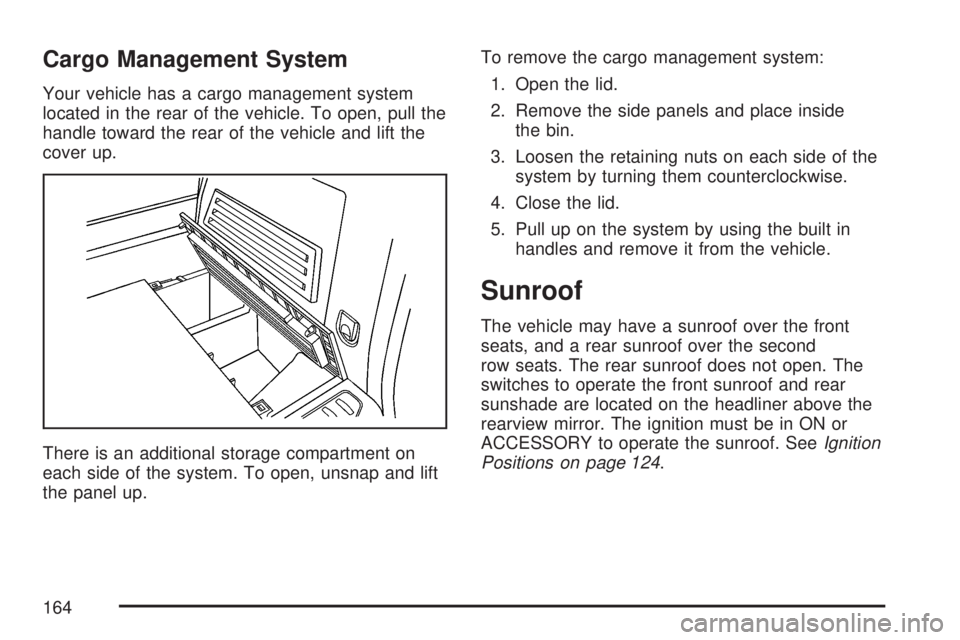
Your vehicle has a cargo management system
located in the rear of the vehicle. To open, pull the
handle toward the rear of the vehicle and lift the
cover up.
There is an additional storage compartment on
each side of the system. To open, unsnap and lift
the panel up.To remove the cargo management system:
1. Open the lid.
2. Remove the side panels and place inside
the bin.
3. Loosen the retaining nuts on each side of the
system by turning them counterclockwise.
4. Close the lid.
5. Pull up on the system by using the built in
handles and remove it from the vehicle.
Sunroof
The vehicle may have a sunroof over the front
seats, and a rear sunroof over the second
row seats. The rear sunroof does not open. The
switches to operate the front sunroof and rear
sunshade are located on the headliner above the
rearview mirror. The ignition must be in ON or
ACCESSORY to operate the sunroof. SeeIgnition
Positions on page 124.
164
Page 168 of 554
Warning Lights, Gages, and Indicators..... 214
Instrument Panel Cluster........................... 215
Speedometer and Odometer...................... 216
Tachometer............................................... 216
Safety Belt Reminder Light........................ 216
Passenger Safety Belt Reminder Light....... 217
Airbag Readiness Light............................. 217
Passenger Airbag Status Indicator............. 218
Charging System Light.............................. 220
Voltmeter Gage......................................... 221
Brake System Warning Light..................... 222
Anti-Lock Brake System Warning Light...... 223
StabiliTrak
®Indicator Light......................... 224
Engine Coolant Temperature Warning
Light...................................................... 224
Engine Coolant Temperature Gage............ 225
Tire Pressure Light.................................... 225
Malfunction Indicator Lamp........................ 226
Oil Pressure Light..................................... 229
Security Light............................................ 229
Fog Lamp Light......................................... 230Cruise Control Light.................................. 230
Highbeam On Light................................... 230
Tow/Haul Mode Light................................ 230
Fuel Gage................................................. 231
Driver Information Center (DIC).................. 232
DIC Operation and Displays
(With DIC Buttons)................................. 233
DIC Operation and Displays
(Without DIC Buttons)............................ 239
DIC Warnings and Messages.................... 244
DIC Vehicle Customization
(With DIC Buttons)................................. 255
Audio System(s)......................................... 264
Setting the Time........................................ 266
Radio with CD........................................... 268
Radio with CD and DVD........................... 278
Using an MP3 (Radio with CD or
Six-Disc CD Player)............................... 295
Using an MP3 (Radio with CD and
DVD Player)........................................... 301
Section 3 Instrument Panel
168
Page 173 of 554
Other Warning Devices
If you carry reective triangles, you can set them
up at the side of the road about 300 feet (100 m)
behind your vehicle.
Horn
Press near or on the horn symbols on the steering
wheel pad to sound the horn.
Tilt and Telescopic Steering Wheel
A tilt and telescope wheel lets you adjust the
steering wheel before you drive. The steering
wheel can be raised to the highest level to give
your legs more room when you enter and exit the
vehicle.
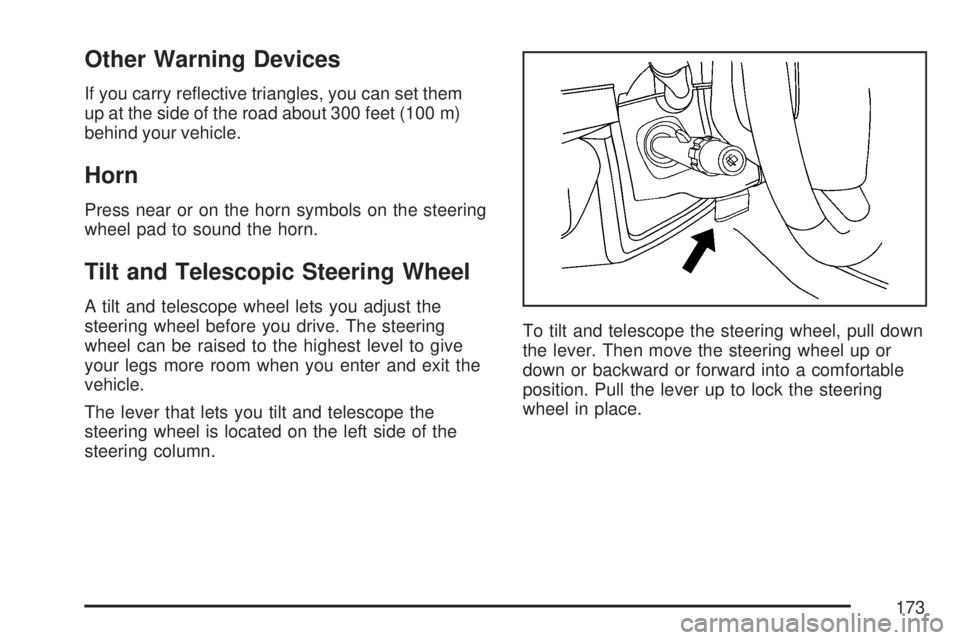
The lever that lets you tilt and telescope the
steering wheel is located on the left side of the
steering column.To tilt and telescope the steering wheel, pull down
the lever. Then move the steering wheel up or
down or backward or forward into a comfortable
position. Pull the lever up to lock the steering
wheel in place.
173
Page 177 of 554
The windshield wipers are controlled by turning
the band with the wiper symbol.
8(Mist):Turn the band to mist for a single wiping
cycle. Hold it there until the wipers start. Then let
go. The wipers will stop after one wipe. Hold the
band on mist longer, for more wipe cycles.
9(Off):To stop the wipers, move the band to off.
6(Delay):The wiper speed can be set for a long
or short delay between wiping cycles. This can be
very useful in light rain or snow. Turn the band to
choose the delay time. The closer to the top of the
lever, the shorter the delay.
6(Low Speed):Turn the band away from
you to the rst solid band past the delay settings,
for steady wiping at low speed.
?(High Speed):Turn the band further, to the
second solid band past the delay settings, for
high-speed wiping.
Windshield Washer
J(Washer Fluid):Press and release this
paddle, located at the top of the turn signal/
multifunction lever, to spray washer uid on the
windshield. The wipers clear the windshield
and either stop or return to the preset speed.
The ignition key must be in ACCESSORY or
ON for this to work. SeeWindshield Washer
Fluid on page 420Windshield Washer Fluid.
{CAUTION:
In freezing weather, do not use your
washer until the windshield is warmed.
Otherwise the washer uid can form ice
on the windshield, blocking your vision.
WASHER FLUID LOW ADD FLUID is displayed
on the Driver Information Center (DIC) when
the washer uid is low. SeeDIC Warnings and
Messages on page 244.
177
Page 179 of 554
Rear Window Wiper/Washer
{CAUTION:
In freezing weather, do not use your
washer until the windshield is warmed.
Otherwise the washer uid can form ice
on the windshield, blocking your vision.
The rear wiper control is located on the turn
signal/multifunction lever.To turn the rear wiper on, slide the lever to a
wiper position.
9(Off):Slide the lever to this setting to turn
the wiper off.
5(Rear Wiper Delay):Slide the lever to this
setting to turn on the rear wiper delay.
Z(Rear Wiper):Slide the lever to this setting
to turn on the rear wiper.
=(Rear Wiper Wash):Push the button on
the end of the turn signal/multifunction lever
to spray washer uid on the rear window. The
wipers will clear the rear window and either
stop or return to your preset speed. For more
washer cycles, press and hold the button.
179
Page 186 of 554
Fog Lamps
Use the fog lamps for better vision in foggy or
misty conditions.
-(Fog Lamps):The fog lamps button is located
on the exterior lamps control. The exterior lamps
control is located on the instrument panel to the
left of the steering column.
The ignition must be on for the fog lamps to work.
Press the exterior lamps button to turn the fog
lamps on or off. A light will come on in the
instrument panel cluster when the fog lamps
are in use.
When the headlamps are changed to high-beam,
the fog lamps will turn off. The fog lamps come
back on again when the high-beam headlamps are
turned off.
Some localities have laws that require the
headlamps to be on along with the fog lamps.
Instrument Panel Brightness
D(Instrument Panel Brightness):The knob
with this symbol on it is located next to the exterior
lamps control. Push the knob in all the way until
it pops out and then turn the knob clockwise
to brighten or counterclockwise to dim the lights.
Push the knob back in when nished.
Courtesy Lamps
When a door is opened, the courtesy lamps
automatically come on. They make it easy for you
to enter and leave your vehicle. You can also
manually turn these lamps on by fully turning the
instrument panel brightness control clockwise.
The reading lamps, located on the headliner, can
be turned on or off independent of the automatic
courtesy lamps, when the doors are closed.
186
Page 187 of 554
Entry Lighting
Your vehicle may have courtesy lamps that will
come on and stay on for a set time whenever
the unlock symbol is pressed on the Remote
Keyless Entry (RKE) Transmitter, if the vehicle
has one.
If a door is opened, the lamps will stay on while
it is open and then turn off automatically about
25 seconds after the door is closed. If the
unlock symbol is pressed and you do not
open a door, the lamps will turn off after about
20 seconds.
Entry lighting includes a feature called theater
dimming. With theater dimming, the lamps do not
turn off at the end of the delay time. Instead,
they slowly dim after the delay time until they go
out. The delay time is canceled if you turn the
ignition key to ON or press the power door
lock switch. The lamps will dim right away.
When the ignition is on, illuminated entry is
inactive, which means the courtesy lamps will
not come on unless a door is opened.
Delayed Entry Lighting
Delayed entry lighting illuminates the interior for
a period of time after all the doors have been
closed.
The ignition must be off for delayed entry lighting
to work. Immediately after all the doors have
been closed, the delayed entry lighting feature
will continue to work until one of the following
occurs:
The ignition is in ON.
The doors are locked.
An illumination period of 25 seconds
has elapsed.
If during the illumination period a door is opened,
the timed illumination period will be canceled
and the interior lamps will remain on because a
door is open.
187
Page 188 of 554
Delayed Exit Lighting
This feature illuminates the interior for a period of
time after the key is removed from the ignition.
The ignition must be off for delayed exit lighting to
work. When the key is removed, interior illumination
will activate and remain on until one of the following
occurs:
The ignition is in ON.
The power door locks are activated.
An illumination period of 20 seconds
has elapsed.
If during the illumination period a door is opened,
the timed illumination period will be canceled
and the interior lamps will remain on because a
door is open.
Parade Dimming
The instrument panel has an added feature called
parade mode. It automatically prohibits the
dimming of the instrument panel displays during
the daylight while the headlamps are on so
that you will still be able to see the displays.
Reading Lamps
The vehicle has reading lamps that also act as the
dome lamp. Press the button to turn them on and off.
Electric Power Management
The vehicle has Electric Power Management (EPM)
that estimates the battery’s temperature and state
of charge. It then adjusts the voltage for best
performance and extended life of the battery.
When the battery’s state of charge is low, the
voltage is raised slightly to quickly put the charge
back in. When the state of charge is high, the
voltage is lowered slightly to prevent overcharging.
If the vehicle has a voltmeter gage or voltage
display on the Driver Information Center (DIC),
you may see the voltage move up or down. This
is normal. If there is a problem, an alert will be
displayed.
The battery can be discharged at idle if the
electrical loads are very high. This is true for all
vehicles. This is because the generator (alternator)
may not be spinning fast enough at idle to
produce all the power that is needed for very
high electrical loads.
188
Page 192 of 554
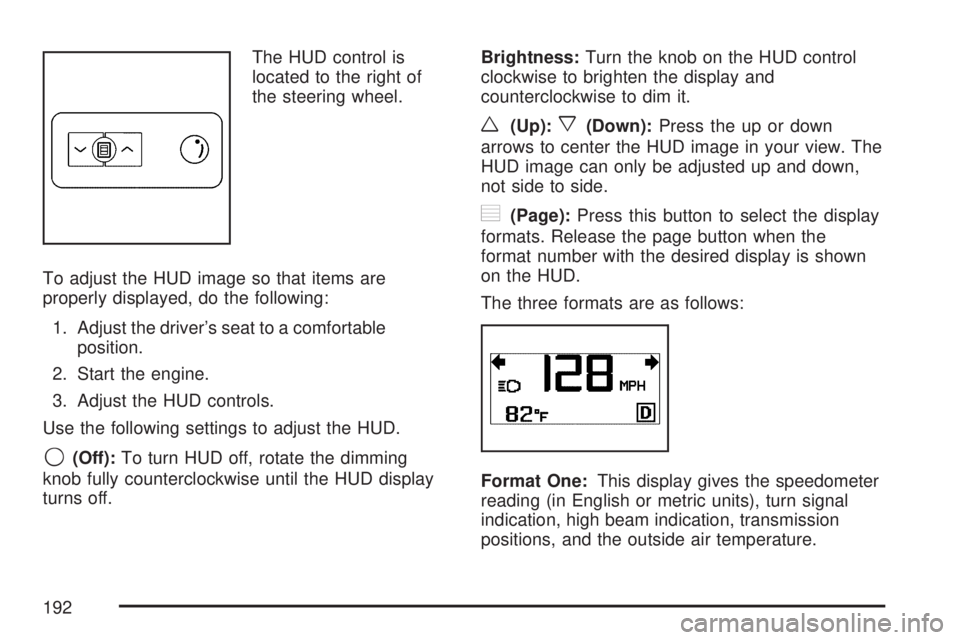
The HUD control is
located to the right of
the steering wheel.
To adjust the HUD image so that items are
properly displayed, do the following:
1. Adjust the driver’s seat to a comfortable
position.
2. Start the engine.
3. Adjust the HUD controls.
Use the following settings to adjust the HUD.
9(Off):To turn HUD off, rotate the dimming
knob fully counterclockwise until the HUD display
turns off.Brightness:Turn the knob on the HUD control
clockwise to brighten the display and
counterclockwise to dim it.
w(Up):x(Down):Press the up or down
arrows to center the HUD image in your view. The
HUD image can only be adjusted up and down,
not side to side.
?(Page):Press this button to select the display
formats. Release the page button when the
format number with the desired display is shown
on the HUD.
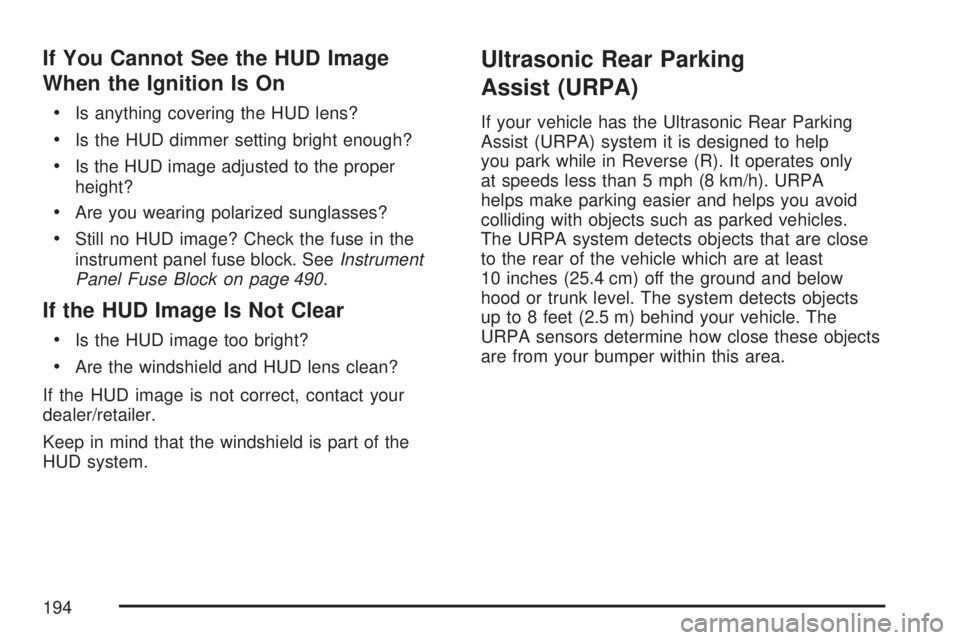
The three formats are as follows:
Format One:This display gives the speedometer
reading (in English or metric units), turn signal
indication, high beam indication, transmission
positions, and the outside air temperature.
192
Page 194 of 554
If You Cannot See the HUD Image
When the Ignition Is On
Is anything covering the HUD lens?
Is the HUD dimmer setting bright enough?
Is the HUD image adjusted to the proper
height?
Are you wearing polarized sunglasses?
Still no HUD image? Check the fuse in the
instrument panel fuse block. SeeInstrument
Panel Fuse Block on page 490.
If the HUD Image Is Not Clear
Is the HUD image too bright?
Are the windshield and HUD lens clean?
If the HUD image is not correct, contact your
dealer/retailer.
Keep in mind that the windshield is part of the
HUD system.
Ultrasonic Rear Parking
Assist (URPA)
If your vehicle has the Ultrasonic Rear Parking
Assist (URPA) system it is designed to help
you park while in Reverse (R). It operates only
at speeds less than 5 mph (8 km/h). URPA
helps make parking easier and helps you avoid
colliding with objects such as parked vehicles.
The URPA system detects objects that are close
to the rear of the vehicle which are at least
10 inches (25.4 cm) off the ground and below
hood or trunk level. The system detects objects
up to 8 feet (2.5 m) behind your vehicle. The
URPA sensors determine how close these objects
are from your bumper within this area.
194