remote GMC ACADIA 2007 Repair Manual
[x] Cancel search | Manufacturer: GMC, Model Year: 2007, Model line: ACADIA, Model: GMC ACADIA 2007Pages: 554, PDF Size: 2.76 MB
Page 321 of 554
Problem Recommended Action
The auxiliary source is
running but there is no
picture or sound.Check that the RSE
video screen is in the
auxiliary source mode.
Check the auxiliary input
connections at both
devices.
Sometimes the wireless
headphone audio cuts
out or buzzes.Check for obstructions,
low batteries, reception
range, and interference
from cellular telephone
towers or by using
your cellular telephone
in the vehicle.
Check that the
headphones are on
correctly using the
L (left) and R (right) on
the headphones.
I lost the remote and/or
the headphones.See your dealer/retailer
for assistance.
The DVD is playing,
but there is no picture
or sound.Check that the RSE video
screen is sourced to the
DVD player.DVD Display Error Messages
The DVD display error message depends on
which radio you have. The video screen may
display one of the following:
Disc Load/Eject Error:This message displays
when there are disc load or eject problems.
Disc Format Error:This message displays, if the
disc is inserted with the disc label wrong side
up, or if the disc is damaged.
Disc Region Error:This message displays, if the
disc is not from a correct region.
No Disc Inserted:This message displays, if no
disc is present when the EJECT button is pressed
on the radio.
321
Page 346 of 554
Driving at Night
Night driving is more dangerous than day driving.
One reason is that some drivers are likely to
be impaired — by alcohol or drugs, with night
vision problems, or by fatigue.
Here are some tips on night driving.
Drive defensively.
Do not drink and drive.
Adjust the inside rearview mirror to reduce the
glare from headlamps behind you.
Since you cannot see as well, slow down and
keep more space between you and other
vehicles.
Slow down, especially on higher speed roads.
Your vehicle’s headlamps can light up only so
much road ahead.
In remote areas, watch for animals.
If you are tired, pull off the road in a safe
place and rest.No one can see as well at night as in the daytime.
But as we get older these differences increase.
A 50-year-old driver might require at least twice as
much light to see the same thing at night as a
20-year-old.
What you do in the daytime can also affect your
night vision. For example, if you spend the
day in bright sunshine you are wise to wear
sunglasses. Your eyes will have less trouble
adjusting to night. But if you are driving, do not
wear sunglasses at night. They might cut down on
glare from headlamps, but they also make a lot
of things invisible.
You can be temporarily blinded by approaching
headlamps. It can take a second or two, or
even several seconds, for your eyes to re-adjust
to the dark. When you are faced with severe glare,
as from a driver who does not lower the high
beams, or a vehicle with misaimed headlamps,
slow down a little. Avoid staring directly into
the approaching headlamps.
346
Page 382 of 554
Trailer Wiring Harness
Your vehicle is equipped with the following wiring
harness for towing a trailer.
Basic Trailer Wiring
The trailer wiring harness, with a seven-pin
connector, is located at the rear of the vehicle
and is tied to the vehicle’s frame. The harness
connector can be plugged into a seven-pin
universal heavy-duty trailer connector available
through your dealer/retailer.
The seven-wire harness contains the following
trailer circuits:
Yellow: Left Stop/Turn Signal
Dark Green: Right Stop/Turn Signal
Brown: Taillamps
White: Ground
Light Green: Back-up Lamps
Red: Battery Feed*
Dark Blue: Trailer Brake*
*The fuses for these two circuits are installed in
the underhood electrical center, but the wires
are not connected. They should be connected by
your dealer/retailer or a qualied service center.
If you are charging a remote (non-vehicle) battery,
press the tow/haul mode button located at the
end of the shift lever. This will boost the vehicle
system voltage and properly charge the battery.
If the trailer is too light for tow/haul mode, you can
turn on the headlamps (Non-HID only) as a
second way to boost the vehicle system and
charge the battery.
Engine Cooling When Trailer Towing
Your cooling system may temporarily overheat
during severe operating conditions. SeeEngine
Overheating on page 410.
382
Page 397 of 554
A. Radiator Pressure Cap (Out of View).
SeeRadiator Pressure Cap on page 410.
B. Engine Coolant Recovery Cap. SeeCooling
System on page 413.
C. Underhood Fuse Block. SeeUnderhood Fuse
Block on page 493.
D. Remote Positive (+) Terminal. SeeJump
Starting on page 425.
E. Power Steering Fluid Reservoir. SeePower
Steering Fluid on page 419.
F. Engine Oil Fill Cap. See “When to Add Engine
Oil” underEngine Oil on page 397.
G. Engine Oil Dipstick. See “Checking Engine Oil”
underEngine Oil on page 397.
H. Automatic Transmission Fluid Dipstick.
See “Checking the Fluid Level” under
Automatic Transmission Fluid on page 404.
I. Brake Master Cylinder Reservoir. See “Brake
Fluid” underBrakes on page 421.
J. Engine Air Cleaner/Filter. SeeEngine Air
Cleaner/Filter on page 402.
K. Windshield Washer Fluid Reservoir.
See “Adding Washer Fluid” under
Windshield Washer Fluid on page 420.Engine Oil
Checking Engine Oil
It is a good idea to check the engine oil every time
you get fuel. In order to get an accurate reading,
the oil must be warm and the vehicle must be
on level ground.
The engine oil dipstick handle is a yellow loop.
SeeEngine Compartment Overview on page 396
for the location of the engine oil dipstick.
1. Turn off the engine and give the oil
several minutes to drain back into the oil
pan. If you do not do this, the oil dipstick might
not show the actual level.
2. Pull out the dipstick and clean it with a paper
towel or cloth, then push it back in all the
way. Remove it again, keeping the tip down,
and check the level.
397
Page 426 of 554
Notice:If you leave your radio or other
accessories on during the jump starting
procedure, they could be damaged. The repairs
would not be covered by your warranty.
Always turn off your radio and other
accessories when jump starting your vehicle.
3. Turn off the ignition on both vehicles.
Unplug unnecessary accessories plugged into
the cigarette lighter or the accessory power
outlets. Turn off the radio and all lamps
that are not needed. This will avoid sparks
and help save both batteries. And it could
save the radio!
4. Open the hoods and locate the positive (+)
and negative (−) terminal locations on the
other vehicle. Your vehicle has a remote
positive (+) and a remote negative (−) jump
starting terminal. SeeEngine Compartment
Overview on page 396for more information on
the terminal locations.
{CAUTION:
Using a match near a battery can cause
battery gas to explode. People have been
hurt doing this, and some have been
blinded. Use a ashlight if you need
more light.
Be sure the batteries have enough water.
You do not need to add water to the
ACDelco
®battery (or batteries) installed in
your new vehicle. But if a battery has ller
caps, be sure the right amount of uid is
there. If it is low, add water to take care of
that rst. If you do not, explosive gas could
be present.
Battery uid contains acid that can
burn you. Do not get it on you. If you
accidentally get it in your eyes or on your
skin, ush the place with water and get
medical help immediately.
426
Page 427 of 554
{CAUTION:
Fans or other moving engine parts can
injure you badly. Keep your hands away
from moving parts once the engine is
running.
5. Check that the jumper cables do not have
loose or missing insulation. If they do, you
could get a shock. The vehicles could
be damaged too.
Before you connect the cables, here are some
basic things you should know. Positive (+)
will go to positive (+) or to a remote
positive (+) terminal if the vehicle has one.
Negative (−) will go to a heavy, unpainted
metal engine part or to a remote negative (−)
terminal if the vehicle has one.
Do not connect positive (+) to negative (−)or
you will get a short that would damage
the battery and maybe other parts too. And do
not connect the negative (−) cable to the
negative (−) terminal on the dead battery
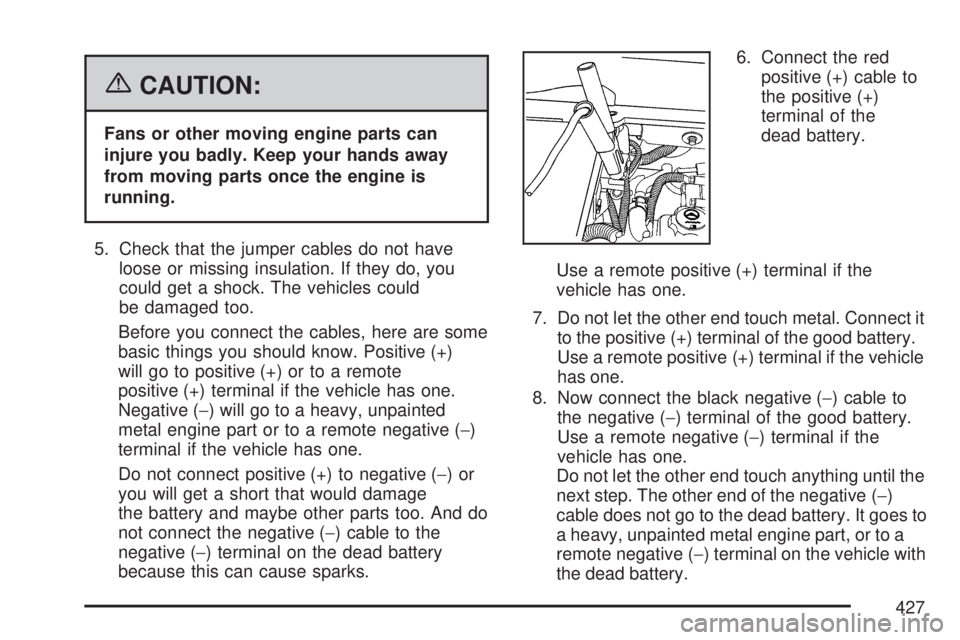
because this can cause sparks.6. Connect the red
positive (+) cable to
the positive (+)
terminal of the
dead battery.
Use a remote positive (+) terminal if the
vehicle has one.
7. Do not let the other end touch metal. Connect it
to the positive (+) terminal of the good battery.
Use a remote positive (+) terminal if the vehicle
has one.
8. Now connect the black negative (−) cable to
the negative (−) terminal of the good battery.
Use a remote negative (−) terminal if the
vehicle has one.
Do not let the other end touch anything until the
next step. The other end of the negative (−)
cable does not go to the dead battery. It goes to
a heavy, unpainted metal engine part, or to a
remote negative (−) terminal on the vehicle with
the dead battery.
427
Page 428 of 554
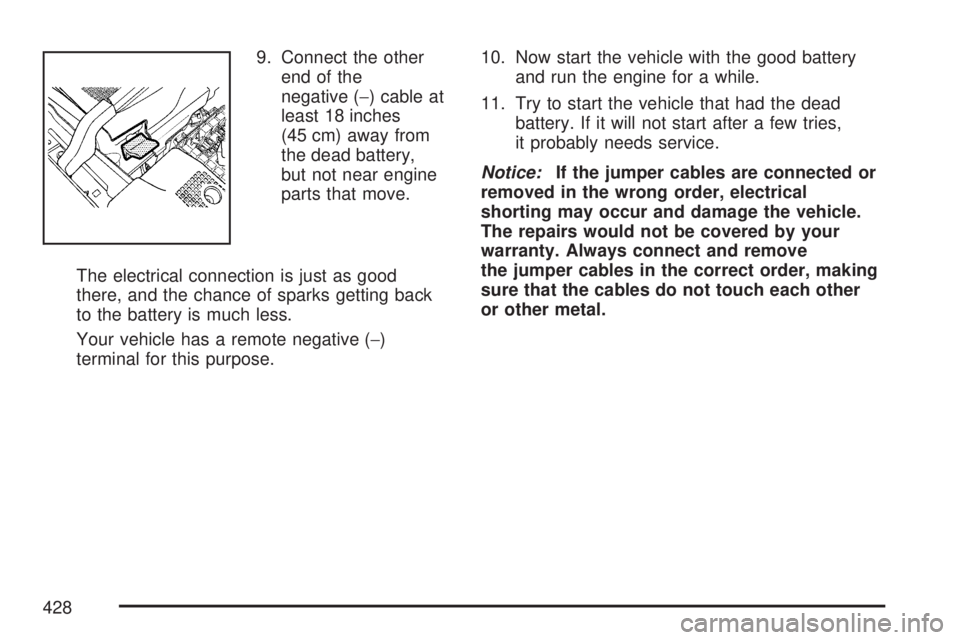
9. Connect the other
end of the
negative (−) cable at
least 18 inches
(45 cm) away from
the dead battery,
but not near engine
parts that move.
The electrical connection is just as good
there, and the chance of sparks getting back
to the battery is much less.
Your vehicle has a remote negative (−)
terminal for this purpose.10. Now start the vehicle with the good battery
and run the engine for a while.
11. Try to start the vehicle that had the dead
battery. If it will not start after a few tries,
it probably needs service.
Notice:If the jumper cables are connected or
removed in the wrong order, electrical
shorting may occur and damage the vehicle.
The repairs would not be covered by your
warranty. Always connect and remove
the jumper cables in the correct order, making
sure that the cables do not touch each other
or other metal.
428
Page 429 of 554
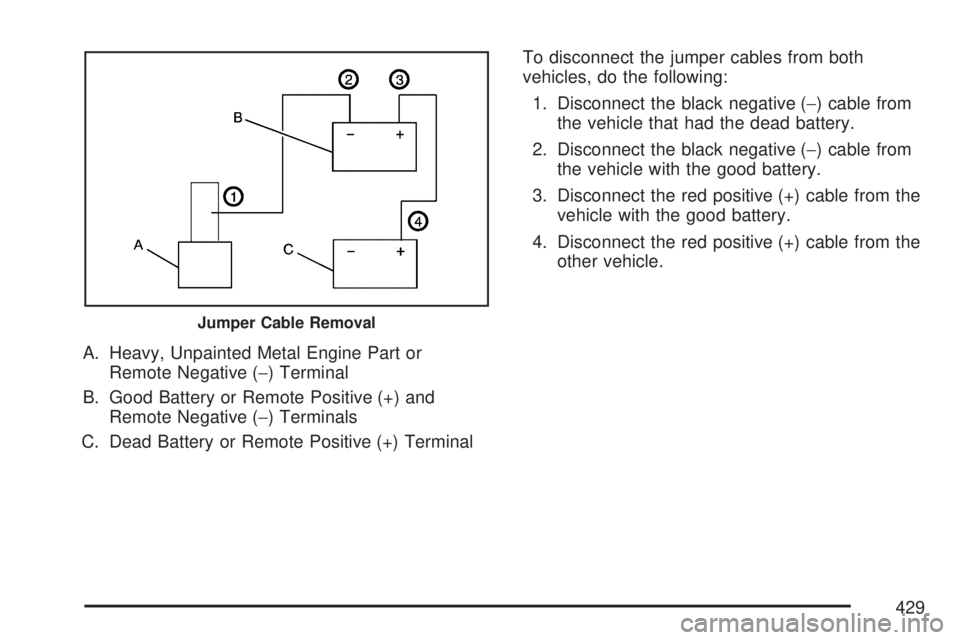
A. Heavy, Unpainted Metal Engine Part or
Remote Negative (−) Terminal
B. Good Battery or Remote Positive (+) and
Remote Negative (−) Terminals
C. Dead Battery or Remote Positive (+) TerminalTo disconnect the jumper cables from both
vehicles, do the following:
1. Disconnect the black negative (−) cable from
the vehicle that had the dead battery.
2. Disconnect the black negative (−) cable from
the vehicle with the good battery.
3. Disconnect the red positive (+) cable from the
vehicle with the good battery.
4. Disconnect the red positive (+) cable from the
other vehicle.
Jumper Cable Removal
429
Page 538 of 554
OnStar
If your vehicle has OnStar®and you subscribe
to the OnStar®services, please refer to the
OnStar®Terms and Conditions for information
on data collection and use. See alsoOnStar®
System on page 145for more information.
Navigation System
If your vehicle has anavigation system,
use of the system may result in the storage of
destinations, addresses, telephone numbers,
and other trip information.Please refer to
the navigation system operating manual for
information on stored data and for deletion
instructions.
Radio Frequency
Identication (RFID)
RFIDtechnology is used in some vehicles for
functions such as tire pressure monitoring
and ignition system security, as well as in
connection with conveniences such as key fobs
for remote door locking/unlocking and starting, and
in-vehicle transmitters for garage door openers.
RFID technology in GM vehicles does not
use or record personal information or link with any
other GM system containing personal information.
538
Page 548 of 554
Maintenance Schedule (cont.)
Maintenance Record................................ 514
Maintenance Requirements...................... 500
Normal Maintenance Replacement Parts ... 512
Owner Checks and Services.................... 507
Recommended Fluids and Lubricants....... 511
Scheduled Maintenance........................... 502
Using....................................................... 501
Your Vehicle and the Environment............ 500
Malfunction Indicator Light........................... 226
Manual Lumbar Controls............................... 11
Manual Seats.................................................. 9
Memory Seat and Mirrors.............................. 13
Message
DIC Warnings and Messages................... 244
Mirrors
Automatic Dimming Rearview with
OnStar
®and Compass......................... 140
Manual Rearview Mirror with OnStar®...... 140
Outside Convex Mirror............................. 144
Outside Heated Mirrors............................ 145
Outside Power Foldaway Mirrors.............. 143
Outside Power Mirrors............................. 142
MP3 ...................................................295, 301
MyGMLink.com............................................ 521
N
Navigation System, Privacy ......................... 538
Navigation/Radio System,
see Navigation Manual............................. 311
New Vehicle Break-In.................................. 123
Normal Maintenance Replacement Parts..... 512
O
Odometer.................................................... 216
Off-Road Recovery...................................... 342
Oil
Engine..................................................... 397
Pressure Light.......................................... 229
Oil, Engine Oil Life System ......................... 400
Older Children, Restraints............................. 48
Online Owner Center................................... 521
OnStar, Privacy........................................... 538
OnStar
®System, see OnStar®Manual........ 145
Operation, Universal Home
Remote System..............................150, 154
Orange Covered Wiring............................... 489
Other Warning Devices................................ 173
Outlet Adjustment........................................ 210
548