phone GMC ACADIA 2007 Owner's Manual
[x] Cancel search | Manufacturer: GMC, Model Year: 2007, Model line: ACADIA, Model: GMC ACADIA 2007Pages: 554, PDF Size: 2.76 MB
Page 91 of 554
Adding Equipment to Your
Airbag-Equipped Vehicle
Q:Is there anything I might add to the
exterior of the vehicle that could keep the
airbags from working properly?
A:Yes. If you add things that change your
vehicle’s frame, bumper system, height,
front end or side sheet metal, they may keep
the airbag system from working properly.
Also, the airbag system may not work properly
if you relocate any of the airbag sensors. If
you have any questions about this, you should
contact Customer Assistance before you
modify your vehicle. The phone numbers and
addresses for Customer Assistance are in
Step Two of the Customer Satisfaction
Procedure in this manual. See Customer
Satisfaction Procedure.
If your vehicle has rollover roof-rail airbags,
seeDifferent Size Tires and Wheels on
page 452for additional important information.
Q:Because I have a disability, I have to get
my vehicle modied. How can I nd out
whether this will affect my airbag system?
A:Changing or moving any parts of the
front seats, safety belts, the airbag sensing
and diagnostic module, steering wheel,
instrument panel, roof-rail airbag modules,
ceiling headliner, and pillar garnish trim, side
impact sensors, rollover sensor module,
or airbag wiring can affect the operation of the
airbag system. If you have questions, call
Customer Assistance. The phone numbers
and addresses for Customer Assistance are in
Step Two of the Customer Satisfaction
Procedure in this manual. SeeCustomer
Satisfaction Procedure on page 518.
Your dealer/retailer and the service manual have
information about the location of the airbag
sensors, sensing and diagnostic module and
airbag wiring.
91
Page 147 of 554

OnStar®Hands-Free Calling
OnStar®Hands-Free Calling allows eligible
OnStar®subscribers to make and receive calls
using voice commands. Hands-Free Calling is fully
integrated into the vehicle, and can be used
with OnStar
®Pre-Paid Minute Packages.
Hands-Free Calling may also be linked to a
Verizon Wireless service plan in the U.S. or a Bell
Mobility service plan in Canada, depending on
eligibility. To nd out more, refer to the OnStar
®
Owners Guide in the vehicle’s glove box, visit
www.onstar.com or www.onstar.ca, or speak with
an OnStar
®advisor by pressing the OnStar®
button or calling 1-888-4-ONSTAR
(1-888-466-7827).
OnStar®Virtual Advisor
OnStar®Virtual Advisor is a feature of OnStar®
Hands-Free Calling that uses your minutes to
access location-based weather, local traffic reports,
and stock quotes. By pressing the phone button
and giving a few simple voice commands, you can
browse through the various topics. See the OnStar
®
Owners Guide for more information (Only available
in the continental U.S.).
OnStar®Steering Wheel Controls
Your vehicle may have a Talk/Mute button that
can be used to interact with OnStar®Hands-Free
Calling. SeeAudio Steering Wheel Controls on
page 325for more information.
On some vehicles, you may have to hold the
button for a few seconds and give the command
“ONSTAR” in order to activate the OnStar
®
Hands-Free Calling feature.
On some vehicles, the mute button can be used to
dial numbers into voicemail systems, or to dial
phone extensions. See the OnStar
®Owner’s
Guide for more information.
147
Page 148 of 554
How OnStar®Service Works
In order to provide you with OnStar®services, your
vehicle’s OnStar®system has the capability of
recording and transmitting vehicle information. This
information is automatically sent to an OnStar
®Call
Center at the time of an OnStar®button press,
Emergency button press or if your airbags or AACN
system deploys. The vehicle information usually
includes your GPS location and, in the event of a
crash, additional information regarding the accident
that your vehicle has been involved in (e.g. the
direction from which your vehicle was hit). When
you use the Virtual Advisor feature of OnStar
®
Hands-Free Calling, your vehicle also sends
OnStar®your GPS location so that we can provide
you with location-based services.
OnStar
®service cannot work unless your vehicle is
in a place where OnStar®has an agreement with a
wireless service provider for service in that area.
OnStar
®service also cannot work unless you are in
a place where the wireless service provider
OnStar
®has hired for that area has coverage,
network capacity and reception when the service is
needed, and technology that is compatible with theOnStar
®service. Not all services are available
everywhere, particularly in remote or enclosed
areas, or at all times.
OnStar
®service that involves location information
about your vehicle cannot work unless GPS
satellite signals are unobstructed and available in
that place as well.
Your vehicle must have a working electrical system
(including adequate battery power) for the OnStar
®
equipment to operate. There are other problems
OnStar®cannot control that may prevent OnStar®
from providing OnStar®service to you at any
particular time or place. Some examples are
damage to important parts of your vehicle in an
accident, hills, tall buildings, tunnels, weather or
wireless phone network congestion.
Your Responsibility
You may need to increase the volume of your radio
to hear the OnStar®advisor. If the light next to the
OnStar®buttons is red, this means that your system
is not functioning properly and should be checked
by your dealer/retailer. If the light appears clear (no
light is appearing), your OnStar
®subscription has
expired. You can always press the OnStar®button
to conrm that your OnStar®equipment is active.
148
Page 149 of 554
Universal Home Remote
System
System Identication
Your vehicle may have a Universal Home Remote
System.
Determine which Universal Home Remote your
vehicle has and then read the pages following for
instructions on programming your specic
system.
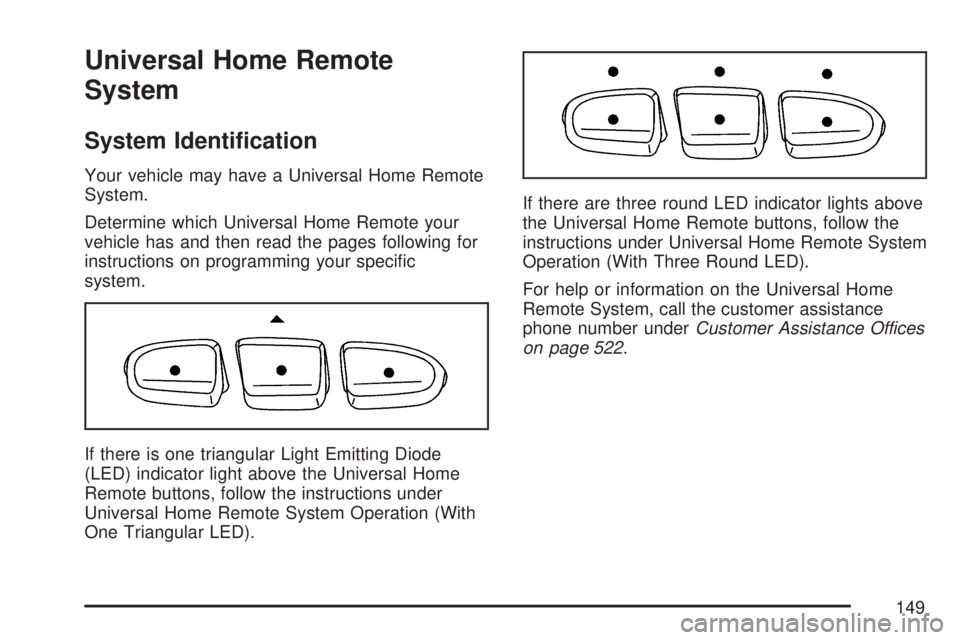
If there is one triangular Light Emitting Diode
(LED) indicator light above the Universal Home
Remote buttons, follow the instructions under
Universal Home Remote System Operation (With
One Triangular LED).If there are three round LED indicator lights above
the Universal Home Remote buttons, follow the
instructions under Universal Home Remote System
Operation (With Three Round LED).
For help or information on the Universal Home
Remote System, call the customer assistance
phone number underCustomer Assistance Offices
on page 522.
149
Page 154 of 554
Reprogramming a Single Universal
Home Remote Button
To program a device to Universal Home Remote
using a Universal Home Remote button
previously trained, follow these steps:
1. Press and hold the desired Universal Home
Remote button. Do not release the button.
2. The indicator light will begin to ash after
20 seconds. While still holding the Universal
Home Remote button, proceed with Step
2 under “Programming Universal Home
Remote” shown earlier in this section.
For help or information on the Universal Home
Remote System, call the customer assistance
phone number underCustomer Assistance Offices
on page 522.
Universal Home Remote System
Operation (With Three Round LED)
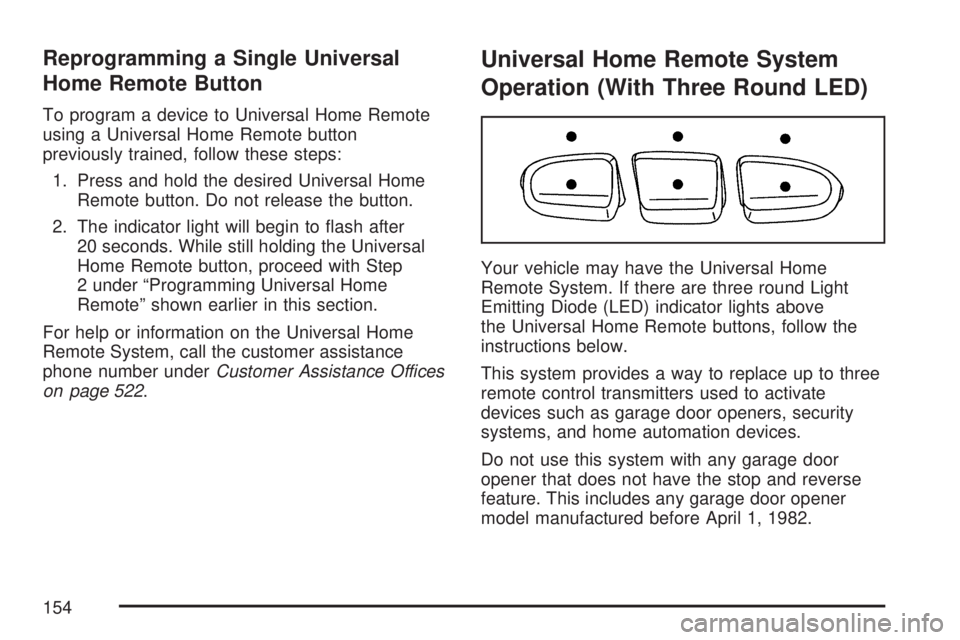
Your vehicle may have the Universal Home
Remote System. If there are three round Light
Emitting Diode (LED) indicator lights above
the Universal Home Remote buttons, follow the
instructions below.
This system provides a way to replace up to three
remote control transmitters used to activate
devices such as garage door openers, security
systems, and home automation devices.
Do not use this system with any garage door
opener that does not have the stop and reverse
feature. This includes any garage door opener
model manufactured before April 1, 1982.
154
Page 160 of 554
5. After entering all of the switch positions,
again, rmly press and release all three
buttons at the same time. The indicator lights
will turn on.
6. Press and hold the button you would like to use
to control the garage door until the garage door
moves. The indicator light above the selected
button should slowly blink. You may need to
hold the button from ve to 55 seconds.
7. Immediately release the button when the
garage door moves. The indicator light will
blink rapidly until programming is complete.
8. Press and release the same button again.
The garage door should move, conrming
that programming is successful and complete.
To program another Fixed Code device such as an
additional garage door opener, a security device,
or home automation device, repeat Steps 1-8,
choosing a different button in Step 6 than what you
used for the garage door opener.
Using Universal Home Remote
Press and hold the appropriate button for at least
half of a second. The indicator light will come
on while the signal is being transmitted.
Reprogramming Universal Home
Remote Buttons
You can reprogram any of the three buttons by
repeating the instructions.
Erasing Universal Home Remote
Buttons
You should erase the programmed buttons when
you sell or terminate your lease.
To erase either Rolling Code or Fixed Code on
the Universal Home Remote device, do the
following:
1. Press and hold the two outside buttons at the
same time for approximately 20 seconds, until
the indicator lights, located directly above
the buttons, begin to blink rapidly.
2. Once the indicator lights begin to blink,
release both buttons. The codes from all
buttons will be erased.
For help or information on the Universal Home
Remote System, call the customer assistance
phone number underCustomer Assistance Offices
on page 522.
160
Page 197 of 554
If this occurs, URPA assumes the object is still
attached, so you will have to wait until the
vehicle is driven forward above 15 mph
(25 km/h) before URPA will return to normal
operation.
The ultrasonic sensors need to be kept clean.
So, be sure to keep your vehicle’s rear bumper
free of mud, dirt, snow, ice, and slush. For
cleaning instructions, seeWashing Your
Vehicle on page 482. If the DIC still displays the
PARK ASSIST OFF message after cleaning the
bumper and driving forward at a speed of at
least 15 mph (25 km/h), see your dealer/retailer.
Other conditions that may affect system
performance include vibrations from a
jackhammer or the compression of air brakes
on a very large truck or other mechanical
devices that interfere with URPA performance.
As always, drivers should use care when backing
up a vehicle. Always look behind you, being
sure to check for other vehicles, obstructions
and blind spots.
If the vehicle bumper is damaged, the URPA
system may not work properly. Take the vehicle
to your dealer/retailer to repair the system.
Accessory Power Outlet(s)
The accessory power outlets can be used to
connect electrical equipment such as a cellular
phone or CB radio.
Your vehicle may have four accessory power
outlets. They are located on the instrument panel
below the climate controls, inside the front
center console storage bin, at the rear of the
center console, and in the rear cargo area.
To use the outlets, remove the cover. When not in
use, always cover the outlet with the protective cap.
Notice:Leaving electrical equipment on for
extended periods will drain the battery. Always
turn off electrical equipment when not in
use and do not plug in equipment that exceeds
the maximum amperage rating of 20 amperes.
197
Page 265 of 554
{CAUTION:
This system provides you with a far greater
access to audio stations and song listings.
Giving extended attention to entertainment
tasks while driving can cause a crash and
you or others can be injured or killed.
Always keep your eyes on the road and
your mind on the drive — avoid engaging
in extended searching while driving.
Keeping your mind on the drive is important for
safe driving. Here are some ways in which you
can help avoid distraction while driving.
While your vehicle is parked:
Familiarize yourself with all of its controls.
Familiarize yourself with its operation.
Set up your audio system by presetting your
favorite radio stations, setting the tone, and
adjusting the speakers. Then, when driving
conditions permit, you can tune to your favorite
radio stations using the presets and steering
wheel controls if the vehicle has them.Notice:Before adding any sound equipment
to your vehicle, such as an audio system,
CD player, CB radio, mobile telephone,
or two-way radio, make sure that it can be
added by checking with your dealer/retailer.
Also, check federal rules covering mobile radio
and telephone units. If sound equipment can
be added, it is very important to do it properly.
Added sound equipment may interfere with
the operation of your vehicle’s engine, radio,
or other systems, and even damage them.
Your vehicle’s systems may interfere with
the operation of sound equipment that
has been added.
Your vehicle has a feature called Retained
Accessory Power (RAP). With RAP, the audio
system can be played even after the ignition
is turned off. SeeRetained Accessory
Power (RAP) on page 125for more information.
265
Page 277 of 554
Playing an MP3/WMA CD-R or
CD-RW Disc
If you have a radio with a six-disc CD player, it
has the capability of playing an MP3/WMA CD-R
or CD-RW disc. For more information on how
to play an MP3/WMA CD-R or CD-RW disc,
see “Using an MP3” in the index.
CD Messages
CHECK DISC:If this message displays and/or
the CD comes out, it could be for one of the
following reasons:
It is very hot. When the temperature
returns to normal, the CD should play.
You are driving on a very rough road.
When the road becomes smoother,
the CD should play.
The CD is dirty, scratched, wet,
or upside down.
The air is very humid. If so, wait about
an hour and try again.
There could have been a problem while
burning the CD.
The label could be caught in the CD player.If the CD is not playing correctly, for any other
reason, try a known good CD.
If any error occurs repeatedly or if an error cannot
be corrected, contact your dealer/retailer. If the
radio displays an error message, write it down and
provide it to your dealer/retailer when reporting
the problem.
Using the Auxiliary Input Jack
Your radio system has an auxiliary input jack
located on the lower right side of the faceplate.
This is not an audio output; do not plug the
headphone set into the front auxiliary input jack.
You can however, connect an external audio
device such as an iPod, laptop computer,
MP3 player, CD changer, or cassette tape player,
etc. to the auxiliary input jack for use as another
source for audio listening.
Drivers are encouraged to set up any auxiliary
device while the vehicle is in PARK (P).
SeeDefensive Driving on page 330for more
information on driver distraction.
277
Page 294 of 554
Ejecting a Disc
Press the eject button on the radio to eject the
disc. If a disc is ejected from the radio, but
not removed, the radio reloads the disc after a
short period of time. The disc is stored in the
radio. The radio does not resume play of the disc
automatically. If the RSA system is sourced to
the DVD, the movie when reloaded into the DVD
player begins to play again. In case loading
and reading of a DVD or CD cannot be completed
(unknown format, etc.), and the disc fails to
eject, press and hold the DVD Eject button more
than 5 seconds to force the disc to eject.
DVD Radio Error Messages
Player Error:This message displays when there
are disc load or eject problems.
Disc Format Error:This message displays, if the
disc is inserted with the disc label wrong side
up, or if the disc is damaged.
Disc Region Error:This message displays, if the
disc is not from a correct region.
No Disc Inserted:This message displays, if no
disc is present when the EJECT or DVD/CD AUX
button is pressed on the radio.
Using the Auxiliary Input Jack(s)
Your radio system has an auxiliary input jack
located on the lower right side of the faceplate.
This is not an audio output; do not plug the
headphone set into the front auxiliary input jack.
You can however, connect an external audio
device such as an iPod, laptop computer,
MP3 player, CD player, or cassette tape player,
etc. to the auxiliary input jack for use as another
source for audio listening.
Drivers are encouraged to set up any auxiliary
device while the vehicle is in PARK (P).
SeeDefensive Driving on page 330for more
information on driver distraction.
To use a portable audio player, connect a
1/8 inch (3.5 mm) cable to the radio’s front
auxiliary input jack. When a device is connected,
the radio automatically begins playing audio
from the device over the vehicle speakers.
To listen to a device through the rear auxiliary
input over the speakers, cycle the DVD/CD Aux
button on the radio faceplate until “Rear Aux Input”
displays on the radio. The RSA or DVD Screen
must be on in order for the radio to source to
rear auxiliary.
294