light GMC ACADIA 2010 User Guide
[x] Cancel search | Manufacturer: GMC, Model Year: 2010, Model line: ACADIA, Model: GMC ACADIA 2010Pages: 444, PDF Size: 2.58 MB
Page 41 of 444
Keys, Doors and Windows 2-13
Vehicle Security
Vehicle theft is big business,
especially in some cities. This
vehicle has theft-deterrent features,
however, they do not make it
impossible to steal.
Anti-Theft Alarm System
On vehicles with an anti-theft alarm
system, to activate the system:
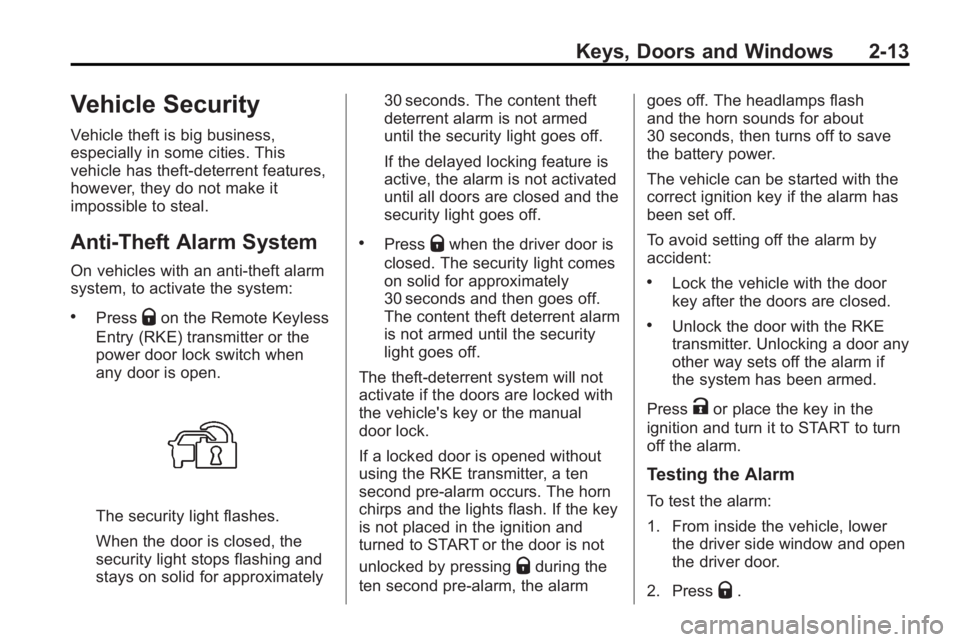
.PressQon the Remote Keyless
Entry (RKE) transmitter or the
power door lock switch when
any door is open.
The security light flashes.
When the door is closed, the
security light stops flashing and
stays on solid for approximately 30 seconds. The content theft
deterrent alarm is not armed
until the security light goes off.
If the delayed locking feature is
active, the alarm is not activated
until all doors are closed and the
security light goes off.
.PressQwhen the driver door is
closed. The security light comes
on solid for approximately
30 seconds and then goes off.
The content theft deterrent alarm
is not armed until the security
light goes off.
The theft-deterrent system will not
activate if the doors are locked with
the vehicle's key or the manual
door lock.
If a locked door is opened without
using the RKE transmitter, a ten
second pre-alarm occurs. The horn
chirps and the lights flash. If the key
is not placed in the ignition and
turned to START or the door is not
unlocked by pressing
Qduring the
ten second pre-alarm, the alarm goes off. The headlamps flash
and the horn sounds for about
30 seconds, then turns off to save
the battery power.
The vehicle can be started with the
correct ignition key if the alarm has
been set off.
To avoid setting off the alarm by
accident:
.Lock the vehicle with the door
key after the doors are closed.
.Unlock the door with the RKE
transmitter. Unlocking a door any
other way sets off the alarm if
the system has been armed.
Press
Kor place the key in the
ignition and turn it to START to turn
off the alarm.
Testing the Alarm
To test the alarm:
1. From inside the vehicle, lower the driver side window and open
the driver door.
2. Press
Q.
Page 42 of 444

2-14 Keys, Doors and Windows
3. Get out of the vehicle, close thedoor and wait for the security
light to go out.
4. Then reach in through the window, unlock the door with the
manual door lock and open the
door. This should set off the
alarm.
If the alarm does not sound when it
should, but the vehicle's headlamps
flash, check to see if the horn
works. The horn fuse may be blown.
To replace the fuse, see Fuses and
Circuit Breakers on page 10‑31.
If the alarm does not sound or the
vehicle's headlamps do not flash,
see your dealer/retailer for service.
Immobilizer
See Radio Frequency Statementon
page 13‑16for information regarding
Part 15 of the Federal
Communications Commission (FCC)
Rules and RSS-210/211 of Industry
and Science Canada.
Immobilizer Operation
This vehicle has PASS-Key®III+
(Personalized Automotive Security
System) theft-deterrent system.
PASS-Key
®III+ is a passive
theft-deterrent system.
The system is automatically armed
when the key is removed from the
ignition.
The system is automatically
disarmed when the key is turned to
ON/RUN, ACC/ACCESSORY or
START from the LOCK/OFF
position.
You do not have to manually arm or
disarm the system.
The security light comes on if there
is a problem with arming or
disarming the theft-deterrent
system.
When the PASS-Key
®III+ system
senses an incorrect key, the vehicle
does not start. Anyone using a
trial-and-error method to start the vehicle will be discouraged because
of the high number of electrical key
codes.
If the engine does not start and the
security light on the instrument
panel comes on when trying to start
the vehicle, there may be a problem
with your theft-deterrent system.
Turn the ignition off and try again.
If the engine still does not start, and
the key appears to be undamaged,
try another ignition key and check
the fuses. See
Fuses and Circuit
Breakers
on page 10‑31for
additional information. If the engine
still does not start with the other key,
the vehicle needs service. If the
vehicle does start, the first key may
be faulty. See your dealer/retailer
who can service the PASS-Key
®III+
to have a new key made. In an
emergency, contact Roadside
Assistance. See Roadside
Assistance Program on page 13‑5.
It is possible for the PASS-Key
®III+
decoder to learn the transponder
value of a new or replacement key.
Page 43 of 444
Keys, Doors and Windows 2-15
Up to 10 keys may be programmed
to the vehicle. The following
procedure is for programming
additional keys only. If all the
currently programmed keys are lost
or do not operate, you must see
your dealer/retailer or a locksmith
who can service PASS-Key
®III+ to
have keys made and programmed
to the system.
See your dealer/retailer or a
locksmith who can service
PASS-Key
®III+ to get a new key
blank that is cut exactly as the
ignition key that operates the
system. To program the new additional key:
1. Verify that the new key has a
1
stamped on it.
2. Insert the already programmed key in the ignition and start the
engine. If the engine does not
start, see your dealer/retailer for
service.
3. After the engine has started, turn the key to LOCK/OFF, and
remove the key.
4. Insert the key to be programmed and turn it to the ON/RUN
position within five seconds of
the original key being turned to
the LOCK/OFF position.
The security light turns off once
the key has been programmed. 5. Repeat Steps 1 through 4 if
additional keys are to be
programmed.
If the PASS-Key®III+ key is lost or
damaged, see your dealer/retailer or
a locksmith to have a new
key made.
The SERVICE THEFT
DETERRENT SYSTEM message
displays on the Driver Information
Center (DIC) when there is a
problem with the theft-deterrent
system. See Anti-Theft Alarm
System Messages
on page 5‑40for additional information.
Do not leave the key or device that
disarms or deactivates the theft
deterrent system in the vehicle.
Page 46 of 444
2-18 Keys, Doors and Windows
Park Tilt Mirrors
If the vehicle has the memory
package, the outside mirrors have a
park tilt feature. This feature tilts the
outside mirrors to a preselected
position when the vehicle is in
R (Reverse). This allows the driver
to view the curb for parallel parking.
The passenger and/or driver mirror
returns to its original position when
the vehicle is shifted out of
R (Reverse), or the ignition is turned
off or to OFF/LOCK.
This feature can be turned on or off
through the Driver Information
Center (DIC). SeeVehicle
Personalization (With DIC Buttons)
on page 5‑44for more information.
Interior Mirrors
Manual Rearview Mirror
Adjust the inside rearview mirror to
see clearly behind your vehicle.
Hold the mirror in the center to
move it up or down and side to side.
Use the day/night adjustment to
help prevent glare from the
headlamps behind you. Move the
lever to the right for nighttime use
and to the left for daytime use.
Vehicles with OnStar
®have three
additional control buttons located at
the bottom of the mirror. See your
dealer/retailer for more information
about OnStar and how to subscribe
to it. See the OnStar
®owner guide
for more information on the services
OnStar provides.
Automatic Dimming
Rearview Mirror
The vehicle may have an automatic
dimming inside rearview mirror.
Automatic dimming reduces the
glare from the headlamps of the
vehicle behind you. The dimming
feature comes on and the indicator
light illuminates each time the
ignition is turned to start.
Vehicles with OnStar
®have three
additional control buttons for the
OnStar
®system. See your dealer/
retailer for more information about
OnStar
®and how to subscribe to it.
See the OnStar®owner guide for
more information about the services
OnStar
®provides.
Page 49 of 444
Keys, Doors and Windows 2-21
2. Press and continue to hold thewindow switch until the window
is fully open.
3. Pull up and hold the window switch to close the window.
Continue to hold it briefly after
the window is fully closed.
4. Repeat for each window that has the express-up feature.
Anti-Pinch Feature
The anti-pinch feature is on
windows with the express-up
feature. If an object is in the way of
the window as it is express-closing,
or in certain weather conditions like
severe icing, the window will stop
and open to a factory preset
position. The window functions
normally once the obstruction is
removed.
Window Lockout
o(Window Lockout): The window
lockout switch is located with the
power window switches on the
driver door armrest. This feature
prevents the rear windows from being operated, except from the
driver position. Press the switch to
turn the lockout feature on or off. An
indicator light will come on to show
the lockout feature is on.
Sun Visors
Pull the sun visor down to block
glare. Detach the sun visor from the
center mount and slide it along the
rod from side-to-side to cover the
driver or passenger side of the front
window. Swing the sun visor to the
side to cover the side window. It can
be moved along the rod from
side-to-side in this position also.
Lighted Visor Vanity Mirror
The vehicle has lighted visor vanity
mirrors on both the driver and
passenger sun visors. Pull the sun
visor down and lift the mirror cover
to turn the lamps on.
Roof
Sunroof
The ignition must be in ON/RUN or
ACC/ACCESSORY to operate the
sunroof and power sunshade. See
Retained Accessory Power (RAP)
on page 9‑17
The vehicle may have a sunroof
over the front seats and a rear
sunroof over the second row seats.
The rear sunroof does not open.
The switch to operate the front
sunroof is on the headliner above
the rearview mirror.
Do not keep the sunroof open for
long periods of time while the
vehicle is not in use. Debris can
collect in the tracks, damage the
sunroof operation and plug the
water draining system.
Page 58 of 444
3-8 Seats and Restraints
Heated Front Seats
{WARNING
If you cannot feel temperature
change or pain to the skin, the
seat heater may cause burns
even at low temperatures. To
reduce the risk of burns, people
with such a condition should use
care when using the seat heater,
especially for long periods of
time. Do not place anything on
the seat that insulates against
heat, such as a blanket, cushion,
cover or similar item. This may
cause the seat heater to
overheat. An overheated seat
heater may cause a burn or may
damage the seat.On vehicles with heated front seats,
the controls are located on the
center console. To operate the
heated seats the engine must be
running.
I
(Heated Seatback): Press to
turn on the heated seatback.
J (Heated Seat and Seatback):
Press to turn on or off the heated
seat and seatback.
The light on the button will come on
to indicate that the feature is on.
Each time the button is pressed, the
temperature settings change from
high, to medium, to low, to off.
Indicator lights above the button will
show the level of heat selected:
three for high, two for medium, and
one for low. The passenger seat may take
longer to heat up.
If the vehicle has remote vehicle
start and is started using the RKE
transmitter, the front heated seats
will be turned on to the high setting
if it is cold outside. See
“Remote
Vehicle Start” underRemote
Keyless Entry (RKE) System
Operation
on page 2‑3. When the
ignition is turned on, the heated seat
feature will turn off. To turn the
heated seat feature back on, press
the desired button.
Page 59 of 444
Seats and Restraints 3-9
Heated and Ventilated
Front Seats
{WARNING
If you cannot feel temperature
change or pain to the skin, the
seat heater may cause burns
even at low temperatures. To
reduce the risk of burns, people
with such a condition should use
care when using the seat heater,
especially for long periods of
time. Do not place anything on
the seat that insulates against
heat, such as a blanket, cushion,
cover or similar item. This may
cause the seat heater to
overheat. An overheated seat
heater may cause a burn or may
damage the seat.
On vehicles with the heated and
ventilated seat feature, the controls
are located on the front doors near
the door handle.
H(Ventilated Seat): Press to
ventilate the entire seat.
This symbol appears on the climate
control display to indicate that the
feature is on.
z(Heated Seat and Seatback):
Press to heat the entire seat.
This symbol appears on the climate
control display to indicate that the
feature is on.
For either feature press the button
once for the highest setting. With
each press of the switch, the seat
changes to the next lower setting,
and then the off setting. The lights
indicate three for the highest setting
and one for the lowest.
The heated and ventilated seats are
canceled after the ignition is turned
off. To use the heated and ventilated
seat feature after the vehicle is
started, you will need to press the
appropriate seat button again.
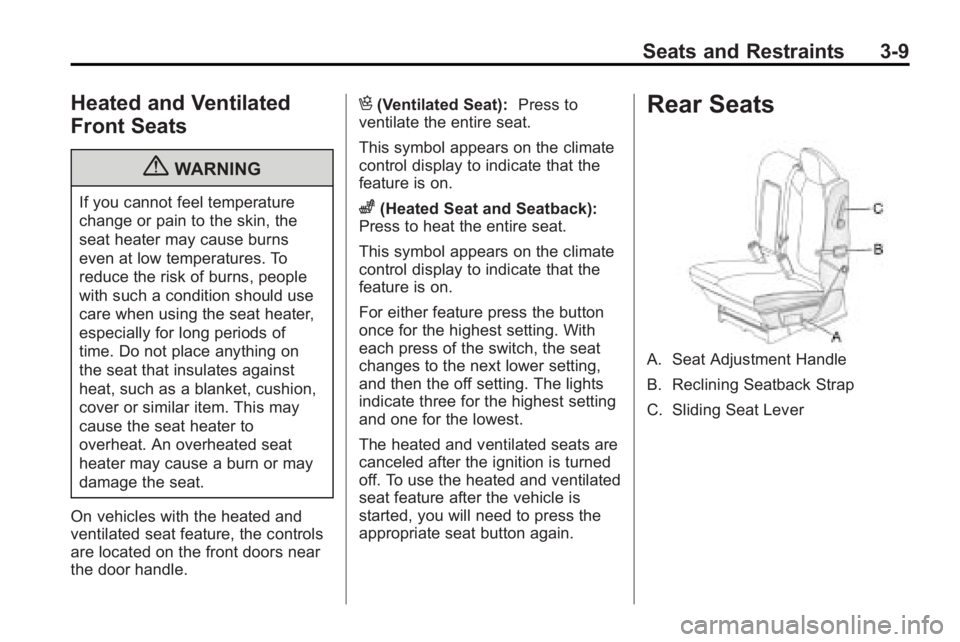
Rear Seats
A. Seat Adjustment Handle
B. Reclining Seatback Strap
C. Sliding Seat Lever
Page 63 of 444
Seats and Restraints 3-13
WARNING (Continued)
sure that the safety belts are
properly routed and attached, and
are not twisted.
4. Reconnect the center safety belt mini-latch to the mini-buckle. Do
not let it twist.
5. Pull on the safety belt to be sure the mini-latch is secure.
Removing the Third Row Seats
1. Remove the cargo managementsystem, if it is in the vehicle. See
Cargo Management System
on
page 4‑3.
2. Remove anything on or under the seat.
Notice: Folding a rear seat with
the safety belts still fastened may
cause damage to the seat or the
safety belts. Always unbuckle the
safety belts and return them to
their normal stowed position
before folding a rear seat. 3. Fold the seatback down. See
“Folding the Seatback” earlier in
this section.
4. Remove the rear bolts located on the floor on each side of
the seat.
5. Remove the seat by tilting it slightly upward, and then pulling
it out of the rear of the vehicle in
one motion.
6. Replace the bolts in the floor holes for storage.
Installing the Third Row Seats
1. Before installing the seat theseatback must be folded
forward. See “Folding the
Seatback” earlier in this section.
The seats must be placed in the
proper locations to attach
correctly. The wider seat must
be installed on the driver side
and the narrower seat on the
passenger side. Remove the
bolts from the holes in the floor
before installing the seats. 2. Place the seat on the vehicle
floor so that the front seat hooks
are on the vehicle bars.
3. Reinstall the bolts, and torque to 55Y (41 lb ft). Pull up on the
seat to make sure it is locked in
place.
4. Raise the seatback to its upright position. Push and pull on the
seatback to make sure it is
locked into place.
5. Push the headrest up into position. Push and pull on the
headrest to make sure it is
locked into place.
6. Reconnect the center safety belt mini-latch to the mini-buckle. Do
not let it twist.
Page 73 of 444
Seats and Restraints 3-23
Lap-Shoulder Belt
All seating positions in the vehicle
have a lap-shoulder belt.
If you are using a rear seating
position with a detachable safety
belt and the safety belt is not
attached, seeThird Row Seats
on
page 3‑11for instruction on
reconnecting the safety belt to the
mini-buckle.
The following instructions explain
how to wear a lap-shoulder belt
properly.
1. Adjust the seat, if the seat is adjustable, so you can sit up
straight. To see how, see “Seats”
in the Index.
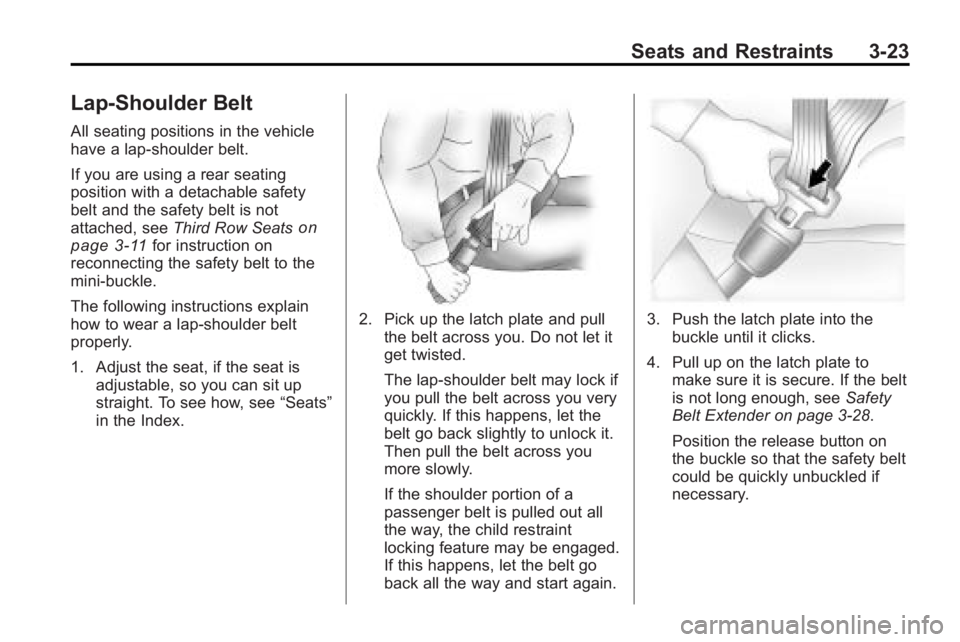
2. Pick up the latch plate and pull the belt across you. Do not let it
get twisted.
The lap-shoulder belt may lock if
you pull the belt across you very
quickly. If this happens, let the
belt go back slightly to unlock it.
Then pull the belt across you
more slowly.
If the shoulder portion of a
passenger belt is pulled out all
the way, the child restraint
locking feature may be engaged.
If this happens, let the belt go
back all the way and start again.3. Push the latch plate into thebuckle until it clicks.
4. Pull up on the latch plate to make sure it is secure. If the belt
is not long enough, see Safety
Belt Extender on page 3‑28.
Position the release button on
the buckle so that the safety belt
could be quickly unbuckled if
necessary.
Page 78 of 444
3-28 Seats and Restraints
Safety Belt Use During
Pregnancy
Safety belts work for everyone,
including pregnant women. Like all
occupants, they are more likely to
be seriously injured if they do not
wear safety belts.
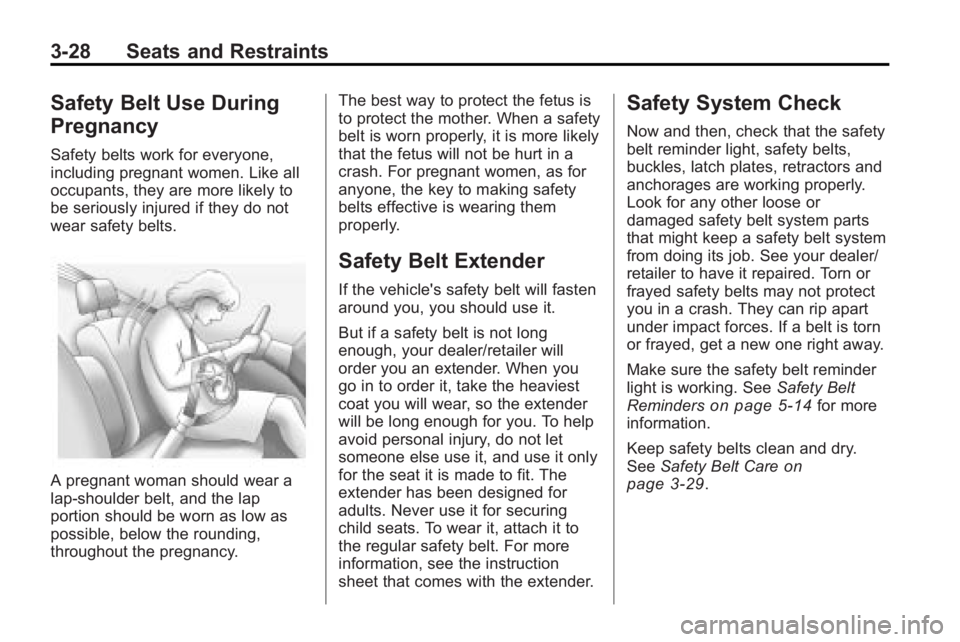
A pregnant woman should wear a
lap-shoulder belt, and the lap
portion should be worn as low as
possible, below the rounding,
throughout the pregnancy.The best way to protect the fetus is
to protect the mother. When a safety
belt is worn properly, it is more likely
that the fetus will not be hurt in a
crash. For pregnant women, as for
anyone, the key to making safety
belts effective is wearing them
properly.
Safety Belt Extender
If the vehicle's safety belt will fasten
around you, you should use it.
But if a safety belt is not long
enough, your dealer/retailer will
order you an extender. When you
go in to order it, take the heaviest
coat you will wear, so the extender
will be long enough for you. To help
avoid personal injury, do not let
someone else use it, and use it only
for the seat it is made to fit. The
extender has been designed for
adults. Never use it for securing
child seats. To wear it, attach it to
the regular safety belt. For more
information, see the instruction
sheet that comes with the extender.
Safety System Check
Now and then, check that the safety
belt reminder light, safety belts,
buckles, latch plates, retractors and
anchorages are working properly.
Look for any other loose or
damaged safety belt system parts
that might keep a safety belt system
from doing its job. See your dealer/
retailer to have it repaired. Torn or
frayed safety belts may not protect
you in a crash. They can rip apart
under impact forces. If a belt is torn
or frayed, get a new one right away.
Make sure the safety belt reminder
light is working. See
Safety Belt
Reminders
on page 5‑14for more
information.
Keep safety belts clean and dry.
See Safety Belt Care
on
page 3‑29.