service GMC ACADIA 2010 User Guide
[x] Cancel search | Manufacturer: GMC, Model Year: 2010, Model line: ACADIA, Model: GMC ACADIA 2010Pages: 444, PDF Size: 2.58 MB
Page 43 of 444
Keys, Doors and Windows 2-15
Up to 10 keys may be programmed
to the vehicle. The following
procedure is for programming
additional keys only. If all the
currently programmed keys are lost
or do not operate, you must see
your dealer/retailer or a locksmith
who can service PASS-Key
®III+ to
have keys made and programmed
to the system.
See your dealer/retailer or a
locksmith who can service
PASS-Key
®III+ to get a new key
blank that is cut exactly as the
ignition key that operates the
system. To program the new additional key:
1. Verify that the new key has a
1
stamped on it.
2. Insert the already programmed key in the ignition and start the
engine. If the engine does not
start, see your dealer/retailer for
service.
3. After the engine has started, turn the key to LOCK/OFF, and
remove the key.
4. Insert the key to be programmed and turn it to the ON/RUN
position within five seconds of
the original key being turned to
the LOCK/OFF position.
The security light turns off once
the key has been programmed. 5. Repeat Steps 1 through 4 if
additional keys are to be
programmed.
If the PASS-Key®III+ key is lost or
damaged, see your dealer/retailer or
a locksmith to have a new
key made.
The SERVICE THEFT
DETERRENT SYSTEM message
displays on the Driver Information
Center (DIC) when there is a
problem with the theft-deterrent
system. See Anti-Theft Alarm
System Messages
on page 5‑40for additional information.
Do not leave the key or device that
disarms or deactivates the theft
deterrent system in the vehicle.
Page 46 of 444
2-18 Keys, Doors and Windows
Park Tilt Mirrors
If the vehicle has the memory
package, the outside mirrors have a
park tilt feature. This feature tilts the
outside mirrors to a preselected
position when the vehicle is in
R (Reverse). This allows the driver
to view the curb for parallel parking.
The passenger and/or driver mirror
returns to its original position when
the vehicle is shifted out of
R (Reverse), or the ignition is turned
off or to OFF/LOCK.
This feature can be turned on or off
through the Driver Information
Center (DIC). SeeVehicle
Personalization (With DIC Buttons)
on page 5‑44for more information.
Interior Mirrors
Manual Rearview Mirror
Adjust the inside rearview mirror to
see clearly behind your vehicle.
Hold the mirror in the center to
move it up or down and side to side.
Use the day/night adjustment to
help prevent glare from the
headlamps behind you. Move the
lever to the right for nighttime use
and to the left for daytime use.
Vehicles with OnStar
®have three
additional control buttons located at
the bottom of the mirror. See your
dealer/retailer for more information
about OnStar and how to subscribe
to it. See the OnStar
®owner guide
for more information on the services
OnStar provides.
Automatic Dimming
Rearview Mirror
The vehicle may have an automatic
dimming inside rearview mirror.
Automatic dimming reduces the
glare from the headlamps of the
vehicle behind you. The dimming
feature comes on and the indicator
light illuminates each time the
ignition is turned to start.
Vehicles with OnStar
®have three
additional control buttons for the
OnStar
®system. See your dealer/
retailer for more information about
OnStar
®and how to subscribe to it.
See the OnStar®owner guide for
more information about the services
OnStar
®provides.
Page 55 of 444
Seats and Restraints 3-5
when the position has not been
changed by another seating position
or the easy exit feature. See
“MEMORY SEAT RECALL”under
Vehicle Personalization (With DIC
Buttons)
on page 5‑44for more
information.
To stop recall movement of the
memory feature at any time, press
one of the power seat controls,
memory buttons, or power mirror
buttons.
If something has blocked the driver
seat while recalling a memory
position, the driver seat recall may
stop working. If this happens, press
the appropriate control for the area
that is not recalling for two seconds,
after the obstruction is removed.
Then try recalling the memory
position again by pressing the
appropriate memory button. If the
memory position is still not being
recalled, see your dealer/retailer for
service.
Easy Exit Seat
The control for this feature is
located on the driver door panel
between buttons 1 and 2.
With the vehicle in P (Park), the exit
position can be recalled by pressing
the exit button. You will hear a
single beep. The driver seat will
move back.
If the easy exit seat feature is on in
the Driver Information Center (DIC),
automatic seat movement will occur
when the key is removed from the
ignition. See “EASY EXIT SEAT”
under Vehicle Personalization (With
DIC Buttons)
on page 5‑44for
more information.
Further programming for the
memory seat feature can be done
using the DIC. You can select or
cancel the following:
.The automatic easy exit seat
feature.
.The remote memory seat recall
feature. For programming information, see
Vehicle Personalization (With DIC
Buttons) on page 5‑44.
Lumbar Adjustment
Manual Lumbar
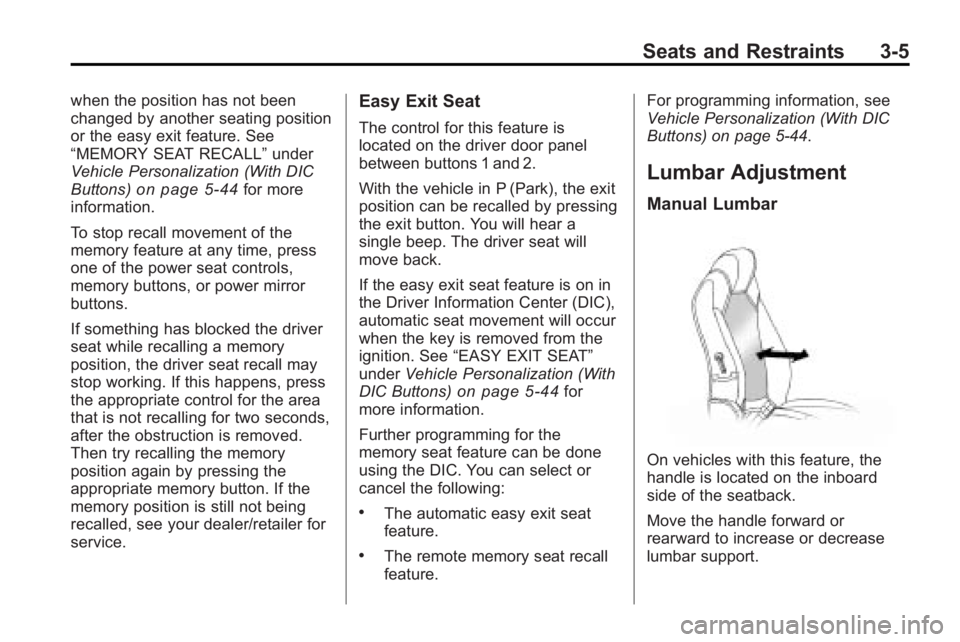
On vehicles with this feature, the
handle is located on the inboard
side of the seatback.
Move the handle forward or
rearward to increase or decrease
lumbar support.
Page 87 of 444
Seats and Restraints 3-37
You can lock the doors, turn off the
interior lamps and hazard warning
flashers by using the controls for
those features.
{WARNING
A crash severe enough to inflate
the airbags may have also
damaged important functions in
the vehicle, such as the fuel
system, brake and steering
systems, etc. Even if the vehicle
appears to be drivable after a
moderate crash, there may be
concealed damage that could
make it difficult to safely operate
the vehicle.
Use caution if you should attempt
to restart the engine after a crash
has occurred.In many crashes severe enough to
inflate the airbag, windshields are
broken by vehicle deformation.
Additional windshield breakage may
also occur from the right front
passenger airbag..Airbags are designed to inflate
only once. After an airbag
inflates, you will need some new
parts for the airbag system.
If you do not get them, the
airbag system will not be there
to help protect you in another
crash. A new system will include
airbag modules and possibly
other parts. The service manual
for your vehicle covers the need
to replace other parts.
.The vehicle has a crash sensing
and diagnostic module which
records information after a
crash. See
Vehicle Data
Recording and Privacy
on
page 13‑14and Event Data
Recorders on page 13‑15.
.Let only qualified technicians
work on the airbag systems.
Improper service can mean that
an airbag system will not work
properly. See your dealer/retailer
for service.
Page 90 of 444
3-40 Seats and Restraints
person’s seating posture and body
build. Everyone in the vehicle who
has outgrown child restraints
should wear a safety belt
properly —whether or not there is
an airbag for that person.
{WARNING
If the airbag readiness light ever
comes on and stays on, it means
that something may be wrong
with the airbag system. To help
avoid injury to yourself or others,
have the vehicle serviced right
away. See Airbag Readiness
Light
on page 5‑14for more
information, including important
safety information.
If the On Indicator is Lit for a
Child Restraint
If a child restraint has been installed
and the on indicator is lit:
1. Turn the vehicle off.
2. Remove the child restraint from the vehicle.
3. Remove any additional items from the seat such as blankets,
cushions, seat covers, seat
heaters, or seat massagers.
4. Reinstall the child restraint following the directions
provided by the child restraint
manufacturer and refer to
Securing Child Restraints
(Rear Seat)
on page 3‑59or
Securing Child Restraints (Right
Front Passenger Seat)
on
page 3‑61. 5. If, after reinstalling the child
restraint and restarting the
vehicle, the on indicator is still lit,
turn the vehicle off. Then slightly
recline the vehicle seatback and
adjust the seat cushion,
if adjustable, to make sure that
the vehicle seatback is not
pushing the child restraint into
the seat cushion.
Also make sure the child
restraint is not trapped under the
vehicle head restraint. If this
happens, adjust the head
restraint. See Head Restraints
on page 3‑2.
6. Restart the vehicle.
The passenger sensing system
may or may not turn off the
airbag for a child in a child
restraint depending upon the
child’s seating posture and body
build. It is better to secure the
child restraint in a rear seat.
Page 92 of 444
3-42 Seats and Restraints
A wet seat can affect the
performance of the passenger
sensing system. Here is how:
.The passenger sensing system
may turn off the passenger
airbag when liquid is soaked into
the seat. If this happens, the off
indicator will be lit, and the
airbag readiness light on the
instrument panel will also be lit.
.Liquid pooled on the seat that
has not soaked in may make it
more likely that the passenger
sensing system will enable (turn
on) the passenger airbag while a
child restraint or child occupant
is on the seat. If the passenger
airbag is turned on, the on
indicator will be lit.
If the passenger seat gets wet, dry
the seat immediately. If the airbag
readiness light is lit, do not install a
child restraint or allow anyone to
occupy the seat. See Airbag
Readiness Light
on page 5‑14for
important safety information. The on indicator may be lit if an
object, such as a briefcase,
handbag, grocery bag, laptop or
other electronic device, is put on an
unoccupied seat. If this is not
desired remove the object from
the seat.
{WARNING
Stowing of articles under the
passenger seat or between the
passenger seat cushion and
seatback may interfere with the
proper operation of the passenger
sensing system.
Servicing the
Airbag-Equipped Vehicle
Airbags affect how the vehicle
should be serviced. There are parts
of the airbag system in several
places around the vehicle. Your
dealer/retailer and the service
manual have information about
servicing the vehicle and the airbag
system. To purchase a service
manual, see
Service Publications
Ordering Information on page 13‑12.
{WARNING
For up to 10 seconds after the
ignition is turned off and the
battery is disconnected, an airbag
can still inflate during improper
service. You can be injured if you
are close to an airbag when it
inflates. Avoid yellow connectors.
They are probably part of the
airbag system. Be sure to follow
proper service procedures, and
make sure the person performing
work for you is qualified to do so.
Page 93 of 444
Seats and Restraints 3-43
Adding Equipment to the
Airbag-Equipped Vehicle
Q: Is there anything I might addto or change about the vehicle
that could keep the airbags
from working properly?
A: Yes. If you add things that
change the vehicle's frame,
bumper system, height, front end
or side sheet metal, they may
keep the airbag system from
working properly. Changing or
moving any parts of the front
seats, safety belts, the airbag
sensing and diagnostic module,
steering wheel, instrument
panel, roof-rail airbag modules,
ceiling headliner or pillar garnish
trim, overhead console, front
sensors, side impact sensors,
rollover sensor module, or airbag
wiring can affect the operation of
the airbag system.
In addition, the vehicle has a
passenger sensing system for
the right front passenger
position, which includes sensors that are part of the passenger
seat. The passenger sensing
system may not operate properly
if the original seat trim is
replaced with non-GM covers,
upholstery or trim, or with GM
covers, upholstery or trim
designed for a different vehicle.
Any object, such as an
aftermarket seat heater or a
comfort enhancing pad or
device, installed under or on top
of the seat fabric, could also
interfere with the operation of
the passenger sensing system.
This could either prevent proper
deployment of the passenger
airbag(s) or prevent the
passenger sensing system from
properly turning off the
passenger airbag(s). See
Passenger Sensing System
on
page 3‑38.
If you have questions, call
Customer Assistance. The
phone numbers and addresses
for Customer Assistance are in Step Two of the Customer
Satisfaction Procedure in this
manual.
If the vehicle has rollover
roof-rail airbags, see
Different
Size Tires and Wheels
on
page 10‑53for additional
important information.
Q: Because I have a disability, I have to get my vehicle
modified. How can I find out
whether this will affect my
airbag system?
A: If you have questions, call
Customer Assistance. The
phone numbers and addresses
for Customer Assistance are in
Step Two of the Customer
Satisfaction Procedure in this
manual.
In addition, your dealer/retailer and
the service manual have information
about the location of the airbag
sensors, sensing and diagnostic
module and airbag wiring.
Page 94 of 444
3-44 Seats and Restraints
Airbag System Check
The airbag system does not need
regularly scheduled maintenance or
replacement. Make sure the airbag
readiness light is working. See
Airbag Readiness Light
on
page 5‑14for more information.
Notice: If an airbag covering is
damaged, opened, or broken, the
airbag may not work properly. Do
not open or break the airbag
coverings. If there are any
opened or broken airbag covers,
have the airbag covering and/or
airbag module replaced. For the
location of the airbag modules,
see What Makes an Airbag
Inflate?
on page 3‑35. See your
dealer/retailer for service.
Replacing Airbag System
Parts After a Crash
{WARNING
A crash can damage the airbag
systems in your vehicle.
A damaged airbag system may
not work properly and may not
protect you and your
passenger(s) in a crash, resulting
in serious injury or even death. To
help make sure your airbag
systems are working properly
after a crash, have them
inspected and any necessary
replacements made as soon as
possible. If an airbag inflates, you will need to
replace airbag system parts. See
your dealer/retailer for service.
If the airbag readiness light stays on
after the vehicle is started or comes
on when you are driving, the airbag
system may not work properly. Have
the vehicle serviced right away. See
Airbag Readiness Light
on
page 5‑14for more information.
Page 120 of 444
5-2 Instruments and Controls
Engine Oil Messages . . . . . . . . 5-37
Engine Power Messages . . . . 5-38
Fuel System Messages . . . . . . 5-38
Key and Lock Messages . . . . . 5-39
Lamp Messages . . . . . . . . . . . . . 5-39
Object Detection SystemMessages . . . . . . . . . . . . . . . . . . 5-39
Ride Control System Messages . . . . . . . . . . . . . . . . . . 5-40
Airbag System Messages . . . . 5-40
Anti-Theft Alarm System Messages . . . . . . . . . . . . . . . . . . 5-40
Service Vehicle Messages . . . 5-41
Tire Messages . . . . . . . . . . . . . . . 5-41
Transmission Messages . . . . . 5-42
Vehicle Reminder Messages . . . . . . . . . . . . . . . . . . 5-43
Vehicle Speed Messages . . . . 5-43
Washer Fluid Messages . . . . . 5-43Vehicle Personalization
Vehicle Personalization (With DIC Buttons) . . . . . . . . 5-44
Universal Remote System
Universal Remote System . . . 5-51
Universal Remote SystemProgramming . . . . . . . . . . . . . . . 5-51
Universal Remote System Operation . . . . . . . . . . . . . . . . . . 5-55
Controls
Steering Wheel
Adjustment
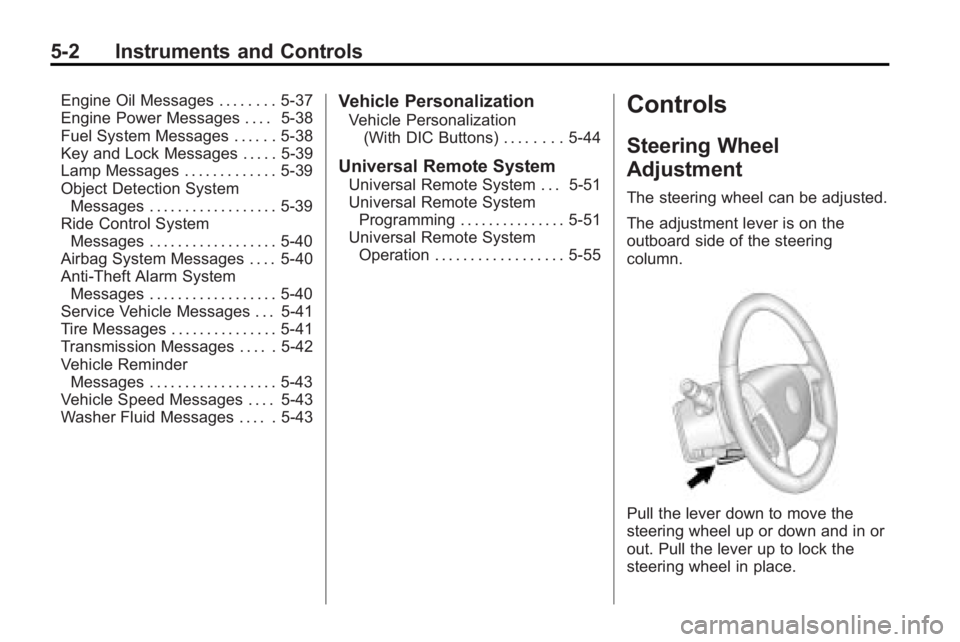
The steering wheel can be adjusted.
The adjustment lever is on the
outboard side of the steering
column.
Pull the lever down to move the
steering wheel up or down and in or
out. Pull the lever up to lock the
steering wheel in place.
Page 131 of 444
Instruments and Controls 5-13
Engine Coolant
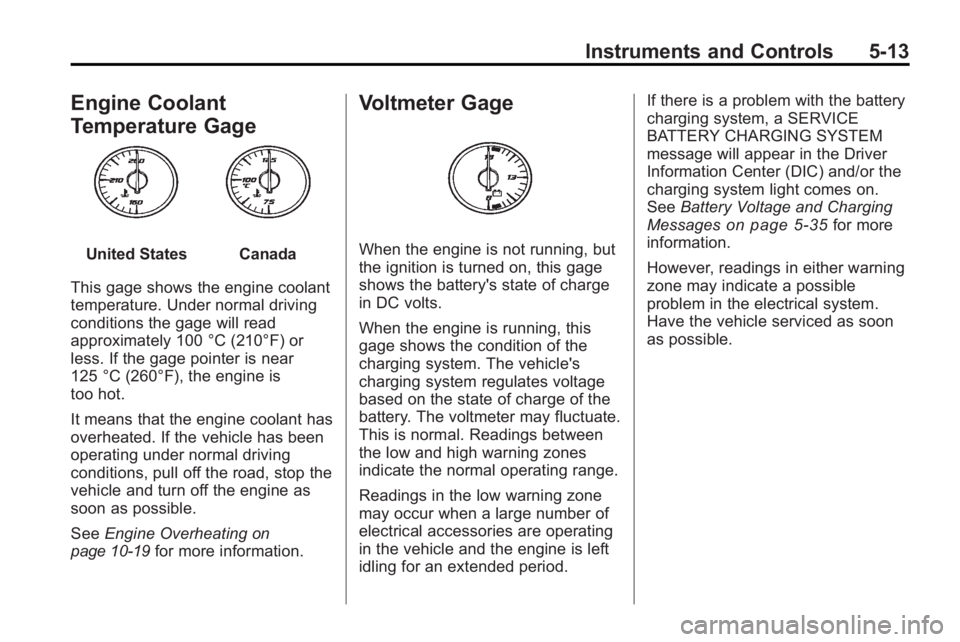
Temperature Gage
United StatesCanada
This gage shows the engine coolant
temperature. Under normal driving
conditions the gage will read
approximately 100 °C (210°F) or
less. If the gage pointer is near
125 °C (260°F), the engine is
too hot.
It means that the engine coolant has
overheated. If the vehicle has been
operating under normal driving
conditions, pull off the road, stop the
vehicle and turn off the engine as
soon as possible.
See Engine Overheating
on
page 10‑19for more information.
Voltmeter Gage
When the engine is not running, but
the ignition is turned on, this gage
shows the battery's state of charge
in DC volts.
When the engine is running, this
gage shows the condition of the
charging system. The vehicle's
charging system regulates voltage
based on the state of charge of the
battery. The voltmeter may fluctuate.
This is normal. Readings between
the low and high warning zones
indicate the normal operating range.
Readings in the low warning zone
may occur when a large number of
electrical accessories are operating
in the vehicle and the engine is left
idling for an extended period. If there is a problem with the battery
charging system, a SERVICE
BATTERY CHARGING SYSTEM
message will appear in the Driver
Information Center (DIC) and/or the
charging system light comes on.
See
Battery Voltage and Charging
Messages
on page 5‑35for more
information.
However, readings in either warning
zone may indicate a possible
problem in the electrical system.
Have the vehicle serviced as soon
as possible.