light GMC ACADIA 2010 Manual PDF
[x] Cancel search | Manufacturer: GMC, Model Year: 2010, Model line: ACADIA, Model: GMC ACADIA 2010Pages: 444, PDF Size: 2.58 MB
Page 218 of 444
7-36 Infotainment System
Rear Seat
Infotainment
Rear Seat Entertainment
(RSE) System
The vehicle may have a DVD Rear
Seat Entertainment (RSE) system.
The RSE system works with the
vehicle's audio system. The DVD
player is part of the front radio. The
RSE system includes a radio with a
DVD player, a video display screen,
audio/video jacks, two wireless
headphones, and a remote control.
SeeOperation
on page 7‑2for
more information on the vehicle's
audio/DVD system.
Before Driving
The RSE is designed for rear seat
passengers only. The driver cannot
safely view the video screen while
driving and should not try to do so. In severe or extreme weather
conditions the RSE system might or
might not work until the temperature
is within the operating range. The
operating range for the RSE system
is above
−4°F (−20°C) or below
140°F (60°C). If the temperature of
the vehicle is outside of this range,
heat or cool the vehicle until the
temperature is within the operating
range of the RSE system.
Parental Control
The RSE system may have a
Parental Control feature, depending
on the radio. To enable Parental
Control, press and hold the radio
power button for more than
two seconds to stop all system
features such as: radio, video
screen, RSA, DVD and/or CD. While
Parental Control is on,
Qdisplays.
When the radio is turned back on,
Parental Control is unlocked.
Headphones
The RSE includes two 2-channel
wireless headphones that are
dedicated to this system. Channel 1
is dedicated to the video screen,
while Channel 2 is dedicated to RSA
selections. These headphones are
used to listen to media such as
CDs, DVDs, MP3/WMAs, DVD-As,
radio, any auxiliary source
connected to A/V jacks, or the
auxiliary input jack, if the vehicle
has this feature. The wireless
headphones have an On/Off button,
channel 1/2 switch, and a volume
control. Switch the headphones to
Off when not in use.
Push the power button to turn on
the headphones. An indicator light
located on the headphones comes
on. If the light does not come on,
the batteries might need to be
replaced. Intermittent sound or static
on the headphones can also be an
indication of weak batteries. See
“Battery Replacement” later in this
section for more information.
Page 219 of 444
Infotainment System 7-37
The headphones may automatically
turn off after four hours of
continuous use.
To adjust the volume on the
headphones, use the volume control
located on the right side.
Infrared transmitters are located at
the rear of the RSE overhead
console. The headphones shut off
automatically to save the battery
power if the RSE system and RSA
are shut off or if the headphones are
out of range of the transmitters for
more than three minutes. Moving too
far forward or stepping out of the
vehicle, can cause the headphones
to lose the audio signal.
For optimal audio performance, the
headphones must be worn correctly.
Headphones should be worn with
the headband over the top of the
head for best audio reception. The
symbol L (Left) appears on the
upper left side, above the ear pad
and should be positioned on the leftear. The symbol R (Right) appears
on the upper right side, above the
ear pad and should be positioned
on the right ear.
Notice:
Do not store the
headphones in heat or direct
sunlight. This could damage the
headphones and repairs will not
be covered by the warranty.
Storage in extreme cold can
weaken the batteries. Keep the
headphones stored in a cool, dry
place.
If the foam ear pads attached to the
headphones become worn or
damaged, the pads can be replaced
separately from the headphone set.
See your dealer/retailer for more
information.
Headphones should be stored in the
front floor console and not in the
front seat back pocket. Headphone
damage can occur when the second
row seats are folded forward. Battery Replacement
To change the batteries on the
headphones:
1. Turn the screw to loosen the
battery door located on the left
side of the headphones. Slide
the battery door open.
2. Replace the two batteries in the compartment. Make sure that
they are installed correctly, using
the diagram on the inside of the
battery compartment.
3. Replace the battery door and tighten the door screw.
If the headphones are to be stored
for a long period of time, remove the
batteries and keep them in a cool,
dry place.
Page 221 of 444
Infotainment System 7-39
The RSE system always transmits
the audio signal to the wireless
headphones, if there is audio
available. See“Headphones” earlier
in this section for more information.
The DVD player is capable of
outputting audio to the wired
headphone jacks on the RSA
system, if the vehicle has this
feature. The DVD player can be
selected as an audio source on the
RSA system. See Rear Seat Audio
(RSA) System
on page 7‑44for
more information.
When a device is connected to the
A/V jacks, or the radio's auxiliary
input jack, if the vehicle has this
feature, the rear seat passengers
are able to hear audio from the
auxiliary device through the wireless
or wired headphones. The front seat
passengers are able to listen to
playback from this device through
the vehicle speakers by selecting
AUX as the source on the radio.
Video Screen
The video screen is located in the
overhead console. When the video
screen is not in use, push it up into
its locked position.
To use the video screen:
1. Push the release button located on the overhead console.
2. Move the screen to the desired position.
If a DVD is playing and the screen
is raised to its locked position, the
screen remains on; this is normal,
and the DVD continues to play
through the previous audio source.
Press
Pon the remote control or
eject the disc to turn off the screen.
The infrared receivers for the
wireless headphones and the
remote control are located at the
rear of the overhead console. Notice:
Avoid directly touching
the video screen, as damage may
occur. See “Cleaning the Video
Screen” later in this section for
more information.
Remote Control
To use the remote control, aim it at
the transmitter window at the rear of
the overhead console and press the
desired button. Direct sunlight or
very bright light could affect the
ability of the RSE transmitter to
receive signals from the remote
control. If the remote control does
not seem to be working, the
batteries might need to be replaced.
See “Battery Replacement” later in
this section. Objects blocking the
line of sight could also affect the
function of the remote control.
Page 222 of 444
7-40 Infotainment System
If a CD or DVD is in the Radio DVD
slot, the remote control
Obutton
can be used to turn on the video
screen display and start the disc.
The radio can also turn on the video
screen display. See Operation
on
page 7‑2for more information.
Notice: Storing the remote
control in a hot area or in direct
sunlight can damage it, and the
repairs will not be covered by the
warranty. Storage in extreme cold
can weaken the batteries. Keep
the remote control stored in a
cool, dry place.
Remote Control Buttons
O(Power): Press to turn the
video screen on and off.
P(Illumination): Press to turn the
remote control backlight on. The
backlight automatically times out
after seven to ten seconds if no
other button is pressed while the
backlight is on.
v(Title): Press to return the DVD
to the main menu of the DVD. This
function could vary for each disc.
y(Main Menu): Press to access
the DVD menu. The DVD menu is
different on every DVD. Use the
navigation arrows to move the
cursor around the DVD menu.
After making a selection press the
enter button. This button only
operates when using a DVD.
n,q,p,o(Menu Navigation
Arrows): Use the arrow buttons to
navigate through a menu.
r(Enter): Press to select the
choice that is highlighted in
any menu.
z(Display Menu): Press to adjust
the brightness, screen display mode
(normal, full, or zoom), and display
the language menu.
q(Return): Press to exit the
current active menu and return to
the previous menu. This button
operates only when the display
menu or a DVD menu is active.
c(Stop): Press to stop playing,
rewinding, or fast forwarding a DVD.
Press twice to return to the
beginning of the DVD.
s(Play/Pause): Press to start
playing a DVD. Press while a DVD
is playing to pause it. Press again to
continue playing the DVD.
When the DVD is playing,
depending on the radio, play may
be slowed down by pressing
s
then[. The DVD continues
playing in a slow play mode.
Depending on the radio, perform
reverse slow play by pressing
s
thenr. To cancel slow play mode,
press
sagain.
t(Previous Track/Chapter):
Press to return to the start of the
current track or chapter. Press again
to go to the previous track or
chapter. This button might not work
when the DVD is playing the
copyright information or the
previews.
Page 240 of 444
8-2 Climate Controls
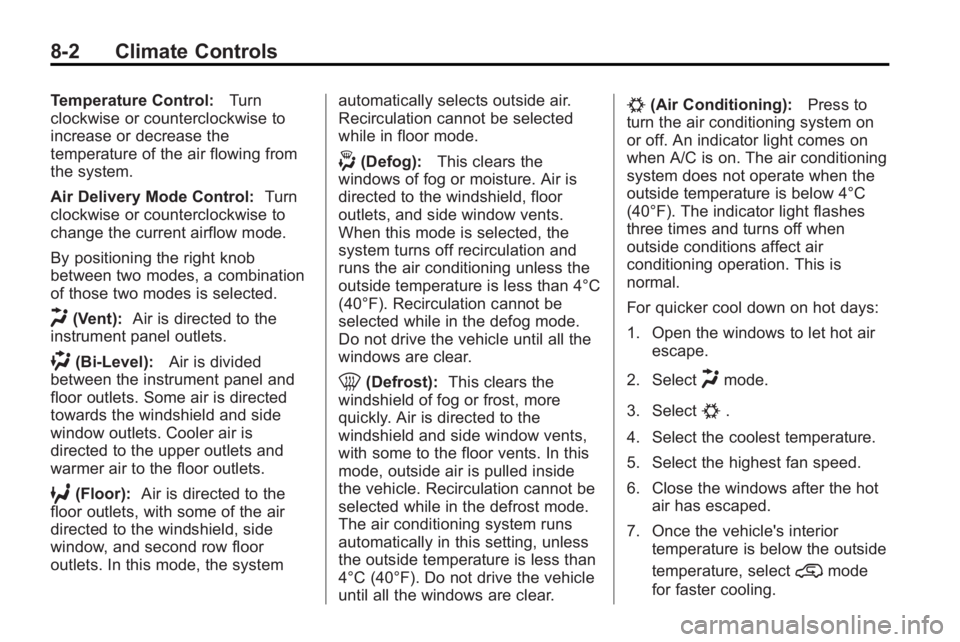
Temperature Control:Turn
clockwise or counterclockwise to
increase or decrease the
temperature of the air flowing from
the system.
Air Delivery Mode Control: Turn
clockwise or counterclockwise to
change the current airflow mode.
By positioning the right knob
between two modes, a combination
of those two modes is selected.
H(Vent): Air is directed to the
instrument panel outlets.
)(Bi-Level): Air is divided
between the instrument panel and
floor outlets. Some air is directed
towards the windshield and side
window outlets. Cooler air is
directed to the upper outlets and
warmer air to the floor outlets.
6(Floor): Air is directed to the
floor outlets, with some of the air
directed to the windshield, side
window, and second row floor
outlets. In this mode, the system automatically selects outside air.
Recirculation cannot be selected
while in floor mode.
-(Defog):
This clears the
windows of fog or moisture. Air is
directed to the windshield, floor
outlets, and side window vents.
When this mode is selected, the
system turns off recirculation and
runs the air conditioning unless the
outside temperature is less than 4°C
(40°F). Recirculation cannot be
selected while in the defog mode.
Do not drive the vehicle until all the
windows are clear.
0(Defrost): This clears the
windshield of fog or frost, more
quickly. Air is directed to the
windshield and side window vents,
with some to the floor vents. In this
mode, outside air is pulled inside
the vehicle. Recirculation cannot be
selected while in the defrost mode.
The air conditioning system runs
automatically in this setting, unless
the outside temperature is less than
4°C (40°F). Do not drive the vehicle
until all the windows are clear.
#(Air Conditioning): Press to
turn the air conditioning system on
or off. An indicator light comes on
when A/C is on. The air conditioning
system does not operate when the
outside temperature is below 4°C
(40°F). The indicator light flashes
three times and turns off when
outside conditions affect air
conditioning operation. This is
normal.
For quicker cool down on hot days:
1. Open the windows to let hot air escape.
2. Select
Hmode.
3. Select
#.
4. Select the coolest temperature.
5. Select the highest fan speed.
6. Close the windows after the hot air has escaped.
7. Once the vehicle's interior temperature is below the outside
temperature, select
@mode
for faster cooling.
Page 241 of 444
Climate Controls 8-3
Using recirculation for long periods
of time could cause the air inside of
the vehicle to become too dry. To
prevent this from happening, after
the inside of the vehicle has cooled,
turn the recirculation mode off.
The air conditioning system
removes moisture from the air, so
water might drip under the vehicle
while idling or after turning off the
engine. This is normal.
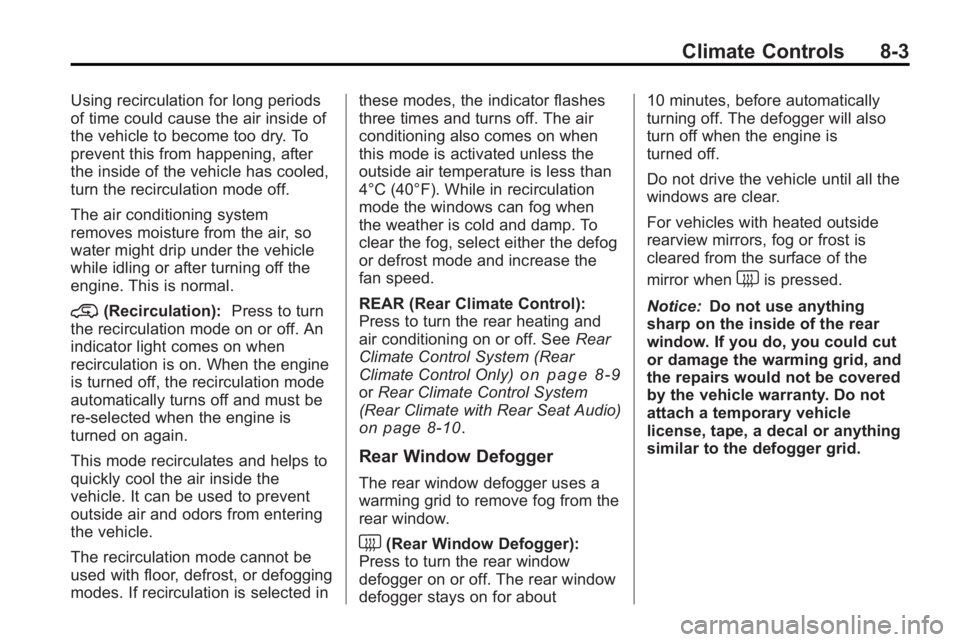
@(Recirculation):Press to turn
the recirculation mode on or off. An
indicator light comes on when
recirculation is on. When the engine
is turned off, the recirculation mode
automatically turns off and must be
re-selected when the engine is
turned on again.
This mode recirculates and helps to
quickly cool the air inside the
vehicle. It can be used to prevent
outside air and odors from entering
the vehicle.
The recirculation mode cannot be
used with floor, defrost, or defogging
modes. If recirculation is selected in these modes, the indicator flashes
three times and turns off. The air
conditioning also comes on when
this mode is activated unless the
outside air temperature is less than
4°C (40°F). While in recirculation
mode the windows can fog when
the weather is cold and damp. To
clear the fog, select either the defog
or defrost mode and increase the
fan speed.
REAR (Rear Climate Control):
Press to turn the rear heating and
air conditioning on or off. See
Rear
Climate Control System (Rear
Climate Control Only)
on page 8‑9or Rear Climate Control System
(Rear Climate with Rear Seat Audio)
on page 8‑10.
Rear Window Defogger
The rear window defogger uses a
warming grid to remove fog from the
rear window.
<(Rear Window Defogger):
Press to turn the rear window
defogger on or off. The rear window
defogger stays on for about 10 minutes, before automatically
turning off. The defogger will also
turn off when the engine is
turned off.
Do not drive the vehicle until all the
windows are clear.
For vehicles with heated outside
rearview mirrors, fog or frost is
cleared from the surface of the
mirror when
sharp on the inside of the rear
window. If you do, you could cut
or damage the warming grid, and
the repairs would not be covered
by the vehicle warranty. Do not
attach a temporary vehicle
license, tape, a decal or anything
similar to the defogger grid.
Page 243 of 444
Climate Controls 8-5
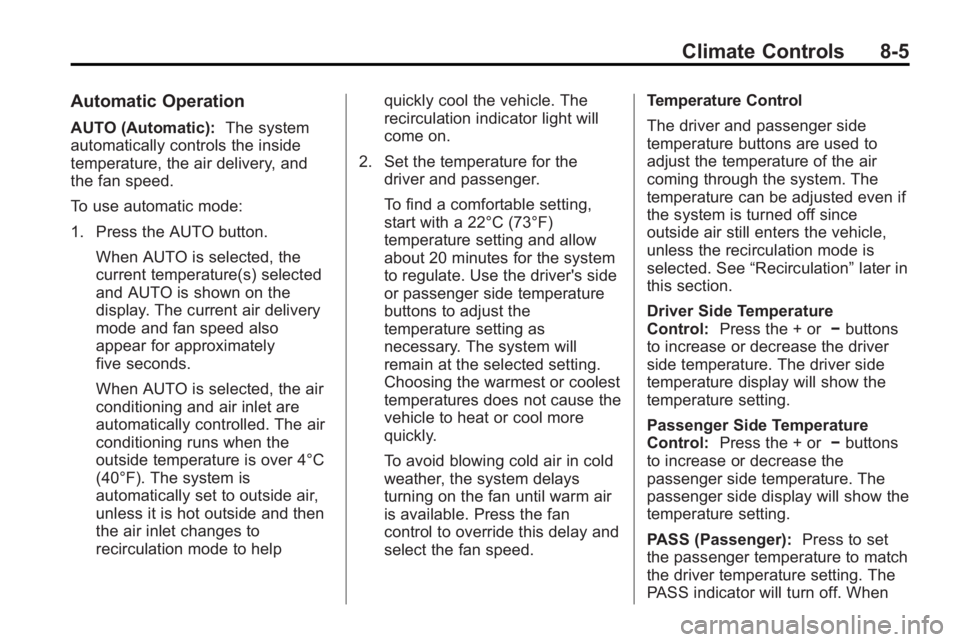
Automatic Operation
AUTO (Automatic):The system
automatically controls the inside
temperature, the air delivery, and
the fan speed.
To use automatic mode:
1. Press the AUTO button.
When AUTO is selected, the
current temperature(s) selected
and AUTO is shown on the
display. The current air delivery
mode and fan speed also
appear for approximately
five seconds.
When AUTO is selected, the air
conditioning and air inlet are
automatically controlled. The air
conditioning runs when the
outside temperature is over 4°C
(40°F). The system is
automatically set to outside air,
unless it is hot outside and then
the air inlet changes to
recirculation mode to help quickly cool the vehicle. The
recirculation indicator light will
come on.
2. Set the temperature for the driver and passenger.
To find a comfortable setting,
start with a 22°C (73°F)
temperature setting and allow
about 20 minutes for the system
to regulate. Use the driver's side
or passenger side temperature
buttons to adjust the
temperature setting as
necessary. The system will
remain at the selected setting.
Choosing the warmest or coolest
temperatures does not cause the
vehicle to heat or cool more
quickly.
To avoid blowing cold air in cold
weather, the system delays
turning on the fan until warm air
is available. Press the fan
control to override this delay and
select the fan speed. Temperature Control
The driver and passenger side
temperature buttons are used to
adjust the temperature of the air
coming through the system. The
temperature can be adjusted even if
the system is turned off since
outside air still enters the vehicle,
unless the recirculation mode is
selected. See
“Recirculation” later in
this section.
Driver Side Temperature
Control: Press the + or −buttons
to increase or decrease the driver
side temperature. The driver side
temperature display will show the
temperature setting.
Passenger Side Temperature
Control: Press the + or −buttons
to increase or decrease the
passenger side temperature. The
passenger side display will show the
temperature setting.
PASS (Passenger): Press to set
the passenger temperature to match
the driver temperature setting. The
PASS indicator will turn off. When
Page 244 of 444
8-6 Climate Controls
the passenger temperature setting
is different than the driver setting,
the PASS indicator comes on.
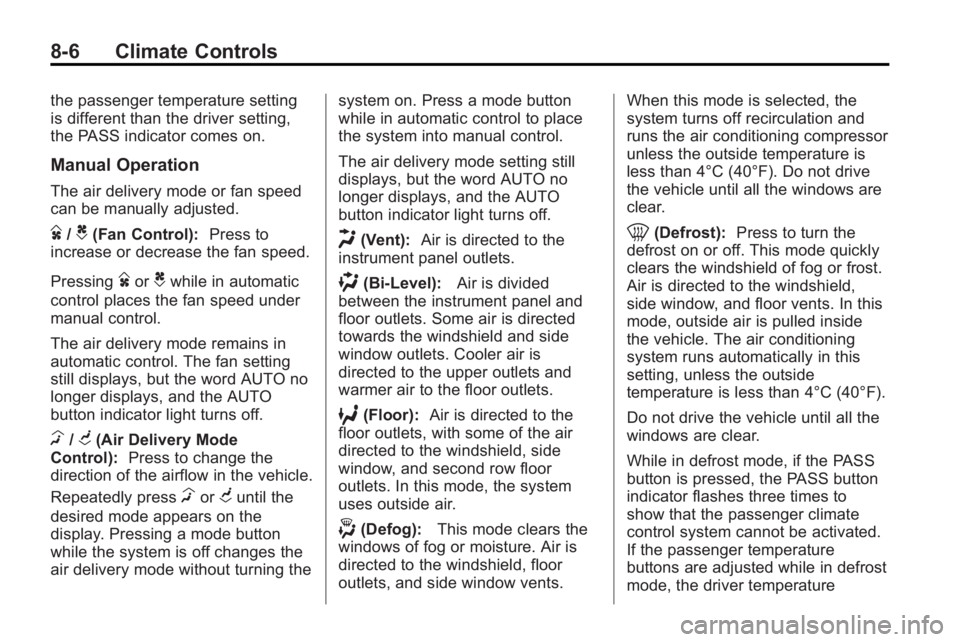
Manual Operation
The air delivery mode or fan speed
can be manually adjusted.
D/C(Fan Control):Press to
increase or decrease the fan speed.
Pressing
DorCwhile in automatic
control places the fan speed under
manual control.
The air delivery mode remains in
automatic control. The fan setting
still displays, but the word AUTO no
longer displays, and the AUTO
button indicator light turns off.
H/G(Air Delivery Mode
Control): Press to change the
direction of the airflow in the vehicle.
Repeatedly press
HorGuntil the
desired mode appears on the
display. Pressing a mode button
while the system is off changes the
air delivery mode without turning the system on. Press a mode button
while in automatic control to place
the system into manual control.
The air delivery mode setting still
displays, but the word AUTO no
longer displays, and the AUTO
button indicator light turns off.
H(Vent):
Air is directed to the
instrument panel outlets.
)(Bi-Level): Air is divided
between the instrument panel and
floor outlets. Some air is directed
towards the windshield and side
window outlets. Cooler air is
directed to the upper outlets and
warmer air to the floor outlets.
6(Floor): Air is directed to the
floor outlets, with some of the air
directed to the windshield, side
window, and second row floor
outlets. In this mode, the system
uses outside air.
-(Defog): This mode clears the
windows of fog or moisture. Air is
directed to the windshield, floor
outlets, and side window vents. When this mode is selected, the
system turns off recirculation and
runs the air conditioning compressor
unless the outside temperature is
less than 4°C (40°F). Do not drive
the vehicle until all the windows are
clear.
0(Defrost):
Press to turn the
defrost on or off. This mode quickly
clears the windshield of fog or frost.
Air is directed to the windshield,
side window, and floor vents. In this
mode, outside air is pulled inside
the vehicle. The air conditioning
system runs automatically in this
setting, unless the outside
temperature is less than 4°C (40°F).
Do not drive the vehicle until all the
windows are clear.
While in defrost mode, if the PASS
button is pressed, the PASS button
indicator flashes three times to
show that the passenger climate
control system cannot be activated.
If the passenger temperature
buttons are adjusted while in defrost
mode, the driver temperature
Page 245 of 444
Climate Controls 8-7
indicator will change. The
passenger temperature will not be
displayed.
When returning to bi-level, vent,
or floor mode, the previous
temperature settings displays in
place of any change made while in
defrost mode.
Air Conditioning
#(Air Conditioning):Press to
turn the air conditioning (A/C) on
and off. An indicator light comes on
when A/C is on.
The A/C does not work when the
outside temperature is below 4°C
(40°F). If
#is pressed the indicator
flashes three times and turns off to
show that the A/C mode is not
available. If the A/C is on and the
outside temperature drops below a
temperature which is too cool for air
conditioning to be effective, the A/C
indicator turns off to show that the
A/C mode has been canceled. On hot days, open the windows
briefly to let hot inside air escape.
This helps reduce the time it takes
for the interior of the vehicle to
cool down.
The air conditioning system
removes moisture from the air, so
water might drip under the vehicle
while idling or after turning off the
engine. This is normal.
@(Recirculation):
Press to turn
the recirculation mode on or off. An
indicator light comes on when
recirculation is on. When the engine
is turned off, the recirculation mode
automatically turns off and must be
re-selected when the engine is
turned on again.
This mode recirculates and helps to
quickly cool the air inside the
vehicle. It can be used to prevent
outside air and odors from entering
the vehicle. The recirculation mode cannot be
used with floor, defog, or defrosting
modes. If recirculation is selected in
these modes, the indicator flashes
three times and turns off. The air
conditioning compressor also comes
on when this mode is activated.
While in recirculation mode the
windows can fog when the weather
is cold and damp. To clear the fog,
select either the defog or defrost
mode and increase the fan speed.
REAR:
Press to turn the rear
heating and air conditioning on or
off. See Rear Climate Control
System (Rear Climate Control Only)
on page 8‑9or Rear Climate
Control System (Rear Climate with
Rear Seat Audio) on page 8‑10.
Page 253 of 444
Driving and Operating 9-3
Medical research shows that alcohol
in a person's system can make
crash injuries worse, especially
injuries to the brain, spinal cord,
or heart. This means that when
anyone who has been
drinking—driver or passenger —is
in a crash, that person's chance of
being killed or permanently disabled
is higher than if the person had not
been drinking.
Control of a Vehicle
The following three systems help to
control the vehicle while
driving —brakes, steering, and
accelerator. At times, as when
driving on snow or ice, it is easy to
ask more of those control systems
than the tires and road can provide.
Meaning, you can lose control of the
vehicle. See StabiliTrak System
on
page 9‑28.
Adding non-dealer/non-retailer
accessories can affect vehicle
performance. See Accessories and
Modifications on page 10‑3.
Braking
See Brake System Warning Lighton page 5‑19.
Braking action involves perception
time and reaction time. Deciding to
push the brake pedal is perception
time. Actually doing it is
reaction time.
Average reaction time is about
three-fourths of a second. But that is
only an average. It might be less
with one driver and as long as two
or three seconds or more with
another. Age, physical condition,
alertness, coordination, and
eyesight all play a part. So do
alcohol, drugs, and frustration. But
even in three-fourths of a second, a
vehicle moving at 100 km/h
(60 mph) travels 20 m (66 ft). That
could be a lot of distance in an
emergency, so keeping enough
space between the vehicle and
others is important.
And, of course, actual stopping
distances vary greatly with the
surface of the road, whether it is pavement or gravel; the condition of
the road, whether it is wet, dry,
or icy; tire tread; the condition of the
brakes; the weight of the vehicle;
and the amount of brake force
applied.
Avoid needless heavy braking.
Some people drive in
spurts
—heavy acceleration
followed by heavy braking —rather
than keeping pace with traffic. This
is a mistake. The brakes might not
have time to cool between hard
stops. The brakes will wear out
much faster with a lot of heavy
braking. Keeping pace with the
traffic and allowing realistic following
distances eliminates a lot of
unnecessary braking. That means
better braking and longer brake life.
If the engine ever stops while the
vehicle is being driven, brake
normally but do not pump the
brakes. If the brakes are pumped,
the pedal could get harder to push
down. If the engine stops, there will
still be some power brake assist but
it will be used when the brake is