light GMC ACADIA 2011 Owners Manual
[x] Cancel search | Manufacturer: GMC, Model Year: 2011, Model line: ACADIA, Model: GMC ACADIA 2011Pages: 478, PDF Size: 5.52 MB
Page 302 of 478
Black plate (30,1)GMC Acadia/Acadia Denali Owner Manual - 2011
9-30 Driving and Operating
Parking Brake
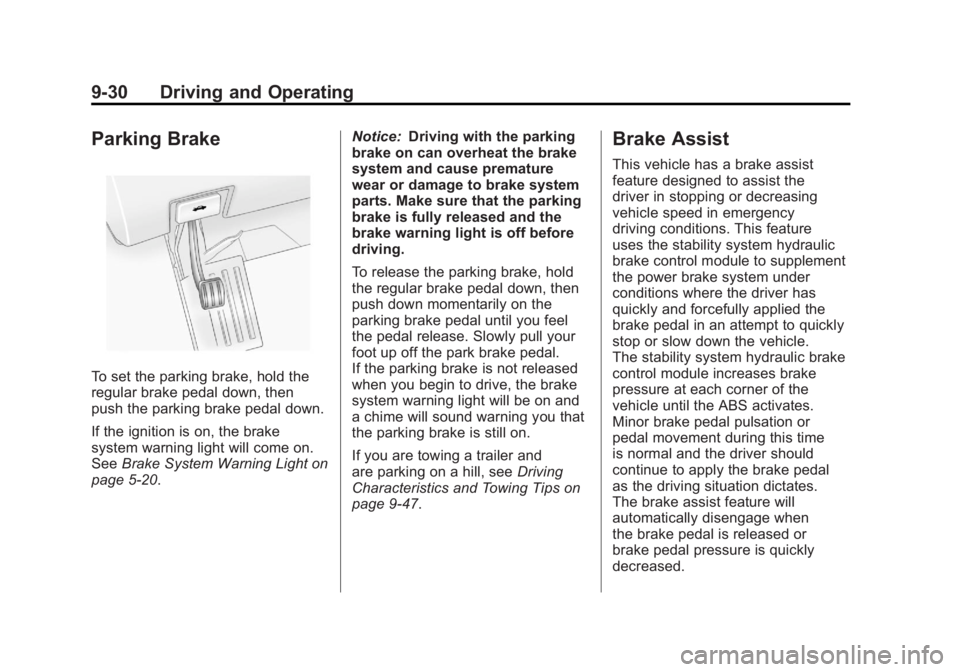
To set the parking brake, hold the
regular brake pedal down, then
push the parking brake pedal down.
If the ignition is on, the brake
system warning light will come on.
SeeBrake System Warning Light on
page 5‑20. Notice:
Driving with the parking
brake on can overheat the brake
system and cause premature
wear or damage to brake system
parts. Make sure that the parking
brake is fully released and the
brake warning light is off before
driving.
To release the parking brake, hold
the regular brake pedal down, then
push down momentarily on the
parking brake pedal until you feel
the pedal release. Slowly pull your
foot up off the park brake pedal.
If the parking brake is not released
when you begin to drive, the brake
system warning light will be on and
a chime will sound warning you that
the parking brake is still on.
If you are towing a trailer and
are parking on a hill, see Driving
Characteristics and Towing Tips on
page 9‑47.
Brake Assist
This vehicle has a brake assist
feature designed to assist the
driver in stopping or decreasing
vehicle speed in emergency
driving conditions. This feature
uses the stability system hydraulic
brake control module to supplement
the power brake system under
conditions where the driver has
quickly and forcefully applied the
brake pedal in an attempt to quickly
stop or slow down the vehicle.
The stability system hydraulic brake
control module increases brake
pressure at each corner of the
vehicle until the ABS activates.
Minor brake pedal pulsation or
pedal movement during this time
is normal and the driver should
continue to apply the brake pedal
as the driving situation dictates.
The brake assist feature will
automatically disengage when
the brake pedal is released or
brake pedal pressure is quickly
decreased.
Page 303 of 478
Black plate (31,1)GMC Acadia/Acadia Denali Owner Manual - 2011
Driving and Operating 9-31
Ride Control Systems
StabiliTrak®System
The vehicle has the StabiliTrak
system which combines antilock
brake, traction and stability control
systems and helps the driver
maintain directional control of the
vehicle in most driving conditions.
When you first start the vehicle
and begin to drive away, the
system performs several diagnostic
checks to ensure there are no
problems. The system may be
heard or felt while it is working.
This is normal and does not
mean there is a problem with the
vehicle. The system should initialize
before the vehicle reaches 32 km/h
(20 mph). In some cases, it may
take approximately 3.2 km (2 miles)
of driving before the system
initializes.
If the system fails to turn on or
activate, one of the following
messages will be displayed on theDriver Information Center (DIC):
SERVICE TRACTION CONTROL,
SERVICE STABILITRAK, the
StabiliTrak light will come on
and stay and four chimes are
heard. If these conditions are
observed, turn the vehicle off, wait
15 seconds, and then turn it back
on again to reset the system. If any
of these messages still appear on
the Driver Information Center (DIC),
the vehicle should be taken in for
service. For more information on
the DIC messages, see
Driver
Information Center (DIC) (With DIC
Buttons) on page 5‑25 orDriver
Information Center (DIC) (Without
DIC Buttons) on page 5‑30.
The StabiliTrak light will flash on the
instrument panel cluster when the
system is both on and activated. The system may be heard or felt
while it is working; this is normal.
The traction control button is located
on the instrument panel.
The traction control part of
StabiliTrak can be turned off by
pressing and releasing the traction
control button.
Traction control can be turned
on by pressing and releasing the
traction control button and the
appropriate TRACTION CONTROL
ON message will be displayed, if not
automatically shut off for any other
reason.
Page 304 of 478
Black plate (32,1)GMC Acadia/Acadia Denali Owner Manual - 2011
9-32 Driving and Operating
When the traction control system
is turned off, the appropriate
TRACTION CONTROL OFF
message will be displayed on
the DIC. The vehicle will still
have brake-traction control when
traction control is off, but will not
be able to use the engine speed
management system. See“Traction
Control Operation” following for
more information.
When the traction control system
has been turned off, system noises
may be heard and felt as a result of
the brake-traction control working.
It is recommended to leave the
system on for normal driving
conditions, but it may be necessary
to turn the system off if the vehicle
is stuck in sand, mud, ice or snow,
and you want to “rock”the vehicle
to attempt to free it. It may also be
necessary to turn off the system
when driving in extreme off-road
conditions where high wheel spin
is required. See If the Vehicle is
Stuck on page 9‑11.Traction Control Operation
The traction control system is part
of the StabiliTrak system. Traction
control limits wheel spin by reducing
engine power to the wheels (engine
speed management) and by
applying the brakes as necessary.
The traction control system is
enabled automatically when the
vehicle is started. It will activate
and the StabiliTrak light will flash
if it senses that any of the wheels
are spinning or beginning to lose
traction while driving. If traction
control is turned off, only the
brake-traction control portion
of traction control will work.
The engine speed management
will be disabled. In this mode,
engine power is not reduced
automatically and the driven
wheels can spin more freely.
This can cause the brake-traction
control to activate constantly. Notice:
If the wheel(s) of one axle
is allowed to spin excessively
while the StabiliTrak®, ABS, brake
warning lights, and any relevant
DIC messages are displayed, the
transfer case could be damaged.
The repairs would not be covered
by the vehicle warranty. Reduce
engine power and do not spin
the wheel(s) excessively while
these lights and messages are
displayed.
The traction control system may
activate on dry or rough roads
or under conditions such as
heavy acceleration while turning or
abrupt upshifts/downshifts of the
transmission. When this happens,
a reduction in acceleration may be
noticed, or a noise or vibration may
be heard. This is normal.
Page 305 of 478
Black plate (33,1)GMC Acadia/Acadia Denali Owner Manual - 2011
Driving and Operating 9-33
If cruise control is being used when
the system activates, the StabiliTrak
light will flash and cruise control will
automatically disengage. Cruise
control may be reengaged when
road conditions allow. SeeCruise
Control on page 9‑33.
StabiliTrak may also turn off
automatically if it determines that
a problem exists with the system.
If the problem does not clear itself
after restarting the vehicle, see your
dealer for service.Cruise Control
With cruise control, a speed of
about 40 km/h (25 mph) or more
can be maintained without keeping
your foot on the accelerator. Cruise
control does not work at speeds
below about 40 km/h (25 mph).
When the brakes are applied, the
cruise control is disengaged.
{WARNING
Cruise control can be dangerous
where you cannot drive safely at
a steady speed. So, do not use
the cruise control on winding
roads or in heavy traffic.
Cruise control can be dangerous
on slippery roads. On such roads,
fast changes in tire traction can
cause excessive wheel slip, and
you could lose control. Do not use
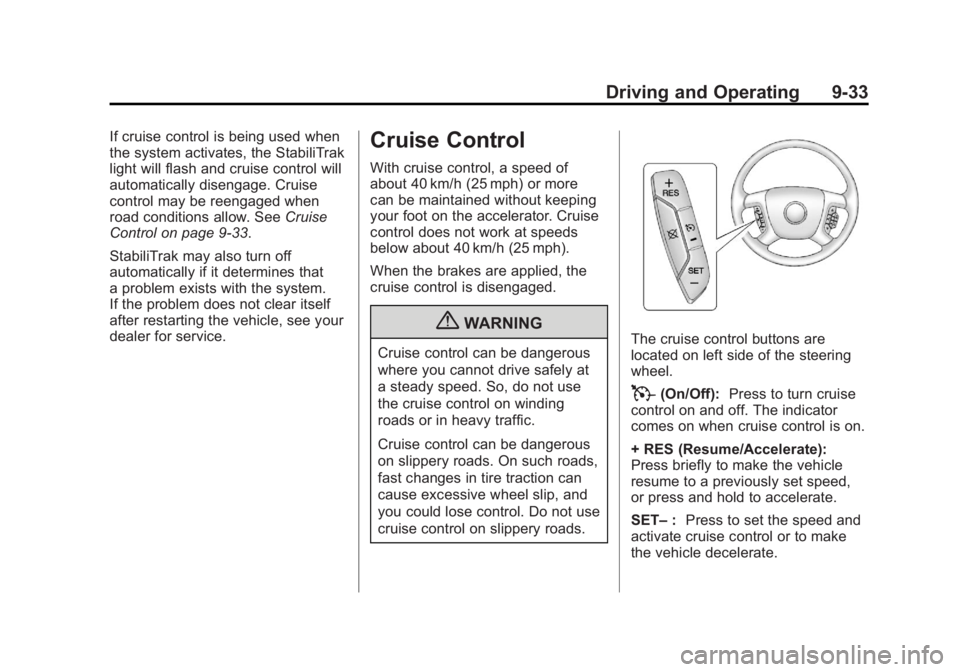
cruise control on slippery roads.The cruise control buttons are
located on left side of the steering
wheel.
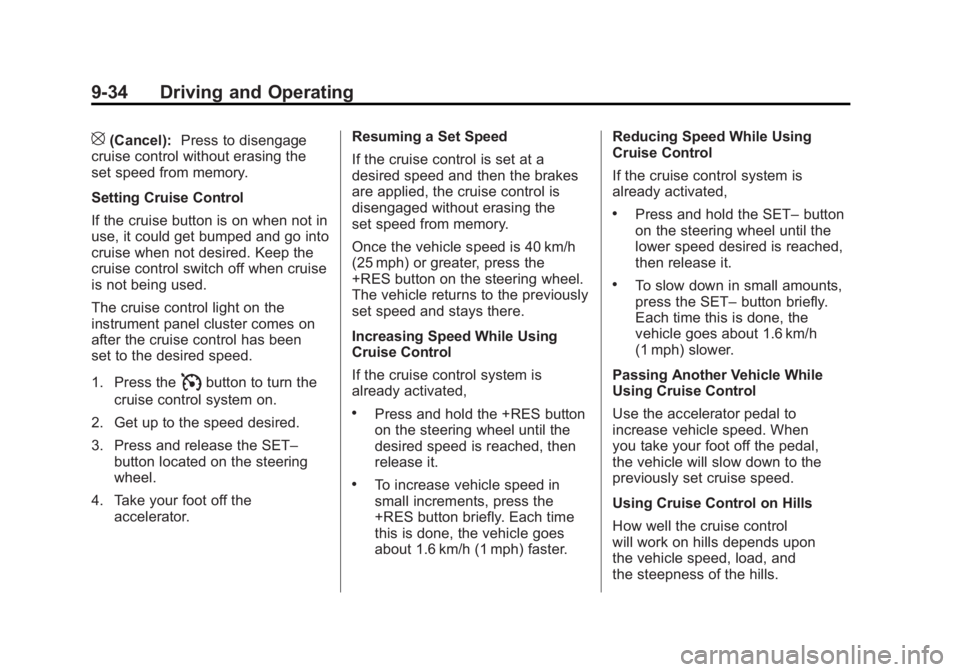
T(On/Off): Press to turn cruise
control on and off. The indicator
comes on when cruise control is on.
+ RES (Resume/Accelerate):
Press briefly to make the vehicle
resume to a previously set speed,
or press and hold to accelerate.
SET– :Press to set the speed and
activate cruise control or to make
the vehicle decelerate.
Page 306 of 478
Black plate (34,1)GMC Acadia/Acadia Denali Owner Manual - 2011
9-34 Driving and Operating
[(Cancel):Press to disengage
cruise control without erasing the
set speed from memory.
Setting Cruise Control
If the cruise button is on when not in
use, it could get bumped and go into
cruise when not desired. Keep the
cruise control switch off when cruise
is not being used.
The cruise control light on the
instrument panel cluster comes on
after the cruise control has been
set to the desired speed.
1. Press the
Ibutton to turn the
cruise control system on.
2. Get up to the speed desired.
3. Press and release the SET– button located on the steering
wheel.
4. Take your foot off the accelerator. Resuming a Set Speed
If the cruise control is set at a
desired speed and then the brakes
are applied, the cruise control is
disengaged without erasing the
set speed from memory.
Once the vehicle speed is 40 km/h
(25 mph) or greater, press the
+RES button on the steering wheel.
The vehicle returns to the previously
set speed and stays there.
Increasing Speed While Using
Cruise Control
If the cruise control system is
already activated,
.Press and hold the +RES button
on the steering wheel until the
desired speed is reached, then
release it.
.To increase vehicle speed in
small increments, press the
+RES button briefly. Each time
this is done, the vehicle goes
about 1.6 km/h (1 mph) faster.Reducing Speed While Using
Cruise Control
If the cruise control system is
already activated,
.Press and hold the SET–
button
on the steering wheel until the
lower speed desired is reached,
then release it.
.To slow down in small amounts,
press the SET– button briefly.
Each time this is done, the
vehicle goes about 1.6 km/h
(1 mph) slower.
Passing Another Vehicle While
Using Cruise Control
Use the accelerator pedal to
increase vehicle speed. When
you take your foot off the pedal,
the vehicle will slow down to the
previously set cruise speed.
Using Cruise Control on Hills
How well the cruise control
will work on hills depends upon
the vehicle speed, load, and
the steepness of the hills.
Page 307 of 478
Black plate (35,1)GMC Acadia/Acadia Denali Owner Manual - 2011
Driving and Operating 9-35
When going up steep hills,
you might have to step on the
accelerator pedal to maintain
the vehicle speed. When going
downhill, you might have to brake
or shift to a lower gear to keep the
vehicle speed down. When the
brakes are applied the cruise
control is disengaged.
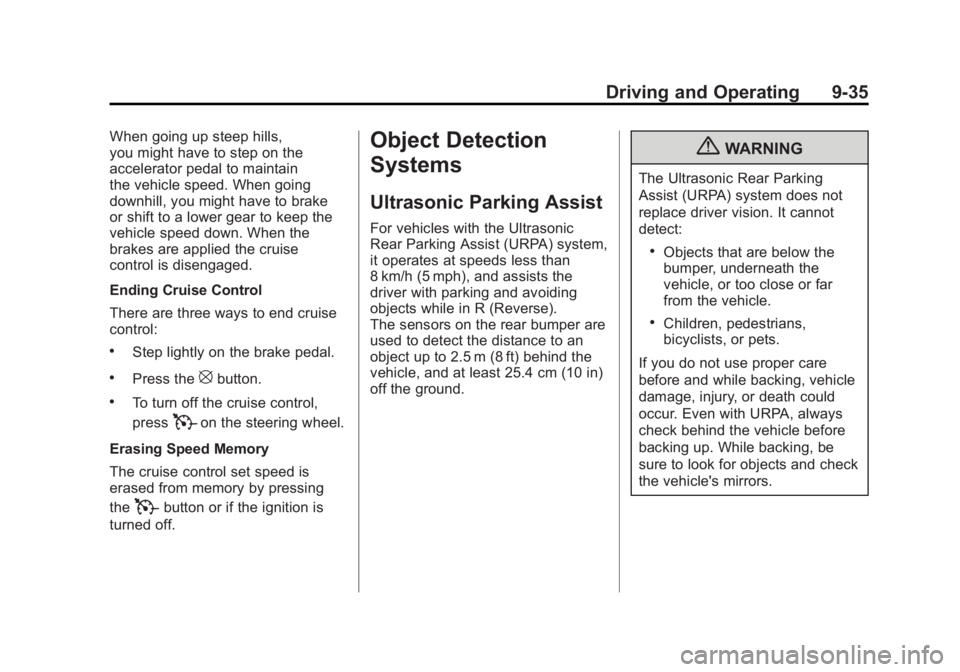
Ending Cruise Control
There are three ways to end cruise
control:
.Step lightly on the brake pedal.
.Press the[button.
.To turn off the cruise control,
press
Ton the steering wheel.
Erasing Speed Memory
The cruise control set speed is
erased from memory by pressing
the
Tbutton or if the ignition is
turned off.
Object Detection
Systems
Ultrasonic Parking Assist
For vehicles with the Ultrasonic
Rear Parking Assist (URPA) system,
it operates at speeds less than
8 km/h (5 mph), and assists the
driver with parking and avoiding
objects while in R (Reverse).
The sensors on the rear bumper are
used to detect the distance to an
object up to 2.5 m (8 ft) behind the
vehicle, and at least 25.4 cm (10 in)
off the ground.
{WARNING
The Ultrasonic Rear Parking
Assist (URPA) system does not
replace driver vision. It cannot
detect:
.Objects that are below the
bumper, underneath the
vehicle, or too close or far
from the vehicle.
.Children, pedestrians,
bicyclists, or pets.
If you do not use proper care
before and while backing, vehicle
damage, injury, or death could
occur. Even with URPA, always
check behind the vehicle before
backing up. While backing, be
sure to look for objects and check
the vehicle's mirrors.
Page 310 of 478
Black plate (38,1)GMC Acadia/Acadia Denali Owner Manual - 2011
9-38 Driving and Operating
Turning the Rear Vision Camera
System Off or On
To turn off the rear vision camera
system, press and hold
z, located
on the inside rearview mirror, until
the left indicator light turns off.
The rear vision camera display
is now disabled.
To turn the rear vision camera
system on again, press and
hold
zuntil the left indicator light
illuminates. The rear vision camera
system display is now enabled and
the display will appear in the mirror
normally.
Vehicles With Navigation
System
The rear vision camera system is
designed to help the driver when
backing up by displaying a view
of the area behind the vehicle.
When the driver shifts the vehicle
into R (Reverse), the video image
automatically appears on the
navigation screen. Once the driver
shifts out of R (Reverse), the
navigation screen will go back to
the last screen that had been
displayed, after a delay.
Turning the Rear Vision Camera
System On or Off
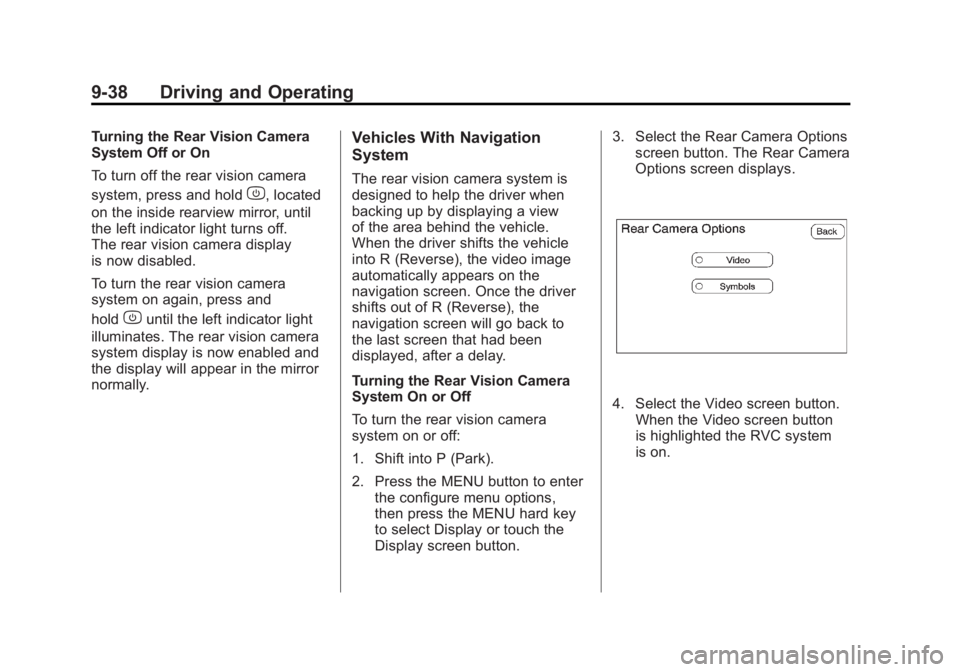
To turn the rear vision camera
system on or off:
1. Shift into P (Park).
2. Press the MENU button to enter the configure menu options,
then press the MENU hard key
to select Display or touch the
Display screen button. 3. Select the Rear Camera Options
screen button. The Rear Camera
Options screen displays.
4. Select the Video screen button.
When the Video screen button
is highlighted the RVC system
is on.
Page 311 of 478
Black plate (39,1)GMC Acadia/Acadia Denali Owner Manual - 2011
Driving and Operating 9-39
The delay that is received after
shifting out of R (Reverse) is
approximately 10 seconds.
The delay can be cancelled by
performing one of the following:
.Pressing a hard key on the
navigation system.
.Shifting in to P (Park).
.Reach a vehicle speed of
5 mph (8 km/h).
There is a message on the rear
vision camera screen that states
“Check Surroundings for Safety”.
Adjusting the Brightness and
Contrast of the Screen
To adjust the brightness and
contrast of the screen, press the
MENU button while the rear vision
camera image is on the display.
Any adjustments made will only
affect the rear vision camera screen.
](Brightness) : Touch the
+ (plus) or –(minus) screen
buttons to increase or decrease
the brightness of the screen.
_(Contrast) : Touch the + (plus)
or –(minus) screen buttons to
increase or decrease the contrast
of the screen.
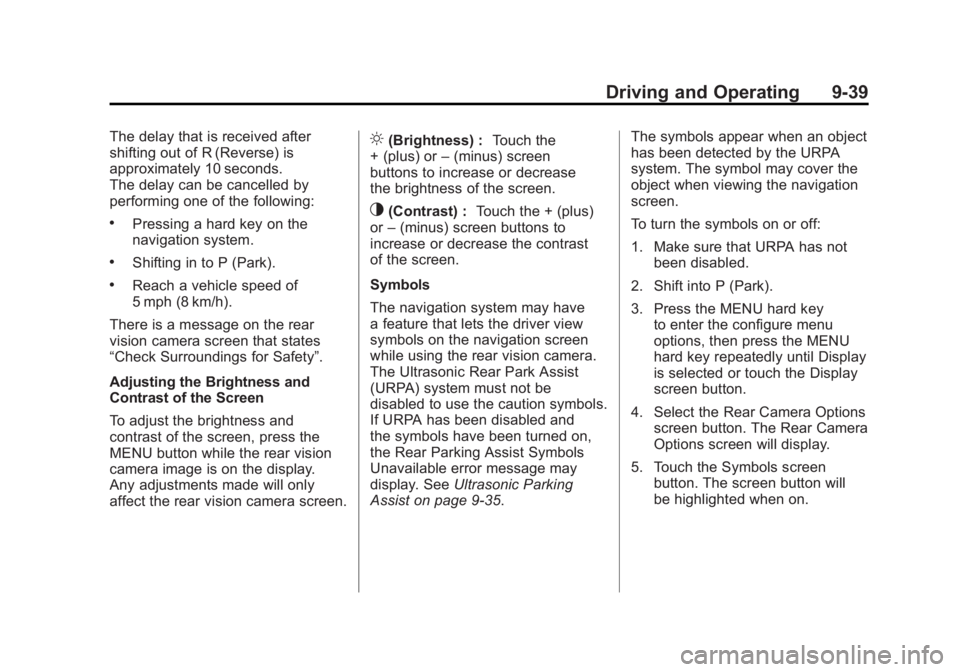
Symbols
The navigation system may have
a feature that lets the driver view
symbols on the navigation screen
while using the rear vision camera.
The Ultrasonic Rear Park Assist
(URPA) system must not be
disabled to use the caution symbols.
If URPA has been disabled and
the symbols have been turned on,
the Rear Parking Assist Symbols
Unavailable error message may
display. See Ultrasonic Parking
Assist on page 9‑35. The symbols appear when an object
has been detected by the URPA
system. The symbol may cover the
object when viewing the navigation
screen.
To turn the symbols on or off:
1. Make sure that URPA has not
been disabled.
2. Shift into P (Park).
3. Press the MENU hard key to enter the configure menu
options, then press the MENU
hard key repeatedly until Display
is selected or touch the Display
screen button.
4. Select the Rear Camera Options screen button. The Rear Camera
Options screen will display.
5. Touch the Symbols screen button. The screen button will
be highlighted when on.
Page 313 of 478
Black plate (41,1)GMC Acadia/Acadia Denali Owner Manual - 2011
Driving and Operating 9-41
When the System Does Not
Seem To Work Properly
The rear vision camera system
might not work properly or display
a clear image if:
.The RVC is turned off.
See“Turning the Rear Camera
System On or Off” earlier in this
section.
.It is dark.
.The sun or the beam of
headlights is shining directly
into the camera lens.
.Ice, snow, mud, or anything else
builds up on the camera lens.
Clean the lens, rinse it with
water, and wipe it with a soft
cloth.
.The back of the vehicle is in
an accident, the position and
mounting angle of the camera
can change or the camera can
be affected. Be sure to have
the camera and its position and
mounting angle checked at your
dealer.
.There are extreme temperature
changes.
The rear vision camera system
display in the rearview mirror
may turn off or not appear as
expected due to one of the following
conditions. If this occurs the left
indicator light on the mirror will
flash.
.A slow flash may indicate a
loss of video signal, or no video
signal present during the reverse
cycle.
.A fast flash may indicate that
the display has been on for
the maximum allowable time
during a reverse cycle, or the
display has reached an Over
Temperature limit.
The fast flash conditions
are used to protect the video
device from high temperature
conditions. Once conditions
return to normal the device will
reset and the green indicator
will stop flashing.
During any of these fault conditions,
the display will be blank and the
indicator will continue to flash as
long as the vehicle is in R (Reverse)
or until the conditions return to
normal.
Pressing and holding
zwhen the
left indicator light is flashing will turn
off the video display along with the
left indicator light.
Page 317 of 478
Black plate (45,1)GMC Acadia/Acadia Denali Owner Manual - 2011
Driving and Operating 9-45
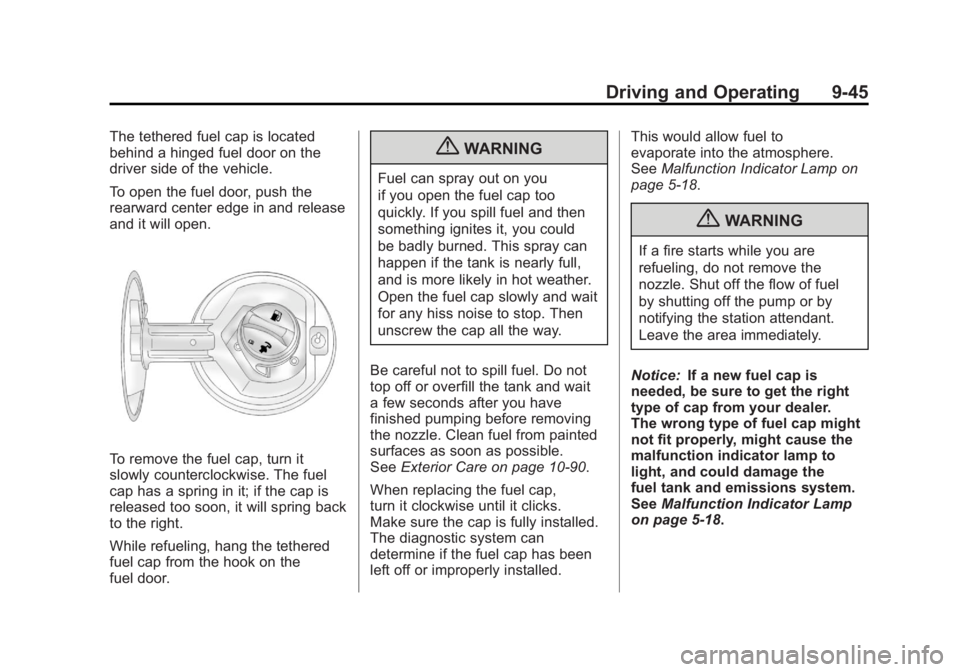
The tethered fuel cap is located
behind a hinged fuel door on the
driver side of the vehicle.
To open the fuel door, push the
rearward center edge in and release
and it will open.
To remove the fuel cap, turn it
slowly counterclockwise. The fuel
cap has a spring in it; if the cap is
released too soon, it will spring back
to the right.
While refueling, hang the tethered
fuel cap from the hook on the
fuel door.
{WARNING
Fuel can spray out on you
if you open the fuel cap too
quickly. If you spill fuel and then
something ignites it, you could
be badly burned. This spray can
happen if the tank is nearly full,
and is more likely in hot weather.
Open the fuel cap slowly and wait
for any hiss noise to stop. Then
unscrew the cap all the way.
Be careful not to spill fuel. Do not
top off or overfill the tank and wait
a few seconds after you have
finished pumping before removing
the nozzle. Clean fuel from painted
surfaces as soon as possible.
See Exterior Care on page 10‑90.
When replacing the fuel cap,
turn it clockwise until it clicks.
Make sure the cap is fully installed.
The diagnostic system can
determine if the fuel cap has been
left off or improperly installed. This would allow fuel to
evaporate into the atmosphere.
See
Malfunction Indicator Lamp on
page 5‑18.
{WARNING
If a fire starts while you are
refueling, do not remove the
nozzle. Shut off the flow of fuel
by shutting off the pump or by
notifying the station attendant.
Leave the area immediately.
Notice: If a new fuel cap is
needed, be sure to get the right
type of cap from your dealer.
The wrong type of fuel cap might
not fit properly, might cause the
malfunction indicator lamp to
light, and could damage the
fuel tank and emissions system.
See Malfunction Indicator Lamp
on page 5‑18.