display GMC ACADIA 2011 Owner's Manual
[x] Cancel search | Manufacturer: GMC, Model Year: 2011, Model line: ACADIA, Model: GMC ACADIA 2011Pages: 478, PDF Size: 5.52 MB
Page 303 of 478
Black plate (31,1)GMC Acadia/Acadia Denali Owner Manual - 2011
Driving and Operating 9-31
Ride Control Systems
StabiliTrak®System
The vehicle has the StabiliTrak
system which combines antilock
brake, traction and stability control
systems and helps the driver
maintain directional control of the
vehicle in most driving conditions.
When you first start the vehicle
and begin to drive away, the
system performs several diagnostic
checks to ensure there are no
problems. The system may be
heard or felt while it is working.
This is normal and does not
mean there is a problem with the
vehicle. The system should initialize
before the vehicle reaches 32 km/h
(20 mph). In some cases, it may
take approximately 3.2 km (2 miles)
of driving before the system
initializes.
If the system fails to turn on or
activate, one of the following
messages will be displayed on theDriver Information Center (DIC):
SERVICE TRACTION CONTROL,
SERVICE STABILITRAK, the
StabiliTrak light will come on
and stay and four chimes are
heard. If these conditions are
observed, turn the vehicle off, wait
15 seconds, and then turn it back
on again to reset the system. If any
of these messages still appear on
the Driver Information Center (DIC),
the vehicle should be taken in for
service. For more information on
the DIC messages, see
Driver
Information Center (DIC) (With DIC
Buttons) on page 5‑25 orDriver
Information Center (DIC) (Without
DIC Buttons) on page 5‑30.
The StabiliTrak light will flash on the
instrument panel cluster when the
system is both on and activated. The system may be heard or felt
while it is working; this is normal.
The traction control button is located
on the instrument panel.
The traction control part of
StabiliTrak can be turned off by
pressing and releasing the traction
control button.
Traction control can be turned
on by pressing and releasing the
traction control button and the
appropriate TRACTION CONTROL
ON message will be displayed, if not
automatically shut off for any other
reason.
Page 304 of 478
Black plate (32,1)GMC Acadia/Acadia Denali Owner Manual - 2011
9-32 Driving and Operating
When the traction control system
is turned off, the appropriate
TRACTION CONTROL OFF
message will be displayed on
the DIC. The vehicle will still
have brake-traction control when
traction control is off, but will not
be able to use the engine speed
management system. See“Traction
Control Operation” following for
more information.
When the traction control system
has been turned off, system noises
may be heard and felt as a result of
the brake-traction control working.
It is recommended to leave the
system on for normal driving
conditions, but it may be necessary
to turn the system off if the vehicle
is stuck in sand, mud, ice or snow,
and you want to “rock”the vehicle
to attempt to free it. It may also be
necessary to turn off the system
when driving in extreme off-road
conditions where high wheel spin
is required. See If the Vehicle is
Stuck on page 9‑11.Traction Control Operation
The traction control system is part
of the StabiliTrak system. Traction
control limits wheel spin by reducing
engine power to the wheels (engine
speed management) and by
applying the brakes as necessary.
The traction control system is
enabled automatically when the
vehicle is started. It will activate
and the StabiliTrak light will flash
if it senses that any of the wheels
are spinning or beginning to lose
traction while driving. If traction
control is turned off, only the
brake-traction control portion
of traction control will work.
The engine speed management
will be disabled. In this mode,
engine power is not reduced
automatically and the driven
wheels can spin more freely.
This can cause the brake-traction
control to activate constantly. Notice:
If the wheel(s) of one axle
is allowed to spin excessively
while the StabiliTrak®, ABS, brake
warning lights, and any relevant
DIC messages are displayed, the
transfer case could be damaged.
The repairs would not be covered
by the vehicle warranty. Reduce
engine power and do not spin
the wheel(s) excessively while
these lights and messages are
displayed.
The traction control system may
activate on dry or rough roads
or under conditions such as
heavy acceleration while turning or
abrupt upshifts/downshifts of the
transmission. When this happens,
a reduction in acceleration may be
noticed, or a noise or vibration may
be heard. This is normal.
Page 308 of 478
Black plate (36,1)GMC Acadia/Acadia Denali Owner Manual - 2011
9-36 Driving and Operating
How the System Works
URPA comes on automatically
when the shift lever is moved into
R (Reverse). A single tone sounds
to indicate the system is working.
URPA operates only at speeds less
than 8 km/h (5 mph).
An obstacle is indicated by audible
beeps. The interval between the
beeps becomes shorter as the
vehicle gets closer to the obstacle.
When the distance is less than
30 cm (12 in) the beeps are
continuous.
To be detected, objects must be at
least 25.4 cm (10 in) off the ground
and below liftgate level. Objects
must also be within 2.5 m (8 ft) from
the rear bumper. This distance may
be less during warmer or humid
weather.
The system can be disabled through
the Driver Information Center (DIC).
See“Park Assist” underVehicle
Personalization (With DIC Buttons)
on page 5‑47 for more information.
When the System Does Not
Seem to Work Properly
If the URPA system does not
activate due to a temporary
condition, the message PARK
ASSIST OFF or PARK ASST
BLOCKED SEE OWNERS
MANUAL will be displayed
on the DIC.
SERVICE PARK ASSIST: If this
message occurs, take the vehicle
to your dealer to repair the system.
PARK ASSIST OFF: This message
occurs if the driver disables the
system.
PARK ASST BLOCKED SEE
OWNERS MANUAL: This
message can occur under the
following conditions:
.The ultrasonic sensors are not
clean. Keep the vehicle's rear
bumper free of mud, dirt, snow,
ice and slush. For cleaning
instructions, see Exterior Care
on page 10‑90.
.The park assist sensors are
covered by frost or ice. Frost or
ice can form around and behind
the sensors and may not always
be seen; this can occur after
washing the vehicle in cold
weather. The message may
not clear until the frost or ice
has melted.
.A trailer was attached to the
vehicle, or a bicycle or an
object was hanging out of the
liftgate during the last drive
cycle. Once the attached object
is removed, URPA will return
to normal operation.
.A tow bar is attached to the
vehicle.
.The vehicle's bumper is
damaged. Take the vehicle to
your dealer to repair the system.
.Other conditions may affect
system performance, such as
vibrations from a jackhammer or
the compression of air brakes on
a very large truck.
Page 309 of 478
Black plate (37,1)GMC Acadia/Acadia Denali Owner Manual - 2011
Driving and Operating 9-37
Rear Vision
Camera (RVC)
The vehicle may have a Rear Vision
Camera system. Read this entire
section before using it.
{WARNING
The Rear Vision Camera (RVC)
system does not replace driver
vision. RVC does not:
.Detect objects that are
outside the camera's field
of view, below the bumper,
or underneath the vehicle.
.Detect children, pedestrians,
bicyclists, or pets.(Continued)
WARNING (Continued)
Do not back the vehicle by only
looking at the RVC screen, or use
the screen during longer, higher
speed backing maneuvers or
where there could be cross-traffic.
Your judged distances using the
screen will differ from actual
distances.
If you do not use proper care
before backing up, you could
hit a vehicle, child, pedestrian,
bicyclist, or pet, resulting in
vehicle damage, injury, or death.
Even though the vehicle has
the RVC system, always check
carefully before backing up by
checking behind and around the
vehicle.
Vehicles Without Navigation
System
The rear vision camera system is
designed to help the driver when
backing up by displaying a view
of the area behind the vehicle.
When the key is in the ON/RUN
position and the driver shifts the
vehicle into R (Reverse), the video
image automatically appears on
the inside rear view mirror. Once
the driver shifts out of R (Reverse),
the video image automatically
disappears from the inside rear
view mirror.
Page 310 of 478
Black plate (38,1)GMC Acadia/Acadia Denali Owner Manual - 2011
9-38 Driving and Operating
Turning the Rear Vision Camera
System Off or On
To turn off the rear vision camera
system, press and hold
z, located
on the inside rearview mirror, until
the left indicator light turns off.
The rear vision camera display
is now disabled.
To turn the rear vision camera
system on again, press and
hold
zuntil the left indicator light
illuminates. The rear vision camera
system display is now enabled and
the display will appear in the mirror
normally.
Vehicles With Navigation
System
The rear vision camera system is
designed to help the driver when
backing up by displaying a view
of the area behind the vehicle.
When the driver shifts the vehicle
into R (Reverse), the video image
automatically appears on the
navigation screen. Once the driver
shifts out of R (Reverse), the
navigation screen will go back to
the last screen that had been
displayed, after a delay.
Turning the Rear Vision Camera
System On or Off
To turn the rear vision camera
system on or off:
1. Shift into P (Park).
2. Press the MENU button to enter the configure menu options,
then press the MENU hard key
to select Display or touch the
Display screen button. 3. Select the Rear Camera Options
screen button. The Rear Camera
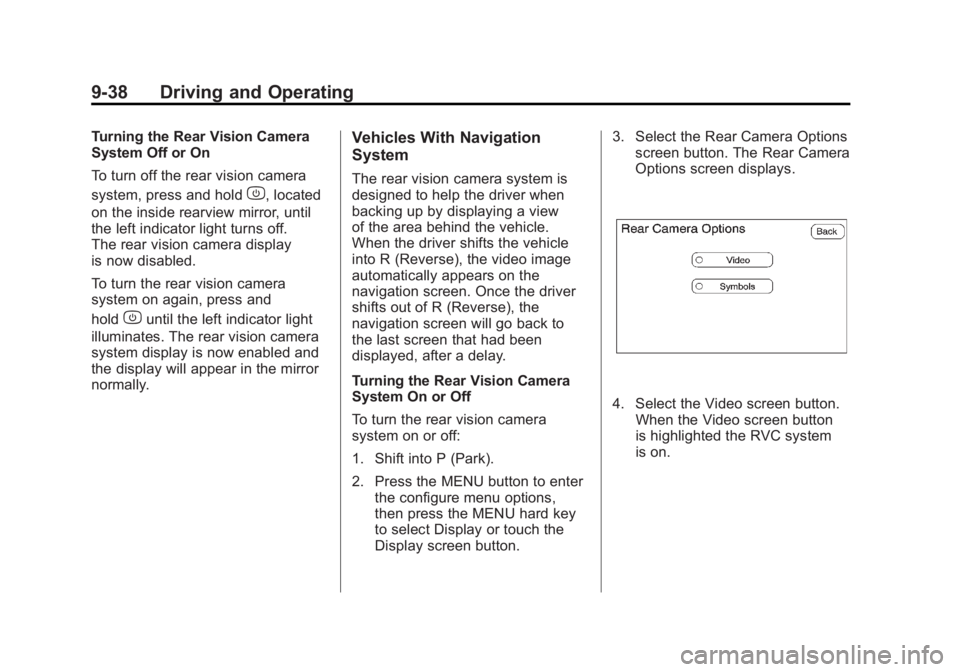
Options screen displays.
4. Select the Video screen button.
When the Video screen button
is highlighted the RVC system
is on.
Page 311 of 478
Black plate (39,1)GMC Acadia/Acadia Denali Owner Manual - 2011
Driving and Operating 9-39
The delay that is received after
shifting out of R (Reverse) is
approximately 10 seconds.
The delay can be cancelled by
performing one of the following:
.Pressing a hard key on the
navigation system.
.Shifting in to P (Park).
.Reach a vehicle speed of
5 mph (8 km/h).
There is a message on the rear
vision camera screen that states
“Check Surroundings for Safety”.
Adjusting the Brightness and
Contrast of the Screen
To adjust the brightness and
contrast of the screen, press the
MENU button while the rear vision
camera image is on the display.
Any adjustments made will only
affect the rear vision camera screen.
](Brightness) : Touch the
+ (plus) or –(minus) screen
buttons to increase or decrease
the brightness of the screen.
_(Contrast) : Touch the + (plus)
or –(minus) screen buttons to
increase or decrease the contrast
of the screen.
Symbols
The navigation system may have
a feature that lets the driver view
symbols on the navigation screen
while using the rear vision camera.
The Ultrasonic Rear Park Assist
(URPA) system must not be
disabled to use the caution symbols.
If URPA has been disabled and
the symbols have been turned on,
the Rear Parking Assist Symbols
Unavailable error message may
display. See Ultrasonic Parking
Assist on page 9‑35. The symbols appear when an object
has been detected by the URPA
system. The symbol may cover the
object when viewing the navigation
screen.
To turn the symbols on or off:
1. Make sure that URPA has not
been disabled.
2. Shift into P (Park).
3. Press the MENU hard key to enter the configure menu
options, then press the MENU
hard key repeatedly until Display
is selected or touch the Display
screen button.
4. Select the Rear Camera Options screen button. The Rear Camera
Options screen will display.
5. Touch the Symbols screen button. The screen button will
be highlighted when on.
Page 312 of 478
Black plate (40,1)GMC Acadia/Acadia Denali Owner Manual - 2011
9-40 Driving and Operating
Rear Vision Camera Error
Messages
Service Rear Vision Camera
System:This message can display
when the system is not receiving
information it requires from other
vehicle systems.
If any other problem occurs or if a
problem persists, see your dealer.
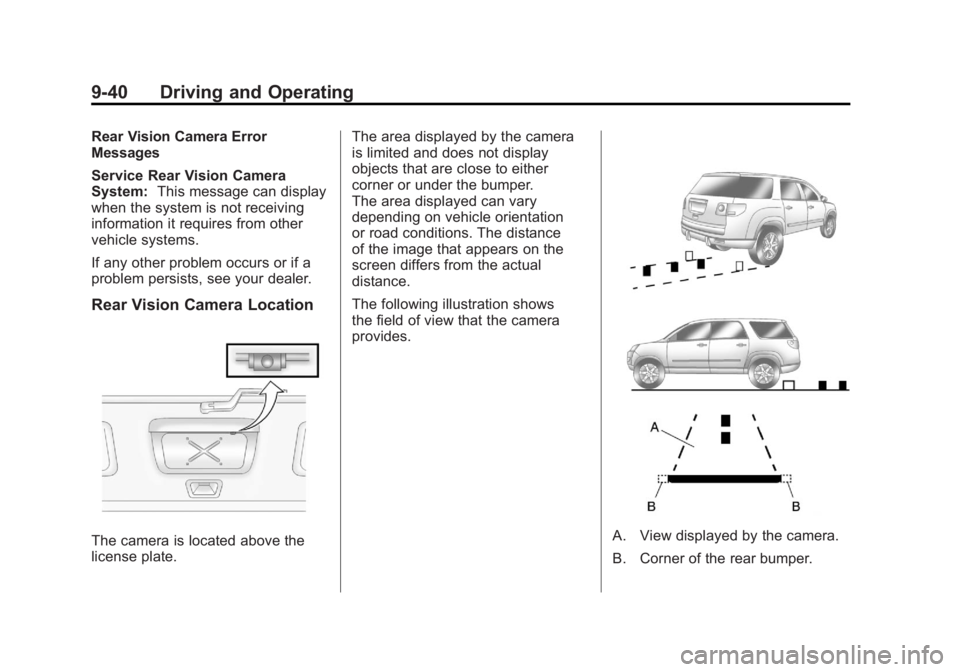
Rear Vision Camera Location
The camera is located above the
license plate. The area displayed by the camera
is limited and does not display
objects that are close to either
corner or under the bumper.
The area displayed can vary
depending on vehicle orientation
or road conditions. The distance
of the image that appears on the
screen differs from the actual
distance.
The following illustration shows
the field of view that the camera
provides.A. View displayed by the camera.
B. Corner of the rear bumper.
Page 313 of 478
Black plate (41,1)GMC Acadia/Acadia Denali Owner Manual - 2011
Driving and Operating 9-41
When the System Does Not
Seem To Work Properly
The rear vision camera system
might not work properly or display
a clear image if:
.The RVC is turned off.
See“Turning the Rear Camera
System On or Off” earlier in this
section.
.It is dark.
.The sun or the beam of
headlights is shining directly
into the camera lens.
.Ice, snow, mud, or anything else
builds up on the camera lens.
Clean the lens, rinse it with
water, and wipe it with a soft
cloth.
.The back of the vehicle is in
an accident, the position and
mounting angle of the camera
can change or the camera can
be affected. Be sure to have
the camera and its position and
mounting angle checked at your
dealer.
.There are extreme temperature
changes.
The rear vision camera system
display in the rearview mirror
may turn off or not appear as
expected due to one of the following
conditions. If this occurs the left
indicator light on the mirror will
flash.
.A slow flash may indicate a
loss of video signal, or no video
signal present during the reverse
cycle.
.A fast flash may indicate that
the display has been on for
the maximum allowable time
during a reverse cycle, or the
display has reached an Over
Temperature limit.
The fast flash conditions
are used to protect the video
device from high temperature
conditions. Once conditions
return to normal the device will
reset and the green indicator
will stop flashing.
During any of these fault conditions,
the display will be blank and the
indicator will continue to flash as
long as the vehicle is in R (Reverse)
or until the conditions return to
normal.
Pressing and holding
zwhen the
left indicator light is flashing will turn
off the video display along with the
left indicator light.
Page 337 of 478
Black plate (9,1)GMC Acadia/Acadia Denali Owner Manual - 2011
Vehicle Care 10-9
Notice:Do not add too much
oil. Oil levels above or below
the acceptable operating range
shown on the dipstick are harmful
to the engine. If you find that
you have an oil level above the
operating range, i.e., the engine
has so much oil that the oil level
gets above the cross-hatched
area that shows the proper
operating range, the engine
could be damaged. You should
drain out the excess oil or limit
driving of the vehicle and seek a
service professional to remove
the excess amount of oil.
See Engine Compartment Overview
on page 10‑6 for the location of the
engine oil fill cap.
Add enough oil to put the level
somewhere in the proper operating
range. Push the dipstick all the way
back in when through.Selecting the Right Engine Oil
Selecting the right engine oil
depends on both the proper oil
specification and viscosity grade:
Specification
Use and ask for engine oils with
the dexos™ certification mark.
Oils meeting the requirements of
the vehicle should have the dexos
certification mark on the container.
This certification mark indicates that
the oil has been approved to the
dexos specification.
This vehicle was filled at the factory
with dexos‐approved engine oil. Notice:
Use only engine oil
that is approved to the dexos
specification or an equivalent
engine oil of the appropriate
viscosity grade. Engine
oils approved to the dexos
specification will show the
dexos symbol on the container.
Failure to use the recommended
engine oil or equivalent can
result in engine damage not
covered by the vehicle warranty.
If you are unsure whether the
oil is approved to the dexos
specification, ask your service
provider.
Use of Substitute Engine Oils if
dexos is unavailable: In the event
that dexos‐approved engine oil is
not available at an oil change or
for maintaining proper oil level,
you may use substitute engine oil
displaying the API Starburst symbol
and of SAE 5W-30 viscosity grade.
Page 339 of 478
Black plate (11,1)GMC Acadia/Acadia Denali Owner Manual - 2011
Vehicle Care 10-11
Engine Oil Additives/Engine
Oil Flushes
Do not add anything to the oil.
The recommended oils with the
dexos specification and displaying
the dexos certification mark are all
that is needed for good performance
and engine protection.
Engine oil system flushes are not
recommended and could cause
engine damage not covered by
the vehicle warranty.
What to Do with Used Oil
Used engine oil contains certain
elements that can be unhealthy for
your skin and could even cause
cancer. Do not let used oil stay on
your skin for very long. Clean your
skin and nails with soap and water,
or a good hand cleaner. Wash or
properly dispose of clothing or rags
containing used engine oil. See the
manufacturer's warnings about the
use and disposal of oil products.
Used oil can be a threat to the
environment. If you change your
own oil, be sure to drain all the
oil from the filter before disposal.
Never dispose of oil by putting it
in the trash or pouring it on the
ground, into sewers, or into streams
or bodies of water. Recycle it by
taking it to a place that collects
used oil.
Engine Oil Life System
When to Change Engine Oil
This vehicle has a computer system
that indicates when to change the
engine oil and filter. This is based
on engine revolutions and engine
temperature, and not on mileage.
Based on driving conditions, the
mileage at which an oil change is
indicated can vary considerably.
For the oil life system to work
properly, the system must be reset
every time the oil is changed.
When the system has calculated
that oil life has been diminished,
it indicates that an oil change is
necessary. A CHANGE ENGINE
OIL SOON message comes on.
Change the oil as soon as possible
within the next 600 miles (1 000 km).