lock GMC ACADIA 2011 Owner's Manual
[x] Cancel search | Manufacturer: GMC, Model Year: 2011, Model line: ACADIA, Model: GMC ACADIA 2011Pages: 478, PDF Size: 5.52 MB
Page 404 of 478
Black plate (76,1)GMC Acadia/Acadia Denali Owner Manual - 2011
10-76 Vehicle Care
{WARNING
Rust or dirt on a wheel, or on the
parts to which it is fastened, can
make wheel nuts become loose
after time. The wheel could come
off and cause an accident. When
changing a wheel, remove any
rust or dirt from places where the
wheel attaches to the vehicle.
In an emergency, use a cloth or
a paper towel to do this; but be
sure to use a scraper or wire
brush later, if needed, to get all
the rust or dirt off. SeeIf a Tire
Goes Flat on page 10‑61.
{WARNING
Never use oil or grease on bolts
or nuts because the nuts might
come loose. The vehicle's wheel
could fall off, causing a crash. 10. Remove any rust or dirt from
the wheel bolts, mounting
surfaces, and spare wheel.
11. Place the spare tire on the wheel mounting surface.
12. Put the nuts on by hand by turning them clockwise until
the wheel is held against the
mounting surface. Make sure
the rounded end is toward the
wheel.
13. Lower the vehicle by attaching the lug wrench to the jack
and turning the wrench
counterclockwise. Lower
the jack completely.
{WARNING
Wheel nuts that are improperly or
incorrectly tightened can cause
the wheels to become loose or
come off. The wheel nuts should
be tightened with a torque wrench
(Continued)
WARNING (Continued)
to the proper torque specification
after replacing. Follow the torque
specification supplied by the
aftermarket manufacturer when
using accessory locking wheel
nuts. SeeCapacities and
Specifications on page 12‑2
for original equipment wheel
nut torque specifications.
Notice: Improperly tightened
wheel nuts can lead to brake
pulsation and rotor damage.
To avoid expensive brake repairs,
evenly tighten the wheel nuts
in the proper sequence and to
the proper torque specification.
See Capacities and Specifications
on page 12‑2 for the wheel nut
torque specification.
Page 408 of 478
Black plate (80,1)GMC Acadia/Acadia Denali Owner Manual - 2011
10-80 Vehicle Care
3. Reinstall the wing bolt (B) byturning clockwise.
4. To replace the cover, line up the tab at the front of the cover with
the notch in the cover opening.
Push the cover in place and
make sure that the rear clips are
in the slots and push the cover
closed.
Store the center cap or the plastic
bolt‐on wheel covers until a full
size tire is put back on the vehicle.
When you replace the compact
spare with a full‐size tire, reinstall
the bolt‐on wheel covers or the
center cap. Hand‐tighten them
over the wheel nuts, using the
lug wrench.Secondary Latch System
This vehicle has an underbody
mounted tire hoist assembly that
has a secondary latch system.
It is designed to stop the compact
spare tire from suddenly falling off
the vehicle if the cable holding the
spare tire is damaged. For the
secondary latch to work, the tire
must be stowed with the valve stem
pointing down. See Tire Changing
on page 10‑71 for instructions on
storing the spare tire correctly.
{WARNING
Before beginning this procedure
read all the instructions. Failure
to read and follow the instructions
could damage the hoist assembly
and you and others could get
hurt. Read and follow the
instructions listed next. To release the spare tire from the
secondary latch:
{WARNING
Someone standing too close
during the procedure could be
injured by the jack. If the spare
tire does not slide off the jack
completely, make sure no one is
behind you or on either side of
you as you pull the jack out from
under the spare.
1. If the cable is not visible, start this procedure at Step 3.
Page 409 of 478
Black plate (81,1)GMC Acadia/Acadia Denali Owner Manual - 2011
Vehicle Care 10-81
All‐Wheel‐Drive Vehicle shown
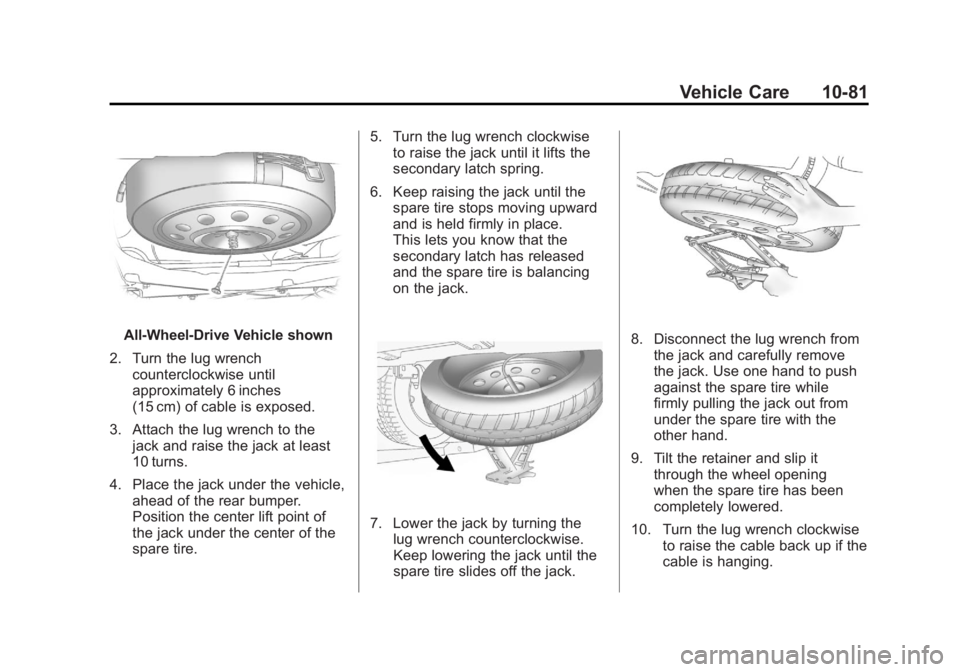
2. Turn the lug wrench counterclockwise until
approximately 6 inches
(15 cm) of cable is exposed.
3. Attach the lug wrench to the jack and raise the jack at least
10 turns.
4. Place the jack under the vehicle, ahead of the rear bumper.
Position the center lift point of
the jack under the center of the
spare tire. 5. Turn the lug wrench clockwise
to raise the jack until it lifts the
secondary latch spring.
6. Keep raising the jack until the spare tire stops moving upward
and is held firmly in place.
This lets you know that the
secondary latch has released
and the spare tire is balancing
on the jack.
7. Lower the jack by turning thelug wrench counterclockwise.
Keep lowering the jack until the
spare tire slides off the jack.
8. Disconnect the lug wrench from
the jack and carefully remove
the jack. Use one hand to push
against the spare tire while
firmly pulling the jack out from
under the spare tire with the
other hand.
9. Tilt the retainer and slip it through the wheel opening
when the spare tire has been
completely lowered.
10. Turn the lug wrench clockwise to raise the cable back up if the
cable is hanging.
Page 416 of 478
Black plate (88,1)GMC Acadia/Acadia Denali Owner Manual - 2011
10-88 Vehicle Care
Dinghy Towing
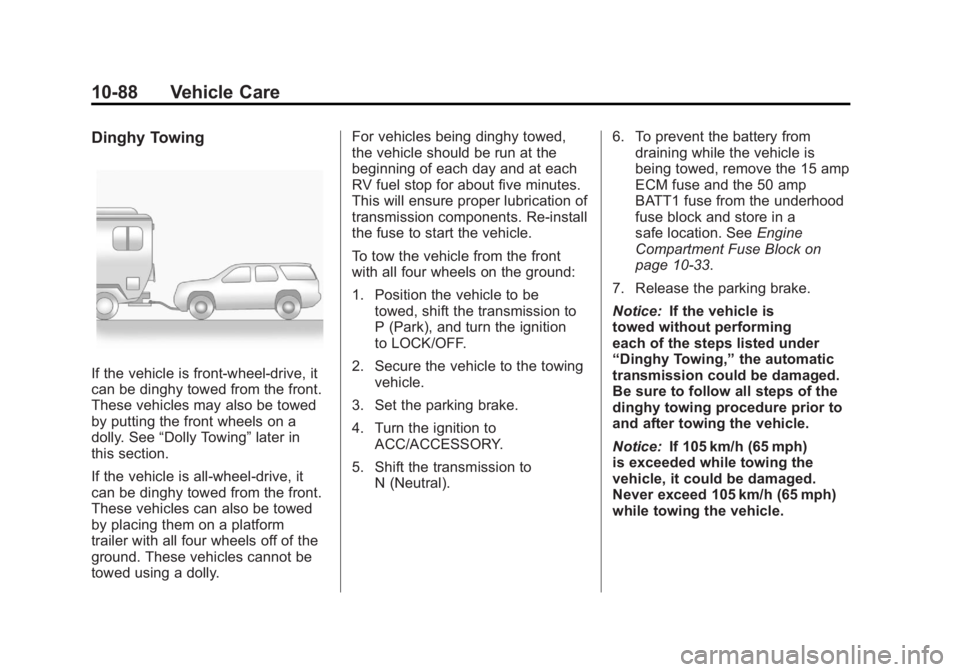
If the vehicle is front-wheel‐drive, it
can be dinghy towed from the front.
These vehicles may also be towed
by putting the front wheels on a
dolly. See“Dolly Towing” later in
this section.
If the vehicle is all‐wheel‐drive, it
can be dinghy towed from the front.
These vehicles can also be towed
by placing them on a platform
trailer with all four wheels off of the
ground. These vehicles cannot be
towed using a dolly. For vehicles being dinghy towed,
the vehicle should be run at the
beginning of each day and at each
RV fuel stop for about five minutes.
This will ensure proper lubrication of
transmission components. Re-install
the fuse to start the vehicle.
To tow the vehicle from the front
with all four wheels on the ground:
1. Position the vehicle to be
towed, shift the transmission to
P (Park), and turn the ignition
to LOCK/OFF.
2. Secure the vehicle to the towing vehicle.
3. Set the parking brake.
4. Turn the ignition to ACC/ACCESSORY.
5. Shift the transmission to N (Neutral). 6. To prevent the battery from
draining while the vehicle is
being towed, remove the 15 amp
ECM fuse and the 50 amp
BATT1 fuse from the underhood
fuse block and store in a
safe location. See Engine
Compartment Fuse Block on
page 10‑33.
7. Release the parking brake.
Notice: If the vehicle is
towed without performing
each of the steps listed under
“Dinghy Towing,” the automatic
transmission could be damaged.
Be sure to follow all steps of the
dinghy towing procedure prior to
and after towing the vehicle.
Notice: If 105 km/h (65 mph)
is exceeded while towing the
vehicle, it could be damaged.
Never exceed 105 km/h (65 mph)
while towing the vehicle.
Page 417 of 478
Black plate (89,1)GMC Acadia/Acadia Denali Owner Manual - 2011
Vehicle Care 10-89
Once the destination is reached:
1. Set the parking brake.
2. Reinstall the fuses in theunderhood fuse block.
3. Shift the transmission to P (Park), turn the ignition to
LOCK/OFF and remove the
key from the ignition.
4. Disconnect the vehicle from the towing vehicle.
Notice: Do not tow a vehicle
with the front drive wheels on
the ground if one of the front tires
is a compact spare tire. Towing
with two different tire sizes on the
front of the vehicle can cause
severe damage to the
transmission.Dolly Towing
(All-Wheel‐Drive Vehicles)
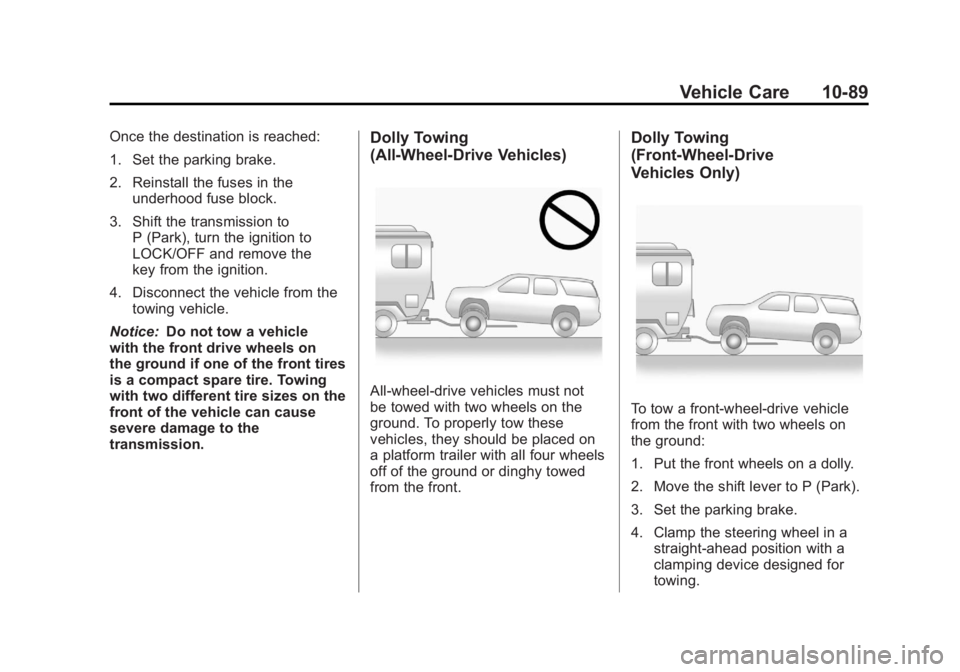
All-wheel‐drive vehicles must not
be towed with two wheels on the
ground. To properly tow these
vehicles, they should be placed on
a platform trailer with all four wheels
off of the ground or dinghy towed
from the front.
Dolly Towing
(Front-Wheel‐ Drive
Vehicles Only)
To tow a front-wheel‐drive vehicle
from the front with two wheels on
the ground:
1. Put the front wheels on a dolly.
2. Move the shift lever to P (Park).
3. Set the parking brake.
4. Clamp the steering wheel in a
straight-ahead position with a
clamping device designed for
towing.
Page 427 of 478
Black plate (99,1)GMC Acadia/Acadia Denali Owner Manual - 2011
Vehicle Care 10-99
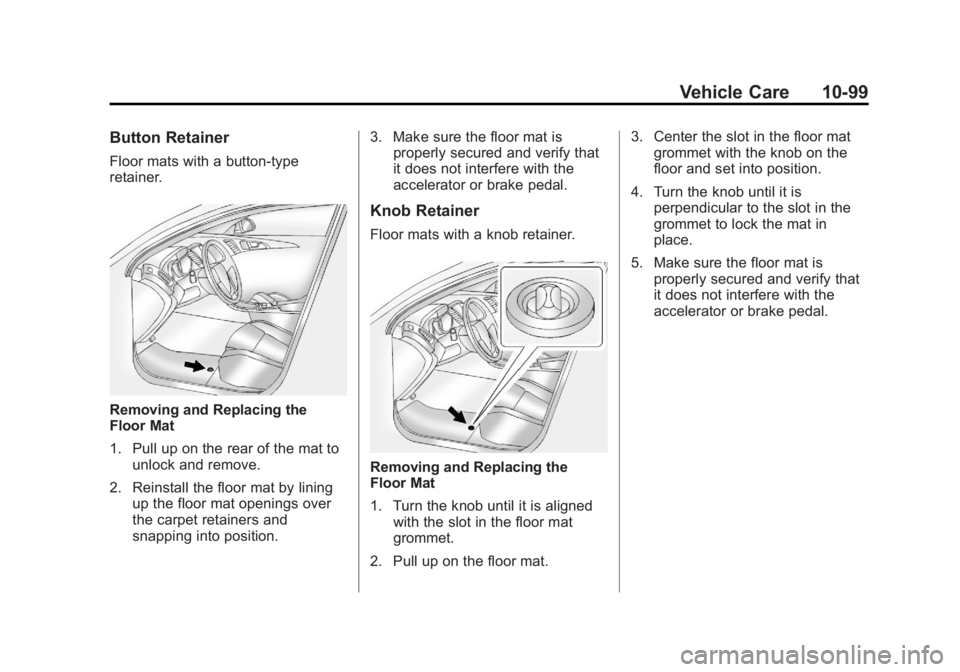
Button Retainer
Floor mats with a button-type
retainer.
Removing and Replacing the
Floor Mat
1. Pull up on the rear of the mat tounlock and remove.
2. Reinstall the floor mat by lining up the floor mat openings over
the carpet retainers and
snapping into position. 3. Make sure the floor mat is
properly secured and verify that
it does not interfere with the
accelerator or brake pedal.
Knob Retainer
Floor mats with a knob retainer.
Removing and Replacing the
Floor Mat
1. Turn the knob until it is aligned
with the slot in the floor mat
grommet.
2. Pull up on the floor mat. 3. Center the slot in the floor mat
grommet with the knob on the
floor and set into position.
4. Turn the knob until it is perpendicular to the slot in the
grommet to lock the mat in
place.
5. Make sure the floor mat is properly secured and verify that
it does not interfere with the
accelerator or brake pedal.
Page 432 of 478
Black plate (4,1)GMC Acadia/Acadia Denali Owner Manual - 2011
11-4 Service and Maintenance
.Body hinges and latches, key
lock cylinders, hood latch
assemblies, secondary latches,
pivots, spring anchor and
release pawl, hood and door
hinges, rear folding seats,
and liftgate hinges lubrication.
SeeRecommended Fluids
and Lubricants on page 11‑7.
More frequent lubrication may
be required when the vehicle
is exposed to a corrosive
environment. Applying silicone
grease on weatherstrips with a
clean cloth makes them last
longer, seal better, and not
stick or squeak.
.Restraint system component
check. See Safety System
Check on page 3‑31.
.Fuel system inspection for
damage or leaks.
.Exhaust system and nearby heat
shields inspection for loose or
damaged components.
Additional Required Services
Every 12 000 km/7,500 Miles
.Rotate tires. Tires should
be rotated every 12 000 km/
7,500 miles. See Tire Rotation
on page 10‑52.
At Each Fuel Stop
.Engine oil level check.
See Engine Oil on page 10‑8.
.Engine coolant level check.
SeeEngine Coolant on
page 10‑15.
.Windshield washer fluid level
check. See Washer Fluid on
page 10‑23. Once a Month
.Tire inflation check. See
Tire
Pressure on page 10‑45.
.Tire wear inspection. See Tire
Inspection on page 10‑51.
.Sunroof track and seal
inspection, if equipped.
See Sunroof on page 2‑22.
Once a Year
.See Starter Switch Check on
page 10‑27.
.See Automatic Transmission
Shift Lock Control Function
Check on page 10‑28.
.See Ignition Transmission Lock
Check on page 10‑28.
.See Park Brake and P (Park)
Mechanism Check on
page 10‑28.
Page 436 of 478
Black plate (8,1)GMC Acadia/Acadia Denali Owner Manual - 2011
11-8 Service and Maintenance
UsageFluid/Lubricant
Automatic Transmission DEXRON
®-VI Automatic Transmission Fluid.
Carrier Assembly —Differential
(Rear Drive Module) and Transfer Case (Power Transfer Unit) SAE 75W‐90 Synthetic Axle Lubricant (GM Part No. 89021677,
in Canada 89021678).
Key Lock Cylinders Multi-Purpose Lubricant, Superlube (GM Part No. 12346241,
in Canada 10953474).
Hood Latch Assembly, Secondary Latch, Pivots, Spring Anchor, and Release Pawl Lubriplate Lubricant Aerosol (GM Part No. 12346293, in Canada 992723)
or lubricant meeting requirements of NLGI #2, Category LB or GC-LB.
Hood and Door Hinges and Rear Folding Seat Multi-Purpose Lubricant, Superlube (GM Part No. 12346241,
in Canada 10953474).
Weatherstrip Conditioning Weatherstrip Lubricant (GM Part No. 3634770, in Canada 10953518) or
Dielectric Silicone Grease (GM Part No. 12345579, in Canada 992887).
Page 453 of 478
Black plate (9,1)GMC Acadia/Acadia Denali Owner Manual - 2011
Customer Information 13-9
Coverage
Services are provided up to
5 years/160 000 km (100,000 miles),
whichever comes first.
In the U.S., anyone driving the
vehicle is covered. In Canada, a
person driving the vehicle without
permission from the owner is not
covered.
Roadside Assistance is not a
part of the New Vehicle Limited
Warranty. GMC and General Motors
of Canada Limited reserve the right
to make any changes or discontinue
the Roadside Assistance program
at any time without notification.
GMC and General Motors of
Canada Limited reserve the right
to limit services or payment to an
owner or driver if they decide the
claims are made too often, or the
same type of claim is made many
times.
Services Provided
.Emergency Fuel Delivery:
Delivery of enough fuel for the
vehicle to get to the nearest
service station.
.Lock‐Out Service:Service to
unlock the vehicle if you are
locked out. A remote unlock
may be available if you have
OnStar
®. For security reasons,
the driver must present
identification before this
service is given.
.Emergency Tow From a Public
Road or Highway: Tow to the
nearest GMC dealer for warranty
service, or if the vehicle was
in a crash and cannot be driven.
Assistance is also given when
the vehicle is stuck in the sand,
mud, or snow.
.Flat Tire Change: Service to
change a flat tire with the spare
tire. The spare tire, if equipped,
must be in good condition and properly inflated. It is the owner's
responsibility for the repair or
replacement of the tire if it is
not covered by the warranty.
.Battery Jump Start:
Service to
jump start a dead battery.
.Trip Routing Service: Detailed
maps of North America when
requested either with the
most direct route or the most
scenic route. Additional travel
information is also available.
Allow three weeks for delivery.
.Trip Interruption Benefits
and Assistance: If your
trip is interrupted due to
a warranty failure, incidental
expenses may be reimbursed
during the 5 years/(160 000 km)
100,000 miles Powertrain
warranty period. Items
considered are hotel, meals,
and rental car.
Page 454 of 478
Black plate (10,1)GMC Acadia/Acadia Denali Owner Manual - 2011
13-10 Customer Information
Services Not Included in
Roadside Assistance
.Impound towing caused by
violation of any laws.
.Legal fines.
.Mounting, dismounting,
or changing of snow tires,
chains, or other traction devices.
.Towing or services for vehicles
driven on a non-public road or
highway.
Services Specific to
Canadian‐Purchased Vehicles
.Fuel Delivery:Reimbursement
is approximately $5 Canadian.
Diesel fuel delivery may be
restricted. Propane and other
fuels are not provided through
this service.
.Lock-Out Service: Vehicle
registration is required.
.Trip Routing Service: Limit of
six requests per year.
.Trip Interruption Benefits
and Assistance: Must be
over 250 kilometres from
where your trip was started
to qualify. General Motors
of Canada Limited requires
pre-authorization, original
detailed receipts, and a copy
of the repair orders. Once
authorization has been received,
the Roadside Assistance advisor
will help to make arrangements
and explain how to receive
payment.
.Alternative Service: If
assistance cannot be provided
right away, the Roadside
Assistance advisor may
give permission to get local
emergency road service.
You will receive payment, up to
$100, after sending the original
receipt to Roadside Assistance.
Mechanical failures may be
covered, however any cost for
parts and labor for repairs not
covered by the warranty are
the owner responsibility.
Roadside Assistance
Program (Mexico)
Roadside Assistance is available
24 hours a day, 365 days of
the year.
For detailed information about
Roadside Assistance, please
see the brochure provided with
your new vehicle or visit our
website at: www.gmc.com.mx.
Navigate the site and click on
“Asistencia en el Camino.” E-mail
correspondence should be
sent to: [email protected].
To contact Roadside Assistance by
phone, use the following numbers:
Mexico
01-800-466-0801
United States
1-866-466-8902
Canada
1-800-268-6800