Air conditioning GMC ACADIA 2011 User Guide
[x] Cancel search | Manufacturer: GMC, Model Year: 2011, Model line: ACADIA, Model: GMC ACADIA 2011Pages: 478, PDF Size: 5.52 MB
Page 265 of 478
Black plate (7,1)GMC Acadia/Acadia Denali Owner Manual - 2011
Climate Controls 8-7
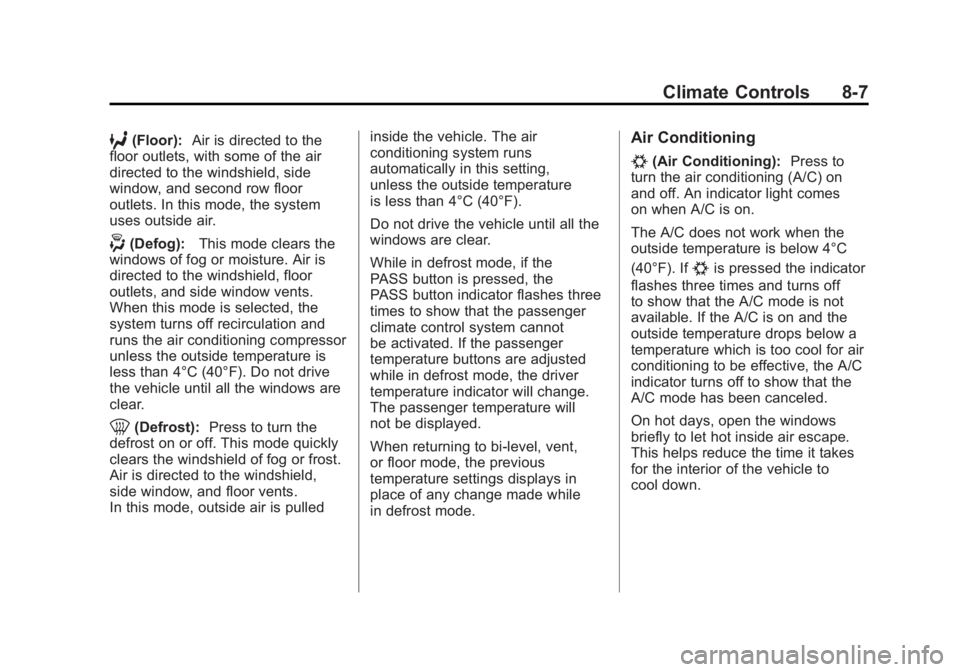
6(Floor):Air is directed to the
floor outlets, with some of the air
directed to the windshield, side
window, and second row floor
outlets. In this mode, the system
uses outside air.
-(Defog): This mode clears the
windows of fog or moisture. Air is
directed to the windshield, floor
outlets, and side window vents.
When this mode is selected, the
system turns off recirculation and
runs the air conditioning compressor
unless the outside temperature is
less than 4°C (40°F). Do not drive
the vehicle until all the windows are
clear.
0(Defrost): Press to turn the
defrost on or off. This mode quickly
clears the windshield of fog or frost.
Air is directed to the windshield,
side window, and floor vents.
In this mode, outside air is pulled inside the vehicle. The air
conditioning system runs
automatically in this setting,
unless the outside temperature
is less than 4°C (40°F).
Do not drive the vehicle until all the
windows are clear.
While in defrost mode, if the
PASS button is pressed, the
PASS button indicator flashes three
times to show that the passenger
climate control system cannot
be activated. If the passenger
temperature buttons are adjusted
while in defrost mode, the driver
temperature indicator will change.
The passenger temperature will
not be displayed.
When returning to bi-level, vent,
or floor mode, the previous
temperature settings displays in
place of any change made while
in defrost mode.
Air Conditioning
#(Air Conditioning):
Press to
turn the air conditioning (A/C) on
and off. An indicator light comes
on when A/C is on.
The A/C does not work when the
outside temperature is below 4°C
(40°F). If
#is pressed the indicator
flashes three times and turns off
to show that the A/C mode is not
available. If the A/C is on and the
outside temperature drops below a
temperature which is too cool for air
conditioning to be effective, the A/C
indicator turns off to show that the
A/C mode has been canceled.
On hot days, open the windows
briefly to let hot inside air escape.
This helps reduce the time it takes
for the interior of the vehicle to
cool down.
Page 266 of 478
Black plate (8,1)GMC Acadia/Acadia Denali Owner Manual - 2011
8-8 Climate Controls
The air conditioning system
removes moisture from the air, so
water might drip under the vehicle
while idling or after turning off the
engine. This is normal.
@(Recirculation):Press to turn
the recirculation mode on or off.
An indicator light comes on when
recirculation is on. When the engine
is turned off, the recirculation mode
automatically turns off and must
be re‐selected when the engine is
turned on again.
This mode recirculates and helps
to quickly cool the air inside the
vehicle. It can be used to prevent
outside air and odors from entering
the vehicle. The recirculation mode cannot be
used with floor, defog, or defrosting
modes. If recirculation is selected in
these modes, the indicator flashes
three times and turns off. The air
conditioning compressor also comes
on when this mode is activated.
While in recirculation mode the
windows can fog when the weather
is cold and damp. To clear the fog,
select either the defog or defrost
mode and increase the fan speed.
REAR:
Press to turn the rear
heating and air conditioning on
or off. See Rear Climate Control
System (Rear Climate Control Only)
on page 8‑10 orRear Climate
Control System (Rear Climate with
Rear Seat Audio) on page 8‑11.
Rear Window Defogger
The rear window defogger uses a
warming grid to remove fog from the
rear window.
<(Rear Window Defogger):
Press to turn the rear window
defogger on or off. The rear
window defogger stays on for
about 10 minutes, before turning
off. The defogger also turns off
when the engine is turned off.
Do not drive the vehicle until
all the windows are clear.
For vehicles with heated outside
rearview mirrors, fog or frost is
cleared from the surface of the
mirror when the rear window
defog button is pressed.
Notice: Do not use a razor blade
or sharp object to clear the inside
rear window. Do not adhere
anything to the defogger grid
lines in the rear glass. These
actions may damage the rear
defogger. Repairs would not be
covered by your warranty.
Page 349 of 478
Black plate (21,1)GMC Acadia/Acadia Denali Owner Manual - 2011
Vehicle Care 10-21
If No Steam Is Coming from
the Engine Compartment
If an engine overheat warning is
displayed but no steam can be seen
or heard, the problem may not be
too serious. Sometimes the engine
can get a little too hot when the
vehicle:
.Climbs a long hill on a hot day
.Stops after high-speed driving
.Idles for long periods in traffic
.Tows a trailerIf the overheat warning is displayed
with no sign of steam:
1. Turn the air conditioning off.
2. Turn the heater on to the highest
temperature and to the highest
fan speed. Open the windows as
necessary.
3. If in a traffic jam, shift to N (Neutral), otherwise, shift
to the highest gear while
driving —D (Drive) or L (Low).
If the temperature overheat gauge
is no longer in the overheat zone
or an overheat warning no longer
displays, the vehicle can be driven. Continue to drive the vehicle slow
for about 10 minutes. Keep a safe
vehicle distance from the car in front
of you. If the warning does not come
back on, continue to drive normally.
If the warning continues, pull
over, stop, and park the vehicle
right away.
If there is no sign of steam, idle
the engine for three minutes while
parked. If the warning is still
displayed, turn off the engine until it
cools down. Also, see
“Overheated
Engine Protection Operating Mode”
next in this section.
Page 361 of 478

Black plate (33,1)GMC Acadia/Acadia Denali Owner Manual - 2011
Vehicle Care 10-33
Engine Compartment
Fuse Block
The underhood fuse block is located
in the engine compartment, on the
passenger side of the vehicle.
Lift the cover for access to the
fuse/relay block.
Notice:Spilling liquid on any
electrical component on the
vehicle may damage it. Always
keep the covers on any electrical
component. To remove fuses, hold the end of the fuse between your thumb and index
finger and pull straight out.
The vehicle may not be equipped
with all of the fuses, relays, and
features shown.
Fuses Usage
A/C CLUTCH Air Conditioning
Clutch
ABS MTR Antilock Braking
System (ABS)
Motor
Page 362 of 478
Black plate (34,1)GMC Acadia/Acadia Denali Owner Manual - 2011
10-34 Vehicle Care
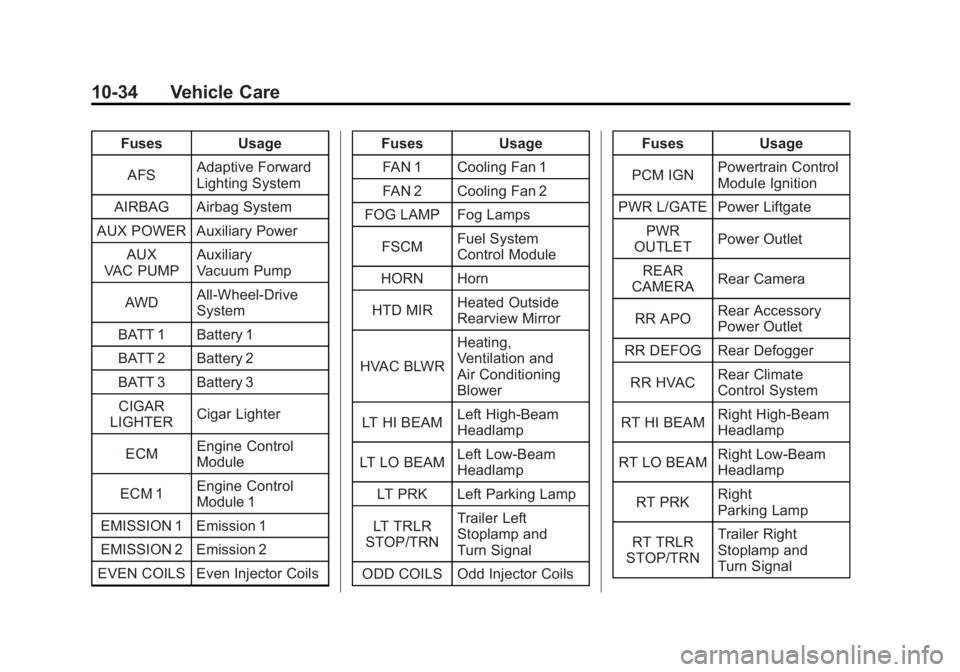
FusesUsage
AFS Adaptive Forward
Lighting System
AIRBAG Airbag System
AUX POWER Auxiliary Power AUX
VAC PUMP Auxiliary
Vacuum Pump
AWD All-Wheel-Drive
System
BATT 1 Battery 1
BATT 2 Battery 2
BATT 3 Battery 3
CIGAR
LIGHTER Cigar Lighter
ECM Engine Control
Module
ECM 1 Engine Control
Module 1
EMISSION 1 Emission 1
EMISSION 2 Emission 2
EVEN COILS Even Injector Coils Fuses
Usage
FAN 1 Cooling Fan 1
FAN 2 Cooling Fan 2
FOG LAMP Fog Lamps
FSCM Fuel System
Control Module
HORN Horn
HTD MIR Heated Outside
Rearview Mirror
HVAC BLWR Heating,
Ventilation and
Air Conditioning
Blower
LT HI BEAM Left High-Beam
Headlamp
LT LO BEAM Left Low‐Beam
Headlamp
LT PRK Left Parking Lamp
LT TRLR
STOP/TRN Trailer Left
Stoplamp and
Turn Signal
ODD COILS Odd Injector Coils Fuses
Usage
PCM IGN Powertrain Control
Module Ignition
PWR L/GATE Power Liftgate PWR
OUTLET Power Outlet
REAR
CAMERA Rear Camera
RR APO Rear Accessory
Power Outlet
RR DEFOG Rear Defogger
RR HVAC Rear Climate
Control System
RT HI BEAM Right High‐Beam
Headlamp
RT LO BEAM Right Low‐Beam
Headlamp
RT PRK Right
Parking Lamp
RT TRLR
STOP/TRN Trailer Right
Stoplamp and
Turn Signal
Page 363 of 478
Black plate (35,1)GMC Acadia/Acadia Denali Owner Manual - 2011
Vehicle Care 10-35
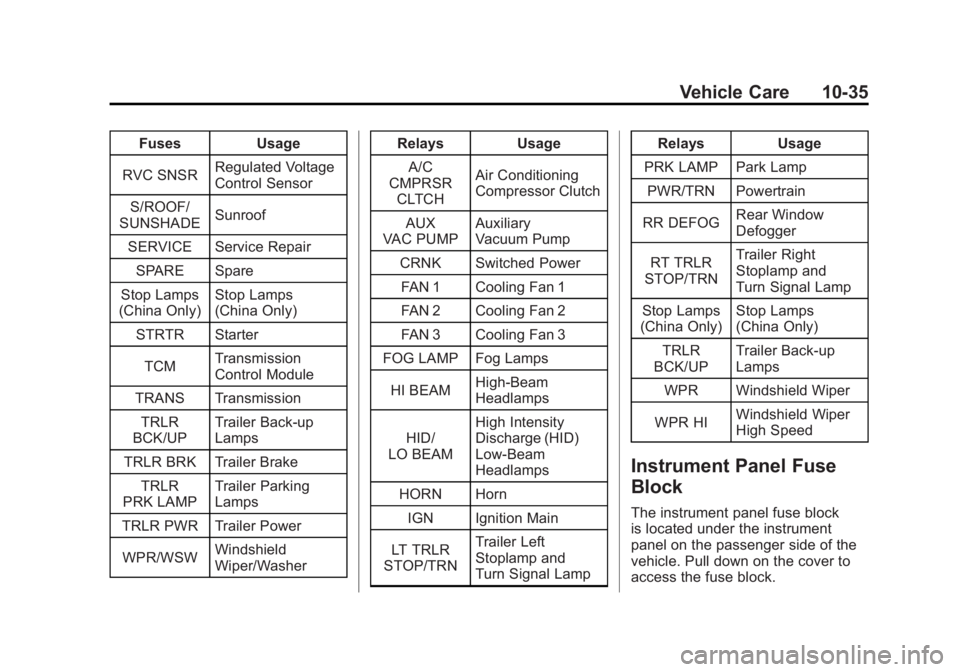
FusesUsage
RVC SNSR Regulated Voltage
Control Sensor
S/ROOF/
SUNSHADE Sunroof
SERVICE Service Repair SPARE Spare
Stop Lamps
(China Only) Stop Lamps
(China Only)
STRTR Starter
TCM Transmission
Control Module
TRANS Transmission TRLR
BCK/UP Trailer Back‐up
Lamps
TRLR BRK Trailer Brake TRLR
PRK LAMP Trailer Parking
Lamps
TRLR PWR Trailer Power
WPR/WSW Windshield
Wiper/Washer Relays
Usage
A/C
CMPRSR
CLTCH Air Conditioning
Compressor Clutch
AUX
VAC PUMP Auxiliary
Vacuum Pump
CRNK Switched Power FAN 1 Cooling Fan 1
FAN 2 Cooling Fan 2
FAN 3 Cooling Fan 3
FOG LAMP Fog Lamps
HI BEAM High‐Beam
Headlamps
HID/
LO BEAM High Intensity
Discharge (HID)
Low‐Beam
Headlamps
HORN Horn IGN Ignition Main
LT TRLR
STOP/TRN Trailer Left
Stoplamp and
Turn Signal Lamp Relays
Usage
PRK LAMP Park Lamp PWR/TRN Powertrain
RR DEFOG Rear Window
Defogger
RT TRLR
STOP/TRN Trailer Right
Stoplamp and
Turn Signal Lamp
Stop Lamps
(China Only) Stop Lamps
(China Only)
TRLR
BCK/UP Trailer Back-up
Lamps
WPR Windshield Wiper
WPR HI Windshield Wiper
High Speed
Instrument Panel Fuse
Block
The instrument panel fuse block
is located under the instrument
panel on the passenger side of the
vehicle. Pull down on the cover to
access the fuse block.
Page 364 of 478
Black plate (36,1)GMC Acadia/Acadia Denali Owner Manual - 2011
10-36 Vehicle Care
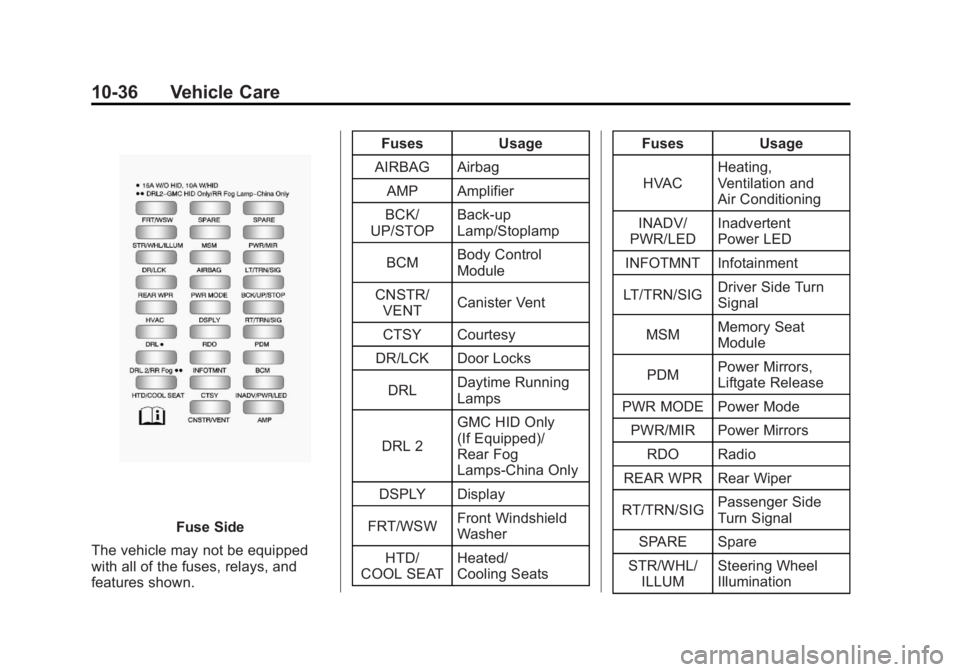
Fuse Side
The vehicle may not be equipped
with all of the fuses, relays, and
features shown. Fuses Usage
AIRBAG Airbag AMP Amplifier
BCK/
UP/STOP Back‐up
Lamp/Stoplamp
BCM Body Control
Module
CNSTR/ VENT Canister Vent
CTSY Courtesy
DR/LCK Door Locks
DRL Daytime Running
Lamps
DRL 2 GMC HID Only
(If Equipped)/
Rear Fog
Lamps-China Only
DSPLY Display
FRT/WSW Front Windshield
Washer
HTD/
COOL SEAT Heated/
Cooling Seats Fuses Usage
HVAC Heating,
Ventilation and
Air Conditioning
INADV/
PWR/LED Inadvertent
Power LED
INFOTMNT Infotainment
LT/TRN/SIG Driver Side Turn
Signal
MSM Memory Seat
Module
PDM Power Mirrors,
Liftgate Release
PWR MODE Power Mode
PWR/MIR Power Mirrors RDO Radio
REAR WPR Rear Wiper
RT/TRN/SIG Passenger Side
Turn Signal
SPARE Spare
STR/WHL/ ILLUM Steering Wheel
Illumination
Page 370 of 478
Black plate (42,1)GMC Acadia/Acadia Denali Owner Manual - 2011
10-42 Vehicle Care
(E) Rim Diameter:Diameter of
the wheel in inches.
(F) Service Description
:These
characters represent the load
index and speed rating of the
tire. The load index represents
the load carrying capacity a tire
is certified to carry. The speed
rating is the maximum speed a
tire is certified to carry a load.
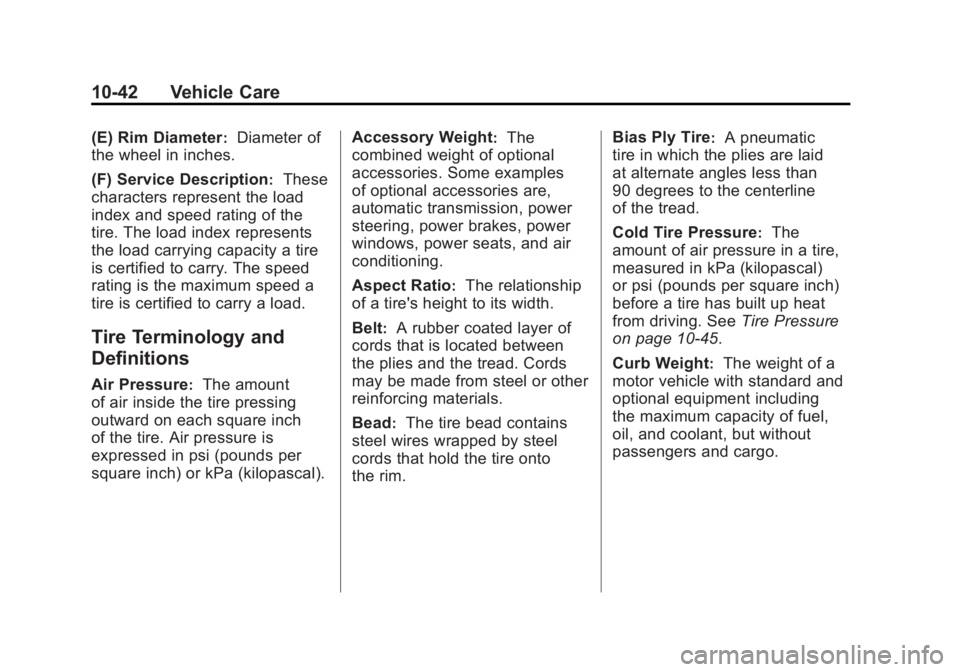
Tire Terminology and
Definitions
Air Pressure:The amount
of air inside the tire pressing
outward on each square inch
of the tire. Air pressure is
expressed in psi (pounds per
square inch) or kPa (kilopascal). Accessory Weight
:The
combined weight of optional
accessories. Some examples
of optional accessories are,
automatic transmission, power
steering, power brakes, power
windows, power seats, and air
conditioning.
Aspect Ratio
:The relationship
of a tire's height to its width.
Belt
:A rubber coated layer of
cords that is located between
the plies and the tread. Cords
may be made from steel or other
reinforcing materials.
Bead
:The tire bead contains
steel wires wrapped by steel
cords that hold the tire onto
the rim. Bias Ply Tire
:A pneumatic
tire in which the plies are laid
at alternate angles less than
90 degrees to the centerline
of the tread.
Cold Tire Pressure
:The
amount of air pressure in a tire,
measured in kPa (kilopascal)
or psi (pounds per square inch)
before a tire has built up heat
from driving. See Tire Pressure
on page 10‑45.
Curb Weight
:The weight of a
motor vehicle with standard and
optional equipment including
the maximum capacity of fuel,
oil, and coolant, but without
passengers and cargo.
Page 442 of 478
Black plate (2,1)GMC Acadia/Acadia Denali Owner Manual - 2011
12-2 Technical Data
Vehicle Data
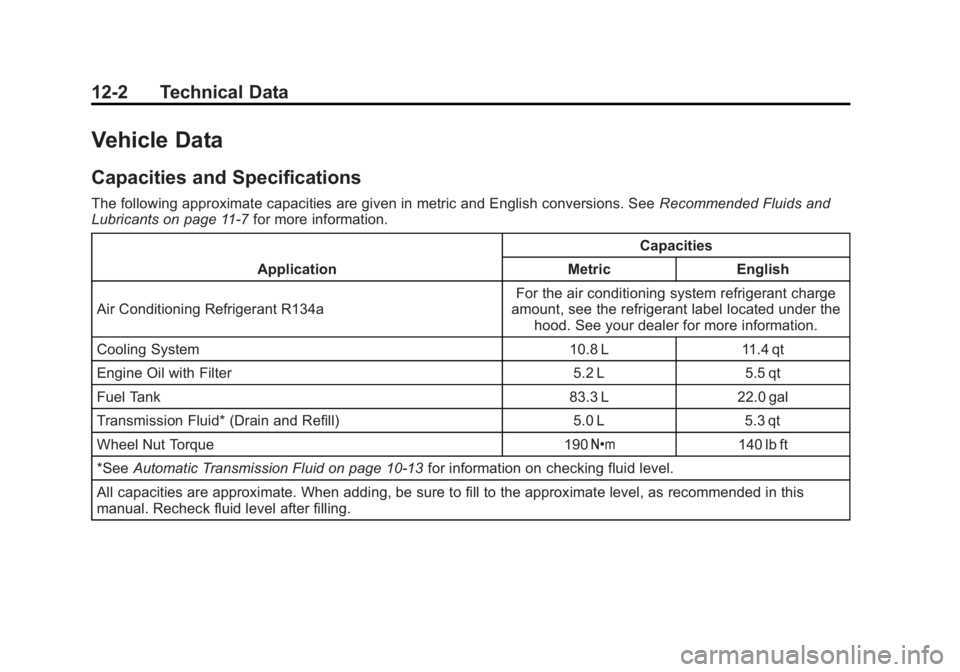
Capacities and Specifications
The following approximate capacities are given in metric and English conversions. SeeRecommended Fluids and
Lubricants on page 11‑7 for more information.
Application Capacities
Metric English
Air Conditioning Refrigerant R134a For the air conditioning system refrigerant charge
amount, see the refrigerant label located under the hood. See your dealer for more information.
Cooling System 10.8 L 11.4 qt
Engine Oil with Filter 5.2 L 5.5 qt
Fuel Tank 83.3 L 22.0 gal
Transmission Fluid* (Drain and Refill) 5.0 L 5.3 qt
Wheel Nut Torque 190 Y140 lb ft
*See Automatic Transmission Fluid on page 10‑13 for information on checking fluid level.
All capacities are approximate. When adding, be sure to fill to the approximate level, as recommended in this
manual. Recheck fluid level after filling.
Page 467 of 478
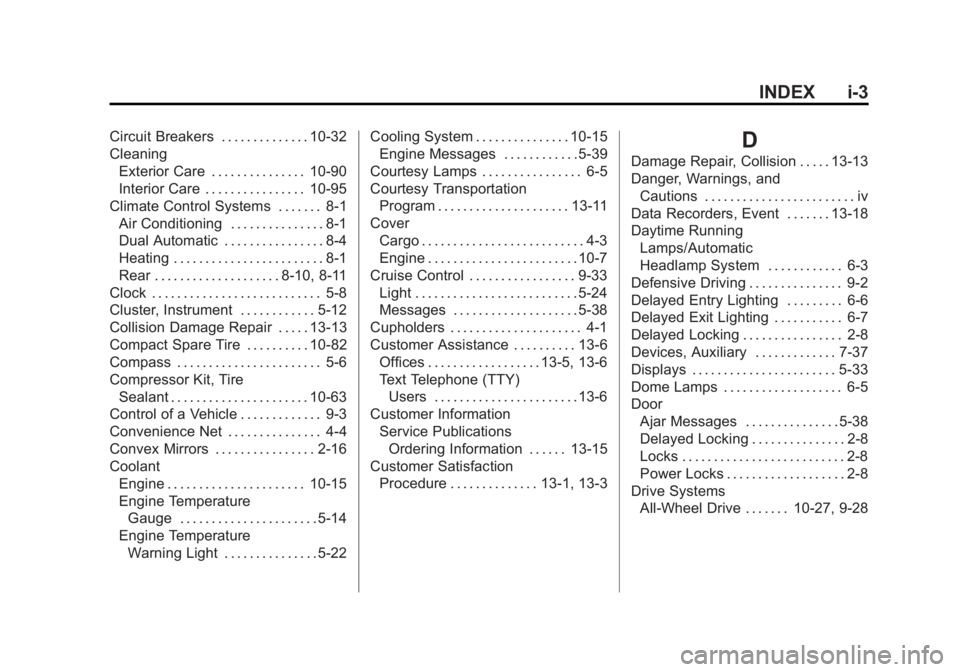
Black plate (3,1)GMC Acadia/Acadia Denali Owner Manual - 2011
INDEX i-3
Circuit Breakers . . . . . . . . . . . . . . 10-32
CleaningExterior Care . . . . . . . . . . . . . . . 10-90
Interior Care . . . . . . . . . . . . . . . . 10-95
Climate Control Systems . . . . . . . 8-1 Air Conditioning . . . . . . . . . . . . . . . 8-1
Dual Automatic . . . . . . . . . . . . . . . . 8-4
Heating . . . . . . . . . . . . . . . . . . . . . . . . 8-1
Rear . . . . . . . . . . . . . . . . . . . . 8-10, 8-11
Clock . . . . . . . . . . . . . . . . . . . . . . . . . . . 5-8
Cluster, Instrument . . . . . . . . . . . . 5-12
Collision Damage Repair . . . . . 13-13
Compact Spare Tire . . . . . . . . . . 10-82
Compass . . . . . . . . . . . . . . . . . . . . . . . 5-6
Compressor Kit, Tire Sealant . . . . . . . . . . . . . . . . . . . . . . 10-63
Control of a Vehicle . . . . . . . . . . . . . 9-3
Convenience Net . . . . . . . . . . . . . . . 4-4
Convex Mirrors . . . . . . . . . . . . . . . . 2-16
Coolant Engine . . . . . . . . . . . . . . . . . . . . . . 10-15
Engine Temperature
Gauge . . . . . . . . . . . . . . . . . . . . . . 5-14
Engine Temperature Warning Light . . . . . . . . . . . . . . . 5-22 Cooling System . . . . . . . . . . . . . . . 10-15
Engine Messages . . . . . . . . . . . . 5-39
Courtesy Lamps . . . . . . . . . . . . . . . . 6-5
Courtesy Transportation Program . . . . . . . . . . . . . . . . . . . . . 13-11
Cover Cargo . . . . . . . . . . . . . . . . . . . . . . . . . . 4-3
Engine . . . . . . . . . . . . . . . . . . . . . . . . 10-7
Cruise Control . . . . . . . . . . . . . . . . . 9-33 Light . . . . . . . . . . . . . . . . . . . . . . . . . . 5-24
Messages . . . . . . . . . . . . . . . . . . . . 5-38
Cupholders . . . . . . . . . . . . . . . . . . . . . 4-1
Customer Assistance . . . . . . . . . . 13-6 Offices . . . . . . . . . . . . . . . . . . 13-5, 13-6
Text Telephone (TTY)Users . . . . . . . . . . . . . . . . . . . . . . . 13-6
Customer Information Service PublicationsOrdering Information . . . . . . 13-15
Customer Satisfaction Procedure . . . . . . . . . . . . . . 13-1, 13-3D
Damage Repair, Collision . . . . . 13-13
Danger, Warnings, and
Cautions . . . . . . . . . . . . . . . . . . . . . . . . iv
Data Recorders, Event . . . . . . . 13-18
Daytime Running Lamps/Automatic
Headlamp System . . . . . . . . . . . . 6-3
Defensive Driving . . . . . . . . . . . . . . . 9-2
Delayed Entry Lighting . . . . . . . . . 6-6
Delayed Exit Lighting . . . . . . . . . . . 6-7
Delayed Locking . . . . . . . . . . . . . . . . 2-8
Devices, Auxiliary . . . . . . . . . . . . . 7-37
Displays . . . . . . . . . . . . . . . . . . . . . . . 5-33
Dome Lamps . . . . . . . . . . . . . . . . . . . 6-5
Door Ajar Messages . . . . . . . . . . . . . . . 5-38
Delayed Locking . . . . . . . . . . . . . . . 2-8
Locks . . . . . . . . . . . . . . . . . . . . . . . . . . 2-8
Power Locks . . . . . . . . . . . . . . . . . . . 2-8
Drive Systems All-Wheel Drive . . . . . . . 10-27, 9-28