tire size GMC ACADIA 2011 User Guide
[x] Cancel search | Manufacturer: GMC, Model Year: 2011, Model line: ACADIA, Model: GMC ACADIA 2011Pages: 478, PDF Size: 5.52 MB
Page 375 of 478
Black plate (47,1)GMC Acadia/Acadia Denali Owner Manual - 2011
Vehicle Care 10-47
Tire Pressure Monitor
System
The Tire Pressure Monitor System
(TPMS) uses radio and sensor
technology to check tire pressure
levels. The TPMS sensors monitor
the air pressure in your tires and
transmit tire pressure readings to
a receiver located in the vehicle.
Each tire, including the spare
(if provided), should be checked
monthly when cold and inflated to
the inflation pressure recommended
by the vehicle manufacturer on
the vehicle placard or tire inflation
pressure label. (If your vehicle has
tires of a different size than the size
indicated on the vehicle placard or
tire inflation pressure label, you
should determine the proper tire
inflation pressure for those tires.)
As an added safety feature, your
vehicle has been equipped with a
tire pressure monitoring system
(TPMS) that illuminates a low tirepressure telltale when one or
more of your tires is significantly
under‐inflated.
Accordingly, when the low tire
pressure telltale illuminates, you
should stop and check your tires as
soon as possible, and inflate them
to the proper pressure. Driving on
a significantly under‐inflated tire
causes the tire to overheat and can
lead to tire failure. Under‐inflation
also reduces fuel efficiency and
tire tread life, and may affect the
vehicle's handling and stopping
ability.
Please note that the TPMS is
not a substitute for proper tire
maintenance, and it is the driver's
responsibility to maintain correct
tire pressure, even if under‐inflation
has not reached the level to trigger
illumination of the TPMS low tire
pressure telltale.
Your vehicle has also been
equipped with a TPMS malfunction
indicator to indicate when the
system is not operating properly.The TPMS malfunction indicator is
combined with the low tire pressure
telltale. When the system detects a
malfunction, the telltale will flash for
approximately one minute and then
remain continuously illuminated.
This sequence will continue upon
subsequent vehicle start‐ups as
long as the malfunction exists.
When the malfunction indicator
is illuminated, the system may
not be able to detect or signal low
tire pressure as intended. TPMS
malfunctions may occur for a variety
of reasons, including the installation
of replacement or alternate tires or
wheels on the vehicle that prevent
the TPMS from functioning properly.
Always check the TPMS malfunction
telltale after replacing one or more
tires or wheels on your vehicle to
ensure that the replacement or
alternate tires and wheels allow
the TPMS to continue to function
properly.
See
Tire Pressure Monitor
Operation on page 10‑48 for
additional information.
Page 376 of 478
Black plate (48,1)GMC Acadia/Acadia Denali Owner Manual - 2011
10-48 Vehicle Care
Federal Communications
Commission (FCC) and
Industry Canada
SeeRadio Frequency Statement on
page 13‑20 for information
regarding Part 15 of the Federal
Communications Commission
(FCC) rules and Industry Canada
Standards RSS-210/220/310.
Tire Pressure Monitor
Operation
This vehicle may have a Tire
Pressure Monitor System (TPMS).
The TPMS is designed to warn
the driver when a low tire pressure
condition exists. TPMS sensors are
mounted onto each tire and wheel
assembly, excluding the spare tire
and wheel assembly, if the vehicle
has one. The TPMS sensors
monitor the air pressure in the
tires and transmits the tire pressure
readings to a receiver located in
the vehicle.
When a low tire pressure condition
is detected, the TPMS illuminates
the low tire pressure warning light
located on the instrument cluster.
If the warning light comes on, stop
as soon as possible and inflate
the tires to the recommended
pressure shown on the tire loading
information label. See Vehicle Load
Limits on page 9‑12.
A message to check the pressure in
a specific tire displays in the Driver
Information Center (DIC). The low
tire pressure warning light and the
DIC warning message come on at
each ignition cycle until the tires
are inflated to the correct inflation
pressure. Using the DIC, tire
pressure levels can be viewed. For additional information and
details about the DIC operation
and displays see
Driver Information
Center (DIC) (With DIC Buttons) on
page 5‑25 orDriver Information
Center (DIC) (Without DIC Buttons)
on page 5‑30 andTire Messages on
page 5‑44.
The low tire pressure warning light
may come on in cool weather when
the vehicle is first started, and then
turn off as the vehicle is driven.
This could be an early indicator that
the air pressure is getting low and
needs to be inflated to the proper
pressure.
A Tire and Loading Information
label shows the size of the original
equipment tires and the correct
inflation pressure for the tires when
they are cold. See Vehicle Load
Limits on page 9‑12, for an example
of the Tire and Loading Information
label and its location. Also see Tire
Pressure on page 10‑45.
Page 379 of 478
Black plate (51,1)GMC Acadia/Acadia Denali Owner Manual - 2011
Vehicle Care 10-51
4. Start with the driver sidefront tire.
5. Place the relearn tool against the tire sidewall, near the valve
stem. Then press the button
to activate the TPMS sensor.
A horn chirp confirms that the
sensor identification code has
been matched to this tire and
wheel position.
6. Proceed to the passenger side front tire, and repeat the
procedure in Step 5.
7. Proceed to the passenger side rear tire, and repeat the
procedure in Step 5. 8. Proceed to the driver side rear
tire, and repeat the procedure
in Step 5. The horn sounds two
times to indicate the sensor
identification code has been
matched to the driver side rear
tire, and the TPMS sensor
matching process is no longer
active. The TIRE LEARNING
ACTIVE message on the DIC
display screen goes off.
9. Turn the ignition to LOCK/OFF.
10. Set all four tires to the recommended air pressure
level as indicated on the Tire
and Loading Information label.
Tire Inspection
GM recommends that the tires,
including the spare tire, if the
vehicle has one, be inspected
for signs of wear or damage at
least once a month. Replace the tire if:
.The indicators at three or
more places around the tire
can be seen.
.There is cord or fabric
showing through the tire's
rubber.
.The tread or sidewall is
cracked, cut, or snagged
deep enough to show cord
or fabric.
.The tire has a bump, bulge,
or split.
.The tire has a puncture, cut,
or other damage that cannot
be repaired well because of
the size or location of the
damage.
Page 382 of 478
Black plate (54,1)GMC Acadia/Acadia Denali Owner Manual - 2011
10-54 Vehicle Care
Vehicle Storage
Tires age when stored normally
mounted on a parked vehicle.
Park a vehicle that will be stored
for at least a month in a cool, dry,
clean area away from direct sunlight
to slow aging. This area should be
free of grease, gasoline, or other
substances that can deteriorate
rubber.
Parking for an extended period
can cause flat spots on the tires
that may result in vibrations while
driving. When storing a vehicle for
at least a month, remove the tires
or raise the vehicle to reduce the
weight from the tires.
Buying New Tires
GM has developed and matched
specific tires for the vehicle.
The original equipment tires
installed on the vehicle,
when it was new, were
designed to meet General
Motors Tire Performance
Criteria Specification (TPC
Spec) system rating. If you
need replacement tires, GM
strongly recommends that you
get tires with the same TPC
Spec rating. This way, the
vehicle will continue to have
tires that are designed to give
the same performance and
vehicle safety, during normal
use, as the original tires.GM's exclusive TPC Spec
system considers over a
dozen critical specifications that
impact the overall performance
of the vehicle, including brake
system performance, ride and
handling, traction control,
and tire pressure monitoring
performance. GM's TPC Spec
number is molded onto the tire's
sidewall near the tire size. If the
tires have an all‐season tread
design, the TPC Spec number
will be followed by an MS
for mud and snow. See
Tire
Sidewall Labeling on page 10‑39
for additional information.
Page 383 of 478
Black plate (55,1)GMC Acadia/Acadia Denali Owner Manual - 2011
Vehicle Care 10-55
GM recommends replacing
tires in sets of four. This is
because uniform tread depth
on all tires will help keep the
vehicle performing most like it
did when the tires were new.
Replacing less than a full set
of tires can affect the braking
and handling performance of
the vehicle. SeeTire Inspection
on page 10‑51 andTire Rotation
on page 10‑52 for information
on proper tire rotation.
{WARNING
Tires could explode during
improper service. Attempting to
mount or dismount a tire could
cause injury or death. Only your
dealer or authorized tire service
center should mount or dismount
the tires.
{WARNING
Mixing tires could cause you
to lose control while driving.
If you mix tires of different
sizes, brands, or types
(radial and bias-belted tires),
the vehicle may not handle
properly, and you could have
a crash. Using tires of different
sizes, brands, or types may
also cause damage to the
vehicle. Be sure to use the
correct size, brand, and type
of tires on all wheels. It is all
right to drive with the compact
spare temporarily, as it was
developed for use on the
vehicle. See Compact Spare
Tire on page 10‑82.{WARNING
Using bias-ply tires on the
vehicle may cause the wheel
rim flanges to develop cracks
after many miles of driving.
A tire and/or wheel could fail
suddenly and cause a crash.
Use only radial-ply tires with
the wheels on the vehicle.
If you must replace the vehicle's
tires with those that do not
have a TPC Spec number,
make sure they are the same
size, load range, speed rating,
and construction type (radial
and bias‐belted tires) as the
vehicle's original tires.
Page 384 of 478
Black plate (56,1)GMC Acadia/Acadia Denali Owner Manual - 2011
10-56 Vehicle Care
Vehicles that have a tire
pressure monitoring system
could give an inaccurate
low‐pressure warning if
non‐TPC Spec rated tires
are installed on the vehicle.
Non‐TPC Spec rated tires may
give a low‐pressure warning
that is higher or lower than the
proper warning level you would
get with TPC Spec rated tires.
SeeTire Pressure Monitor
System on page 10‑47.
The vehicle's original equipment
tires are listed on the Tire and
Loading Information label.
See Vehicle Load Limits on
page 9‑12 for more information
about the Tire and Loading
Information label and its location
on the vehicle.Different Size Tires and
Wheels
If wheels or tires are installed that
are a different size than the original
equipment wheels and tires, vehicle
performance, including its braking,
ride and handling characteristics,
stability, and resistance to rollover
may be affected. If the vehicle has
electronic systems such as antilock
brakes, rollover airbags, traction
control, and electronic stability
control, the performance of these
systems can also be affected.
{WARNING
If different sized wheels are used,
there may not be an acceptable
level of performance and safety if
tires not recommended for those
(Continued)
WARNING (Continued)
wheels are selected. This
increases the chance of a crash
and serious injury. Only use GM
specific wheel and tire systems
developed for the vehicle, and
have them properly installed by
a GM certified technician.
See Buying New Tires on
page 10‑54 andAccessories
and Modifications on page 10‑3
for additional information.
Page 388 of 478
Black plate (60,1)GMC Acadia/Acadia Denali Owner Manual - 2011
10-60 Vehicle Care
Used Replacement Wheels
{WARNING
Replacing a wheel with a used
one is dangerous. How it has
been used or how far it has been
driven may be unknown. It could
fail suddenly and cause a crash.
When replacing wheels, use a
new GM original equipment
wheel.
Tire Chains
{WARNING
Do not use tire chains. There is
not enough clearance. Tire chains
used on a vehicle without the
proper amount of clearance can
cause damage to the brakes,
suspension or other vehicle parts.
The area damaged by the tire
chains could cause you to lose
control of the vehicle and you or
others may be injured in a crash.(Continued)
WARNING (Continued)
Use another type of traction
device only if its manufacturer
recommends it for use on the
vehicle and tire size combination
and road conditions. Follow that
manufacturer's instructions.
To help avoid damage to the
vehicle, drive slowly, readjust
or remove the device if it is
contacting the vehicle, and do not
spin the vehicle's wheels. If you
do find traction devices that will
fit, install them on the front tires.
Page 401 of 478
Black plate (73,1)GMC Acadia/Acadia Denali Owner Manual - 2011
Vehicle Care 10-73
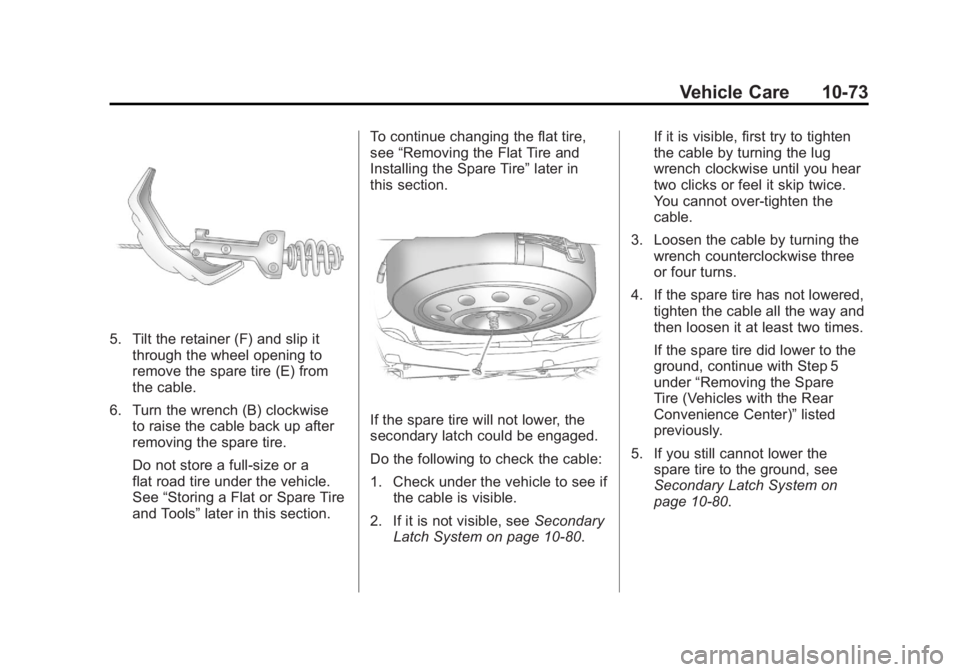
5. Tilt the retainer (F) and slip itthrough the wheel opening to
remove the spare tire (E) from
the cable.
6. Turn the wrench (B) clockwise to raise the cable back up after
removing the spare tire.
Do not store a full‐size or a
flat road tire under the vehicle.
See “Storing a Flat or Spare Tire
and Tools” later in this section. To continue changing the flat tire,
see
“Removing the Flat Tire and
Installing the Spare Tire” later in
this section.
If the spare tire will not lower, the
secondary latch could be engaged.
Do the following to check the cable:
1. Check under the vehicle to see if the cable is visible.
2. If it is not visible, see Secondary
Latch System on page 10‑80. If it is visible, first try to tighten
the cable by turning the lug
wrench clockwise until you hear
two clicks or feel it skip twice.
You cannot over‐tighten the
cable.
3. Loosen the cable by turning the wrench counterclockwise three
or four turns.
4. If the spare tire has not lowered, tighten the cable all the way and
then loosen it at least two times.
If the spare tire did lower to the
ground, continue with Step 5
under “Removing the Spare
Tire (Vehicles with the Rear
Convenience Center)” listed
previously.
5. If you still cannot lower the spare tire to the ground, see
Secondary Latch System on
page 10‑80.
Page 408 of 478
Black plate (80,1)GMC Acadia/Acadia Denali Owner Manual - 2011
10-80 Vehicle Care
3. Reinstall the wing bolt (B) byturning clockwise.
4. To replace the cover, line up the tab at the front of the cover with
the notch in the cover opening.
Push the cover in place and
make sure that the rear clips are
in the slots and push the cover
closed.
Store the center cap or the plastic
bolt‐on wheel covers until a full
size tire is put back on the vehicle.
When you replace the compact
spare with a full‐size tire, reinstall
the bolt‐on wheel covers or the
center cap. Hand‐tighten them
over the wheel nuts, using the
lug wrench.Secondary Latch System
This vehicle has an underbody
mounted tire hoist assembly that
has a secondary latch system.
It is designed to stop the compact
spare tire from suddenly falling off
the vehicle if the cable holding the
spare tire is damaged. For the
secondary latch to work, the tire
must be stowed with the valve stem
pointing down. See Tire Changing
on page 10‑71 for instructions on
storing the spare tire correctly.
{WARNING
Before beginning this procedure
read all the instructions. Failure
to read and follow the instructions
could damage the hoist assembly
and you and others could get
hurt. Read and follow the
instructions listed next. To release the spare tire from the
secondary latch:
{WARNING
Someone standing too close
during the procedure could be
injured by the jack. If the spare
tire does not slide off the jack
completely, make sure no one is
behind you or on either side of
you as you pull the jack out from
under the spare.
1. If the cable is not visible, start this procedure at Step 3.
Page 410 of 478
Black plate (82,1)GMC Acadia/Acadia Denali Owner Manual - 2011
10-82 Vehicle Care
Have the hoist shaft assembly
inspected as soon as you can.
You will not be able to store a spare
tire using the hoist assembly until it
has been repaired or replaced.
Compact Spare Tire
{WARNING
Driving with more than one
compact spare tire at a time
could result in loss of braking
and handling. This could lead
to a crash and you or others
could be injured. Use only one
compact spare tire at a time.
The compact spare tire, if the
vehicle has one, was fully inflated
when the vehicle was new, however,
it can lose air after a time. Check
the inflation pressure regularly.
It should be 60 psi (420 kPa). After installing the compact
spare on the vehicle, stop as
soon as possible and make sure
the spare tire is correctly inflated.
The compact spare is made to
perform well at speeds up to
65 mph (105 km/h) for distances up
to 3,000 miles (5 000 km), so you
can finish your trip and have the
full-size tire repaired or replaced
at your convenience. Of course,
it is best to replace the spare with
a full-size tire as soon as possible.
The spare tire will last longer and be
in good shape in case it is needed
again.
Notice:
When the compact
spare is installed, do not take
the vehicle through an automatic
car wash with guide rails. The
compact spare can get caught on
the rails which can damage the
tire, wheel and other parts of the
vehicle. Do not use the compact spare on
other vehicles.
And do not mix the compact spare
tire or wheel with other wheels or
tires. They will not fit. Keep the
spare tire and its wheel together.
The All-Wheel Drive (AWD) system
will be automatically disabled
when you use the compact spare.
To restore the AWD and prevent
excessive wear on the clutch in
your AWD, replace the compact
spare tire with a full-size tire as
soon as possible.
Notice:
Tire chains will not fit the
compact spare. Using them can
damage the vehicle and can
damage the chains too. Do not
use tire chains on the compact
spare.