remote start GMC ACADIA 2011 Owner's Guide
[x] Cancel search | Manufacturer: GMC, Model Year: 2011, Model line: ACADIA, Model: GMC ACADIA 2011Pages: 478, PDF Size: 5.52 MB
Page 233 of 478
Black plate (33,1)GMC Acadia/Acadia Denali Owner Manual - 2011
Infotainment System 7-33
Playing an MP3/WMA File
From a Disc (In Either the DVD
or CD Slot)
If a disc is inserted into the top DVD
slot, the rear seat operator can turn
on the video screen and use the
remote control to navigate the
CD (tracks only).
f(Tune):Turn to select MP3/WMA
files.
©SEEK: Press to go to the
start of the track, if more than
five seconds have played. Press
to go to the previous track if less
than five seconds have played.
Press and hold or press multiple
times to continue moving backward
through tracks.
¨SEEK: Press to go to the next
track. Press and hold or press
multiple times to continue moving
forward through tracks.
sREV (Reverse): Press and hold
to reverse playback quickly. Sound
is heard at a reduced volume and
the elapsed time of the file displays.
Release
sREV to resume playing.
\FWD (Fast Forward): Press
and hold to advance playback
quickly. Sound is heard at a reduced
volume and the elapsed time of the
file displays. Release
\FWD to
resume playing. The elapsed time
of the file displays.
S c(Previous Folder): Press
the softkey below
S cto go to the
first track in the previous folder.
cT (Next Folder): Press the
softkey below
cT to go to the
first track in the next folder.
RDM (Random): Files on the
disc can be listened to in random,
rather than sequential order. To use
random, press the softkey under the
RDM tab until Random Current Disc displays to play songs in random
order. Press the same softkey again
to turn off random play.
h(Music Navigator):
Press the
softkey below
hto play files in
order by artist or album.
The player scans the disc to sort
the files by artist and album ID3 tag
information. It can take several
minutes to scan the disc depending
on the number of files on the disc.
The radio may begin playing while
it is scanning in the background.
When the scan is finished, the disc
begins playing files in order by
artist. The current artist playing is
shown on the second line of the
display. Once all songs by that artist
are played, the player moves to the
next artist in alphabetical order and
begins playing files by that artist.
To listen to files by another artist,
press the softkey located below
either arrow tab. The disc goes to
the next or previous artist in
Page 244 of 478
Black plate (44,1)GMC Acadia/Acadia Denali Owner Manual - 2011
7-44 Infotainment System
The infrared receivers for the
wireless headphones and the
remote control are located at the
rear of the overhead console.
Notice:Avoid directly touching
the video screen, as damage may
occur. See “Cleaning the Video
Screen” later in this section for
more information.
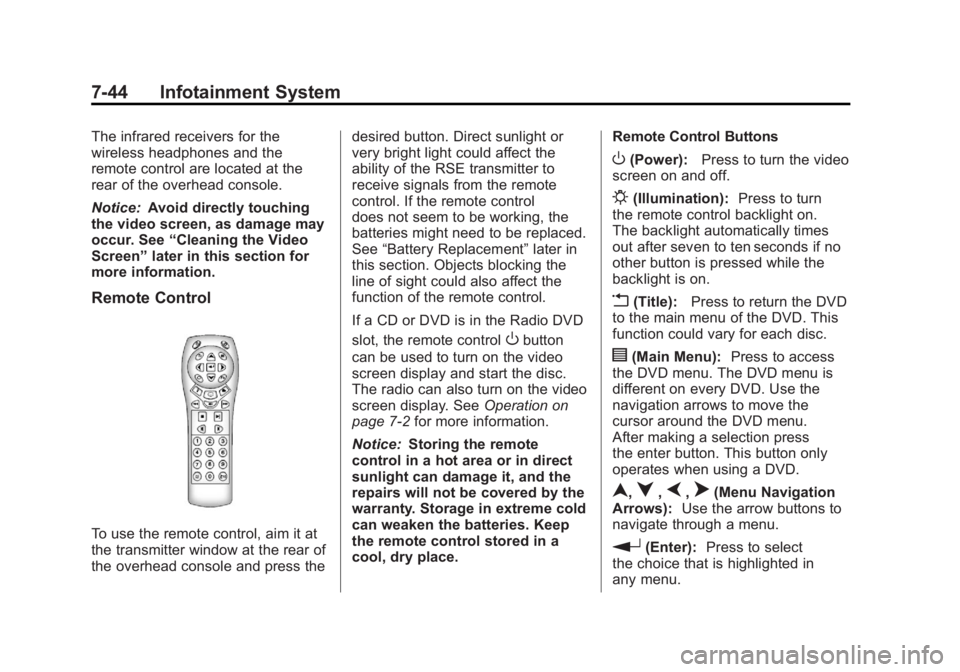
Remote Control
To use the remote control, aim it at
the transmitter window at the rear of
the overhead console and press the desired button. Direct sunlight or
very bright light could affect the
ability of the RSE transmitter to
receive signals from the remote
control. If the remote control
does not seem to be working, the
batteries might need to be replaced.
See
“Battery Replacement” later in
this section. Objects blocking the
line of sight could also affect the
function of the remote control.
If a CD or DVD is in the Radio DVD
slot, the remote control
Obutton
can be used to turn on the video
screen display and start the disc.
The radio can also turn on the video
screen display. See Operation on
page 7‑2 for more information.
Notice: Storing the remote
control in a hot area or in direct
sunlight can damage it, and the
repairs will not be covered by the
warranty. Storage in extreme cold
can weaken the batteries. Keep
the remote control stored in a
cool, dry place. Remote Control Buttons
O(Power):
Press to turn the video
screen on and off.
P(Illumination): Press to turn
the remote control backlight on.
The backlight automatically times
out after seven to ten seconds if no
other button is pressed while the
backlight is on.
v(Title): Press to return the DVD
to the main menu of the DVD. This
function could vary for each disc.
y(Main Menu): Press to access
the DVD menu. The DVD menu is
different on every DVD. Use the
navigation arrows to move the
cursor around the DVD menu.
After making a selection press
the enter button. This button only
operates when using a DVD.
n,q,p,o(Menu Navigation
Arrows): Use the arrow buttons to
navigate through a menu.
r(Enter): Press to select
the choice that is highlighted in
any menu.
Page 247 of 478
Black plate (47,1)GMC Acadia/Acadia Denali Owner Manual - 2011
Infotainment System 7-47
Tips and Troubleshooting Chart (cont'd)
ProblemRecommended Action
After stopping the player, and
pushing Play, sometimes the
DVD starts where it left off and
sometimes at the beginning. If the stop button was pressed one
time, the DVD player resumes
playing where the DVD was
stopped. If the stop button was
pressed two times, the DVD player
begins to play from the beginning
of the DVD.
The auxiliary source is running,
but there is no picture or sound. Check that the RSE video screen
is in the auxiliary source mode.
Check the auxiliary input
connections at both devices.
Sometimes the wireless headphone
audio cuts out or buzzes. Check for obstructions, low
batteries, reception range, and
interference from cellular telephone
towers, or use a cellular telephone
in the vehicle.
Check that the headphones are
on correctly using the L (left) and
R (right) on the headphones.
The remote and/or the headphones
are lost. See your dealer for assistance.
The DVD is playing, but there is no
picture or sound. Check that the RSE video screen is
sourced to the DVD player.
DVD Display Error Messages
The DVD display error message
depends on which radio the vehicle
has. The video screen might display
one of the following:
Disc Load/Eject Error:
This
message displays when there are
disc load or eject problems.
Disc Format Error: This message
displays if the disc is inserted with
the disc label wrong side up, or if
the disc is damaged.
Disc Region Error: This message
displays if the disc is not from a
correct region.
No Disc Inserted: This message
displays if no disc is present when
the
ZEJECT button is pressed on
the radio.
Page 335 of 478
Black plate (7,1)GMC Acadia/Acadia Denali Owner Manual - 2011
Vehicle Care 10-7
A. Radiator Pressure Cap.See Cooling System on
page 10‑15.
B. Engine Coolant Recovery Cap. See Cooling System on
page 10‑15.
C. Remote Negative (−) Terminal. See Jump Starting on
page 10‑83.
D. Engine Compartment Fuse
Block on page 10‑33.
E. Remote Positive (+) Terminal. See Jump Starting on
page 10‑83.
F. Power Steering Reservoir and Cap (under engine cover).
See Power Steering Fluid on
page 10‑22.
G. Engine Oil Fill Cap. See “When
to Add Engine Oil” under
Engine Oil on page 10‑8. H.
Engine Cover on page 10‑7.
I. Engine Oil Dipstick. See “Checking Engine Oil”
under Engine Oil on page 10‑8.
J. Automatic Transmission Fluid Dipstick. See “Checking the
Fluid Level” underAutomatic
Transmission Fluid on
page 10‑13.
K. Brake Master Cylinder Reservoir. See “Brake Fluid”
under Brakes on page 10‑24.
L. Engine Air Cleaner/Filter on
page 10‑13.
M. Windshield Washer Fluid Reservoir. See “Adding Washer
Fluid” under Washer Fluid on
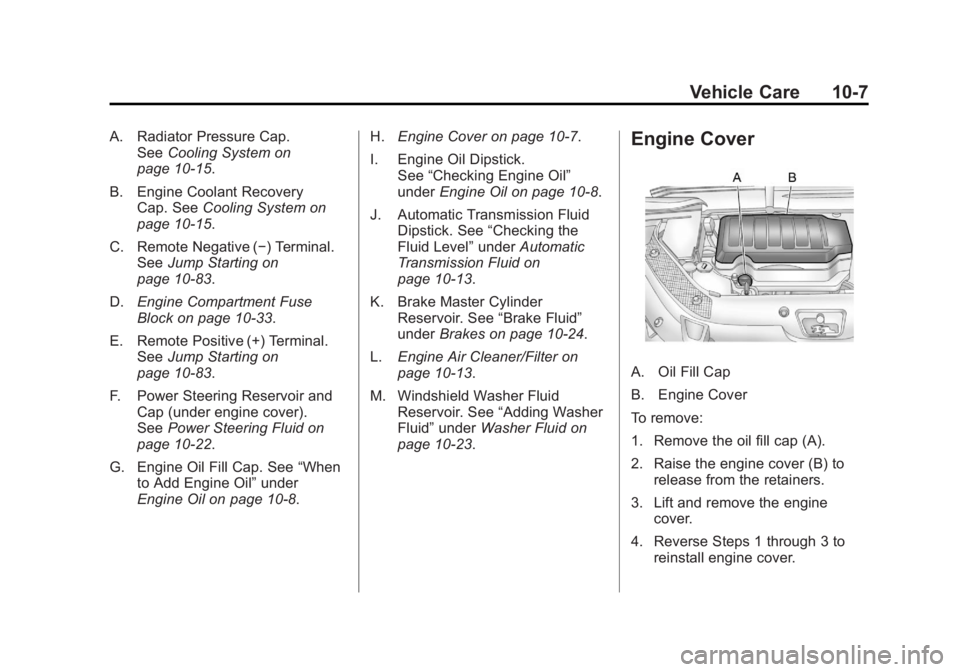
page 10‑23.Engine Cover
A. Oil Fill Cap
B. Engine Cover
To remove:
1. Remove the oil fill cap (A).
2. Raise the engine cover (B) to release from the retainers.
3. Lift and remove the engine cover.
4. Reverse Steps 1 through 3 to reinstall engine cover.
Page 378 of 478
Black plate (50,1)GMC Acadia/Acadia Denali Owner Manual - 2011
10-50 Vehicle Care
.Replacement tires or wheels do
not match the original equipment
tires or wheels. Tires and wheels
other than those recommended
could prevent the TPMS from
functioning properly. SeeBuying
New Tires on page 10‑54.
.Operating electronic devices or
being near facilities using radio
wave frequencies similar to the
TPMS could cause the TPMS
sensors to malfunction.
If the TPMS is not functioning
properly, it cannot detect or signal a
low tire condition. See your dealer
for service if the TPMS malfunction
light and DIC message comes on
and stays on.
TPMS Sensor Matching
Process
Each TPMS sensor has a unique
identification code. The identification
code needs to be matched to a new
tire/wheel position after rotating the
tires or replacing one or more of the
TPMS sensors. The TPMS sensor
matching process should also be
performed after replacing a spare
tire with a road tire containing the
TPMS sensor. The malfunction
light and the DIC message should
go off at the next ignition cycle.
The sensors are matched to the
tire/wheel positions, using a TPMS
relearn tool, in the following order:
driver side front tire, passenger side
front tire, passenger side rear tire,
and driver side rear. See your
dealer for service or to purchase
a relearn tool. There are two minutes to match
the first tire/wheel position, and
five minutes overall to match all
four tire/wheel positions. If it takes
longer, the matching process stops
and must be restarted.
The TPMS sensor matching
process is:
1. Set the parking brake.
2. Turn the ignition to ON/RUN with
the engine off.
3. Press the Remote Keyless Entry (RKE) transmitter's LOCK
and UNLOCK buttons at the
same time for approximately
five seconds. The horn sounds
twice to signal the receiver
is in relearn mode and TIRE
LEARNING ACTIVE message
displays on the DIC screen.
Page 412 of 478
Black plate (84,1)GMC Acadia/Acadia Denali Owner Manual - 2011
10-84 Vehicle Care
Notice:If the radio or other
accessories are left on during
the jump starting procedure, they
could be damaged. The repairs
would not be covered by the
warranty. Always turn off the
radio and other accessories
when jump starting the vehicle.
3. Turn off the ignition on both
vehicles. Unplug unnecessary
accessories plugged into the
cigarette lighter or the accessory
power outlets. Turn off the radio
and all lamps that are not
needed. This will avoid sparks
and help save both batteries.
And it could save the radio!
4. Open the hoods and locate the positive (+) and negative (−)
terminal locations on the
other vehicle. Your vehicle
has a remote positive (+) and
a remote negative (−) jump
starting terminal. See Engine
Compartment Overview on
page 10‑6 for more information
on the terminal locations.{WARNING
Using a match near a battery
can cause battery gas to explode.
People have been hurt doing this,
and some have been blinded.
Use a flashlight if you need
more light.
Be sure the batteries have
enough water. You do not need
to add water to the ACDelco
®
battery (or batteries) installed in
your new vehicle. But if a battery
has filler caps, be sure the right
amount of fluid is there. If it is low,
add water to take care of that
first. If you do not, explosive
gas could be present.
Battery fluid contains acid that
can burn you. Do not get it on
you. If you accidentally get it in
your eyes or on your skin, flush
the place with water and get
medical help immediately.
{WARNING
Fans or other moving engine
parts can injure you badly. Keep
your hands away from moving
parts once the engine is running.
5. Check that the jumper cables do not have loose or missing
insulation. If they do, you could
get a shock. The vehicles could
be damaged too.
Before you connect the cables,
here are some basic things you
should know. Positive (+) will go
to positive (+) or to a remote
positive (+) terminal if the vehicle
has one. Negative (−) will go to a
heavy, unpainted metal engine
part or to a remote negative (−)
terminal if the vehicle has one.
Page 414 of 478
Black plate (86,1)GMC Acadia/Acadia Denali Owner Manual - 2011
10-86 Vehicle Care
10. Now start the vehicle withthe good battery and run the
engine for a while.
11. Try to start the vehicle that had the dead battery. If it will
not start after a few tries, it
probably needs service.
Notice: If the jumper cables
are connected or removed in
the wrong order, electrical
shorting may occur and damage
the vehicle. The repairs would
not be covered by the vehicle
warranty. Always connect and
remove the jumper cables in the
correct order, making sure that
the cables do not touch each
other or other metal.
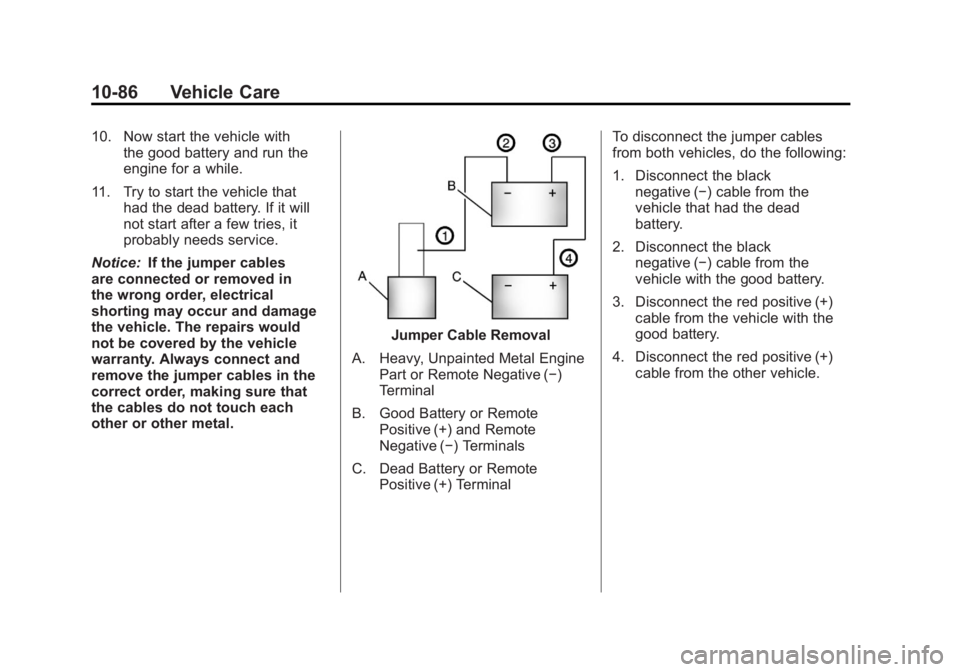
Jumper Cable Removal
A. Heavy, Unpainted Metal Engine Part or Remote Negative (−)
Terminal
B. Good Battery or Remote Positive (+) and Remote
Negative (−) Terminals
C. Dead Battery or Remote Positive (+) Terminal To disconnect the jumper cables
from both vehicles, do the following:
1. Disconnect the black
negative (−) cable from the
vehicle that had the dead
battery.
2. Disconnect the black negative (−) cable from the
vehicle with the good battery.
3. Disconnect the red positive (+) cable from the vehicle with the
good battery.
4. Disconnect the red positive (+) cable from the other vehicle.
Page 453 of 478
Black plate (9,1)GMC Acadia/Acadia Denali Owner Manual - 2011
Customer Information 13-9
Coverage
Services are provided up to
5 years/160 000 km (100,000 miles),
whichever comes first.
In the U.S., anyone driving the
vehicle is covered. In Canada, a
person driving the vehicle without
permission from the owner is not
covered.
Roadside Assistance is not a
part of the New Vehicle Limited
Warranty. GMC and General Motors
of Canada Limited reserve the right
to make any changes or discontinue
the Roadside Assistance program
at any time without notification.
GMC and General Motors of
Canada Limited reserve the right
to limit services or payment to an
owner or driver if they decide the
claims are made too often, or the
same type of claim is made many
times.
Services Provided
.Emergency Fuel Delivery:
Delivery of enough fuel for the
vehicle to get to the nearest
service station.
.Lock‐Out Service:Service to
unlock the vehicle if you are
locked out. A remote unlock
may be available if you have
OnStar
®. For security reasons,
the driver must present
identification before this
service is given.
.Emergency Tow From a Public
Road or Highway: Tow to the
nearest GMC dealer for warranty
service, or if the vehicle was
in a crash and cannot be driven.
Assistance is also given when
the vehicle is stuck in the sand,
mud, or snow.
.Flat Tire Change: Service to
change a flat tire with the spare
tire. The spare tire, if equipped,
must be in good condition and properly inflated. It is the owner's
responsibility for the repair or
replacement of the tire if it is
not covered by the warranty.
.Battery Jump Start:
Service to
jump start a dead battery.
.Trip Routing Service: Detailed
maps of North America when
requested either with the
most direct route or the most
scenic route. Additional travel
information is also available.
Allow three weeks for delivery.
.Trip Interruption Benefits
and Assistance: If your
trip is interrupted due to
a warranty failure, incidental
expenses may be reimbursed
during the 5 years/(160 000 km)
100,000 miles Powertrain
warranty period. Items
considered are hotel, meals,
and rental car.
Page 463 of 478
Black plate (19,1)GMC Acadia/Acadia Denali Owner Manual - 2011
Customer Information 13-19
GM will not access this data or
share it with others except: with the
consent of the vehicle owner or,
if the vehicle is leased, with the
consent of the lessee; in response
to an official request by police or
similar government office; as part
of GM's defense of litigation
through the discovery process; or,
as required by law. Data that GM
collects or receives may also be
used for GM research needs or
may be made available to others for
research purposes, where a need is
shown and the data is not tied to a
specific vehicle or vehicle owner.OnStar®
If the vehicle is equipped with
an active OnStar system, that
system may also record data in
crash or near crash‐like situations.
The OnStar Terms and Conditions
provides information on data
collection and use and is available
in the OnStar glove box kit,
at www.onstar.com (U.S.) or
www.onstar.ca (Canada), or
by pressing the
Qbutton and
speaking to an advisor.
Navigation System
If the vehicle has a navigation
system, use of the system may
result in the storage of destinations,
addresses, telephone numbers, and
other trip information. Refer to the
navigation system operating manual
for information on stored data and
for deletion instructions.
Radio Frequency
Identification (RFID)
RFID technology is used in some
vehicles for functions such as tire
pressure monitoring and ignition
system security, as well as in
connection with conveniences
such as key fobs for remote door
locking/unlocking and starting, and
in-vehicle transmitters for garage
door openers. RFID technology in
GM vehicles does not use or record
personal information or link with
any other GM system containing
personal information.
Page 470 of 478
Black plate (6,1)GMC Acadia/Acadia Denali Owner Manual - 2011
i-6 INDEX
H
Halogen Bulbs . . . . . . . . . . . . . . . . 10-30
Hazard Warning Flashers . . . . . . . 6-3
Head Restraints . . . . . . . . . . . . . . . . 3-2
Head Up Display . . . . . . . . . . . . . . 5-33
HeadlampsAiming . . . . . . . . . . . . . . . . . . . . . . 10-30
Bulb Replacement . . . . . . . . . . 10-30
Daytime Running
Lamps/Automatic
Headlamp System . . . . . . . . . . . 6-3
Flash-to-Pass . . . . . . . . . . . . . . . . . . 6-3
High Intensity Discharge (HID) Lighting . . . . . . . . . . . . . 10-30
High-Beam On Light . . . . . . . . . . 5-24
High/Low Beam Changer . . . . . . 6-2
Heated and Ventilated Front Seats . . . . . . . . . . . . . . . . . . . . . . . . . 3-9 Heated Mirrors . . . . . . . . . . . . . . . . . 2-18
Heater
Engine . . . . . . . . . . . . . . . . . . . . . . . . 9-20
Heating and Air Conditioning . . . 8-1
High Voltage Devices and Wiring . . . . . . . . . . . . . . . . . . . . . . . 10-31
High-Beam On Light . . . . . . . . . . . 5-24
Highway Hypnosis . . . . . . . . . . . . . . 9-8
Hill and Mountain Roads . . . . . . . . 9-8
Hood . . . . . . . . . . . . . . . . . . . . . . . . . . 10-5
Horn . . . . . . . . . . . . . . . . . . . . . . . . . . . . 5-4
How to Wear Safety Belts
Properly . . . . . . . . . . . . . . . . . . . . . . 3-19
I
Ignition Positions . . . . . . . . . . . . . . 9-18
Ignition Transmission LockCheck . . . . . . . . . . . . . . . . . . . . . . . 10-28
Immobilizer . . . . . . . . . . . . . . . . . . . . 2-15 Infants and Young Children,
Restraints . . . . . . . . . . . . . . . . . . . . 3-51
Infotainment . . . . . . . . . . . . . . . . . . . . 7-1
Instrument Cluster . . . . . . . . . . . . . 5-12
Instrument Panel Storage Area . . . . . . . . . . . . . . . . . . 4-1
Introduction . . . . . . . . . . . . . . . . . . . . . . . iii
J
Jump Starting . . . . . . . . . . . . . . . . . 10-83
K
Key and Lock Messages . . . . . . . 5-41
Keyless Entry
Remote (RKE) System . . . . . . . . 2-3
Keys . . . . . . . . . . . . . . . . . . . . . . . . . . . . 2-2