change time GMC ACADIA 2011 Owner's Guide
[x] Cancel search | Manufacturer: GMC, Model Year: 2011, Model line: ACADIA, Model: GMC ACADIA 2011Pages: 478, PDF Size: 5.52 MB
Page 336 of 478
Black plate (8,1)GMC Acadia/Acadia Denali Owner Manual - 2011
10-8 Vehicle Care
Engine Oil
To ensure proper engine
performance and long life,
careful attention must be paid
to engine oil. Following these
simple, but important steps will
help protect your investment:
.Always use engine oil approved
to the proper specification and
of the proper viscosity grade.
See“Selecting the Right Engine
Oil” in this section.
.Check the engine oil level
regularly and maintain the
proper oil level. See “Checking
Engine Oil” and“When to Add
Engine Oil” in this section.
.Change the engine oil at the
appropriate time. See Engine
Oil Life System on page 10‑11.
.Always dispose of engine oil
properly. See “What to Do with
Used Oil” in this section.
Checking Engine Oil
It is a good idea to check the
engine oil level at each fuel fill.
In order to get an accurate reading,
the vehicle must be on level ground.
The engine oil dipstick handle
is a yellow loop. See Engine
Compartment Overview on
page 10‑6 for the location of
the engine oil dipstick.
Obtaining an accurate oil level
reading is essential:
1. If the engine has been running recently, turn off the engine and
allow several minutes for the oil
to drain back into the oil pan.
Checking the oil level too soon
after engine shutoff will not
provide an accurate oil level
reading.
2. Pull out the dipstick and clean it with a paper towel or cloth,
then push it back in all the way.
Remove it again, keeping the
tip down, and check the level.
When to Add Engine Oil
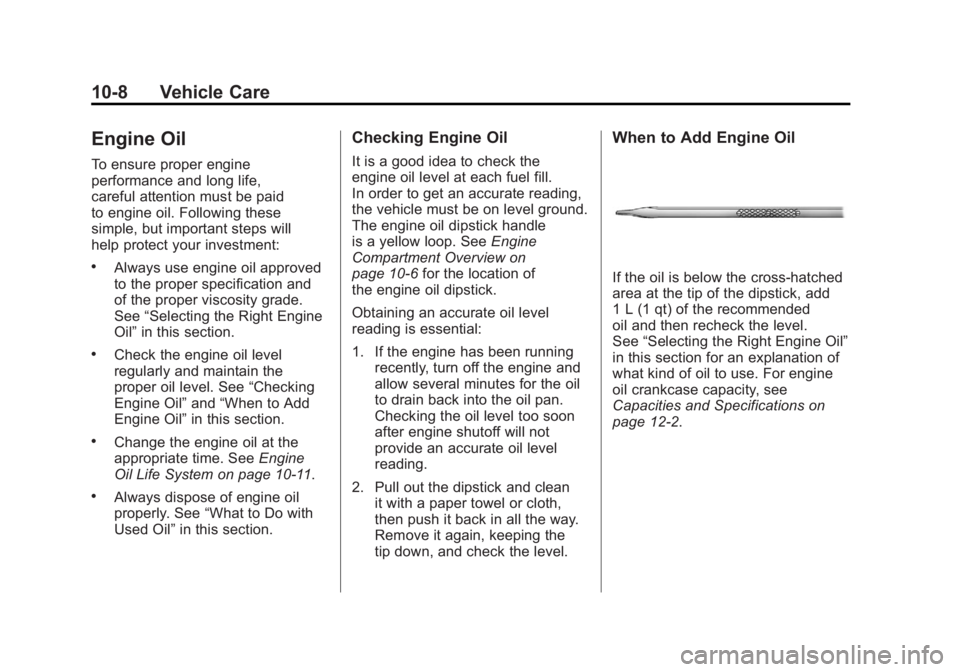
If the oil is below the cross-hatched
area at the tip of the dipstick, add
1 L (1 qt) of the recommended
oil and then recheck the level.
See “Selecting the Right Engine Oil”
in this section for an explanation of
what kind of oil to use. For engine
oil crankcase capacity, see
Capacities and Specifications on
page 12‑2.
Page 339 of 478
Black plate (11,1)GMC Acadia/Acadia Denali Owner Manual - 2011
Vehicle Care 10-11
Engine Oil Additives/Engine
Oil Flushes
Do not add anything to the oil.
The recommended oils with the
dexos specification and displaying
the dexos certification mark are all
that is needed for good performance
and engine protection.
Engine oil system flushes are not
recommended and could cause
engine damage not covered by
the vehicle warranty.
What to Do with Used Oil
Used engine oil contains certain
elements that can be unhealthy for
your skin and could even cause
cancer. Do not let used oil stay on
your skin for very long. Clean your
skin and nails with soap and water,
or a good hand cleaner. Wash or
properly dispose of clothing or rags
containing used engine oil. See the
manufacturer's warnings about the
use and disposal of oil products.
Used oil can be a threat to the
environment. If you change your
own oil, be sure to drain all the
oil from the filter before disposal.
Never dispose of oil by putting it
in the trash or pouring it on the
ground, into sewers, or into streams
or bodies of water. Recycle it by
taking it to a place that collects
used oil.
Engine Oil Life System
When to Change Engine Oil
This vehicle has a computer system
that indicates when to change the
engine oil and filter. This is based
on engine revolutions and engine
temperature, and not on mileage.
Based on driving conditions, the
mileage at which an oil change is
indicated can vary considerably.
For the oil life system to work
properly, the system must be reset
every time the oil is changed.
When the system has calculated
that oil life has been diminished,
it indicates that an oil change is
necessary. A CHANGE ENGINE
OIL SOON message comes on.
Change the oil as soon as possible
within the next 600 miles (1 000 km).
Page 340 of 478
Black plate (12,1)GMC Acadia/Acadia Denali Owner Manual - 2011
10-12 Vehicle Care
It is possible that, if driving under
the best conditions, the oil life
system might indicate that an oil
change is not necessary for up to a
year. The engine oil and filter must
be changed at least once a year
and, at this time, the system must
be reset. Your dealer has trained
service people who will perform
this work and reset the system.
It is also important to check the
oil regularly over the course of
an oil drain interval and keep it
at the proper level.
If the system is ever reset
accidentally, the oil must be
changed at 3,000 miles (5 000 km)
since the last oil change.
Remember to reset the oil life
system whenever the oil is changed.How to Reset the Engine Oil
Life System
Reset the system whenever the
engine oil is changed so that the
system can calculate the next
engine oil change. To reset the
system:
If the vehicle does not have Driver
Information Center (DIC) buttons:
1. Turn the ignition to ON/RUN,with the engine off. The vehicle
must be in P (Park) to access
this display. Press the trip
odometer reset stem until OIL
LIFE REMAINING displays.
2. Press and hold the trip odometer reset stem until OIL LIFE
REMAINING shows “100%.”
Three chimes sound and the
CHANGE ENGINE OIL SOON
message goes off. 3. Turn the key to LOCK/OFF.
If the CHANGE ENGINE OIL
SOON message comes back
on when the vehicle is started,
the engine oil life system has
not been reset. Repeat the
procedure.
If the vehicle has Driver Information
Center (DIC) buttons:
1. Turn the ignition to ON/RUN, with the engine off.
2. Press the vehicle information button until OIL LIFE
REMAINING displays.
3. Press and hold the set/reset button until “100%”is displayed.
Three chimes sound and the
CHANGE ENGINE OIL SOON
message goes off.
4. Turn the key to LOCK/OFF.
If the CHANGE ENGINE OIL SOON
message comes back on when the
vehicle is started, the engine oil life
system has not been reset. Repeat
the procedure.
Page 352 of 478
Black plate (24,1)GMC Acadia/Acadia Denali Owner Manual - 2011
10-24 Vehicle Care
Brakes
This vehicle has disc brakes.
Disc brake pads have built-in wear
indicators that make a high-pitched
warning sound when the brake pads
are worn and new pads are needed.
The sound can come and go or be
heard all the time the vehicle is
moving, except when applying
the brake pedal firmly.
{WARNING
The brake wear warning sound
means that soon the brakes will
not work well. That could lead to
a crash. When the brake wear
warning sound is heard, have the
vehicle serviced.
Notice: Continuing to drive with
worn-out brake pads could result
in costly brake repair. Some driving conditions or climates
can cause a brake squeal when
the brakes are first applied or
lightly applied. This does not mean
something is wrong with the brakes.
Properly torqued wheel nuts are
necessary to help prevent brake
pulsation. When tires are rotated,
inspect brake pads for wear and
evenly tighten wheel nuts in
the proper sequence to torque
specifications in
Capacities and
Specifications on page 12‑2.
Brake linings should always be
replaced as complete axle sets.
Brake Pedal Travel
See your dealer if the brake pedal
does not return to normal height,
or if there is a rapid increase in
pedal travel. This could be a
sign that brake service might be
required.
Brake Adjustment
Every time the brakes are applied,
with or without the vehicle moving,
the brakes adjust for wear.
Replacing Brake System Parts
The braking system on a vehicle is
complex. Its many parts have to be
of top quality and work well together
if the vehicle is to have really good
braking. The vehicle was designed
and tested with top-quality brake
parts. When parts of the braking
system are replaced, be sure to get
new, approved replacement parts.
If this is not done, the brakes might
not work properly. For example,
installing disc brake pads that are
wrong for the vehicle, can change
the balance between the front and
rear brakes —for the worse. The
braking performance expected can
change in many other ways if the
wrong replacement brake parts are
installed.
Page 381 of 478
Black plate (53,1)GMC Acadia/Acadia Denali Owner Manual - 2011
Vehicle Care 10-53
Lightly coat the center of the
wheel hub with wheel bearing
grease after a wheel change or
tire rotation to prevent corrosion
or rust build-up. Do not get
grease on the flat wheel
mounting surface or on the
wheel nuts or bolts.
Make sure the spare tire, if
the vehicle has one, is stored
securely. Push, pull, and then
try to rotate or turn the tire.
If it moves, tighten the cable.
SeeTire Changing on
page 10‑71.When It Is Time for New
Tires
Factors such as maintenance,
temperatures, driving speeds,
vehicle loading, and road conditions
affect the wear rate of the tires.
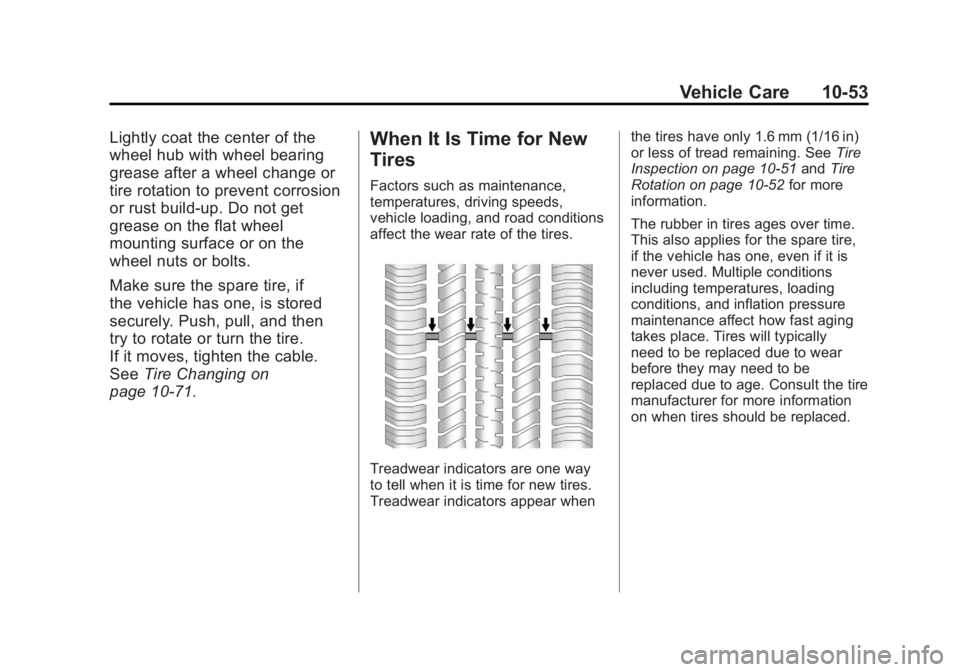
Treadwear indicators are one way
to tell when it is time for new tires.
Treadwear indicators appear when the tires have only 1.6 mm (1/16 in)
or less of tread remaining. See
Tire
Inspection on page 10‑51 andTire
Rotation on page 10‑52 for more
information.
The rubber in tires ages over time.
This also applies for the spare tire,
if the vehicle has one, even if it is
never used. Multiple conditions
including temperatures, loading
conditions, and inflation pressure
maintenance affect how fast aging
takes place. Tires will typically
need to be replaced due to wear
before they may need to be
replaced due to age. Consult the tire
manufacturer for more information
on when tires should be replaced.
Page 453 of 478
Black plate (9,1)GMC Acadia/Acadia Denali Owner Manual - 2011
Customer Information 13-9
Coverage
Services are provided up to
5 years/160 000 km (100,000 miles),
whichever comes first.
In the U.S., anyone driving the
vehicle is covered. In Canada, a
person driving the vehicle without
permission from the owner is not
covered.
Roadside Assistance is not a
part of the New Vehicle Limited
Warranty. GMC and General Motors
of Canada Limited reserve the right
to make any changes or discontinue
the Roadside Assistance program
at any time without notification.
GMC and General Motors of
Canada Limited reserve the right
to limit services or payment to an
owner or driver if they decide the
claims are made too often, or the
same type of claim is made many
times.
Services Provided
.Emergency Fuel Delivery:
Delivery of enough fuel for the
vehicle to get to the nearest
service station.
.Lock‐Out Service:Service to
unlock the vehicle if you are
locked out. A remote unlock
may be available if you have
OnStar
®. For security reasons,
the driver must present
identification before this
service is given.
.Emergency Tow From a Public
Road or Highway: Tow to the
nearest GMC dealer for warranty
service, or if the vehicle was
in a crash and cannot be driven.
Assistance is also given when
the vehicle is stuck in the sand,
mud, or snow.
.Flat Tire Change: Service to
change a flat tire with the spare
tire. The spare tire, if equipped,
must be in good condition and properly inflated. It is the owner's
responsibility for the repair or
replacement of the tire if it is
not covered by the warranty.
.Battery Jump Start:
Service to
jump start a dead battery.
.Trip Routing Service: Detailed
maps of North America when
requested either with the
most direct route or the most
scenic route. Additional travel
information is also available.
Allow three weeks for delivery.
.Trip Interruption Benefits
and Assistance: If your
trip is interrupted due to
a warranty failure, incidental
expenses may be reimbursed
during the 5 years/(160 000 km)
100,000 miles Powertrain
warranty period. Items
considered are hotel, meals,
and rental car.
Page 456 of 478
Black plate (12,1)GMC Acadia/Acadia Denali Owner Manual - 2011
13-12 Customer Information
Public Transportation or Fuel
Reimbursement
If the vehicle requires overnight
warranty repairs, and public
transportation is used instead
of the dealer's shuttle service,
the expense must be supported
by original receipts and can only
be up to the maximum amount
allowed by GM for shuttle service.
In addition, for U.S. customers,
should you arrange transportation
through a friend or relative, limited
reimbursement for reasonable
fuel expenses may be available.
Claim amounts should reflect
actual costs and be supported by
original receipts. See the dealer for
information regarding the allowance
amounts for reimbursement of fuel
or other transportation costs.Courtesy Rental Vehicle
The dealer may arrange to provide
you with a courtesy rental vehicle
or reimburse you for a rental vehicle
that you obtain if the vehicle is kept
for an overnight warranty repair.
Rental reimbursement will be limited
and must be supported by original
receipts. This requires that you sign
and complete a rental agreement
and meet state/provincial, local,
and rental vehicle provider
requirements. Requirements vary
and may include minimum age
requirements, insurance coverage,
credit card, etc. You are responsible
for fuel usage charges and may
also be responsible for taxes, levies,
usage fees, excessive mileage,
or rental usage beyond the
completion of the repair.
It may not be possible to provide a
like vehicle as a courtesy rental.Additional Program
Information
All program options, such as shuttle
service, may not be available at
every dealer. Please contact the
dealer for specific information
about availability. All Courtesy
Transportation arrangements
will be administered by appropriate
dealer personnel.
General Motors reserves the
right to unilaterally modify,
change, or discontinue Courtesy
Transportation at any time and
to resolve all questions of claim
eligibility pursuant to the terms
and conditions described herein
at its sole discretion.
Page 460 of 478
Black plate (16,1)GMC Acadia/Acadia Denali Owner Manual - 2011
13-16 Customer Information
Owner Information
Owner publications are written
specifically for owners and intended
to provide basic operational
information about the vehicle.
The Owner Manual includes the
Maintenance Schedule for all
models.
In-Portfolio: Includes a Portfolio,
Owner Manual, and Warranty
Booklet.
RETAIL SELL PRICE:
$35.00 (U.S.) plus handling and
shipping fees.
Without Portfolio: Owner
Manual only.
RETAIL SELL PRICE:
$25.00 (U.S.) plus handling and
shipping fees.
Current and Past Models
Technical Service Bulletins and
Manuals are available for current
and past model GM vehicles.
ORDER TOLL FREE:
1-800-551-4123 Monday - Friday
8:00 AM - 6:00 PM Eastern Time
For Credit Card Orders Only
(VISA-MasterCard-Discover), visit
Helm, Inc. at: www.helminc.com.
Or write to:
Helm, Incorporated
P.O. Box 07130
Detroit, MI 48207
Prices are subject to change
without notice and without incurring
obligation. Allow ample time for
delivery.
All listed prices are quoted in
U.S. funds. Make checks payable
in U.S. funds.
Reporting Safety
Defects
Reporting Safety Defects
to the United States
Government
If you believe that your vehicle
has a defect which could cause
a crash or could cause injury or
death, you should immediately
inform the National Highway
Traffic Safety Administration
(NHTSA) in addition to notifying
General Motors.
If NHTSA receives similar
complaints, it may open an
investigation, and if it finds that
a safety defect exists in a group
of vehicles, it may order a recall
and remedy campaign.
Page 470 of 478
Black plate (6,1)GMC Acadia/Acadia Denali Owner Manual - 2011
i-6 INDEX
H
Halogen Bulbs . . . . . . . . . . . . . . . . 10-30
Hazard Warning Flashers . . . . . . . 6-3
Head Restraints . . . . . . . . . . . . . . . . 3-2
Head Up Display . . . . . . . . . . . . . . 5-33
HeadlampsAiming . . . . . . . . . . . . . . . . . . . . . . 10-30
Bulb Replacement . . . . . . . . . . 10-30
Daytime Running
Lamps/Automatic
Headlamp System . . . . . . . . . . . 6-3
Flash-to-Pass . . . . . . . . . . . . . . . . . . 6-3
High Intensity Discharge (HID) Lighting . . . . . . . . . . . . . 10-30
High-Beam On Light . . . . . . . . . . 5-24
High/Low Beam Changer . . . . . . 6-2
Heated and Ventilated Front Seats . . . . . . . . . . . . . . . . . . . . . . . . . 3-9 Heated Mirrors . . . . . . . . . . . . . . . . . 2-18
Heater
Engine . . . . . . . . . . . . . . . . . . . . . . . . 9-20
Heating and Air Conditioning . . . 8-1
High Voltage Devices and Wiring . . . . . . . . . . . . . . . . . . . . . . . 10-31
High-Beam On Light . . . . . . . . . . . 5-24
Highway Hypnosis . . . . . . . . . . . . . . 9-8
Hill and Mountain Roads . . . . . . . . 9-8
Hood . . . . . . . . . . . . . . . . . . . . . . . . . . 10-5
Horn . . . . . . . . . . . . . . . . . . . . . . . . . . . . 5-4
How to Wear Safety Belts
Properly . . . . . . . . . . . . . . . . . . . . . . 3-19
I
Ignition Positions . . . . . . . . . . . . . . 9-18
Ignition Transmission LockCheck . . . . . . . . . . . . . . . . . . . . . . . 10-28
Immobilizer . . . . . . . . . . . . . . . . . . . . 2-15 Infants and Young Children,
Restraints . . . . . . . . . . . . . . . . . . . . 3-51
Infotainment . . . . . . . . . . . . . . . . . . . . 7-1
Instrument Cluster . . . . . . . . . . . . . 5-12
Instrument Panel Storage Area . . . . . . . . . . . . . . . . . . 4-1
Introduction . . . . . . . . . . . . . . . . . . . . . . . iii
J
Jump Starting . . . . . . . . . . . . . . . . . 10-83
K
Key and Lock Messages . . . . . . . 5-41
Keyless Entry
Remote (RKE) System . . . . . . . . 2-3
Keys . . . . . . . . . . . . . . . . . . . . . . . . . . . . 2-2
Page 476 of 478
Black plate (12,1)GMC Acadia/Acadia Denali Owner Manual - 2011
i-12 INDEX
Signals, Turn andLane-Change . . . . . . . . . . . . . . . . . 6-4
Spare Tire Compact . . . . . . . . . . . . . . . . . . . . 10-82
Specifications and Capacities . . . . . . . . . . . . . . . . . . . . 12-2
Speedometer . . . . . . . . . . . . . . . . . . 5-13
StabiliTrak
®Indicator Light . . . . 5-22
StabiliTrak®System . . . . . . . . . . . 9-31
Start Vehicle, Remote . . . . . . . . . . 2-5
Starter Switch Check . . . . . . . . . 10-27
Starting the Engine . . . . . . . . . . . . 9-19
Steering . . . . . . . . . . . . . . . . . . . . . . . . 9-4 Fluid, Power . . . . . . . . . . . . . . . . 10-22
Wheel Adjustment . . . . . . . . . . . . . 5-2
Wheel Controls . . . . . . . . . . . . . . . . 5-2
Storage Areas Armrest . . . . . . . . . . . . . . . . . . . . . . . . 4-1
Cargo Cover . . . . . . . . . . . . . . . . . . . 4-3
Cargo Management System . . . 4-3 Storage Areas (cont.)
Center Console . . . . . . . . . . . . . . . . 4-2
Convenience Net . . . . . . . . . . . . . . 4-4
Floor Console . . . . . . . . . . . . . . . . . 4-2
Glove Box . . . . . . . . . . . . . . . . . . . . . 4-1
Instrument Panel . . . . . . . . . . . . . . 4-1
Roof Rack System . . . . . . . . . . . . . 4-5
Storing the Tire Sealant and Compressor Kit . . . . . . . . . 10-70
Stuck Vehicle . . . . . . . . . . . . . . . . . . 9-11
Sun Visors . . . . . . . . . . . . . . . . . . . . . 2-22
Sunroof . . . . . . . . . . . . . . . . . . . . . . . . 2-22
Symbols . . . . . . . . . . . . . . . . . . . . . . . . . . iv
System Infotainment . . . . . . . . . . . . . . . . . . . 7-1
Roof Rack . . . . . . . . . . . . . . . . . . . . . 4-5
T
Tachometer . . . . . . . . . . . . . . . . . . . . 5-13
Text Telephone (TTY) Users . . . 13-6
Theft-Deterrent Systems . . . . . . . 2-15Immobilizer . . . . . . . . . . . . . . . . . . . 2-15
Third-Row Seats . . . . . . . . . . . . . . . 3-13
Time . . . . . . . . . . . . . . . . . . . . . . . . . . . . 5-8
Tires Buying New Tires . . . . . . . . . . . 10-54
Chains . . . . . . . . . . . . . . . . . . . . . . 10-60
Changing . . . . . . . . . . . . . . . . . . . 10-71
Compact Spare . . . . . . . . . . . . . 10-82
Designations . . . . . . . . . . . . . . . 10-41
Different Size . . . . . . . . . . . . . . . 10-56
If a Tire Goes Flat . . . . . . . . . . 10-61
Inflation Monitor System . . . . 10-48
Inspection . . . . . . . . . . . . . . . . . . 10-51
Messages . . . . . . . . . . . . . . . . . . . . 5-44