Fan control GMC ACADIA 2012 User Guide
[x] Cancel search | Manufacturer: GMC, Model Year: 2012, Model line: ACADIA, Model: GMC ACADIA 2012Pages: 468, PDF Size: 5.57 MB
Page 252 of 468
Black plate (8,1)GMC Acadia/Acadia Denali Owner Manual - 2012
8-8 Climate Controls
The air conditioning system
removes moisture from the air, so
water might drip under the vehicle
while idling or after turning off the
engine. This is normal.
@(Recirculation):Press to turn
the recirculation mode on or off.
An indicator light comes on when
recirculation is on. When the engine
is turned off, the recirculation mode
automatically turns off and must be
re‐selected when the engine is
turned on again.
This mode recirculates and helps
to quickly cool the air inside the
vehicle. It can be used to prevent
outside air and odors from entering
the vehicle.
The recirculation mode cannot be
used with floor, defog, or defrosting
modes. If recirculation is selected
in these modes, the indicator
flashes three times and turns off. The air conditioning compressor
also comes on when this mode is
activated. While in recirculation
mode the windows can fog when
the weather is cold and damp.
To clear the fog, select either the
defog or defrost mode and increase
the fan speed.
REAR:
Press to turn the rear
heating and air conditioning on or
off. See Rear Climate Control
System (Rear Climate Control Only)
on page 8‑10 orRear Climate
Control System (Rear Climate with
Rear Seat Audio) on page 8‑11.
Rear Window Defogger
The rear window defogger uses a
warming grid to remove fog from the
rear window.
1(Rear Window Defogger):
Press to turn the rear window
defogger on or off. The rear window
defogger stays on for about
10 minutes, before turning off.
The defogger also turns off when
the engine is turned off. Do not drive
the vehicle until all the windows
are clear.
For vehicles with heated outside
rearview mirrors, fog or frost is
cleared from the surface of the
mirror when the rear window defog
button is pressed.
Notice: Do not use a razor blade
or sharp object to clear the inside
rear window. Do not adhere
anything to the defogger grid
lines in the rear glass. These
actions may damage the rear
defogger. Repairs would not be
covered by your warranty.
Page 253 of 468
Black plate (9,1)GMC Acadia/Acadia Denali Owner Manual - 2012
Climate Controls 8-9
Sensors
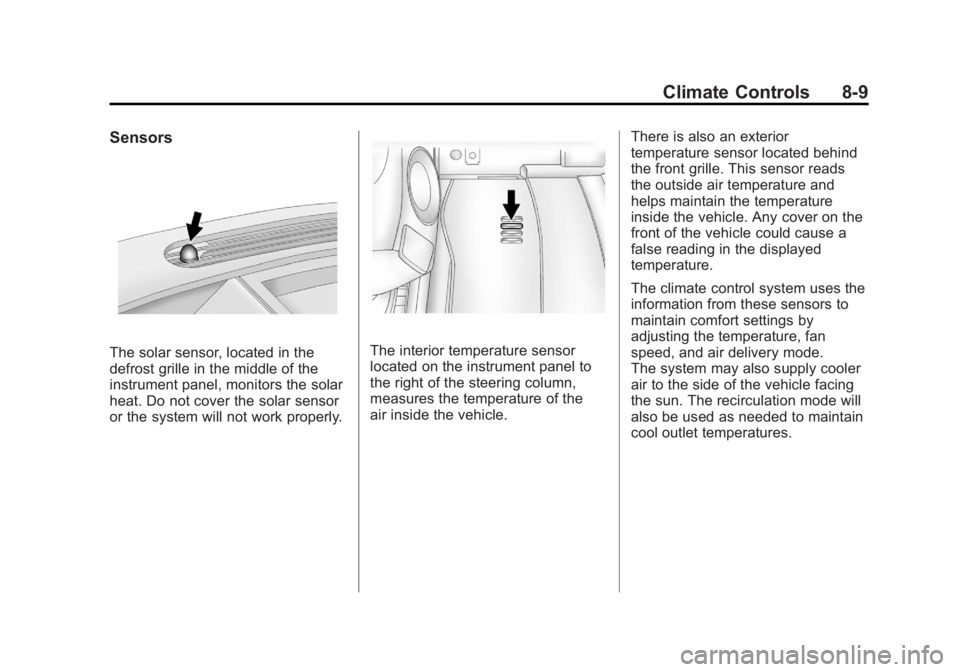
The solar sensor, located in the
defrost grille in the middle of the
instrument panel, monitors the solar
heat. Do not cover the solar sensor
or the system will not work properly.The interior temperature sensor
located on the instrument panel to
the right of the steering column,
measures the temperature of the
air inside the vehicle.There is also an exterior
temperature sensor located behind
the front grille. This sensor reads
the outside air temperature and
helps maintain the temperature
inside the vehicle. Any cover on the
front of the vehicle could cause a
false reading in the displayed
temperature.
The climate control system uses the
information from these sensors to
maintain comfort settings by
adjusting the temperature, fan
speed, and air delivery mode.
The system may also supply cooler
air to the side of the vehicle facing
the sun. The recirculation mode will
also be used as needed to maintain
cool outlet temperatures.
Page 254 of 468
Black plate (10,1)GMC Acadia/Acadia Denali Owner Manual - 2012
8-10 Climate Controls
Rear Climate Control System (Rear Climate
Control Only)
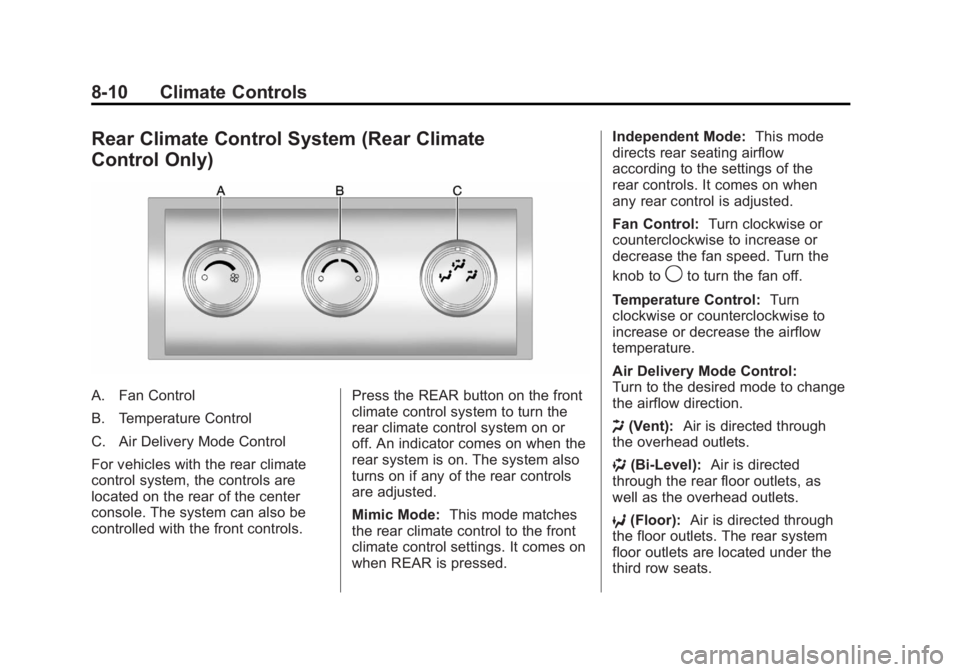
A. Fan Control
B. Temperature Control
C. Air Delivery Mode Control
For vehicles with the rear climate
control system, the controls are
located on the rear of the center
console. The system can also be
controlled with the front controls.Press the REAR button on the front
climate control system to turn the
rear climate control system on or
off. An indicator comes on when the
rear system is on. The system also
turns on if any of the rear controls
are adjusted.
Mimic Mode:
This mode matches
the rear climate control to the front
climate control settings. It comes on
when REAR is pressed. Independent Mode:
This mode
directs rear seating airflow
according to the settings of the
rear controls. It comes on when
any rear control is adjusted.
Fan Control: Turn clockwise or
counterclockwise to increase or
decrease the fan speed. Turn the
knob to
9to turn the fan off.
Temperature Control: Turn
clockwise or counterclockwise to
increase or decrease the airflow
temperature.
Air Delivery Mode Control:
Turn to the desired mode to change
the airflow direction.
H (Vent): Air is directed through
the overhead outlets.
) (Bi-Level): Air is directed
through the rear floor outlets, as
well as the overhead outlets.
6 (Floor): Air is directed through
the floor outlets. The rear system
floor outlets are located under the
third row seats.
Page 255 of 468
Black plate (11,1)GMC Acadia/Acadia Denali Owner Manual - 2012
Climate Controls 8-11
Rear Climate Control System (Rear Climate with Rear
Seat Audio)
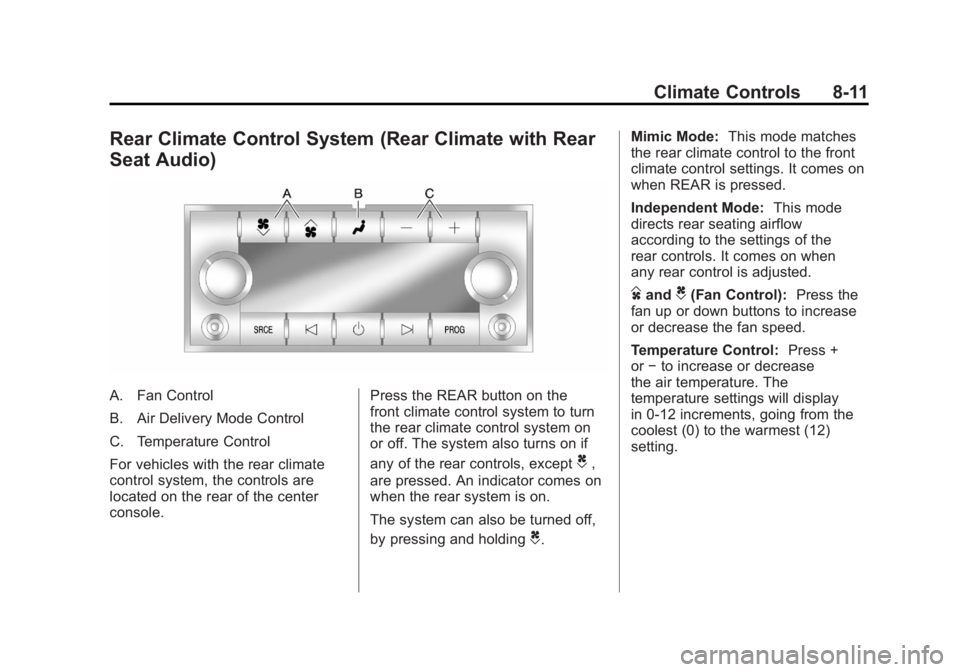
A. Fan Control
B. Air Delivery Mode Control
C. Temperature Control
For vehicles with the rear climate
control system, the controls are
located on the rear of the center
console.Press the REAR button on the
front climate control system to turn
the rear climate control system on
or off. The system also turns on if
any of the rear controls, except
C,
are pressed. An indicator comes on
when the rear system is on.
The system can also be turned off,
by pressing and holding
C. Mimic Mode:
This mode matches
the rear climate control to the front
climate control settings. It comes on
when REAR is pressed.
Independent Mode: This mode
directs rear seating airflow
according to the settings of the
rear controls. It comes on when
any rear control is adjusted.
DandC(Fan Control): Press the
fan up or down buttons to increase
or decrease the fan speed.
Temperature Control: Press +
or −to increase or decrease
the air temperature. The
temperature settings will display
in 0‐12 increments, going from the
coolest (0) to the warmest (12)
setting.
Page 267 of 468
Black plate (9,1)GMC Acadia/Acadia Denali Owner Manual - 2012
Driving and Operating 9-9
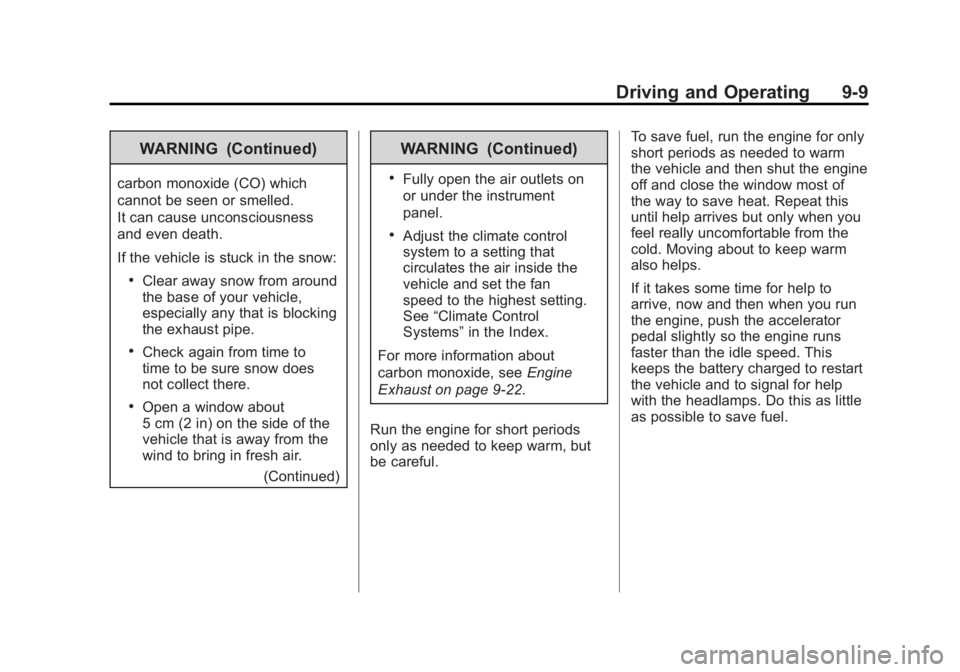
WARNING (Continued)
carbon monoxide (CO) which
cannot be seen or smelled.
It can cause unconsciousness
and even death.
If the vehicle is stuck in the snow:
.Clear away snow from around
the base of your vehicle,
especially any that is blocking
the exhaust pipe.
.Check again from time to
time to be sure snow does
not collect there.
.Open a window about
5 cm (2 in) on the side of the
vehicle that is away from the
wind to bring in fresh air.(Continued)
WARNING (Continued)
.Fully open the air outlets on
or under the instrument
panel.
.Adjust the climate control
system to a setting that
circulates the air inside the
vehicle and set the fan
speed to the highest setting.
See“Climate Control
Systems” in the Index.
For more information about
carbon monoxide, see Engine
Exhaust on page 9‑22.
Run the engine for short periods
only as needed to keep warm, but
be careful. To save fuel, run the engine for only
short periods as needed to warm
the vehicle and then shut the engine
off and close the window most of
the way to save heat. Repeat this
until help arrives but only when you
feel really uncomfortable from the
cold. Moving about to keep warm
also helps.
If it takes some time for help to
arrive, now and then when you run
the engine, push the accelerator
pedal slightly so the engine runs
faster than the idle speed. This
keeps the battery charged to restart
the vehicle and to signal for help
with the headlamps. Do this as little
as possible to save fuel.
Page 345 of 468
Black plate (33,1)GMC Acadia/Acadia Denali Owner Manual - 2012
Vehicle Care 10-33
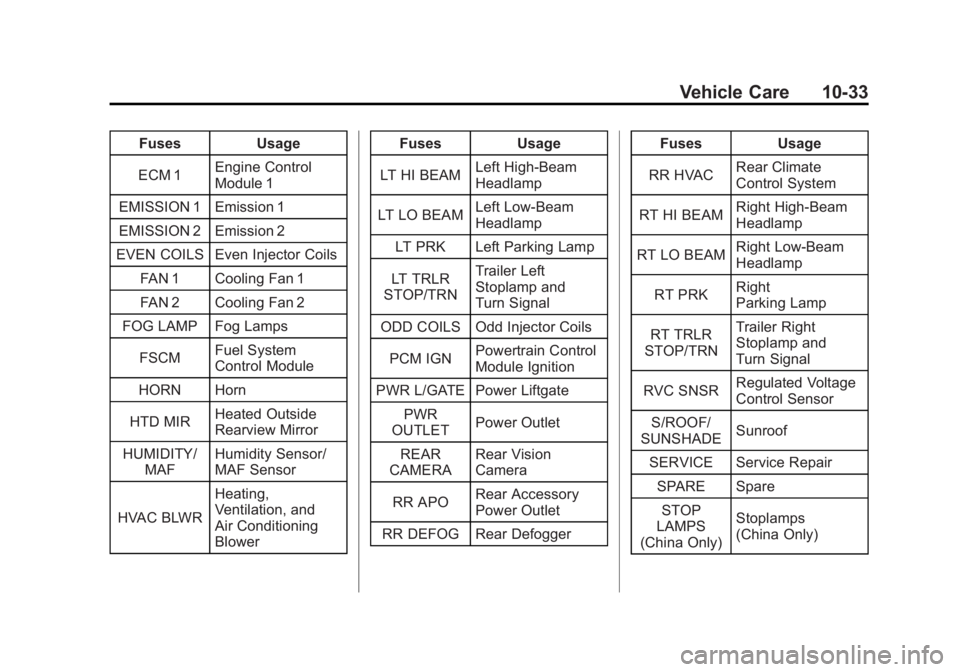
FusesUsage
ECM 1 Engine Control
Module 1
EMISSION 1 Emission 1
EMISSION 2 Emission 2
EVEN COILS Even Injector Coils
FAN 1 Cooling Fan 1
FAN 2 Cooling Fan 2
FOG LAMP Fog Lamps
FSCM Fuel System
Control Module
HORN Horn
HTD MIR Heated Outside
Rearview Mirror
HUMIDITY/ MAF Humidity Sensor/
MAF Sensor
HVAC BLWR Heating,
Ventilation, and
Air Conditioning
Blower Fuses
Usage
LT HI BEAM Left High-Beam
Headlamp
LT LO BEAM Left Low‐Beam
Headlamp
LT PRK Left Parking Lamp
LT TRLR
STOP/TRN Trailer Left
Stoplamp and
Turn Signal
ODD COILS Odd Injector Coils
PCM IGN Powertrain Control
Module Ignition
PWR L/GATE Power Liftgate PWR
OUTLET Power Outlet
REAR
CAMERA Rear Vision
Camera
RR APO Rear Accessory
Power Outlet
RR DEFOG Rear Defogger Fuses
Usage
RR HVAC Rear Climate
Control System
RT HI BEAM Right High‐Beam
Headlamp
RT LO BEAM Right Low‐Beam
Headlamp
RT PRK Right
Parking Lamp
RT TRLR
STOP/TRN Trailer Right
Stoplamp and
Turn Signal
RVC SNSR Regulated Voltage
Control Sensor
S/ROOF/
SUNSHADE Sunroof
SERVICE Service Repair SPARE SpareSTOP
LAMPS
(China Only) Stoplamps
(China Only)
Page 346 of 468
Black plate (34,1)GMC Acadia/Acadia Denali Owner Manual - 2012
10-34 Vehicle Care
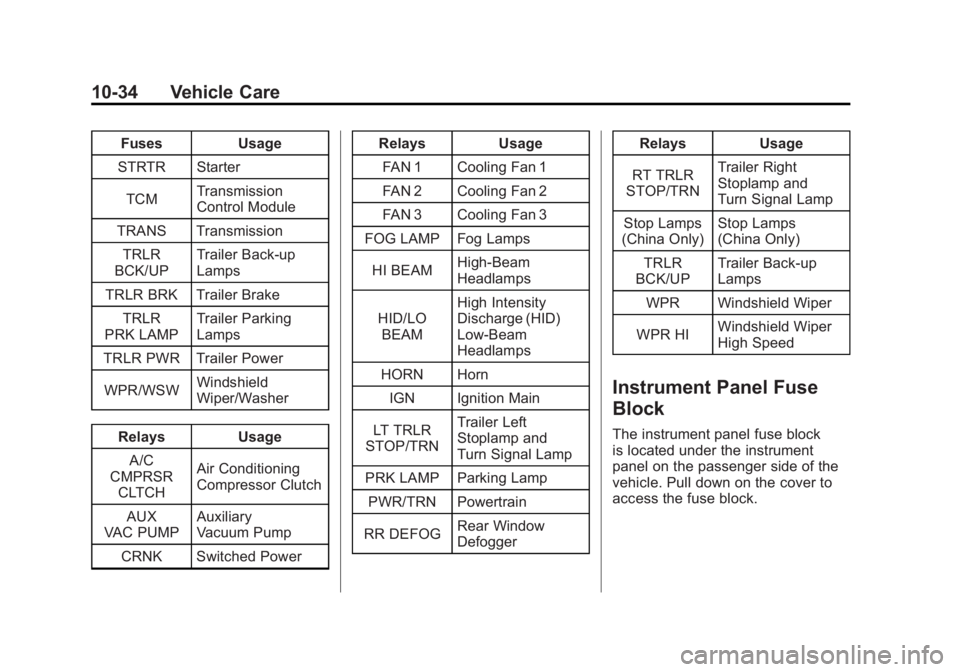
FusesUsage
STRTR Starter
TCM Transmission
Control Module
TRANS Transmission TRLR
BCK/UP Trailer Back‐up
Lamps
TRLR BRK Trailer Brake TRLR
PRK LAMP Trailer Parking
Lamps
TRLR PWR Trailer Power
WPR/WSW Windshield
Wiper/Washer
Relays Usage
A/C
CMPRSR CLTCH Air Conditioning
Compressor Clutch
AUX
VAC PUMP Auxiliary
Vacuum Pump
CRNK Switched Power Relays
Usage
FAN 1 Cooling Fan 1
FAN 2 Cooling Fan 2
FAN 3 Cooling Fan 3
FOG LAMP Fog Lamps
HI BEAM High‐Beam
Headlamps
HID/LO BEAM High Intensity
Discharge (HID)
Low‐Beam
Headlamps
HORN Horn IGN Ignition Main
LT TRLR
STOP/TRN Trailer Left
Stoplamp and
Turn Signal Lamp
PRK LAMP Parking Lamp
PWR/TRN Powertrain
RR DEFOG Rear Window
Defogger Relays
Usage
RT TRLR
STOP/TRN Trailer Right
Stoplamp and
Turn Signal Lamp
Stop Lamps
(China Only) Stop Lamps
(China Only)
TRLR
BCK/UP Trailer Back-up
Lamps
WPR Windshield Wiper
WPR HI Windshield Wiper
High Speed
Instrument Panel Fuse
Block
The instrument panel fuse block
is located under the instrument
panel on the passenger side of the
vehicle. Pull down on the cover to
access the fuse block.
Page 458 of 468
Black plate (2,1)GMC Acadia/Acadia Denali Owner Manual - 2012
i-2 INDEX
Automatic TransmissionManual Mode . . . . . . . . . . . . . . . . . 9-25
Shift Lock Control
Function Check . . . . . . . . . . . 10-26
Auxiliary Devices . . . . . . . . . . . . . . . . . . . . . . . 7-36
B
Battery . . . . . . . . . . . . . . . . . . . . . . . 10-25Jump Starting . . . . . . . . . . . . . . . 10-78
Load Management . . . . . . . . . . . . . 6-7
Power Protection . . . . . . . . . . . . . . 6-8
Voltage and ChargingMessages . . . . . . . . . . . . . . . . . . . 5-37
Blade Replacement, Wiper . . . 10-28
Blind Spot Mirrors . . . . . . . . . . . . . 2-18
Bluetooth . . . . . . . . . . . . . . . . . . . . . . 7-49
Brake System Warning Light . . . . . . . . 5-21
Brakes . . . . . . . . . . . . . . . . . . . . . . . . 10-22 Antilock . . . . . . . . . . . . . . . . . . . . . . . 9-27
Assist . . . . . . . . . . . . . . . . . . . . . . . . . 9-29
Fluid . . . . . . . . . . . . . . . . . . . . . . . . 10-24
Parking . . . . . . . . . . . . . . . . . . . . . . . 9-28
System Messages . . . . . . . . . . . . 5-38 Braking . . . . . . . . . . . . . . . . . . . . . . . . . 9-3
Break-In, New Vehicle . . . . . . . . . 9-15
Bulb Replacement . . . . . . . . . . . . 10-29
Fog Lamps . . . . . . . . . . . . . . . . . . . . 6-5
Headlamp Aiming . . . . . . . . . . . 10-28
Headlamps . . . . . . . . . . . . . . . . . 10-29
License Plate Lamps . . . . . . . 10-29
Buying New Tires . . . . . . . . . . . . . 10-52C
Calibration . . . . . . . . . . . . . . . . . . . . . . 5-6
California Fuel Requirements . . . . . . . . . . . 9-40
Perchlorate Materials
Requirements . . . . . . . . . . . . . . . 10-3
Warning . . . . . . . . . . . . . . . . . . . . . . 10-3
Camera, Rear Vision . . . . . . . . . . 9-35
Canadian Vehicle Owners . . . . . . . . iii
Capacities and Specifications . . . . . . . . . . . . . . . . 12-2
Carbon Monoxide Engine Exhaust . . . . . . . . . . . . . . . 9-22
Liftgate . . . . . . . . . . . . . . . . . . . . . . . 2-10
Winter Driving . . . . . . . . . . . . . . . . . 9-8 Cargo
Cover . . . . . . . . . . . . . . . . . . . . . . . . . . 4-4
Management System . . . . . . . . . . 4-4
Tie-Downs . . . . . . . . . . . . . . . . . . . . . 4-4
Cautions, Danger, and Warnings . . . . . . . . . . . . . . . . . . . . . . . . iv
CD Player . . . . . . . . . . . . . . . . . . . . . 7-13
CD/DVD Player . . . . . . . . . . . . . . . . 7-15
Center Console Storage . . . . . . . . 4-2
Chains, Tire . . . . . . . . . . . . . . . . . . 10-57
Charging System Light . . . . . . . . 5-18
Check
Engine Light . . . . . . . . . . . . . . . . . . 5-18
IgnitionTransmission Lock . . . . . . . . 10-27
Child Restraints
Infants and YoungChildren . . . . . . . . . . . . . . . . . . . . . 3-40
Lower Anchors and Tethers for Children . . . . . . . . . 3-46
Older Children . . . . . . . . . . . . . . . . 3-38
Securing . . . . . . . . . . . . . . . . 3-54, 3-56
Systems . . . . . . . . . . . . . . . . . . . . . . 3-42
Circuit Breakers . . . . . . . . . . . . . . 10-31
Page 462 of 468
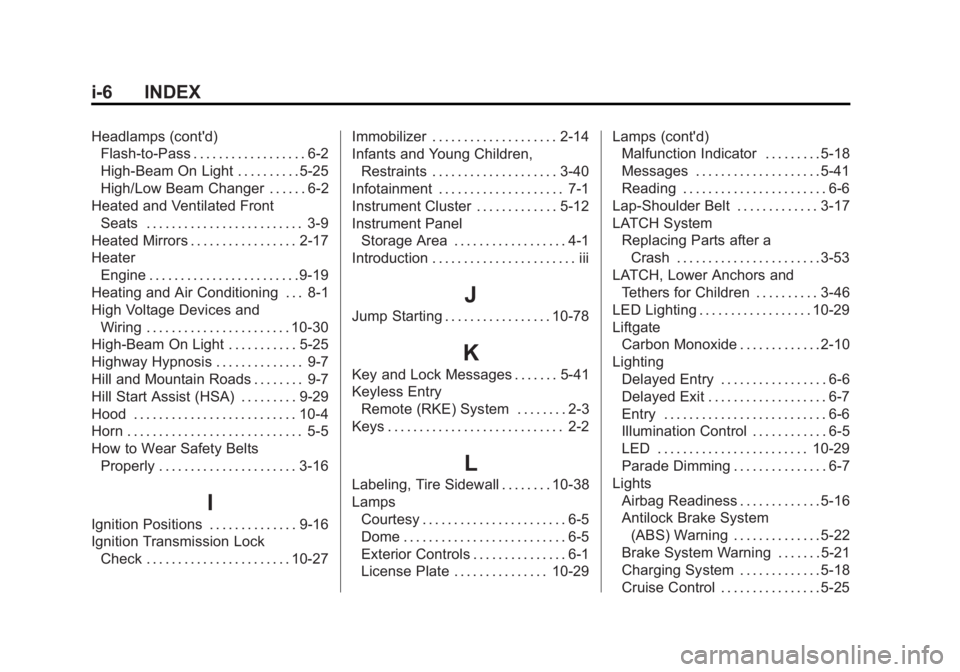
Black plate (6,1)GMC Acadia/Acadia Denali Owner Manual - 2012
i-6 INDEX
Headlamps (cont'd)Flash-to-Pass . . . . . . . . . . . . . . . . . . 6-2
High-Beam On Light . . . . . . . . . . 5-25
High/Low Beam Changer . . . . . . 6-2
Heated and Ventilated Front Seats . . . . . . . . . . . . . . . . . . . . . . . . . 3-9
Heated Mirrors . . . . . . . . . . . . . . . . . 2-17
Heater Engine . . . . . . . . . . . . . . . . . . . . . . . . 9-19
Heating and Air Conditioning . . . 8-1
High Voltage Devices and Wiring . . . . . . . . . . . . . . . . . . . . . . . 10-30
High-Beam On Light . . . . . . . . . . . 5-25
Highway Hypnosis . . . . . . . . . . . . . . 9-7
Hill and Mountain Roads . . . . . . . . 9-7
Hill Start Assist (HSA) . . . . . . . . . 9-29
Hood . . . . . . . . . . . . . . . . . . . . . . . . . . 10-4
Horn . . . . . . . . . . . . . . . . . . . . . . . . . . . . 5-5
How to Wear Safety Belts Properly . . . . . . . . . . . . . . . . . . . . . . 3-16
I
Ignition Positions . . . . . . . . . . . . . . 9-16
Ignition Transmission LockCheck . . . . . . . . . . . . . . . . . . . . . . . 10-27 Immobilizer . . . . . . . . . . . . . . . . . . . . 2-14
Infants and Young Children,
Restraints . . . . . . . . . . . . . . . . . . . . 3-40
Infotainment . . . . . . . . . . . . . . . . . . . . 7-1
Instrument Cluster . . . . . . . . . . . . . 5-12
Instrument Panel Storage Area . . . . . . . . . . . . . . . . . . 4-1
Introduction . . . . . . . . . . . . . . . . . . . . . . . iii
J
Jump Starting . . . . . . . . . . . . . . . . . 10-78
K
Key and Lock Messages . . . . . . . 5-41
Keyless Entry Remote (RKE) System . . . . . . . . 2-3
Keys . . . . . . . . . . . . . . . . . . . . . . . . . . . . 2-2
L
Labeling, Tire Sidewall . . . . . . . . 10-38
Lamps Courtesy . . . . . . . . . . . . . . . . . . . . . . . 6-5
Dome . . . . . . . . . . . . . . . . . . . . . . . . . . 6-5
Exterior Controls . . . . . . . . . . . . . . . 6-1
License Plate . . . . . . . . . . . . . . . 10-29 Lamps (cont'd)
Malfunction Indicator . . . . . . . . . 5-18
Messages . . . . . . . . . . . . . . . . . . . . 5-41
Reading . . . . . . . . . . . . . . . . . . . . . . . 6-6
Lap-Shoulder Belt . . . . . . . . . . . . . 3-17
LATCH System Replacing Parts after aCrash . . . . . . . . . . . . . . . . . . . . . . . 3-53
LATCH, Lower Anchors and
Tethers for Children . . . . . . . . . . 3-46
LED Lighting . . . . . . . . . . . . . . . . . . 10-29
Liftgate Carbon Monoxide . . . . . . . . . . . . . 2-10
Lighting
Delayed Entry . . . . . . . . . . . . . . . . . 6-6
Delayed Exit . . . . . . . . . . . . . . . . . . . 6-7
Entry . . . . . . . . . . . . . . . . . . . . . . . . . . 6-6
Illumination Control . . . . . . . . . . . . 6-5
LED . . . . . . . . . . . . . . . . . . . . . . . . 10-29
Parade Dimming . . . . . . . . . . . . . . . 6-7
Lights Airbag Readiness . . . . . . . . . . . . . 5-16
Antilock Brake System(ABS) Warning . . . . . . . . . . . . . . 5-22
Brake System Warning . . . . . . . 5-21
Charging System . . . . . . . . . . . . . 5-18
Cruise Control . . . . . . . . . . . . . . . . 5-25