light GMC ACADIA 2012 User Guide
[x] Cancel search | Manufacturer: GMC, Model Year: 2012, Model line: ACADIA, Model: GMC ACADIA 2012Pages: 468, PDF Size: 5.57 MB
Page 47 of 468
Black plate (15,1)GMC Acadia/Acadia Denali Owner Manual - 2012
Keys, Doors, and Windows 2-15
The security light comes on if there
is a problem with arming or
disarming the theft-deterrent
system.
When the PASS-Key III+ system
senses an incorrect key, the vehicle
does not start. Anyone using a
trial-and-error method to start the
vehicle will be discouraged because
of the high number of electrical key
codes.
If the engine does not start and the
security light on the instrument
panel comes on when trying to start
the vehicle, there may be a problem
with the theft-deterrent system.
Turn the ignition off and try again.
If the engine still does not start, and
the key appears to be undamaged,
try another ignition key and check
the fuses. SeeFuses and Circuit
Breakers on page 10‑31 for
additional information. If the engine
still does not start with the other
key, the vehicle needs service. If the vehicle does start, the first key
may be faulty. See your dealer who
can service the PASS-Key III+ to
have a new key made. In an
emergency, contact Roadside
Assistance. See
Roadside
Assistance Program (U.S. and
Canada) on page 13‑8 orRoadside
Assistance Program (Mexico) on
page 13‑10.
It is possible for the PASS-Key III+
decoder to learn the transponder
value of a new or replacement key.
Up to 10 keys may be programmed
to the vehicle. The following
procedure is for programming
additional keys only. If all currently
programmed keys are lost or do not
operate, you must see your dealer
or a locksmith who can service
PASS-Key III+ to have keys made
and programmed to the system.
See your dealer or a locksmith who
can service PASS-Key III+ to get a
new key blank that is cut exactly as
the ignition key that operates the
system. To program the new additional key:
1. Verify that the new key has a
1
stamped on it.
2. Insert the already programmed key in the ignition and start the
engine. If the engine does not
start, see your dealer for service.
3. After the engine has started, turn the key to LOCK/OFF, and
remove the key.
4. Insert the key to be programmed and turn it to the ON/RUN
position within five seconds of
the original key being turned to
the LOCK/OFF position.
The security light turns off once
the key has been programmed.
5. Repeat Steps 1 through 4 if additional keys are to be
programmed.
Page 52 of 468
Black plate (20,1)GMC Acadia/Acadia Denali Owner Manual - 2012
2-20 Keys, Doors, and Windows
Automatic Dimming
Rearview Mirror
The vehicle may have an automatic
dimming inside rearview mirror.
Automatic dimming reduces the
glare from the headlamps of the
vehicle behind you. The dimming
feature comes on and the indicator
light illuminates each time the
ignition is turned to start.
O(On/Off):Press to turn the
dimming feature on or off.
The vehicle may also have a Rear
Vision Camera (RVC). See Rear
Vision Camera (RVC) on page 9‑35
for more information. If the vehicle has a RVC, the
O
button for turning the dimming
feature on or off will not be
available.
Vehicles with OnStar have three
additional control buttons for the
OnStar system. See
OnStar
Overview on page 14‑1.
Cleaning the Mirror
Do not spray glass cleaner directly
on the mirror. Use a soft towel
dampened with water.
Windows
{WARNING
Leaving children, helpless adults,
or pets in a vehicle with the
windows closed is dangerous.
They can be overcome by the
extreme heat and suffer
permanent injuries or even death
from heat stroke. Never leave a
child, a helpless adult, or a pet
alone in a vehicle, especially with
the windows closed in warm or
hot weather.
Page 54 of 468

Black plate (22,1)GMC Acadia/Acadia Denali Owner Manual - 2012
2-22 Keys, Doors, and Windows
Express-Up/Express-Down
Windows
A window with the express‐up/down
feature allows it to be raised or
lowered without holding the switch.
Press or pull the window switch
fully and release it to activate the
express feature. The express mode
can be canceled by pressing or
pulling the switch.
Programming the Power
Windows
If the battery on the vehicle has
been recharged, disconnected,
or replaced, windows with the
express-up feature need to be
reprogrammed for this feature to
work. To program the window:
1. Close all doors with the ignitionin the ACC/ACCESSORY,
ON/RUN position, or when
Retained Accessory
Power (RAP) is active.
See Retained Accessory
Power (RAP) on page 9‑20. 2. Press and continue to hold the
window switch until the window
is fully open.
3. Pull up and hold the window switch to close the window.
Continue to hold it briefly after
the window is fully closed.
4. Repeat for each window that has the express-up feature.
Anti-Pinch Feature
The anti-pinch feature is on
windows with the express-up
feature. If an object is in the way of
the window as it is express-closing,
or in certain weather conditions like
severe icing, the window will stop
and open to a factory preset
position. The window functions
normally once the obstruction is
removed.
Rear Window Lockout
The rear window lockout feature
prevents the rear passenger
windows from operating, except
from the driver position.
Press
vto activate the rear window
lockout switch. The LED light comes
on when activated.
Press
vagain to deactivate the
lockout switch.
Page 65 of 468
Black plate (9,1)GMC Acadia/Acadia Denali Owner Manual - 2012
Seats and Restraints 3-9
Heated and Ventilated
Front Seats
{WARNING
If you cannot feel temperature
change or pain to the skin, the
seat heater may cause burns
even at low temperatures.
To reduce the risk of burns,
people with such a condition
should use care when using the
seat heater, especially for long
periods of time. Do not place
anything on the seat that
insulates against heat, such as
a blanket, cushion, cover,
or similar item. This may cause
the seat heater to overheat.
An overheated seat heater may
cause a burn or may damage
the seat.
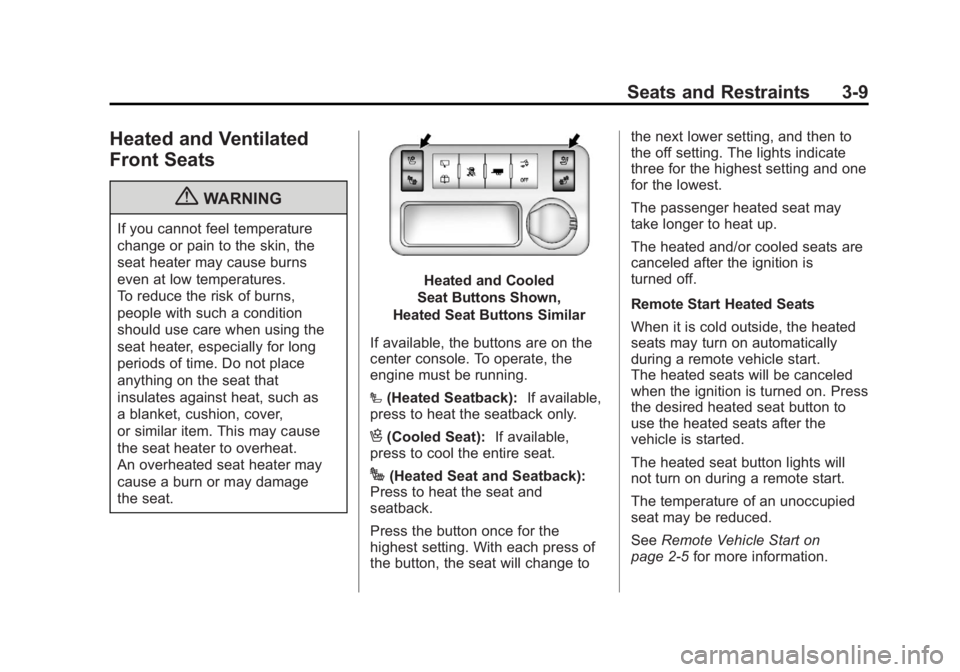
Heated and Cooled
Seat Buttons Shown,
Heated Seat Buttons Similar
If available, the buttons are on the
center console. To operate, the
engine must be running.
I (Heated Seatback): If available,
press to heat the seatback only.
H(Cooled Seat): If available,
press to cool the entire seat.
J(Heated Seat and Seatback):
Press to heat the seat and
seatback.
Press the button once for the
highest setting. With each press of
the button, the seat will change to the next lower setting, and then to
the off setting. The lights indicate
three for the highest setting and one
for the lowest.
The passenger heated seat may
take longer to heat up.
The heated and/or cooled seats are
canceled after the ignition is
turned off.
Remote Start Heated Seats
When it is cold outside, the heated
seats may turn on automatically
during a remote vehicle start.
The heated seats will be canceled
when the ignition is turned on. Press
the desired heated seat button to
use the heated seats after the
vehicle is started.
The heated seat button lights will
not turn on during a remote start.
The temperature of an unoccupied
seat may be reduced.
See
Remote Vehicle Start on
page 2‑5 for more information.
Page 70 of 468
Black plate (14,1)GMC Acadia/Acadia Denali Owner Manual - 2012
3-14 Seats and Restraints
Removing the Third Row Seats
To remove a third row seat:
1. Remove the cargo managementsystem, if available and
installed. See Cargo
Management System on
page 4‑4.
2. Remove anything on or under the seat.
Notice: Folding a rear seat with
the safety belts still fastened may
cause damage to the seat or the
safety belts. Always unbuckle the
safety belts and return them to
their normal stowed position
before folding a rear seat.
3. Fold the seatback down.
See “Folding the Seatback”
earlier in this section.
4. Remove the rear bolts on the floor on each side of the seat. 5. Remove the seat by tilting it
slightly upward, and then pulling
it out of the rear of the vehicle in
one motion.
6. Replace the bolts in the floor holes for storage.
Installing the Third Row Seats
To reinstall a third row seat:
1. Before installing the seat the
seatback must be folded
forward. See “Folding the
Seatback” earlier in this section.
The seats must be placed in the
proper locations to attach
correctly. The wider seat must
be installed on the driver side
and the narrower seat on the
passenger side. Remove the
bolts from the holes in the floor
before installing the seats. 2. Place the seat on the vehicle
floor so that the front seat hooks
are on the vehicle bars.
3. Reinstall the bolts, and torque to 55Y (41 lb ft). Pull up on the
seat to make sure it is locked in
place.
4. Raise the seatback to the upright position. Push and pull
on the seatback to make sure it
is locked into place.
5. Reconnect the center safety belt mini-latch to the mini-buckle.
Do not let it twist.
Page 73 of 468
Black plate (17,1)GMC Acadia/Acadia Denali Owner Manual - 2012
Seats and Restraints 3-17
.Wear the shoulder belt over the
shoulder and across the chest.
These parts of the body are best
able to take belt restraining
forces. The shoulder belt locks if
there is a sudden stop or crash.
{WARNING
You can be seriously injured,
or even killed, by not wearing
your safety belt properly.
.Never allow the lap or
shoulder belt to become
loose or twisted.
.Never wear the shoulder belt
under both arms or behind
your back.
.Never route the lap or
shoulder belt over an
armrest.
Lap-Shoulder Belt
All seating positions in the vehicle
have a lap-shoulder belt.
If you are using a rear seating
position with a detachable safety
belt and the safety belt is not
attached, see“Returning the Seat to
the Seating Position” underThird
Row Seats on page 3‑12 for
instruction on reconnecting the
safety belt to the mini-buckle.
The following instructions explain
how to wear a lap-shoulder belt
properly.
1. Adjust the seat, if the seat is adjustable, so you can sit up
straight. To see how, see “Seats”
in the Index.
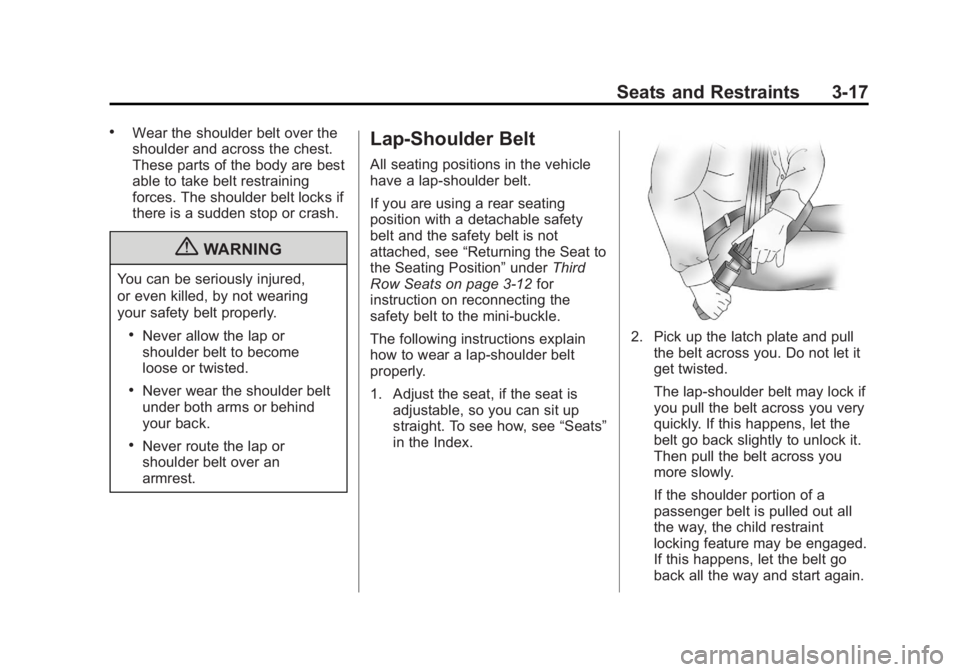
2. Pick up the latch plate and pull the belt across you. Do not let it
get twisted.
The lap-shoulder belt may lock if
you pull the belt across you very
quickly. If this happens, let the
belt go back slightly to unlock it.
Then pull the belt across you
more slowly.
If the shoulder portion of a
passenger belt is pulled out all
the way, the child restraint
locking feature may be engaged.
If this happens, let the belt go
back all the way and start again.
Page 79 of 468
Black plate (23,1)GMC Acadia/Acadia Denali Owner Manual - 2012
Seats and Restraints 3-23
Safety System Check
Now and then, check that the safety
belt reminder light, safety belts,
buckles, latch plates, retractors, and
anchorages are all working properly.
Look for any other loose or
damaged safety belt system parts
that might keep a safety belt system
from doing its job. See your dealer
to have it repaired. Torn or frayed
safety belts may not protect you in a
crash. They can rip apart under
impact forces. If a belt is torn or
frayed, get a new one right away.
Make sure the safety belt reminder
light is working. SeeSafety Belt
Reminders on page 5‑15 for more
information.
Keep safety belts clean and dry.
See Safety Belt Care on page 3‑23.
Safety Belt Care
Keep belts clean and dry.
{WARNING
Do not bleach or dye safety belts.
It may severely weaken them.
In a crash, they might not be able
to provide adequate protection.
Clean safety belts only with mild
soap and lukewarm water.
Replacing Safety Belt
System Parts after a
Crash
{WARNING
A crash can damage the safety
belt system in the vehicle.
A damaged safety belt system
may not properly protect the
person using it, resulting in
serious injury or even death in a
(Continued)
WARNING (Continued)
crash. To help make sure the
safety belt systems are working
properly after a crash, have them
inspected and any necessary
replacements made as soon as
possible.
After a minor crash, replacement of
safety belts may not be necessary.
But the safety belt assemblies that
were used during any crash may
have been stressed or damaged.
See your dealer to have the safety
belt assemblies inspected or
replaced.
New parts and repairs may be
necessary even if the safety belt
system was not being used at the
time of the crash.
Have the safety belt pretensioners
checked if the vehicle has been in a
crash, or if the airbag readiness light
stays on after you start the vehicle
or while you are driving. See Airbag
Readiness Light on page 5‑16.
Page 81 of 468
Black plate (25,1)GMC Acadia/Acadia Denali Owner Manual - 2012
Seats and Restraints 3-25
{WARNING
Because airbags inflate with great
force and faster than the blink of
an eye, anyone who is up
against, or very close to any
airbag when it inflates can be
seriously injured or killed. Do not
sit unnecessarily close to any
airbag, as you would be if sitting
on the edge of the seat or leaning
forward. Safety belts help keep
you in position before and during
a crash. Always wear a safety
belt, even with airbags. The driver
should sit as far back as possible
while still maintaining control of
the vehicle.
Occupants should not lean on or
sleep against the door or side
windows in seating positions with
seat-mounted side impact airbags
and/or roof-rail airbags.
{WARNING
Children who are up against,
or very close to, any airbag when
it inflates can be seriously injured
or killed. Airbags plus
lap-shoulder belts offer protection
for adults and older children, but
not for young children and infants.
Neither the vehicle's safety belt
system nor its airbag system is
designed for them. Young
children and infants need the
protection that a child restraint
system can provide. Always
secure children properly in the
vehicle. To read how, seeOlder
Children on page 3‑38 orInfants
and Young Children on
page 3‑40.
There is an airbag readiness light
on the instrument panel cluster,
which shows the airbag symbol.
The system checks the airbag
electrical system for malfunctions.
The light tells you if there is an
electrical problem. See Airbag
Readiness Light on page 5‑16 for
more information.
Page 87 of 468
Black plate (31,1)GMC Acadia/Acadia Denali Owner Manual - 2012
Seats and Restraints 3-31
Passenger Sensing
System
The vehicle has a passenger
sensing system for the front
outboard passenger position.
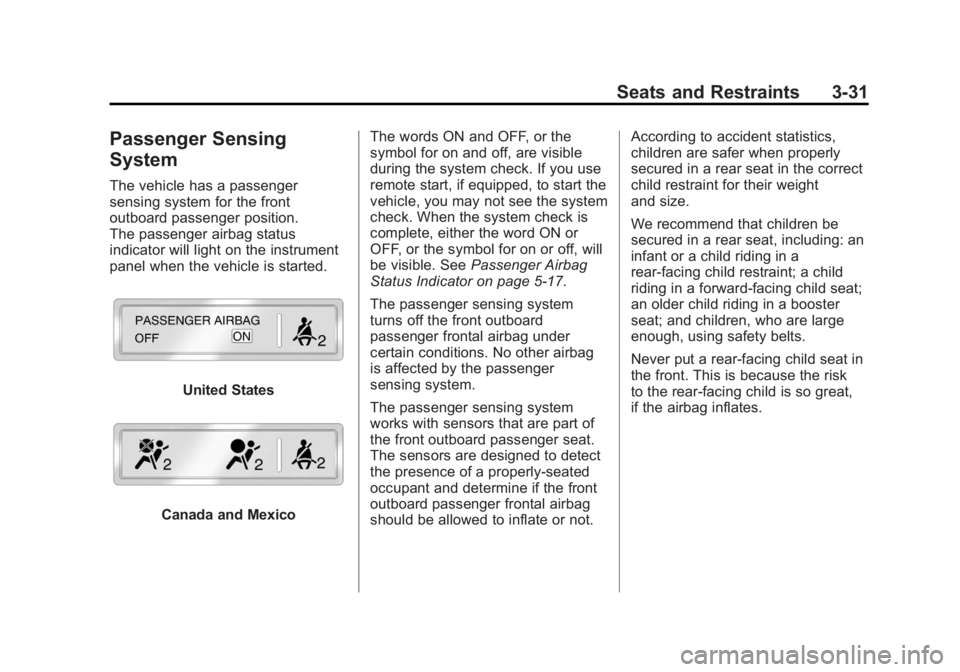
The passenger airbag status
indicator will light on the instrument
panel when the vehicle is started.
United States
Canada and MexicoThe words ON and OFF, or the
symbol for on and off, are visible
during the system check. If you use
remote start, if equipped, to start the
vehicle, you may not see the system
check. When the system check is
complete, either the word ON or
OFF, or the symbol for on or off, will
be visible. See
Passenger Airbag
Status Indicator on page 5‑17.
The passenger sensing system
turns off the front outboard
passenger frontal airbag under
certain conditions. No other airbag
is affected by the passenger
sensing system.
The passenger sensing system
works with sensors that are part of
the front outboard passenger seat.
The sensors are designed to detect
the presence of a properly-seated
occupant and determine if the front
outboard passenger frontal airbag
should be allowed to inflate or not. According to accident statistics,
children are safer when properly
secured in a rear seat in the correct
child restraint for their weight
and size.
We recommend that children be
secured in a rear seat, including: an
infant or a child riding in a
rear-facing child restraint; a child
riding in a forward-facing child seat;
an older child riding in a booster
seat; and children, who are large
enough, using safety belts.
Never put a rear-facing child seat in
the front. This is because the risk
to the rear-facing child is so great,
if the airbag inflates.
Page 88 of 468
Black plate (32,1)GMC Acadia/Acadia Denali Owner Manual - 2012
3-32 Seats and Restraints
{WARNING
A child in a rear-facing child
restraint can be seriously injured
or killed if the passenger frontal
airbag inflates. This is because
the back of the rear-facing child
restraint would be very close to
the inflating airbag. A child in a
forward-facing child restraint can
be seriously injured or killed if the
passenger frontal airbag inflates
and the passenger seat is in a
forward position.
Even if the passenger sensing
system has turned off the
passenger frontal airbag, no
system is fail-safe. No one can
guarantee that an airbag will not
inflate under some unusual
circumstance, even though the
airbag is off.(Continued)
WARNING (Continued)
Secure rear-facing child
restraints in a rear seat, even if
the airbag is off. If you secure a
forward-facing child restraint in
the front outboard passenger
seat, always move the seat as far
back as it will go. It is better to
secure the child restraint in a
rear seat.
The passenger sensing system is
designed to turn off the front
outboard passenger frontal airbag if:
.The front outboard passenger
seat is unoccupied.
.The system determines that
an infant is present in a child
restraint.
.A front outboard passenger
takes his/her weight off of the
seat for a period of time.
.There is a critical problem with
the airbag system or the
passenger sensing system. When the passenger sensing
system has turned off the front
outboard passenger frontal airbag,
the off indicator will light and stay lit
as a reminder that the airbag is off.
See
Passenger Airbag Status
Indicator on page 5‑17.
The passenger sensing system is
designed to turn on the front
outboard passenger frontal airbag
anytime the system senses that a
person of adult size is sitting
properly in the front outboard
passenger seat.
When the passenger sensing
system has allowed the airbag to be
enabled, the on indicator will light
and stay lit as a reminder that the
airbag is active.
For some children, including
children in child restraints, and for
very small adults, the passenger
sensing system may or may not
turn off the front outboard