Spare tire GMC ACADIA 2012 Owner's Guide
[x] Cancel search | Manufacturer: GMC, Model Year: 2012, Model line: ACADIA, Model: GMC ACADIA 2012Pages: 468, PDF Size: 5.57 MB
Page 384 of 468
Black plate (72,1)GMC Acadia/Acadia Denali Owner Manual - 2012
10-72 Vehicle Care
{WARNING
Raising the vehicle with the jack
improperly positioned can
damage the vehicle and even
make the vehicle fall. To help
avoid personal injury and vehicle
damage, be sure to fit the jack lift
head into the proper location
before raising the vehicle.
7. Raise the vehicle by turning the wrench clockwise in the jack.
Raise the vehicle far enough off
the ground so that there is
enough room for the spare tire
to fit under the wheel well.
8. Remove all the wheel nuts and the flat tire.
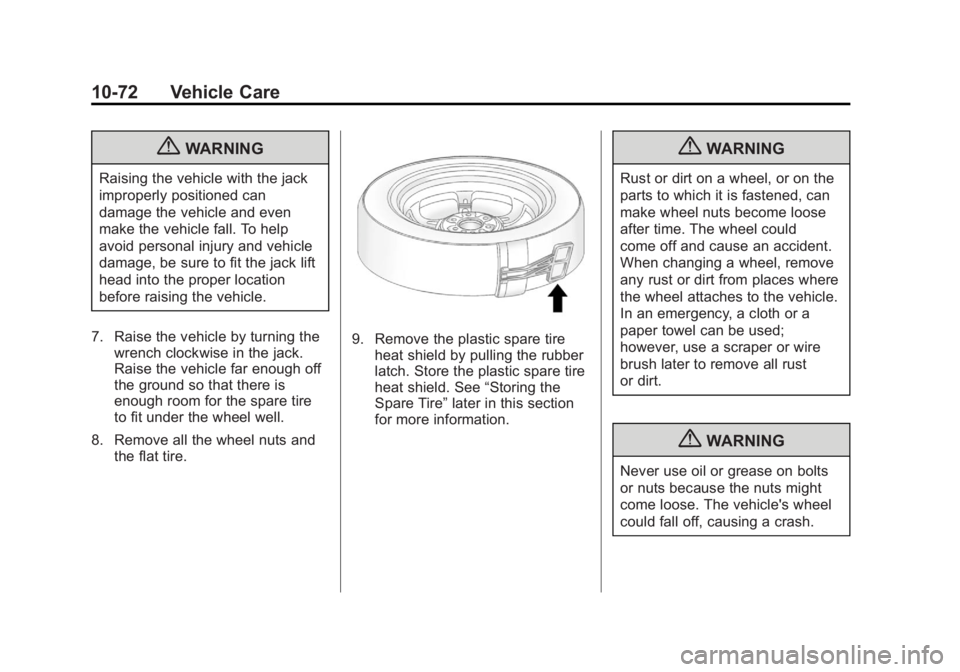
9. Remove the plastic spare tire
heat shield by pulling the rubber
latch. Store the plastic spare tire
heat shield. See “Storing the
Spare Tire” later in this section
for more information.
{WARNING
Rust or dirt on a wheel, or on the
parts to which it is fastened, can
make wheel nuts become loose
after time. The wheel could
come off and cause an accident.
When changing a wheel, remove
any rust or dirt from places where
the wheel attaches to the vehicle.
In an emergency, a cloth or a
paper towel can be used;
however, use a scraper or wire
brush later to remove all rust
or dirt.
{WARNING
Never use oil or grease on bolts
or nuts because the nuts might
come loose. The vehicle's wheel
could fall off, causing a crash.
Page 385 of 468
Black plate (73,1)GMC Acadia/Acadia Denali Owner Manual - 2012
Vehicle Care 10-73
10. Remove any rust or dirt fromthe wheel bolts, mounting
surfaces, and spare wheel.
11. Place the spare tire on the wheel mounting surface.
12. Put the nuts on by hand by turning them clockwise until
the wheel is held against the
mounting surface. Make sure
the rounded end is toward
the wheel.
13. Lower the vehicle by attaching the wrench to the
jack and turning the wrench
counterclockwise. Lower the
jack completely.{WARNING
Wheel nuts that are improperly or
incorrectly tightened can cause
the wheels to become loose or
come off. The wheel nuts should
be tightened with a torque wrench
to the proper torque specification
after replacing. Follow the torque
specification supplied by the
aftermarket manufacturer when
using accessory locking wheel
nuts. See Capacities and
Specifications on page 12‑2 for
original equipment wheel nut
torque specifications.
Notice: Improperly tightened
wheel nuts can lead to brake
pulsation and rotor damage.
To avoid expensive brake repairs,
evenly tighten the wheel nuts in
the proper sequence and to the
proper torque specification.
See Capacities and Specifications
on page 12‑2 for the wheel nut
torque specification.
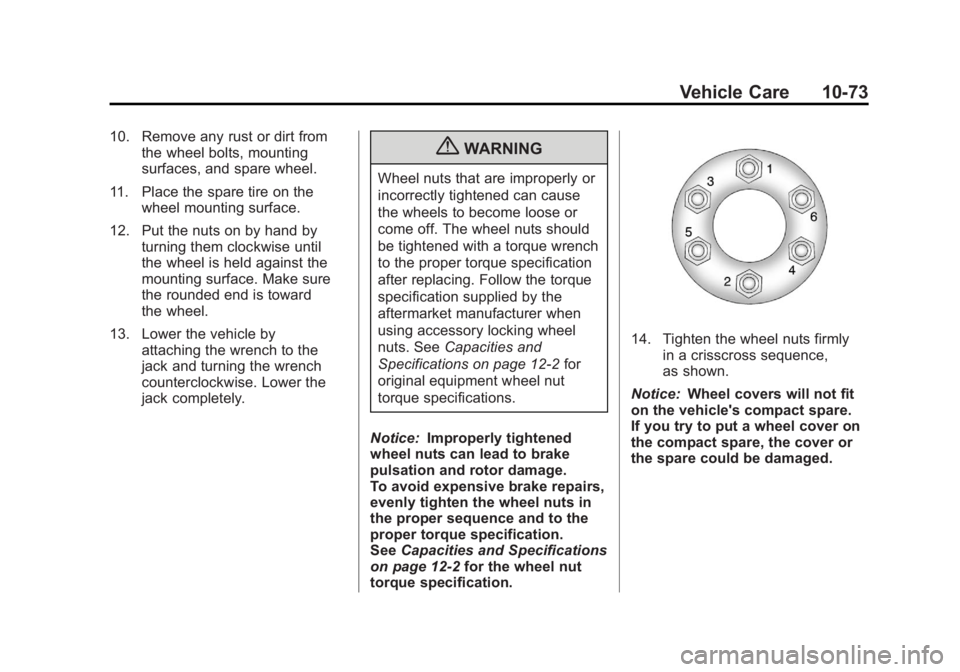
14. Tighten the wheel nuts firmly in a crisscross sequence,
as shown.
Notice: Wheel covers will not fit
on the vehicle's compact spare.
If you try to put a wheel cover on
the compact spare, the cover or
the spare could be damaged.
Page 386 of 468
Black plate (74,1)GMC Acadia/Acadia Denali Owner Manual - 2012
10-74 Vehicle Care
Storing the Spare Tire
{WARNING
The underbody-mounted spare
tire needs to be stored with the
valve stem pointing down. If the
spare tire is stored with the valve
stem pointing upwards, the
secondary latch will not work
properly and the spare tire could
loosen and suddenly fall from the
vehicle. If this happened when
the vehicle was being driven, the
tire might contact a person or
another vehicle, causing injury
and damage to itself. Be sure the
underbody-mounted spare tire
is stored with the valve stem
pointing down.
{WARNING
Storing a jack, a tire, or other
equipment in the passenger
compartment of the vehicle could
cause injury. In a sudden stop or
collision, loose equipment could
strike someone. Store all these in
the proper place.
To store the spare tire:
1. Lay the compact spare tire near the rear of the vehicle with the
valve stem down.
2. Reinstall the plastic spare tire heat shield on the compact
spare tire.
3. Slide the cable retainer through the center of the wheel and start
to raise the compact spare tire.
Make sure the retainer is fully
seated across the underside of
the wheel. 4. When the compact spare tire is
almost in the stored position,
turn the tire so the valve is
toward the rear of the vehicle.
This position helps when
checking the air pressure in the
compact spare tire.
5. Raise the tire fully against the underside of the vehicle.
Continue turning the wrench until
you feel more than two clicks.
This indicates that the compact
spare tire is secure and the
cable is tight. The spare tire
hoist cannot be overtightened.
Page 387 of 468
Black plate (75,1)GMC Acadia/Acadia Denali Owner Manual - 2012
Vehicle Care 10-75
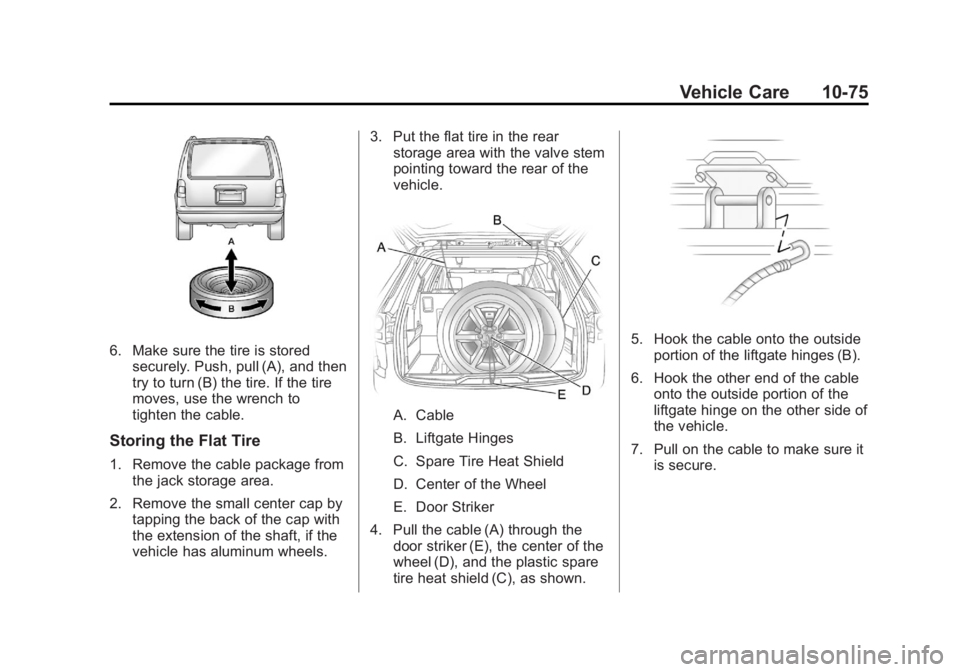
6. Make sure the tire is storedsecurely. Push, pull (A), and then
try to turn (B) the tire. If the tire
moves, use the wrench to
tighten the cable.
Storing the Flat Tire
1. Remove the cable package fromthe jack storage area.
2. Remove the small center cap by tapping the back of the cap with
the extension of the shaft, if the
vehicle has aluminum wheels. 3. Put the flat tire in the rear
storage area with the valve stem
pointing toward the rear of the
vehicle.
A. Cable
B. Liftgate Hinges
C. Spare Tire Heat Shield
D. Center of the Wheel
E. Door Striker
4. Pull the cable (A) through the door striker (E), the center of the
wheel (D), and the plastic spare
tire heat shield (C), as shown.
5. Hook the cable onto the outsideportion of the liftgate hinges (B).
6. Hook the other end of the cable onto the outside portion of the
liftgate hinge on the other side of
the vehicle.
7. Pull on the cable to make sure it is secure.
Page 388 of 468
Black plate (76,1)GMC Acadia/Acadia Denali Owner Manual - 2012
10-76 Vehicle Care
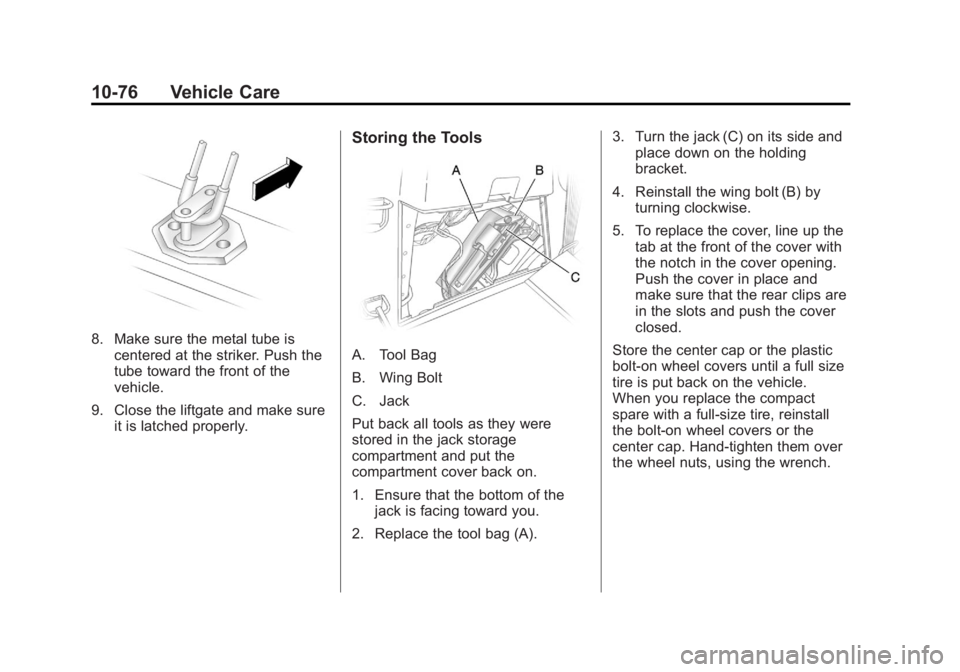
8. Make sure the metal tube iscentered at the striker. Push the
tube toward the front of the
vehicle.
9. Close the liftgate and make sure it is latched properly.
Storing the Tools
A. Tool Bag
B. Wing Bolt
C. Jack
Put back all tools as they were
stored in the jack storage
compartment and put the
compartment cover back on.
1. Ensure that the bottom of thejack is facing toward you.
2. Replace the tool bag (A). 3. Turn the jack (C) on its side and
place down on the holding
bracket.
4. Reinstall the wing bolt (B) by turning clockwise.
5. To replace the cover, line up the tab at the front of the cover with
the notch in the cover opening.
Push the cover in place and
make sure that the rear clips are
in the slots and push the cover
closed.
Store the center cap or the plastic
bolt‐on wheel covers until a full size
tire is put back on the vehicle.
When you replace the compact
spare with a full‐size tire, reinstall
the bolt‐on wheel covers or the
center cap. Hand‐tighten them over
the wheel nuts, using the wrench.
Page 389 of 468
Black plate (77,1)GMC Acadia/Acadia Denali Owner Manual - 2012
Vehicle Care 10-77
Compact Spare Tire
{WARNING
Driving with more than one
compact spare tire at a time
could result in loss of braking and
handling. This could lead to a
crash and you or others could be
injured. Use only one compact
spare tire at a time.
The compact spare tire, if the
vehicle has one, was fully inflated
when the vehicle was new, however,
it can lose air after a time. Check
the inflation pressure regularly.
It should be 420 kPa (60 psi).
After installing the compact spare
on the vehicle, stop as soon as
possible and make sure the
spare tire is correctly inflated. The compact spare is made to
perform well at speeds up to
105 km/h (65 mph) for distances up
to 5 000 km (3,000 mi), so you can
finish your trip and have the full-size
tire repaired or replaced at your
convenience. Of course, it is best to
replace the spare with a full-size tire
as soon as possible. The spare tire
will last longer and be in good
shape in case it is needed again.
Notice:
When the compact
spare is installed, do not take the
vehicle through an automatic
car wash with guide rails.
The compact spare can get
caught on the rails which can
damage the tire, wheel, and
other parts of the vehicle.
Do not use the compact spare on
other vehicles. And do not mix the compact spare
tire or wheel with other wheels or
tires. They will not fit. Keep the
spare tire and its wheel together.
The All-Wheel Drive (AWD) system
will be automatically disabled
when you use the compact spare.
To restore the AWD and prevent
excessive wear on the clutch in your
AWD, replace the compact spare
tire with a full-size tire as soon as
possible.
Notice:
Tire chains will not fit the
compact spare. Using them can
damage the vehicle and can
damage the chains too. Do not
use tire chains on the compact
spare.
Page 396 of 468
Black plate (84,1)GMC Acadia/Acadia Denali Owner Manual - 2012
10-84 Vehicle Care
6. To prevent the battery fromdraining while the vehicle is
being towed, remove the
20 amp ECM1 fuse and the
50 amp BATT1 fuse from the
underhood fuse block and store
in a safe location. See Engine
Compartment Fuse Block on
page 10‑31.
7. Release the parking brake.
Notice: If the vehicle is towed
without performing each of the
steps listed under “Dinghy
Towing,” the automatic
transmission could be damaged.
Be sure to follow all steps of the
dinghy towing procedure prior to
and after towing the vehicle.
Notice: If 105 km/h (65 mph) is
exceeded while towing the
vehicle, it could be damaged.
Never exceed 105 km/h (65 mph)
while towing the vehicle. Once the destination is reached:
1. Set the parking brake.
2. Reinstall the fuses in the
underhood fuse block.
3. Shift the transmission to P (Park), turn the ignition to
LOCK/OFF and remove the key
from the ignition.
4. Disconnect the vehicle from the towing vehicle.
Notice: Do not tow a vehicle with
the front drive wheels on the
ground if one of the front tires is
a compact spare tire. Towing with
two different tire sizes on the
front of the vehicle can cause
severe damage to the
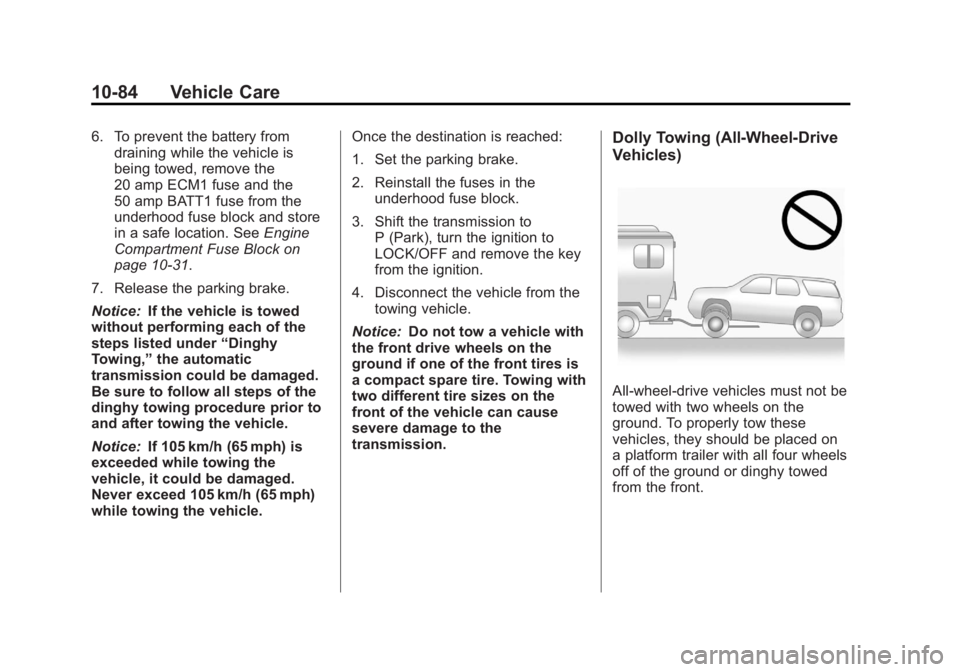
transmission.Dolly Towing (All-Wheel‐Drive
Vehicles)
All-wheel‐drive vehicles must not be
towed with two wheels on the
ground. To properly tow these
vehicles, they should be placed on
a platform trailer with all four wheels
off of the ground or dinghy towed
from the front.
Page 435 of 468
Black plate (9,1)GMC Acadia/Acadia Denali Owner Manual - 2012
Customer Information 13-9
GMC and General Motors of
Canada Limited reserve the right to
limit services or payment to an
owner or driver if they decide the
claims are made too often, or the
same type of claim is made many
times.
Services Provided
.Emergency Fuel Delivery:
Delivery of enough fuel for the
vehicle to get to the nearest
service station.
.Lock‐Out Service:Service to
unlock the vehicle if you are
locked out. A remote unlock
may be available if you have
OnStar
®. For security reasons,
the driver must present
identification before this
service is given.
.Emergency Tow From a Public
Road or Highway: Tow to the
nearest GMC dealer for warranty
service, or if the vehicle was in
a crash and cannot be driven.
Assistance is also given when
the vehicle is stuck in the sand,
mud, or snow.
.Flat Tire Change: Service to
change a flat tire with the spare
tire. The spare tire, if equipped,
must be in good condition and
properly inflated. It is the owner's
responsibility for the repair or
replacement of the tire if it is not
covered by the warranty.
.Battery Jump Start: Service to
jump start a dead battery.
.Trip Routing Service: Detailed
maps of North America when
requested either with the
most direct route or the most
scenic route. Additional travel
information is also available.
Allow three weeks for delivery.
.Trip Interruption Benefits and
Assistance: If your trip is
interrupted due to a warranty
failure, incidental expenses
may be reimbursed during the
5 years/(160 000 km) 100,000 mi
Powertrain warranty period.
Items considered are hotel,
meals, and rental car.
Services Not Included in
Roadside Assistance
.Impound towing caused by
violation of any laws.
.Legal fines.
.Mounting, dismounting,
or changing of snow tires,
chains, or other traction devices.
.Towing or services for vehicles
driven on a non-public road or
highway.
Page 459 of 468

Black plate (3,1)GMC Acadia/Acadia Denali Owner Manual - 2012
INDEX i-3
CleaningExterior Care . . . . . . . . . . . . . . . 10-86
Interior Care . . . . . . . . . . . . . . . . 10-89
Climate Control Systems . . . . . . . 8-1 Air Conditioning . . . . . . . . . . . . . . . 8-1
Dual Automatic . . . . . . . . . . . . . . . . 8-4
Heating . . . . . . . . . . . . . . . . . . . . . . . . 8-1
Rear . . . . . . . . . . . . . . . . . . . . 8-10, 8-11
Clock . . . . . . . . . . . . . . . . . . . . . . . . . . . 5-8
Cluster, Instrument . . . . . . . . . . . . 5-12
Collision Damage Repair . . . . . 13-16
Compact Spare Tire . . . . . . . . . . 10-77
Compass . . . . . . . . . . . . . . . . . . . . . . . 5-6
Compressor Kit, Tire Sealant . . . . . . . . . . . . . . . . . . . . . . 10-60
Connections, OnStar
®. . . . . . . . . 14-4
Control of a Vehicle . . . . . . . . . . . . . 9-3
Convenience Net . . . . . . . . . . . . . . . 4-5
Convex Mirrors . . . . . . . . . . . . . . . . 2-16
Coolant Engine . . . . . . . . . . . . . . . . . . . . . . 10-14
Engine Temperature
Gauge . . . . . . . . . . . . . . . . . . . . . . 5-14
Engine Temperature Warning Light . . . . . . . . . . . . . . . 5-23 Cooling System . . . . . . . . . . . . . . . 10-14
Engine Messages . . . . . . . . . . . . 5-39
Courtesy Lamps . . . . . . . . . . . . . . . . 6-5
Courtesy Transportation Program . . . . . . . . . . . . . . . . . . . . . 13-14
Cover Cargo . . . . . . . . . . . . . . . . . . . . . . . . . . 4-4
Engine . . . . . . . . . . . . . . . . . . . . . . . . 10-8
Cruise Control . . . . . . . . . . . . . . . . . 9-32 Light . . . . . . . . . . . . . . . . . . . . . . . . . . 5-25
Messages . . . . . . . . . . . . . . . . . . . . 5-38
Cupholders . . . . . . . . . . . . . . . . . . . . . 4-1
Customer Assistance . . . . . . . . . . 13-6 Offices . . . . . . . . . . . . . . . . . . 13-5, 13-6
Text Telephone (TTY)Users . . . . . . . . . . . . . . . . . . . . . . . 13-6
Customer Information Service PublicationsOrdering Information . . . . . . 13-18
Customer Satisfaction Procedure . . . . . . . . . . . . . . 13-2, 13-4
D
Damage Repair, Collision . . . . . 13-16
Danger, Warnings, and
Cautions . . . . . . . . . . . . . . . . . . . . . . . . iv
Data Recorders, Event . . . . . . . 13-21
Daytime Running Lamps/Automatic Headlamp
System . . . . . . . . . . . . . . . . . . . . . . . . 6-3
Defensive Driving . . . . . . . . . . . . . . . 9-3
Delayed Entry Lighting . . . . . . . . . 6-6
Delayed Exit Lighting . . . . . . . . . . . 6-7
Delayed Headlamps . . . . . . . . . . . . 6-3
Delayed Locking . . . . . . . . . . . . . . . . 2-8
Devices, Auxiliary . . . . . . . . . . . . . 7-36
Diagnostics, OnStar
®. . . . . . . . . . 14-5
Distracted Driving . . . . . . . . . . . . . . . 9-2
Dome Lamps . . . . . . . . . . . . . . . . . . . 6-5
Door
Ajar Messages . . . . . . . . . . . . . . . 5-38
Delayed Locking . . . . . . . . . . . . . . . 2-8
Locks . . . . . . . . . . . . . . . . . . . . . . . . . . 2-7
Power Locks . . . . . . . . . . . . . . . . . . . 2-8
Drive Belt Routing, Engine . . . . . 12-3
Page 466 of 468
Black plate (10,1)GMC Acadia/Acadia Denali Owner Manual - 2012
i-10 INDEX
S
Safety Belts . . . . . . . . . . . . . . . . . . . 3-15Care . . . . . . . . . . . . . . . . . . . . . . . . . . 3-23
Extender . . . . . . . . . . . . . . . . . . . . . . 3-22
How to Wear Safety BeltsProperly . . . . . . . . . . . . . . . . . . . . . 3-16
Lap-Shoulder Belt . . . . . . . . . . . . 3-17
Reminders . . . . . . . . . . . . . . . . . . . . 5-15
Replacing after a Crash . . . . . . 3-23
Use During Pregnancy . . . . . . . . 3-22
Safety Defects Reporting
Canadian Government . . . . . . 13-20
General Motors . . . . . . . . . . . . . 13-20
U.S. Government . . . . . . . . . . . 13-19
Safety Locks . . . . . . . . . . . . . . . . . . . . 2-9
Safety System Check . . . . . . . . . . 3-23
Satellite Radio . . . . . . . . . . . . . . . . . . 7-8
Scheduling Appointments . . . . . 13-14
Sealant Kit, Tire . . . . . . . . . . . . . . 10-60
Seats Adjustment, Front . . . . . . . . . . . . . . 3-3
Head Restraints . . . . . . . . . . . . . . . 3-2
Heated and Ventilated Front . . . 3-9
Lumbar Adjustment, Front . . . . . 3-4
Memory . . . . . . . . . . . . . . . . . . . . . . . . 3-7
Power Adjustment, Front . . . . . . 3-4 Seats (cont'd)
Rear . . . . . . . . . . . . . . . . . . . . . . . . . . 3-10
Reclining Seatbacks . . . . . . . . . . . 3-5
Third Row Seat . . . . . . . . . . . . . . . 3-12
Securing Child Restraints . . . . . . . . . . . . . . 3-54, 3-56
Security Light . . . . . . . . . . . . . . . . . . . . . . . . . . 5-24
OnStar
®. . . . . . . . . . . . . . . . . . . . . . 14-2
Vehicle . . . . . . . . . . . . . . . . . . . . . . . 2-13
Service Accessories andModifications . . . . . . . . . . . . . . . . 10-3
Doing Your Own Work . . . . . . . . 10-4
Engine Soon Light . . . . . . . . . . . . 5-18
Maintenance Records . . . . . . .11-14
Maintenance, General Information . . . . . . . . . . . . . . . . . . 11-1
Parts Identification Label . . . . . 12-1
Publications Ordering Information . . . . . . . . . . . . . . . . 13-18
Scheduling Appointments . . . 13-14
Vehicle Messages . . . . . . . . . . . . 5-43
Servicing the Airbag . . . . . . . . . . . 3-35
Shift Lock Control Function Check, Automatic
Transmission . . . . . . . . . . . . . . . . 10-26 Shifting
Into Park . . . . . . . . . . . . . . . . . . . . . . 9-20
Out of Park . . . . . . . . . . . . . . . . . . . 9-21
Signals, Turn and Lane-Change . . . . . . . . . . . . . . . . . 6-4
Spare Tire Compact . . . . . . . . . . . . . . . . . . . . 10-77
Specifications and Capacities . . . . . . . . . . . . . . . . . . . . 12-2
Speedometer . . . . . . . . . . . . . . . . . . 5-13
StabiliTrak Indicator Light . . . . . . . . . . . . . . . . 5-22
System . . . . . . . . . . . . . . . . . . . . . . . 9-30
Start Assist, Hills . . . . . . . . . . . . . . 9-29
Start Vehicle, Remote . . . . . . . . . . 2-5
Starter Switch Check . . . . . . . . . 10-26
Starting the Engine . . . . . . . . . . . . 9-18
Steering . . . . . . . . . . . . . . . . . . . . . . . . 9-4 Fluid, Power . . . . . . . . . . . . . . . . 10-21
Wheel Adjustment . . . . . . . . . . . . . 5-2
Wheel Controls . . . . . . . . . . . . . . . . 5-2
Storage Areas Armrest . . . . . . . . . . . . . . . . . . . . . . . . 4-2
Cargo Cover . . . . . . . . . . . . . . . . . . . 4-4
Cargo Management System . . . 4-4
Center Console . . . . . . . . . . . . . . . . 4-2