clock GMC ACADIA 2012 Owner's Guide
[x] Cancel search | Manufacturer: GMC, Model Year: 2012, Model line: ACADIA, Model: GMC ACADIA 2012Pages: 468, PDF Size: 5.57 MB
Page 385 of 468
Black plate (73,1)GMC Acadia/Acadia Denali Owner Manual - 2012
Vehicle Care 10-73
10. Remove any rust or dirt fromthe wheel bolts, mounting
surfaces, and spare wheel.
11. Place the spare tire on the wheel mounting surface.
12. Put the nuts on by hand by turning them clockwise until
the wheel is held against the
mounting surface. Make sure
the rounded end is toward
the wheel.
13. Lower the vehicle by attaching the wrench to the
jack and turning the wrench
counterclockwise. Lower the
jack completely.{WARNING
Wheel nuts that are improperly or
incorrectly tightened can cause
the wheels to become loose or
come off. The wheel nuts should
be tightened with a torque wrench
to the proper torque specification
after replacing. Follow the torque
specification supplied by the
aftermarket manufacturer when
using accessory locking wheel
nuts. See Capacities and
Specifications on page 12‑2 for
original equipment wheel nut
torque specifications.
Notice: Improperly tightened
wheel nuts can lead to brake
pulsation and rotor damage.
To avoid expensive brake repairs,
evenly tighten the wheel nuts in
the proper sequence and to the
proper torque specification.
See Capacities and Specifications
on page 12‑2 for the wheel nut
torque specification.
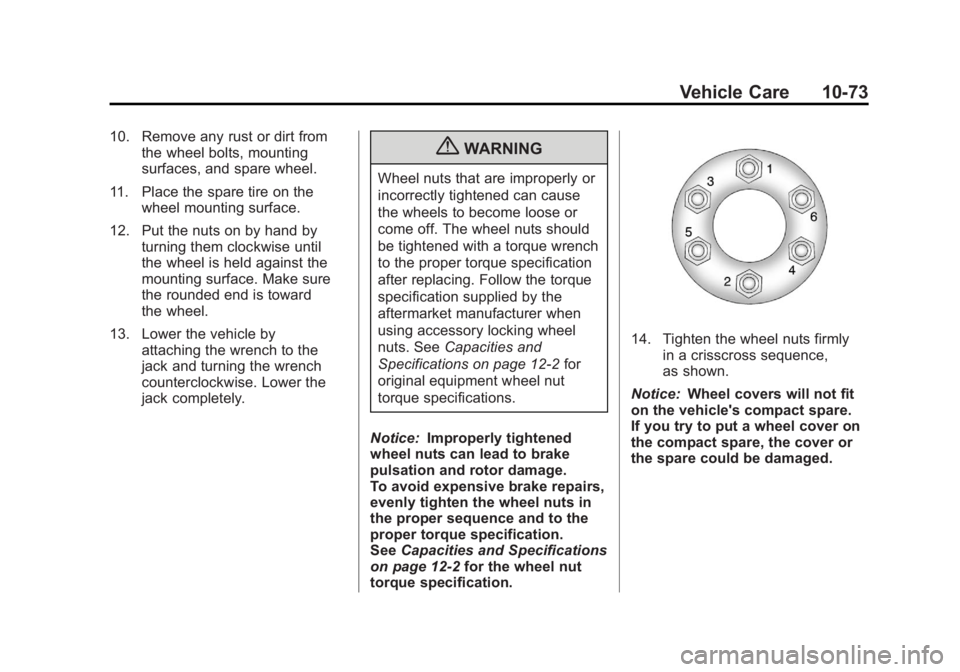
14. Tighten the wheel nuts firmly in a crisscross sequence,
as shown.
Notice: Wheel covers will not fit
on the vehicle's compact spare.
If you try to put a wheel cover on
the compact spare, the cover or
the spare could be damaged.
Page 388 of 468
Black plate (76,1)GMC Acadia/Acadia Denali Owner Manual - 2012
10-76 Vehicle Care
8. Make sure the metal tube iscentered at the striker. Push the
tube toward the front of the
vehicle.
9. Close the liftgate and make sure it is latched properly.
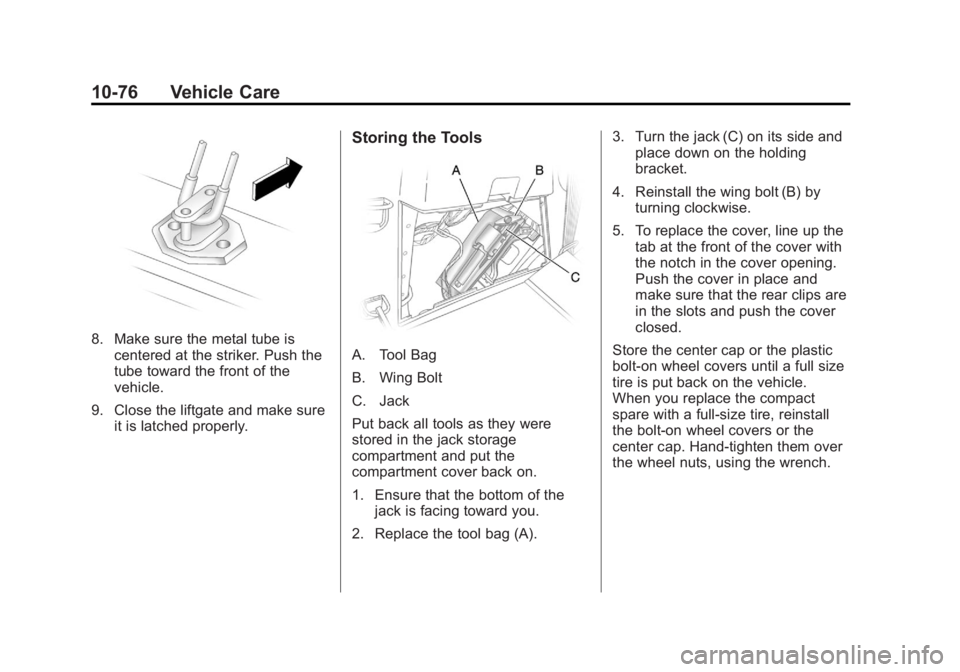
Storing the Tools
A. Tool Bag
B. Wing Bolt
C. Jack
Put back all tools as they were
stored in the jack storage
compartment and put the
compartment cover back on.
1. Ensure that the bottom of thejack is facing toward you.
2. Replace the tool bag (A). 3. Turn the jack (C) on its side and
place down on the holding
bracket.
4. Reinstall the wing bolt (B) by turning clockwise.
5. To replace the cover, line up the tab at the front of the cover with
the notch in the cover opening.
Push the cover in place and
make sure that the rear clips are
in the slots and push the cover
closed.
Store the center cap or the plastic
bolt‐on wheel covers until a full size
tire is put back on the vehicle.
When you replace the compact
spare with a full‐size tire, reinstall
the bolt‐on wheel covers or the
center cap. Hand‐tighten them over
the wheel nuts, using the wrench.
Page 459 of 468

Black plate (3,1)GMC Acadia/Acadia Denali Owner Manual - 2012
INDEX i-3
CleaningExterior Care . . . . . . . . . . . . . . . 10-86
Interior Care . . . . . . . . . . . . . . . . 10-89
Climate Control Systems . . . . . . . 8-1 Air Conditioning . . . . . . . . . . . . . . . 8-1
Dual Automatic . . . . . . . . . . . . . . . . 8-4
Heating . . . . . . . . . . . . . . . . . . . . . . . . 8-1
Rear . . . . . . . . . . . . . . . . . . . . 8-10, 8-11
Clock . . . . . . . . . . . . . . . . . . . . . . . . . . . 5-8
Cluster, Instrument . . . . . . . . . . . . 5-12
Collision Damage Repair . . . . . 13-16
Compact Spare Tire . . . . . . . . . . 10-77
Compass . . . . . . . . . . . . . . . . . . . . . . . 5-6
Compressor Kit, Tire Sealant . . . . . . . . . . . . . . . . . . . . . . 10-60
Connections, OnStar
®. . . . . . . . . 14-4
Control of a Vehicle . . . . . . . . . . . . . 9-3
Convenience Net . . . . . . . . . . . . . . . 4-5
Convex Mirrors . . . . . . . . . . . . . . . . 2-16
Coolant Engine . . . . . . . . . . . . . . . . . . . . . . 10-14
Engine Temperature
Gauge . . . . . . . . . . . . . . . . . . . . . . 5-14
Engine Temperature Warning Light . . . . . . . . . . . . . . . 5-23 Cooling System . . . . . . . . . . . . . . . 10-14
Engine Messages . . . . . . . . . . . . 5-39
Courtesy Lamps . . . . . . . . . . . . . . . . 6-5
Courtesy Transportation Program . . . . . . . . . . . . . . . . . . . . . 13-14
Cover Cargo . . . . . . . . . . . . . . . . . . . . . . . . . . 4-4
Engine . . . . . . . . . . . . . . . . . . . . . . . . 10-8
Cruise Control . . . . . . . . . . . . . . . . . 9-32 Light . . . . . . . . . . . . . . . . . . . . . . . . . . 5-25
Messages . . . . . . . . . . . . . . . . . . . . 5-38
Cupholders . . . . . . . . . . . . . . . . . . . . . 4-1
Customer Assistance . . . . . . . . . . 13-6 Offices . . . . . . . . . . . . . . . . . . 13-5, 13-6
Text Telephone (TTY)Users . . . . . . . . . . . . . . . . . . . . . . . 13-6
Customer Information Service PublicationsOrdering Information . . . . . . 13-18
Customer Satisfaction Procedure . . . . . . . . . . . . . . 13-2, 13-4
D
Damage Repair, Collision . . . . . 13-16
Danger, Warnings, and
Cautions . . . . . . . . . . . . . . . . . . . . . . . . iv
Data Recorders, Event . . . . . . . 13-21
Daytime Running Lamps/Automatic Headlamp
System . . . . . . . . . . . . . . . . . . . . . . . . 6-3
Defensive Driving . . . . . . . . . . . . . . . 9-3
Delayed Entry Lighting . . . . . . . . . 6-6
Delayed Exit Lighting . . . . . . . . . . . 6-7
Delayed Headlamps . . . . . . . . . . . . 6-3
Delayed Locking . . . . . . . . . . . . . . . . 2-8
Devices, Auxiliary . . . . . . . . . . . . . 7-36
Diagnostics, OnStar
®. . . . . . . . . . 14-5
Distracted Driving . . . . . . . . . . . . . . . 9-2
Dome Lamps . . . . . . . . . . . . . . . . . . . 6-5
Door
Ajar Messages . . . . . . . . . . . . . . . 5-38
Delayed Locking . . . . . . . . . . . . . . . 2-8
Locks . . . . . . . . . . . . . . . . . . . . . . . . . . 2-7
Power Locks . . . . . . . . . . . . . . . . . . . 2-8
Drive Belt Routing, Engine . . . . . 12-3