instrument panel GMC ACADIA 2012 Workshop Manual
[x] Cancel search | Manufacturer: GMC, Model Year: 2012, Model line: ACADIA, Model: GMC ACADIA 2012Pages: 468, PDF Size: 5.57 MB
Page 246 of 468
Black plate (2,1)GMC Acadia/Acadia Denali Owner Manual - 2012
8-2 Climate Controls
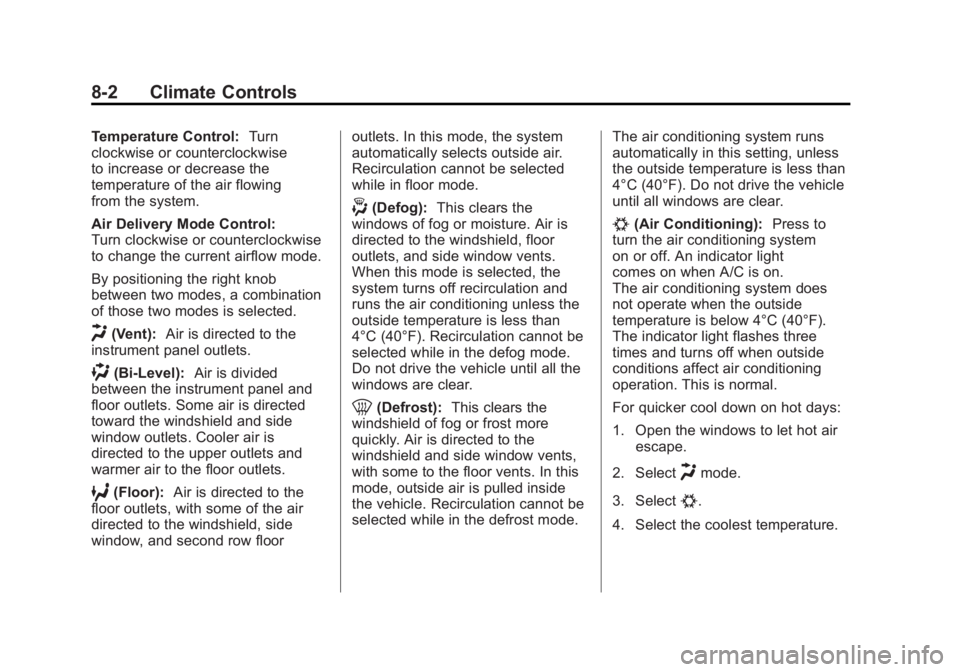
Temperature Control:Turn
clockwise or counterclockwise
to increase or decrease the
temperature of the air flowing
from the system.
Air Delivery Mode Control:
Turn clockwise or counterclockwise
to change the current airflow mode.
By positioning the right knob
between two modes, a combination
of those two modes is selected.
H(Vent): Air is directed to the
instrument panel outlets.
)(Bi-Level): Air is divided
between the instrument panel and
floor outlets. Some air is directed
toward the windshield and side
window outlets. Cooler air is
directed to the upper outlets and
warmer air to the floor outlets.
6(Floor): Air is directed to the
floor outlets, with some of the air
directed to the windshield, side
window, and second row floor outlets. In this mode, the system
automatically selects outside air.
Recirculation cannot be selected
while in floor mode.
-(Defog):
This clears the
windows of fog or moisture. Air is
directed to the windshield, floor
outlets, and side window vents.
When this mode is selected, the
system turns off recirculation and
runs the air conditioning unless the
outside temperature is less than
4°C (40°F). Recirculation cannot be
selected while in the defog mode.
Do not drive the vehicle until all the
windows are clear.
0(Defrost): This clears the
windshield of fog or frost more
quickly. Air is directed to the
windshield and side window vents,
with some to the floor vents. In this
mode, outside air is pulled inside
the vehicle. Recirculation cannot be
selected while in the defrost mode. The air conditioning system runs
automatically in this setting, unless
the outside temperature is less than
4°C (40°F). Do not drive the vehicle
until all windows are clear.
#(Air Conditioning):
Press to
turn the air conditioning system
on or off. An indicator light
comes on when A/C is on.
The air conditioning system does
not operate when the outside
temperature is below 4°C (40°F).
The indicator light flashes three
times and turns off when outside
conditions affect air conditioning
operation. This is normal.
For quicker cool down on hot days:
1. Open the windows to let hot air escape.
2. Select
Hmode.
3. Select
#.
4. Select the coolest temperature.
Page 249 of 468
Black plate (5,1)GMC Acadia/Acadia Denali Owner Manual - 2012
Climate Controls 8-5
Display Function
Each time the temperature, mode,
or fan control buttons are pressed,
the climate control display shows
that function along with the inside
temperature setting. The outside
temperature is displayed on the
instrument panel cluster.
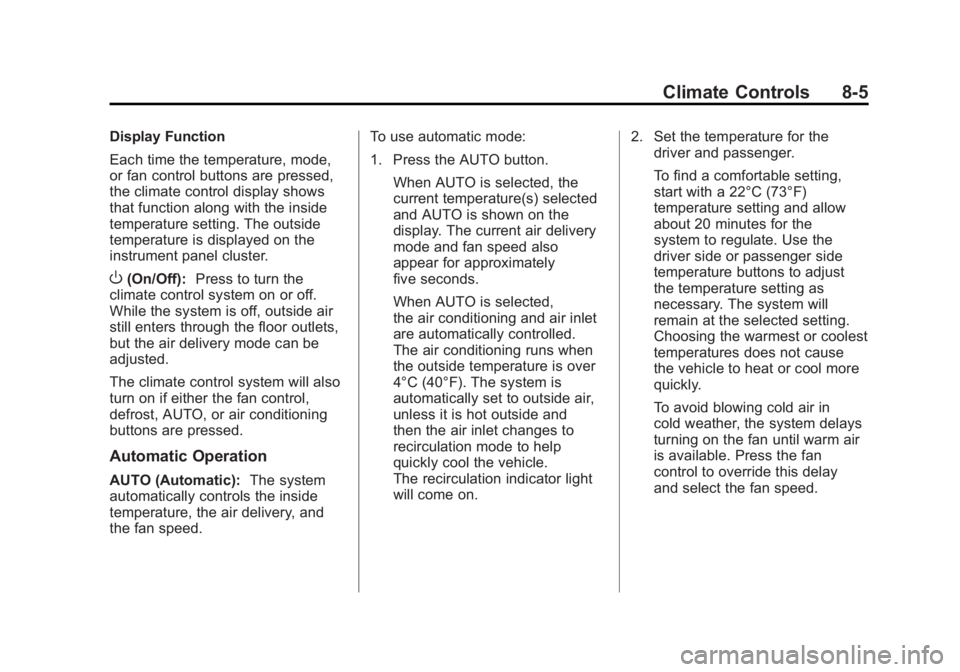
O(On/Off):Press to turn the
climate control system on or off.
While the system is off, outside air
still enters through the floor outlets,
but the air delivery mode can be
adjusted.
The climate control system will also
turn on if either the fan control,
defrost, AUTO, or air conditioning
buttons are pressed.
Automatic Operation
AUTO (Automatic): The system
automatically controls the inside
temperature, the air delivery, and
the fan speed. To use automatic mode:
1. Press the AUTO button.
When AUTO is selected, the
current temperature(s) selected
and AUTO is shown on the
display. The current air delivery
mode and fan speed also
appear for approximately
five seconds.
When AUTO is selected,
the air conditioning and air inlet
are automatically controlled.
The air conditioning runs when
the outside temperature is over
4°C (40°F). The system is
automatically set to outside air,
unless it is hot outside and
then the air inlet changes to
recirculation mode to help
quickly cool the vehicle.
The recirculation indicator light
will come on. 2. Set the temperature for the
driver and passenger.
To find a comfortable setting,
start with a 22°C (73°F)
temperature setting and allow
about 20 minutes for the
system to regulate. Use the
driver side or passenger side
temperature buttons to adjust
the temperature setting as
necessary. The system will
remain at the selected setting.
Choosing the warmest or coolest
temperatures does not cause
the vehicle to heat or cool more
quickly.
To avoid blowing cold air in
cold weather, the system delays
turning on the fan until warm air
is available. Press the fan
control to override this delay
and select the fan speed.
Page 250 of 468
Black plate (6,1)GMC Acadia/Acadia Denali Owner Manual - 2012
8-6 Climate Controls
Temperature Control
The driver and passenger side
temperature buttons are used to
adjust the temperature of the air
coming through the system. The
temperature can be adjusted even
if the system is turned off since
outside air still enters the vehicle,
unless the recirculation mode is
selected. See“Recirculation” later
in this section.
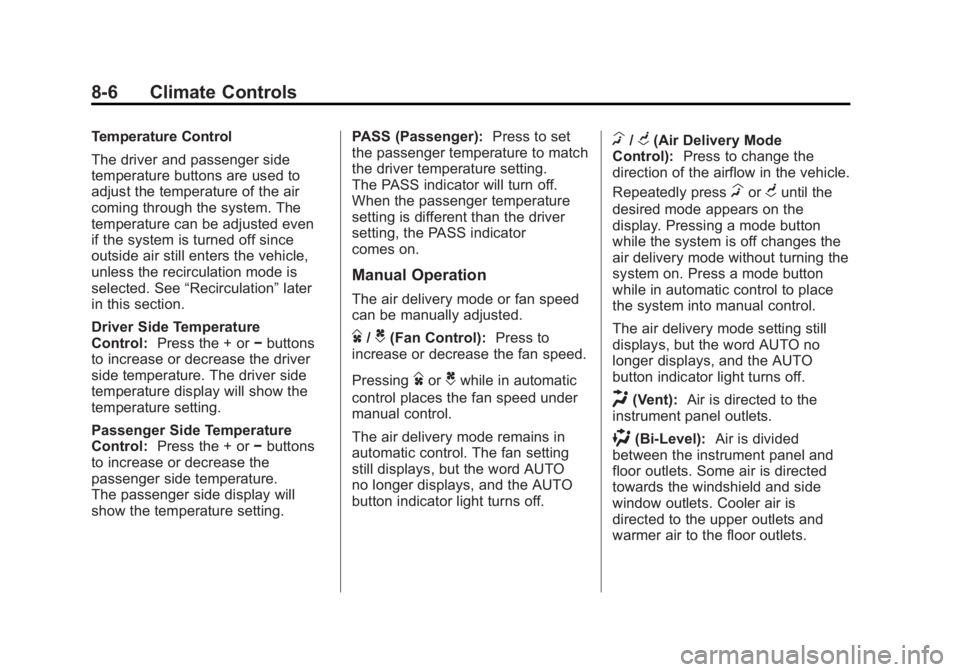
Driver Side Temperature
Control: Press the + or −buttons
to increase or decrease the driver
side temperature. The driver side
temperature display will show the
temperature setting.
Passenger Side Temperature
Control: Press the + or −buttons
to increase or decrease the
passenger side temperature.
The passenger side display will
show the temperature setting. PASS (Passenger):
Press to set
the passenger temperature to match
the driver temperature setting.
The PASS indicator will turn off.
When the passenger temperature
setting is different than the driver
setting, the PASS indicator
comes on.
Manual Operation
The air delivery mode or fan speed
can be manually adjusted.
D/C(Fan Control): Press to
increase or decrease the fan speed.
Pressing
DorCwhile in automatic
control places the fan speed under
manual control.
The air delivery mode remains in
automatic control. The fan setting
still displays, but the word AUTO
no longer displays, and the AUTO
button indicator light turns off.
H/G(Air Delivery Mode
Control): Press to change the
direction of the airflow in the vehicle.
Repeatedly press
HorGuntil the
desired mode appears on the
display. Pressing a mode button
while the system is off changes the
air delivery mode without turning the
system on. Press a mode button
while in automatic control to place
the system into manual control.
The air delivery mode setting still
displays, but the word AUTO no
longer displays, and the AUTO
button indicator light turns off.
H(Vent): Air is directed to the
instrument panel outlets.
)(Bi-Level): Air is divided
between the instrument panel and
floor outlets. Some air is directed
towards the windshield and side
window outlets. Cooler air is
directed to the upper outlets and
warmer air to the floor outlets.
Page 253 of 468
Black plate (9,1)GMC Acadia/Acadia Denali Owner Manual - 2012
Climate Controls 8-9
Sensors
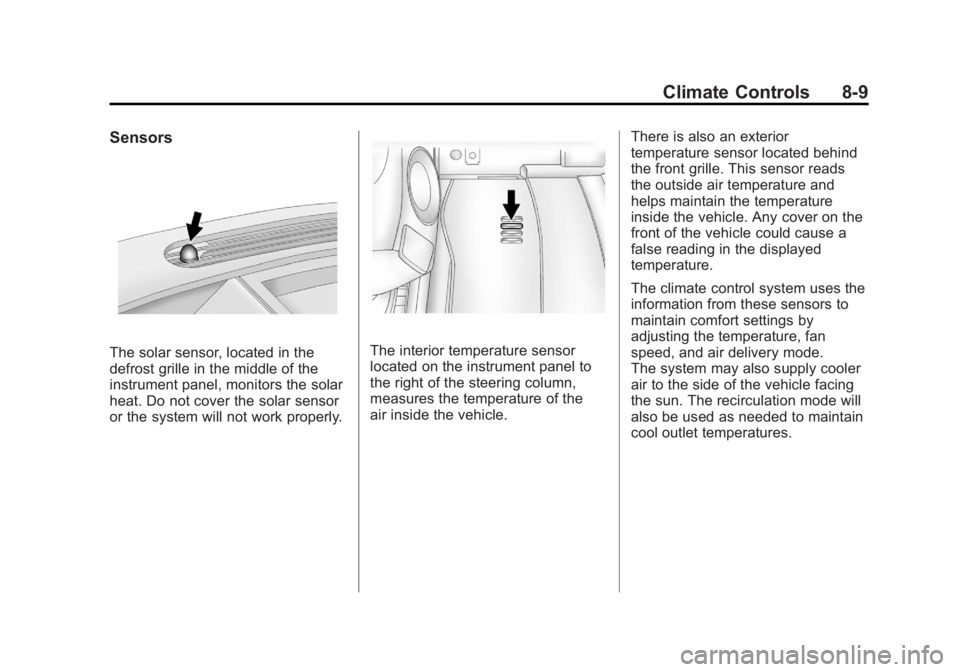
The solar sensor, located in the
defrost grille in the middle of the
instrument panel, monitors the solar
heat. Do not cover the solar sensor
or the system will not work properly.The interior temperature sensor
located on the instrument panel to
the right of the steering column,
measures the temperature of the
air inside the vehicle.There is also an exterior
temperature sensor located behind
the front grille. This sensor reads
the outside air temperature and
helps maintain the temperature
inside the vehicle. Any cover on the
front of the vehicle could cause a
false reading in the displayed
temperature.
The climate control system uses the
information from these sensors to
maintain comfort settings by
adjusting the temperature, fan
speed, and air delivery mode.
The system may also supply cooler
air to the side of the vehicle facing
the sun. The recirculation mode will
also be used as needed to maintain
cool outlet temperatures.
Page 257 of 468
Black plate (13,1)GMC Acadia/Acadia Denali Owner Manual - 2012
Climate Controls 8-13
Maintenance
Passenger Compartment
Air Filter
The filter removes dust, pollen,
and other airborne irritants from
outside air and inside air when in
recirculation mode.
To find out what type of replacement
filter to use, seeMaintenance
Replacement Parts on page 11‑13.
1. Open the glove box.
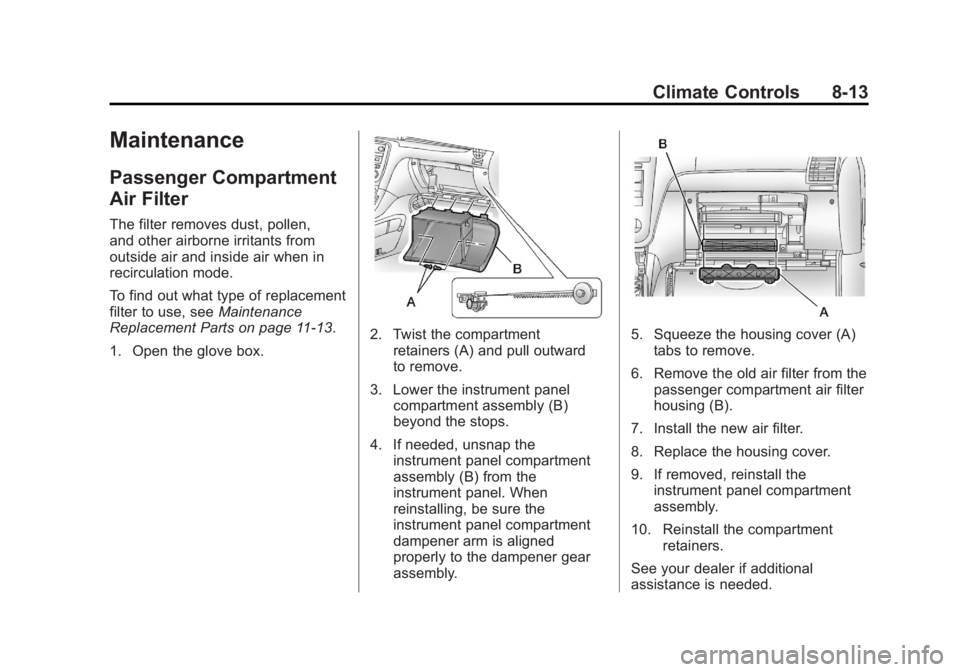
2. Twist the compartment retainers (A) and pull outward
to remove.
3. Lower the instrument panel compartment assembly (B)
beyond the stops.
4. If needed, unsnap the instrument panel compartment
assembly (B) from the
instrument panel. When
reinstalling, be sure the
instrument panel compartment
dampener arm is aligned
properly to the dampener gear
assembly.5. Squeeze the housing cover (A)tabs to remove.
6. Remove the old air filter from the passenger compartment air filter
housing (B).
7. Install the new air filter.
8. Replace the housing cover.
9. If removed, reinstall the instrument panel compartment
assembly.
10. Reinstall the compartment retainers.
See your dealer if additional
assistance is needed.
Page 267 of 468
Black plate (9,1)GMC Acadia/Acadia Denali Owner Manual - 2012
Driving and Operating 9-9
WARNING (Continued)
carbon monoxide (CO) which
cannot be seen or smelled.
It can cause unconsciousness
and even death.
If the vehicle is stuck in the snow:
.Clear away snow from around
the base of your vehicle,
especially any that is blocking
the exhaust pipe.
.Check again from time to
time to be sure snow does
not collect there.
.Open a window about
5 cm (2 in) on the side of the
vehicle that is away from the
wind to bring in fresh air.(Continued)
WARNING (Continued)
.Fully open the air outlets on
or under the instrument
panel.
.Adjust the climate control
system to a setting that
circulates the air inside the
vehicle and set the fan
speed to the highest setting.
See“Climate Control
Systems” in the Index.
For more information about
carbon monoxide, see Engine
Exhaust on page 9‑22.
Run the engine for short periods
only as needed to keep warm, but
be careful. To save fuel, run the engine for only
short periods as needed to warm
the vehicle and then shut the engine
off and close the window most of
the way to save heat. Repeat this
until help arrives but only when you
feel really uncomfortable from the
cold. Moving about to keep warm
also helps.
If it takes some time for help to
arrive, now and then when you run
the engine, push the accelerator
pedal slightly so the engine runs
faster than the idle speed. This
keeps the battery charged to restart
the vehicle and to signal for help
with the headlamps. Do this as little
as possible to save fuel.
Page 275 of 468
Black plate (17,1)GMC Acadia/Acadia Denali Owner Manual - 2012
Driving and Operating 9-17
If the vehicle cannot be pulled
over, and must be shut off while
driving, turn the ignition to
ACC/ACCESSORY.
The steering can bind with the
wheels turned off center. If this
happens, move the steering wheel
from right to left while turning the
key to ACC/ACCESSORY. If this
does not work, then the vehicle
needs service.
ACC (ACC/ACCESSORY):This is
the position in which you can
operate the electrical accessories or
items plugged into the accessory
power outlets. This position unlocks
the ignition and steering wheel. Use
this position if the vehicle must be
pushed or towed.
R(ON/RUN): This position can be
used to operate the electrical
accessories and to display some
instrument panel warning and indicator lights. This position can
also be used for service and
diagnostics, and to verify the
proper operation of the malfunction
indicator lamp as may be required
for emission inspection purposes.
The switch stays in this position
when the engine is running.
The transmission is also unlocked
in this position. If you leave the
key in the ACC/ACCESSORY or
ON/RUN position with the engine
off, the battery could be drained.
You may not be able to start the
vehicle if the battery is allowed to
drain for an extended period of time.
/(START):
This is the position
that starts the engine. When the
engine starts, release the key.
The ignition switch will return to
ON/RUN for driving.
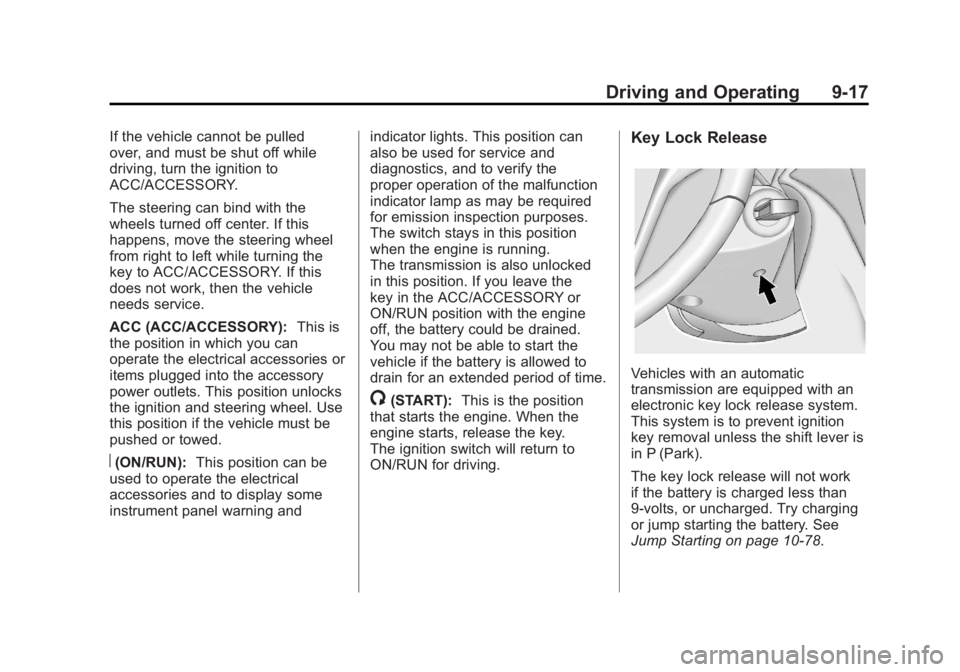
Key Lock Release
Vehicles with an automatic
transmission are equipped with an
electronic key lock release system.
This system is to prevent ignition
key removal unless the shift lever is
in P (Park).
The key lock release will not work
if the battery is charged less than
9‐volts, or uncharged. Try charging
or jump starting the battery. See
Jump Starting on page 10‑78.
Page 283 of 468
Black plate (25,1)GMC Acadia/Acadia Denali Owner Manual - 2012
Driving and Operating 9-25
Notice:Shifting out of P (Park)
or N (Neutral) with the engine
running at high speed may
damage the transmission. The
repairs would not be covered by
the vehicle warranty. Be sure the
engine is not running at high
speed when shifting the vehicle.
D (Drive): This position is for
normal driving. It provides the best
fuel economy. If you need more
power for passing, and you are:
.Going less than 56 km/h
(35 mph), push the accelerator
pedal about halfway down.
.Going about 56 km/h (35 mph) or
more, push the accelerator all
the way down.
Notice: If the vehicle seems to
accelerate slowly or not shift
gears when you go faster, and
you continue to drive the vehicle
that way, you could damage the transmission. Have the vehicle
serviced right away. You can
drive in L (Low) when you are
driving less than 56 km/h (35 mph)
and D (Drive) for higher speeds
until then.
If the vehicle is stopped on a hill,
with your foot off the brake pedal,
the vehicle may roll. This is normal
and is due to the torque converter
designed to improve fuel economy
and performance. Use the brake to
hold the vehicle on a hill. Do not use
the accelerator pedal.
L (Low):
This position gives you
access to gear ranges. This
provides more engine braking but
lower fuel economy than D (Drive).
You can use it on very steep hills,
or in deep snow or mud.
Manual Mode
Electronic Range Select
(ERS) Mode
ERS mode allows you to choose
the top-gear limit of the transmission
and the vehicle's speed while
driving downhill or towing a trailer.
The vehicle has an electronic
shift position indicator within the
instrument panel cluster. When
using the ERS mode a number will
display next to the L, indicating the
current gear that has been selected.
To use this feature:
1. Move the shift lever to L (Low).
2. Press the plus/minus button located on the shift lever, to
increase or decrease the gear
range available.
Page 284 of 468

Black plate (26,1)GMC Acadia/Acadia Denali Owner Manual - 2012
9-26 Driving and Operating
When you shift from D (Drive) to
L (Low), the transmission will shift to
a pre-determined lower gear range.
The highest gear available for this
pre-determined range is displayed
next to the L in the DIC. SeeDriver
Information Center (DIC) (Without
DIC Buttons) on page 5‑30 orDriver
Information Center (DIC) (With DIC
Buttons) on page 5‑25 for more
information. The number displayed
in the DIC is the highest gear that
the transmission will be allowed to
operate in. This means that all
gears below that number are
available. For example, when
4 (Fourth) is shown next to the L,
1 (First) through 4 (Fourth) gears
are automatically shifted by the
vehicle. The transmission will not
shift into 5 (Fifth) until the + (Plus)
button is used or you shift back
into D (Drive). While in L (Low), the transmission
will prevent shifting to a lower gear
range if the engine speed is too
high. You have a brief period of time
to slow the vehicle. If vehicle speed
is not reduced within the time
allowed, the lower gear range shift
will not be completed. You must
further slow the vehicle, then press
the
−(Minus) button to the desired
lower gear range.
Automatic Engine Grade Braking
is not available when the ERS is
active. It is available in D (Drive) for
both normal and Tow/Haul mode.
While using the ERS, cruise control
and the Tow/Haul mode can be
used. See Tow/Haul Mode following.Tow/Haul Mode
_
(Tow/Haul): The vehicle may
have a Tow/Haul mode.
The button is located on the
instrument panel under the climate
controls.
Push the button to activate the
system. Push it again to deactivate
the system. You can use this feature
to assist when towing or hauling a
heavy load.
When Tow/Haul is activated the
Tow/Haul symbol will come on
the instrument panel cluster.
See “Tow/Haul Mode” underDriving
Characteristics and Towing Tips on
page 9‑45 for more information.
Page 288 of 468
Black plate (30,1)GMC Acadia/Acadia Denali Owner Manual - 2012
9-30 Driving and Operating
Ride Control Systems
StabiliTrak®System
The vehicle has the StabiliTrak
system which combines antilock
brake, traction, and stability control
systems and helps the driver
maintain directional control of the
vehicle in most driving conditions.
When you first start the vehicle and
begin to drive away, the system
performs several diagnostic checks
to ensure there are no problems.
The system may be heard or felt
while it is working. This is normal
and does not mean there is a
problem with the vehicle. The
system should initialize before the
vehicle reaches 32 km/h (20 mph).
In some cases, it may take
approximately 3.2 km (2 mi) of
driving before the system initializes.
If the system fails to turn on or
activate, one of the following
messages will be displayed on theDriver Information Center (DIC):
SERVICE TRACTION CONTROL,
SERVICE STABILITRAK, the
StabiliTrak light will come on and
stay and four chimes are heard.
If these conditions are observed,
turn the vehicle off, wait
15 seconds, and then turn it back
on again to reset the system. If any
of these messages still appear on
the Driver Information Center (DIC),
the vehicle should be taken in for
service. For more information on the
DIC messages, see
Ride Control
System Messages on page 5‑42.
The StabiliTrak light will flash on the
instrument panel cluster when the
system is both on and activated.
The system may be heard or felt
while it is working; this is normal.
The traction control button is
located on the instrument panel.
The traction control part of
StabiliTrak can be turned off by
pressing and releasing the traction
control button.
Traction control can be turned on by
pressing and releasing the traction
control button and the appropriate
TRACTION CONTROL ON
message will be displayed, if not
automatically shut off for any other
reason.
When the traction control system
is turned off, the appropriate
TRACTION CONTROL OFF
message will be displayed on the
DIC. The vehicle will still have
brake-traction control when traction
control is off, but will not be able to
use the engine speed management