engine overheat GMC ACADIA 2012 Owner's Manual
[x] Cancel search | Manufacturer: GMC, Model Year: 2012, Model line: ACADIA, Model: GMC ACADIA 2012Pages: 468, PDF Size: 5.57 MB
Page 65 of 468
Black plate (9,1)GMC Acadia/Acadia Denali Owner Manual - 2012
Seats and Restraints 3-9
Heated and Ventilated
Front Seats
{WARNING
If you cannot feel temperature
change or pain to the skin, the
seat heater may cause burns
even at low temperatures.
To reduce the risk of burns,
people with such a condition
should use care when using the
seat heater, especially for long
periods of time. Do not place
anything on the seat that
insulates against heat, such as
a blanket, cushion, cover,
or similar item. This may cause
the seat heater to overheat.
An overheated seat heater may
cause a burn or may damage
the seat.
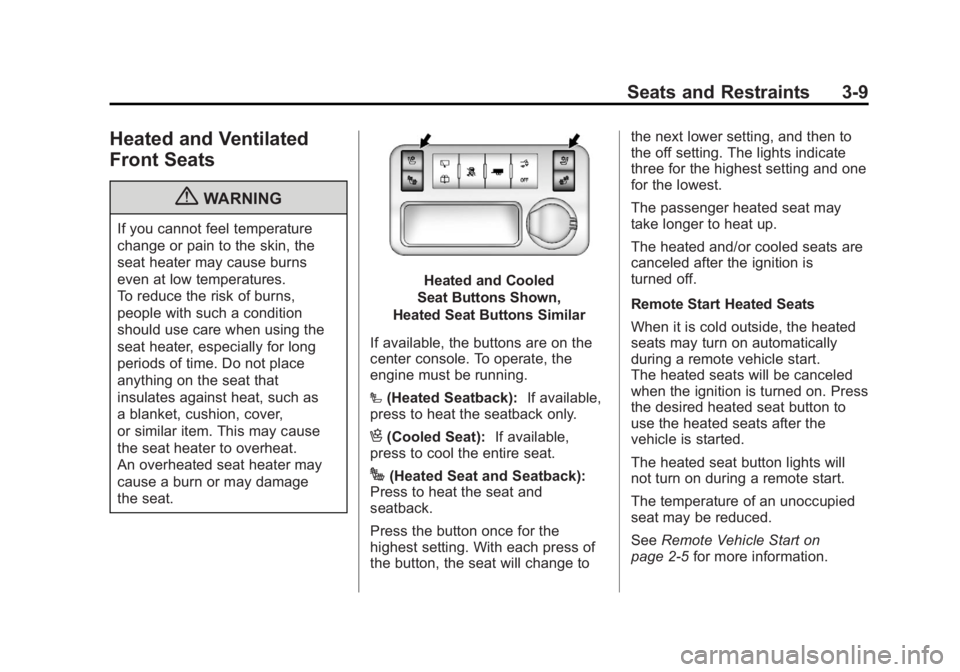
Heated and Cooled
Seat Buttons Shown,
Heated Seat Buttons Similar
If available, the buttons are on the
center console. To operate, the
engine must be running.
I (Heated Seatback): If available,
press to heat the seatback only.
H(Cooled Seat): If available,
press to cool the entire seat.
J(Heated Seat and Seatback):
Press to heat the seat and
seatback.
Press the button once for the
highest setting. With each press of
the button, the seat will change to the next lower setting, and then to
the off setting. The lights indicate
three for the highest setting and one
for the lowest.
The passenger heated seat may
take longer to heat up.
The heated and/or cooled seats are
canceled after the ignition is
turned off.
Remote Start Heated Seats
When it is cold outside, the heated
seats may turn on automatically
during a remote vehicle start.
The heated seats will be canceled
when the ignition is turned on. Press
the desired heated seat button to
use the heated seats after the
vehicle is started.
The heated seat button lights will
not turn on during a remote start.
The temperature of an unoccupied
seat may be reduced.
See
Remote Vehicle Start on
page 2‑5 for more information.
Page 134 of 468
Black plate (14,1)GMC Acadia/Acadia Denali Owner Manual - 2012
5-14 Instruments and Controls
When the fuel tank is low on fuel,
the FUEL LEVEL LOW message will
appear on the Driver Information
Center (DIC). For more information
seeFuel System Messages on
page 5‑40.
Here are some situations that may
occur with the fuel gauge. None of
these indicate a problem with the
fuel gauge.
.At the gas station, the fuel pump
shuts off before the gauge
reads full.
.It takes a little more or less fuel
to fill up than the fuel gauge
indicated. For example, the
gauge may have indicated the
tank was half full, but it actually
took a little more or less than
half the tank's capacity to fill
the tank.
.The gauge goes back to empty
when the ignition is turned off.
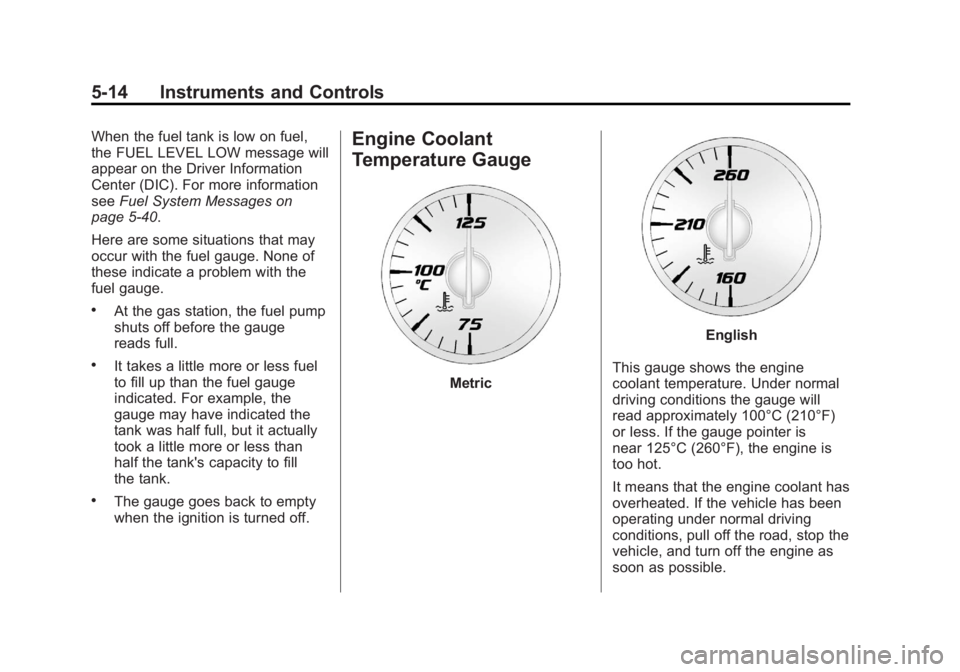
Engine Coolant
Temperature Gauge
Metric
English
This gauge shows the engine
coolant temperature. Under normal
driving conditions the gauge will
read approximately 100°C (210°F)
or less. If the gauge pointer is
near 125°C (260°F), the engine is
too hot.
It means that the engine coolant has
overheated. If the vehicle has been
operating under normal driving
conditions, pull off the road, stop the
vehicle, and turn off the engine as
soon as possible.
Page 135 of 468
Black plate (15,1)GMC Acadia/Acadia Denali Owner Manual - 2012
Instruments and Controls 5-15
SeeEngine Overheating on
page 10‑18 for more information.
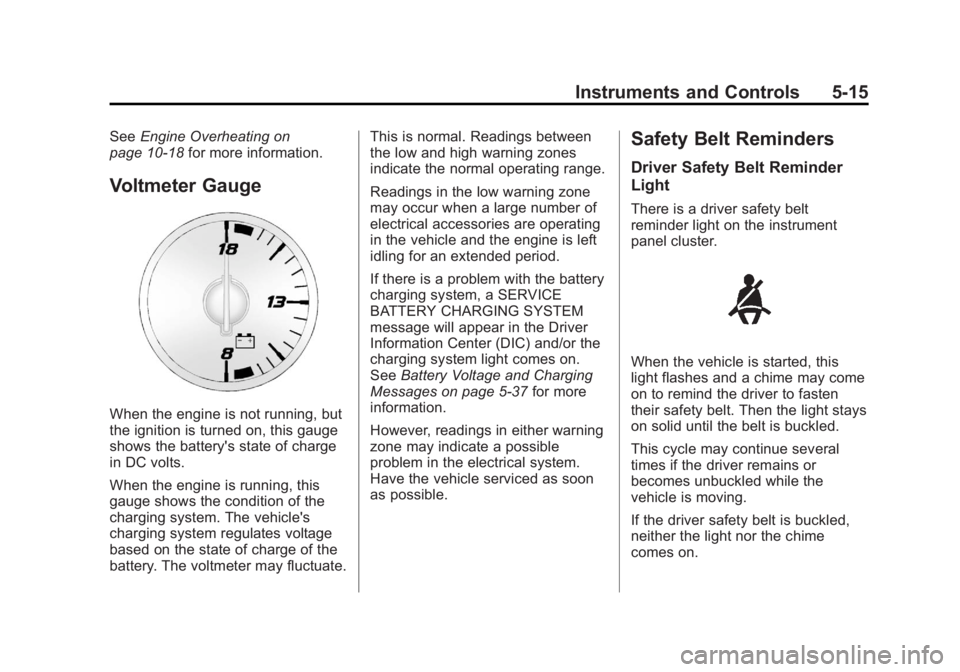
Voltmeter Gauge
When the engine is not running, but
the ignition is turned on, this gauge
shows the battery's state of charge
in DC volts.
When the engine is running, this
gauge shows the condition of the
charging system. The vehicle's
charging system regulates voltage
based on the state of charge of the
battery. The voltmeter may fluctuate. This is normal. Readings between
the low and high warning zones
indicate the normal operating range.
Readings in the low warning zone
may occur when a large number of
electrical accessories are operating
in the vehicle and the engine is left
idling for an extended period.
If there is a problem with the battery
charging system, a SERVICE
BATTERY CHARGING SYSTEM
message will appear in the Driver
Information Center (DIC) and/or the
charging system light comes on.
See
Battery Voltage and Charging
Messages on page 5‑37 for more
information.
However, readings in either warning
zone may indicate a possible
problem in the electrical system.
Have the vehicle serviced as soon
as possible.
Safety Belt Reminders
Driver Safety Belt Reminder
Light
There is a driver safety belt
reminder light on the instrument
panel cluster.
When the vehicle is started, this
light flashes and a chime may come
on to remind the driver to fasten
their safety belt. Then the light stays
on solid until the belt is buckled.
This cycle may continue several
times if the driver remains or
becomes unbuckled while the
vehicle is moving.
If the driver safety belt is buckled,
neither the light nor the chime
comes on.
Page 143 of 468
Black plate (23,1)GMC Acadia/Acadia Denali Owner Manual - 2012
Instruments and Controls 5-23
Engine Coolant
Temperature Warning
Light
The engine coolant temperature
warning light comes on briefly when
the vehicle is started.
If it does not, have the vehicle
serviced by your dealer. If the
system is working normally, the
indicator light then goes off.
If the light comes on and stays on
while driving, the vehicle may have
a problem with the cooling system.
Stop and turn off the vehicle to
avoid damage to the engine.
A warning chime sounds when this
light is on.
SeeEngine Overheating on
page 10‑18 for more information.
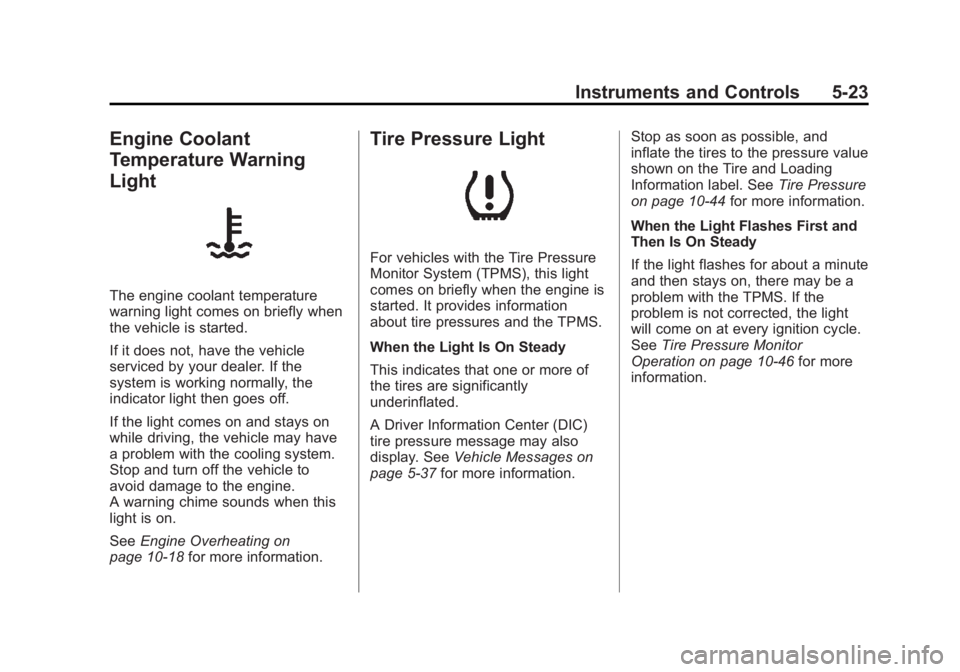
Tire Pressure Light
For vehicles with the Tire Pressure
Monitor System (TPMS), this light
comes on briefly when the engine is
started. It provides information
about tire pressures and the TPMS.
When the Light Is On Steady
This indicates that one or more of
the tires are significantly
underinflated.
A Driver Information Center (DIC)
tire pressure message may also
display. See Vehicle Messages on
page 5‑37 for more information. Stop as soon as possible, and
inflate the tires to the pressure value
shown on the Tire and Loading
Information label. See
Tire Pressure
on page 10‑44 for more information.
When the Light Flashes First and
Then Is On Steady
If the light flashes for about a minute
and then stays on, there may be a
problem with the TPMS. If the
problem is not corrected, the light
will come on at every ignition cycle.
See Tire Pressure Monitor
Operation on page 10‑46 for more
information.
Page 159 of 468
Black plate (39,1)GMC Acadia/Acadia Denali Owner Manual - 2012
Instruments and Controls 5-39
RIGHT REAR DOOR OPEN
This message displays and a chime
sounds if the passenger side rear
door is not fully closed and the
vehicle is shifted out of P (Park).
Stop and turn off the vehicle, check
the door for obstructions, and close
the door again. Check to see if the
message still appears on the DIC.
Engine Cooling System
Messages
ENGINE HOT A/C
(Air Conditioning) OFF
This message displays when the
engine coolant becomes hotter than
the normal operating temperature.
SeeEngine Coolant Temperature
Gauge on page 5‑14. To avoid
added strain on a hot engine,
the air conditioning compressor
automatically turns off. When the
coolant temperature returns to
normal, the air conditioning
compressor turns back on. You can
continue to drive your vehicle. If this message continues to appear,
have the system repaired by your
dealer as soon as possible to avoid
damage to the engine.
ENGINE OVERHEATED
IDLE ENGINE
Notice:
If you drive the vehicle
while the engine is overheating,
severe engine damage may
occur. If an overheat warning
appears on the instrument panel
cluster and/or DIC, stop the
vehicle as soon as possible.
Do not increase the engine
speed above normal idling speed.
See Engine Overheating on
page 10‑18 for more information.
This message displays when the
engine coolant temperature is too
hot. Stop and allow the vehicle to
idle until it cools down. See Engine
Coolant Temperature Gauge on
page 5‑14.
See Overheated Engine Protection
Operating Mode on page 10‑20
for information on driving to a safe
place in an emergency.
ENGINE OVERHEATED
STOP ENGINE
Notice: If you drive the vehicle
while the engine is overheating,
severe engine damage may
occur. If an overheat warning
appears on the instrument panel
cluster and/or DIC, stop the
vehicle as soon as possible.
Do not increase the engine
speed above normal idling speed.
See Engine Overheating on
page 10‑18 for more information.
This message displays and a
continuous chime sounds if the
engine cooling system reaches
unsafe temperatures for operation.
Stop and turn off the vehicle as
soon as it is safe to do so to avoid
severe damage. This message
clears when the engine has cooled
to a safe operating temperature.
Page 160 of 468
Black plate (40,1)GMC Acadia/Acadia Denali Owner Manual - 2012
5-40 Instruments and Controls
Engine Oil Messages
CHANGE ENGINE OIL SOON
This message displays when the
engine oil needs to be changed.
When you change the engine oil, be
sure to reset the CHANGE ENGINE
OIL SOON message. SeeEngine
Oil Life System on page 10‑10 for
information on how to reset the
message. See Engine Oil on
page 10‑8 andMaintenance
Schedule on page 11‑3 for more
information.
OIL PRESSURE LOW STOP
ENGINE
Notice: If you drive the vehicle
while the engine oil pressure is
low, severe engine damage may
occur. If a low oil pressure
warning appears on the
instrument panel cluster and/or
DIC, stop the vehicle as soon as
possible. Do not drive the vehicle until the cause of the low oil
pressure is corrected. See
Engine
Oil on page 10‑8 for more
information.
This message displays if low oil
pressure levels occur. Stop the
vehicle as soon as safely possible
and do not operate it until the cause
of the low oil pressure has been
corrected. Check the oil as soon as
possible and have your vehicle
serviced by your dealer. See Engine
Oil on page 10‑8.
Engine Power Messages
ENGINE POWER IS REDUCED
This message displays and a
chime sounds when the cooling
system temperature gets too hot
and the engine further enters the
engine coolant protection mode.
See Engine Overheating on
page 10‑18 for further information. This message also displays when
the vehicle's engine power is
reduced. Reduced engine power
can affect the vehicle's ability to
accelerate. If this message is on,
but there is no reduction in
performance, proceed to your
destination. The performance may
be reduced the next time the vehicle
is driven. The vehicle may be driven
at a reduced speed while this
message is on, but acceleration and
speed may be reduced. Anytime
this message stays on, the vehicle
should be taken to your dealer for
service as soon as possible.Fuel System Messages
FUEL LEVEL LOW
This message displays and a chime
sounds if the fuel level is low. Refuel
as soon as possible. See
Fuel
Gauge on page 5‑13 andFuel on
page 9‑40 for more information.
Page 165 of 468
Black plate (45,1)GMC Acadia/Acadia Denali Owner Manual - 2012
Instruments and Controls 5-45
SERVICE TRANSMISSION
This message displays when there
is a problem with the transmission.
See your dealer for service.
TRANSMISSION HOT
IDLE ENGINE
Notice:If you drive the vehicle
while the transmission fluid is
overheating and the transmission
temperature warning is displayed
on the instrument panel cluster
and/or DIC, you can damage the
transmission. This could lead to
costly repairs that would not be
covered by the warranty. Do not
drive the vehicle with overheated
transmission fluid or while the
transmission temperature
warning is displayed. This message displays and a chime
sounds if the transmission fluid in
the vehicle gets hot. Driving with the
transmission fluid temperature high
can cause damage to the vehicle.
Stop the vehicle and let it idle to
allow the transmission to cool.
This message clears when the fluid
temperature reaches a safe level.
Vehicle Reminder
Messages
ICE POSSIBLE DRIVE
WITH CARE
This message displays when the
outside air temperature is cold
enough to create icy road
conditions. Adjust your driving
accordingly.
Vehicle Speed Messages
SPEED LIMITED TO
XXX MPH (KM/H)
This message displays when your
vehicle speed is limited to 128 km/h
(80 mph) because the vehicle
detects a problem in the speed
variable assist steering system.
Have your vehicle serviced by your
dealer.
Washer Fluid Messages
WASHER FLUID LOW
ADD FLUID
This message displays when the
windshield washer fluid is low.
Fill the windshield washer fluid
reservoir as soon as possible. See
Engine Compartment Overview on
page 10‑6
for the location of the
windshield washer fluid reservoir.
Also, see Washer Fluid on
page 10‑22 for more information.
Page 268 of 468
Black plate (10,1)GMC Acadia/Acadia Denali Owner Manual - 2012
9-10 Driving and Operating
If the Vehicle Is Stuck
Slowly and cautiously spin the
wheels to free the vehicle when
stuck in sand, mud, ice, or snow.
If the vehicle has a traction system,
it can often help to free a stuck
vehicle. Refer to the vehicle's
traction system in the Index. If stuck
too severely for the traction system
to free the vehicle, turn the traction
system off and use the rocking
method.
{WARNING
If the vehicle's tires spin at high
speed, they can explode, and
you or others could be injured.
The vehicle can overheat,
causing an engine compartment
fire or other damage. Spin the
wheels as little as possible and
avoid going above 55 km/h
(35 mph).For information about using tire
chains on the vehicle, see
Tire
Chains on page 10‑57.
Rocking the Vehicle to Get
It Out
Turn the steering wheel left and
right to clear the area around the
front wheels. Turn off any traction or
stability system. Shift back and forth
between R (Reverse) and a forward
gear, spinning the wheels as little as
possible. To prevent transmission
wear, wait until the wheels stop
spinning before shifting gears.
Release the accelerator pedal
while shifting, and press lightly on
the accelerator pedal when the
transmission is in gear. Slowly
spinning the wheels in the forward
and reverse directions causes a
rocking motion that could free the
vehicle. If that does not get the
vehicle out after a few tries, it might
need to be towed out. If the vehicle
does need to be towed out, see
Towing the Vehicle on page 10‑82.
Vehicle Load Limits
It is very important to know how
much weight your vehicle can
carry. This weight is called the
vehicle capacity weight and
includes the weight of all
occupants, cargo, and all
nonfactory-installed options.
Two labels on your vehicle
show how much weight it may
properly carry, the Tire and
Loading Information label and
the Certification/Tire label.
{WARNING
Do not load the vehicle any
heavier than the Gross
Vehicle Weight Rating
(GVWR), or either the
maximum front or rear Gross
Axle Weight Rating (GAWR).
(Continued)
Page 276 of 468
Black plate (18,1)GMC Acadia/Acadia Denali Owner Manual - 2012
9-18 Driving and Operating
If charging or jump starting the
battery does not work, there is a
manual key lock release. Locate the
hole below the ignition lock. Insert a
tool or key into the opening. Locate
the lever, and press it toward the
driver while removing the key from
the ignition.
Starting the Engine
Move the shift lever to P (Park) or
N (Neutral). The engine will not start
in any other position. To restart the
engine when the vehicle is already
moving, use N (Neutral) only.
Notice:Do not try to shift to
P (Park) if the vehicle is moving.
If you do, you could damage the
transmission. Shift to P (Park)
only when the vehicle is stopped.
Starting Procedure
1. With your foot off the accelerator
pedal, turn the ignition to START.
When the engine starts, let go of
the key. The idle speed will slow
down as the engine warms. Do not race the engine
immediately after starting it.
Operate the engine and
transmission gently to allow
the oil to warm up and lubricate
all moving parts.
The vehicle has a
Computer-Controlled Cranking
System. This feature assists in
starting the engine and protects
components. If the ignition key is
turned to the START position,
and then released when the
engine begins cranking, the
engine will continue cranking
for a few seconds or until the
vehicle starts. If the engine
does not start and the key is
held in START, cranking will be
stopped after 15 seconds to
prevent cranking motor damage.
To prevent gear damage, this
system also prevents cranking if
the engine is already running.
Engine cranking can be stopped
by turning the ignition switch to
the ACC/ACCESSORY or
LOCK/OFF position.Notice:
Cranking the engine for
long periods of time, by returning
the key to the START position
immediately after cranking has
ended, can overheat and damage
the cranking motor, and drain the
battery. Wait at least 15 seconds
between each try, to let the
cranking motor cool down.
2. If the engine does not start
after five to 10 seconds,
especially in very cold weather
(below 0°F or −18°C), it could be
flooded with too much gasoline.
Try pushing the accelerator
pedal all the way to the floor
and holding it there as you hold
the key in START for up to a
maximum of 15 seconds.
Wait at least 15 seconds
between each try, to allow the
cranking motor to cool down.
When the engine starts, let go
of the key and accelerator.
Page 277 of 468
Black plate (19,1)GMC Acadia/Acadia Denali Owner Manual - 2012
Driving and Operating 9-19
If the vehicle starts briefly but
then stops again, repeat these
steps. This clears the extra
gasoline from the engine.
Do not race the engine
immediately after starting it.
Operate the engine and
transmission gently until the oil
warms up and lubricates all
moving parts.
Notice: The engine is designed to
work with the electronics in the
vehicle. If you add electrical parts
or accessories, you could change
the way the engine operates.
Before adding electrical
equipment, check with your
dealer. If you do not, the engine
might not perform properly.
Any resulting damage would
not be covered by the vehicle
warranty.Engine Heater
The engine coolant heater can
provide easier starting and better
fuel economy during engine
warm-up in cold weather conditions
at or below 0°F (−18°C). Vehicles
with an engine coolant heater
should be plugged in at least four
hours before starting. Some models
may have an internal thermostat in
the cord which will prevent engine
coolant heater operation at
temperatures above 0°F (−18°C).
To Use the Engine Coolant
Heater
1. Turn off the engine.
2. Open the hood and unwrap the electrical cord. The cord is
located on the driver side of the
engine compartment. It is routed
around the windshield washer
fluid reservoir.
3. Plug the cord into a normal, grounded 110-volt AC outlet.
{WARNING
Plugging the cord into an
ungrounded outlet could cause an
electrical shock. Also, the wrong
kind of extension cord could
overheat and cause a fire. You
could be seriously injured. Plug
the cord into a properly grounded
three-prong 110-volt AC outlet.
If the cord will not reach, use a
heavy-duty three-prong extension
cord rated for at least 15 amps.
4. Before starting the engine, be sure to unplug and store the
cord as it was before to keep it
away from moving engine parts.
If you do not, it could be
damaged.
The length of time the heater should
remain plugged in depends on
several factors. Ask a dealer in the
area where you will be parking the
vehicle for the best advice on this.