seats GMC ACADIA 2012 Owner's Manual
[x] Cancel search | Manufacturer: GMC, Model Year: 2012, Model line: ACADIA, Model: GMC ACADIA 2012Pages: 468, PDF Size: 5.57 MB
Page 1 of 468
Black plate (1,1)GMC Acadia/Acadia Denali Owner Manual - 2012
2012 GMC Acadia/Acadia Denali Owner ManualM
In Brief. . . . . . . . . . . . . . . . . . . . . . . . 1-1
Instrument Panel . . . . . . . . . . . . . . 1-2
Initial Drive Information . . . . . . . . 1-4
Vehicle Features . . . . . . . . . . . . . 1-17
Performance and Maintenance . . . . . . . . . . . . . . . . 1-22
Keys, Doors, and Windows . . . . . . . . . . . . . . . . . . . . 2-1
Keys and Locks . . . . . . . . . . . . . . . 2-2
Doors . . . . . . . . . . . . . . . . . . . . . . . . 2-10
Vehicle Security . . . . . . . . . . . . . . 2-13
Exterior Mirrors . . . . . . . . . . . . . . . 2-16
Interior Mirrors . . . . . . . . . . . . . . . . 2-19
Windows . . . . . . . . . . . . . . . . . . . . . 2-20
Roof . . . . . . . . . . . . . . . . . . . . . . . . . . 2-23 Seats and Restraints
. . . . . . . . . 3-1
Head Restraints . . . . . . . . . . . . . . . 3-2
Front Seats . . . . . . . . . . . . . . . . . . . . 3-3
Rear Seats . . . . . . . . . . . . . . . . . . . 3-10
Safety Belts . . . . . . . . . . . . . . . . . . 3-15
Airbag System . . . . . . . . . . . . . . . . 3-24
Child Restraints . . . . . . . . . . . . . . 3-38
Storage . . . . . . . . . . . . . . . . . . . . . . . 4-1
Storage Compartments . . . . . . . . 4-1
Additional Storage Features . . . 4-4
Roof Rack System . . . . . . . . . . . . . 4-5
Instruments and Controls . . . . 5-1
Controls . . . . . . . . . . . . . . . . . . . . . . . 5-2
Warning Lights, Gauges, and
Indicators . . . . . . . . . . . . . . . . . . . 5-11
Information Displays . . . . . . . . . . 5-25
Vehicle Messages . . . . . . . . . . . . 5-37
Vehicle Personalization . . . . . . . 5-46
Universal Remote System . . . . 5-54 Lighting
. . . . . . . . . . . . . . . . . . . . . . . 6-1
Exterior Lighting . . . . . . . . . . . . . . . 6-1
Interior Lighting . . . . . . . . . . . . . . . . 6-5
Lighting Features . . . . . . . . . . . . . . 6-6
Infotainment System . . . . . . . . . 7-1
Introduction . . . . . . . . . . . . . . . . . . . . 7-1
Radio . . . . . . . . . . . . . . . . . . . . . . . . . . 7-7
Audio Players . . . . . . . . . . . . . . . . 7-13
Rear Seat Infotainment . . . . . . . 7-38
Phone . . . . . . . . . . . . . . . . . . . . . . . . 7-49
Trademarks and License Agreements . . . . . . . . . . . . . . . . . 7-57
Climate Controls . . . . . . . . . . . . . 8-1
Climate Control Systems . . . . . . 8-1
Air Vents . . . . . . . . . . . . . . . . . . . . . 8-12
Maintenance . . . . . . . . . . . . . . . . . 8-13
Page 7 of 468
Black plate (1,1)GMC Acadia/Acadia Denali Owner Manual - 2012
In Brief 1-1
In Brief
Instrument Panel
Instrument Panel . . . . . . . . . . . . . . 1-2
Initial Drive Information
Initial Drive Information . . . . . . . . 1-4
Remote Keyless Entry (RKE)System . . . . . . . . . . . . . . . . . . . . . . 1-4
Remote Vehicle Start . . . . . . . . . 1-4
Door Locks . . . . . . . . . . . . . . . . . . . 1-5
Liftgate . . . . . . . . . . . . . . . . . . . . . . . . 1-5
Windows . . . . . . . . . . . . . . . . . . . . . . 1-6
Seat Adjustment . . . . . . . . . . . . . . 1-6
Memory Features . . . . . . . . . . . . . 1-8
Second Row Seats . . . . . . . . . . . 1-9
Third Row Seats . . . . . . . . . . . . . . 1-9
Heated and Ventilated Seats . . . . . . . . . . . . . . . . . . . . . . . 1-10
Head Restraint Adjustment . . . . . . . . . . . . . . . . . 1-10 Safety Belts . . . . . . . . . . . . . . . . . . 1-11
Passenger Sensing
System . . . . . . . . . . . . . . . . . . . . . 1-11
Mirror Adjustment . . . . . . . . . . . . 1-12
Steering Wheel Adjustment . . . . . . . . . . . . . . . . . 1-13
Interior Lighting . . . . . . . . . . . . . . 1-13
Exterior Lighting . . . . . . . . . . . . . 1-14
Windshield Wiper/Washer . . . . 1-14
Climate Controls . . . . . . . . . . . . . 1-15
Transmission . . . . . . . . . . . . . . . . 1-16
Vehicle Features
Radio(s) . . . . . . . . . . . . . . . . . . . . . 1-17
Satellite Radio . . . . . . . . . . . . . . . 1-18
Portable Audio Devices . . . . . . 1-18
Bluetooth
®. . . . . . . . . . . . . . . . . . . 1-19
Steering Wheel Controls . . . . . 1-19
Cruise Control . . . . . . . . . . . . . . . 1-20
Navigation System . . . . . . . . . . . 1-20
Ultrasonic Parking Assist . . . . 1-20
Storage Compartments . . . . . . 1-21
Power Outlets . . . . . . . . . . . . . . . 1-21
Sunroof . . . . . . . . . . . . . . . . . . . . . . 1-21
Performance and Maintenance
StabiliTrak®System . . . . . . . . . 1-22
Tire Pressure Monitor . . . . . . . . 1-22
Tire Sealant and Compressor Kit . . . . . . . . . . . . . 1-23
Engine Oil Life System . . . . . . 1-23
Driving for Better Fuel
Economy . . . . . . . . . . . . . . . . . . . 1-24
Roadside Assistance Program . . . . . . . . . . . . . . . . . . . . 1-24
OnStar
®. . . . . . . . . . . . . . . . . . . . . 1-25
Page 9 of 468
Black plate (3,1)GMC Acadia/Acadia Denali Owner Manual - 2012
In Brief 1-3
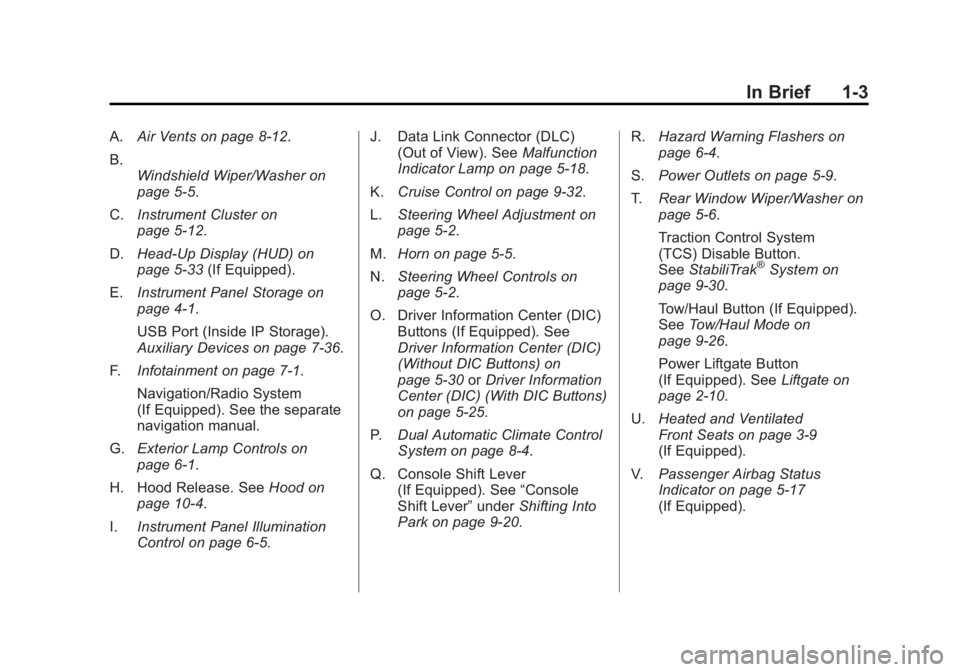
A.Air Vents on page 8‑12.
B. Windshield Wiper/Washer on
page 5‑5.
C. Instrument Cluster on
page 5‑12.
D. Head-Up Display (HUD) on
page 5‑33 (If Equipped).
E. Instrument Panel Storage on
page 4‑1.
USB Port (Inside IP Storage).
Auxiliary Devices on page 7‑36.
F. Infotainment on page 7‑1.
Navigation/Radio System
(If Equipped). See the separate
navigation manual.
G. Exterior Lamp Controls on
page 6‑1.
H. Hood Release. See Hood on
page 10‑4.
I. Instrument Panel Illumination
Control on page 6‑5. J. Data Link Connector (DLC)
(Out of View). See Malfunction
Indicator Lamp on page 5‑18.
K. Cruise Control on page 9‑32.
L. Steering Wheel Adjustment on
page 5‑2.
M. Horn on page 5‑5.
N. Steering Wheel Controls on
page 5‑2.
O. Driver Information Center (DIC) Buttons (If Equipped). See
Driver Information Center (DIC)
(Without DIC Buttons) on
page 5‑30 orDriver Information
Center (DIC) (With DIC Buttons)
on page 5‑25.
P. Dual Automatic Climate Control
System on page 8‑4.
Q. Console Shift Lever (If Equipped). See “Console
Shift Lever” underShifting Into
Park on page 9‑20. R.
Hazard Warning Flashers on
page 6‑4.
S. Power Outlets on page 5‑9.
T. Rear Window Wiper/Washer on
page 5‑6.
Traction Control System
(TCS) Disable Button.
See StabiliTrak
®System on
page 9‑30.
Tow/Haul Button (If Equipped).
See Tow/Haul Mode on
page 9‑26.
Power Liftgate Button
(If Equipped). See Liftgate on
page 2‑10.
U. Heated and Ventilated
Front Seats on page 3‑9
(If Equipped).
V. Passenger Airbag Status
Indicator on page 5‑17
(If Equipped).
Page 12 of 468
Black plate (6,1)GMC Acadia/Acadia Denali Owner Manual - 2012
1-6 In Brief
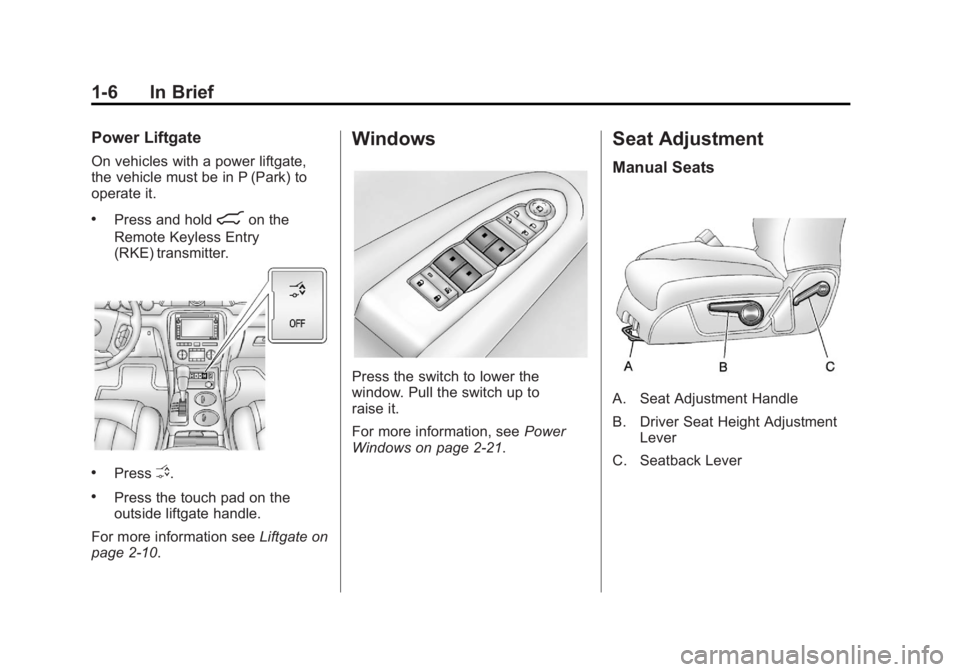
Power Liftgate
On vehicles with a power liftgate,
the vehicle must be in P (Park) to
operate it.
.Press and hold8on the
Remote Keyless Entry
(RKE) transmitter.
.PressO.
.Press the touch pad on the
outside liftgate handle.
For more information see Liftgate on
page 2‑10.
Windows
Press the switch to lower the
window. Pull the switch up to
raise it.
For more information, see Power
Windows on page 2‑21.
Seat Adjustment
Manual Seats
A. Seat Adjustment Handle
B. Driver Seat Height Adjustment Lever
C. Seatback Lever
Page 13 of 468
Black plate (7,1)GMC Acadia/Acadia Denali Owner Manual - 2012
In Brief 1-7
To adjust a manual seat:
1. Lift the handle (A) under the seatto unlock it.
2. Slide the seat to the desired position, and then release the
handle.
3. Try to move the seat back and forth to be sure it is locked in
place.
Move the lever (B) up or down to
raise or lower the seat.
Use the lever (C) to adjust the
seatback.
See Seat Adjustment on page 3‑3
and Reclining Seatbacks on
page 3‑5 for more information.Power Seats
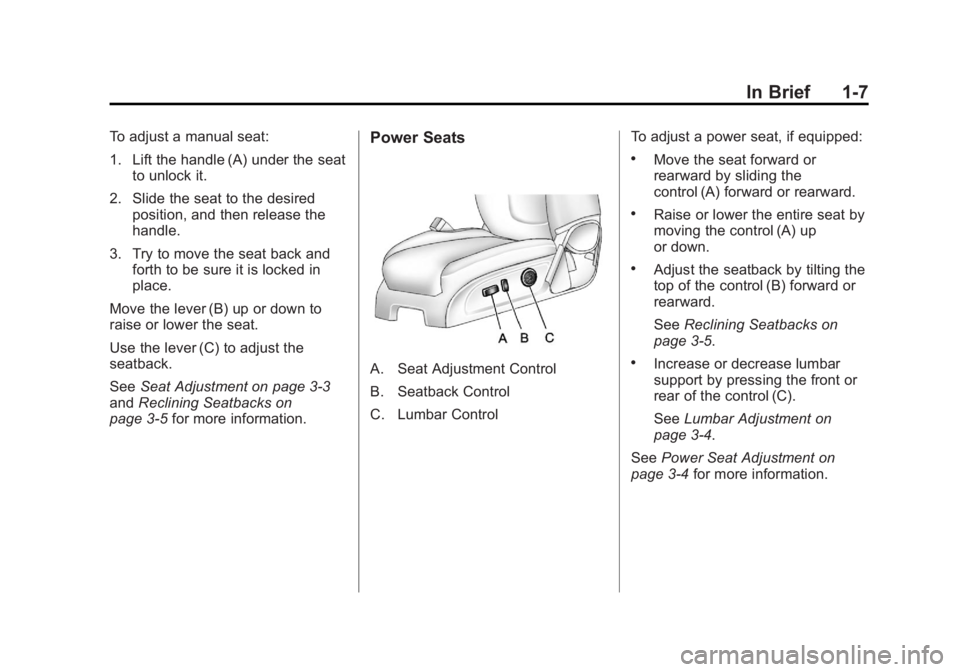
A. Seat Adjustment Control
B. Seatback Control
C. Lumbar Control To adjust a power seat, if equipped:
.Move the seat forward or
rearward by sliding the
control (A) forward or rearward.
.Raise or lower the entire seat by
moving the control (A) up
or down.
.Adjust the seatback by tilting the
top of the control (B) forward or
rearward.
See
Reclining Seatbacks on
page 3‑5.
.Increase or decrease lumbar
support by pressing the front or
rear of the control (C).
See Lumbar Adjustment on
page 3‑4.
See Power Seat Adjustment on
page 3‑4 for more information.
Page 14 of 468
Black plate (8,1)GMC Acadia/Acadia Denali Owner Manual - 2012
1-8 In Brief
Memory Features
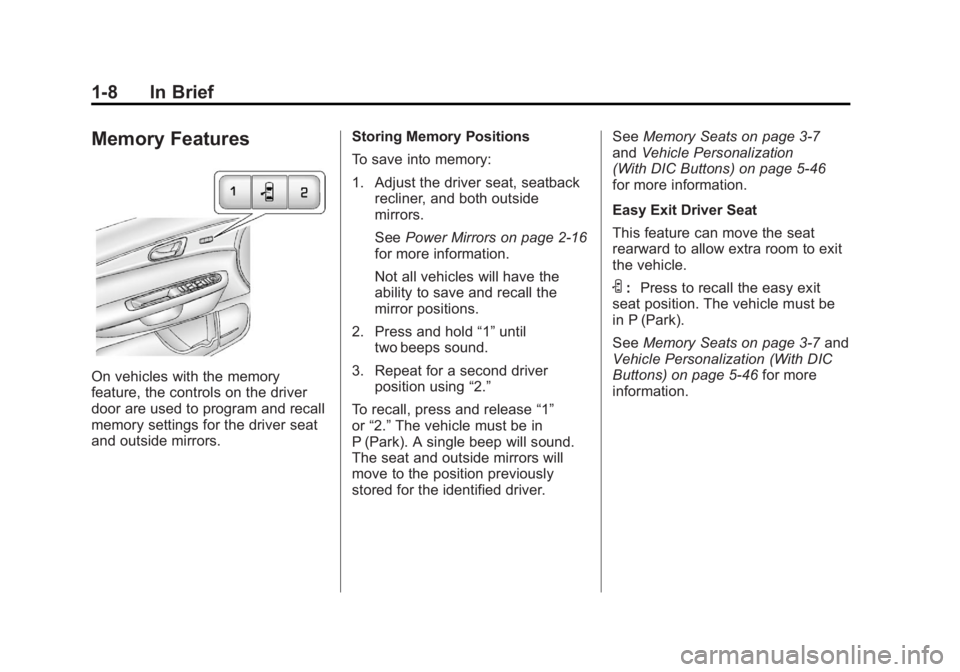
On vehicles with the memory
feature, the controls on the driver
door are used to program and recall
memory settings for the driver seat
and outside mirrors.Storing Memory Positions
To save into memory:
1. Adjust the driver seat, seatback
recliner, and both outside
mirrors.
See Power Mirrors on page 2‑16
for more information.
Not all vehicles will have the
ability to save and recall the
mirror positions.
2. Press and hold “1”until
two beeps sound.
3. Repeat for a second driver position using “2.”
To recall, press and release “1”
or “2.” The vehicle must be in
P (Park). A single beep will sound.
The seat and outside mirrors will
move to the position previously
stored for the identified driver. See
Memory Seats on page 3‑7
and Vehicle Personalization
(With DIC Buttons) on page 5‑46
for more information.
Easy Exit Driver Seat
This feature can move the seat
rearward to allow extra room to exit
the vehicle.
S: Press to recall the easy exit
seat position. The vehicle must be
in P (Park).
See Memory Seats on page 3‑7 and
Vehicle Personalization (With DIC
Buttons) on page 5‑46 for more
information.
Page 15 of 468
Black plate (9,1)GMC Acadia/Acadia Denali Owner Manual - 2012
In Brief 1-9
Second Row Seats
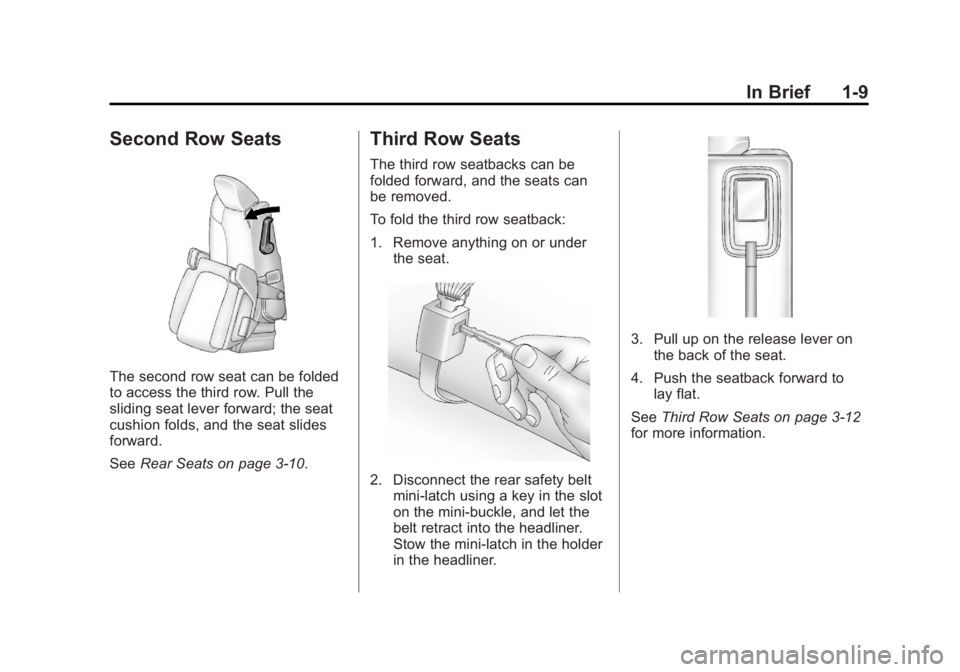
The second row seat can be folded
to access the third row. Pull the
sliding seat lever forward; the seat
cushion folds, and the seat slides
forward.
SeeRear Seats on page 3‑10.
Third Row Seats
The third row seatbacks can be
folded forward, and the seats can
be removed.
To fold the third row seatback:
1. Remove anything on or under
the seat.
2. Disconnect the rear safety beltmini-latch using a key in the slot
on the mini-buckle, and let the
belt retract into the headliner.
Stow the mini-latch in the holder
in the headliner.
3. Pull up on the release lever onthe back of the seat.
4. Push the seatback forward to lay flat.
See Third Row Seats on page 3‑12
for more information.
Page 16 of 468
Black plate (10,1)GMC Acadia/Acadia Denali Owner Manual - 2012
1-10 In Brief
Heated and Ventilated
Seats
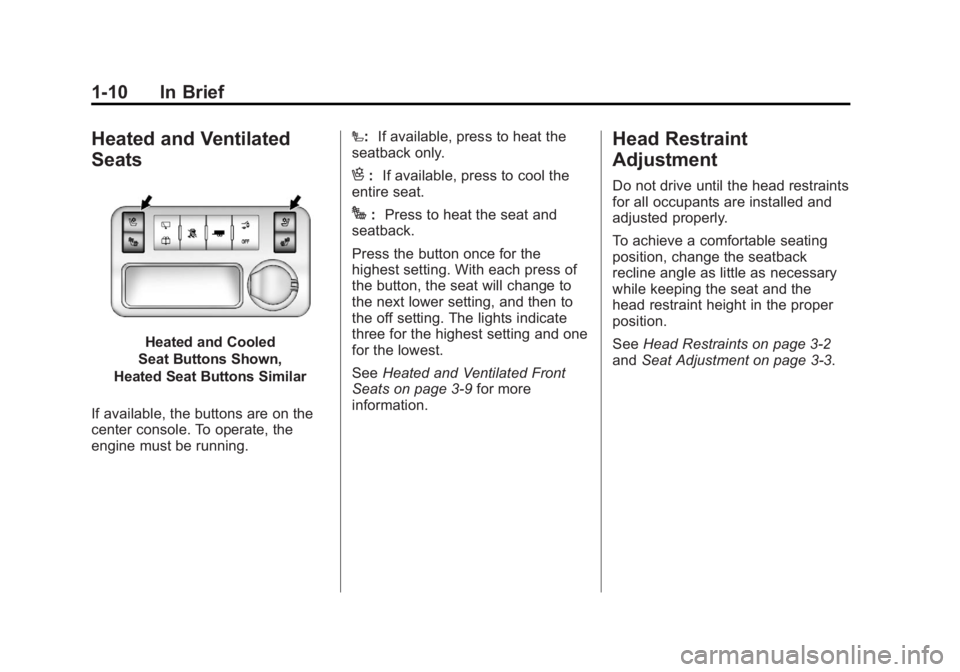
Heated and Cooled
Seat Buttons Shown,
Heated Seat Buttons Similar
If available, the buttons are on the
center console. To operate, the
engine must be running. I:
If available, press to heat the
seatback only.
H: If available, press to cool the
entire seat.
J: Press to heat the seat and
seatback.
Press the button once for the
highest setting. With each press of
the button, the seat will change to
the next lower setting, and then to
the off setting. The lights indicate
three for the highest setting and one
for the lowest.
See Heated and Ventilated Front
Seats on page 3‑9 for more
information.
Head Restraint
Adjustment
Do not drive until the head restraints
for all occupants are installed and
adjusted properly.
To achieve a comfortable seating
position, change the seatback
recline angle as little as necessary
while keeping the seat and the
head restraint height in the proper
position.
See Head Restraints on page 3‑2
and Seat Adjustment on page 3‑3.
Page 27 of 468
Black plate (21,1)GMC Acadia/Acadia Denali Owner Manual - 2012
In Brief 1-21
Storage Compartments
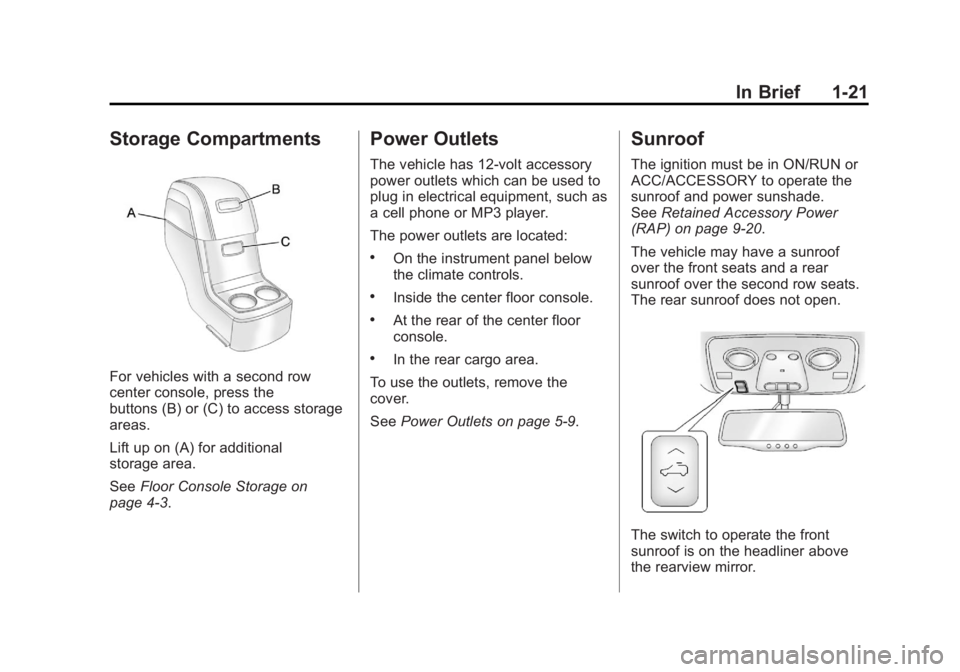
For vehicles with a second row
center console, press the
buttons (B) or (C) to access storage
areas.
Lift up on (A) for additional
storage area.
SeeFloor Console Storage on
page 4‑3.
Power Outlets
The vehicle has 12‐volt accessory
power outlets which can be used to
plug in electrical equipment, such as
a cell phone or MP3 player.
The power outlets are located:
.On the instrument panel below
the climate controls.
.Inside the center floor console.
.At the rear of the center floor
console.
.In the rear cargo area.
To use the outlets, remove the
cover.
See Power Outlets on page 5‑9.
Sunroof
The ignition must be in ON/RUN or
ACC/ACCESSORY to operate the
sunroof and power sunshade.
SeeRetained Accessory Power
(RAP) on page 9‑20.
The vehicle may have a sunroof
over the front seats and a rear
sunroof over the second row seats.
The rear sunroof does not open.
The switch to operate the front
sunroof is on the headliner above
the rearview mirror.
Page 38 of 468
Black plate (6,1)GMC Acadia/Acadia Denali Owner Manual - 2012
2-6 Keys, Doors, and Windows
When the vehicle starts, the parking
lamps will turn on and remain on as
long as the engine is running.
The doors will be locked and the
climate control system will operate
automatically if the vehicle has the
automatic system, or at the same
setting as when the vehicle was last
turned off.
If the vehicle has an automatic
climate control system and heated
seats, the heated seats turn on
during colder outside temperatures
and shut off when the key is turned
to ON/RUN. SeeHeated and
Ventilated Front Seats on page 3‑9
for more information.
The rear window defogger and
heated mirrors, if the vehicle has
them, turn on during colder outside
temperatures and turn off when the
key is turned to ON/RUN. After entering the vehicle during a
remote start, insert and turn the key
to the ON/RUN position to drive the
vehicle.
If the vehicle is left running it
automatically shuts off after
10 minutes unless a time extension
has been done.
Extending Engine Run Time
To extend the engine run time
by 10 minutes, repeat Steps 1
through 3 while the engine is still
running. The engine run time can
only be extended if it is the first
remote start since the vehicle has
been driven. Remote start can be
extended one time.
If the remote start procedure is
used again before the first
10-minute time frame has ended,
the first 10 minutes will immediately
expire and the second 10-minute
time frame will start.For example, if
Qand then/are
pressed again after the vehicle
has been running for five minutes,
10 minutes are added, allowing
the engine to run for a total of
15 minutes.
A maximum of two remote starts or
remote start attempts are allowed
between ignition cycles.
After the vehicle's engine has been
started two times using the remote
start button, the ignition must be
turned on and then back off before
the remote start procedure can be
used again.