tow GMC ACADIA 2012 Owner's Manual
[x] Cancel search | Manufacturer: GMC, Model Year: 2012, Model line: ACADIA, Model: GMC ACADIA 2012Pages: 468, PDF Size: 5.57 MB
Page 2 of 468
Black plate (2,1)GMC Acadia/Acadia Denali Owner Manual - 2012
2012 GMC Acadia/Acadia Denali Owner ManualM
Driving and Operating. . . . . . . . 9-1
Driving Information . . . . . . . . . . . . . 9-2
Starting and Operating . . . . . . . 9-15
Engine Exhaust . . . . . . . . . . . . . . 9-22
Automatic Transmission . . . . . . 9-23
Drive Systems . . . . . . . . . . . . . . . . 9-27
Brakes . . . . . . . . . . . . . . . . . . . . . . . 9-27
Ride Control Systems . . . . . . . . 9-30
Cruise Control . . . . . . . . . . . . . . . . 9-32
Object Detection Systems . . . . 9-34
Fuel . . . . . . . . . . . . . . . . . . . . . . . . . . 9-40
Towing . . . . . . . . . . . . . . . . . . . . . . . 9-44
Conversions and Add-Ons . . . 9-53
Vehicle Care . . . . . . . . . . . . . . . . . 10-1
General Information . . . . . . . . . . 10-2
Vehicle Checks . . . . . . . . . . . . . . . 10-4
Headlamp Aiming . . . . . . . . . . . 10-28
Bulb Replacement . . . . . . . . . . 10-29 Electrical System . . . . . . . . . . . . 10-30
Wheels and Tires . . . . . . . . . . . 10-37
Jump Starting . . . . . . . . . . . . . . . 10-78
Towing . . . . . . . . . . . . . . . . . . . . . . 10-82
Appearance Care . . . . . . . . . . . 10-86
Service and Maintenance . . . 11-1
General Information . . . . . . . . . . 11-1
Maintenance Schedule . . . . . . . 11-3
Special Application Services . . . . . . . . . . . . . . . . . . . . 11-8
Additional Maintenance and Care . . . . . . . . . . . . . . . . . . . . 11-9
Recommended Fluids, Lubricants, and Parts . . . . . . 11-12
Maintenance Records . . . . . . . 11-14
Technical Data . . . . . . . . . . . . . . . 12-1
Vehicle Identification . . . . . . . . . 12-1
Vehicle Data . . . . . . . . . . . . . . . . . . 12-2 Customer Information
. . . . . . . 13-1
Customer Information . . . . . . . . 13-2
Reporting Safety Defects . . . . 13-19
Vehicle Data Recording and
Privacy . . . . . . . . . . . . . . . . . . . . 13-20
OnStar . . . . . . . . . . . . . . . . . . . . . . . 14-1
OnStar Overview . . . . . . . . . . . . . 14-1
OnStar Services . . . . . . . . . . . . . . 14-2
OnStar Additional
Information . . . . . . . . . . . . . . . . . . 14-5
Index . . . . . . . . . . . . . . . . . . . . . i-1
Page 5 of 468
Black plate (5,1)GMC Acadia/Acadia Denali Owner Manual - 2012
Introduction v
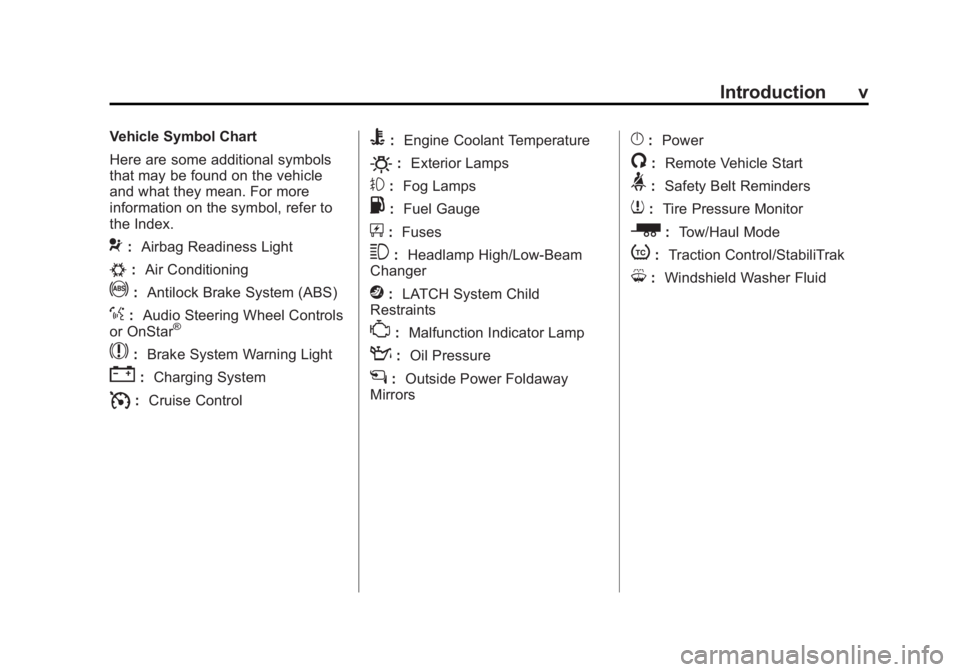
Vehicle Symbol Chart
Here are some additional symbols
that may be found on the vehicle
and what they mean. For more
information on the symbol, refer to
the Index.
9:Airbag Readiness Light
#:Air Conditioning
!:Antilock Brake System (ABS)
%:Audio Steering Wheel Controls
or OnStar®
$: Brake System Warning Light
":Charging System
I:Cruise Control
B: Engine Coolant Temperature
O:Exterior Lamps
#:Fog Lamps
.: Fuel Gauge
+:Fuses
3: Headlamp High/Low-Beam
Changer
j: LATCH System Child
Restraints
*: Malfunction Indicator Lamp
::Oil Pressure
g:Outside Power Foldaway
Mirrors
}: Power
/:Remote Vehicle Start
>:Safety Belt Reminders
7:Tire Pressure Monitor
_: Tow/Haul Mode
t:Traction Control/StabiliTrak
M:Windshield Washer Fluid
Page 9 of 468
Black plate (3,1)GMC Acadia/Acadia Denali Owner Manual - 2012
In Brief 1-3
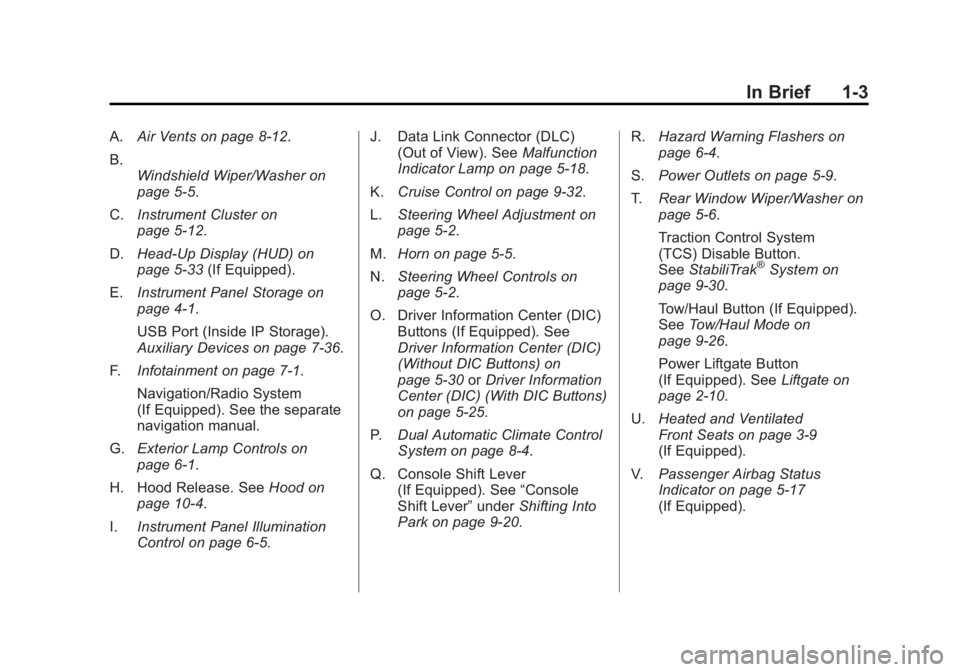
A.Air Vents on page 8‑12.
B. Windshield Wiper/Washer on
page 5‑5.
C. Instrument Cluster on
page 5‑12.
D. Head-Up Display (HUD) on
page 5‑33 (If Equipped).
E. Instrument Panel Storage on
page 4‑1.
USB Port (Inside IP Storage).
Auxiliary Devices on page 7‑36.
F. Infotainment on page 7‑1.
Navigation/Radio System
(If Equipped). See the separate
navigation manual.
G. Exterior Lamp Controls on
page 6‑1.
H. Hood Release. See Hood on
page 10‑4.
I. Instrument Panel Illumination
Control on page 6‑5. J. Data Link Connector (DLC)
(Out of View). See Malfunction
Indicator Lamp on page 5‑18.
K. Cruise Control on page 9‑32.
L. Steering Wheel Adjustment on
page 5‑2.
M. Horn on page 5‑5.
N. Steering Wheel Controls on
page 5‑2.
O. Driver Information Center (DIC) Buttons (If Equipped). See
Driver Information Center (DIC)
(Without DIC Buttons) on
page 5‑30 orDriver Information
Center (DIC) (With DIC Buttons)
on page 5‑25.
P. Dual Automatic Climate Control
System on page 8‑4.
Q. Console Shift Lever (If Equipped). See “Console
Shift Lever” underShifting Into
Park on page 9‑20. R.
Hazard Warning Flashers on
page 6‑4.
S. Power Outlets on page 5‑9.
T. Rear Window Wiper/Washer on
page 5‑6.
Traction Control System
(TCS) Disable Button.
See StabiliTrak
®System on
page 9‑30.
Tow/Haul Button (If Equipped).
See Tow/Haul Mode on
page 9‑26.
Power Liftgate Button
(If Equipped). See Liftgate on
page 2‑10.
U. Heated and Ventilated
Front Seats on page 3‑9
(If Equipped).
V. Passenger Airbag Status
Indicator on page 5‑17
(If Equipped).
Page 11 of 468
Black plate (5,1)GMC Acadia/Acadia Denali Owner Manual - 2012
In Brief 1-5
When the vehicle starts, the parking
lamps will turn on and remain on as
long as the engine is running.
The doors will be locked and the
climate control system may
come on.
The engine will continue to run for
10 minutes. Repeat the steps for a
10-minute time extension. Remote
start can be extended only once.
Canceling a Remote Start
To cancel a remote start:
.Aim the RKE transmitter at the
vehicle and press and hold
/
until the parking lamps turn off.
.Turn on the hazard warning
flashers.
.Turn the ignition switch on and
then off.
See Remote Vehicle Start on
page 2‑5.
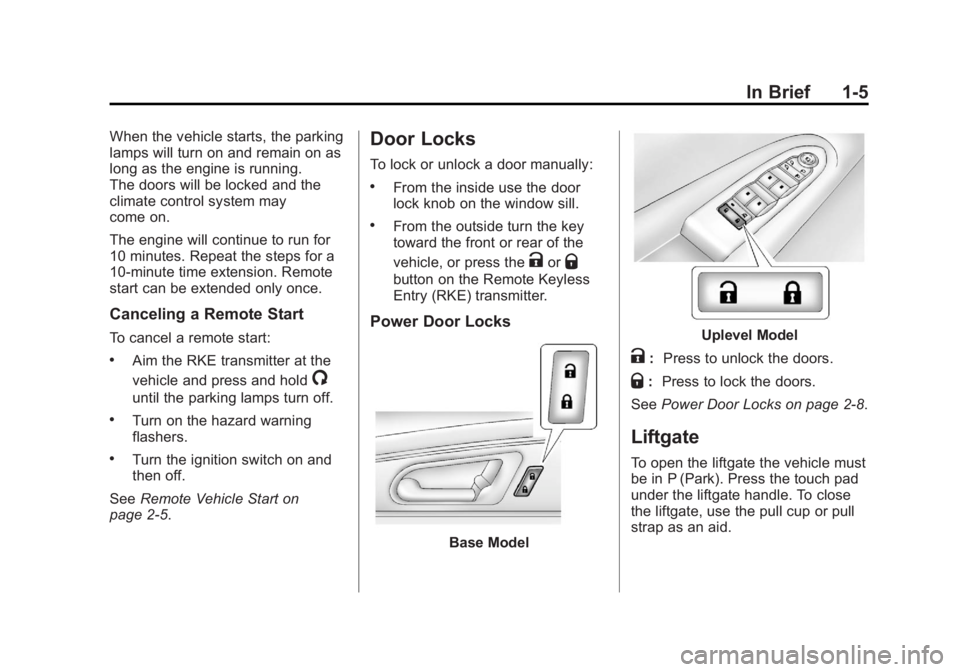
Door Locks
To lock or unlock a door manually:
.From the inside use the door
lock knob on the window sill.
.From the outside turn the key
toward the front or rear of the
vehicle, or press the
KorQ
button on the Remote Keyless
Entry (RKE) transmitter.
Power Door Locks
Base Model
Uplevel Model
K: Press to unlock the doors.
Q:Press to lock the doors.
See Power Door Locks on page 2‑8.
Liftgate
To open the liftgate the vehicle must
be in P (Park). Press the touch pad
under the liftgate handle. To close
the liftgate, use the pull cup or pull
strap as an aid.
Page 15 of 468
Black plate (9,1)GMC Acadia/Acadia Denali Owner Manual - 2012
In Brief 1-9
Second Row Seats
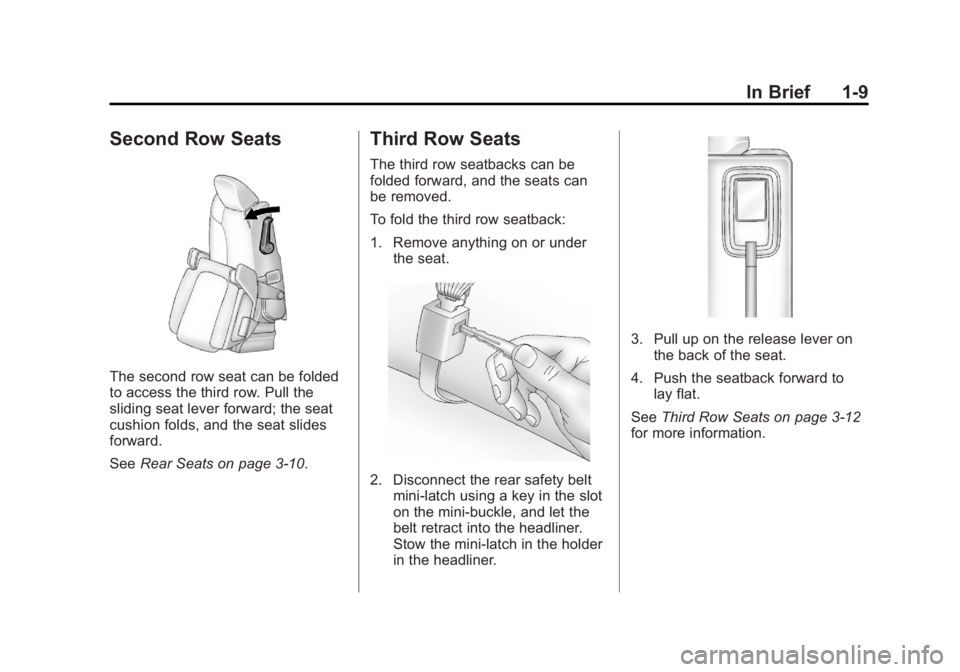
The second row seat can be folded
to access the third row. Pull the
sliding seat lever forward; the seat
cushion folds, and the seat slides
forward.
SeeRear Seats on page 3‑10.
Third Row Seats
The third row seatbacks can be
folded forward, and the seats can
be removed.
To fold the third row seatback:
1. Remove anything on or under
the seat.
2. Disconnect the rear safety beltmini-latch using a key in the slot
on the mini-buckle, and let the
belt retract into the headliner.
Stow the mini-latch in the holder
in the headliner.
3. Pull up on the release lever onthe back of the seat.
4. Push the seatback forward to lay flat.
See Third Row Seats on page 3‑12
for more information.
Page 18 of 468
Black plate (12,1)GMC Acadia/Acadia Denali Owner Manual - 2012
1-12 In Brief
Mirror Adjustment
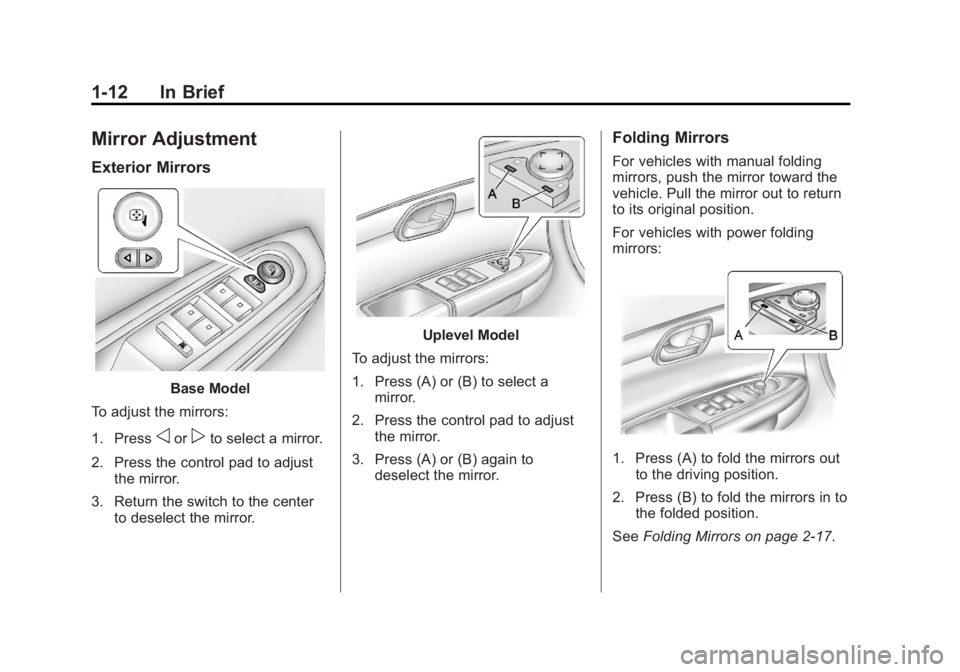
Exterior Mirrors
Base Model
To adjust the mirrors:
1. Press
oorpto select a mirror.
2. Press the control pad to adjust the mirror.
3. Return the switch to the center to deselect the mirror.
Uplevel Model
To adjust the mirrors:
1. Press (A) or (B) to select a mirror.
2. Press the control pad to adjust the mirror.
3. Press (A) or (B) again to deselect the mirror.
Folding Mirrors
For vehicles with manual folding
mirrors, push the mirror toward the
vehicle. Pull the mirror out to return
to its original position.
For vehicles with power folding
mirrors:
1. Press (A) to fold the mirrors out
to the driving position.
2. Press (B) to fold the mirrors in to the folded position.
See Folding Mirrors on page 2‑17.
Page 22 of 468

Black plate (16,1)GMC Acadia/Acadia Denali Owner Manual - 2012
1-16 In Brief
Dual Automatic Climate Control System
A. Fan Control
B. AUTO (Auto Operation)
C. Defrost
D. Recirculation
E. REAR (Rear Climate Control)
F. Air Delivery Mode Control
G. Driver Side Temperature Control
H. Display
I. Power (On/Off)
J. Rear Window DefoggerK. Air Conditioning
L. PASS (Passenger)
M. Passenger Side Temperature
Control
See Climate Control Systems on
page 8‑1 orDual Automatic
Climate Control System on page 8‑4
(If Equipped). For more information
about the rear climate control, see
Rear Climate Control System (Rear
Climate Control Only) on page 8‑10
or Rear Climate Control System
(Rear Climate with Rear Seat Audio)
on page 8‑11.
Transmission
Electronic Range Select
(ERS) Mode
ERS mode allows you to choose the
top-gear limit of the transmission
and the vehicle's speed while
driving downhill or towing a trailer.
The vehicle has an electronic
shift position indicator within the
instrument panel cluster. When
using the ERS mode a number will
display next to the L, indicating the
current gear that has been selected.
To use this feature:
1. Move the shift lever to L (Low).
2. Press the plus/minus button located on the shift lever, to
increase or decrease the gear
range available.
See Manual Mode on page 9‑25.
Page 49 of 468
Black plate (17,1)GMC Acadia/Acadia Denali Owner Manual - 2012
Keys, Doors, and Windows 2-17
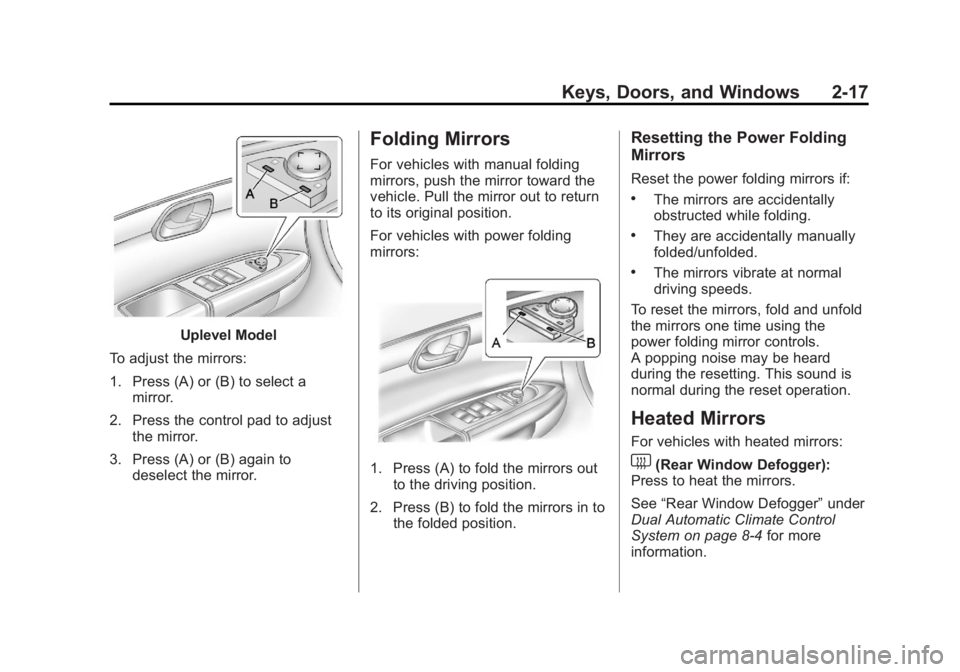
Uplevel Model
To adjust the mirrors:
1. Press (A) or (B) to select a mirror.
2. Press the control pad to adjust the mirror.
3. Press (A) or (B) again to deselect the mirror.
Folding Mirrors
For vehicles with manual folding
mirrors, push the mirror toward the
vehicle. Pull the mirror out to return
to its original position.
For vehicles with power folding
mirrors:
1. Press (A) to fold the mirrors out
to the driving position.
2. Press (B) to fold the mirrors in to the folded position.
Resetting the Power Folding
Mirrors
Reset the power folding mirrors if:
.The mirrors are accidentally
obstructed while folding.
.They are accidentally manually
folded/unfolded.
.The mirrors vibrate at normal
driving speeds.
To reset the mirrors, fold and unfold
the mirrors one time using the
power folding mirror controls.
A popping noise may be heard
during the resetting. This sound is
normal during the reset operation.
Heated Mirrors
For vehicles with heated mirrors:
1(Rear Window Defogger):
Press to heat the mirrors.
See “Rear Window Defogger” under
Dual Automatic Climate Control
System on page 8‑4 for more
information.
Page 52 of 468
Black plate (20,1)GMC Acadia/Acadia Denali Owner Manual - 2012
2-20 Keys, Doors, and Windows
Automatic Dimming
Rearview Mirror
The vehicle may have an automatic
dimming inside rearview mirror.
Automatic dimming reduces the
glare from the headlamps of the
vehicle behind you. The dimming
feature comes on and the indicator
light illuminates each time the
ignition is turned to start.
O(On/Off):Press to turn the
dimming feature on or off.
The vehicle may also have a Rear
Vision Camera (RVC). See Rear
Vision Camera (RVC) on page 9‑35
for more information. If the vehicle has a RVC, the
O
button for turning the dimming
feature on or off will not be
available.
Vehicles with OnStar have three
additional control buttons for the
OnStar system. See
OnStar
Overview on page 14‑1.
Cleaning the Mirror
Do not spray glass cleaner directly
on the mirror. Use a soft towel
dampened with water.
Windows
{WARNING
Leaving children, helpless adults,
or pets in a vehicle with the
windows closed is dangerous.
They can be overcome by the
extreme heat and suffer
permanent injuries or even death
from heat stroke. Never leave a
child, a helpless adult, or a pet
alone in a vehicle, especially with
the windows closed in warm or
hot weather.
Page 66 of 468
Black plate (10,1)GMC Acadia/Acadia Denali Owner Manual - 2012
3-10 Seats and Restraints
Rear Seats
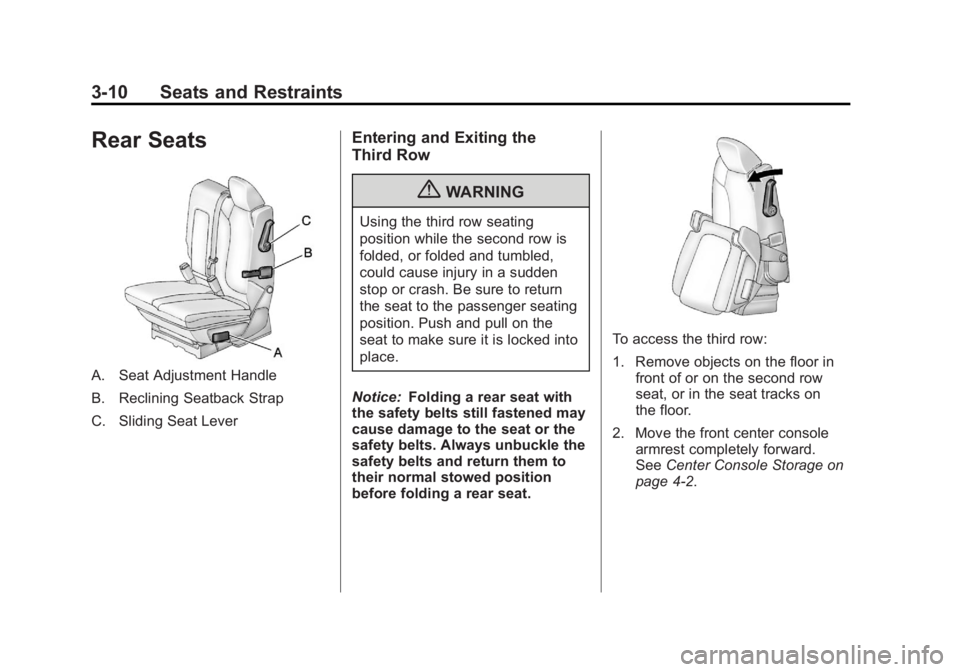
A. Seat Adjustment Handle
B. Reclining Seatback Strap
C. Sliding Seat Lever
Entering and Exiting the
Third Row
{WARNING
Using the third row seating
position while the second row is
folded, or folded and tumbled,
could cause injury in a sudden
stop or crash. Be sure to return
the seat to the passenger seating
position. Push and pull on the
seat to make sure it is locked into
place.
Notice: Folding a rear seat with
the safety belts still fastened may
cause damage to the seat or the
safety belts. Always unbuckle the
safety belts and return them to
their normal stowed position
before folding a rear seat.
To access the third row:
1. Remove objects on the floor in front of or on the second row
seat, or in the seat tracks on
the floor.
2. Move the front center console armrest completely forward.
See Center Console Storage on
page 4‑2.