air condition GMC ACADIA 2013 User Guide
[x] Cancel search | Manufacturer: GMC, Model Year: 2013, Model line: ACADIA, Model: GMC ACADIA 2013Pages: 410, PDF Size: 5.46 MB
Page 153 of 410
Black plate (39,1)Acadia/Acadia Denali Owner Manual - 2013 - crc2 - 12/11/12
Instruments and Controls 5-39
STARTING DISABLED
SERVICE THROTTLE
This message displays when your
vehicle's throttle system is not
functioning properly. Have your
vehicle serviced by your dealer.
Tire Messages
TIRE LOW ADD AIR TO TIRE
On vehicles with the Tire Pressure
Monitor System (TPMS), this
message displays when the
pressure in one or more of the
vehicle's tires is low.
This message also displays LEFT
FRT (left front), RIGHT FRT (right
front), LEFT RR (left rear),
or RIGHT RR (right rear) to indicate
the location of the low tire.
The low tire pressure warning light
will also come on. SeeTire
Pressure Light on page 5‑21.
If a tire pressure message appears
on the DIC, stop as soon as you
can. Inflate the tires by adding air until the tire pressure is equal to the
values shown on the Tire and
Loading Information label. See
Tires
on page 10‑37, Vehicle Load Limits
on page 9‑9, and Tire Pressure on
page 10‑45.
You can receive more than one tire
pressure message at a time. To
read the other messages that may
have been sent at the same time,
press the set/reset button or the trip
odometer reset stem. The DIC also
shows the tire pressure values. See
Driver Information Center (DIC) on
page 5‑23.
SERVICE TIRE MONITOR
SYSTEM
On vehicles with the Tire Pressure
Monitor System (TPMS), this
message displays if a part on the
TPMS is not working properly. The
tire pressure light also flashes and
then remains on during the same
ignition cycle. See Tire Pressure
Light on page 5‑21. Several
conditions may cause this message
to appear. See
Tire Pressure Monitor
Operation on page 10‑47 for more
information. If the warning comes on
and stays on, there may be a
problem with the TPMS. See your
dealer.
TIRE LEARNING ACTIVE
This message displays when the
Tire Pressure Monitor System
(TPMS) is relearning the tire
positions on your vehicle. The tire
positions must be relearned after
rotating the tires or after replacing a
tire or sensor. See Tire Rotation on
page 10‑50, Tire Pressure Monitor
System on page 10‑46, and Tire
Pressure on page 10‑45 for more
information.
Page 154 of 410
Black plate (40,1)Acadia/Acadia Denali Owner Manual - 2013 - crc2 - 12/11/12
5-40 Instruments and Controls
Transmission Messages
ALL WHEEL DRIVE OFF
If your vehicle has the All-Wheel
Drive (AWD) system, this message
displays when there is a temporary
condition making the AWD system
unavailable. The vehicle will run in
2WD. This could be caused by:
.A compact spare tire on the
vehicle
.AWD system overheat
.Loss of wheel or vehicle speed
.Certain other vehicle electrical
conditions
This message turns off when the
compact spare tire is replaced by a
full-size tire, the differential fluid
cools or the above conditions are no
longer present and the warning
message is reset. To reset the
warning message manually, turn the
ignition off and then back on again
after 30 seconds. If the message
stays on, see your dealer. See
All-Wheel Drive on page 9‑25.
SERVICE ALL WHEEL DRIVE
This message displays if a problem
occurs with the All-Wheel Drive
(AWD) system. The vehicle will run
in 2WD. This could be caused by:
.An electronics problem
.Worn out or overheated clutch
plates
.Various electrical issues
If this message appears, stop as
soon as possible and turn off the
ignition for 30 seconds. Restart the
vehicle and check for the message
on the DIC display. If the message
still displays or appears again when
you begin driving, the system needs
service. See your dealer right away.
SERVICE TRANSMISSION
This message displays when there
is a problem with the transmission.
See your dealer for service.
TRANSMISSION HOT IDLE
ENGINE
Notice: Do not drive the vehicle
while the transmission fluid is
overheating and the transmission
temperature warning is displayed
on the instrument cluster and/or
DIC, or the transmission can be
damaged. This could lead to
costly repairs that would not be
covered by the warranty.
This message displays and a chime
sounds if the transmission fluid in
the vehicle gets hot. Driving with the
transmission fluid temperature high
can cause damage to the vehicle.
Stop the vehicle and let it idle to
allow the transmission to cool. This
message clears when the fluid
temperature reaches a safe level.
Page 155 of 410
Black plate (41,1)Acadia/Acadia Denali Owner Manual - 2013 - crc2 - 12/11/12
Instruments and Controls 5-41
Vehicle Reminder
Messages
ICE POSSIBLE DRIVE
WITH CARE
This message displays when the
outside air temperature is cold
enough to create icy road
conditions. Adjust your driving
accordingly.
Vehicle Speed Messages
SPEED LIMITED TO XXX MPH
(KM/H)
This message displays when your
vehicle speed is limited to 128 km/h
(80 mph) because the vehicle
detects a problem in the speed
variable assist steering system.
Have your vehicle serviced by your
dealer.
Washer Fluid Messages
WASHER FLUID LOW ADD
FLUID
This message displays when the
windshield washer fluid is low. Fill
the windshield washer fluid reservoir
as soon as possible. SeeEngine
Compartment Overview on
page 10‑5 for the location of the
windshield washer fluid reservoir.
Also, see Washer Fluid on
page 10‑18 for more information.
Vehicle
Personalization
Your vehicle may have
customization capabilities that allow
you to program certain features to
one preferred setting. Customization
features can only be programmed to
one setting on the vehicle and
cannot be programmed to a
preferred setting for two different
drivers.
All of the customization options may
not be available on your vehicle.
Only the options available will be
displayed on the DIC.
The default settings for the
customization features were set
when your vehicle left the factory,
but may have been changed from
their default state since then.
The customization preferences are
automatically recalled.
To change customization
preferences, use the following
procedure.
Page 202 of 410
Black plate (28,1)Acadia/Acadia Denali Owner Manual - 2013 - crc2 - 12/11/12
7-28 Infotainment System
Settings
Press Settings on the Home Page
to adjust features and preferences,
such as Time, Date, Bluetooth
Device List, Voice Recognition,
Favorite Pages, Display Settings,
Navigation Settings, etc.
1. Press the Settings screen buttonon the Home Page.
2. Touch-tap the scroll bar until the desired option displays. Select
the desired settings to change.
A few of the setting options change
the way the navigation system
displays or reacts while in use.
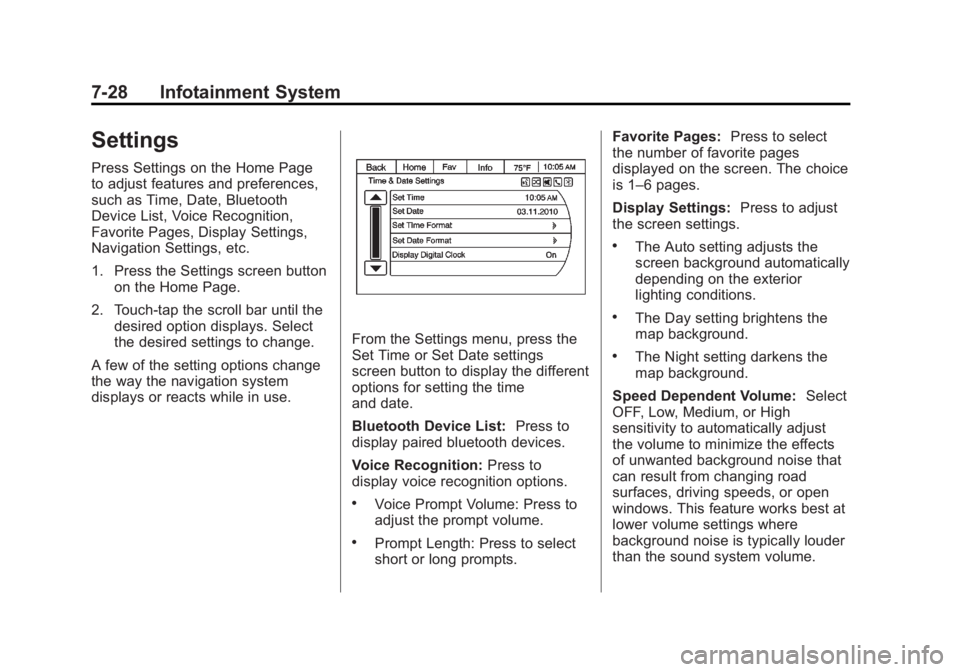
From the Settings menu, press the
Set Time or Set Date settings
screen button to display the different
options for setting the time
and date.
Bluetooth Device List: Press to
display paired bluetooth devices.
Voice Recognition: Press to
display voice recognition options.
.Voice Prompt Volume: Press to
adjust the prompt volume.
.Prompt Length: Press to select
short or long prompts. Favorite Pages:
Press to select
the number of favorite pages
displayed on the screen. The choice
is 1–6 pages.
Display Settings: Press to adjust
the screen settings.
.The Auto setting adjusts the
screen background automatically
depending on the exterior
lighting conditions.
.The Day setting brightens the
map background.
.The Night setting darkens the
map background.
Speed Dependent Volume: Select
OFF, Low, Medium, or High
sensitivity to automatically adjust
the volume to minimize the effects
of unwanted background noise that
can result from changing road
surfaces, driving speeds, or open
windows. This feature works best at
lower volume settings where
background noise is typically louder
than the sound system volume.
Page 205 of 410
Black plate (1,1)Acadia/Acadia Denali Owner Manual - 2013 - crc2 - 12/11/12
Climate Controls 8-1
Climate Controls
Climate Control Systems
Climate Control Systems . . . . . . 8-1
Dual Automatic Climate ControlSystem . . . . . . . . . . . . . . . . . . . . . . 8-4
Rear Climate Control System . . . . . . . . . . . . . . . . . . . . . . 8-9
Rear Climate Control System (with Rear Seat Audio) . . . . . 8-10
Air Vents
Air Vents . . . . . . . . . . . . . . . . . . . . . 8-11
Maintenance
Passenger Compartment AirFilter . . . . . . . . . . . . . . . . . . . . . . . 8-12
Climate Control Systems
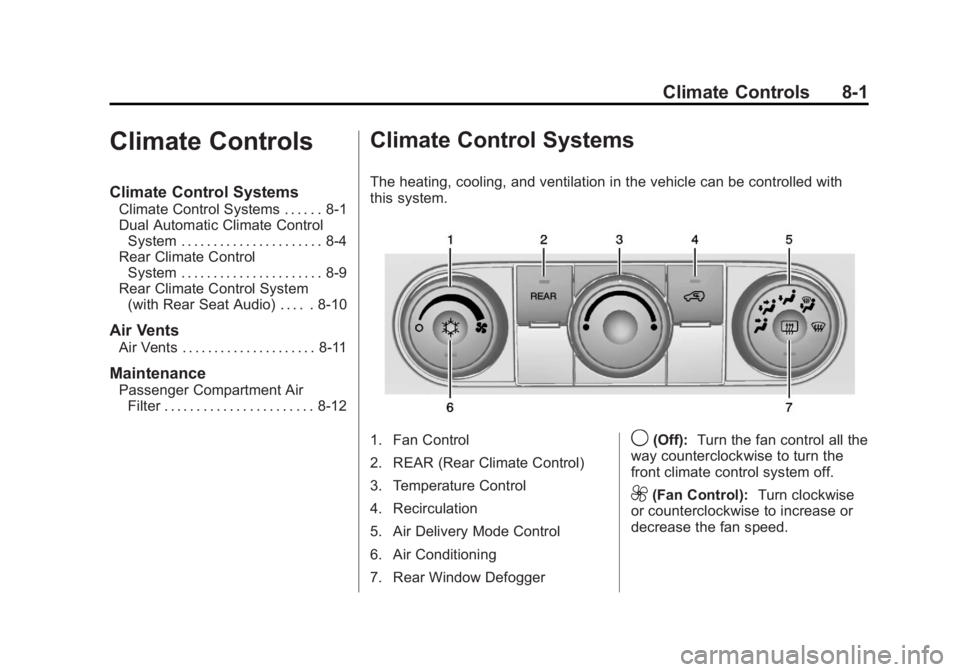
The heating, cooling, and ventilation in the vehicle can be controlled with
this system.
1. Fan Control
2. REAR (Rear Climate Control)
3. Temperature Control
4. Recirculation
5. Air Delivery Mode Control
6. Air Conditioning
7. Rear Window Defogger9(Off): Turn the fan control all the
way counterclockwise to turn the
front climate control system off.
9(Fan Control): Turn clockwise
or counterclockwise to increase or
decrease the fan speed.
Page 206 of 410
Black plate (2,1)Acadia/Acadia Denali Owner Manual - 2013 - crc2 - 12/11/12
8-2 Climate Controls
Temperature Control:Turn
clockwise or counterclockwise to
increase or decrease the
temperature of the air flowing from
the system.
Air Delivery Mode Control: Turn
clockwise or counterclockwise to
change the current airflow mode.
By positioning the right knob
between two modes, a combination
of those two modes is selected.
H(Vent): Air is directed to the
instrument panel outlets.
)(Bi-Level): Air is divided
between the instrument panel and
floor outlets. Some air is directed
toward the windshield and side
window outlets. Cooler air is
directed to the upper outlets and
warmer air to the floor outlets.
6(Floor): Air is directed to the
floor outlets, with some of the air
directed to the windshield, side
window, and second row floor
outlets. In this mode, the system automatically selects outside air.
Recirculation cannot be selected
while in floor mode.
-(Defog):
This clears the
windows of fog or moisture. Air is
directed to the windshield, floor
outlets, and side window vents.
When this mode is selected, the
system turns off recirculation and
runs the air conditioning unless the
outside temperature is less than 4°C
(40°F). Recirculation cannot be
selected while in the defog mode.
Do not drive the vehicle until all the
windows are clear.
0(Defrost): This clears the
windshield of fog or frost more
quickly. Air is directed to the
windshield and side window vents,
with some to the floor vents. In this
mode, outside air is pulled inside
the vehicle. Recirculation cannot be
selected while in the defrost mode.
The air conditioning system runs
automatically in this setting, unless
the outside temperature is less than
4°C (40°F). Do not drive the vehicle
until all windows are clear.
#(Air Conditioning): Press to
turn the air conditioning system on
or off. An indicator light comes on
when A/C is on. The air conditioning
system does not operate when the
outside temperature is below 4°C
(40°F). The indicator light flashes
three times and turns off when
outside conditions affect air
conditioning operation. This is
normal.
For quicker cool down on hot days:
1. Open the windows to let hot air escape.
2. Select
Hmode.
3. Select
#.
4. Select the coolest temperature.
5. Select the highest fan speed.
6. Close the windows after the hot air has escaped.
7. Once the vehicle's interior temperature is below the outside
temperature, select
@mode
for faster cooling.
Page 207 of 410
Black plate (3,1)Acadia/Acadia Denali Owner Manual - 2013 - crc2 - 12/11/12
Climate Controls 8-3
Using recirculation for long periods
of time could cause the air inside
the vehicle to become too dry. To
prevent this from happening, after
the inside of the vehicle has cooled,
turn the recirculation mode off.
The air conditioning system
removes moisture from the air, so
water might drip under the vehicle
while idling or after turning off the
engine. This is normal.
@(Recirculation):Press to turn
the recirculation mode on or off. An
indicator light comes on when
recirculation is on. When the engine
is turned off, the recirculation mode
automatically turns off and must be
re-selected when the engine is
turned on again.
This mode recirculates and helps to
quickly cool the air inside the
vehicle. It can be used to prevent
outside air and odors from entering
the vehicle.
The recirculation mode cannot be
used with floor, defrost, or defogging
modes. If recirculation is selected in these modes, the indicator flashes
three times and turns off. The air
conditioning also comes on when
this mode is activated unless the
outside air temperature is less than
4°C (40°F). While in recirculation
mode the windows can fog when
the weather is cold and damp. To
clear the fog, select either the defog
or defrost mode and increase the
fan speed.
REAR (Rear Climate Control):
Press to turn the rear heating and
air conditioning on or off. See
Rear
Climate Control System on page 8‑9
or Rear Climate Control System
(with Rear Seat Audio) on
page 8‑10.
Rear Window Defogger
The rear window defogger uses a
warming grid to remove fog from the
rear window.
1(Rear Window Defogger):
Press to turn the rear window
defogger on or off. The rear window
defogger stays on for about
10 minutes, before automatically turning off. The defogger will also
turn off when the engine is
turned off.
Do not drive the vehicle until all
windows are clear.
For vehicles with heated outside
rearview mirrors, fog or frost is
cleared from the surface of the
mirror when
1is pressed.
Notice: Do not use anything
sharp on the inside of the rear
window. If you do, you could cut
or damage the warming grid, and
the repairs would not be covered
by the vehicle warranty. Do not
attach a temporary vehicle
license, tape, a decal, or anything
similar to the defogger grid.
Page 208 of 410
Black plate (4,1)Acadia/Acadia Denali Owner Manual - 2013 - crc2 - 12/11/12
8-4 Climate Controls
Dual Automatic Climate Control System
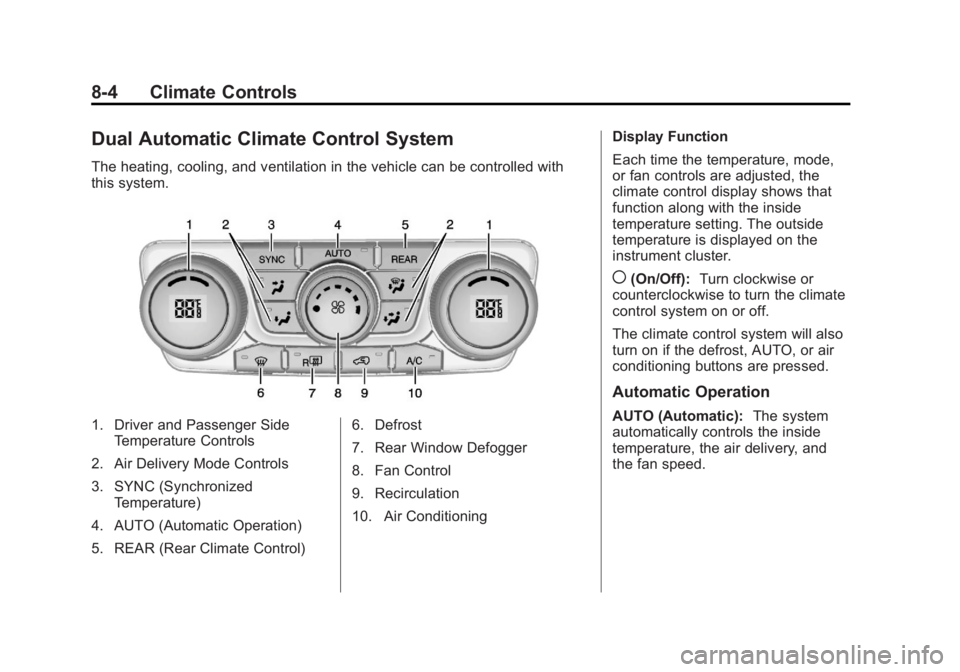
The heating, cooling, and ventilation in the vehicle can be controlled with
this system.
1. Driver and Passenger SideTemperature Controls
2. Air Delivery Mode Controls
3. SYNC (Synchronized Temperature)
4. AUTO (Automatic Operation)
5. REAR (Rear Climate Control) 6. Defrost
7. Rear Window Defogger
8. Fan Control
9. Recirculation
10. Air ConditioningDisplay Function
Each time the temperature, mode,
or fan controls are adjusted, the
climate control display shows that
function along with the inside
temperature setting. The outside
temperature is displayed on the
instrument cluster.
((On/Off):
Turn clockwise or
counterclockwise to turn the climate
control system on or off.
The climate control system will also
turn on if the defrost, AUTO, or air
conditioning buttons are pressed.
Automatic Operation
AUTO (Automatic): The system
automatically controls the inside
temperature, the air delivery, and
the fan speed.
Page 209 of 410
Black plate (5,1)Acadia/Acadia Denali Owner Manual - 2013 - crc2 - 12/11/12
Climate Controls 8-5
To use automatic mode:
1. Press the AUTO button.When AUTO is selected, the
current temperature(s) is
displayed and the AUTO
indicator light is on.
When AUTO is selected, the air
conditioning and air inlet are
automatically controlled. The air
conditioning runs when the
outside temperature is over 4°C
(40°F). The system is
automatically set to outside air,
unless it is hot outside and then
the air inlet changes to
recirculation mode to help
quickly cool the vehicle. The
recirculation indicator light will
come on. 2. Set the temperature for the
driver and passenger.
To find a comfortable setting,
start with a 22°C (73°F)
temperature setting and allow
about 20 minutes for the system
to regulate. Use the driver side
or passenger side temperature
control to adjust the temperature
setting as necessary. The
system will remain at the
selected setting. Choosing the
warmest or coolest temperatures
does not cause the vehicle to
heat or cool more quickly.
To avoid blowing cold air in cold
weather, the system delays
turning on the fan until warm air
is available. Turn the fan knob to
override this delay and select
the fan speed. Temperature Control
The driver and passenger side
temperature controls are used to
adjust the temperature of the air
coming through the system. The
temperature can be adjusted even if
the system is turned off since
outside air still enters the vehicle,
unless the recirculation mode is
selected. See
“Recirculation” later in
this section.
Driver Side Temperature
Control: Turn clockwise or
counterclockwise to increase or
decrease the driver side
temperature. The driver side
temperature display will show the
temperature setting.
Passenger Side Temperature
Control: Turn clockwise or
counterclockwise to increase or
decrease the passenger side
temperature. The passenger side
display will show the temperature
setting.
Page 210 of 410
Black plate (6,1)Acadia/Acadia Denali Owner Manual - 2013 - crc2 - 12/11/12
8-6 Climate Controls
SYNC (Synchronized
Temperature):Press to set the
passenger temperature to match the
driver temperature setting.
Manual Operation
The air delivery mode or fan speed
can be manually adjusted.
9(Fan Control): Turn the knob
clockwise or counterclockwise to
increase or decrease the fan speed.
Turning the fan control knob while in
automatic control places the fan
speed under manual control.
The air delivery mode remains in
automatic control. The fan setting
displays momentarily and then no
longer displays.
Air Delivery Modes: Press
H,),
6, or-to change the direction of
the airflow in the vehicle. An
indicator light comes on in the
selected mode button. Pressing a
mode button while the system is off
changes the air delivery mode
without turning the system on. Changing the air delivery mode
while in automatic control places the
system into manual control. The air
delivery mode button indicator
displays, and the AUTO button
indicator light turns off.
H(Vent):
Air is directed to the
instrument panel outlets.
)(Bi-Level): Air is divided
between the instrument panel and
floor outlets. Some air is directed
towards the windshield and side
window outlets. Cooler air is
directed to the upper outlets and
warmer air to the floor outlets.
6(Floor): Air is directed to the
floor outlets, with some of the air
directed to the windshield, side
window, and second row floor
outlets. In this mode, the system
uses outside air.
-(Defog): This mode clears the
windows of fog or moisture. Air is
directed to the windshield, floor
outlets, and side window vents.
When this mode is selected, the
system turns off recirculation and runs the air conditioning compressor
unless the outside temperature is
less than 4°C (40°F). Do not drive
the vehicle until all the windows are
clear.
0(Defrost):
Press to turn the
defrost on or off. This mode quickly
clears the windshield of fog or frost.
Air is directed to the windshield,
side window, and floor vents. In this
mode, outside air is pulled inside
the vehicle. The air conditioning
system runs automatically in this
setting, unless the outside
temperature is less than 4°C (40°F).
Do not drive the vehicle until all the
windows are clear.
Air Conditioning
A/C (Air Conditioning): Press to
turn the air conditioning on and off.
An indicator light comes on when
A/C is on.
The A/C does not work when the
outside temperature is below 4°C
(40°F). If A/C is pressed the
indicator flashes three times and