turn signal GMC ACADIA 2013 Owner's Guide
[x] Cancel search | Manufacturer: GMC, Model Year: 2013, Model line: ACADIA, Model: GMC ACADIA 2013Pages: 410, PDF Size: 5.46 MB
Page 300 of 410
Black plate (34,1)Acadia/Acadia Denali Owner Manual - 2013 - crc2 - 12/11/12
10-34 Vehicle Care
FusesUsage
TRLR PWR Trailer Power WPR/WSW Windshield Wiper/ Washer
Relays Usage
A/C
CMPRSR CLTCH Air Conditioning
Compressor Clutch
AUX
VAC PUMP Auxiliary
Vacuum Pump
CRNK Switched Power FAN 1 Cooling Fan 1
FAN 2 Cooling Fan 2
FAN 3 Cooling Fan 3
RT DRL Right Daytime Running Lamp
HI BEAM High-Beam Headlamps
LT DRL Left Daytime Running Lamp
HORN Horn Relays
Usage
IGN Ignition Main
LT TRLR
STOP/TRN Trailer Left
Stoplamp and Turn
Signal Lamp
PRK LAMP Parking Lamp
PWR/TRN Powertrain
RR DEFOG Rear Window Defogger
RT TRLR
STOP/TRN Trailer Right
Stoplamp and Turn
Signal Lamp
FOG LAMPS Fog Lamps TRLR
BCK/UP Trailer Back-up
Lamps
WPR Windshield Wiper
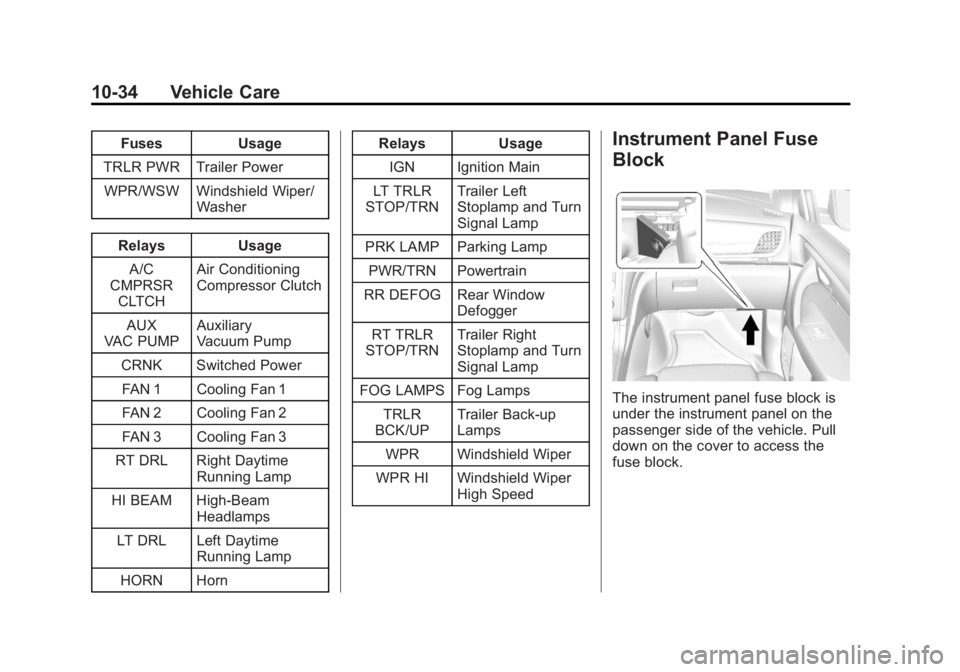
WPR HI Windshield Wiper High SpeedInstrument Panel Fuse
Block
The instrument panel fuse block is
under the instrument panel on the
passenger side of the vehicle. Pull
down on the cover to access the
fuse block.
Page 301 of 410
Black plate (35,1)Acadia/Acadia Denali Owner Manual - 2013 - crc2 - 12/11/12
Vehicle Care 10-35
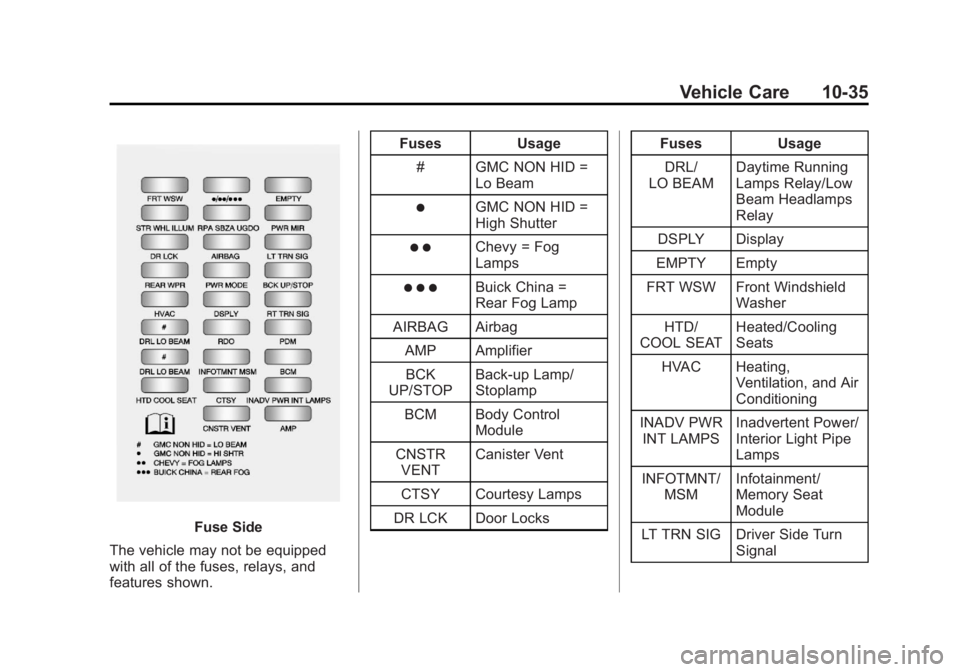
Fuse Side
The vehicle may not be equipped
with all of the fuses, relays, and
features shown. Fuses Usage
# GMC NON HID = Lo Beam
)GMC NON HID =
High Shutter
) )Chevy = Fog
Lamps
) ) )Buick China =
Rear Fog Lamp
AIRBAG Airbag
AMP AmplifierBCK
UP/STOP Back-up Lamp/
Stoplamp
BCM Body Control Module
CNSTR VENT Canister Vent
CTSY Courtesy Lamps
DR LCK Door Locks Fuses Usage
DRL/
LO BEAM Daytime Running
Lamps Relay/Low
Beam Headlamps
Relay
DSPLY Display
EMPTY Empty
FRT WSW Front Windshield Washer
HTD/
COOL SEAT Heated/Cooling
Seats
HVAC Heating, Ventilation, and Air
Conditioning
INADV PWR INT LAMPS Inadvertent Power/
Interior Light Pipe
Lamps
INFOTMNT/ MSM Infotainment/
Memory Seat
Module
LT TRN SIG Driver Side Turn Signal
Page 302 of 410
Black plate (36,1)Acadia/Acadia Denali Owner Manual - 2013 - crc2 - 12/11/12
10-36 Vehicle Care
FusesUsage
PDM Power Mirrors, Liftgate Release
PWR MODE Power Mode PWR MIR Power Mirrors RDO Radio
REAR WPR Rear Wiper RPA/
SBZA/UGDO Rear Park Assist/
Side Blind Zone
Alert/Universal
Garage Door
Opener
RT TRN SIG Passenger Side Turn Signal
STR WHL ILLUM Steering Wheel
Illumination
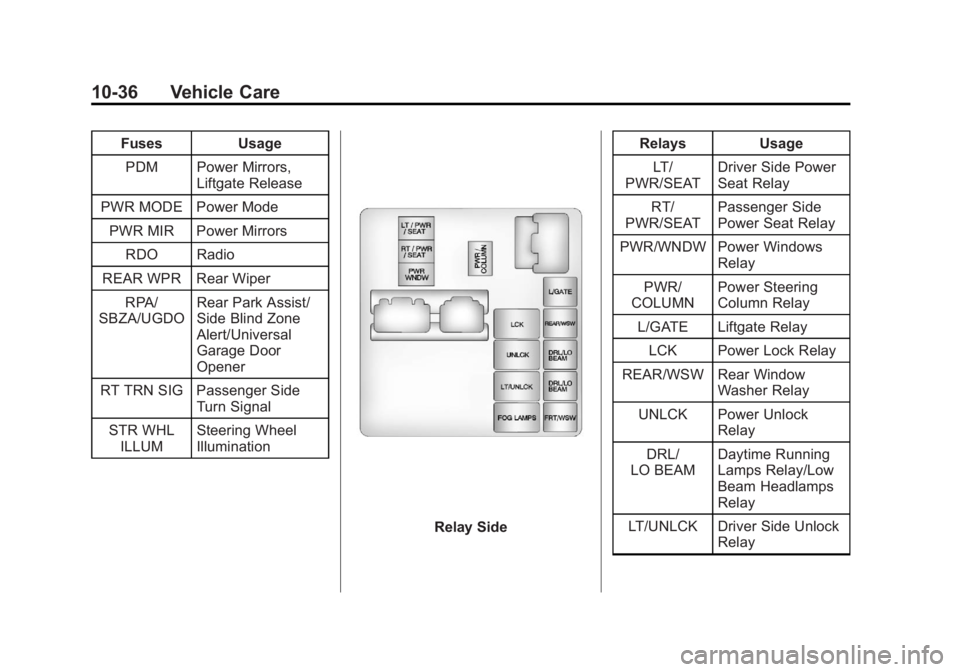
Relay Side Relays Usage
LT/
PWR/SEAT Driver Side Power
Seat Relay
RT/
PWR/SEAT Passenger Side
Power Seat Relay
PWR/WNDW Power Windows Relay
PWR/
COLUMN Power Steering
Column Relay
L/GATE Liftgate Relay
LCK Power Lock Relay
REAR/WSW Rear Window Washer Relay
UNLCK Power Unlock Relay
DRL/
LO BEAM Daytime Running
Lamps Relay/Low
Beam Headlamps
Relay
LT/UNLCK Driver Side Unlock Relay
Page 312 of 410
Black plate (46,1)Acadia/Acadia Denali Owner Manual - 2013 - crc2 - 12/11/12
10-46 Vehicle Care
pressure on the Tire and
Loading Information label, no
further adjustment is necessary.
If the inflation pressure is low,
add air until the recommended
pressure is reached. If the
inflation pressure is high, press
on the metal stem in the center
of the tire valve to release air.
Recheck the tire pressure with
the tire gauge.
Return the valve caps on the
valve stems to prevent leaks
and keep out dirt and moisture.
Tire Pressure Monitor
System
The Tire Pressure Monitor System
(TPMS) uses radio and sensor
technology to check tire pressure
levels. The TPMS sensors monitor
the air pressure in your tires and
transmit tire pressure readings to a
receiver located in the vehicle.Each tire, including the spare
(if provided), should be checked
monthly when cold and inflated to
the inflation pressure recommended
by the vehicle manufacturer on the
vehicle placard or tire inflation
pressure label. (If your vehicle has
tires of a different size than the size
indicated on the vehicle placard or
tire inflation pressure label, you
should determine the proper tire
inflation pressure for those tires.)
As an added safety feature, your
vehicle has been equipped with a
tire pressure monitoring system
(TPMS) that illuminates a low tire
pressure telltale when one or more
of your tires is significantly
under-inflated.
Accordingly, when the low tire
pressure telltale illuminates, you
should stop and check your tires as
soon as possible, and inflate them
to the proper pressure. Driving on a
significantly under-inflated tire
causes the tire to overheat and can
lead to tire failure. Under-inflation
also reduces fuel efficiency and tiretread life, and may affect the
vehicle's handling and stopping
ability.
Please note that the TPMS is not a
substitute for proper tire
maintenance, and it is the driver's
responsibility to maintain correct tire
pressure, even if under-inflation has
not reached the level to trigger
illumination of the TPMS low tire
pressure telltale.
Your vehicle has also been
equipped with a TPMS malfunction
indicator to indicate when the
system is not operating properly.
The TPMS malfunction indicator is
combined with the low tire pressure
telltale. When the system detects a
malfunction, the telltale will flash for
approximately one minute and then
remain continuously illuminated.
This sequence will continue upon
subsequent vehicle start-ups as
long as the malfunction exists.
When the malfunction indicator is
illuminated, the system may not be
able to detect or signal low tire
Page 315 of 410
Black plate (49,1)Acadia/Acadia Denali Owner Manual - 2013 - crc2 - 12/11/12
Vehicle Care 10-49
.Operating electronic devices or
being near facilities using radio
wave frequencies similar to the
TPMS could cause the TPMS
sensors to malfunction.
If the TPMS is not functioning
properly, it cannot detect or signal a
low tire condition. See your dealer
for service if the TPMS malfunction
light and DIC message comes on
and stays on.
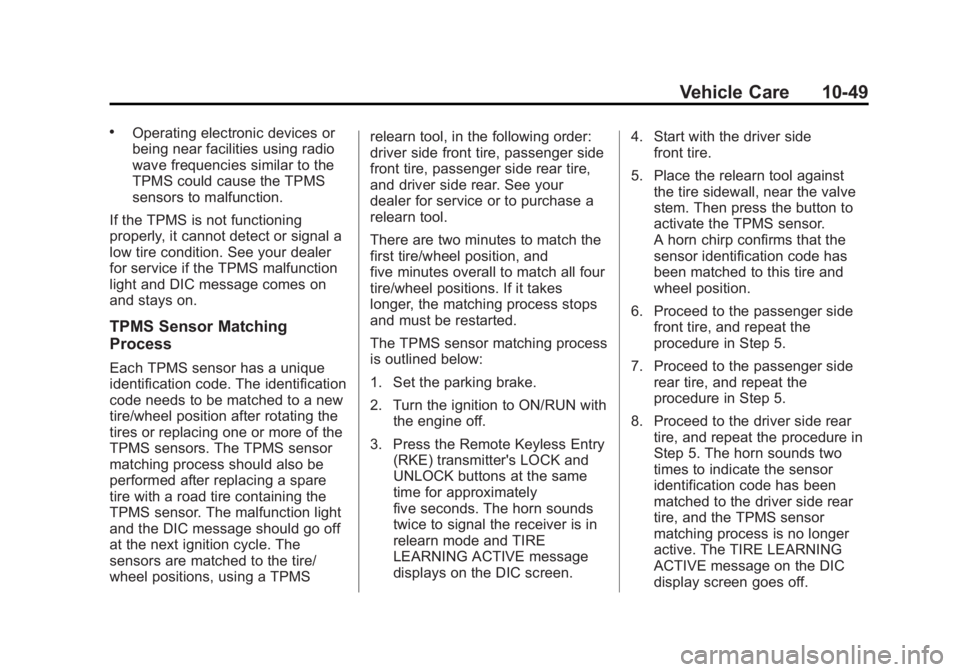
TPMS Sensor Matching
Process
Each TPMS sensor has a unique
identification code. The identification
code needs to be matched to a new
tire/wheel position after rotating the
tires or replacing one or more of the
TPMS sensors. The TPMS sensor
matching process should also be
performed after replacing a spare
tire with a road tire containing the
TPMS sensor. The malfunction light
and the DIC message should go off
at the next ignition cycle. The
sensors are matched to the tire/
wheel positions, using a TPMS relearn tool, in the following order:
driver side front tire, passenger side
front tire, passenger side rear tire,
and driver side rear. See your
dealer for service or to purchase a
relearn tool.
There are two minutes to match the
first tire/wheel position, and
five minutes overall to match all four
tire/wheel positions. If it takes
longer, the matching process stops
and must be restarted.
The TPMS sensor matching process
is outlined below:
1. Set the parking brake.
2. Turn the ignition to ON/RUN with
the engine off.
3. Press the Remote Keyless Entry (RKE) transmitter's LOCK and
UNLOCK buttons at the same
time for approximately
five seconds. The horn sounds
twice to signal the receiver is in
relearn mode and TIRE
LEARNING ACTIVE message
displays on the DIC screen. 4. Start with the driver side
front tire.
5. Place the relearn tool against the tire sidewall, near the valve
stem. Then press the button to
activate the TPMS sensor.
A horn chirp confirms that the
sensor identification code has
been matched to this tire and
wheel position.
6. Proceed to the passenger side front tire, and repeat the
procedure in Step 5.
7. Proceed to the passenger side rear tire, and repeat the
procedure in Step 5.
8. Proceed to the driver side rear tire, and repeat the procedure in
Step 5. The horn sounds two
times to indicate the sensor
identification code has been
matched to the driver side rear
tire, and the TPMS sensor
matching process is no longer
active. The TIRE LEARNING
ACTIVE message on the DIC
display screen goes off.
Page 394 of 410
Black plate (6,1)Acadia/Acadia Denali Owner Manual - 2013 - crc2 - 12/11/12
14-6 OnStar
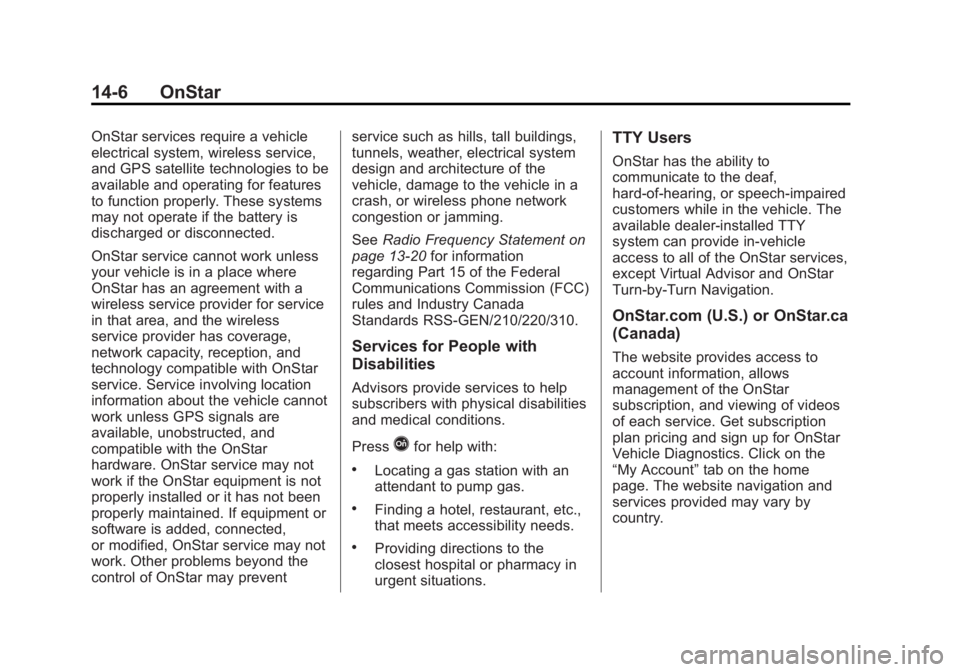
OnStar services require a vehicle
electrical system, wireless service,
and GPS satellite technologies to be
available and operating for features
to function properly. These systems
may not operate if the battery is
discharged or disconnected.
OnStar service cannot work unless
your vehicle is in a place where
OnStar has an agreement with a
wireless service provider for service
in that area, and the wireless
service provider has coverage,
network capacity, reception, and
technology compatible with OnStar
service. Service involving location
information about the vehicle cannot
work unless GPS signals are
available, unobstructed, and
compatible with the OnStar
hardware. OnStar service may not
work if the OnStar equipment is not
properly installed or it has not been
properly maintained. If equipment or
software is added, connected,
or modified, OnStar service may not
work. Other problems beyond the
control of OnStar may preventservice such as hills, tall buildings,
tunnels, weather, electrical system
design and architecture of the
vehicle, damage to the vehicle in a
crash, or wireless phone network
congestion or jamming.
See
Radio Frequency Statement on
page 13‑20 for information
regarding Part 15 of the Federal
Communications Commission (FCC)
rules and Industry Canada
Standards RSS-GEN/210/220/310.
Services for People with
Disabilities
Advisors provide services to help
subscribers with physical disabilities
and medical conditions.
Press
Qfor help with:
.Locating a gas station with an
attendant to pump gas.
.Finding a hotel, restaurant, etc.,
that meets accessibility needs.
.Providing directions to the
closest hospital or pharmacy in
urgent situations.
TTY Users
OnStar has the ability to
communicate to the deaf,
hard-of-hearing, or speech-impaired
customers while in the vehicle. The
available dealer-installed TTY
system can provide in-vehicle
access to all of the OnStar services,
except Virtual Advisor and OnStar
Turn-by-Turn Navigation.
OnStar.com (U.S.) or OnStar.ca
(Canada)
The website provides access to
account information, allows
management of the OnStar
subscription, and viewing of videos
of each service. Get subscription
plan pricing and sign up for OnStar
Vehicle Diagnostics. Click on the
“My Account” tab on the home
page. The website navigation and
services provided may vary by
country.
Page 395 of 410
Black plate (7,1)Acadia/Acadia Denali Owner Manual - 2013 - crc2 - 12/11/12
OnStar 14-7
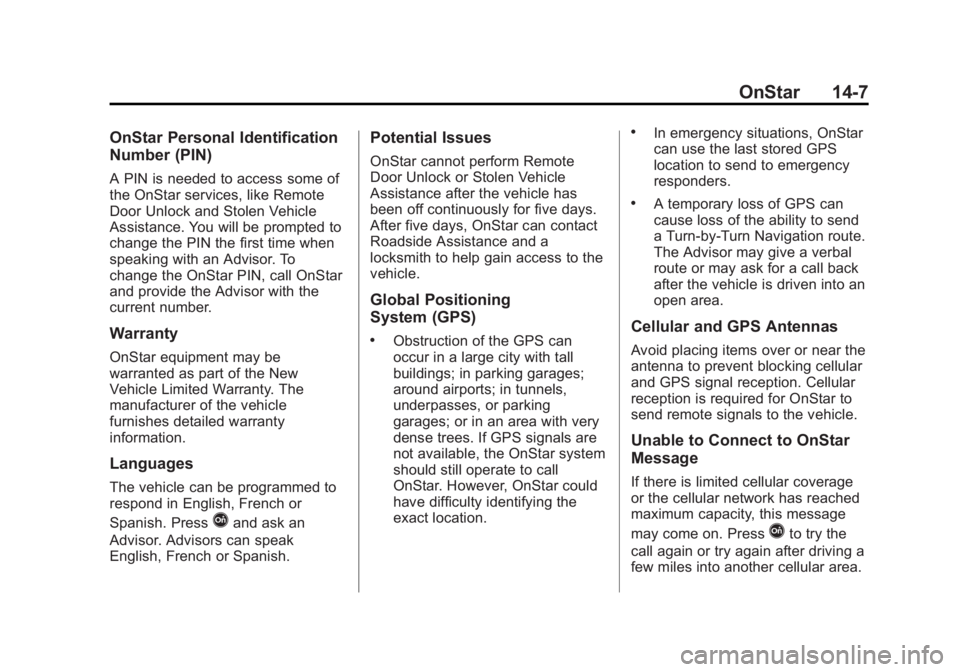
OnStar Personal Identification
Number (PIN)
A PIN is needed to access some of
the OnStar services, like Remote
Door Unlock and Stolen Vehicle
Assistance. You will be prompted to
change the PIN the first time when
speaking with an Advisor. To
change the OnStar PIN, call OnStar
and provide the Advisor with the
current number.
Warranty
OnStar equipment may be
warranted as part of the New
Vehicle Limited Warranty. The
manufacturer of the vehicle
furnishes detailed warranty
information.
Languages
The vehicle can be programmed to
respond in English, French or
Spanish. Press
Qand ask an
Advisor. Advisors can speak
English, French or Spanish.
Potential Issues
OnStar cannot perform Remote
Door Unlock or Stolen Vehicle
Assistance after the vehicle has
been off continuously for five days.
After five days, OnStar can contact
Roadside Assistance and a
locksmith to help gain access to the
vehicle.
Global Positioning
System (GPS)
.Obstruction of the GPS can
occur in a large city with tall
buildings; in parking garages;
around airports; in tunnels,
underpasses, or parking
garages; or in an area with very
dense trees. If GPS signals are
not available, the OnStar system
should still operate to call
OnStar. However, OnStar could
have difficulty identifying the
exact location.
.In emergency situations, OnStar
can use the last stored GPS
location to send to emergency
responders.
.A temporary loss of GPS can
cause loss of the ability to send
a Turn-by-Turn Navigation route.
The Advisor may give a verbal
route or may ask for a call back
after the vehicle is driven into an
open area.
Cellular and GPS Antennas
Avoid placing items over or near the
antenna to prevent blocking cellular
and GPS signal reception. Cellular
reception is required for OnStar to
send remote signals to the vehicle.
Unable to Connect to OnStar
Message
If there is limited cellular coverage
or the cellular network has reached
maximum capacity, this message
may come on. Press
Qto try the
call again or try again after driving a
few miles into another cellular area.
Page 408 of 410
Black plate (10,1)Acadia/Acadia Denali Owner Manual - 2013 - crc2 - 12/11/12
i-10 INDEX
Safety Defects ReportingCanadian Government . . . . . . 13-18
General Motors . . . . . . . . . . . . . 13-18
U.S. Government . . . . . . . . . . . 13-17
Safety Locks . . . . . . . . . . . . . . . . . . . . 2-8
Safety System Check . . . . . . . . . . 3-22
Satellite Radio . . . . . . . . . . . . . . . . . . 7-9
Scheduling Appointments . . . . . 13-12
Seats Adjustment, Front . . . . . . . . . . . . . . 3-3
Head Restraints . . . . . . . . . . . . . . . 3-2
Heated and Ventilated Front . . . 3-8
Lumbar Adjustment, Front . . . . . 3-4
Memory . . . . . . . . . . . . . . . . . . . . . . . . 3-6
Power Adjustment, Front . . . . . . 3-4
Rear . . . . . . . . . . . . . . . . . . . . . . . . . . . 3-9
Reclining Seatbacks . . . . . . . . . . . 3-5
Third Row Seat . . . . . . . . . . . . . . . 3-11
Securing Child Restraints . . . . . . . . . . . . . . 3-51, 3-53
Security
Light . . . . . . . . . . . . . . . . . . . . . . . . . . 5-21
Messages . . . . . . . . . . . . . . . . . . . . 5-38
OnStar
®. . . . . . . . . . . . . . . . . . . . . . 14-2
Vehicle . . . . . . . . . . . . . . . . . . . . . . . 2-11
Vehicle Alarm . . . . . . . . . . . . . . . . . 2-11 Service
Accessories and
Modifications . . . . . . . . . . . . . . . . 10-2
Doing Your Own Work . . . . . . . . 10-3
Engine Soon Light . . . . . . . . . . . . 5-16
Maintenance Records . . . . . . .11-14
Maintenance, General Information . . . . . . . . . . . . . . . . . . 11-1
Parts Identification Label . . . . . 12-1
Publications Ordering Information . . . . . . . . . . . . . . . . 13-16
Scheduling Appointments . . . 13-12
Vehicle Messages . . . . . . . . . . . . 5-38
Servicing the Airbag . . . . . . . . . . . 3-34
Settings . . . . . . . . . . . . . . . . . . . . . . . 7-28
Shift Lock Control Function Check, Automatic
Transmission . . . . . . . . . . . . . . . . 10-23
Shifting Into Park . . . . . . . . . . . . . . . . . . . . . . 9-18
Out of Park . . . . . . . . . . . . . . . . . . . 9-19
Side Blind Zone Alert . . . . . . . . . . 9-33
Signals, Turn and Lane-Change . . . . . . . . . . . . . . . . . 6-4
Spare Tire
Compact . . . . . . . . . . . . . . . . . . . . 10-67 Specifications and
Capacities . . . . . . . . . . . . . . . . . . . . 12-2
Speedometer . . . . . . . . . . . . . . . . . . 5-11
StabiliTrak Indicator Light . . . . . . . . . . . . . . . . 5-20
System . . . . . . . . . . . . . . . . . . . . . . . 9-27
Start Assist, Hills . . . . . . . . . . . . . . 9-27
Start Vehicle, Remote . . . . . . . . . . 2-4
Starter Switch Check . . . . . . . . . 10-22
Starting the Engine . . . . . . . . . . . . 9-16
Steering . . . . . . . . . . . . . . . . . . . . . . . . 9-3
Fluid, Power . . . . . . . . . . . . . . . . 10-18
Wheel Adjustment . . . . . . . . . . . . . 5-2
Wheel Controls . . . . . . . . . . . . . . . . 5-2
Storage Areas Armrest . . . . . . . . . . . . . . . . . . . . . . . . 4-2
Cargo Cover . . . . . . . . . . . . . . . . . . . 4-3
Cargo Management System . . . 4-3
Center Console . . . . . . . . . . . . . . . . 4-2
Convenience Net . . . . . . . . . . . . . . 4-4
Glove Box . . . . . . . . . . . . . . . . . . . . . 4-1
Instrument Panel . . . . . . . . . . . . . . 4-1
Roof Rack System . . . . . . . . . . . . . 4-4
Stuck Vehicle . . . . . . . . . . . . . . . . . . . 9-9
Sun Visors . . . . . . . . . . . . . . . . . . . . . 2-20
Sunroof . . . . . . . . . . . . . . . . . . . . . . . . 2-20
Page 409 of 410
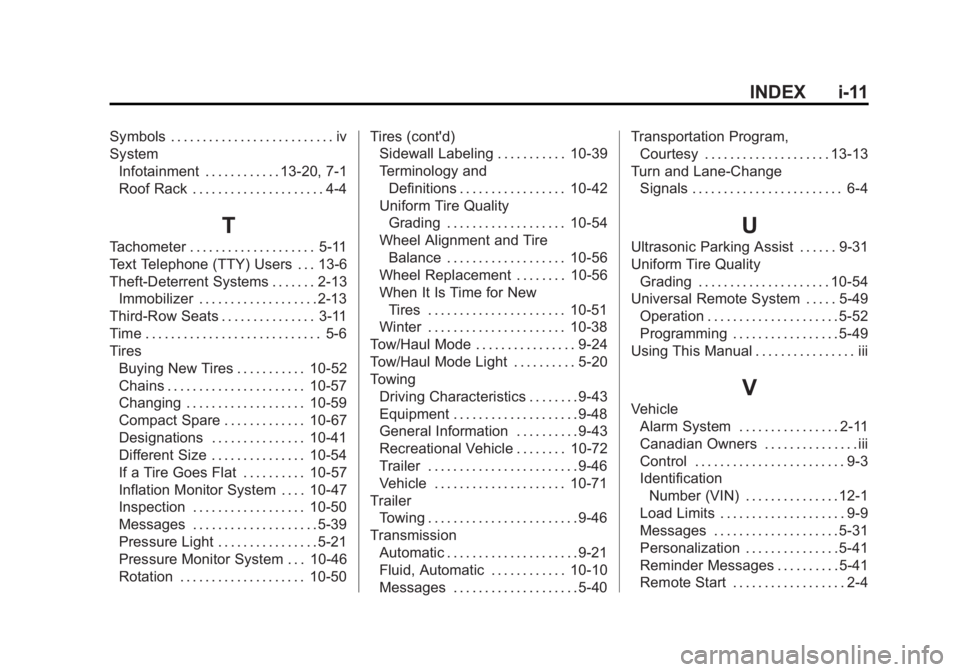
Black plate (11,1)Acadia/Acadia Denali Owner Manual - 2013 - crc2 - 12/11/12
INDEX i-11
Symbols . . . . . . . . . . . . . . . . . . . . . . . . . . iv
SystemInfotainment . . . . . . . . . . . . 13-20, 7-1
Roof Rack . . . . . . . . . . . . . . . . . . . . . 4-4
T
Tachometer . . . . . . . . . . . . . . . . . . . . 5-11
Text Telephone (TTY) Users . . . 13-6
Theft-Deterrent Systems . . . . . . . 2-13Immobilizer . . . . . . . . . . . . . . . . . . . 2-13
Third-Row Seats . . . . . . . . . . . . . . . 3-11
Time . . . . . . . . . . . . . . . . . . . . . . . . . . . . 5-6
Tires Buying New Tires . . . . . . . . . . . 10-52
Chains . . . . . . . . . . . . . . . . . . . . . . 10-57
Changing . . . . . . . . . . . . . . . . . . . 10-59
Compact Spare . . . . . . . . . . . . . 10-67
Designations . . . . . . . . . . . . . . . 10-41
Different Size . . . . . . . . . . . . . . . 10-54
If a Tire Goes Flat . . . . . . . . . . 10-57
Inflation Monitor System . . . . 10-47
Inspection . . . . . . . . . . . . . . . . . . 10-50
Messages . . . . . . . . . . . . . . . . . . . . 5-39
Pressure Light . . . . . . . . . . . . . . . . 5-21
Pressure Monitor System . . . 10-46
Rotation . . . . . . . . . . . . . . . . . . . . 10-50 Tires (cont'd)
Sidewall Labeling . . . . . . . . . . . 10-39
Terminology and
Definitions . . . . . . . . . . . . . . . . . 10-42
Uniform Tire Quality Grading . . . . . . . . . . . . . . . . . . . 10-54
Wheel Alignment and Tire Balance . . . . . . . . . . . . . . . . . . . 10-56
Wheel Replacement . . . . . . . . 10-56
When It Is Time for New
Tires . . . . . . . . . . . . . . . . . . . . . . 10-51
Winter . . . . . . . . . . . . . . . . . . . . . . 10-38
Tow/Haul Mode . . . . . . . . . . . . . . . . 9-24
Tow/Haul Mode Light . . . . . . . . . . 5-20
Towing Driving Characteristics . . . . . . . . 9-43
Equipment . . . . . . . . . . . . . . . . . . . . 9-48
General Information . . . . . . . . . . 9-43
Recreational Vehicle . . . . . . . . 10-72
Trailer . . . . . . . . . . . . . . . . . . . . . . . . 9-46
Vehicle . . . . . . . . . . . . . . . . . . . . . 10-71
Trailer Towing . . . . . . . . . . . . . . . . . . . . . . . . 9-46
Transmission Automatic . . . . . . . . . . . . . . . . . . . . . 9-21
Fluid, Automatic . . . . . . . . . . . . 10-10
Messages . . . . . . . . . . . . . . . . . . . . 5-40 Transportation Program,
Courtesy . . . . . . . . . . . . . . . . . . . . 13-13
Turn and Lane-Change Signals . . . . . . . . . . . . . . . . . . . . . . . . 6-4
U
Ultrasonic Parking Assist . . . . . . 9-31
Uniform Tire QualityGrading . . . . . . . . . . . . . . . . . . . . . 10-54
Universal Remote System . . . . . 5-49 Operation . . . . . . . . . . . . . . . . . . . . . 5-52
Programming . . . . . . . . . . . . . . . . . 5-49
Using This Manual . . . . . . . . . . . . . . . . iii
V
Vehicle
Alarm System . . . . . . . . . . . . . . . . 2-11
Canadian Owners . . . . . . . . . . . . . . . iii
Control . . . . . . . . . . . . . . . . . . . . . . . . 9-3
IdentificationNumber (VIN) . . . . . . . . . . . . . . . 12-1
Load Limits . . . . . . . . . . . . . . . . . . . . 9-9
Messages . . . . . . . . . . . . . . . . . . . . 5-31
Personalization . . . . . . . . . . . . . . . 5-41
Reminder Messages . . . . . . . . . . 5-41
Remote Start . . . . . . . . . . . . . . . . . . 2-4