battery GMC ACADIA 2013 Owner's Guide
[x] Cancel search | Manufacturer: GMC, Model Year: 2013, Model line: ACADIA, Model: GMC ACADIA 2013Pages: 410, PDF Size: 5.46 MB
Page 334 of 410
Black plate (68,1)Acadia/Acadia Denali Owner Manual - 2013 - crc2 - 12/11/12
10-68 Vehicle Care
Performance of the All-Wheel
Drive (AWD) system will be
automatically reduced to protect the
system when using the compact
spare. To restore the AWD and
prevent excessive wear on the
clutch in the AWD, replace the
compact spare tire with a full-size
tire as soon as possible.
Notice:Tire chains will not fit the
compact spare. Using them can
damage the vehicle and the
chains. Do not use tire chains on
the compact spare.Jump Starting
For more information about the
vehicle battery, see Battery on
page 10‑22.
If the vehicle battery has run down,
you may want to use another
vehicle and some jumper cables to
start your vehicle. Be sure to use
the following steps to do it safely.
{WARNING
Batteries can hurt you. They can
be dangerous because:
.They contain acid that can
burn you.
.They contain gas that can
explode or ignite.
.They contain enough
electricity to burn you.
If you do not follow these steps
exactly, some or all of these
things can hurt you. Notice:
Ignoring these steps
could result in costly damage to
the vehicle that would not be
covered by the warranty.
Trying to start the vehicle by
pushing or pulling it will not
work, and it could damage the
vehicle.
1. Check the other vehicle. It must
have a 12-volt battery with a
negative ground system.
Notice: Only use a vehicle that
has a 12-volt system with a
negative ground for jump
starting. If the other vehicle does
not have a 12-volt system with a
negative ground, both vehicles
can be damaged.
Page 335 of 410
Black plate (69,1)Acadia/Acadia Denali Owner Manual - 2013 - crc2 - 12/11/12
Vehicle Care 10-69
2. Get the vehicles close enoughso the jumper cables can reach,
but be sure the vehicles are not
touching each other. If they are,
it could cause a ground
connection you do not want. You
would not be able to start your
vehicle, and the bad grounding
could damage the electrical
systems.
To avoid the possibility of the
vehicles rolling, set the parking
brake firmly on both vehicles
involved in the jump start
procedure. Put an automatic
transmission in P (Park) or a
manual transmission in Neutral
before setting the parking brake.
If one of the vehicles is a
four-wheel-drive vehicle, be sure
the transfer case is not in
Neutral.
Notice: If any accessories are left
on or plugged in during the jump
starting procedure, they could be
damaged. The repairs would not
be covered by the vehicle
warranty. Whenever possible, turn off or unplug all accessories
on either vehicle when jump
starting the vehicle.
3. Turn off the ignition on both
vehicles. Unplug unnecessary
accessories plugged into the
cigarette lighter or the accessory
power outlets. Turn off the radio
and all lamps that are not
needed. This will avoid sparks
and help save both batteries.
And it could save the radio!
4. Open the hoods and locate the positive (+) and negative (−)
terminal locations on the other
vehicle. Your vehicle has a
remote positive (+) and a remote
negative (−) jump starting
terminal. See Engine
Compartment Overview on
page 10‑5 for the terminal
locations.{WARNING
Using a match near a battery can
cause battery gas to explode.
People have been hurt doing this,
and some have been blinded.
Use a flashlight if you need more
light.
Be sure the batteries have
enough water. You do not need to
add water to the ACDelco
®
battery (or batteries) installed in
your new vehicle. But if a battery
has filler caps, be sure the right
amount of fluid is there. If it is low,
add water to take care of that
first. If you do not, explosive gas
could be present.
Battery fluid contains acid that
can burn you. Do not get it on
you. If you accidentally get it in
your eyes or on your skin, flush
the place with water and get
medical help immediately.
Page 336 of 410
Black plate (70,1)Acadia/Acadia Denali Owner Manual - 2013 - crc2 - 12/11/12
10-70 Vehicle Care
{WARNING
Fans or other moving engine
parts can injure you badly. Keep
your hands away from moving
parts once the engine is running.
5. Check that the jumper cables do not have loose or missing
insulation. If they do, you could
get a shock. The vehicles could
be damaged too.
Before you connect the cables,
here are some basic things you
should know. Positive (+) will go
to positive (+) or to a remote
positive (+) terminal if the vehicle
has one. Negative (−) will go to a
heavy, unpainted metal engine
part or to a remote negative (−)
terminal if the vehicle has one.
Do not connect positive (+) to
negative (−) or you will get a
short that would damage the
battery and maybe other parts
too. And do not connect the negative (−) cable to the
negative (−) terminal on the dead
battery because this can cause
sparks.
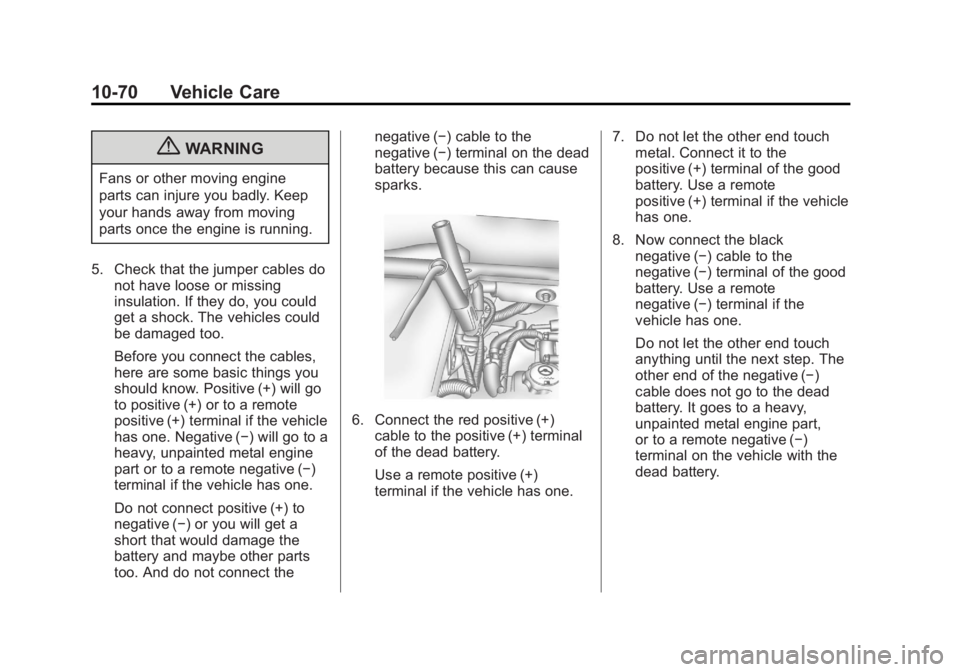
6. Connect the red positive (+)
cable to the positive (+) terminal
of the dead battery.
Use a remote positive (+)
terminal if the vehicle has one. 7. Do not let the other end touch
metal. Connect it to the
positive (+) terminal of the good
battery. Use a remote
positive (+) terminal if the vehicle
has one.
8. Now connect the black negative (−) cable to the
negative (−) terminal of the good
battery. Use a remote
negative (−) terminal if the
vehicle has one.
Do not let the other end touch
anything until the next step. The
other end of the negative (−)
cable does not go to the dead
battery. It goes to a heavy,
unpainted metal engine part,
or to a remote negative (−)
terminal on the vehicle with the
dead battery.
Page 337 of 410
Black plate (71,1)Acadia/Acadia Denali Owner Manual - 2013 - crc2 - 12/11/12
Vehicle Care 10-71
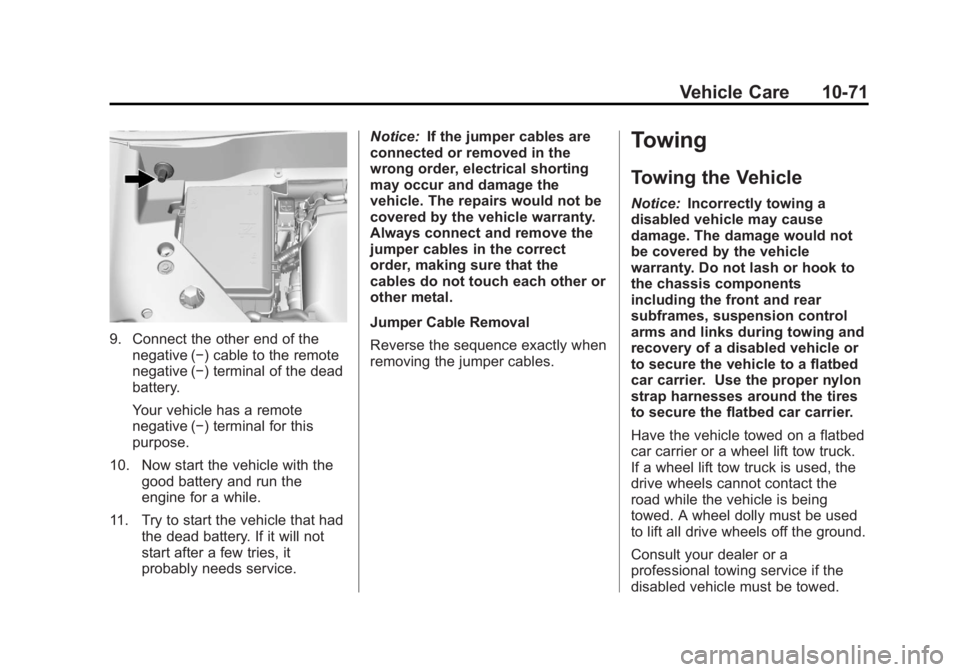
9. Connect the other end of thenegative (−) cable to the remote
negative (−) terminal of the dead
battery.
Your vehicle has a remote
negative (−) terminal for this
purpose.
10. Now start the vehicle with the good battery and run the
engine for a while.
11. Try to start the vehicle that had the dead battery. If it will not
start after a few tries, it
probably needs service. Notice:
If the jumper cables are
connected or removed in the
wrong order, electrical shorting
may occur and damage the
vehicle. The repairs would not be
covered by the vehicle warranty.
Always connect and remove the
jumper cables in the correct
order, making sure that the
cables do not touch each other or
other metal.
Jumper Cable Removal
Reverse the sequence exactly when
removing the jumper cables.
Towing
Towing the Vehicle
Notice: Incorrectly towing a
disabled vehicle may cause
damage. The damage would not
be covered by the vehicle
warranty. Do not lash or hook to
the chassis components
including the front and rear
subframes, suspension control
arms and links during towing and
recovery of a disabled vehicle or
to secure the vehicle to a flatbed
car carrier. Use the proper nylon
strap harnesses around the tires
to secure the flatbed car carrier.
Have the vehicle towed on a flatbed
car carrier or a wheel lift tow truck.
If a wheel lift tow truck is used, the
drive wheels cannot contact the
road while the vehicle is being
towed. A wheel dolly must be used
to lift all drive wheels off the ground.
Consult your dealer or a
professional towing service if the
disabled vehicle must be towed.
Page 339 of 410
Black plate (73,1)Acadia/Acadia Denali Owner Manual - 2013 - crc2 - 12/11/12
Vehicle Care 10-73
For vehicles being dinghy towed,
the vehicle should be run at the
beginning of each day and at each
RV fuel stop for about five minutes.
This will ensure proper lubrication of
transmission components. Reinstall
the fuse to start the vehicle.
To tow the vehicle from the front
with all four wheels on the ground:
1. Position the vehicle to be towed,shift the transmission to
P (Park), and turn the ignition to
LOCK/OFF.
2. Secure the vehicle to the towing vehicle.
3. Set the parking brake.
4. Turn the ignition to ACC/ ACCESSORY.
5. Shift the transmission to N (Neutral).
6. To prevent the battery from draining while the vehicle is
being towed, remove the 15 amp
ECM fuse and the 15 amp
Onstar fuse. These are in the
battery compartment behind the passenger seat on the floor.
Also, remove the 50 amp BATT1
fuse from the underhood fuse
block and store all fuses in a
safe location. See
Engine
Compartment Fuse Block on
page 10‑28.
7. Release the parking brake.
Notice: If the vehicle is towed
without performing each of the
steps listed under “Dinghy
Towing,” the automatic
transmission could be damaged.
Be sure to follow all steps of the
dinghy towing procedure prior to
and after towing the vehicle.
Notice: If 105 km/h (65 mph) is
exceeded while towing the
vehicle, it could be damaged.
Never exceed 105 km/h (65 mph)
while towing the vehicle.
Once the destination is reached:
1. Set the parking brake.
2. Reinstall the fuses. 3. Shift the transmission to
P (Park), turn the ignition to
LOCK/OFF and remove the key
from the ignition.
4. Disconnect the vehicle from the towing vehicle.
Notice: Do not tow a vehicle with
the front drive wheels on the
ground if one of the front tires is
a compact spare tire. Towing with
two different tire sizes on the
front of the vehicle can cause
severe damage to the
transmission.
Page 357 of 410
Black plate (9,1)Acadia/Acadia Denali Owner Manual - 2013 - crc2 - 12/11/12
Service and Maintenance 11-9
Additional
Maintenance and Care
Your vehicle is an important
investment and caring for it properly
may help to avoid future costly
repairs. To maintain vehicle
performance, additional
maintenance services may be
required.
It is recommended that your dealer
perform these services—their
trained dealer technicians know
your vehicle best. Your dealer can
also perform a thorough
assessment with a multi-point
inspection to recommend when your
vehicle may need attention.
The following list is intended to
explain the services and conditions
to look for that may indicate
services are required. Battery
The battery supplies power to start
the engine and operate any
additional electrical accessories.
.To avoid break-down or failure to
start the vehicle, maintain a
battery with full cranking power.
.Trained dealer technicians have
the diagnostic equipment to test
the battery and ensure that the
connections and cables are
corrosion-free.
Belts
.Belts may need replacing if they
squeak or show signs of
cracking or splitting.
.Trained dealer technicians have
access to tools and equipment
to inspect the belts and
recommend adjustment or
replacement when necessary. Brakes
Brakes stop the vehicle and are
crucial to safe driving.
.Signs of brake wear may include
chirping, grinding, or squealing
noises, or difficulty stopping.
.Trained dealer technicians have
access to tools and equipment
to inspect the brakes and
recommend quality parts
engineered for the vehicle.
Fluids
Proper fluid levels and approved
fluids protect the vehicle’s systems
and components. See
Recommended Fluids and
Lubricants on page 11‑12 for GM
approved fluids.
.Engine oil and windshield
washer fluid levels should be
checked at every fuel fill.
.Instrument cluster lights may
come on to indicate that fluids
may be low and need to be
filled.
Page 376 of 410
Black plate (8,1)Acadia/Acadia Denali Owner Manual - 2013 - crc2 - 12/11/12
13-8 Customer Information
This service is limited to the
transfer of the vehicle to the
repair facility.
.Emergency Fuel Delivery:
Delivery of enough fuel for the
vehicle to get to the nearest
service station.
.Lock-Out Service: Service to
unlock the vehicle if you are
locked out.
.Battery Jump Start: Service to
jump start a dead battery.
.*Emergency Messages:
Transmission of urgent phone
messages.
.*Emergency Calls: Call for
emergency services.
.*Dealership Location
Assistance: Information
regarding addresses and
telephone numbers for GMC
dealers.
.Emergency Towing: Tow to the
nearest dealer for warranty
service if the vehicle cannot be
driven.
If the vehicle is involved in an
accident during the commission
of a crime, administrative
violation, or breach of traffic
regulations, Roadside
Assistance will not provide
service. When the vehicle is not
accessible to be towed, all
maneuvers required to access it
will be at the owner's expense.
If the vehicle is in another city
outside of your residence,
Roadside Assistance is limited
to moving the vehicle to the
nearest dealer. If you would like
the vehicle moved to a different
dealer, you will be asked to
cover the difference in cost at
the time of the move.
If the vehicle cannot be received
by the nearest GMC dealer due
to scheduling conflicts, the
vehicle will be taken to a safe
place where it will remain for upto 48 hours until it can be taken
to the dealer. If the storage costs
exceed the amount authorized,
the owner is responsible to pay
the difference at the time of
service. Contact Roadside
Assistance for more information
on authorized amounts.
.*Trip Interruption: This service
is provided if you are prevented
from further usage of your
vehicle while traveling and it is
not possible for the nearest
GMC dealership to repair the
vehicle the same day, requiring
the vehicle to stay at the
dealership for a night or more.
If this happens, in addition to the
previously listed services and
prior to confirmation by the
dealership, you are entitled to
choose one of the following
alternatives, within the limits of
existing Roadside Assistance
program guidelines. If the costs
exceed the amount authorized
Page 379 of 410
Black plate (11,1)Acadia/Acadia Denali Owner Manual - 2013 - crc2 - 12/11/12
Customer Information 13-11
.Odometer reading, Vehicle
Identification Number (VIN), and
delivery date of the vehicle
.Description of the problem
Coverage
Services are provided up to 5 years/
160 000 km (100,000 mi), whichever
comes first.
In the U.S., anyone driving the
vehicle is covered. In Canada, a
person driving the vehicle without
permission from the owner is not
covered.
Roadside Assistance is not a part of
the New Vehicle Limited Warranty.
GMC and General Motors of
Canada Limited reserve the right to
make any changes or discontinue
the Roadside Assistance program at
any time without notification.
GMC and General Motors of
Canada Limited reserve the right to
limit services or payment to an
owner or driver if they decide theclaims are made too often, or the
same type of claim is made many
times.
Services Provided
.Emergency Fuel Delivery:
Delivery of enough fuel for the
vehicle to get to the nearest
service station.
.Lock-Out Service:
Service to
unlock the vehicle if you are
locked out. A remote unlock may
be available if you have
OnStar
®. For security reasons,
the driver must present
identification before this service
is given.
.Emergency Tow From a Public
Road or Highway: Tow to the
nearest GMC dealer for warranty
service, or if the vehicle was in a
crash and cannot be driven.
Assistance is also given when
the vehicle is stuck in the sand,
mud, or snow.
.Flat Tire Change: Service to
change a flat tire with the spare
tire. The spare tire, if equipped,
must be in good condition and
properly inflated. It is the owner's
responsibility for the repair or
replacement of the tire if it is not
covered by the warranty.
.Battery Jump Start: Service to
jump start a dead battery.
.Trip Interruption Benefits and
Assistance: If your trip is
interrupted due to a warranty
failure, incidental expenses may
be reimbursed during the
5 years/(160 000 km) 100,000 mi
Powertrain warranty period.
Items considered are hotel,
meals, and rental car.
Page 394 of 410
Black plate (6,1)Acadia/Acadia Denali Owner Manual - 2013 - crc2 - 12/11/12
14-6 OnStar
OnStar services require a vehicle
electrical system, wireless service,
and GPS satellite technologies to be
available and operating for features
to function properly. These systems
may not operate if the battery is
discharged or disconnected.
OnStar service cannot work unless
your vehicle is in a place where
OnStar has an agreement with a
wireless service provider for service
in that area, and the wireless
service provider has coverage,
network capacity, reception, and
technology compatible with OnStar
service. Service involving location
information about the vehicle cannot
work unless GPS signals are
available, unobstructed, and
compatible with the OnStar
hardware. OnStar service may not
work if the OnStar equipment is not
properly installed or it has not been
properly maintained. If equipment or
software is added, connected,
or modified, OnStar service may not
work. Other problems beyond the
control of OnStar may preventservice such as hills, tall buildings,
tunnels, weather, electrical system
design and architecture of the
vehicle, damage to the vehicle in a
crash, or wireless phone network
congestion or jamming.
See
Radio Frequency Statement on
page 13‑20 for information
regarding Part 15 of the Federal
Communications Commission (FCC)
rules and Industry Canada
Standards RSS-GEN/210/220/310.
Services for People with
Disabilities
Advisors provide services to help
subscribers with physical disabilities
and medical conditions.
Press
Qfor help with:
.Locating a gas station with an
attendant to pump gas.
.Finding a hotel, restaurant, etc.,
that meets accessibility needs.
.Providing directions to the
closest hospital or pharmacy in
urgent situations.
TTY Users
OnStar has the ability to
communicate to the deaf,
hard-of-hearing, or speech-impaired
customers while in the vehicle. The
available dealer-installed TTY
system can provide in-vehicle
access to all of the OnStar services,
except Virtual Advisor and OnStar
Turn-by-Turn Navigation.
OnStar.com (U.S.) or OnStar.ca
(Canada)
The website provides access to
account information, allows
management of the OnStar
subscription, and viewing of videos
of each service. Get subscription
plan pricing and sign up for OnStar
Vehicle Diagnostics. Click on the
“My Account” tab on the home
page. The website navigation and
services provided may vary by
country.
Page 396 of 410
Black plate (8,1)Acadia/Acadia Denali Owner Manual - 2013 - crc2 - 12/11/12
14-8 OnStar
Vehicle and Power Issues
OnStar services require a vehicle
electrical system, wireless service,
and GPS satellite technologies to be
available and operating for features
to function properly. These systems
may not operate if the battery is
discharged or disconnected.
Add-on Electrical Equipment
The OnStar system is integrated
into the electrical architecture of the
vehicle. Do not add any electrical
equipment. SeeAdd-On Electrical
Equipment on page 9‑50. Added
electrical equipment may interfere
with the operation of the OnStar
system and cause it to not operate.
Privacy
The complete OnStar Privacy
Statement may be found at
www.onstar.com (U.S.),
or www.onstar.ca (Canada).
Privacy-sensitive users of wireless
communications are cautioned that
the privacy of any information sent
via wireless cellular communications cannot be assured. Third parties
may unlawfully intercept or access
transmissions and private
communications without consent.
OnStar - libcurl and unzip
acknowledgments
Certain OnStar components include
libcurl and unzip software. Below
are the notices and licenses
associated with this software:
libcurl:
COPYRIGHT AND PERMISSION
NOTICE
Copyright (c) 1996 - 2010, Daniel
Stenberg,
All rights reserved.
Permission to use, copy, modify,
and distribute this software for any
purpose with or without fee is
hereby granted, provided that the
above copyright notice and this
permission notice appear in all
copies.
THE SOFTWARE IS PROVIDED
“AS IS,”
WITHOUT WARRANTY OF
ANY KIND, EXPRESS OR
IMPLIED, INCLUDING BUT NOT
LIMITED TO THE WARRANTIES
OF MERCHANTABILITY, FITNESS
FOR A PARTICULAR PURPOSE
AND NONINFRINGEMENT OF
THIRD PARTY RIGHTS. IN NO
EVENT SHALL THE AUTHORS OR
COPYRIGHT HOLDERS BE
LIABLE FOR ANY CLAIM,
DAMAGES OR OTHER LIABILITY,
WHETHER IN AN ACTION OF
CONTRACT, TORT OR
OTHERWISE, ARISING FROM,
OUT OF OR IN CONNECTION
WITH THE SOFTWARE OR THE
USE OR OTHER DEALINGS IN
THE SOFTWARE.
Except as contained in this notice,
the name of a copyright holder shall
not be used in advertising or
otherwise to promote the sale, use
or other dealings in this Software
without prior written authorization of
the copyright holder.