ECU GMC ACADIA 2015 Service Manual
[x] Cancel search | Manufacturer: GMC, Model Year: 2015, Model line: ACADIA, Model: GMC ACADIA 2015Pages: 407, PDF Size: 4.46 MB
Page 227 of 407
Black plate (14,1)GMC Acadia/Acadia Denali Owner Manual (GMNA-Localizing-U.S./Canada/
Mexico-7576030) - 2015 - CRC - 8/18/14
9-14 Driving and Operating
Warning (Continued)
.When you carry something
inside the vehicle, secure
it whenever you can.
.Do not leave a seat folded
down unless you need to.
Starting and
Operating
New Vehicle Break-In
{Caution
The vehicle does not need an
elaborate break-in. But it will
perform better in the long run if
you follow these guidelines:
.Do not drive at any one
constant speed, fast or slow,
for the first 805 km (500 mi).
Do not make full-throttle
starts. Avoid downshifting to
brake or slow the vehicle.
.Avoid making hard stops for
the first 322 km (200 mi) or
so. During this time the new
brake linings are not yet
broken in. Hard stops with
new linings can mean
premature wear and earlier
replacement. Follow this(Continued)
Caution (Continued)
breaking-in guideline every
time you get new brake
linings.
Following break-in, engine speed
and load can be gradually
increased.
Ignition Positions
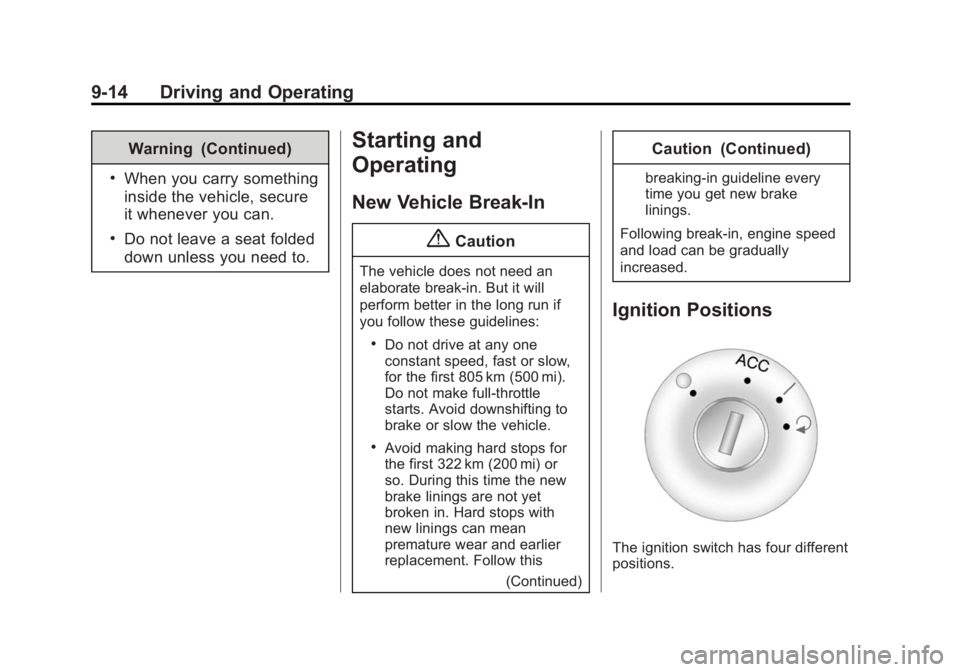
The ignition switch has four different
positions.
Page 231 of 407
Black plate (18,1)GMC Acadia/Acadia Denali Owner Manual (GMNA-Localizing-U.S./Canada/
Mexico-7576030) - 2015 - CRC - 8/18/14
9-18 Driving and Operating
To Use the Engine Coolant
Heater
1. Turn off the engine.
2. Open the hood and unwrap theelectrical cord. The bundled cord
is located on the driver side of
the engine compartment,
between the engine air cleaner
and the windshield washer fluid
reservoir. See Engine
Compartment Overview on
page 10-5.
Check the heater cord for
damage. If it is damaged, do not
use it. See your dealer for a
replacement. Inspect the cord for
damage yearly.
3. Plug the cord into a normal, grounded 110-volt AC outlet.
{Warning
Improper use of the heater cord
or an extension cord can damage
the cord and may result in
overheating and fire.
.Plug the cord into a
three-prong electrical utility
receptacle that is protected
by a ground fault detection
function. An ungrounded
outlet could cause an electric
shock.
.Use a weatherproof,
heavy-duty, 15 amp-rated
extension cord if needed.
Failure to use the
recommended extension cord
in good operating condition,
or using a damaged heater or
extension cord, could make it
(Continued)
Warning (Continued)
overheat and cause a fire,
property damage, electric
shock, and injury.
.Do not operate the vehicle
with the heater cord
permanently attached to the
vehicle. Possible heater cord
and thermostat damage could
occur.
.While in use, do not let the
heater cord touch vehicle
parts or sharp edges. Never
close the hood on the
heater cord.
.Before starting the vehicle,
unplug the cord, reattach the
cover to the plug, and
securely fasten the cord.
Keep the cord away from any
moving parts.
4. Before starting the engine, be sure to unplug and store the
cord as it was before to keep it
Page 260 of 407
Black plate (47,1)GMC Acadia/Acadia Denali Owner Manual (GMNA-Localizing-U.S./Canada/
Mexico-7576030) - 2015 - CRC - 8/18/14
Driving and Operating 9-47
Towing a trailer requires a certain
amount of experience. The
combination you are driving is
longer and not as responsive as the
vehicle itself. Get acquainted with
the handling and braking of the rig
before setting out for the open road.
Before starting, check all trailer hitch
parts and attachments, safety
chains, electrical connectors, lamps,
tires and mirrors. If the trailer has
electric brakes, start the
combination moving and then apply
the trailer brake controller by hand
to be sure the brakes work.
During the trip, check occasionally
to be sure that the load is secure
and the lamps and any trailer
brakes still work.
Towing with a Stability Control
System
When towing, the sound of the
stability control system might be
heard. The system is reacting to the
vehicle movement caused by thetrailer, which mainly occurs during
cornering. This is normal when
towing heavier trailers.
Following Distance
Stay at least twice as far behind the
vehicle ahead as you would when
driving the vehicle without a trailer.
This can help to avoid situations
that require heavy braking and
sudden turns.
Passing
More passing distance is needed
when towing a trailer. Because the
rig is longer, it is necessary to go
farther beyond the passed vehicle
before returning to the lane.
Backing Up
Hold the bottom of the steering
wheel with one hand. To move the
trailer to the left, move your hand to
the left. To move the trailer to the
right, move your hand to the right.
Always back up slowly and,
if possible, have someone
guide you.
Making Turns
{Caution
Making very sharp turns while
trailering could cause the trailer to
come in contact with the vehicle.
The vehicle could be damaged.
Avoid making very sharp turns
while trailering.
When turning with a trailer, make
wider turns than normal so the
trailer will not strike soft shoulders,
curbs, road signs, trees or other
objects. Use the turn signal well in
advance and avoid jerky or sudden
maneuvers.
Turn Signals When Towing a
Trailer
The turn signal indicators on the
instrument cluster flash whenever
signaling a turn or lane change.
Page 283 of 407
Black plate (16,1)GMC Acadia/Acadia Denali Owner Manual (GMNA-Localizing-U.S./Canada/
Mexico-7576030) - 2015 - CRC - 8/18/14
10-16 Vehicle Care
6. Reinstall the cap on the coolantrecovery tank but leave the
radiator pressure cap off.
7. Start the engine and let it run until the upper radiator hose
feels warm. Any time during this
procedure, watch out for the
engine cooling fans.
8. If the coolant level inside the radiator filler neck is low, add
more of the proper DEX-COOL
coolant mixture through the filler
neck until the level is back up to
the base of the filler neck.
9. Replace the pressure cap tightly. At any time during this
procedure if coolant begins to
flow out of the filler neck,
reinstall the pressure cap.{Caution
If the pressure cap is not tightly
installed, coolant loss and
possible engine damage may
occur. Be sure the cap is properly
and tightly secured.
Engine Overheating
The vehicle has several indicators
to warn of engine overheating.
There is an engine coolant
temperature gauge on the
instrument panel cluster. See
Engine Coolant Temperature Gauge
on page 5-12.
The vehicle may also display an
ENGINE OVERHEATED IDLE
ENGINE and ENGINE
OVERHEATED STOP ENGINE
message in the Driver Information
Center (DIC). See Engine Cooling
System Messages on page 5-34. You may decide not to lift the hood
when this warning appears, but
instead get service help right away.
See
Roadside Assistance Program
on page 13-5.
If you do decide to lift the hood,
make sure the vehicle is parked on
a level surface.
Then check to see if the engine
cooling fans are running. If the
engine is overheating, both fans
should be running. If they are not,
do not continue to run the engine
and have the vehicle serviced.
{Caution
Running the engine without
coolant may cause damage or a
fire. Vehicle damage would not be
covered by the vehicle warranty.
See Overheated Engine
Protection Operating Mode on
page 10-18 for information on
driving to a safe place in an
emergency.
Page 292 of 407
Black plate (25,1)GMC Acadia/Acadia Denali Owner Manual (GMNA-Localizing-U.S./Canada/
Mexico-7576030) - 2015 - CRC - 8/18/14
Vehicle Care 10-25
be covered by your warranty. Do
not allow the wiper blade arm to
touch the windshield.
4. Repeat the steps for the other blade.
Rear Wiper Blade
To replace the rear wiper blade:
1. Pull the wiper blade assemblyaway from the backglass.
The rear wiper blade will not lock
in a vertical position so care
should be used when pulling it
away from the vehicle.
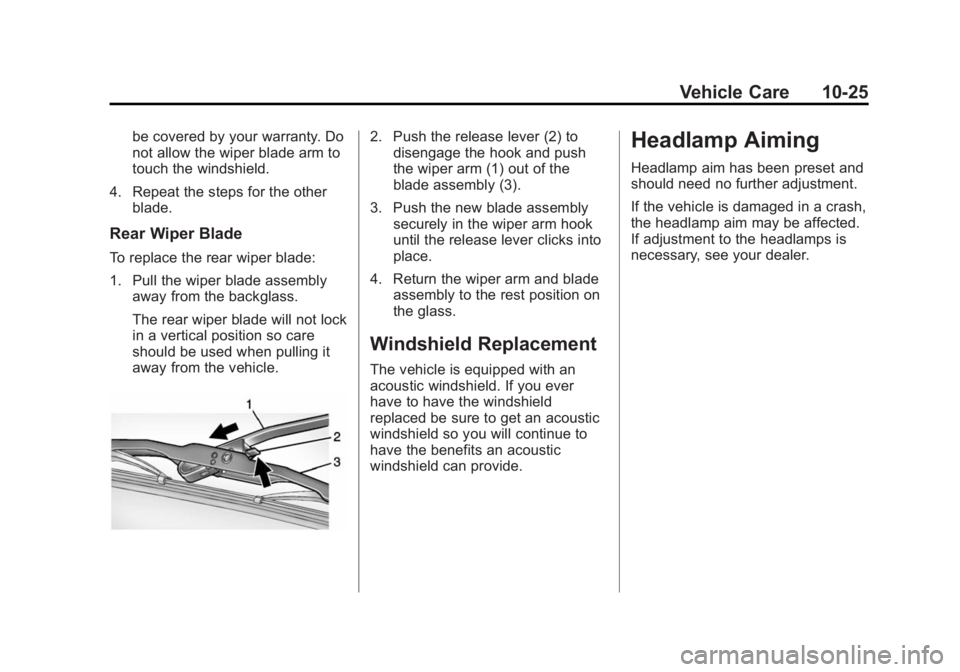
2. Push the release lever (2) todisengage the hook and push
the wiper arm (1) out of the
blade assembly (3).
3. Push the new blade assembly securely in the wiper arm hook
until the release lever clicks into
place.
4. Return the wiper arm and blade assembly to the rest position on
the glass.
Windshield Replacement
The vehicle is equipped with an
acoustic windshield. If you ever
have to have the windshield
replaced be sure to get an acoustic
windshield so you will continue to
have the benefits an acoustic
windshield can provide.
Headlamp Aiming
Headlamp aim has been preset and
should need no further adjustment.
If the vehicle is damaged in a crash,
the headlamp aim may be affected.
If adjustment to the headlamps is
necessary, see your dealer.
Page 328 of 407
Black plate (61,1)GMC Acadia/Acadia Denali Owner Manual (GMNA-Localizing-U.S./Canada/
Mexico-7576030) - 2015 - CRC - 8/18/14
Vehicle Care 10-61
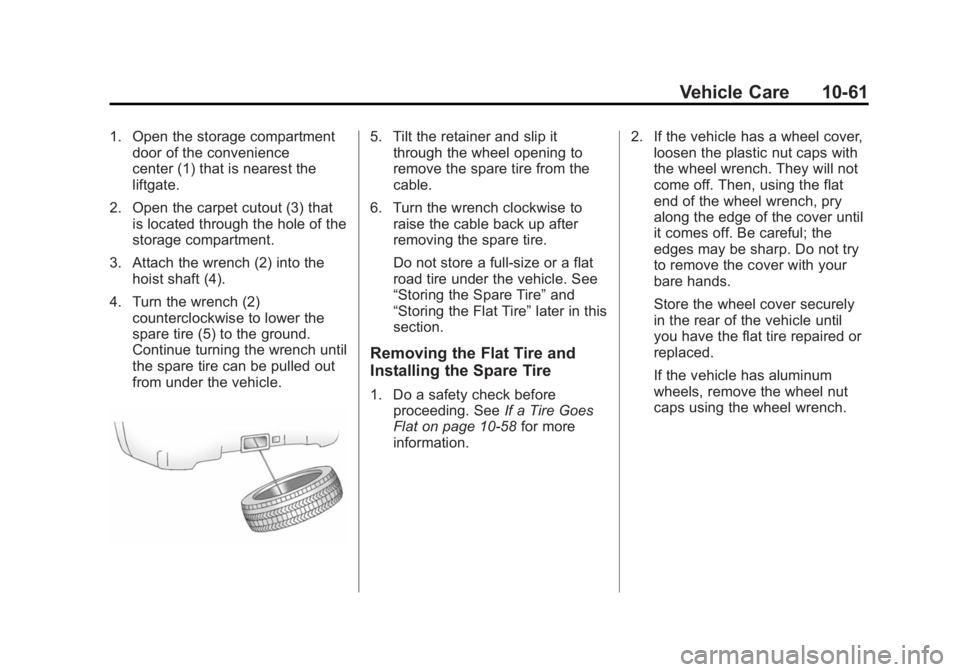
1. Open the storage compartmentdoor of the convenience
center (1) that is nearest the
liftgate.
2. Open the carpet cutout (3) that is located through the hole of the
storage compartment.
3. Attach the wrench (2) into the hoist shaft (4).
4. Turn the wrench (2) counterclockwise to lower the
spare tire (5) to the ground.
Continue turning the wrench until
the spare tire can be pulled out
from under the vehicle.5. Tilt the retainer and slip itthrough the wheel opening to
remove the spare tire from the
cable.
6. Turn the wrench clockwise to raise the cable back up after
removing the spare tire.
Do not store a full-size or a flat
road tire under the vehicle. See
“Storing the Spare Tire” and
“Storing the Flat Tire” later in this
section.
Removing the Flat Tire and
Installing the Spare Tire
1. Do a safety check before proceeding. See If a Tire Goes
Flat on page 10-58 for more
information. 2. If the vehicle has a wheel cover,
loosen the plastic nut caps with
the wheel wrench. They will not
come off. Then, using the flat
end of the wheel wrench, pry
along the edge of the cover until
it comes off. Be careful; the
edges may be sharp. Do not try
to remove the cover with your
bare hands.
Store the wheel cover securely
in the rear of the vehicle until
you have the flat tire repaired or
replaced.
If the vehicle has aluminum
wheels, remove the wheel nut
caps using the wheel wrench.
Page 332 of 407
Black plate (65,1)GMC Acadia/Acadia Denali Owner Manual (GMNA-Localizing-U.S./Canada/
Mexico-7576030) - 2015 - CRC - 8/18/14
Vehicle Care 10-65
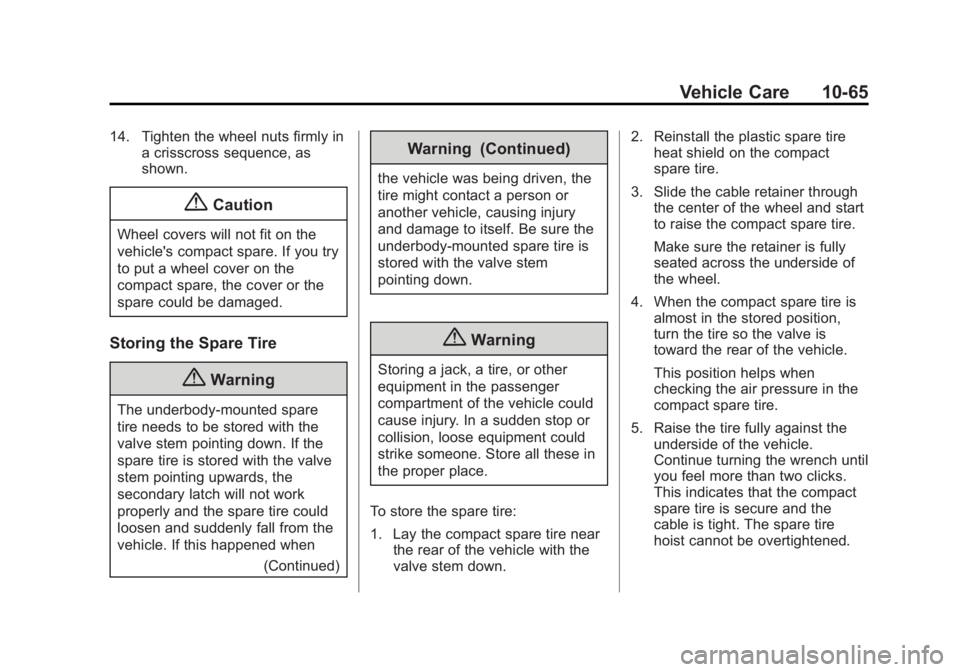
14. Tighten the wheel nuts firmly ina crisscross sequence, as
shown.
{Caution
Wheel covers will not fit on the
vehicle's compact spare. If you try
to put a wheel cover on the
compact spare, the cover or the
spare could be damaged.
Storing the Spare Tire
{Warning
The underbody-mounted spare
tire needs to be stored with the
valve stem pointing down. If the
spare tire is stored with the valve
stem pointing upwards, the
secondary latch will not work
properly and the spare tire could
loosen and suddenly fall from the
vehicle. If this happened when
(Continued)
Warning (Continued)
the vehicle was being driven, the
tire might contact a person or
another vehicle, causing injury
and damage to itself. Be sure the
underbody-mounted spare tire is
stored with the valve stem
pointing down.
{Warning
Storing a jack, a tire, or other
equipment in the passenger
compartment of the vehicle could
cause injury. In a sudden stop or
collision, loose equipment could
strike someone. Store all these in
the proper place.
To store the spare tire:
1. Lay the compact spare tire near the rear of the vehicle with the
valve stem down. 2. Reinstall the plastic spare tire
heat shield on the compact
spare tire.
3. Slide the cable retainer through the center of the wheel and start
to raise the compact spare tire.
Make sure the retainer is fully
seated across the underside of
the wheel.
4. When the compact spare tire is almost in the stored position,
turn the tire so the valve is
toward the rear of the vehicle.
This position helps when
checking the air pressure in the
compact spare tire.
5. Raise the tire fully against the underside of the vehicle.
Continue turning the wrench until
you feel more than two clicks.
This indicates that the compact
spare tire is secure and the
cable is tight. The spare tire
hoist cannot be overtightened.
Page 333 of 407
Black plate (66,1)GMC Acadia/Acadia Denali Owner Manual (GMNA-Localizing-U.S./Canada/
Mexico-7576030) - 2015 - CRC - 8/18/14
10-66 Vehicle Care
6. Make sure the tire is storedsecurely. Push, pull, and then try
to turn the tire. If the tire moves,
use the wrench to tighten the
cable.
Storing the Flat Tire
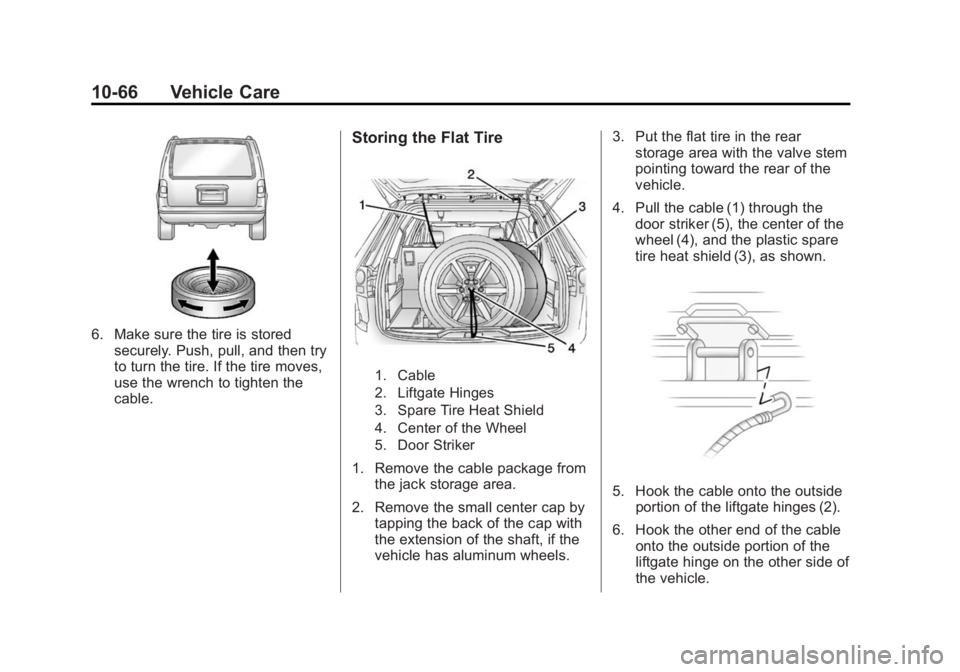
1. Cable
2. Liftgate Hinges
3. Spare Tire Heat Shield
4. Center of the Wheel
5. Door Striker
1. Remove the cable package fromthe jack storage area.
2. Remove the small center cap by tapping the back of the cap with
the extension of the shaft, if the
vehicle has aluminum wheels. 3. Put the flat tire in the rear
storage area with the valve stem
pointing toward the rear of the
vehicle.
4. Pull the cable (1) through the door striker (5), the center of the
wheel (4), and the plastic spare
tire heat shield (3), as shown.
5. Hook the cable onto the outside
portion of the liftgate hinges (2).
6. Hook the other end of the cable onto the outside portion of the
liftgate hinge on the other side of
the vehicle.
Page 334 of 407
Black plate (67,1)GMC Acadia/Acadia Denali Owner Manual (GMNA-Localizing-U.S./Canada/
Mexico-7576030) - 2015 - CRC - 8/18/14
Vehicle Care 10-67
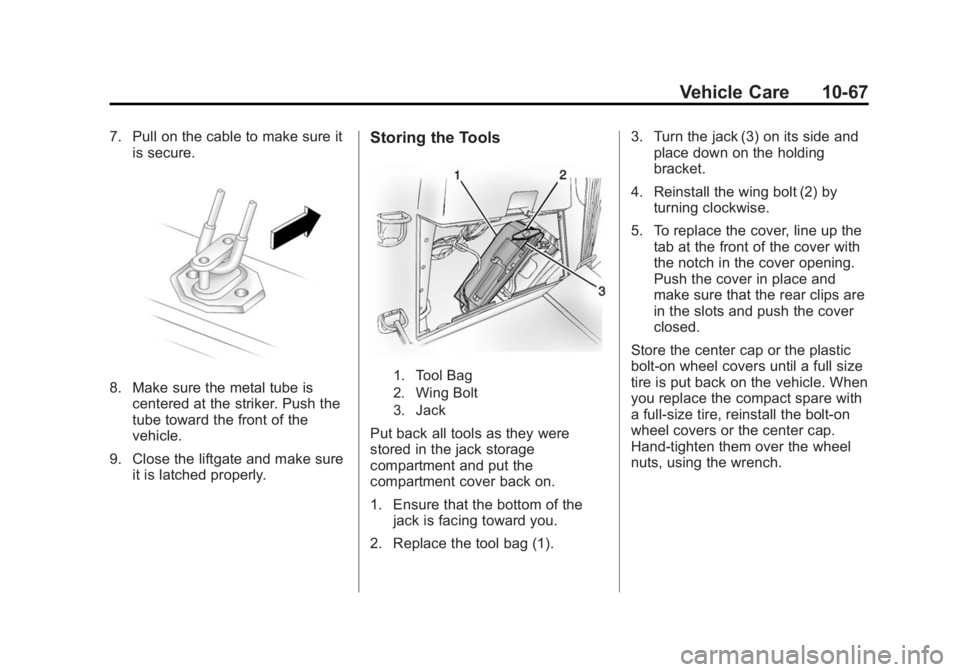
7. Pull on the cable to make sure itis secure.
8. Make sure the metal tube iscentered at the striker. Push the
tube toward the front of the
vehicle.
9. Close the liftgate and make sure it is latched properly.
Storing the Tools
1. Tool Bag
2. Wing Bolt
3. Jack
Put back all tools as they were
stored in the jack storage
compartment and put the
compartment cover back on.
1. Ensure that the bottom of thejack is facing toward you.
2. Replace the tool bag (1). 3. Turn the jack (3) on its side and
place down on the holding
bracket.
4. Reinstall the wing bolt (2) by turning clockwise.
5. To replace the cover, line up the tab at the front of the cover with
the notch in the cover opening.
Push the cover in place and
make sure that the rear clips are
in the slots and push the cover
closed.
Store the center cap or the plastic
bolt-on wheel covers until a full size
tire is put back on the vehicle. When
you replace the compact spare with
a full-size tire, reinstall the bolt-on
wheel covers or the center cap.
Hand-tighten them over the wheel
nuts, using the wrench.
Page 340 of 407
Black plate (73,1)GMC Acadia/Acadia Denali Owner Manual (GMNA-Localizing-U.S./Canada/
Mexico-7576030) - 2015 - CRC - 8/18/14
Vehicle Care 10-73
.If the vehicle is ready to be
towed. Just as preparing the
vehicle for a long trip, make sure
the vehicle is prepared to be
towed.
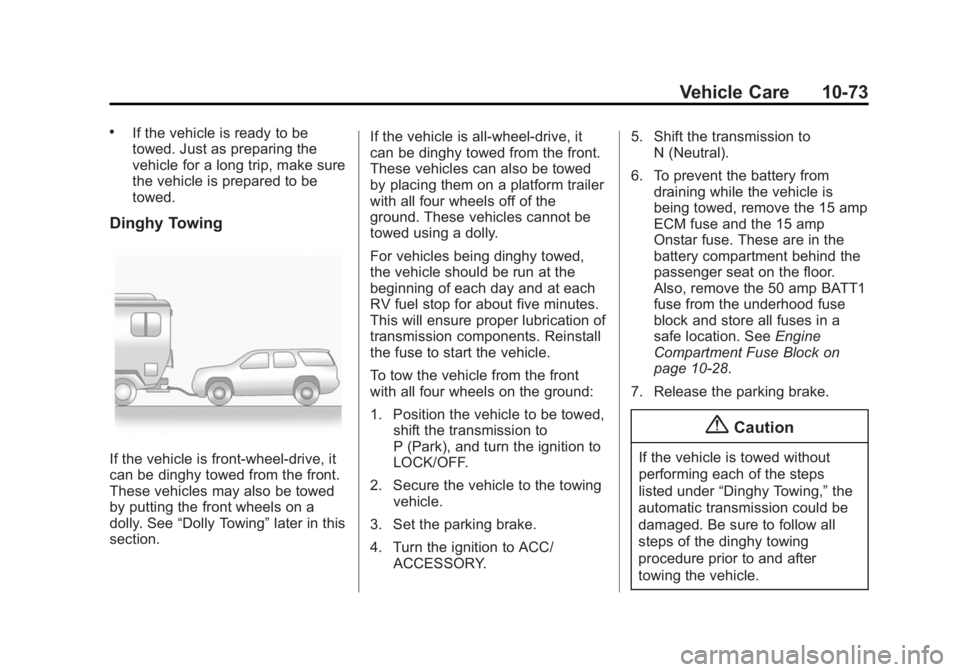
Dinghy Towing
If the vehicle is front-wheel-drive, it
can be dinghy towed from the front.
These vehicles may also be towed
by putting the front wheels on a
dolly. See“Dolly Towing” later in this
section. If the vehicle is all-wheel-drive, it
can be dinghy towed from the front.
These vehicles can also be towed
by placing them on a platform trailer
with all four wheels off of the
ground. These vehicles cannot be
towed using a dolly.
For vehicles being dinghy towed,
the vehicle should be run at the
beginning of each day and at each
RV fuel stop for about five minutes.
This will ensure proper lubrication of
transmission components. Reinstall
the fuse to start the vehicle.
To tow the vehicle from the front
with all four wheels on the ground:
1. Position the vehicle to be towed,
shift the transmission to
P (Park), and turn the ignition to
LOCK/OFF.
2. Secure the vehicle to the towing vehicle.
3. Set the parking brake.
4. Turn the ignition to ACC/ ACCESSORY. 5. Shift the transmission to
N (Neutral).
6. To prevent the battery from draining while the vehicle is
being towed, remove the 15 amp
ECM fuse and the 15 amp
Onstar fuse. These are in the
battery compartment behind the
passenger seat on the floor.
Also, remove the 50 amp BATT1
fuse from the underhood fuse
block and store all fuses in a
safe location. See Engine
Compartment Fuse Block on
page 10-28.
7. Release the parking brake.
{Caution
If the vehicle is towed without
performing each of the steps
listed under “Dinghy Towing,” the
automatic transmission could be
damaged. Be sure to follow all
steps of the dinghy towing
procedure prior to and after
towing the vehicle.