center console GMC ACADIA 2016 User Guide
[x] Cancel search | Manufacturer: GMC, Model Year: 2016, Model line: ACADIA, Model: GMC ACADIA 2016Pages: 371, PDF Size: 5.28 MB
Page 171 of 371
GMC Acadia/Acadia Denali Owner Manual (GMNA-Localizing-U.S./Canada/
Mexico-9159268) - 2016 - crc - 7/31/15
170 Infotainment System
If equipped, there are two USB
ports on the rear of the center
console that can be used for
charging only. They can charge
devices that draw 2.1 amps or less.
See the device’s owner manual for
the specification.
Using the 3.5 mm (1/8 in)
Auxiliary Input Jack
This is not an audio output; do not
plug a headphone set into the front
auxiliary input jack. Connect an
auxiliary input device such as an
iPod, laptop computer, MP3 player,
CD player, or cassette tape player
to the auxiliary input jack for use as
another source for audio listening.
Drivers are encouraged to set up
any auxiliary device while the
vehicle is in P (Park). See
Defensive Driving 0194 for more
information on driver distraction.
To use an auxiliary input device,
connect a 3.5 mm (1/8 in) cable to
the radio's front auxiliary input jack.
Press SRCE to select the device.
Using the USB Port
The USB port can control a USB
storage device or an iPod using the
radio buttons and knobs.
USB Supported Devices
. USB Flash Drives
. Portable USB Hard Drives
. Fifth generation or later iPod
. iPod classic
®(6th generation)
. iPod nano
®(3G, 4G, 5G,
and 6G)
. iPod touch
®(1G, 2G, 3G,
and 4G)
. iPhone
®(2G, 3G, 3GS, 4, and 5)
. iPad
®(1G, 2G)
Not all iPods and USB drives are
compatible with the USB port.
Make sure the iPod has the latest
firmware from Apple
®for proper
operation. iPod firmware can be
updated using the latest iTunes
®
application. See www.apple.com/
itunes.
For help identifying your iPod, go to
www.apple.com/support.
OnStar System
OnStar®with 4G LTE
If equipped with OnStar 4G LTE, up
to seven devices, such as
smartphones, tablets, and laptops,
can be connected to high-speed
Internet through the vehicle’s built-in
Wi-Fi hotspot.
Page 190 of 371
GMC Acadia/Acadia Denali Owner Manual (GMNA-Localizing-U.S./Canada/
Mexico-9159268) - 2016 - crc - 7/31/15
Climate Controls 189
speed, and air delivery mode. The
system may also supply cooler air to
the side of the vehicle facing the
sun. The recirculation mode will also
be used as needed to maintain cool
outlet temperatures.Rear Climate Control System
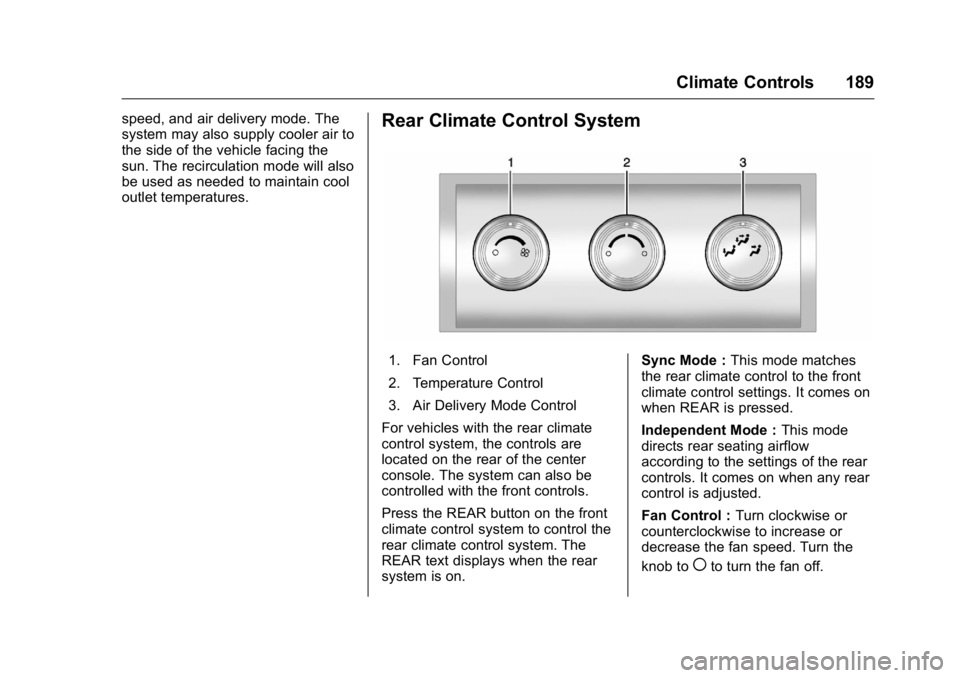
1. Fan Control
2. Temperature Control
3. Air Delivery Mode Control
For vehicles with the rear climate
control system, the controls are
located on the rear of the center
console. The system can also be
controlled with the front controls.
Press the REAR button on the front
climate control system to control the
rear climate control system. The
REAR text displays when the rear
system is on. Sync Mode :
This mode matches
the rear climate control to the front
climate control settings. It comes on
when REAR is pressed.
Independent Mode : This mode
directs rear seating airflow
according to the settings of the rear
controls. It comes on when any rear
control is adjusted.
Fan Control : Turn clockwise or
counterclockwise to increase or
decrease the fan speed. Turn the
knob to
(to turn the fan off.
Page 191 of 371
GMC Acadia/Acadia Denali Owner Manual (GMNA-Localizing-U.S./Canada/
Mexico-9159268) - 2016 - crc - 7/31/15
190 Climate Controls
Temperature Control :Turn
clockwise or counterclockwise to
increase or decrease the airflow
temperature.
Air Delivery Mode Control : Turn
to the desired mode to change the
airflow direction.
H (Vent) : Air is directed through
the overhead outlets.
) (Bi-Level) : Air is directed
through the rear floor outlets, as
well as the overhead outlets.
6 (Floor) : Air is directed through
the floor outlets. The rear system
floor outlets are located under the
third row seats.Rear Climate Control System (with Rear Seat Audio)
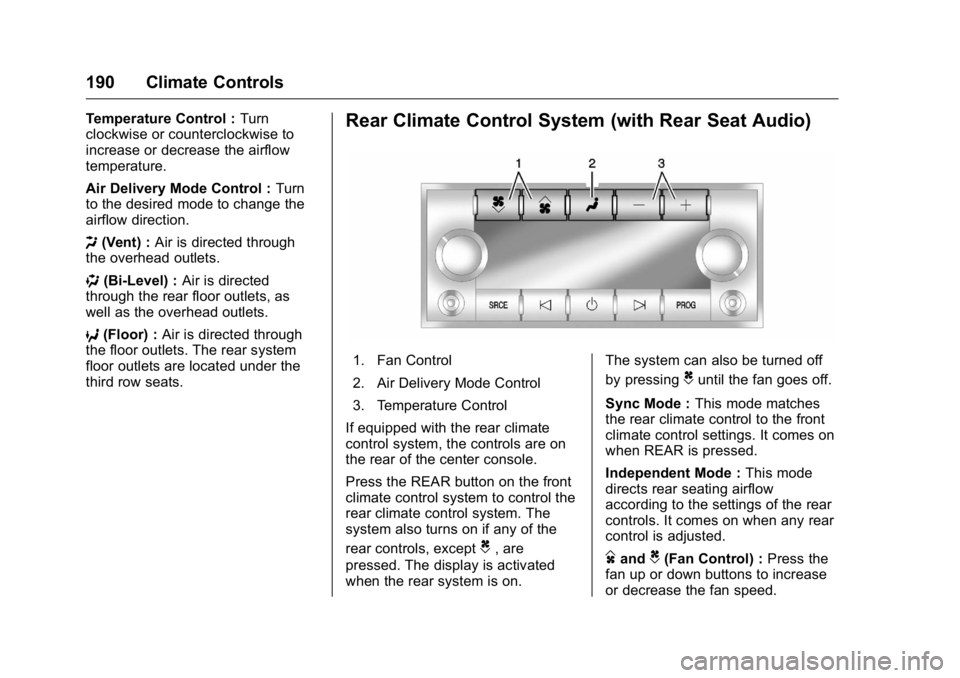
1. Fan Control
2. Air Delivery Mode Control
3. Temperature Control
If equipped with the rear climate
control system, the controls are on
the rear of the center console.
Press the REAR button on the front
climate control system to control the
rear climate control system. The
system also turns on if any of the
rear controls, except
C, are
pressed. The display is activated
when the rear system is on. The system can also be turned off
by pressing
Cuntil the fan goes off.
Sync Mode : This mode matches
the rear climate control to the front
climate control settings. It comes on
when REAR is pressed.
Independent Mode : This mode
directs rear seating airflow
according to the settings of the rear
controls. It comes on when any rear
control is adjusted.
DandC(Fan Control) : Press the
fan up or down buttons to increase
or decrease the fan speed.
Page 240 of 371
GMC Acadia/Acadia Denali Owner Manual (GMNA-Localizing-U.S./Canada/
Mexico-9159268) - 2016 - crc - 7/31/15
Driving and Operating 239
Safety Chains
Always attach chains between the
vehicle and the trailer. Cross the
safety chains under the tongue of
the trailer to help prevent the tongue
from contacting the road if it
becomes separated from the hitch.
Always leave just enough slack so
the rig can turn. Never allow safety
chains to drag on the ground.
Trailer Brakes
A loaded trailer that weighs more
than 450 kg (1,000 lb) needs to have
its own brake system that is
adequate for the weight of the
trailer. Be sure to read and follow
the instructions for the trailer brakes
so they are installed, adjusted, and
maintained properly.
Because the vehicle has antilock
brakes, do not try to tap into the
vehicle's hydraulic brake system.
If you do, both brake systems will
not work well, or at all.
Trailer Wiring Harness
Basic Trailer Wiring
The trailer wiring harness, with a
seven-pin connector, is located at
the rear of the vehicle and is tied to
the vehicle's frame. The harness
connector can be plugged into a
seven-pin universal heavy-duty
trailer connector available through
your dealer.
The seven-wire harness contains
the following trailer circuits:
.Yellow: Left Stop/Turn Signal
. Dark Green: Right Stop/Turn
Signal
. Brown: Taillamps
. Black: Ground
. Light Green: Back-up Lamps
. Red/Black: Battery Feed
. Dark Blue: Trailer Brake*
*The fuse for this circuit is installed
in the underhood electrical center,
but the wires are not connected.
They should be connected by your
dealer or a qualified service center. If the back-up lamp circuit is not
functional, contact your dealer.
If a remote (non-vehicle) battery is
being charged, press the Tow/Haul
mode switch located on the center
console near the climate controls.
This will boost the vehicle system
voltage and properly charge the
battery. If the trailer is too light for
Tow/Haul mode, turn on the
headlamps (non-HID only) as a
second way to boost the vehicle
system and charge the battery.
Electric Trailer Brake Control
Wiring Provisions
These wiring provisions for an
electric trailer brake controller are
included with the vehicle as part of
the trailer wiring package. The
instrument panel contains blunt cut
wires above the parking brake
assembly for the electric trailer
brake controller. The harness
contains the following wires:
.
Red/Black: Power Supply
. White: Brake Switch Signal
. Gray: Illumination
Page 362 of 371

GMC Acadia/Acadia Denali Owner Manual (GMNA-Localizing-U.S./Canada/
Mexico-9159268) - 2016 - crc - 7/31/15
Index 361
AudioTheft-Deterrent Feature . . . . . . . 158
Audio Players CD . . . . . . . . . . . . . . . . . . . . . . . . . . . 166
MP3 . . . . . . . . . . . . . . . . . . . . . . . . . . 168
Automatic Dimming Mirrors . . . . . . . . . . . . . . . . 42
Door Locks . . . . . . . . . . . . . . . . . . . . . 34
Transmission . . . . . . . . . . . . . . . . . .211
Transmission Fluid . . . . . . . . . . . 249
Automatic Transmission
Manual Mode . . . . . . . . . . . . . . . . . 213
Shift Lock Control FunctionCheck . . . . . . . . . . . . . . . . . . . . . . . 261
Auxiliary Devices . . . . . . . . . . . . . . . . . . . . . . . 169
B
Battery
Load Management . . . . . . . . . . . . 155
Power Protection . . . . . . . . . . . . . 156
Voltage and ChargingMessages . . . . . . . . . . . . . . . . . . . 131
Battery - North America . . . . 260, 304
Blade Replacement, Wiper . . . . . 262
Bluetooth Overview . . . . . . . . . . . . . . . . . . . . . 173
Brake System Warning Light . . . . . . . . .118 Brakes . . . . . . . . . . . . . . . . . . . . . . . . . . 258
Antilock . . . . . . . . . . . . . . . . . . . . . . . 215
Assist . . . . . . . . . . . . . . . . . . . . . . . . . 216
Fluid . . . . . . . . . . . . . . . . . . . . . . . . . . 259
Parking . . . . . . . . . . . . . . . . . . . . . . . 216
System Messages . . . . . . . . . . . . 131
Braking . . . . . . . . . . . . . . . . . . . . . . . . . 195
Break-In, New Vehicle . . . . . . . . . . 204
Bulb Replacement . . . . . . . . . . . . . . 264
Fog Lamps . . . . . . . . . . . . . . . . . . . 152
Headlamp Aiming . . . . . . . . . . . . . 263
Headlamps . . . . . . . . . . . . . . . . . . . 264
License Plate Lamps . . . . . . . . . 264
Buying New Tires . . . . . . . . . . . . . . . 289
C
Calibration . . . . . . . . . . . . . . . . . . . . . . 106
California Fuel Requirements . . . . . . . . . . . 230
Perchlorate MaterialsRequirements . . . . . . . . . . . . . . . 242
California Proposition
65 Warning . . . . . . . . . .242, 260, 304
Camera Rear Vision (RVC) . . . . . . . . . . . . 221
Canadian Vehicle Owners . . . . . . . . 2
Capacities and Specifications . . . . . . . . . . . . . . . . . 334 Carbon Monoxide
Engine Exhaust . . . . . . . . . . . . . . . 210
Liftgate . . . . . . . . . . . . . . . . . . . . . . . . . 35
Winter Driving . . . . . . . . . . . . . . . . 198
Cargo Cover . . . . . . . . . . . . . . . . . . . . . . . . . 100
Management System . . . . . . . . . 100
Tie-Downs . . . . . . . . . . . . . . . . . . . . 100
Caution, Danger, and Warning . . . . 2
CD Player . . . . . . . . . . . . . . . . . . . . . . 166
Center Console Storage . . . . . . . . . 99
Chains, Tire . . . . . . . . . . . . . . . . . . . . 294
Charging System Light . . . . . . . . . 116
Check Ignition Transmission Lock . . . 261
Malfunction IndicatorEngine Light . . . . . . . . . . . . . . . . .117
Child Restraints Infants and Young Children . . . . . 80
Lower Anchors and Tethersfor Children . . . . . . . . . . . . . . . . . . . 86
Older Children . . . . . . . . . . . . . . . . . . 79
Securing . . . . . . . . . . . . . . . . . . . . 92, 94
Systems . . . . . . . . . . . . . . . . . . . . . . . . 83
Circuit Breakers . . . . . . . . . . . . . . . . 265
Cleaning
Exterior Care . . . . . . . . . . . . . . . . . .311
Interior Care . . . . . . . . . . . . . . . . . . 315
Page 370 of 371

GMC Acadia/Acadia Denali Owner Manual (GMNA-Localizing-U.S./Canada/
Mexico-9159268) - 2016 - crc - 7/31/15
Index 369
StabiliTrakIndicator Light . . . . . . . . . . . . . . . . 120
Start Assist, Hills . . . . . . . . . . . . . . . 217
Start Vehicle, Remote . . . . . . . . . . . 31
Starter Switch Check . . . . . . . . . . . 261
Starting the Engine . . . . . . . . . . . . . 206
Steering . . . . . . . . . . . . . . . . . . . . . . . . 195 Fluid, Power . . . . . . . . . . . . . . . . . . 257
Wheel Adjustment . . . . . . . . . . . . 104
Wheel Controls . . . . . . . . . . . . . . . 105
Storage Areas
Armrest . . . . . . . . . . . . . . . . . . . . . . . . . 99
Cargo Cover . . . . . . . . . . . . . . . . . . 100
Cargo ManagementSystem . . . . . . . . . . . . . . . . . . . . . . 100
Center Console . . . . . . . . . . . . . . . . . 99
Convenience Net . . . . . . . . . . . . . 101
Glove Box . . . . . . . . . . . . . . . . . . . . . . 98
Instrument Panel . . . . . . . . . . . . . . . 98
Roof Rack System . . . . . . . . . . . . 101
Storage Compartments . . . . . . . . . . 98
Stuck Vehicle . . . . . . . . . . . . . . . . . . . 200
Summer Tires . . . . . . . . . . . . . . . . . . 277
Sun Visors . . . . . . . . . . . . . . . . . . . . . . . 45
Sunroof . . . . . . . . . . . . . . . . . . . . . . . . . . 45
Symbols . . . . . . . . . . . . . . . . . . . . . . . . . . 3 System
Forward Collision
Alert (FCA) . . . . . . . . . . . . . . . . . . 224
Infotainment . . . . . . . . . . . . . 157, 349
Rear Seat Audio (RSA) . . . . . . . 171
Roof Rack . . . . . . . . . . . . . . . . . . . . 101
T
Tachometer . . . . . . . . . . . . . . . . . . . . . 112
Text Telephone (TTY) Users . . . . 338
Theft-Deterrent Systems . . . . . . . . . 39 Immobilizer . . . . . . . . . . . . . . . . . . . . . 39
Third-Row Seats . . . . . . . . . . . . . . . . . 56
Time . . . . . . . . . . . . . . . . . . . . . . . . . . . . 108
Tires . . . . . . . . . . . . . . . . . . . . . . . . . . . . 275 All-Season . . . . . . . . . . . . . . . . . . . . 276
Buying New Tires . . . . . . . . . . . . . 289
Chains . . . . . . . . . . . . . . . . . . . . . . . . 294
Changing . . . . . . . . . . . . . . . . . . . . . 295
Compact Spare . . . . . . . . . . . . . . . 302
Designations . . . . . . . . . . . . . . . . . 279
Different Size . . . . . . . . . . . . . . . . . 291
If a Tire Goes Flat . . . . . . . . . . . . 294
Inspection . . . . . . . . . . . . . . . . . . . . 287
Messages . . . . . . . . . . . . . . . . . . . . 137
Pressure Light . . . . . . . . . . . . . . . . 121
Pressure Monitor Operation . . 284
Pressure Monitor System . . . . . 283
Rotation . . . . . . . . . . . . . . . . . . . . . . 288 Tires (cont'd)
Sidewall Labeling . . . . . . . . . . . . . 277
Terminology and Definitions . . 280
Uniform Tire Quality
Grading . . . . . . . . . . . . . . . . . . . . . 291
Wheel Alignment and Tire Balance . . . . . . . . . . . . . . . . . . . . . 293
Wheel Replacement . . . . . . . . . . 293
When It Is Time for New Tires . . . . . . . . . . . . . . . . . . . . . . . . 289
Winter . . . . . . . . . . . . . . . . . . . . . . . . 276
Tow/Haul Mode . . . . . . . . . . . . . . . . . 214
Tow/Haul Mode Light . . . . . . . . . . . 120
Towing Driving Characteristics . . . . . . . . 233
Equipment . . . . . . . . . . . . . . . . . . . . 238
General Information . . . . . . . . . . 233
Recreational Vehicle . . . . . . . . . . 307
Trailer . . . . . . . . . . . . . . . . . . . . . . . . 236
Vehicle . . . . . . . . . . . . . . . . . . . . . . . 307
Traction Control/Electronic Stability Control . . . . . . . . . . . . . . . 217
Trademarks and License
Agreements . . . . . . . . . . . . . . . . . . . 181
Trailer Towing . . . . . . . . . . . . . . . . . . . . . . . . 236
Transmission Automatic . . . . . . . . . . . . . . . . . . . . . .211