controls GMC ACADIA 2016 User Guide
[x] Cancel search | Manufacturer: GMC, Model Year: 2016, Model line: ACADIA, Model: GMC ACADIA 2016Pages: 371, PDF Size: 5.28 MB
Page 24 of 371
GMC Acadia/Acadia Denali Owner Manual (GMNA-Localizing-U.S./Canada/
Mexico-9159268) - 2016 - crc - 7/31/15
In Brief 23
to detect the lane markings. The
LDW light,
@, is green if a lane
marking is detected. If the vehicle
departs the lane without using a turn
signal in that direction, the light will
change to amber and flash. In
addition, beeps will sound.
See Lane Departure Warning (LDW)
0 228.
Side Blind Zone
Alert (SBZA)
If equipped, SBZA will detect
moving vehicles in the next lane
over in the vehicle's side blind zone
area. When this happens, the SBZA
display will light up in the
corresponding outside side mirror
and will flash if the turn signal is on.
See Side Blind Zone Alert (SBZA)
0 226.
Rear Vision
Camera (RVC)
If equipped, RVC displays a view of
the area behind the vehicle, on the
infotainment system display, when
the vehicle is shifted into
R (Reverse).
See Rear Vision Camera (RVC)
0 221.
Rear Cross Traffic Alert
(RCTA) System
If equipped, the RCTA system uses
a triangle with an arrow displayed
on the RVC screen to warn of traffic
behind your vehicle that may cross
your vehicle's path while in
R (Reverse). In addition, beeps will
sound.
See “Rear Cross Traffic Alert
(RCTA)” underRear Vision Camera
(RVC) 0221.
Parking Assist
If equipped, Rear Parking Assist
(RPA) uses sensors on the rear
bumper to assist with parking and avoiding objects while in
R (Reverse). It operates at speeds
less than 8 km/h (5 mph) and uses
audible beeps to provide distance
and system information.
Keep the sensors on the vehicle's
rear bumper clean to ensure proper
operation.
See
Parking Assist 0223.
Power Outlets
The vehicle has 12-volt accessory
power outlets, which can be used to
plug in electrical equipment, such as
a cell phone or MP3 player.
The power outlets are located:
.
On the center stack below the
climate controls.
. Inside the center console.
. At the rear of the center console.
. In the rear cargo area.
To use the outlets, remove the
cover.
See Power Outlets 0108.
Page 28 of 371
GMC Acadia/Acadia Denali Owner Manual (GMNA-Localizing-U.S./Canada/
Mexico-9159268) - 2016 - crc - 7/31/15
Keys, Doors, and Windows 27
Keys, Doors, and
Windows
Keys and Locks
Keys . . . . . . . . . . . . . . . . . . . . . . . . . . . 27
Remote Keyless Entry (RKE)System . . . . . . . . . . . . . . . . . . . . . . . 29
Remote Keyless Entry (RKE) System Operation . . . . . . . . . . . . 29
Remote Vehicle Start . . . . . . . . . . 31
Door Locks . . . . . . . . . . . . . . . . . . . . 32
Power Door Locks . . . . . . . . . . . . . 33
Delayed Locking . . . . . . . . . . . . . . . 33
Automatic Door Locks . . . . . . . . . 34
Lockout Protection . . . . . . . . . . . . . 34
Safety Locks . . . . . . . . . . . . . . . . . . . 34
Doors
Liftgate . . . . . . . . . . . . . . . . . . . . . . . . 35
Vehicle Security
Vehicle Security . . . . . . . . . . . . . . . . 38
Vehicle Alarm System . . . . . . . . . 38
Immobilizer . . . . . . . . . . . . . . . . . . . . 39
Immobilizer Operation . . . . . . . . . 39
Exterior Mirrors
Convex Mirrors . . . . . . . . . . . . . . . . 40
Power Mirrors . . . . . . . . . . . . . . . . . . 41 Folding Mirrors . . . . . . . . . . . . . . . . . 41
Heated Mirrors . . . . . . . . . . . . . . . . . 42
Automatic Dimming Mirror . . . . . 42
Park Tilt Mirrors . . . . . . . . . . . . . . . . 42
Interior Mirrors
Interior Rearview Mirrors . . . . . . . 42
Manual Rearview Mirror . . . . . . . . 42
Automatic Dimming Rearview
Mirror . . . . . . . . . . . . . . . . . . . . . . . . . 43
Windows
Windows . . . . . . . . . . . . . . . . . . . . . . . 43
Power Windows . . . . . . . . . . . . . . . 43
Sun Visors . . . . . . . . . . . . . . . . . . . . . 45
Roof
Sunroof . . . . . . . . . . . . . . . . . . . . . . . . 45
Keys and Locks
Keys
{Warning
Leaving children in a vehicle with
the ignition key is dangerous and
children or others could be
seriously injured or killed. They
could operate the power windows
or other controls or make the
vehicle move. The windows will
function with the keys in the
ignition, and children or others
could be caught in the path of a
closing window. Do not leave
children in a vehicle with the
ignition key.
Page 43 of 371
GMC Acadia/Acadia Denali Owner Manual (GMNA-Localizing-U.S./Canada/
Mexico-9159268) - 2016 - crc - 7/31/15
42 Keys, Doors, and Windows
Resetting the Power Folding
Mirrors
Reset the power folding mirrors if:
.The mirrors are accidentally
obstructed while folding.
. They are accidentally manually
folded/unfolded.
. The mirrors vibrate at normal
driving speeds.
To reset the mirrors, fold and unfold
the mirrors one time using the
power folding mirror controls.
A popping noise may be heard
during the resetting. This sound is
normal during the reset operation.
Heated Mirrors
For vehicles with heated mirrors:
1(Rear Window Defogger) :
Press to heat the mirrors.
See “Rear Window Defogger” under
Dual Automatic Climate Control
System 0185.
Automatic Dimming
Mirror
If equipped, the driver outside mirror
automatically adjusts for the glare of
the headlamps from behind. See
Automatic Dimming Rearview Mirror
043.
Park Tilt Mirrors
If equipped with memory seats, the
passenger and/or driver mirror tilts
to a preselected position when the
vehicle is in R (Reverse). This
allows the curb to be seen when
parallel parking.
The mirror(s) return to the original
position when:
.
The vehicle is shifted out of
R (Reverse), or remains in
R (Reverse) for about
30 seconds.
. The ignition is turned off.
. The vehicle is driven in
R (Reverse) above a set speed.
To turn this feature on or off, see
Vehicle Personalization 0140.
Interior Mirrors
Interior Rearview Mirrors
Adjust the rearview mirror for a clear
view of the area behind your
vehicle.
If equipped with OnStar, the vehicle
may have three control buttons at
the bottom of the mirror. See your
dealer for more information about
OnStar and how to subscribe to it.
See “OnStar,” if equipped.
Do not spray glass cleaner directly
on the mirror. Use a soft towel
dampened with water.
Manual Rearview Mirror
If equipped, push the tab forward for
daytime use and pull it for nighttime
use to avoid glare from the
headlamps from behind.
Page 53 of 371
GMC Acadia/Acadia Denali Owner Manual (GMNA-Localizing-U.S./Canada/
Mexico-9159268) - 2016 - crc - 7/31/15
52 Seats and Restraints
2. Push and pull on the seatbackto make sure it is locked.
Power Reclining Seatbacks
To adjust a power seatback,
if equipped:
.Tilt the top of the control
rearward to recline.
. Tilt the top of the control forward
to raise.
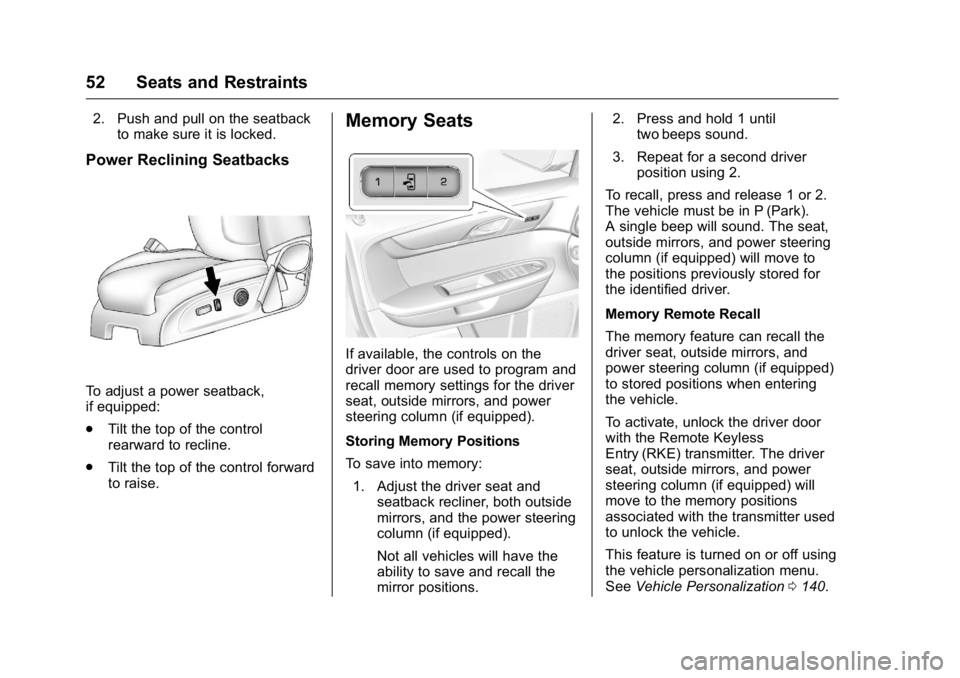
Memory Seats
If available, the controls on the
driver door are used to program and
recall memory settings for the driver
seat, outside mirrors, and power
steering column (if equipped).
Storing Memory Positions
To save into memory:
1. Adjust the driver seat and seatback recliner, both outside
mirrors, and the power steering
column (if equipped).
Not all vehicles will have the
ability to save and recall the
mirror positions. 2. Press and hold 1 until
two beeps sound.
3. Repeat for a second driver position using 2.
To recall, press and release 1 or 2.
The vehicle must be in P (Park).
A single beep will sound. The seat,
outside mirrors, and power steering
column (if equipped) will move to
the positions previously stored for
the identified driver.
Memory Remote Recall
The memory feature can recall the
driver seat, outside mirrors, and
power steering column (if equipped)
to stored positions when entering
the vehicle.
To activate, unlock the driver door
with the Remote Keyless
Entry (RKE) transmitter. The driver
seat, outside mirrors, and power
steering column (if equipped) will
move to the memory positions
associated with the transmitter used
to unlock the vehicle.
This feature is turned on or off using
the vehicle personalization menu.
See Vehicle Personalization 0140.
Page 54 of 371
GMC Acadia/Acadia Denali Owner Manual (GMNA-Localizing-U.S./Canada/
Mexico-9159268) - 2016 - crc - 7/31/15
Seats and Restraints 53
To stop recall movement, press one
of the power seat controls, memory
buttons, power mirror buttons, or the
power steering column control (if
equipped).
If something has blocked the driver
seat and/or steering column while
recalling a memory position, the
recall may stop. Remove the
obstruction; then press and hold the
appropriate manual control for the
memory item that is not recalling for
two seconds. Try recalling the
memory position again by pressing
the appropriate memory button.
If the memory position is still not
recalling, see your dealer for
service.
Easy Exit Driver Seat
The easy exit feature can move the
driver seat rearward and the power
steering column (if equipped) up
and forward to allow extra room to
exit the vehicle.
S(Easy Exit Positions) :Press to
activate the recall. The vehicle must
be in P (Park). If this feature is programmed on in
the vehicle personalization menu,
automatic driver seat and power
steering column movement occur
when the ignition key is removed.
A single beep sounds. The driver
seat moves back approximately
8 cm (3 in) and the power steering
column (if equipped) moves up and
forward. To move the seat back
farther, press
Sagain until the seat
is all the way back.
If something has blocked the driver
seat while recalling the exit position,
the recall may stop. Remove the
obstruction; then press and hold the
power seat control rearward for
two seconds. Try recalling the exit
position again. If the exit position is
still not recalling, see your dealer for
service.
See Vehicle Personalization 0140.
Heated and Cooled Front
Seats
{Warning
If you cannot feel temperature
change or pain to the skin, the
seat heater may cause burns. To
reduce the risk of burns, people
with such a condition should use
care when using the seat heater,
especially for long periods of
time. Do not place anything on
the seat that insulates against
heat, such as a blanket, cushion,
cover, or similar item. This may
cause the seat heater to
overheat. An overheated seat
heater may cause a burn or may
damage the seat.
Page 73 of 371
GMC Acadia/Acadia Denali Owner Manual (GMNA-Localizing-U.S./Canada/
Mexico-9159268) - 2016 - crc - 7/31/15
72 Seats and Restraints
least partially inflated for some time
after they inflate. Some components
of the airbag module may be hot for
several minutes. For location of the
airbags, seeWhere Are the
Airbags? 068.
The parts of the airbag that come
into contact with you may be warm,
but not too hot to touch. There may
be some smoke and dust coming
from the vents in the deflated
airbags. Airbag inflation does not
prevent the driver from seeing out of
the windshield or being able to steer
the vehicle, nor does it prevent
people from leaving the vehicle.
{Warning
When an airbag inflates, there
may be dust in the air. This dust
could cause breathing problems
for people with a history of
asthma or other breathing trouble.
To avoid this, everyone in the
vehicle should get out as soon as
it is safe to do so. If you have
breathing problems but cannot (Continued)
Warning (Continued)
get out of the vehicle after an
airbag inflates, then get fresh air
by opening a window or a door.
If you experience breathing
problems following an airbag
deployment, you should seek
medical attention.
The vehicle has a feature that may
automatically unlock the doors, turn
on the interior lamps and hazard
warning flashers, and shut off the
fuel system after the airbags inflate.
The feature may also activate,
without airbag inflation, after an
event that exceeds a predetermined
threshold. You can lock the doors,
and turn off the interior lamps and
hazard warning flashers by using
the controls for those features.
{Warning
A crash severe enough to inflate
the airbags may have also
damaged important functions in
the vehicle, such as the fuel
system, brake and steering
systems, etc. Even if the vehicle
appears to be drivable after a
moderate crash, there may be
concealed damage that could
make it difficult to safely operate
the vehicle.
Use caution if you should attempt
to restart the engine after a crash
has occurred.
In many crashes severe enough to
inflate the airbag, windshields are
broken by vehicle deformation.
Additional windshield breakage may
also occur from the front outboard
passenger airbag.
. Airbags are designed to inflate
only once. After an airbag
inflates, you will need some new
parts for the airbag system.
If you do not get them, the
Page 104 of 371
GMC Acadia/Acadia Denali Owner Manual (GMNA-Localizing-U.S./Canada/
Mexico-9159268) - 2016 - crc - 7/31/15
Instruments and Controls 103
Instruments and
Controls
Controls
Steering Wheel Adjustment . . . 104
Steering Wheel Controls . . . . . . 105
Horn . . . . . . . . . . . . . . . . . . . . . . . . . . 105
Windshield Wiper/Washer . . . . 105
Rear Window Wiper/Washer . . . . . . . . . . . . . . . . . . . . . 106
Compass . . . . . . . . . . . . . . . . . . . . . 106
Clock . . . . . . . . . . . . . . . . . . . . . . . . . 108
Power Outlets . . . . . . . . . . . . . . . . 108
Warning Lights, Gauges, and
Indicators
Warning Lights, Gauges, and Indicators . . . . . . . . . . . . . . . . . . . 110
Instrument Cluster . . . . . . . . . . . . 111
Speedometer . . . . . . . . . . . . . . . . . 112
Odometer . . . . . . . . . . . . . . . . . . . . . 112
Tachometer . . . . . . . . . . . . . . . . . . . 112
Fuel Gauge . . . . . . . . . . . . . . . . . . . 112
Engine Coolant Temperature Gauge . . . . . . . . . . . . . . . . . . . . . . 113
Voltmeter Gauge . . . . . . . . . . . . . . 114
Safety Belt Reminders . . . . . . . . 114
Airbag Readiness Light . . . . . . . 115 Passenger Airbag Status
Indicator . . . . . . . . . . . . . . . . . . . . . 115
Charging System Light . . . . . . . 116
Malfunction Indicator Lamp (Check Engine Light) . . . . . . . . 117
Brake System Warning Light . . . . . . . . . . . . . . . . . . . . . . . . 118
Antilock Brake System (ABS) Warning Light . . . . . . . . . . . . . . . 119
Tow/Haul Mode Light . . . . . . . . . 120
Lane Departure Warning (LDW) Light . . . . . . . . . . . . . . . . . 120
Vehicle Ahead Indicator . . . . . . 120
StabiliTrak
®Indicator Light . . . 120
Engine Coolant Temperature Warning Light . . . . . . . . . . . . . . . 121
Tire Pressure Light . . . . . . . . . . . 121
Engine Oil Pressure Light . . . . 121
Security Light . . . . . . . . . . . . . . . . . 122
High-Beam On Light . . . . . . . . . . 122
Front Fog Lamp Light . . . . . . . . . 122
Cruise Control Light . . . . . . . . . . 123
Information Displays
Driver Information Center (DIC) . . . . . . . . . . . . . . . . 123
Head-Up Display (HUD) . . . . . . 127
Vehicle Messages
Vehicle Messages . . . . . . . . . . . . 131 Battery Voltage and Charging
Messages . . . . . . . . . . . . . . . . . . . 131
Brake System Messages . . . . . 131
Cruise Control Messages . . . . . 132
Door Ajar Messages . . . . . . . . . . 132
Engine Cooling System Messages . . . . . . . . . . . . . . . . . . . 132
Engine Oil Messages . . . . . . . . . 133
Engine Power Messages . . . . . 133
Fuel System Messages . . . . . . . 134
Key and Lock Messages . . . . . 134
Lamp Messages . . . . . . . . . . . . . . 134
Object Detection System Messages . . . . . . . . . . . . . . . . . . . 135
Ride Control System Messages . . . . . . . . . . . . . . . . . . . 136
Airbag System Messages . . . . 137
Security Messages . . . . . . . . . . . 137
Service Vehicle Messages . . . . 137
Tire Messages . . . . . . . . . . . . . . . . 137
Transmission Messages . . . . . . 138
Vehicle Reminder Messages . . . . . . . . . . . . . . . . . . . 139
Vehicle Speed Messages . . . . . 139
Washer Fluid Messages . . . . . . 139
Vehicle Personalization
Vehicle Personalization . . . . . . . 140
Universal Remote System
Universal Remote System . . . . 146
Page 105 of 371
GMC Acadia/Acadia Denali Owner Manual (GMNA-Localizing-U.S./Canada/
Mexico-9159268) - 2016 - crc - 7/31/15
104 Instruments and Controls
Universal Remote SystemProgramming . . . . . . . . . . . . . . . 146
Universal Remote System Operation . . . . . . . . . . . . . . . . . . . 149Controls
Steering Wheel
Adjustment
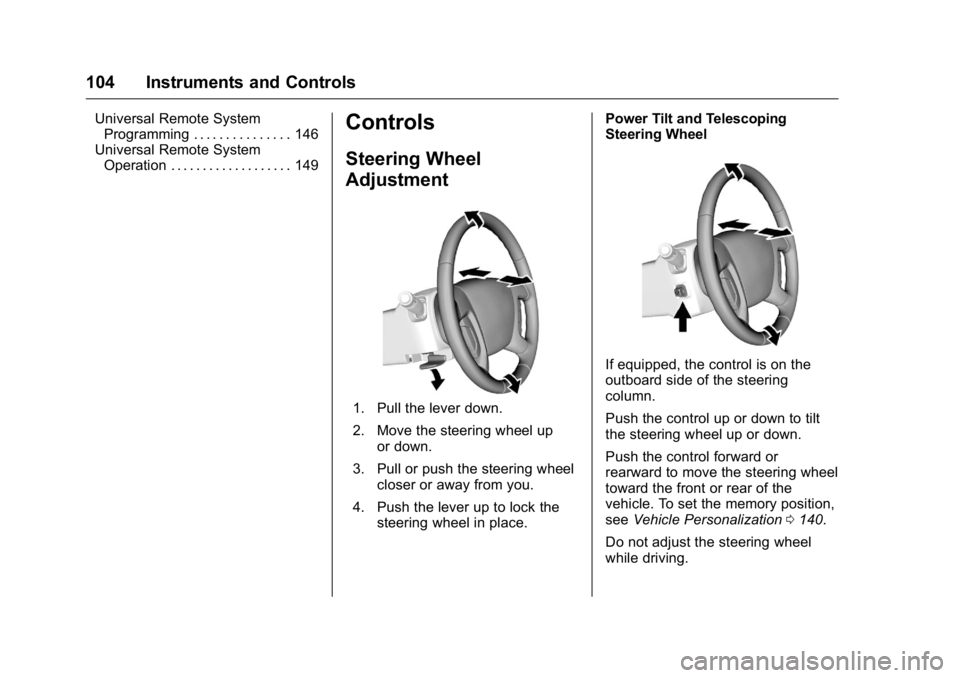
1. Pull the lever down.
2. Move the steering wheel up
or down.
3. Pull or push the steering wheel closer or away from you.
4. Push the lever up to lock the steering wheel in place. Power Tilt and Telescoping
Steering Wheel
If equipped, the control is on the
outboard side of the steering
column.
Push the control up or down to tilt
the steering wheel up or down.
Push the control forward or
rearward to move the steering wheel
toward the front or rear of the
vehicle. To set the memory position,
see
Vehicle Personalization 0140.
Do not adjust the steering wheel
while driving.
Page 106 of 371
GMC Acadia/Acadia Denali Owner Manual (GMNA-Localizing-U.S./Canada/
Mexico-9159268) - 2016 - crc - 7/31/15
Instruments and Controls 105
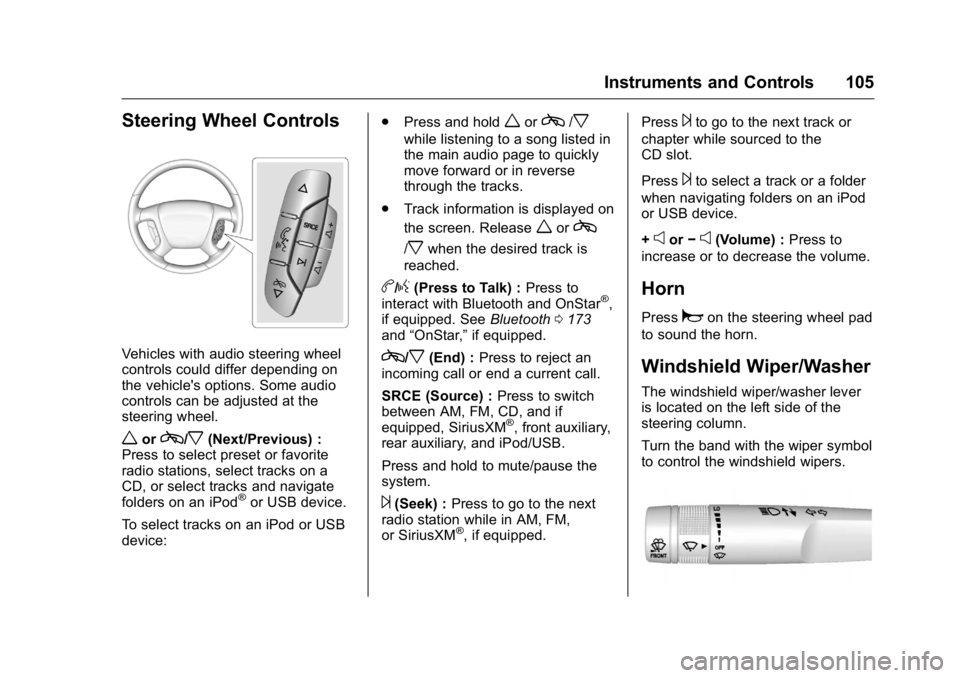
Steering Wheel Controls
Vehicles with audio steering wheel
controls could differ depending on
the vehicle's options. Some audio
controls can be adjusted at the
steering wheel.
worc/x(Next/Previous) :
Press to select preset or favorite
radio stations, select tracks on a
CD, or select tracks and navigate
folders on an iPod
®or USB device.
To select tracks on an iPod or USB
device: .
Press and hold
worc/x
while listening to a song listed in
the main audio page to quickly
move forward or in reverse
through the tracks.
. Track information is displayed on
the screen. Release
worc
/xwhen the desired track is
reached.
b/g(Press to Talk) : Press to
interact with Bluetooth and OnStar®,
if equipped. See Bluetooth0173
and “OnStar,” if equipped.
c/x(End) :Press to reject an
incoming call or end a current call.
SRCE (Source) : Press to switch
between AM, FM, CD, and if
equipped, SiriusXM
®, front auxiliary,
rear auxiliary, and iPod/USB.
Press and hold to mute/pause the
system.
¨(Seek) : Press to go to the next
radio station while in AM, FM,
or SiriusXM
®, if equipped. Press
¨to go to the next track or
chapter while sourced to the
CD slot.
Press
¨to select a track or a folder
when navigating folders on an iPod
or USB device.
+
eor −e(Volume) : Press to
increase or to decrease the volume.
Horn
Pressaon the steering wheel pad
to sound the horn.
Windshield Wiper/Washer
The windshield wiper/washer lever
is located on the left side of the
steering column.
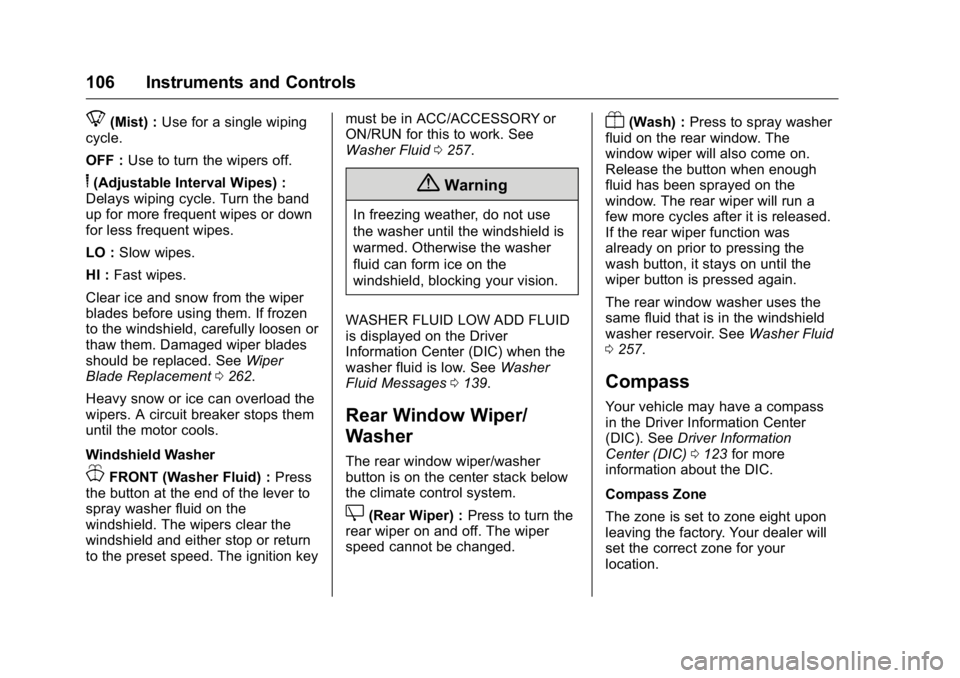
Turn the band with the wiper symbol
to control the windshield wipers.
Page 107 of 371
GMC Acadia/Acadia Denali Owner Manual (GMNA-Localizing-U.S./Canada/
Mexico-9159268) - 2016 - crc - 7/31/15
106 Instruments and Controls
8(Mist) :Use for a single wiping
cycle.
OFF : Use to turn the wipers off.
6(Adjustable Interval Wipes) :
Delays wiping cycle. Turn the band
up for more frequent wipes or down
for less frequent wipes.
LO : Slow wipes.
HI : Fast wipes.
Clear ice and snow from the wiper
blades before using them. If frozen
to the windshield, carefully loosen or
thaw them. Damaged wiper blades
should be replaced. See Wiper
Blade Replacement 0262.
Heavy snow or ice can overload the
wipers. A circuit breaker stops them
until the motor cools.
Windshield Washer
JFRONT (Washer Fluid) : Press
the button at the end of the lever to
spray washer fluid on the
windshield. The wipers clear the
windshield and either stop or return
to the preset speed. The ignition key must be in ACC/ACCESSORY or
ON/RUN for this to work. See
Washer Fluid
0257.
{Warning
In freezing weather, do not use
the washer until the windshield is
warmed. Otherwise the washer
fluid can form ice on the
windshield, blocking your vision.
WASHER FLUID LOW ADD FLUID
is displayed on the Driver
Information Center (DIC) when the
washer fluid is low. See Washer
Fluid Messages 0139.
Rear Window Wiper/
Washer
The rear window wiper/washer
button is on the center stack below
the climate control system.
Z(Rear Wiper) : Press to turn the
rear wiper on and off. The wiper
speed cannot be changed.
Y(Wash) : Press to spray washer
fluid on the rear window. The
window wiper will also come on.
Release the button when enough
fluid has been sprayed on the
window. The rear wiper will run a
few more cycles after it is released.
If the rear wiper function was
already on prior to pressing the
wash button, it stays on until the
wiper button is pressed again.
The rear window washer uses the
same fluid that is in the windshield
washer reservoir. See Washer Fluid
0 257.
Compass
Your vehicle may have a compass
in the Driver Information Center
(DIC). See Driver Information
Center (DIC) 0123 for more
information about the DIC.
Compass Zone
The zone is set to zone eight upon
leaving the factory. Your dealer will
set the correct zone for your
location.