fog light GMC ACADIA 2016 User Guide
[x] Cancel search | Manufacturer: GMC, Model Year: 2016, Model line: ACADIA, Model: GMC ACADIA 2016Pages: 371, PDF Size: 5.28 MB
Page 184 of 371
GMC Acadia/Acadia Denali Owner Manual (GMNA-Localizing-U.S./Canada/
Mexico-9159268) - 2016 - crc - 7/31/15
Climate Controls 183
Air Delivery Mode Control :Turn
clockwise or counterclockwise to
change the current airflow mode.
By positioning the right knob
between two modes, a combination
of those two modes is selected.
H(Vent) : Air is directed to the
instrument panel outlets.
)(Bi-Level) : Air is divided
between the instrument panel and
floor outlets. Some air is directed
toward the windshield and side
window outlets. Cooler air is
directed to the upper outlets and
warmer air to the floor outlets.
6(Floor) : Air is directed to the
floor outlets, with some of the air
directed to the windshield, side
window, and second row floor
outlets. In this mode, the system
automatically selects outside air.
Recirculation cannot be selected
while in floor mode.
-(Defog) : This clears the
windows of fog or moisture. Air is
directed to the windshield, floor
outlets, and side window vents.
When this mode is selected, the system turns off recirculation and
runs the air conditioning unless the
outside temperature is less than 4 °
C (40 °F). Recirculation cannot be
selected while in the defog mode.
Do not drive the vehicle until all the
windows are clear.
0(Defrost) :
This clears the
windshield of fog or frost more
quickly. Air is directed to the
windshield and side window vents,
with some to the floor vents. In this
mode, outside air is pulled inside
the vehicle. Recirculation cannot be
selected while in the defrost mode.
The air conditioning system runs
automatically in this setting, unless
the outside temperature is less than
4 °C (40 °F). Do not drive the
vehicle until all windows are clear.
#(Air Conditioning) : Press to
turn the air conditioning system on
or off. An indicator light comes on
when A/C is on. The air conditioning
system does not operate when the
outside temperature is below 4 °C
(40 °F). The indicator light flashes
three times and turns off when outside conditions affect air
conditioning operation. This is
normal.
For quicker cool down on hot days:
1. Open the windows to let hot air escape.
2. Select
Hmode.
3. Select
#.
4. Select the coolest temperature.
5. Select the highest fan speed.
6. Close the windows after the hot air has escaped.
7. Once the vehicle's interior temperature is below the
outside temperature, select
@mode for faster cooling.
Using recirculation for long periods
of time could cause the air inside
the vehicle to become too dry. To
prevent this from happening, after
the inside of the vehicle has cooled,
turn the recirculation mode off.
Page 185 of 371
GMC Acadia/Acadia Denali Owner Manual (GMNA-Localizing-U.S./Canada/
Mexico-9159268) - 2016 - crc - 7/31/15
184 Climate Controls
The air conditioning system
removes moisture from the air, so
water might drip under the vehicle
while idling or after turning off the
engine. This is normal.
@(Recirculation) :Press to turn
the recirculation mode on or off. An
indicator light comes on when
recirculation is on. When the engine
is turned off, the recirculation mode
automatically turns off and must be
re-selected when the engine is
turned on again.
This mode recirculates and helps to
quickly cool the air inside the
vehicle. It can be used to reduce the
outside air and odors that may enter
the vehicle.
The recirculation mode cannot be
used with floor, defrost, or defogging
modes. If recirculation is selected in
these modes, the indicator flashes
three times and turns off. The air
conditioning also comes on when
this mode is activated unless the
outside air temperature is less than
4 °C (40 °F). While in recirculation
mode the windows can fog when
the weather is cold and damp. To clear the fog, select either the defog
or defrost mode and increase the
fan speed.
REAR (Rear Climate Control) :
Press to turn the rear heating and
air conditioning on or off. See
Rear
Climate Control System 0189 or
Rear Climate Control System (with
Rear Seat Audio) 0190.
Rear Window Defogger
The rear window defogger uses a
warming grid to remove fog from the
rear window.
1(Rear Window Defogger) :
Press to turn the rear window
defogger on or off. An indicator light
on the button comes on to show that
the rear window defogger is on. Do
not drive the vehicle until all the
windows are clear.
The defogger only works when the
vehicle is in ON/RUN. The defogger
will turn off if the vehicle is
turned off.
If equipped with heated outside
rearview mirrors, fog or frost is
cleared from the surface of the
mirror when
1is pressed.
Caution
Using a razor blade or sharp
object to clear the inside rear
window can damage the rear
window defogger. Repairs would
not be covered by the vehicle
warranty. Do not clear the inside
rear window with sharp objects.
Page 186 of 371
GMC Acadia/Acadia Denali Owner Manual (GMNA-Localizing-U.S./Canada/
Mexico-9159268) - 2016 - crc - 7/31/15
Climate Controls 185
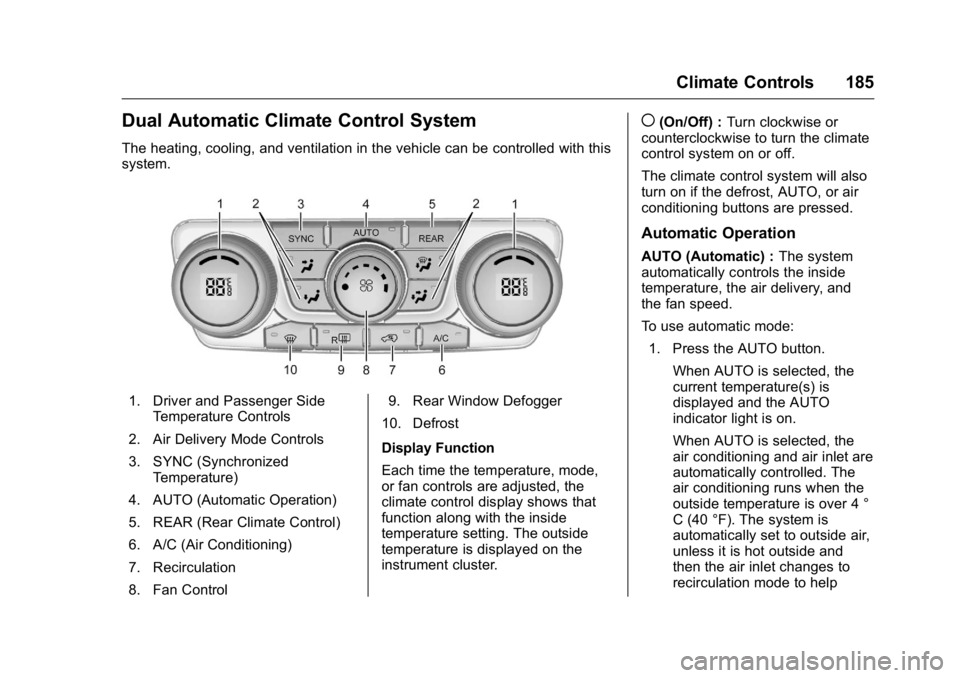
Dual Automatic Climate Control System
The heating, cooling, and ventilation in the vehicle can be controlled with this
system.
1. Driver and Passenger SideTemperature Controls
2. Air Delivery Mode Controls
3. SYNC (Synchronized Temperature)
4. AUTO (Automatic Operation)
5. REAR (Rear Climate Control)
6. A/C (Air Conditioning)
7. Recirculation
8. Fan Control 9. Rear Window Defogger
10. Defrost
Display Function
Each time the temperature, mode,
or fan controls are adjusted, the
climate control display shows that
function along with the inside
temperature setting. The outside
temperature is displayed on the
instrument cluster.
((On/Off) : Turn clockwise or
counterclockwise to turn the climate
control system on or off.
The climate control system will also
turn on if the defrost, AUTO, or air
conditioning buttons are pressed.
Automatic Operation
AUTO (Automatic) : The system
automatically controls the inside
temperature, the air delivery, and
the fan speed.
To use automatic mode:
1. Press the AUTO button.
When AUTO is selected, the
current temperature(s) is
displayed and the AUTO
indicator light is on.
When AUTO is selected, the
air conditioning and air inlet are
automatically controlled. The
air conditioning runs when the
outside temperature is over 4 °
C (40 °F). The system is
automatically set to outside air,
unless it is hot outside and
then the air inlet changes to
recirculation mode to help
Page 188 of 371
GMC Acadia/Acadia Denali Owner Manual (GMNA-Localizing-U.S./Canada/
Mexico-9159268) - 2016 - crc - 7/31/15
Climate Controls 187
H(Vent) :Air is directed to the
instrument panel outlets.
)(Bi-Level) : Air is divided
between the instrument panel and
floor outlets. Some air is directed
towards the windshield and side
window outlets. Cooler air is
directed to the upper outlets and
warmer air to the floor outlets.
6(Floor) : Air is directed to the
floor outlets, with some of the air
directed to the windshield, side
window, and second row floor
outlets. In this mode, the system
uses outside air.
-(Defog) : This mode clears the
windows of fog or moisture. Air is
directed to the windshield, floor
outlets, and side window vents.
When this mode is selected, the
system turns off recirculation and
runs the air conditioning compressor
unless the outside temperature is
less than 4 °C (40 °F). Do not drive
the vehicle until all the windows are
clear.
0(Defrost) : Press to turn the
defrost on or off. This mode quickly
clears the windshield of fog or frost. Air is directed to the windshield,
side window, and floor vents. In this
mode, outside air is pulled inside
the vehicle. The air conditioning
system runs automatically in this
setting, unless the outside
temperature is less than 4 °C (40
°F).
Do not drive the vehicle until all the
windows are clear.
Air Conditioning
A/C (Air Conditioning) :
Press to
turn the air conditioning on and off.
An indicator light comes on when
A/C is on.
The A/C does not work when the
outside temperature is below 4 °C
(40 °F). If A/C is pressed the
indicator flashes three times and
turns off to show that the A/C mode
is not available. If the A/C is on and
the outside temperature drops
below a temperature which is too
cool for air conditioning to be
effective, the A/C indicator turns off
to show that the A/C mode has
been canceled. On hot days, open the windows
briefly to let hot inside air escape.
This helps reduce the time it takes
for the interior of the vehicle to
cool down.
The air conditioning system
removes moisture from the air, so
water might drip under the vehicle
while idling or after turning off the
engine. This is normal.
@(Recirculation) :
Press to
alternate between recirculating air
inside the vehicle or pulling in
outside air. An indicator light comes
on when recirculation mode is
active. With each ignition cycle, the
recirculation mode is reset to
automatic. When the engine is
turned on, outside air or
recirculation is automatically
selected for better performance.
When recirculation is activated, the
air conditioning compressor comes
on and helps to quickly cool the air
inside the vehicle. This mode also
helps to reduce the outside air and
odors that may enter the vehicle.
Page 189 of 371
GMC Acadia/Acadia Denali Owner Manual (GMNA-Localizing-U.S./Canada/
Mexico-9159268) - 2016 - crc - 7/31/15
188 Climate Controls
The recirculation mode cannot be
used with floor, defog, or defrosting
modes. If recirculation is selected in
these modes, the indicator flashes
three times and turns off. While in
recirculation mode the windows can
fog when the weather is cold and
damp. To clear the fog, select either
the defog or defrost mode and
increase the fan speed.
REAR :Press to turn the rear
heating and air conditioning on or
off. See Rear Climate Control
System 0189 orRear Climate
Control System (with Rear Seat
Audio) 0190.
Rear Window Defogger
The rear window defogger uses a
warming grid to remove fog from the
rear window.
R
1(Rear Window Defogger) :
Press to turn the rear window
defogger on or off. An indicator light
on the button comes on to show that
the rear window defogger is on. Do
not drive the vehicle until all the
windows are clear. The defogger only works when the
vehicle is in ON/RUN. The defogger
will turn off if the vehicle is
turned off.
If equipped with heated outside
rearview mirrors, fog or frost is
cleared from the surface of the
mirror when the rear window defog
button is pressed.
Caution
Using a razor blade or sharp
object to clear the inside rear
window can damage the rear
window defogger. Repairs would
not be covered by the vehicle
warranty. Do not clear the inside
rear window with sharp objects.
Sensors
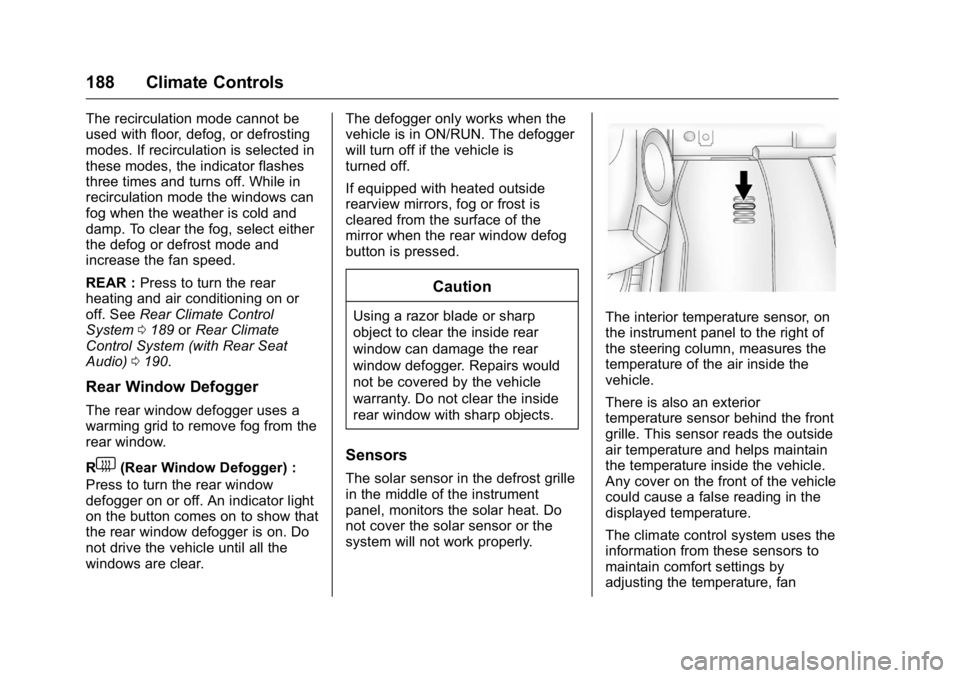
The solar sensor in the defrost grille
in the middle of the instrument
panel, monitors the solar heat. Do
not cover the solar sensor or the
system will not work properly.
The interior temperature sensor, on
the instrument panel to the right of
the steering column, measures the
temperature of the air inside the
vehicle.
There is also an exterior
temperature sensor behind the front
grille. This sensor reads the outside
air temperature and helps maintain
the temperature inside the vehicle.
Any cover on the front of the vehicle
could cause a false reading in the
displayed temperature.
The climate control system uses the
information from these sensors to
maintain comfort settings by
adjusting the temperature, fan
Page 274 of 371
GMC Acadia/Acadia Denali Owner Manual (GMNA-Localizing-U.S./Canada/
Mexico-9159268) - 2016 - crc - 7/31/15
Vehicle Care 273
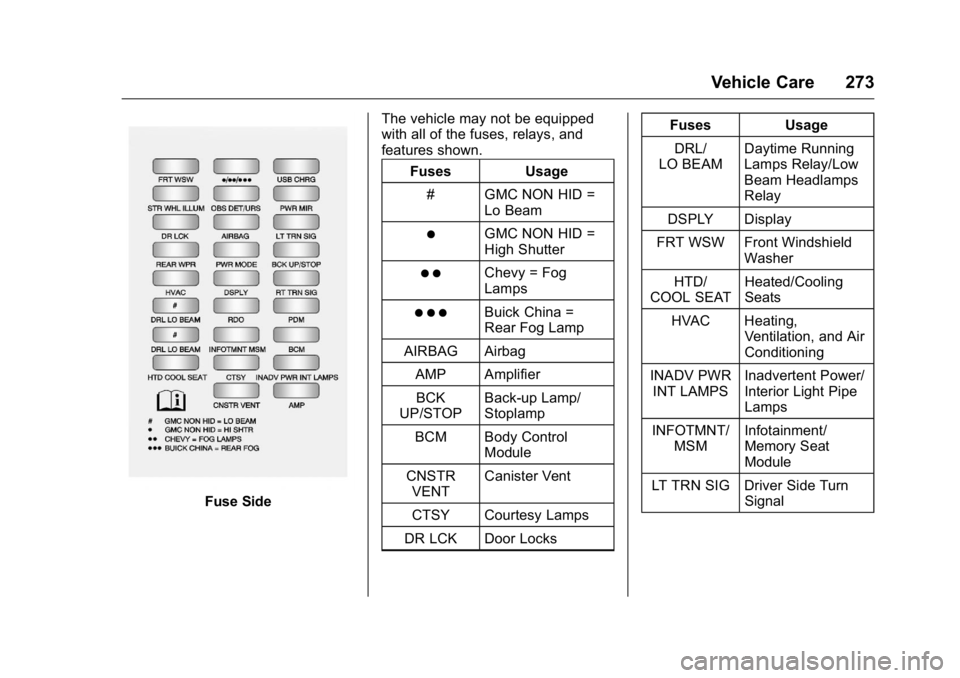
Fuse SideThe vehicle may not be equipped
with all of the fuses, relays, and
features shown.
Fuses Usage
# GMC NON HID = Lo Beam
)GMC NON HID =
High Shutter
) )Chevy = Fog
Lamps
) ) )Buick China =
Rear Fog Lamp
AIRBAG Airbag
AMP AmplifierBCK
UP/STOP Back-up Lamp/
Stoplamp
BCM Body Control Module
CNSTR VENT Canister Vent
CTSY Courtesy Lamps
DR LCK Door Locks Fuses Usage
DRL/
LO BEAM Daytime Running
Lamps Relay/Low
Beam Headlamps
Relay
DSPLY Display
FRT WSW Front Windshield Washer
HTD/
COOL SEAT Heated/Cooling
Seats
HVAC Heating, Ventilation, and Air
Conditioning
INADV PWR INT LAMPS Inadvertent Power/
Interior Light Pipe
Lamps
INFOTMNT/ MSM Infotainment/
Memory Seat
Module
LT TRN SIG Driver Side Turn Signal
Page 317 of 371
GMC Acadia/Acadia Denali Owner Manual (GMNA-Localizing-U.S./Canada/
Mexico-9159268) - 2016 - crc - 7/31/15
316 Vehicle Care
.Do not use solvents or cleaners
containing solvents.
Interior Glass
To clean, use a terry cloth fabric
dampened with water. Wipe droplets
left behind with a clean dry cloth.
If necessary, use a commercial
glass cleaner after cleaning with
plain water.
Caution
To prevent scratching, never use
abrasive cleaners on automotive
glass. Abrasive cleaners or
aggressive cleaning may damage
the rear window defogger.
Cleaning the windshield with water
during the first three to six months
of ownership will reduce tendency
to fog.
Speaker Covers
Vacuum around a speaker cover
gently, so that the speaker will not
be damaged. Clean spots with water
and mild soap.
Coated Moldings
Coated moldings should be cleaned.
. When lightly soiled, wipe with a
sponge or soft, lint-free cloth
dampened with water.
. When heavily soiled, use warm
soapy water.
Fabric/Carpet/Suede
Start by vacuuming the surface
using a soft brush attachment. If a
rotating vacuum brush attachment is
being used, only use it on the floor
carpet. Before cleaning, gently
remove as much of the soil as
possible:
.Gently blot liquids with a paper
towel. Continue blotting until no
more soil can be removed.
. For solid soils, remove as much
as possible prior to vacuuming.
To clean:
1. Saturate a clean, lint-free colorfast cloth with water.
Microfiber cloth is
recommended to prevent lint
transfer to the fabric or carpet. 2. Remove excess moisture by
gently wringing until water does
not drip from the cleaning cloth.
3. Start on the outside edge of the soil and gently rub toward the
center. Fold the cleaning cloth
to a clean area frequently to
prevent forcing the soil in to the
fabric.
4. Continue gently rubbing the soiled area until there is no
longer any color transfer from
the soil to the cleaning cloth.
5. If the soil is not completely removed, use a mild soap
solution followed only by plain
water.
If the soil is not completely
removed, it may be necessary to
use a commercial upholstery
cleaner or spot lifter. Test a small
hidden area for colorfastness before
using a commercial upholstery
cleaner or spot lifter. If ring
formation occurs, clean the entire
fabric or carpet.
After cleaning, use a paper towel to
blot excess moisture.
Page 362 of 371

GMC Acadia/Acadia Denali Owner Manual (GMNA-Localizing-U.S./Canada/
Mexico-9159268) - 2016 - crc - 7/31/15
Index 361
AudioTheft-Deterrent Feature . . . . . . . 158
Audio Players CD . . . . . . . . . . . . . . . . . . . . . . . . . . . 166
MP3 . . . . . . . . . . . . . . . . . . . . . . . . . . 168
Automatic Dimming Mirrors . . . . . . . . . . . . . . . . 42
Door Locks . . . . . . . . . . . . . . . . . . . . . 34
Transmission . . . . . . . . . . . . . . . . . .211
Transmission Fluid . . . . . . . . . . . 249
Automatic Transmission
Manual Mode . . . . . . . . . . . . . . . . . 213
Shift Lock Control FunctionCheck . . . . . . . . . . . . . . . . . . . . . . . 261
Auxiliary Devices . . . . . . . . . . . . . . . . . . . . . . . 169
B
Battery
Load Management . . . . . . . . . . . . 155
Power Protection . . . . . . . . . . . . . 156
Voltage and ChargingMessages . . . . . . . . . . . . . . . . . . . 131
Battery - North America . . . . 260, 304
Blade Replacement, Wiper . . . . . 262
Bluetooth Overview . . . . . . . . . . . . . . . . . . . . . 173
Brake System Warning Light . . . . . . . . .118 Brakes . . . . . . . . . . . . . . . . . . . . . . . . . . 258
Antilock . . . . . . . . . . . . . . . . . . . . . . . 215
Assist . . . . . . . . . . . . . . . . . . . . . . . . . 216
Fluid . . . . . . . . . . . . . . . . . . . . . . . . . . 259
Parking . . . . . . . . . . . . . . . . . . . . . . . 216
System Messages . . . . . . . . . . . . 131
Braking . . . . . . . . . . . . . . . . . . . . . . . . . 195
Break-In, New Vehicle . . . . . . . . . . 204
Bulb Replacement . . . . . . . . . . . . . . 264
Fog Lamps . . . . . . . . . . . . . . . . . . . 152
Headlamp Aiming . . . . . . . . . . . . . 263
Headlamps . . . . . . . . . . . . . . . . . . . 264
License Plate Lamps . . . . . . . . . 264
Buying New Tires . . . . . . . . . . . . . . . 289
C
Calibration . . . . . . . . . . . . . . . . . . . . . . 106
California Fuel Requirements . . . . . . . . . . . 230
Perchlorate MaterialsRequirements . . . . . . . . . . . . . . . 242
California Proposition
65 Warning . . . . . . . . . .242, 260, 304
Camera Rear Vision (RVC) . . . . . . . . . . . . 221
Canadian Vehicle Owners . . . . . . . . 2
Capacities and Specifications . . . . . . . . . . . . . . . . . 334 Carbon Monoxide
Engine Exhaust . . . . . . . . . . . . . . . 210
Liftgate . . . . . . . . . . . . . . . . . . . . . . . . . 35
Winter Driving . . . . . . . . . . . . . . . . 198
Cargo Cover . . . . . . . . . . . . . . . . . . . . . . . . . 100
Management System . . . . . . . . . 100
Tie-Downs . . . . . . . . . . . . . . . . . . . . 100
Caution, Danger, and Warning . . . . 2
CD Player . . . . . . . . . . . . . . . . . . . . . . 166
Center Console Storage . . . . . . . . . 99
Chains, Tire . . . . . . . . . . . . . . . . . . . . 294
Charging System Light . . . . . . . . . 116
Check Ignition Transmission Lock . . . 261
Malfunction IndicatorEngine Light . . . . . . . . . . . . . . . . .117
Child Restraints Infants and Young Children . . . . . 80
Lower Anchors and Tethersfor Children . . . . . . . . . . . . . . . . . . . 86
Older Children . . . . . . . . . . . . . . . . . . 79
Securing . . . . . . . . . . . . . . . . . . . . 92, 94
Systems . . . . . . . . . . . . . . . . . . . . . . . . 83
Circuit Breakers . . . . . . . . . . . . . . . . 265
Cleaning
Exterior Care . . . . . . . . . . . . . . . . . .311
Interior Care . . . . . . . . . . . . . . . . . . 315
Page 364 of 371

GMC Acadia/Acadia Denali Owner Manual (GMNA-Localizing-U.S./Canada/
Mexico-9159268) - 2016 - crc - 7/31/15
Index 363
Driving (cont'd)If the Vehicle is Stuck . . . . . . . . . 200
Loss of Control . . . . . . . . . . . . . . . 196
Off-Road Recovery . . . . . . . . . . . 196
Vehicle Load Limits . . . . . . . . . . . 200
Wet Roads . . . . . . . . . . . . . . . . . . . 197
Winter . . . . . . . . . . . . . . . . . . . . . . . . 198
Dual Automatic Climate Control System . . . . . . . . . . . . . . . . 185
E
Electrical Equipment,
Add-On . . . . . . . . . . . . . . . . . . . . . . . 240
Electrical System
Engine Compartment FuseBlock . . . . . . . . . . . . . . . . . . . . . . . . 266
Fuses and Circuit Breakers . . . 265
Instrument Panel Fuse Block . . . . . . . . . . . . . . . . . . . . . . . . 272
Overload . . . . . . . . . . . . . . . . . . . . . 265
Emergency OnStar
®. . . . . . . . . . . . . . . . . . . . . . 351
Engine Air Cleaner/Filter . . . . . . . . . . . . . 250
Check and Service Engine
Soon Light . . . . . . . . . . . . . . . . . . .117
Compartment Overview . . . . . . . 245
Coolant . . . . . . . . . . . . . . . . . . . . . . . 252 Engine (cont'd)
Coolant Temperature
Gauge . . . . . . . . . . . . . . . . . . . . . . .113
Coolant Temperature
Warning Light . . . . . . . . . . . . . . . 121
Cooling System . . . . . . . . . . . . . . . 251
Cooling System Messages . . . 132
Cover . . . . . . . . . . . . . . . . . . . . . . . . . 246
Drive Belt Routing . . . . . . . . . . . . 335
Exhaust . . . . . . . . . . . . . . . . . . . . . . 210
Heater . . . . . . . . . . . . . . . . . . . . . . . . 207
Oil Life System . . . . . . . . . . . . . . . 249
Oil Messages . . . . . . . . . . . . . . . . . 133
Oil Pressure Light . . . . . . . . . . . . 121
Overheated Protection Operating Mode . . . . . . . . . . . . . 256
Overheating . . . . . . . . . . . . . . . . . . 255
Power Messages . . . . . . . . . . . . . 133
Running While Parked . . . . . . . . .211
Starting . . . . . . . . . . . . . . . . . . . . . . . 206
Entry Lighting . . . . . . . . . . . . . . . . . . . 154
Equipment, Towing . . . . . . . . . . . . . 238
Event Data Recorders . . . . . . . . . . 348
Extender, Safety Belt . . . . . . . . . . . . 65
Exterior Lamp Controls . . . . . . . . . 150
F
Features Memory . . . . . . . . . . . . . . . . . . . . . . . . . 11
Filter, Engine Air Cleaner . . . . . . . . . . . 250
Flash-to-Pass . . . . . . . . . . . . . . . . . . . 151
Flashers, Hazard Warning . . . . . . 152
Flat Tire . . . . . . . . . . . . . . . . . . . . . . . . 294 Changing . . . . . . . . . . . . . . . . . . . . . 295
Floor Mats . . . . . . . . . . . . . . . . . . . . . . 318
Fluid
Automatic Transmission . . . . . . 249
Brakes . . . . . . . . . . . . . . . . . . . . . . . . 259
Power Steering . . . . . . . . . . . . . . . 257
Washer . . . . . . . . . . . . . . . . . . . . . . . 257
Fog Lamps Bulb Replacement . . . . . . . . . . . . 152
Folding Mirrors . . . . . . . . . . . . . . . . . . 41
Forward Collision Alert (FCA) System . . . . . . . . . . . . . . . . . 224
Frequency Statement Radio . . . . . . . . . . . . . . . . . . . . . . . . . 346
Front Fog Lamp Light . . . . . . . . . . . . . . . . . . . . . . . . . . 122
Front Seats Adjustment . . . . . . . . . . . . . . . . . . . . . 49
Heated and Cooled . . . . . . . . . . . . . 53
Fuel . . . . . . . . . . . . . . . . . . . . . . . . . . . . 229
Page 366 of 371

GMC Acadia/Acadia Denali Owner Manual (GMNA-Localizing-U.S./Canada/
Mexico-9159268) - 2016 - crc - 7/31/15
Index 365
J
Jump Starting - NorthAmerica . . . . . . . . . . . . . . . . . . . . . . . 304
K
Key and Lock Messages . . . . . . . . 134
Keyless EntryRemote (RKE) System . . . . . . . . . 29
Keys . . . . . . . . . . . . . . . . . . . . . . . . . . . . . 27
L
Labeling, Tire Sidewall . . . . . . . . . . 277
Lamps Courtesy . . . . . . . . . . . . . . . . . . . . . . 153
Dome . . . . . . . . . . . . . . . . . . . . . . . . . 153
Exterior Controls . . . . . . . . . . . . . . 150
License Plate . . . . . . . . . . . . . . . . . 264
Malfunction Indicator . . . . . . . . . .117
Messages . . . . . . . . . . . . . . . . . . . . 134
Reading . . . . . . . . . . . . . . . . . . . . . . 154
Lane Departure
Warning (LDW) . . . . . . . . . . . . . . . . 228
Lane Departure Warning Light . . . . . . . . . . . . . . . . . . . . . . . . . . 120
Lap-Shoulder Belt . . . . . . . . . . . . . . . 61
LATCH System
Replacing Parts after aCrash . . . . . . . . . . . . . . . . . . . . . . . . . 92 LATCH, Lower Anchors and
Tethers for Children . . . . . . . . . . . . 86
LED Lighting . . . . . . . . . . . . . . . . . . . . 264
Liftgate . . . . . . . . . . . . . . . . . . . . . . . . . . 35
Lighting Delayed Entry . . . . . . . . . . . . . . . . 155
Delayed Exit . . . . . . . . . . . . . . . . . . 155
Entry . . . . . . . . . . . . . . . . . . . . . . . . . 154
Illumination Control . . . . . . . . . . . 153
LED . . . . . . . . . . . . . . . . . . . . . . . . . . 264
Parade Dimming . . . . . . . . . . . . . . 155
Lights . . . . . . . . . . . . . . . . . . . . . . . . . . . 120 Airbag Readiness . . . . . . . . . . . . . .115
Antilock Brake System(ABS) Warning . . . . . . . . . . . . . . .119
Brake System Warning . . . . . . . .118
Charging System . . . . . . . . . . . . . .116
Cruise Control . . . . . . . . . . . . . . . . 123
Engine Coolant
Temperature Warning . . . . . . . 121
Engine Oil Pressure . . . . . . . . . . 121
Flash-to-Pass . . . . . . . . . . . . . . . . . 151
Front Fog Lamp . . . . . . . . . . . . . . 122
High-Beam On . . . . . . . . . . . . . . . . 122
High/Low Beam Changer . . . . . 150
Lane Departure Warning . . . . . . 120
Safety Belt Reminders . . . . . . . . .114
Security . . . . . . . . . . . . . . . . . . . . . . 122 Lights (cont'd)
StabiliTrak
®Indicator . . . . . . . . . 120
Tire Pressure . . . . . . . . . . . . . . . . . 121
Tow/Haul Mode . . . . . . . . . . . . . . . 120
Locks Automatic Door . . . . . . . . . . . . . . . . . 34
Delayed Locking . . . . . . . . . . . . . . . . 33
Door . . . . . . . . . . . . . . . . . . . . . . . . . . . . 32
Lockout Protection . . . . . . . . . . . . . . 34
Power Door . . . . . . . . . . . . . . . . . . . . . 33
Safety . . . . . . . . . . . . . . . . . . . . . . . . . . 34
Loss of Control . . . . . . . . . . . . . . . . . 196
Lower Anchors and Tethers for Children (LATCH
System) . . . . . . . . . . . . . . . . . . . . . . . . 86
Lumbar Adjustment . . . . . . . . . . . . . . 50 Front Seats . . . . . . . . . . . . . . . . . . . . . 50
M
MaintenanceRecords . . . . . . . . . . . . . . . . . . . . . . 332
Maintenance and Care Additional . . . . . . . . . . . . . . . . . . . . . 327
Maintenance Schedule . . . . . . . . . 321
Recommended Fluids andLubricants . . . . . . . . . . . . . . . . . . . 330
Malfunction Indicator Lamp . . . . . 117
Manual Mode . . . . . . . . . . . . . . . . . . . 213
Memory Features . . . . . . . . . . . . . . . . 11