audio GMC ACADIA 2016 Owner's Guide
[x] Cancel search | Manufacturer: GMC, Model Year: 2016, Model line: ACADIA, Model: GMC ACADIA 2016Pages: 371, PDF Size: 5.28 MB
Page 179 of 371
GMC Acadia/Acadia Denali Owner Manual (GMNA-Localizing-U.S./Canada/
Mexico-9159268) - 2016 - crc - 7/31/15
178 Infotainment System
.Pressb/gto answer the call.
. Press
c/xto ignore a call.
Call Waiting
Call waiting must be supported on
the cell phone and enabled by the
wireless service carrier.
.Press
b/gto answer an
incoming call when another call
is active. The original call is
placed on hold.
. Press
b/gagain to return to
the original call.
. To ignore the incoming call, no
action is required.
. Press
c/xto disconnect the
current call and switch to the call
on hold.
Three-Way Calling
Three-way calling must be
supported on the cell phone and
enabled by the wireless service
carrier.
1. While on a call, press
b/g.
2. Say “Three-way call.” 3. Use the dial or call command
to dial the number of the third
party to be called.
4. Once the call is connected, press
b/gto link all callers
together.
Ending a Call
Pressc/xto end a call.
Muting a Call
During a call, all sounds from inside
the vehicle can be muted so that the
person on the other end of the call
cannot hear them.
. To mute a call, press
b/g, and
then say “Mute call.”
. To cancel mute, press
b/g,
and then say “Un-mute call.”
Transferring a Call
Audio can be transferred between
the Bluetooth system and the cell
phone.
The cell phone must be paired and
connected with the Bluetooth
system before a call can be transferred. The connection process
can take up to two minutes after the
ignition is turned to ON/RUN.
Transferring Audio from the
Bluetooth System to a Cell Phone
During a call with the audio in the
vehicle:
1. Press
b/g.
2. Say “Transfer Call.”
Transferring Audio to the
Bluetooth System from a Cell
Phone
During a call with the audio on the
cell phone, press
b/g. The audio
transfers to the vehicle. If the audio
does not transfer to the vehicle, use
the audio transfer feature on the cell
phone. See your cell phone
manufacturer's user guide for more
information.
Voice Pass-Thru
Voice pass-thru allows access to the
voice recognition commands on the
cell phone. See your cell phone
manufacturer's user guide to see if
the cell phone supports this feature.
Page 183 of 371
GMC Acadia/Acadia Denali Owner Manual (GMNA-Localizing-U.S./Canada/
Mexico-9159268) - 2016 - crc - 7/31/15
182 Climate Controls
Climate Controls
Climate Control Systems
Climate Control Systems . . . . . 182
Dual Automatic ClimateControl System . . . . . . . . . . . . . 185
Rear Climate Control System . . . . . . . . . . . . . . . . . . . . . . 189
Rear Climate Control System (with Rear Seat Audio) . . . . . . 190
Air Vents
Air Vents . . . . . . . . . . . . . . . . . . . . . 191
Maintenance
Passenger Compartment AirFilter . . . . . . . . . . . . . . . . . . . . . . . . 192
Climate Control Systems
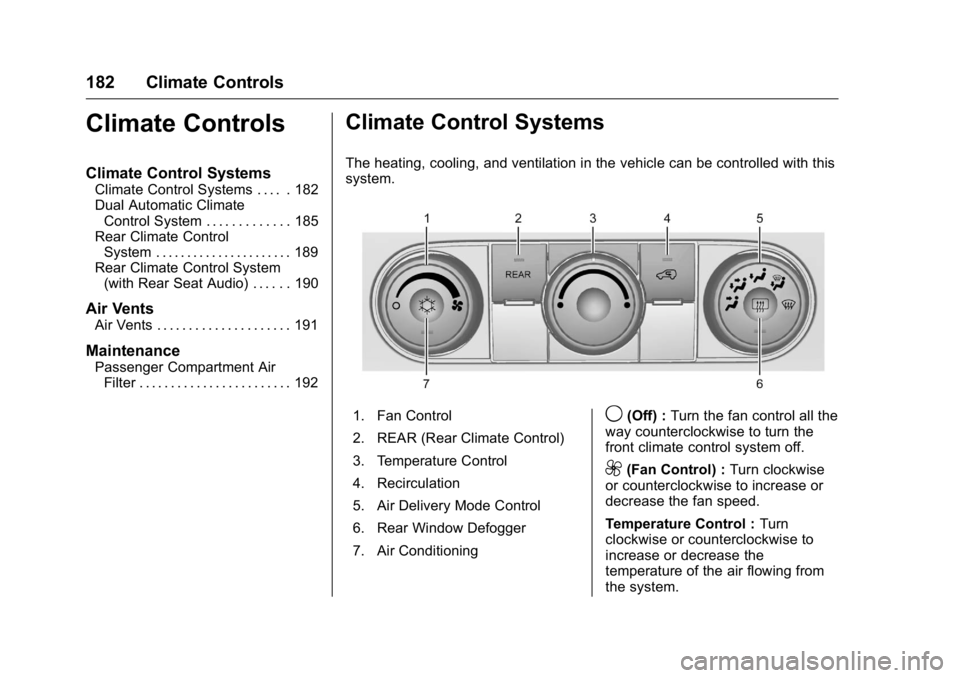
The heating, cooling, and ventilation in the vehicle can be controlled with this
system.
1. Fan Control
2. REAR (Rear Climate Control)
3. Temperature Control
4. Recirculation
5. Air Delivery Mode Control
6. Rear Window Defogger
7. Air Conditioning9(Off) : Turn the fan control all the
way counterclockwise to turn the
front climate control system off.
9(Fan Control) : Turn clockwise
or counterclockwise to increase or
decrease the fan speed.
Temperature Control : Turn
clockwise or counterclockwise to
increase or decrease the
temperature of the air flowing from
the system.
Page 185 of 371
GMC Acadia/Acadia Denali Owner Manual (GMNA-Localizing-U.S./Canada/
Mexico-9159268) - 2016 - crc - 7/31/15
184 Climate Controls
The air conditioning system
removes moisture from the air, so
water might drip under the vehicle
while idling or after turning off the
engine. This is normal.
@(Recirculation) :Press to turn
the recirculation mode on or off. An
indicator light comes on when
recirculation is on. When the engine
is turned off, the recirculation mode
automatically turns off and must be
re-selected when the engine is
turned on again.
This mode recirculates and helps to
quickly cool the air inside the
vehicle. It can be used to reduce the
outside air and odors that may enter
the vehicle.
The recirculation mode cannot be
used with floor, defrost, or defogging
modes. If recirculation is selected in
these modes, the indicator flashes
three times and turns off. The air
conditioning also comes on when
this mode is activated unless the
outside air temperature is less than
4 °C (40 °F). While in recirculation
mode the windows can fog when
the weather is cold and damp. To clear the fog, select either the defog
or defrost mode and increase the
fan speed.
REAR (Rear Climate Control) :
Press to turn the rear heating and
air conditioning on or off. See
Rear
Climate Control System 0189 or
Rear Climate Control System (with
Rear Seat Audio) 0190.
Rear Window Defogger
The rear window defogger uses a
warming grid to remove fog from the
rear window.
1(Rear Window Defogger) :
Press to turn the rear window
defogger on or off. An indicator light
on the button comes on to show that
the rear window defogger is on. Do
not drive the vehicle until all the
windows are clear.
The defogger only works when the
vehicle is in ON/RUN. The defogger
will turn off if the vehicle is
turned off.
If equipped with heated outside
rearview mirrors, fog or frost is
cleared from the surface of the
mirror when
1is pressed.
Caution
Using a razor blade or sharp
object to clear the inside rear
window can damage the rear
window defogger. Repairs would
not be covered by the vehicle
warranty. Do not clear the inside
rear window with sharp objects.
Page 189 of 371
GMC Acadia/Acadia Denali Owner Manual (GMNA-Localizing-U.S./Canada/
Mexico-9159268) - 2016 - crc - 7/31/15
188 Climate Controls
The recirculation mode cannot be
used with floor, defog, or defrosting
modes. If recirculation is selected in
these modes, the indicator flashes
three times and turns off. While in
recirculation mode the windows can
fog when the weather is cold and
damp. To clear the fog, select either
the defog or defrost mode and
increase the fan speed.
REAR :Press to turn the rear
heating and air conditioning on or
off. See Rear Climate Control
System 0189 orRear Climate
Control System (with Rear Seat
Audio) 0190.
Rear Window Defogger
The rear window defogger uses a
warming grid to remove fog from the
rear window.
R
1(Rear Window Defogger) :
Press to turn the rear window
defogger on or off. An indicator light
on the button comes on to show that
the rear window defogger is on. Do
not drive the vehicle until all the
windows are clear. The defogger only works when the
vehicle is in ON/RUN. The defogger
will turn off if the vehicle is
turned off.
If equipped with heated outside
rearview mirrors, fog or frost is
cleared from the surface of the
mirror when the rear window defog
button is pressed.
Caution
Using a razor blade or sharp
object to clear the inside rear
window can damage the rear
window defogger. Repairs would
not be covered by the vehicle
warranty. Do not clear the inside
rear window with sharp objects.
Sensors
The solar sensor in the defrost grille
in the middle of the instrument
panel, monitors the solar heat. Do
not cover the solar sensor or the
system will not work properly.
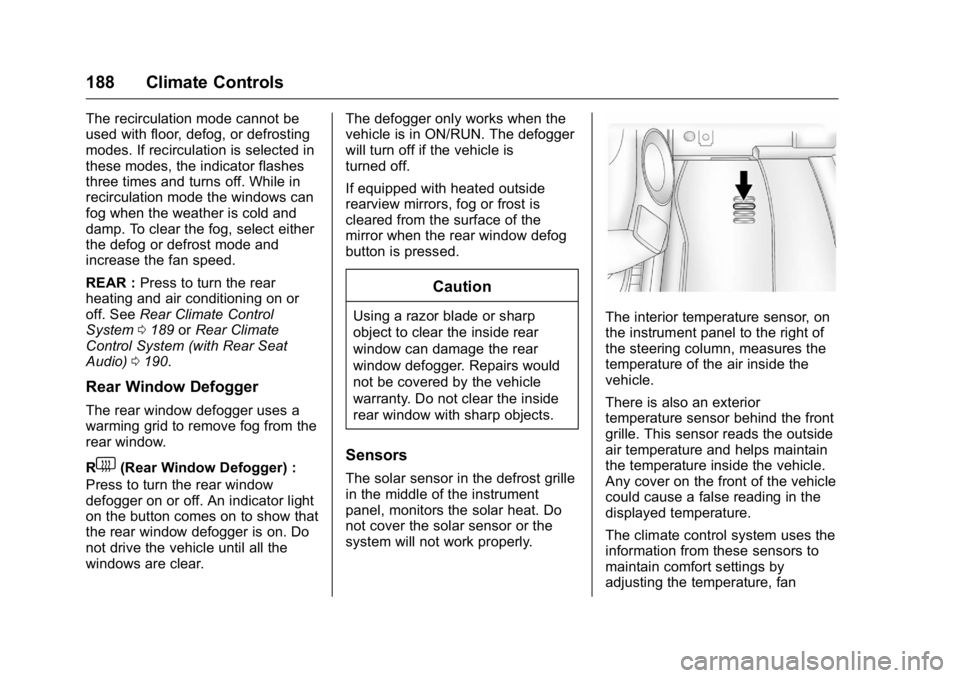
The interior temperature sensor, on
the instrument panel to the right of
the steering column, measures the
temperature of the air inside the
vehicle.
There is also an exterior
temperature sensor behind the front
grille. This sensor reads the outside
air temperature and helps maintain
the temperature inside the vehicle.
Any cover on the front of the vehicle
could cause a false reading in the
displayed temperature.
The climate control system uses the
information from these sensors to
maintain comfort settings by
adjusting the temperature, fan
Page 191 of 371
GMC Acadia/Acadia Denali Owner Manual (GMNA-Localizing-U.S./Canada/
Mexico-9159268) - 2016 - crc - 7/31/15
190 Climate Controls
Temperature Control :Turn
clockwise or counterclockwise to
increase or decrease the airflow
temperature.
Air Delivery Mode Control : Turn
to the desired mode to change the
airflow direction.
H (Vent) : Air is directed through
the overhead outlets.
) (Bi-Level) : Air is directed
through the rear floor outlets, as
well as the overhead outlets.
6 (Floor) : Air is directed through
the floor outlets. The rear system
floor outlets are located under the
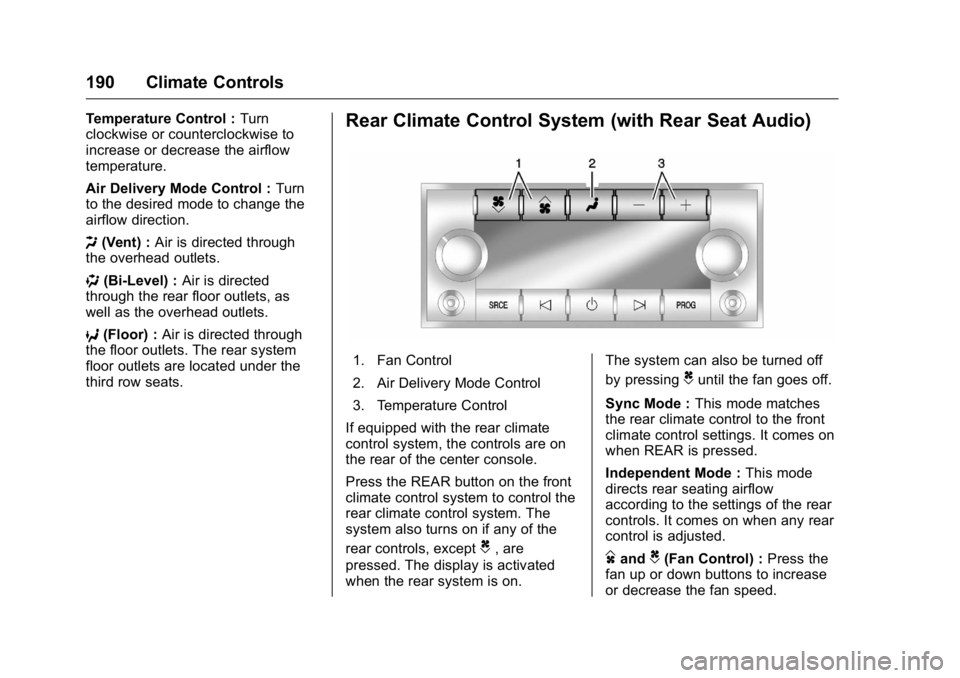
third row seats.Rear Climate Control System (with Rear Seat Audio)
1. Fan Control
2. Air Delivery Mode Control
3. Temperature Control
If equipped with the rear climate
control system, the controls are on
the rear of the center console.
Press the REAR button on the front
climate control system to control the
rear climate control system. The
system also turns on if any of the
rear controls, except
C, are
pressed. The display is activated
when the rear system is on. The system can also be turned off
by pressing
Cuntil the fan goes off.
Sync Mode : This mode matches
the rear climate control to the front
climate control settings. It comes on
when REAR is pressed.
Independent Mode : This mode
directs rear seating airflow
according to the settings of the rear
controls. It comes on when any rear
control is adjusted.
DandC(Fan Control) : Press the
fan up or down buttons to increase
or decrease the fan speed.
Page 209 of 371
GMC Acadia/Acadia Denali Owner Manual (GMNA-Localizing-U.S./Canada/
Mexico-9159268) - 2016 - crc - 7/31/15
208 Driving and Operating
Warning (Continued)
it overheat and cause a fire,
property damage, electric
shock, and injury.
. Do not operate the vehicle
with the heater cord
permanently attached to the
vehicle. Possible heater
cord and thermostat
damage could occur.
. While in use, do not let the
heater cord touch vehicle
parts or sharp edges. Never
close the hood on the
heater cord.
. Before starting the vehicle,
unplug the cord, reattach
the cover to the plug, and
securely fasten the cord.
Keep the cord away from
any moving parts.
4. Before starting the engine, be sure to unplug and store the
cord as it was before to keep it away from moving engine
parts. If you do not, it could be
damaged.
The length of time the heater should
remain plugged in depends on
several factors. Ask a dealer in the
area where you will be parking the
vehicle for the best advice on this.
Retained Accessory
Power (RAP)
These vehicle accessories can be
used for up to 10 minutes after the
ignition key is turned off:
. Audio System
. Power Windows
. Sunroof (if equipped)
Power to the windows and sunroof
will work up to 10 minutes or until a
door is opened.
The radio continues to work for
10 minutes or until the driver door is
opened.
For an additional 10 minutes of
operation, close all the doors and
turn the key to ON/RUN and then
back to LOCK/OFF. All these features will work when the
key is in the ON/RUN or ACC/
ACCESSORY positions.
Shifting Into Park
1. Hold the brake pedal down and
set the parking brake. See
Parking Brake 0216 for more
information.
2. Move the shift lever into P (Park) by holding in the
button on the shift lever and
pushing the shift lever all the
way toward the front of the
vehicle.
3. Turn the ignition key to LOCK/OFF.
4. Remove the key and take it with you. If you can leave the
vehicle with the ignition key in
your hand, the vehicle is in
P (Park).
Page 355 of 371
GMC Acadia/Acadia Denali Owner Manual (GMNA-Localizing-U.S./Canada/
Mexico-9159268) - 2016 - crc - 7/31/15
354 OnStar
2. Say“My number.” System
responds: “Your OnStar
Hands-Free Calling number is,”
then says the number.
End a Call
Press=. System responds: “Call
ended.”
Verify Minutes and Expiration
Press=and say “Minutes” then
“Verify” to check how many minutes
remain and their expiration date.
Diagnostics
Advanced Diagnostics provides a
status of the vehicle’ s key systems
with a monthly e-mail, or by
pressing
Q. Real-time Diagnostic
Alerts can be sent by email or
text.The Proactive Alerts feature (if
available) can help predict and alert
of potential upcoming maintenance
issues with select components on
the vehicle, before they become a
problem.
OnStar can also monitor and report
tire pressure, if vehicle is equipped
with a Tire Pressure Monitoring
System.
OnStar Additional
Information
In-Vehicle Audio Messages
Audio messages may play important
information at the following times:
. Prior to vehicle purchase. Press
Qto set up an account.
. With the OnStar Basic Plan,
every 60 days.
. After change in ownership and
at 90 days.
Transferring Service
PressQto request account transfer
eligibility information. The Advisor
can cancel or change account
information.
Selling/Transferring the
Vehicle
Call 1-888-4ONSTAR
(1-888-466-7827) immediately to
terminate your OnStar services if
the vehicle is disposed of, sold,
transferred, or if the lease ends.
Page 362 of 371

GMC Acadia/Acadia Denali Owner Manual (GMNA-Localizing-U.S./Canada/
Mexico-9159268) - 2016 - crc - 7/31/15
Index 361
AudioTheft-Deterrent Feature . . . . . . . 158
Audio Players CD . . . . . . . . . . . . . . . . . . . . . . . . . . . 166
MP3 . . . . . . . . . . . . . . . . . . . . . . . . . . 168
Automatic Dimming Mirrors . . . . . . . . . . . . . . . . 42
Door Locks . . . . . . . . . . . . . . . . . . . . . 34
Transmission . . . . . . . . . . . . . . . . . .211
Transmission Fluid . . . . . . . . . . . 249
Automatic Transmission
Manual Mode . . . . . . . . . . . . . . . . . 213
Shift Lock Control FunctionCheck . . . . . . . . . . . . . . . . . . . . . . . 261
Auxiliary Devices . . . . . . . . . . . . . . . . . . . . . . . 169
B
Battery
Load Management . . . . . . . . . . . . 155
Power Protection . . . . . . . . . . . . . 156
Voltage and ChargingMessages . . . . . . . . . . . . . . . . . . . 131
Battery - North America . . . . 260, 304
Blade Replacement, Wiper . . . . . 262
Bluetooth Overview . . . . . . . . . . . . . . . . . . . . . 173
Brake System Warning Light . . . . . . . . .118 Brakes . . . . . . . . . . . . . . . . . . . . . . . . . . 258
Antilock . . . . . . . . . . . . . . . . . . . . . . . 215
Assist . . . . . . . . . . . . . . . . . . . . . . . . . 216
Fluid . . . . . . . . . . . . . . . . . . . . . . . . . . 259
Parking . . . . . . . . . . . . . . . . . . . . . . . 216
System Messages . . . . . . . . . . . . 131
Braking . . . . . . . . . . . . . . . . . . . . . . . . . 195
Break-In, New Vehicle . . . . . . . . . . 204
Bulb Replacement . . . . . . . . . . . . . . 264
Fog Lamps . . . . . . . . . . . . . . . . . . . 152
Headlamp Aiming . . . . . . . . . . . . . 263
Headlamps . . . . . . . . . . . . . . . . . . . 264
License Plate Lamps . . . . . . . . . 264
Buying New Tires . . . . . . . . . . . . . . . 289
C
Calibration . . . . . . . . . . . . . . . . . . . . . . 106
California Fuel Requirements . . . . . . . . . . . 230
Perchlorate MaterialsRequirements . . . . . . . . . . . . . . . 242
California Proposition
65 Warning . . . . . . . . . .242, 260, 304
Camera Rear Vision (RVC) . . . . . . . . . . . . 221
Canadian Vehicle Owners . . . . . . . . 2
Capacities and Specifications . . . . . . . . . . . . . . . . . 334 Carbon Monoxide
Engine Exhaust . . . . . . . . . . . . . . . 210
Liftgate . . . . . . . . . . . . . . . . . . . . . . . . . 35
Winter Driving . . . . . . . . . . . . . . . . 198
Cargo Cover . . . . . . . . . . . . . . . . . . . . . . . . . 100
Management System . . . . . . . . . 100
Tie-Downs . . . . . . . . . . . . . . . . . . . . 100
Caution, Danger, and Warning . . . . 2
CD Player . . . . . . . . . . . . . . . . . . . . . . 166
Center Console Storage . . . . . . . . . 99
Chains, Tire . . . . . . . . . . . . . . . . . . . . 294
Charging System Light . . . . . . . . . 116
Check Ignition Transmission Lock . . . 261
Malfunction IndicatorEngine Light . . . . . . . . . . . . . . . . .117
Child Restraints Infants and Young Children . . . . . 80
Lower Anchors and Tethersfor Children . . . . . . . . . . . . . . . . . . . 86
Older Children . . . . . . . . . . . . . . . . . . 79
Securing . . . . . . . . . . . . . . . . . . . . 92, 94
Systems . . . . . . . . . . . . . . . . . . . . . . . . 83
Circuit Breakers . . . . . . . . . . . . . . . . 265
Cleaning
Exterior Care . . . . . . . . . . . . . . . . . .311
Interior Care . . . . . . . . . . . . . . . . . . 315
Page 363 of 371

GMC Acadia/Acadia Denali Owner Manual (GMNA-Localizing-U.S./Canada/
Mexico-9159268) - 2016 - crc - 7/31/15
362 Index
Climate Control Systems . . . . . . . 182Air Conditioning . . . . . . . . . . . . . . 182
Dual Automatic . . . . . . . . . . . . . . . 185
Heating . . . . . . . . . . . . . . . . . . . . . . . 182
Rear . . . . . . . . . . . . . . . . . . . . . 189, 190
Clock . . . . . . . . . . . . . . . . . . . . . . . . . . . 108
Cluster, Instrument . . . . . . . . . . . . . 111
Collision Damage Repair . . . . . . . 343
Compact Spare Tire . . . . . . . . . . . . 302
Compartments Storage . . . . . . . . . . . . . . . . . . . . . . . . . 98
Compass . . . . . . . . . . . . . . . . . . . . . . . 106
Connections OnStar
®. . . . . . . . . . . . . . . . . . . . . . 352
Control Traction and Electronic
Stability . . . . . . . . . . . . . . . . . . . . . 217
Control of a Vehicle . . . . . . . . . . . . . 195
Controller Rear Audio . . . . . . . . . . . . . . . . . . . 172
Convenience Net . . . . . . . . . . . . . . . 101
Convex Mirrors . . . . . . . . . . . . . . . . . . 40
Coolant
Engine . . . . . . . . . . . . . . . . . . . . . . . . 252
Engine Temperature Gauge . . .113
Engine TemperatureWarning Light . . . . . . . . . . . . . . . 121
Cooling System . . . . . . . . . . . . . . . . . 251 Cooling System (cont'd)
Engine Messages . . . . . . . . . . . . 132
Courtesy Lamps . . . . . . . . . . . . . . . . 153
Courtesy Transportation Program . . . . . . . . . . . . . . . . . . . . . . . 342
Cover Cargo . . . . . . . . . . . . . . . . . . . . . . . . . 100
Engine . . . . . . . . . . . . . . . . . . . . . . . . 246
Cruise Control . . . . . . . . . . . . . . . . . . 219
Light . . . . . . . . . . . . . . . . . . . . . . . . . . 123
Messages . . . . . . . . . . . . . . . . . . . . 132
Cupholders . . . . . . . . . . . . . . . . . . . . . . 98
Customer Assistance . . . . . . . . . . . 338 Offices . . . . . . . . . . . . . . . . . . . . . . . . 338
Text Telephone (TTY)
Users . . . . . . . . . . . . . . . . . . . . . . . 338
Customer Information Service Publications
Ordering Information . . . . . . . . 345
Customer Satisfaction Procedure . . . . . . . . . . . . . . . . . . . . . 336
D
Damage Repair, Collision . . . . . . . 343
Danger, Warning, and Caution . . . . 2
Data Recorders, Event . . . . . . . . . 348
Daytime Running Lamps/Automatic Headlamp
System . . . . . . . . . . . . . . . . . . . . . . . . 151 Defensive Driving . . . . . . . . . . . . . . . 194
Delayed Entry Lighting . . . . . . . . . 155
Delayed Exit Lighting . . . . . . . . . . . 155
Delayed Headlamps . . . . . . . . . . . . 151
Delayed Locking . . . . . . . . . . . . . . . . . 33
Devices
Auxiliary . . . . . . . . . . . . . . . . . . . . . . 169
Diagnostics OnStar
®. . . . . . . . . . . . . . . . . . . . . . 354
Distracted Driving . . . . . . . . . . . . . . . 194
Dome Lamps . . . . . . . . . . . . . . . . . . . 153
Door Ajar Messages . . . . . . . . . . . . . . . 132
Delayed Locking . . . . . . . . . . . . . . . . 33
Locks . . . . . . . . . . . . . . . . . . . . . . . . . . . 32
Power Locks . . . . . . . . . . . . . . . . . . . . 33
Drive Belt Routing, Engine . . . . . . 335
Drive Systems All-Wheel Drive . . . . . . . . . . 215, 261
Driver Information Center (DIC) . . . . . . . . . . . . . . . . . . 123
Driving Characteristics andTowing Tips . . . . . . . . . . . . . . . . . 233
Defensive . . . . . . . . . . . . . . . . . . . . . 194
Drunk . . . . . . . . . . . . . . . . . . . . . . . . . 194
For Better Fuel Economy . . . . . . . 25
Hill and Mountain Roads . . . . . . 198
Page 368 of 371

GMC Acadia/Acadia Denali Owner Manual (GMNA-Localizing-U.S./Canada/
Mexico-9159268) - 2016 - crc - 7/31/15
Index 367
P
Parade Dimming . . . . . . . . . . . . . . . . 155
ParkShifting Into . . . . . . . . . . . . . . . . . . . 208
Shifting Out of . . . . . . . . . . . . . . . . 209
Tilt Mirrors . . . . . . . . . . . . . . . . . . . . . . 42
Parking Brake . . . . . . . . . . . . . . . . . . . . . . . . . 216
Brake and P (Park)Mechanism Check . . . . . . . . . . 262
Over Things That Burn . . . . . . . 210
Parking Assist . . . . . . . . . . . . . . . . . . 223
Passenger Airbag Status Indicator . . . . . . . . . . . . . . . . . . . . . . 115
Passenger Compartment Air Filter . . . . . . . . . . . . . . . . . . . . . . . . . . 192
Passenger Sensing System . . . . . 73
Perchlorate Materials Requirements, California . . . . . . 242
Personalization Vehicle . . . . . . . . . . . . . . . . . . . . . . . 140
Phone Bluetooth . . . . . . . . . . . . . . . . . . . . . 173
Power
Door Locks . . . . . . . . . . . . . . . . . . . . . 33
Mirrors . . . . . . . . . . . . . . . . . . . . . . . . . . 41
Outlets . . . . . . . . . . . . . . . . . . . . . . . 108
Protection, Battery . . . . . . . . . . . . 156 Power (cont'd)
Retained Accessory (RAP) . . . 208
Seat Adjustment . . . . . . . . . . . . . . . . 50
Steering Fluid . . . . . . . . . . . . . . . . . 257
Windows . . . . . . . . . . . . . . . . . . . . . . . 43
Pregnancy, Using Safety Belts . . . 65
Privacy Vehicle Data Recording . . . . . . . 347
Program
Courtesy Transportation . . . . . . 342
Proposition 65 Warning,
California . . . . . . . . . . . .242, 260, 304
R
Radio Frequency Statement . . . . 346
Radio Reception . . . . . . . . . . . . . . . . 165
RadiosAM-FM Radio . . . . . . . . . . . . . . . . . 162
Satellite . . . . . . . . . . . . . . . . . . . . . . . 165
Reading Lamps . . . . . . . . . . . . . . . . . 154
Rear Audio Controller (RAC) . . . 172
Rear Climate Control System . . . . . . . . . . . . . . . . . . . 189, 190
Rear Seat Audio (RSA) System . . . . . . . . . . . . . . . . . . . . . . . . 171
Rear Seats . . . . . . . . . . . . . . . . . . . . . . 54
Rear Vision Camera (RVC) . . . . . 221
Rear Window Washer/Wiper . . . . 106 Rearview Mirrors . . . . . . . . . . . . . . . . 42
Automatic Dimming . . . . . . . . . . . . . 43
Reclining Seatbacks . . . . . . . . . . . . . 51
Recommended Fluids and Lubricants . . . . . . . . . . . . . . . . . . . . . 330
Records Maintenance . . . . . . . . . . . . . . . . . . 332
Recreational Vehicle Towing . . . . 307
Reimbursement Program, GM Mobility . . . . . . . . . . . . . . . . . . . 339
Remote Keyless Entry (RKE)
System . . . . . . . . . . . . . . . . . . . . . . . . . 29
Remote Vehicle Start . . . . . . . . . . . . 31
Replacement Bulbs . . . . . . . . . . . . . 264
Replacement Parts Airbags . . . . . . . . . . . . . . . . . . . . . . . . . 78
Maintenance . . . . . . . . . . . . . . . . . . 331
Replacing Airbag System . . . . . . . . 78
Replacing LATCH System Parts after a Crash . . . . . . . . . . . . . 92
Replacing Safety Belt System
Parts after a Crash . . . . . . . . . . . . . 66
Reporting Safety Defects Canadian Government . . . . . . . . 347
General Motors . . . . . . . . . . . . . . . 347
U.S. Government . . . . . . . . . . . . . 346
Restraints Where to Put . . . . . . . . . . . . . . . . . . . 84