223 GMC ACADIA 2016 Owner's Manual
[x] Cancel search | Manufacturer: GMC, Model Year: 2016, Model line: ACADIA, Model: GMC ACADIA 2016Pages: 371, PDF Size: 5.28 MB
Page 24 of 371
GMC Acadia/Acadia Denali Owner Manual (GMNA-Localizing-U.S./Canada/
Mexico-9159268) - 2016 - crc - 7/31/15
In Brief 23
to detect the lane markings. The
LDW light,
@, is green if a lane
marking is detected. If the vehicle
departs the lane without using a turn
signal in that direction, the light will
change to amber and flash. In
addition, beeps will sound.
See Lane Departure Warning (LDW)
0 228.
Side Blind Zone
Alert (SBZA)
If equipped, SBZA will detect
moving vehicles in the next lane
over in the vehicle's side blind zone
area. When this happens, the SBZA
display will light up in the
corresponding outside side mirror
and will flash if the turn signal is on.
See Side Blind Zone Alert (SBZA)
0 226.
Rear Vision
Camera (RVC)
If equipped, RVC displays a view of
the area behind the vehicle, on the
infotainment system display, when
the vehicle is shifted into
R (Reverse).
See Rear Vision Camera (RVC)
0 221.
Rear Cross Traffic Alert
(RCTA) System
If equipped, the RCTA system uses
a triangle with an arrow displayed
on the RVC screen to warn of traffic
behind your vehicle that may cross
your vehicle's path while in
R (Reverse). In addition, beeps will
sound.
See “Rear Cross Traffic Alert
(RCTA)” underRear Vision Camera
(RVC) 0221.
Parking Assist
If equipped, Rear Parking Assist
(RPA) uses sensors on the rear
bumper to assist with parking and avoiding objects while in
R (Reverse). It operates at speeds
less than 8 km/h (5 mph) and uses
audible beeps to provide distance
and system information.
Keep the sensors on the vehicle's
rear bumper clean to ensure proper
operation.
See
Parking Assist 0223.
Power Outlets
The vehicle has 12-volt accessory
power outlets, which can be used to
plug in electrical equipment, such as
a cell phone or MP3 player.
The power outlets are located:
.
On the center stack below the
climate controls.
. Inside the center console.
. At the rear of the center console.
. In the rear cargo area.
To use the outlets, remove the
cover.
See Power Outlets 0108.
Page 126 of 371
GMC Acadia/Acadia Denali Owner Manual (GMNA-Localizing-U.S./Canada/
Mexico-9159268) - 2016 - crc - 7/31/15
Instruments and Controls 125
PARK ASSIST
If your vehicle has the Rear Parking
Assist (RPA) system, press the
vehicle information button until
PARK ASSIST displays. This
display allows the system to be
turned on or off. Once in this
display, press the set/reset button to
select between ON or OFF. If you
choose ON, the system will be
turned on. If you choose OFF, the
system will be turned off. The RPA
system automatically turns back on
after each vehicle start. When the
RPA system is turned off and the
vehicle is shifted out of P (Park), the
DIC will display the PARK ASSIST
OFF message as a reminder that
the system has been turned off. See
Object Detection System Messages
0135 andParking Assist 0223.
REAR CROSS TRAFFIC ALERT
If the vehicle has the Rear Cross
Traffic Alert (RCTA) system, this
display allows the system to be
turned on or off. Once in this
display, press the set/reset button to
select between ON or OFF. If you
choose ON, the system will be turned on. If you choose OFF, the
system will be turned off. When the
RCTA system is turned off, the DIC
will display the REAR CROSS
TRAFFIC ALERT SYSTEM OFF
message as a reminder that the
system has been turned off. See
Object Detection System Messages
0
135 andRear Vision Camera
(RVC) 0221.
UNITS
Press the vehicle information button
until UNITS displays. This display
allows you to select between metric
or English units of measurement.
Once in this display, press the set/
reset button to select between
METRIC or ENGLISH units. All of
the vehicle information will then be
displayed in the unit of
measurement selected.
FRONT TIRES or REAR TIRES
On vehicles with the Tire Pressure
Monitor System (TPMS), the
pressure for each tire can be viewed
in the DIC. The tire pressure will be
shown in either kilopascals (kPa) or
pounds per square inch (psi). Press
the vehicle information button until the DIC displays FRONT
TIRES kPa (PSI) LEFT ##
RIGHT ##. Press the vehicle
information button again until the
DIC displays REAR TIRES kPa
(PSI) LEFT ## RIGHT ##.
If a low tire pressure condition is
detected by the system while
driving, a message advising you to
add air to a specific tire will appear
in the display. See
Tire Pressure
0 282 andTire Messages 0137.
If the tire pressure display shows
dashes instead of a value, there
may be a problem with your vehicle.
If this consistently occurs, see your
dealer for service.
COMPASS ZONE SETTING
This display will be available if the
vehicle has a compass. See
Compass 0106.
COMPASS RECALIBRATION
This display will be available if the
vehicle has a compass. See
Compass 0106.
Blank Display
This display shows no information.
Page 136 of 371
GMC Acadia/Acadia Denali Owner Manual (GMNA-Localizing-U.S./Canada/
Mexico-9159268) - 2016 - crc - 7/31/15
Instruments and Controls 135
Object Detection System
Messages
FORWARD COLLISION ALERT
UNAVAILABLE
This message displays when
attempting to activate the Forward
Collision Alert (FCA) system when it
is temporarily unavailable. The FCA
system does not need service.
This message could be due to the
camera being blocked. Cleaning the
outside of the windshield behind the
rearview mirror may correct the
issue.
FRT CAMERA BLOCKED
CLEAN WINDSHIELD
This message displays when the
camera is blocked. Cleaning the
outside of the windshield behind the
rearview mirror may correct the
issue. The Lane Departure Warning
system will not operate. Forward
Collision Alert (FCA) may not work
or may not work as well.
LANE DEPARTURE SYS
UNAVAILABLE
This message displays when
attempting to activate the Lane
Departure Warning (LDW) system
when it is temporarily unavailable.
The LDW system does not need
service.
This message could be due to the
camera being blocked. Cleaning the
outside of the windshield behind the
rearview mirror may correct the
issue.
PARK ASST BLOCKED SEE
OWNERS MANUAL
This message displays if there is
something interfering with the Rear
Parking Assist (RPA) system. See
Parking Assist0223.
PARK ASSIST OFF
After the vehicle has been started,
this message displays to remind the
driver that the RPA system has
been turned off. To turn the RPA
system back on, see Parking Assist
0 223.
REAR CROSS TRAFFIC
ALERT SYSTEM OFF
If the vehicle has the Rear Cross
Traffic Alert (RCTA) system, this
message displays when the RCTA
system has been turned off. See
Rear Vision Camera (RVC) 0221
and Driver Information Center (DIC)
0 123.
SERVICE FRONT CAMERA
If this message remains on after
continued driving, the vehicle needs
service. Do not use the Lane
Departure Warning (LDW) and
Forward Collision Alert (FCA)
features. Take the vehicle to your
dealer.
SERVICE PARK ASSIST
This message displays if there is a
problem with the Rear Parking
Assist (RPA) system. Do not use
this system to help you park. See
Parking Assist 0223. See your
dealer for service.
Page 194 of 371
GMC Acadia/Acadia Denali Owner Manual (GMNA-Localizing-U.S./Canada/
Mexico-9159268) - 2016 - crc - 7/31/15
Driving and Operating 193
Driving and
Operating
Driving Information
Distracted Driving . . . . . . . . . . . . 194
Defensive Driving . . . . . . . . . . . . . 194
Drunk Driving . . . . . . . . . . . . . . . . . 194
Control of a Vehicle . . . . . . . . . . . 195
Braking . . . . . . . . . . . . . . . . . . . . . . . 195
Steering . . . . . . . . . . . . . . . . . . . . . . 195
Off-Road Recovery . . . . . . . . . . . 196
Loss of Control . . . . . . . . . . . . . . . 196
Driving on Wet Roads . . . . . . . . 197
Hill and Mountain Roads . . . . . 198
Winter Driving . . . . . . . . . . . . . . . . 198
If the Vehicle Is Stuck . . . . . . . . 200
Vehicle Load Limits . . . . . . . . . . . 200
Starting and Operating
New Vehicle Break-In . . . . . . . . . 204
Ignition Positions . . . . . . . . . . . . . 204
Starting the Engine . . . . . . . . . . . 206
Engine Heater . . . . . . . . . . . . . . . . 207
Retained AccessoryPower (RAP) . . . . . . . . . . . . . . . . 208
Shifting Into Park . . . . . . . . . . . . . 208
Shifting out of Park . . . . . . . . . . . 209
Parking over Things That Burn . . . . . . . . . . . . . . . . . . . 210
Engine Exhaust
Engine Exhaust . . . . . . . . . . . . . . 210
Running the Vehicle WhileParked . . . . . . . . . . . . . . . . . . . . . . 211
Automatic Transmission
Automatic Transmission . . . . . . 211
Manual Mode . . . . . . . . . . . . . . . . . 213
Tow/Haul Mode . . . . . . . . . . . . . . . 214
Drive Systems
All-Wheel Drive . . . . . . . . . . . . . . . 215
Brakes
Antilock BrakeSystem (ABS) . . . . . . . . . . . . . . . 215
Parking Brake . . . . . . . . . . . . . . . . 216
Brake Assist . . . . . . . . . . . . . . . . . . 216
Hill Start Assist (HSA) . . . . . . . . 217
Ride Control Systems
Traction Control/Electronic Stability Control . . . . . . . . . . . . . 217
Cruise Control
Cruise Control . . . . . . . . . . . . . . . . 219
Driver Assistance Systems
Rear Vision Camera (RVC) . . . 221
Parking Assist . . . . . . . . . . . . . . . . 223
Forward Collision Alert (FCA)System . . . . . . . . . . . . . . . . . . . . . . 224 Side Blind Zone
Alert (SBZA) . . . . . . . . . . . . . . . . 226
Lane Departure Warning (LDW) . . . . . . . . . . . . . 228
Fuel
Fuel . . . . . . . . . . . . . . . . . . . . . . . . . . 229
California FuelRequirements . . . . . . . . . . . . . . . 230
Fuels in Foreign Countries . . . 230
Fuel Additives . . . . . . . . . . . . . . . . 231
Filling the Tank . . . . . . . . . . . . . . . 231
Filling a Portable Fuel Container . . . . . . . . . . . . . . . . . . . 232
Trailer Towing
General TowingInformation . . . . . . . . . . . . . . . . . . 233
Driving Characteristics and Towing Tips . . . . . . . . . . . . . . . . . 233
Trailer Towing . . . . . . . . . . . . . . . . 236
Towing Equipment . . . . . . . . . . . . 238
Conversions and Add-Ons
Add-On Electrical Equipment . . . . . . . . . . . . . . . . . . 240
Page 223 of 371
GMC Acadia/Acadia Denali Owner Manual (GMNA-Localizing-U.S./Canada/
Mexico-9159268) - 2016 - crc - 7/31/15
222 Driving and Operating
Parking Assist (RPA) system must
not be disabled to use these
symbols. SeeParking Assist 0223.
The caution symbols appear when
an object has been detected by the
RPA system. The symbol may cover
the object when viewing the RVC
screen.
The RVC system may have a
guideline overlay that can help the
driver align the vehicle when
backing into a parking spot.
To turn the symbols and guidelines
on or off: 1. Shift into P (Park).
2. Press Settings on the Home screen of the infotainment
system.
3. Select Display and then Rear Camera.
4. Select Symbols or Guidelines. When a checkmark appears
next to the item, it is on.
Rear Cross Traffic Alert (RCTA)
On vehicles with RCTA, a red
warning triangle with an arrow may
also display on the RVC screen to warn of traffic coming from either
direction, behind the vehicle. When
an object is detected, three beeps
sound on the left or right side,
depending on the direction of the
detected vehicle. This system
detects objects coming from up to
20 m (65 ft) from the left or right side
behind the vehicle.
Use caution while backing up when
towing a trailer, as the RCTA
detection zones that extend out
from the back of your vehicle do not
move further back when a trailer is
towed.
The RCTA system can be disabled
through the Driver Information
Center (DIC). See
Driver
Information Center (DIC) 0123.
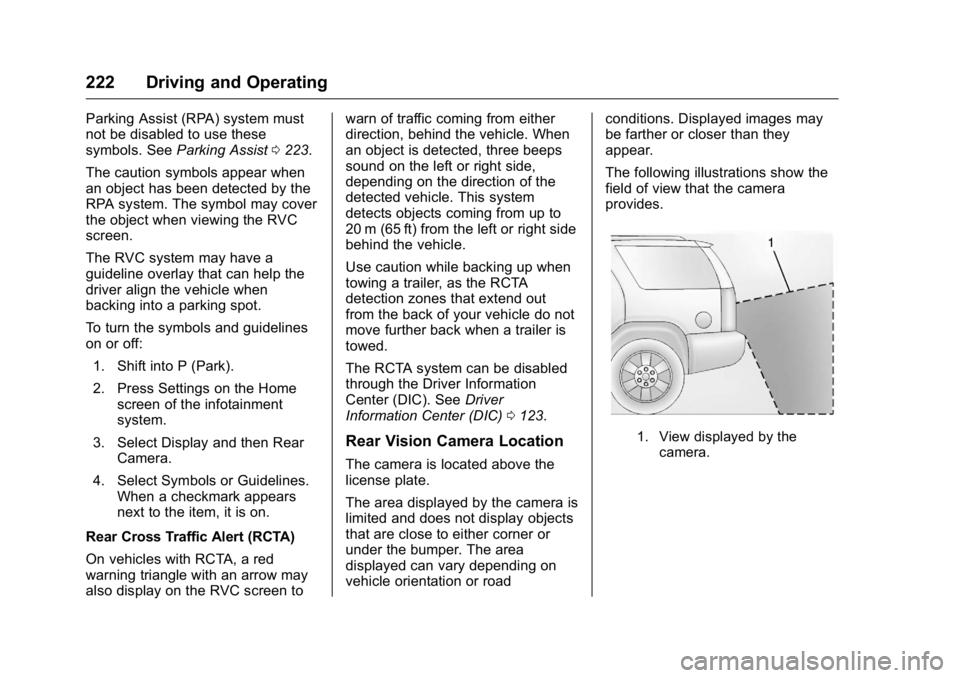
Rear Vision Camera Location
The camera is located above the
license plate.
The area displayed by the camera is
limited and does not display objects
that are close to either corner or
under the bumper. The area
displayed can vary depending on
vehicle orientation or road conditions. Displayed images may
be farther or closer than they
appear.
The following illustrations show the
field of view that the camera
provides.
1. View displayed by the
camera.
Page 224 of 371

GMC Acadia/Acadia Denali Owner Manual (GMNA-Localizing-U.S./Canada/
Mexico-9159268) - 2016 - crc - 7/31/15
Driving and Operating 223
1. View displayed by thecamera.
2. Corner of the rear bumper.
When the System Does Not
Seem To Work Properly
The RVC system might not work
properly or display a clear image if:
. It is dark.
. The sun or the beam of
headlamps is shining directly
into the camera lens.
. Ice, snow, mud, or anything else
builds up on the camera lens.
Clean the lens, rinse it with
water, and wipe it with a soft
cloth. .
The back of the vehicle is in an
accident. The position and
mounting angle of the camera
can change or the camera can
be affected. Be sure to have the
camera and its position and
mounting angle checked at your
dealer.
. There are extreme temperature
changes.
Parking Assist
If available, the Rear Parking Assist
(RPA) system assists the driver with
parking and avoiding objects while
in R (Reverse). RPA operates at
speeds less than 8 km/h (5 mph).
The sensors on the rear bumper are
used to detect objects up to
2.5 m (8 ft) behind the vehicle, and
at least 25 cm (10 in) off the ground
and below liftgate level. Detection
distances may be less during
warmer or humid weather.
{Warning
The parking assist system does
not detect children, pedestrians,
bicyclists, animals, or objects
below the bumper or that are too
close or too far from the vehicle.
It is not available at speeds
greater than 8 km/h (5 mph). To
prevent injury, death, or vehicle
damage, even with parking assist,
always check the area around the
vehicle and check all mirrors
before backing.
How the System Works
RPA comes on automatically when
the shift lever is moved into
R (Reverse). A single beep sounds
to indicate the system is working.
An obstacle is indicated by audible
beeps. The interval between the
beeps becomes shorter as the
vehicle gets closer to the obstacle.
When the distance is less than
30 cm (12 in) the beeping is
continuous for five seconds.
Page 368 of 371

GMC Acadia/Acadia Denali Owner Manual (GMNA-Localizing-U.S./Canada/
Mexico-9159268) - 2016 - crc - 7/31/15
Index 367
P
Parade Dimming . . . . . . . . . . . . . . . . 155
ParkShifting Into . . . . . . . . . . . . . . . . . . . 208
Shifting Out of . . . . . . . . . . . . . . . . 209
Tilt Mirrors . . . . . . . . . . . . . . . . . . . . . . 42
Parking Brake . . . . . . . . . . . . . . . . . . . . . . . . . 216
Brake and P (Park)Mechanism Check . . . . . . . . . . 262
Over Things That Burn . . . . . . . 210
Parking Assist . . . . . . . . . . . . . . . . . . 223
Passenger Airbag Status Indicator . . . . . . . . . . . . . . . . . . . . . . 115
Passenger Compartment Air Filter . . . . . . . . . . . . . . . . . . . . . . . . . . 192
Passenger Sensing System . . . . . 73
Perchlorate Materials Requirements, California . . . . . . 242
Personalization Vehicle . . . . . . . . . . . . . . . . . . . . . . . 140
Phone Bluetooth . . . . . . . . . . . . . . . . . . . . . 173
Power
Door Locks . . . . . . . . . . . . . . . . . . . . . 33
Mirrors . . . . . . . . . . . . . . . . . . . . . . . . . . 41
Outlets . . . . . . . . . . . . . . . . . . . . . . . 108
Protection, Battery . . . . . . . . . . . . 156 Power (cont'd)
Retained Accessory (RAP) . . . 208
Seat Adjustment . . . . . . . . . . . . . . . . 50
Steering Fluid . . . . . . . . . . . . . . . . . 257
Windows . . . . . . . . . . . . . . . . . . . . . . . 43
Pregnancy, Using Safety Belts . . . 65
Privacy Vehicle Data Recording . . . . . . . 347
Program
Courtesy Transportation . . . . . . 342
Proposition 65 Warning,
California . . . . . . . . . . . .242, 260, 304
R
Radio Frequency Statement . . . . 346
Radio Reception . . . . . . . . . . . . . . . . 165
RadiosAM-FM Radio . . . . . . . . . . . . . . . . . 162
Satellite . . . . . . . . . . . . . . . . . . . . . . . 165
Reading Lamps . . . . . . . . . . . . . . . . . 154
Rear Audio Controller (RAC) . . . 172
Rear Climate Control System . . . . . . . . . . . . . . . . . . . 189, 190
Rear Seat Audio (RSA) System . . . . . . . . . . . . . . . . . . . . . . . . 171
Rear Seats . . . . . . . . . . . . . . . . . . . . . . 54
Rear Vision Camera (RVC) . . . . . 221
Rear Window Washer/Wiper . . . . 106 Rearview Mirrors . . . . . . . . . . . . . . . . 42
Automatic Dimming . . . . . . . . . . . . . 43
Reclining Seatbacks . . . . . . . . . . . . . 51
Recommended Fluids and Lubricants . . . . . . . . . . . . . . . . . . . . . 330
Records Maintenance . . . . . . . . . . . . . . . . . . 332
Recreational Vehicle Towing . . . . 307
Reimbursement Program, GM Mobility . . . . . . . . . . . . . . . . . . . 339
Remote Keyless Entry (RKE)
System . . . . . . . . . . . . . . . . . . . . . . . . . 29
Remote Vehicle Start . . . . . . . . . . . . 31
Replacement Bulbs . . . . . . . . . . . . . 264
Replacement Parts Airbags . . . . . . . . . . . . . . . . . . . . . . . . . 78
Maintenance . . . . . . . . . . . . . . . . . . 331
Replacing Airbag System . . . . . . . . 78
Replacing LATCH System Parts after a Crash . . . . . . . . . . . . . 92
Replacing Safety Belt System
Parts after a Crash . . . . . . . . . . . . . 66
Reporting Safety Defects Canadian Government . . . . . . . . 347
General Motors . . . . . . . . . . . . . . . 347
U.S. Government . . . . . . . . . . . . . 346
Restraints Where to Put . . . . . . . . . . . . . . . . . . . 84