door GMC ACADIA 2016 Owner's Manual
[x] Cancel search | Manufacturer: GMC, Model Year: 2016, Model line: ACADIA, Model: GMC ACADIA 2016Pages: 371, PDF Size: 5.28 MB
Page 2 of 371

GMC Acadia/Acadia Denali Owner Manual (GMNA-Localizing-U.S./Canada/
Mexico-9159268) - 2016 - crc - 7/31/15
ContentsIntroduction . . . . . . . . . . . . . . . . . . . . . . 2
In Brief . . . . . . . . . . . . . . . . . . . . . . . . . . . 5
Keys, Doors, and Windows . . . . . 27
Seats and Restraints . . . . . . . . . . . 47
Storage . . . . . . . . . . . . . . . . . . . . . . . . . 98
Instruments and Controls . . . . . . 103
Lighting . . . . . . . . . . . . . . . . . . . . . . . 150
Infotainment System . . . . . . . . . . 157
Climate Controls . . . . . . . . . . . . . . 182
Driving and Operating . . . . . . . . . 193
Vehicle Care . . . . . . . . . . . . . . . . . . 241
Service and Maintenance . . . . . 320
Technical Data . . . . . . . . . . . . . . . . 333
Customer Information . . . . . . . . . 336
Reporting Safety Defects . . . . . . 346
OnStar . . . . . . . . . . . . . . . . . . . . . . . . 350
Index . . . . . . . . . . . . . . . . . . . . 360
Page 6 of 371
GMC Acadia/Acadia Denali Owner Manual (GMNA-Localizing-U.S./Canada/
Mexico-9159268) - 2016 - crc - 7/31/15
In Brief 5
In Brief
Instrument Panel
Instrument Panel . . . . . . . . . . . . . . . . 6
Initial Drive Information
Initial Drive Information . . . . . . . . . . 8
Remote Keyless Entry (RKE)System . . . . . . . . . . . . . . . . . . . . . . . . 8
Remote Vehicle Start . . . . . . . . . . . 8
Door Locks . . . . . . . . . . . . . . . . . . . . . 9
Liftgate . . . . . . . . . . . . . . . . . . . . . . . . . . 9
Windows . . . . . . . . . . . . . . . . . . . . . . . 10
Seat Adjustment . . . . . . . . . . . . . . . 10
Memory Features . . . . . . . . . . . . . . 11
Second Row Seats . . . . . . . . . . . . 12
Third Row Seats . . . . . . . . . . . . . . . 12
Heated and Cooled Front Seats . . . . . . . . . . . . . . . . . . . . . . . . . 13
Head Restraint Adjustment . . . . 13
Safety Belts . . . . . . . . . . . . . . . . . . . . 13
Passenger Sensing System . . . 14
Mirror Adjustment . . . . . . . . . . . . . . 14
Steering Wheel Adjustment . . . . 15
Interior Lighting . . . . . . . . . . . . . . . . 16
Exterior Lighting . . . . . . . . . . . . . . . 17
Windshield Wiper/Washer . . . . . . 17
Climate Controls . . . . . . . . . . . . . . . 18
Transmission . . . . . . . . . . . . . . . . . . 19
Vehicle Features
Radio(s) . . . . . . . . . . . . . . . . . . . . . . . 20
Satellite Radio . . . . . . . . . . . . . . . . . 21
Portable Audio Devices . . . . . . . . 21
Bluetooth
®. . . . . . . . . . . . . . . . . . . . . 21
Steering Wheel Controls . . . . . . . 21
Cruise Control . . . . . . . . . . . . . . . . . 22
Forward Collision Alert (FCA)
System . . . . . . . . . . . . . . . . . . . . . . . 22
Lane Departure Warning (LDW) . . . . . . . . . . . . . . . 22
Side Blind Zone Alert (SBZA) . . . . . . . . . . . . . . . . . . 23
Rear Vision Camera (RVC) . . . . 23
Rear Cross Traffic Alert (RCTA) System . . . . . . . . . . . . . . . . . . . . . . . 23
Parking Assist . . . . . . . . . . . . . . . . . 23
Power Outlets . . . . . . . . . . . . . . . . . 23
Universal Remote System . . . . . 24
Sunroof . . . . . . . . . . . . . . . . . . . . . . . . 24
Performance and Maintenance
Traction Control/Electronic Stability Control . . . . . . . . . . . . . . 24
Tire Pressure Monitor . . . . . . . . . . 25
Engine Oil Life System . . . . . . . . 25
Driving for Better Fuel Economy . . . . . . . . . . . . . . . . . . . . . 25
Roadside Assistance Program . . . . . . . . . . . . . . . . . . . . . . 26
Page 9 of 371
GMC Acadia/Acadia Denali Owner Manual (GMNA-Localizing-U.S./Canada/
Mexico-9159268) - 2016 - crc - 7/31/15
8 In Brief
Initial Drive
Information
This section provides a brief
overview about some of the
important features that may or may
not be on your specific vehicle.
For more detailed information, refer
to each of the features which can be
found later in this owner manual.
Remote Keyless Entry
(RKE) System
The RKE transmitter is used to
remotely lock and unlock the doors
from up to 60 m (195 ft) away from
the vehicle.
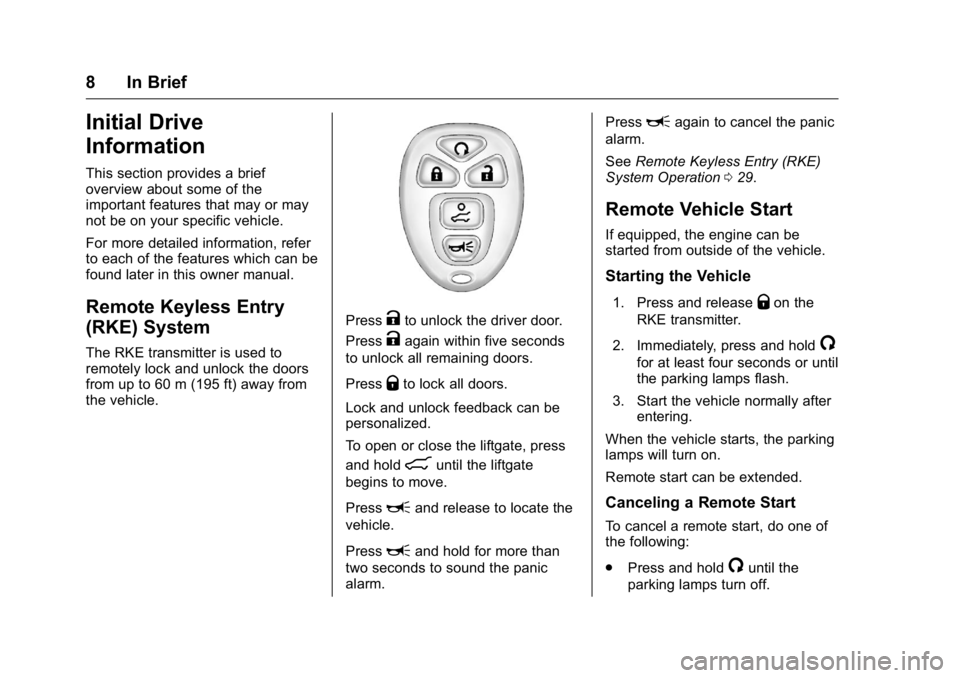
PressKto unlock the driver door.
Press
Kagain within five seconds
to unlock all remaining doors.
Press
Qto lock all doors.
Lock and unlock feedback can be
personalized.
To open or close the liftgate, press
and hold
8until the liftgate
begins to move.
Press
Land release to locate the
vehicle.
Press
Land hold for more than
two seconds to sound the panic
alarm. Press
Lagain to cancel the panic
alarm.
See Remote Keyless Entry (RKE)
System Operation 029.
Remote Vehicle Start
If equipped, the engine can be
started from outside of the vehicle.
Starting the Vehicle
1. Press and releaseQon the
RKE transmitter.
2. Immediately, press and hold
/
for at least four seconds or until
the parking lamps flash.
3. Start the vehicle normally after entering.
When the vehicle starts, the parking
lamps will turn on.
Remote start can be extended.
Canceling a Remote Start
To cancel a remote start, do one of
the following:
. Press and hold
/until the
parking lamps turn off.
Page 10 of 371
GMC Acadia/Acadia Denali Owner Manual (GMNA-Localizing-U.S./Canada/
Mexico-9159268) - 2016 - crc - 7/31/15
In Brief 9
.Turn on the hazard warning
flashers.
. Turn the vehicle on and then off.
See Remote Vehicle Start 031.
Door Locks
To lock or unlock a door manually:
.
From the inside use the door
lock knob on the window sill.
. From the outside turn the key
toward the front or rear of the
vehicle, or press the
KorQ
button on the Remote Keyless
Entry (RKE) transmitter.
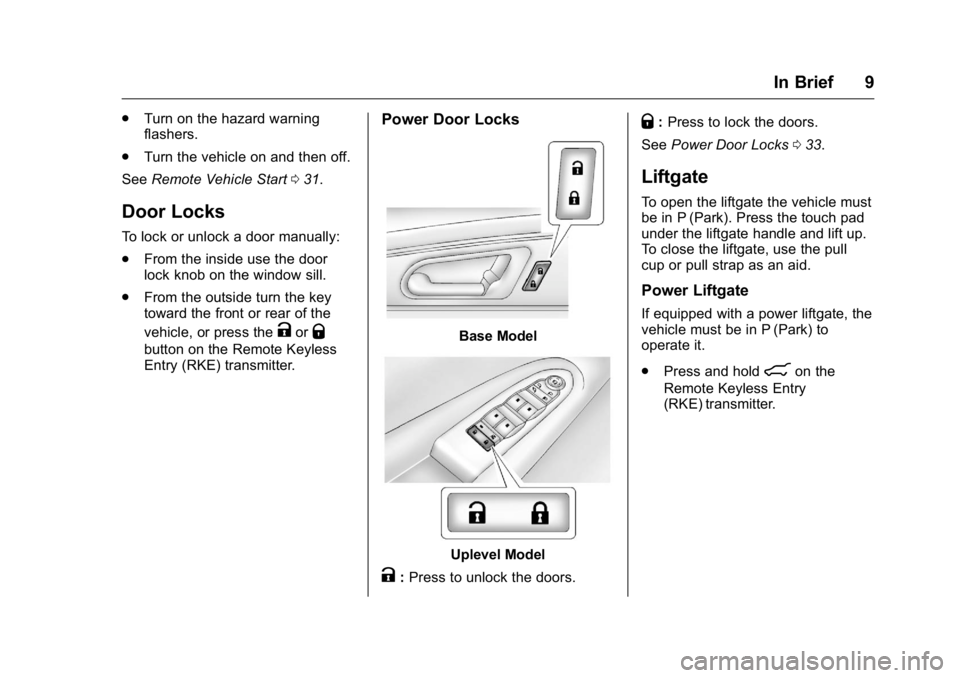
Power Door Locks
Base Model
Uplevel Model
K:Press to unlock the doors.
Q: Press to lock the doors.
See Power Door Locks 033.
Liftgate
To open the liftgate the vehicle must
be in P (Park). Press the touch pad
under the liftgate handle and lift up.
To close the liftgate, use the pull
cup or pull strap as an aid.
Power Liftgate
If equipped with a power liftgate, the
vehicle must be in P (Park) to
operate it.
.
Press and hold
8on the
Remote Keyless Entry
(RKE) transmitter.
Page 12 of 371
GMC Acadia/Acadia Denali Owner Manual (GMNA-Localizing-U.S./Canada/
Mexico-9159268) - 2016 - crc - 7/31/15
In Brief 11
3. Try to move the seat back andforth to be sure it is locked in
place.
Move the lever (2) up or down to
raise or lower the seat.
Use the lever (3) to adjust the
seatback.
See Seat Adjustment 049 and
Reclining Seatbacks 051.
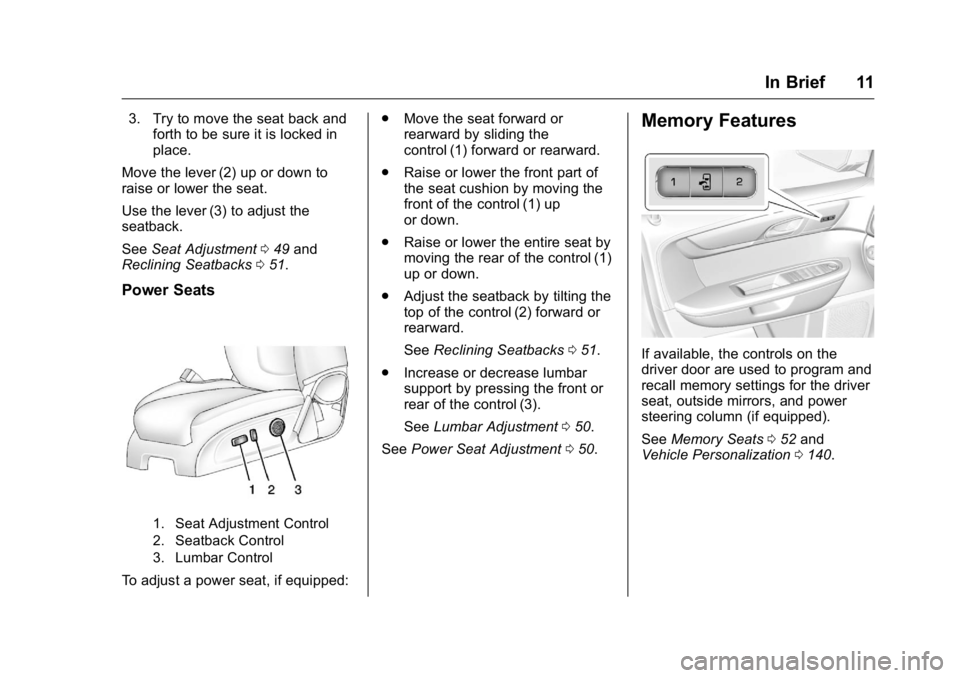
Power Seats
1. Seat Adjustment Control
2. Seatback Control
3. Lumbar Control
To adjust a power seat, if equipped: .
Move the seat forward or
rearward by sliding the
control (1) forward or rearward.
. Raise or lower the front part of
the seat cushion by moving the
front of the control (1) up
or down.
. Raise or lower the entire seat by
moving the rear of the control (1)
up or down.
. Adjust the seatback by tilting the
top of the control (2) forward or
rearward.
See Reclining Seatbacks 051.
. Increase or decrease lumbar
support by pressing the front or
rear of the control (3).
See Lumbar Adjustment 050.
See Power Seat Adjustment 050.
Memory Features
If available, the controls on the
driver door are used to program and
recall memory settings for the driver
seat, outside mirrors, and power
steering column (if equipped).
See Memory Seats 052 and
Vehicle Personalization 0140.
Page 17 of 371
GMC Acadia/Acadia Denali Owner Manual (GMNA-Localizing-U.S./Canada/
Mexico-9159268) - 2016 - crc - 7/31/15
16 In Brief
Power Tilt and Telescoping
Steering Wheel
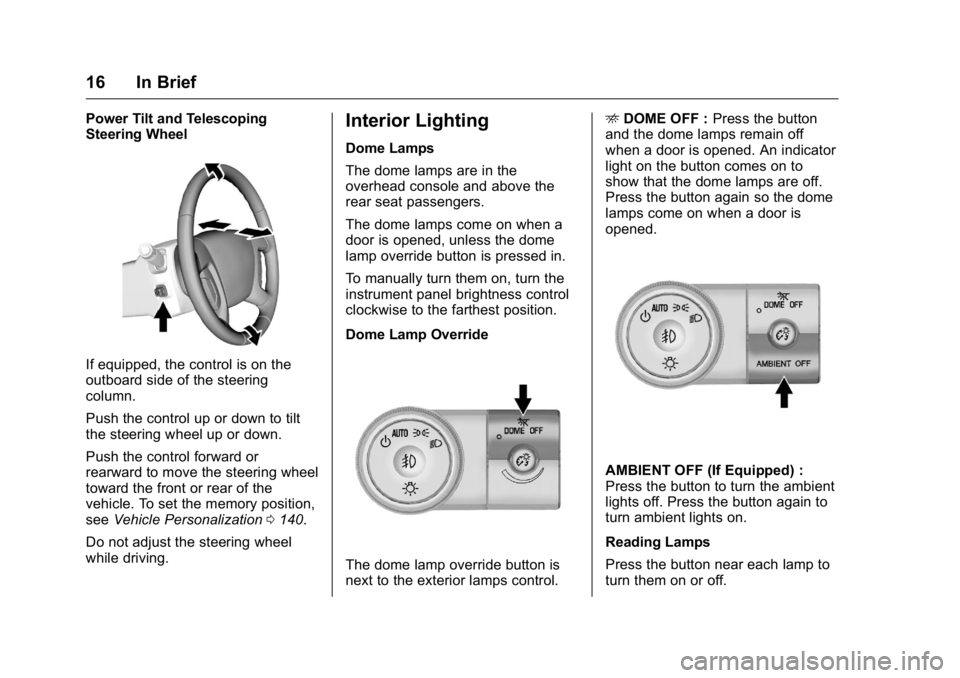
If equipped, the control is on the
outboard side of the steering
column.
Push the control up or down to tilt
the steering wheel up or down.
Push the control forward or
rearward to move the steering wheel
toward the front or rear of the
vehicle. To set the memory position,
seeVehicle Personalization 0140.
Do not adjust the steering wheel
while driving.
Interior Lighting
Dome Lamps
The dome lamps are in the
overhead console and above the
rear seat passengers.
The dome lamps come on when a
door is opened, unless the dome
lamp override button is pressed in.
To manually turn them on, turn the
instrument panel brightness control
clockwise to the farthest position.
Dome Lamp Override
The dome lamp override button is
next to the exterior lamps control. E
DOME OFF : Press the button
and the dome lamps remain off
when a door is opened. An indicator
light on the button comes on to
show that the dome lamps are off.
Press the button again so the dome
lamps come on when a door is
opened.
AMBIENT OFF (If Equipped) :
Press the button to turn the ambient
lights off. Press the button again to
turn ambient lights on.
Reading Lamps
Press the button near each lamp to
turn them on or off.
Page 18 of 371
GMC Acadia/Acadia Denali Owner Manual (GMNA-Localizing-U.S./Canada/
Mexico-9159268) - 2016 - crc - 7/31/15
In Brief 17
For more information, see:
.Dome Lamps 0153.
. Instrument Panel Illumination
Control 0153.
Exterior Lighting
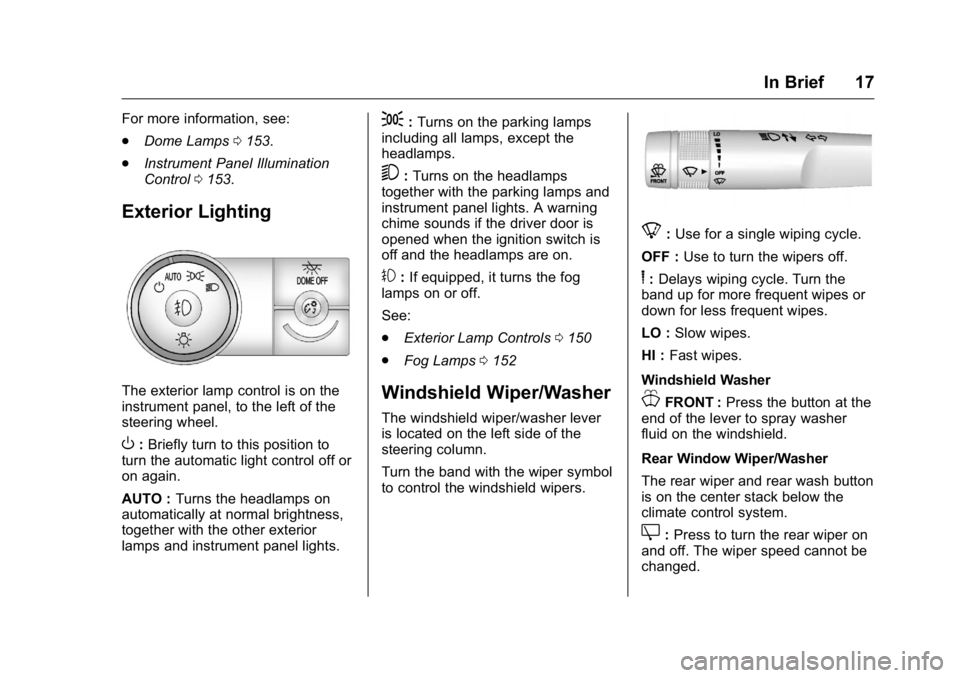
The exterior lamp control is on the
instrument panel, to the left of the
steering wheel.
O:Briefly turn to this position to
turn the automatic light control off or
on again.
AUTO : Turns the headlamps on
automatically at normal brightness,
together with the other exterior
lamps and instrument panel lights.
;: Turns on the parking lamps
including all lamps, except the
headlamps.
5: Turns on the headlamps
together with the parking lamps and
instrument panel lights. A warning
chime sounds if the driver door is
opened when the ignition switch is
off and the headlamps are on.
#: If equipped, it turns the fog
lamps on or off.
See:
. Exterior Lamp Controls 0150
. Fog Lamps 0152
Windshield Wiper/Washer
The windshield wiper/washer lever
is located on the left side of the
steering column.
Turn the band with the wiper symbol
to control the windshield wipers.
8:Use for a single wiping cycle.
OFF : Use to turn the wipers off.
6:Delays wiping cycle. Turn the
band up for more frequent wipes or
down for less frequent wipes.
LO : Slow wipes.
HI : Fast wipes.
Windshield Washer
JFRONT : Press the button at the
end of the lever to spray washer
fluid on the windshield.
Rear Window Wiper/Washer
The rear wiper and rear wash button
is on the center stack below the
climate control system.
Z: Press to turn the rear wiper on
and off. The wiper speed cannot be
changed.
Page 25 of 371
GMC Acadia/Acadia Denali Owner Manual (GMNA-Localizing-U.S./Canada/
Mexico-9159268) - 2016 - crc - 7/31/15
24 In Brief
Universal Remote System
If equipped, the Universal Home
Remote System allows for garage
door openers, security systems, and
home automation devices to be
programmed to work with these
buttons in the vehicle.
SeeUniversal Remote System
0 146.
Sunroof
The ignition must be in ON/RUN or
ACC/ACCESSORY, or Retained
Accessory Power (RAP) must be
active to operate the sunroof and
power sunshade. See Retained
Accessory Power (RAP) 0208.
The vehicle may have a sunroof
over the front seats and a rear
sunroof over the second row seats.
The rear sunroof does not open.
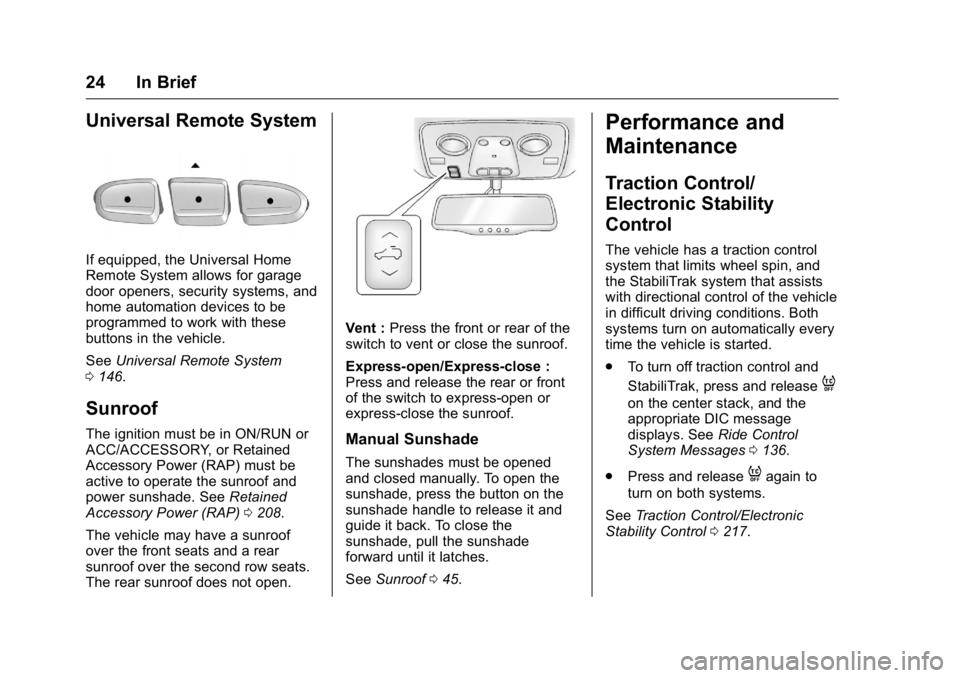
Vent : Press the front or rear of the
switch to vent or close the sunroof.
Express-open/Express-close :
Press and release the rear or front
of the switch to express-open or
express-close the sunroof.
Manual Sunshade
The sunshades must be opened
and closed manually. To open the
sunshade, press the button on the
sunshade handle to release it and
guide it back. To close the
sunshade, pull the sunshade
forward until it latches.
See Sunroof 045.
Performance and
Maintenance
Traction Control/
Electronic Stability
Control
The vehicle has a traction control
system that limits wheel spin, and
the StabiliTrak system that assists
with directional control of the vehicle
in difficult driving conditions. Both
systems turn on automatically every
time the vehicle is started.
.
To turn off traction control and
StabiliTrak, press and release
4
on the center stack, and the
appropriate DIC message
displays. See Ride Control
System Messages 0136.
. Press and release
4again to
turn on both systems.
See Traction Control/Electronic
Stability Control 0217.
Page 28 of 371
GMC Acadia/Acadia Denali Owner Manual (GMNA-Localizing-U.S./Canada/
Mexico-9159268) - 2016 - crc - 7/31/15
Keys, Doors, and Windows 27
Keys, Doors, and
Windows
Keys and Locks
Keys . . . . . . . . . . . . . . . . . . . . . . . . . . . 27
Remote Keyless Entry (RKE)System . . . . . . . . . . . . . . . . . . . . . . . 29
Remote Keyless Entry (RKE) System Operation . . . . . . . . . . . . 29
Remote Vehicle Start . . . . . . . . . . 31
Door Locks . . . . . . . . . . . . . . . . . . . . 32
Power Door Locks . . . . . . . . . . . . . 33
Delayed Locking . . . . . . . . . . . . . . . 33
Automatic Door Locks . . . . . . . . . 34
Lockout Protection . . . . . . . . . . . . . 34
Safety Locks . . . . . . . . . . . . . . . . . . . 34
Doors
Liftgate . . . . . . . . . . . . . . . . . . . . . . . . 35
Vehicle Security
Vehicle Security . . . . . . . . . . . . . . . . 38
Vehicle Alarm System . . . . . . . . . 38
Immobilizer . . . . . . . . . . . . . . . . . . . . 39
Immobilizer Operation . . . . . . . . . 39
Exterior Mirrors
Convex Mirrors . . . . . . . . . . . . . . . . 40
Power Mirrors . . . . . . . . . . . . . . . . . . 41 Folding Mirrors . . . . . . . . . . . . . . . . . 41
Heated Mirrors . . . . . . . . . . . . . . . . . 42
Automatic Dimming Mirror . . . . . 42
Park Tilt Mirrors . . . . . . . . . . . . . . . . 42
Interior Mirrors
Interior Rearview Mirrors . . . . . . . 42
Manual Rearview Mirror . . . . . . . . 42
Automatic Dimming Rearview
Mirror . . . . . . . . . . . . . . . . . . . . . . . . . 43
Windows
Windows . . . . . . . . . . . . . . . . . . . . . . . 43
Power Windows . . . . . . . . . . . . . . . 43
Sun Visors . . . . . . . . . . . . . . . . . . . . . 45
Roof
Sunroof . . . . . . . . . . . . . . . . . . . . . . . . 45
Keys and Locks
Keys
{Warning
Leaving children in a vehicle with
the ignition key is dangerous and
children or others could be
seriously injured or killed. They
could operate the power windows
or other controls or make the
vehicle move. The windows will
function with the keys in the
ignition, and children or others
could be caught in the path of a
closing window. Do not leave
children in a vehicle with the
ignition key.
Page 29 of 371
GMC Acadia/Acadia Denali Owner Manual (GMNA-Localizing-U.S./Canada/
Mexico-9159268) - 2016 - crc - 7/31/15
28 Keys, Doors, and Windows
{Warning
If the key is unintentionally
rotated while the vehicle is
running, the ignition could be
moved out of the RUN position.
This could be caused by heavy
items hanging from the key ring,
or by large or long items attached
to the key ring that could be
contacted by the driver or
steering wheel. If the ignition
moves out of the RUN position,
the engine will shut off, braking
and steering power assist may be(Continued)
Warning (Continued)
impacted, and airbags may not
deploy. To reduce the risk of
unintentional rotation of the
ignition key, do not change the
way the ignition key and Remote
Keyless Entry (RKE) transmitter,
if equipped, are connected to the
provided key rings.
The ignition key, key rings, and RKE
transmitter, if equipped, are
designed to work together. As a
system, it reduces the risk of
unintentionally moving the key out
of the RUN position. If replacements
or additions are required, see your
dealer. Limit added items to a few
essential keys or small, light items
no larger than an RKE transmitter.
Interference from radio-frequency
identification (RFID) tags may
prevent the key from starting the
vehicle. Keep RFID tags away from
the key when starting the vehicle.
The key is used for the ignition and
all door locks.
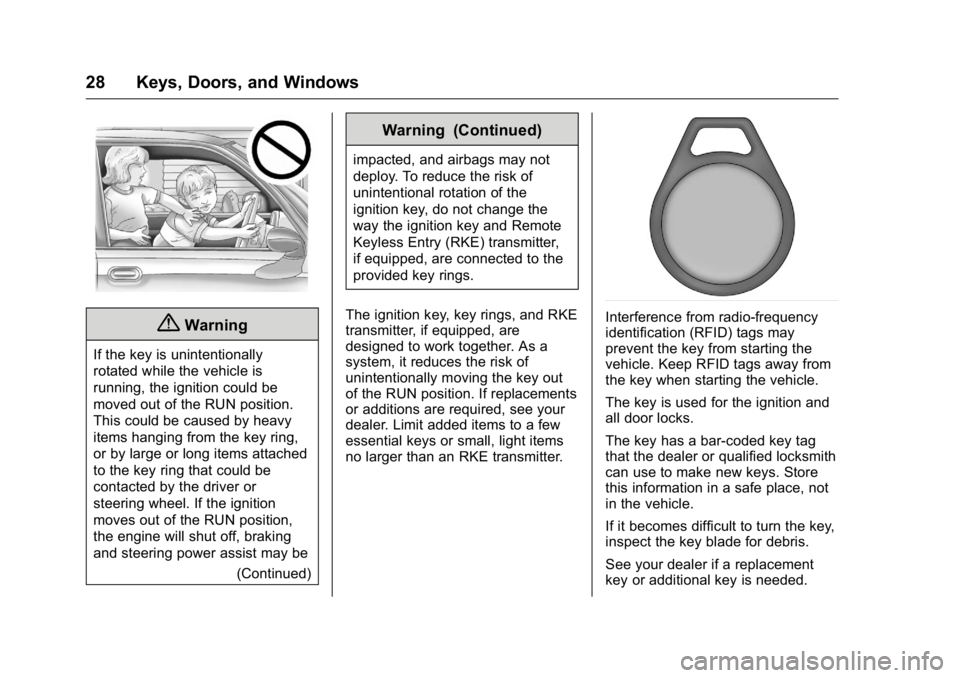
The key has a bar-coded key tag
that the dealer or qualified locksmith
can use to make new keys. Store
this information in a safe place, not
in the vehicle.
If it becomes difficult to turn the key,
inspect the key blade for debris.
See your dealer if a replacement
key or additional key is needed.