power steering GMC ACADIA 2016 Owner's Manual
[x] Cancel search | Manufacturer: GMC, Model Year: 2016, Model line: ACADIA, Model: GMC ACADIA 2016Pages: 371, PDF Size: 5.28 MB
Page 4 of 371
GMC Acadia/Acadia Denali Owner Manual (GMNA-Localizing-U.S./Canada/
Mexico-9159268) - 2016 - crc - 7/31/15
Introduction 3
{Warning
Warning indicates a hazard that
could result in injury or death.
Caution
Caution indicates a hazard that
could result in property or vehicle
damage.
A circle with a slash through it is a
safety symbol which means“Do
Not,” “Do not do this,” or“Do not let
this happen.”
Symbols
The vehicle has components and
labels that use symbols instead of
text. Symbols are shown along with
the text describing the operation or
information relating to a specific
component, control, message,
gauge, or indicator.
M: Shown when the owner
manual has additional instructions
or information.
*: Shown when the service
manual has additional instructions
or information.
0: Shown when there is more
information on another page —
“see page.”
Vehicle Symbol Chart
Here are some additional symbols
that may be found on the vehicle
and what they mean. For more
information on the symbol, refer to
the Index.
9: Airbag Readiness Light
!:Antilock Brake System (ABS)
%:Audio Steering Wheel Controls
or OnStar®(if equipped)
$: Brake System Warning Light
":Charging System
I: Cruise Control
`:Do Not Puncture
^:Do Not Service
B:Engine Coolant Temperature
O:Exterior Lamps
_: Flame/Fire Prohibited
#:Fog Lamps
.:Fuel Gauge
+: Fuses
3:Headlamp High/Low-Beam
Changer
j: LATCH System Child Restraints
*:Malfunction Indicator Lamp
::Oil Pressure
g:Outside Power Foldaway
Mirrors
}: Power
/:Remote Vehicle Start
Page 6 of 371
GMC Acadia/Acadia Denali Owner Manual (GMNA-Localizing-U.S./Canada/
Mexico-9159268) - 2016 - crc - 7/31/15
In Brief 5
In Brief
Instrument Panel
Instrument Panel . . . . . . . . . . . . . . . . 6
Initial Drive Information
Initial Drive Information . . . . . . . . . . 8
Remote Keyless Entry (RKE)System . . . . . . . . . . . . . . . . . . . . . . . . 8
Remote Vehicle Start . . . . . . . . . . . 8
Door Locks . . . . . . . . . . . . . . . . . . . . . 9
Liftgate . . . . . . . . . . . . . . . . . . . . . . . . . . 9
Windows . . . . . . . . . . . . . . . . . . . . . . . 10
Seat Adjustment . . . . . . . . . . . . . . . 10
Memory Features . . . . . . . . . . . . . . 11
Second Row Seats . . . . . . . . . . . . 12
Third Row Seats . . . . . . . . . . . . . . . 12
Heated and Cooled Front Seats . . . . . . . . . . . . . . . . . . . . . . . . . 13
Head Restraint Adjustment . . . . 13
Safety Belts . . . . . . . . . . . . . . . . . . . . 13
Passenger Sensing System . . . 14
Mirror Adjustment . . . . . . . . . . . . . . 14
Steering Wheel Adjustment . . . . 15
Interior Lighting . . . . . . . . . . . . . . . . 16
Exterior Lighting . . . . . . . . . . . . . . . 17
Windshield Wiper/Washer . . . . . . 17
Climate Controls . . . . . . . . . . . . . . . 18
Transmission . . . . . . . . . . . . . . . . . . 19
Vehicle Features
Radio(s) . . . . . . . . . . . . . . . . . . . . . . . 20
Satellite Radio . . . . . . . . . . . . . . . . . 21
Portable Audio Devices . . . . . . . . 21
Bluetooth
®. . . . . . . . . . . . . . . . . . . . . 21
Steering Wheel Controls . . . . . . . 21
Cruise Control . . . . . . . . . . . . . . . . . 22
Forward Collision Alert (FCA)
System . . . . . . . . . . . . . . . . . . . . . . . 22
Lane Departure Warning (LDW) . . . . . . . . . . . . . . . 22
Side Blind Zone Alert (SBZA) . . . . . . . . . . . . . . . . . . 23
Rear Vision Camera (RVC) . . . . 23
Rear Cross Traffic Alert (RCTA) System . . . . . . . . . . . . . . . . . . . . . . . 23
Parking Assist . . . . . . . . . . . . . . . . . 23
Power Outlets . . . . . . . . . . . . . . . . . 23
Universal Remote System . . . . . 24
Sunroof . . . . . . . . . . . . . . . . . . . . . . . . 24
Performance and Maintenance
Traction Control/Electronic Stability Control . . . . . . . . . . . . . . 24
Tire Pressure Monitor . . . . . . . . . . 25
Engine Oil Life System . . . . . . . . 25
Driving for Better Fuel Economy . . . . . . . . . . . . . . . . . . . . . 25
Roadside Assistance Program . . . . . . . . . . . . . . . . . . . . . . 26
Page 8 of 371

GMC Acadia/Acadia Denali Owner Manual (GMNA-Localizing-U.S./Canada/
Mexico-9159268) - 2016 - crc - 7/31/15
In Brief 7
1.Air Vents 0191.
2. Windshield Wiper/Washer
0105 (Out of View).
Turn Signal Lever. See Turn
and Lane-Change Signals
0 152.
3. Instrument Cluster 0111.
4. Head-Up Display (HUD) 0127
(If Equipped).
5. Instrument Panel Storage 098.
6. Infotainment 0157.
7. Passenger Airbag Status Indicator. See Passenger
Sensing System 073.
8. Hazard Warning Flashers
0152.
9. Heated and Cooled Front
Seats 053 (If Equipped).
10. Rear Window Wiper/Washer
0106.
Traction Control/Electronic
Stability Control 0217.
Forward Collision Alert (FCA)
System 0224 (If Equipped). Lane Departure Warning
(LDW)
0228 (If Equipped).
Tow/Haul Button (If Equipped).
See Tow/Haul Mode 0214.
Power Liftgate Button (If
Equipped). See Liftgate035.
11. Power Outlets 0108.
12. USB Port. See Auxiliary
Devices 0169.
13. Shift Lever. See Automatic
Transmission 0211.
14. Climate Control Systems 0182
or Dual Automatic Climate
Control System 0185 (If
Equipped).
15. Driver Information Center (DIC) Buttons. See Driver Information
Center (DIC) 0123.
16. Steering Wheel Controls 0105
(If Equipped).
17. Horn 0105.
18. Steering Wheel Adjustment
0104.
19. Cruise Control 0219. 20. Dome Lamp Override. See
Dome Lamps 0153.
Instrument Panel Illumination
Control 0153.
21. Data Link Connector (DLC) (Out of View). See Malfunction
Indicator Lamp (Check Engine
Light) 0117.
22. Parking Brake 0216.
23. Hood Release. See Hood
0 243.
24. Exterior Lamp Controls 0150.
Page 12 of 371
GMC Acadia/Acadia Denali Owner Manual (GMNA-Localizing-U.S./Canada/
Mexico-9159268) - 2016 - crc - 7/31/15
In Brief 11
3. Try to move the seat back andforth to be sure it is locked in
place.
Move the lever (2) up or down to
raise or lower the seat.
Use the lever (3) to adjust the
seatback.
See Seat Adjustment 049 and
Reclining Seatbacks 051.
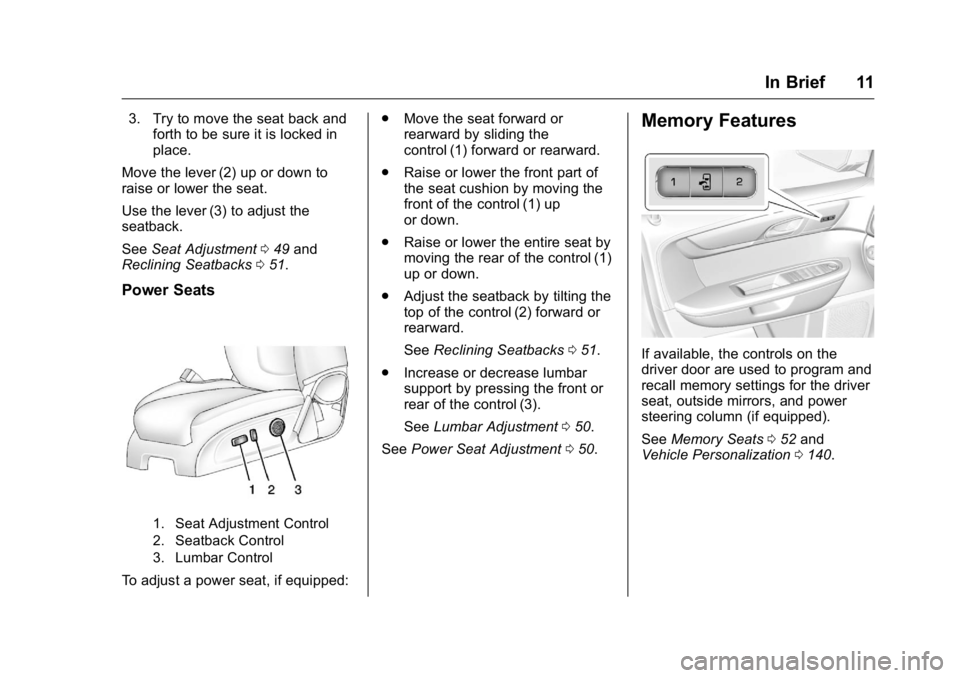
Power Seats
1. Seat Adjustment Control
2. Seatback Control
3. Lumbar Control
To adjust a power seat, if equipped: .
Move the seat forward or
rearward by sliding the
control (1) forward or rearward.
. Raise or lower the front part of
the seat cushion by moving the
front of the control (1) up
or down.
. Raise or lower the entire seat by
moving the rear of the control (1)
up or down.
. Adjust the seatback by tilting the
top of the control (2) forward or
rearward.
See Reclining Seatbacks 051.
. Increase or decrease lumbar
support by pressing the front or
rear of the control (3).
See Lumbar Adjustment 050.
See Power Seat Adjustment 050.
Memory Features
If available, the controls on the
driver door are used to program and
recall memory settings for the driver
seat, outside mirrors, and power
steering column (if equipped).
See Memory Seats 052 and
Vehicle Personalization 0140.
Page 16 of 371
GMC Acadia/Acadia Denali Owner Manual (GMNA-Localizing-U.S./Canada/
Mexico-9159268) - 2016 - crc - 7/31/15
In Brief 15
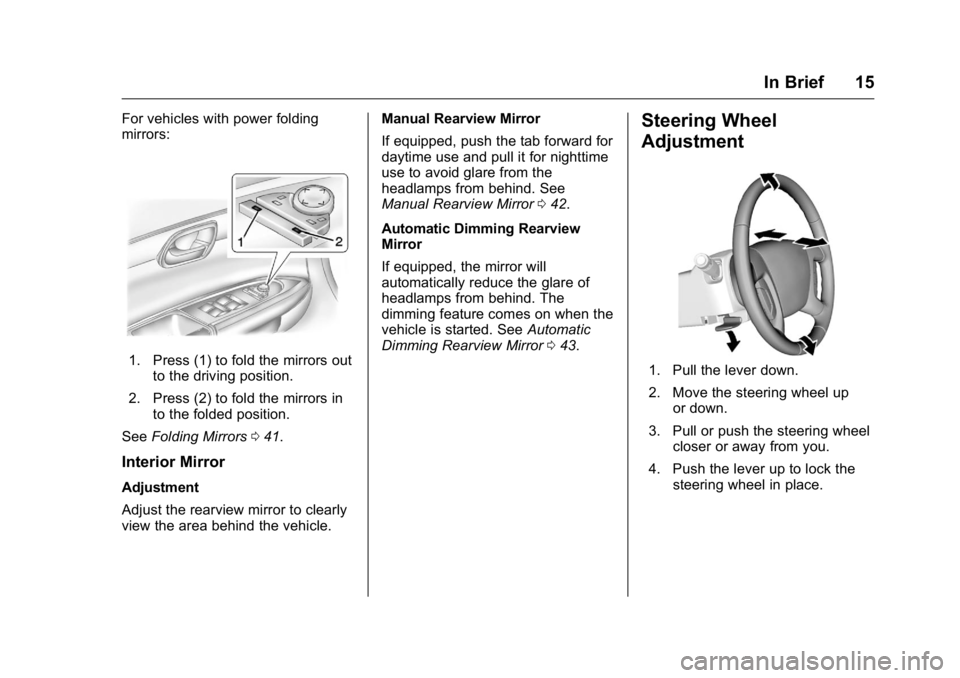
For vehicles with power folding
mirrors:
1. Press (1) to fold the mirrors outto the driving position.
2. Press (2) to fold the mirrors in to the folded position.
See Folding Mirrors 041.
Interior Mirror
Adjustment
Adjust the rearview mirror to clearly
view the area behind the vehicle. Manual Rearview Mirror
If equipped, push the tab forward for
daytime use and pull it for nighttime
use to avoid glare from the
headlamps from behind. See
Manual Rearview Mirror
042.
Automatic Dimming Rearview
Mirror
If equipped, the mirror will
automatically reduce the glare of
headlamps from behind. The
dimming feature comes on when the
vehicle is started. See Automatic
Dimming Rearview Mirror 043.
Steering Wheel
Adjustment
1. Pull the lever down.
2. Move the steering wheel up
or down.
3. Pull or push the steering wheel closer or away from you.
4. Push the lever up to lock the steering wheel in place.
Page 17 of 371
GMC Acadia/Acadia Denali Owner Manual (GMNA-Localizing-U.S./Canada/
Mexico-9159268) - 2016 - crc - 7/31/15
16 In Brief
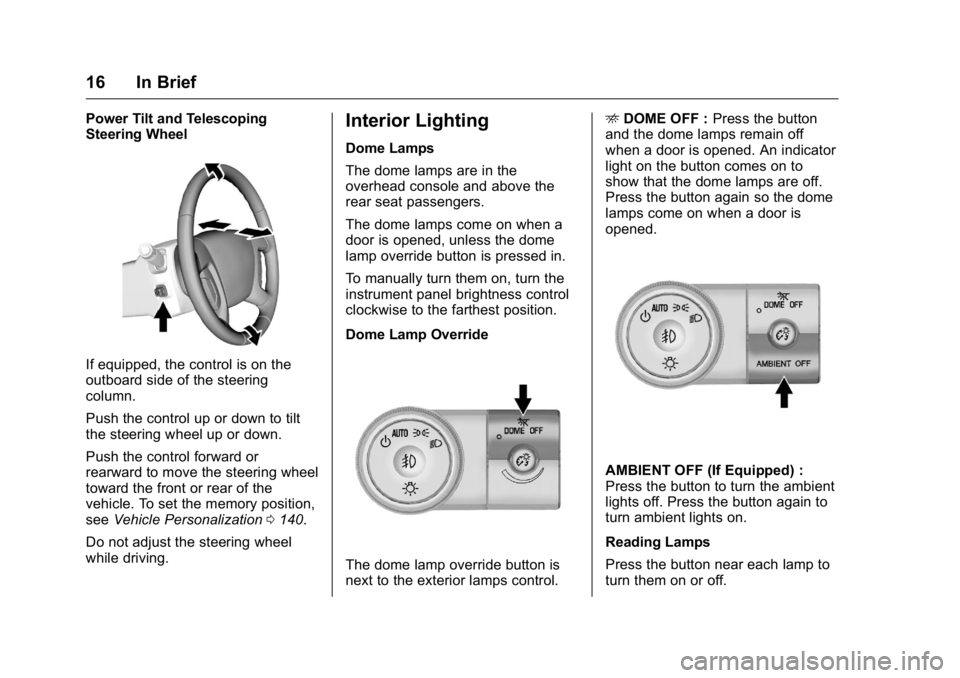
Power Tilt and Telescoping
Steering Wheel
If equipped, the control is on the
outboard side of the steering
column.
Push the control up or down to tilt
the steering wheel up or down.
Push the control forward or
rearward to move the steering wheel
toward the front or rear of the
vehicle. To set the memory position,
seeVehicle Personalization 0140.
Do not adjust the steering wheel
while driving.
Interior Lighting
Dome Lamps
The dome lamps are in the
overhead console and above the
rear seat passengers.
The dome lamps come on when a
door is opened, unless the dome
lamp override button is pressed in.
To manually turn them on, turn the
instrument panel brightness control
clockwise to the farthest position.
Dome Lamp Override
The dome lamp override button is
next to the exterior lamps control. E
DOME OFF : Press the button
and the dome lamps remain off
when a door is opened. An indicator
light on the button comes on to
show that the dome lamps are off.
Press the button again so the dome
lamps come on when a door is
opened.
AMBIENT OFF (If Equipped) :
Press the button to turn the ambient
lights off. Press the button again to
turn ambient lights on.
Reading Lamps
Press the button near each lamp to
turn them on or off.
Page 29 of 371
GMC Acadia/Acadia Denali Owner Manual (GMNA-Localizing-U.S./Canada/
Mexico-9159268) - 2016 - crc - 7/31/15
28 Keys, Doors, and Windows
{Warning
If the key is unintentionally
rotated while the vehicle is
running, the ignition could be
moved out of the RUN position.
This could be caused by heavy
items hanging from the key ring,
or by large or long items attached
to the key ring that could be
contacted by the driver or
steering wheel. If the ignition
moves out of the RUN position,
the engine will shut off, braking
and steering power assist may be(Continued)
Warning (Continued)
impacted, and airbags may not
deploy. To reduce the risk of
unintentional rotation of the
ignition key, do not change the
way the ignition key and Remote
Keyless Entry (RKE) transmitter,
if equipped, are connected to the
provided key rings.
The ignition key, key rings, and RKE
transmitter, if equipped, are
designed to work together. As a
system, it reduces the risk of
unintentionally moving the key out
of the RUN position. If replacements
or additions are required, see your
dealer. Limit added items to a few
essential keys or small, light items
no larger than an RKE transmitter.
Interference from radio-frequency
identification (RFID) tags may
prevent the key from starting the
vehicle. Keep RFID tags away from
the key when starting the vehicle.
The key is used for the ignition and
all door locks.
The key has a bar-coded key tag
that the dealer or qualified locksmith
can use to make new keys. Store
this information in a safe place, not
in the vehicle.
If it becomes difficult to turn the key,
inspect the key blade for debris.
See your dealer if a replacement
key or additional key is needed.
Page 53 of 371
GMC Acadia/Acadia Denali Owner Manual (GMNA-Localizing-U.S./Canada/
Mexico-9159268) - 2016 - crc - 7/31/15
52 Seats and Restraints
2. Push and pull on the seatbackto make sure it is locked.
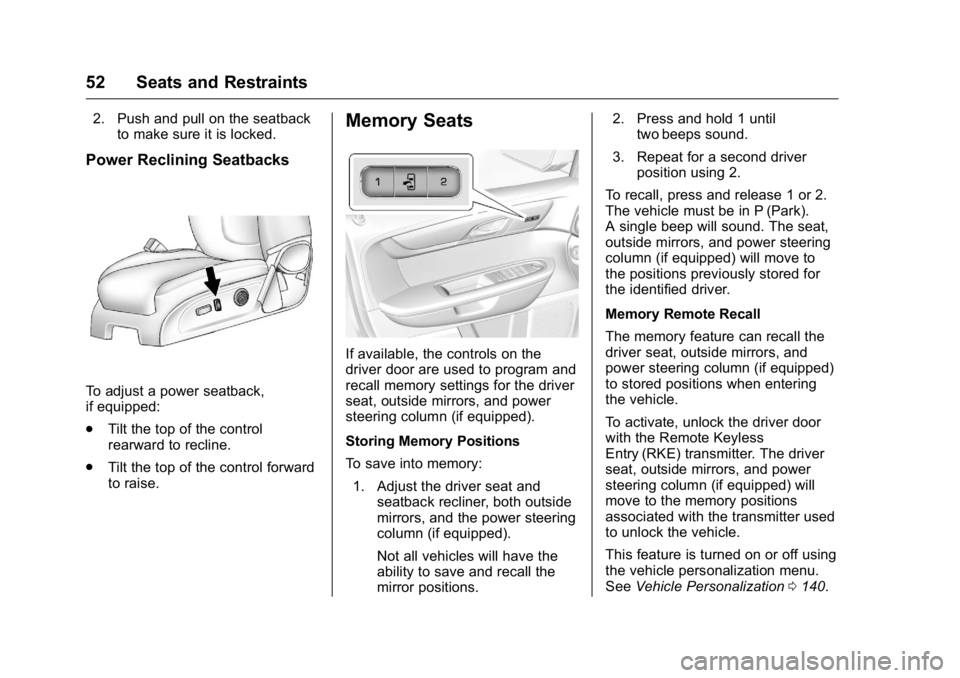
Power Reclining Seatbacks
To adjust a power seatback,
if equipped:
.Tilt the top of the control
rearward to recline.
. Tilt the top of the control forward
to raise.
Memory Seats
If available, the controls on the
driver door are used to program and
recall memory settings for the driver
seat, outside mirrors, and power
steering column (if equipped).
Storing Memory Positions
To save into memory:
1. Adjust the driver seat and seatback recliner, both outside
mirrors, and the power steering
column (if equipped).
Not all vehicles will have the
ability to save and recall the
mirror positions. 2. Press and hold 1 until
two beeps sound.
3. Repeat for a second driver position using 2.
To recall, press and release 1 or 2.
The vehicle must be in P (Park).
A single beep will sound. The seat,
outside mirrors, and power steering
column (if equipped) will move to
the positions previously stored for
the identified driver.
Memory Remote Recall
The memory feature can recall the
driver seat, outside mirrors, and
power steering column (if equipped)
to stored positions when entering
the vehicle.
To activate, unlock the driver door
with the Remote Keyless
Entry (RKE) transmitter. The driver
seat, outside mirrors, and power
steering column (if equipped) will
move to the memory positions
associated with the transmitter used
to unlock the vehicle.
This feature is turned on or off using
the vehicle personalization menu.
See Vehicle Personalization 0140.
Page 54 of 371
GMC Acadia/Acadia Denali Owner Manual (GMNA-Localizing-U.S./Canada/
Mexico-9159268) - 2016 - crc - 7/31/15
Seats and Restraints 53
To stop recall movement, press one
of the power seat controls, memory
buttons, power mirror buttons, or the
power steering column control (if
equipped).
If something has blocked the driver
seat and/or steering column while
recalling a memory position, the
recall may stop. Remove the
obstruction; then press and hold the
appropriate manual control for the
memory item that is not recalling for
two seconds. Try recalling the
memory position again by pressing
the appropriate memory button.
If the memory position is still not
recalling, see your dealer for
service.
Easy Exit Driver Seat
The easy exit feature can move the
driver seat rearward and the power
steering column (if equipped) up
and forward to allow extra room to
exit the vehicle.
S(Easy Exit Positions) :Press to
activate the recall. The vehicle must
be in P (Park). If this feature is programmed on in
the vehicle personalization menu,
automatic driver seat and power
steering column movement occur
when the ignition key is removed.
A single beep sounds. The driver
seat moves back approximately
8 cm (3 in) and the power steering
column (if equipped) moves up and
forward. To move the seat back
farther, press
Sagain until the seat
is all the way back.
If something has blocked the driver
seat while recalling the exit position,
the recall may stop. Remove the
obstruction; then press and hold the
power seat control rearward for
two seconds. Try recalling the exit
position again. If the exit position is
still not recalling, see your dealer for
service.
See Vehicle Personalization 0140.
Heated and Cooled Front
Seats
{Warning
If you cannot feel temperature
change or pain to the skin, the
seat heater may cause burns. To
reduce the risk of burns, people
with such a condition should use
care when using the seat heater,
especially for long periods of
time. Do not place anything on
the seat that insulates against
heat, such as a blanket, cushion,
cover, or similar item. This may
cause the seat heater to
overheat. An overheated seat
heater may cause a burn or may
damage the seat.
Page 104 of 371
GMC Acadia/Acadia Denali Owner Manual (GMNA-Localizing-U.S./Canada/
Mexico-9159268) - 2016 - crc - 7/31/15
Instruments and Controls 103
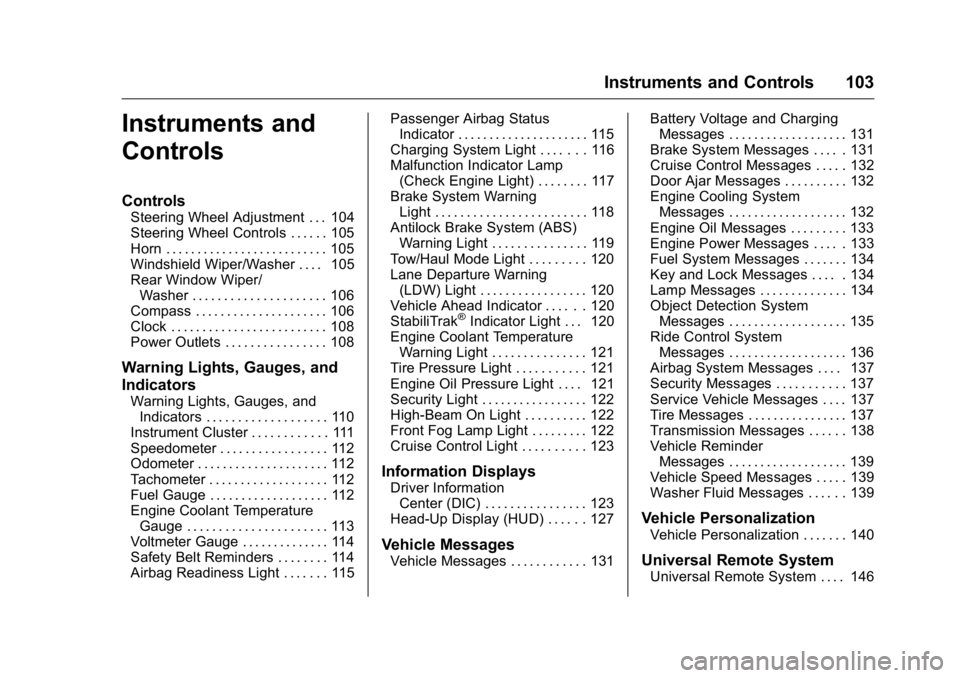
Instruments and
Controls
Controls
Steering Wheel Adjustment . . . 104
Steering Wheel Controls . . . . . . 105
Horn . . . . . . . . . . . . . . . . . . . . . . . . . . 105
Windshield Wiper/Washer . . . . 105
Rear Window Wiper/Washer . . . . . . . . . . . . . . . . . . . . . 106
Compass . . . . . . . . . . . . . . . . . . . . . 106
Clock . . . . . . . . . . . . . . . . . . . . . . . . . 108
Power Outlets . . . . . . . . . . . . . . . . 108
Warning Lights, Gauges, and
Indicators
Warning Lights, Gauges, and Indicators . . . . . . . . . . . . . . . . . . . 110
Instrument Cluster . . . . . . . . . . . . 111
Speedometer . . . . . . . . . . . . . . . . . 112
Odometer . . . . . . . . . . . . . . . . . . . . . 112
Tachometer . . . . . . . . . . . . . . . . . . . 112
Fuel Gauge . . . . . . . . . . . . . . . . . . . 112
Engine Coolant Temperature Gauge . . . . . . . . . . . . . . . . . . . . . . 113
Voltmeter Gauge . . . . . . . . . . . . . . 114
Safety Belt Reminders . . . . . . . . 114
Airbag Readiness Light . . . . . . . 115 Passenger Airbag Status
Indicator . . . . . . . . . . . . . . . . . . . . . 115
Charging System Light . . . . . . . 116
Malfunction Indicator Lamp (Check Engine Light) . . . . . . . . 117
Brake System Warning Light . . . . . . . . . . . . . . . . . . . . . . . . 118
Antilock Brake System (ABS) Warning Light . . . . . . . . . . . . . . . 119
Tow/Haul Mode Light . . . . . . . . . 120
Lane Departure Warning (LDW) Light . . . . . . . . . . . . . . . . . 120
Vehicle Ahead Indicator . . . . . . 120
StabiliTrak
®Indicator Light . . . 120
Engine Coolant Temperature Warning Light . . . . . . . . . . . . . . . 121
Tire Pressure Light . . . . . . . . . . . 121
Engine Oil Pressure Light . . . . 121
Security Light . . . . . . . . . . . . . . . . . 122
High-Beam On Light . . . . . . . . . . 122
Front Fog Lamp Light . . . . . . . . . 122
Cruise Control Light . . . . . . . . . . 123
Information Displays
Driver Information Center (DIC) . . . . . . . . . . . . . . . . 123
Head-Up Display (HUD) . . . . . . 127
Vehicle Messages
Vehicle Messages . . . . . . . . . . . . 131 Battery Voltage and Charging
Messages . . . . . . . . . . . . . . . . . . . 131
Brake System Messages . . . . . 131
Cruise Control Messages . . . . . 132
Door Ajar Messages . . . . . . . . . . 132
Engine Cooling System Messages . . . . . . . . . . . . . . . . . . . 132
Engine Oil Messages . . . . . . . . . 133
Engine Power Messages . . . . . 133
Fuel System Messages . . . . . . . 134
Key and Lock Messages . . . . . 134
Lamp Messages . . . . . . . . . . . . . . 134
Object Detection System Messages . . . . . . . . . . . . . . . . . . . 135
Ride Control System Messages . . . . . . . . . . . . . . . . . . . 136
Airbag System Messages . . . . 137
Security Messages . . . . . . . . . . . 137
Service Vehicle Messages . . . . 137
Tire Messages . . . . . . . . . . . . . . . . 137
Transmission Messages . . . . . . 138
Vehicle Reminder Messages . . . . . . . . . . . . . . . . . . . 139
Vehicle Speed Messages . . . . . 139
Washer Fluid Messages . . . . . . 139
Vehicle Personalization
Vehicle Personalization . . . . . . . 140
Universal Remote System
Universal Remote System . . . . 146