Program remote GMC ACADIA 2017 User Guide
[x] Cancel search | Manufacturer: GMC, Model Year: 2017, Model line: ACADIA, Model: GMC ACADIA 2017Pages: 419, PDF Size: 5.89 MB
Page 116 of 419
GMC Acadia/Acadia Denali Owner Manual (GMNA-Localizing-U.S./Canada/
Mexico-9803770) - 2017 - crc - 7/12/16
Instruments and Controls 115
Security Messages . . . . . . . . . . . 155
Service Vehicle Messages . . . . 155
Steering SystemMessages . . . . . . . . . . . . . . . . . . . 155
Starting the Vehicle
Messages . . . . . . . . . . . . . . . . . . . 156
Tire Messages . . . . . . . . . . . . . . . . 156
Transmission Messages . . . . . . 156
Vehicle Reminder Messages . . . . . . . . . . . . . . . . . . . 157
Vehicle Speed Messages . . . . . 157
Washer Fluid Messages . . . . . . 157
Vehicle Personalization
Vehicle Personalization . . . . . . . 157
Universal Remote System
Universal Remote System . . . . 165
Universal Remote System Programming . . . . . . . . . . . . . . . 165
Universal Remote System Operation . . . . . . . . . . . . . . . . . . . 168
Controls
Steering Wheel
Adjustment
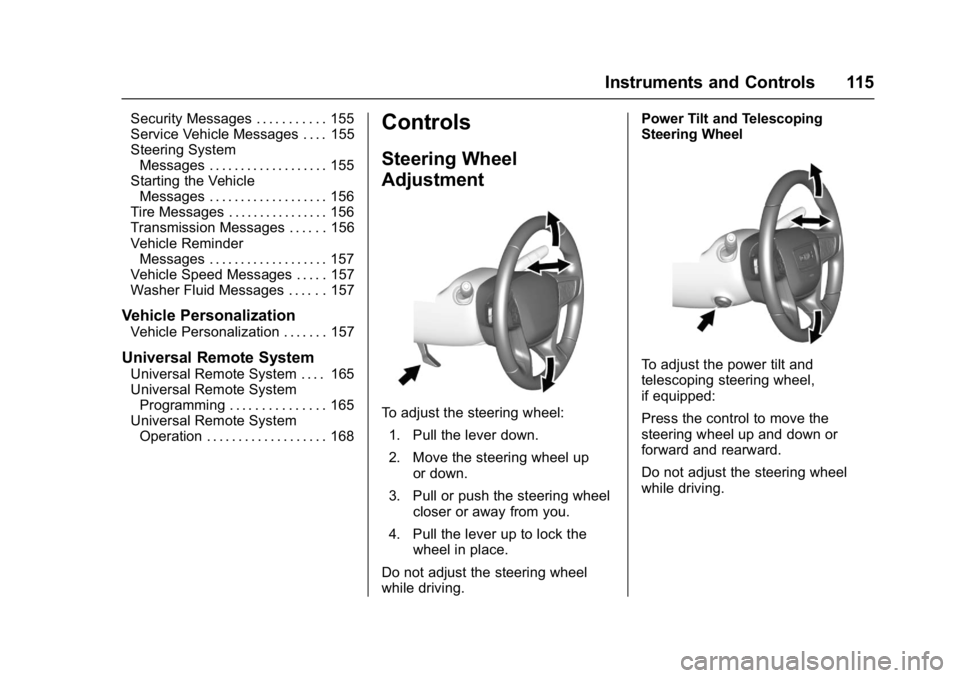
To adjust the steering wheel:
1. Pull the lever down.
2. Move the steering wheel up or down.
3. Pull or push the steering wheel closer or away from you.
4. Pull the lever up to lock the wheel in place.
Do not adjust the steering wheel
while driving. Power Tilt and Telescoping
Steering Wheel
To adjust the power tilt and
telescoping steering wheel,
if equipped:
Press the control to move the
steering wheel up and down or
forward and rearward.
Do not adjust the steering wheel
while driving.
Page 152 of 419
GMC Acadia/Acadia Denali Owner Manual (GMNA-Localizing-U.S./Canada/
Mexico-9803770) - 2017 - crc - 7/12/16
Instruments and Controls 151
Engine Power Messages
ENGINE POWER IS REDUCED
This message displays and a chime
may sound when the cooling system
temperature gets too hot and the
engine further enters the engine
coolant protection mode. See
Engine Overheating0297 for more
information.
This message also displays when
the vehicle's engine power is
reduced. Reduced engine power
can affect the vehicle's ability to
accelerate. If this message is on,
but there is no reduction in
performance, proceed to your
destination. The performance may
be reduced the next time the vehicle
is driven. The vehicle may be driven
at a reduced speed while this
message is on, but acceleration and
speed may be reduced. Anytime
this message stays on, the vehicle
should be taken to your dealer for
service as soon as possible.
Fuel System Messages
FUEL LEVEL LOW
This message displays when the
vehicle is low on fuel. Refuel as
soon as possible.
Key and Lock Messages
NO REMOTE KEY WAS
DETECTED PLACE KEY IN
TRANSMITTER POCKET THEN
START YOUR VEHICLE
This message displays when trying
to start the vehicle if an RKE
transmitter is not detected. The
transmitter battery may be weak.
See “Starting the Vehicle with a Low
Transmitter Battery” underRemote
Keyless Entry (RKE) System
Operation 029.
NO REMOTE DETECTED
This message displays when the
transmitter battery may be weak.
See “Starting the Vehicle with a Low
Transmitter Battery” underRemote
Keyless Entry (RKE) System
Operation 029.
NO REMOTE DETECTED
PRESS BRAKE TO RESTART
This message displays when
attempting to turn off the vehicle
and the RKE transmitter is no longer
detected. Restarting is allowed
without the RKE transmitter for
five minutes. Press the brake pedal
and ENGINE START/STOP to
restart the vehicle.
NUMBER OF KEYS
PROGRAMMED
This message displays when
programming new keys to the
vehicle.
REMOTE LEFT IN VEHICLE
This message displays when
leaving the vehicle with the RKE
transmitter still inside.
REPLACE BATTERY IN
REMOTE KEY
This message displays when the
battery in the RKE transmitter needs
to be replaced.
Page 166 of 419
GMC Acadia/Acadia Denali Owner Manual (GMNA-Localizing-U.S./Canada/
Mexico-9803770) - 2017 - crc - 7/12/16
Instruments and Controls 165
Rear Camera
This allows for Rear Parking Assist
Symbols and Guidance Lines to be
turned off or on.
Select Off or On for the desired
feature.
SeeAssistance Systems for Parking
or Backing 0255.
Return to Factory Settings
Select and the following may
display:
.
Restore Vehicle Settings
. Clear All Private Data
. Restore Radio Settings
Restore Vehicle Settings
This allows selection of restoring
vehicle settings.
Select Restore or Cancel.
Clear All Private Data
This allows selection to clear all
private information from the vehicle.
Select Delete or Cancel. Restore Radio Settings
This allows selection to restore
radio settings.
Select Restore or Cancel.
Software Information
Touch to view the version of the
infotainment system software.
Wi-Fi
Select and the following may
display:
.
Wi-Fi
. Manage Wi-Fi Networks
Wi-Fi
This feature allows Wi-Fi networks
to be turned off or on.
Select Off or On.
Manage Wi-Fi Networks
Select to manage Wi-Fi networks.
Wi-Fi must be on for this feature to
be accessed.
Universal Remote
System
See Radio Frequency
Statement 0394.
Universal Remote System
Programming
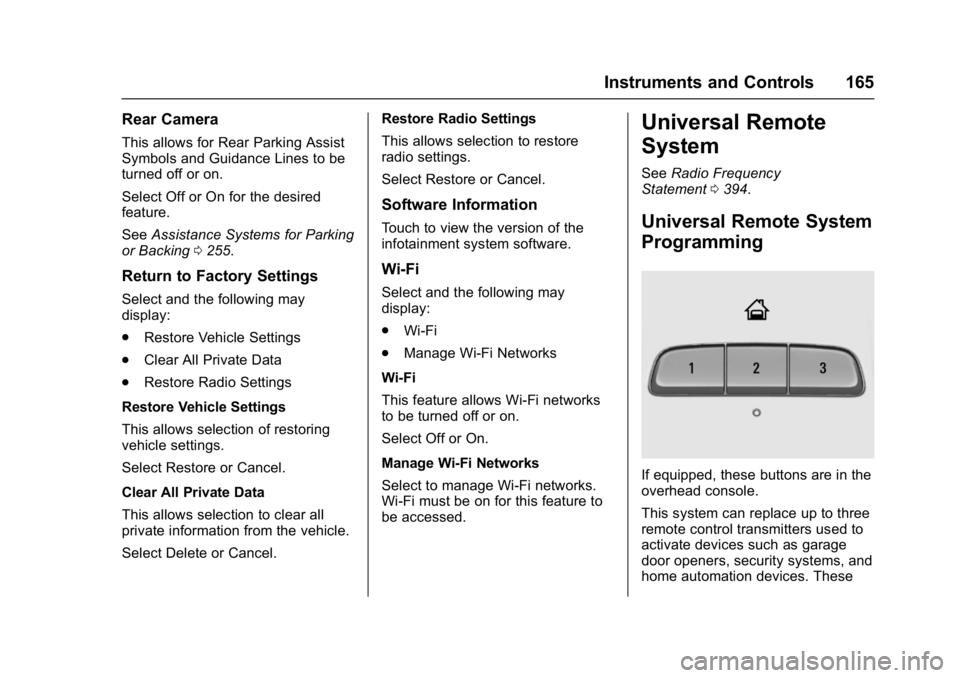
If equipped, these buttons are in the
overhead console.
This system can replace up to three
remote control transmitters used to
activate devices such as garage
door openers, security systems, and
home automation devices. These
Page 167 of 419
GMC Acadia/Acadia Denali Owner Manual (GMNA-Localizing-U.S./Canada/
Mexico-9803770) - 2017 - crc - 7/12/16
166 Instruments and Controls
instructions refer to a garage door
opener, but can be used for other
devices.
Do not use the Universal Remote
system with any garage door opener
that does not have the stop and
reverse feature. This includes any
garage door opener model
manufactured before April 1, 1982.
Read these instructions completely
before programming the Universal
Remote system. It may help to have
another person assist with the
programming process.
Keep the original hand-held
transmitter for use in other vehicles
as well as for future programming.
Erase the programming when
vehicle ownership is terminated.
See“Erasing Universal Remote
System Buttons” later in this
section.
To program a garage door opener,
park outside directly in line with and
facing the garage door opener
receiver. Clear all people and
objects near the garage door. Make sure the hand-held transmitter
has a new battery for quicker and
more accurate transmission of the
radio-frequency signal.
Programming the Universal
Remote System
For questions or help programming
the Universal Remote system, call
1-800-355-3515 or see
www.homelink.com.
Programming involves
time-sensitive actions, and may time
out causing the procedure to be
repeated.
To program up to three devices:
1. Hold the end of the hand-held transmitter about 3 to 8 cm (1
to 3 in) away from the
Universal Remote system
buttons with the indicator light
in view. The hand-held
transmitter was supplied by the
manufacturer of the garage
door opener receiver.
2. At the same time, press and hold both the hand-held
transmitter button and one of
the three Universal Remote system buttons to be used to
operate the garage door. Do
not release either button until
the indicator light changes from
a slow to a rapid flash. Then
release both buttons.
Some garage door openers
may require substitution of
Step 2 with the procedure
under
“Radio Signals for
Canada and Some Gate
Operators” later in this section.
3. Press and hold the newly programmed Universal Remote
system button for five seconds
while watching the indicator
light and garage door
activation.
.If the indicator light stays on
continuously or the garage
door moves when the
button is pressed, then
programming is complete.
There is no need to
complete Steps 4–6.
. If the indicator light does
not come on or the garage
door does not move, a
second button press may
Page 168 of 419
GMC Acadia/Acadia Denali Owner Manual (GMNA-Localizing-U.S./Canada/
Mexico-9803770) - 2017 - crc - 7/12/16
Instruments and Controls 167
be required. For a second
time, press and hold the
newly programmed button
for five seconds. If the light
stays on or the garage door
moves, programming is
complete.
. If the indicator light blinks
rapidly for two seconds,
then changes to a solid light
and the garage door does
not move, continue with
programming Steps 4–6.
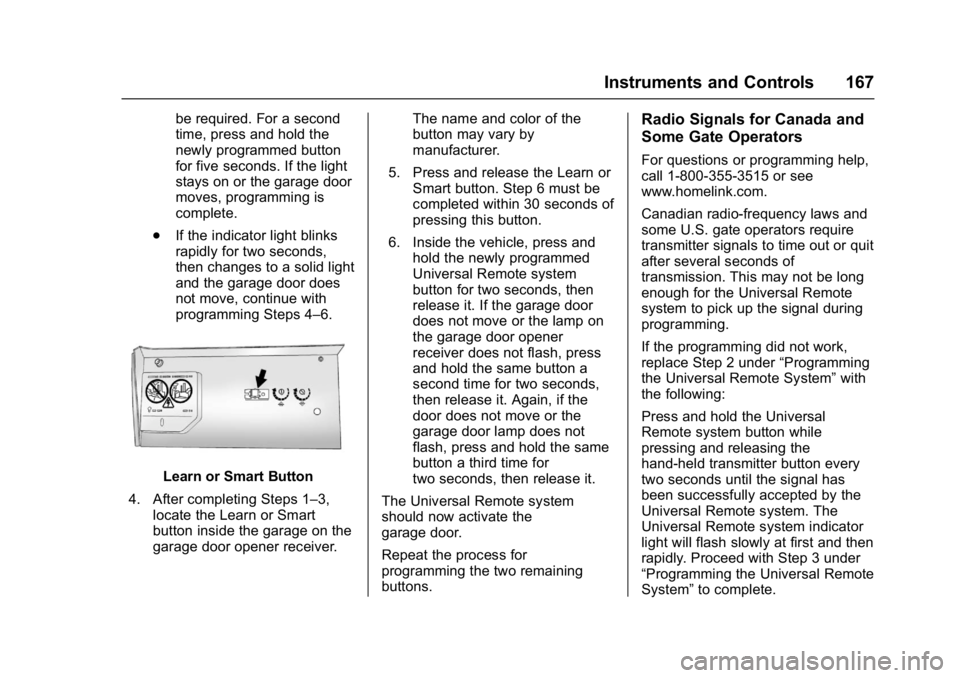
Learn or Smart Button
4. After completing Steps 1–3, locate the Learn or Smart
button inside the garage on the
garage door opener receiver. The name and color of the
button may vary by
manufacturer.
5. Press and release the Learn or Smart button. Step 6 must be
completed within 30 seconds of
pressing this button.
6. Inside the vehicle, press and hold the newly programmed
Universal Remote system
button for two seconds, then
release it. If the garage door
does not move or the lamp on
the garage door opener
receiver does not flash, press
and hold the same button a
second time for two seconds,
then release it. Again, if the
door does not move or the
garage door lamp does not
flash, press and hold the same
button a third time for
two seconds, then release it.
The Universal Remote system
should now activate the
garage door.
Repeat the process for
programming the two remaining
buttons.
Radio Signals for Canada and
Some Gate Operators
For questions or programming help,
call 1-800-355-3515 or see
www.homelink.com.
Canadian radio-frequency laws and
some U.S. gate operators require
transmitter signals to time out or quit
after several seconds of
transmission. This may not be long
enough for the Universal Remote
system to pick up the signal during
programming.
If the programming did not work,
replace Step 2 under “Programming
the Universal Remote System” with
the following:
Press and hold the Universal
Remote system button while
pressing and releasing the
hand-held transmitter button every
two seconds until the signal has
been successfully accepted by the
Universal Remote system. The
Universal Remote system indicator
light will flash slowly at first and then
rapidly. Proceed with Step 3 under
“Programming the Universal Remote
System” to complete.
Page 169 of 419
GMC Acadia/Acadia Denali Owner Manual (GMNA-Localizing-U.S./Canada/
Mexico-9803770) - 2017 - crc - 7/12/16
168 Instruments and Controls
Universal Remote System
Operation
Using the Universal Remote
System
Press and hold the appropriate
Universal Remote system button for
at least one-half second. The
indicator light will come on while the
signal is being transmitted.
Erasing Universal Remote
System Buttons
Erase all programmed buttons when
vehicle ownership is terminated.
To erase:1. Press and hold the two outside buttons until the indicator light
begins to flash. This should
take about 10 seconds.
2. Release both buttons.
Reprogramming a Single
Universal Remote System
Button
To reprogram any of the system
buttons: 1. Press and hold any one of the buttons. Do not release the
button.
2. The indicator light will begin to flash after 20 seconds. Without
releasing the button, proceed
with Step 1 under
“Programming the Universal
Remote System.”
Page 404 of 419
GMC Acadia/Acadia Denali Owner Manual (GMNA-Localizing-U.S./Canada/
Mexico-9803770) - 2017 - crc - 7/12/16
OnStar 403
to the vehicle in a crash, or wireless
phone network congestion or
jamming—may prevent service.
See Radio Frequency
Statement 0394.
Services for People with
Disabilities
Advisors provide services to help
Subscribers with physical disabilities
and medical conditions.
Press
Qto help:
. Locate a gas station with an
attendant to pump gas.
. Find a hotel, restaurant, etc.,
that meets accessibility needs.
. Provide directions to the closest
hospital or pharmacy in urgent
situations.
TTY Users
OnStar has the ability to
communicate to deaf,
hard-of-hearing, or speech-impaired
customers while in the vehicle. The
available dealer-installed TTY
system can provide in-vehicle access to all OnStar services,
except Virtual Advisor and OnStar
Turn-by-Turn Navigation.
OnStar Personal Identification
Number (PIN)
A PIN is needed to access some
OnStar services. The PIN will need
to be changed the first time when
speaking with an Advisor. To
change the OnStar PIN, contact an
OnStar Advisor by pressing
Qor
calling 1-888-4ONSTAR.
Warranty
OnStar equipment may be
warranted as part of the vehicle
warranty.
Languages
The vehicle can be programmed to
respond in multiple languages.
Press
Qand ask for an Advisor.
Advisors are available in English,
Spanish, and French. Available
languages may vary by country.
Potential Issues
OnStar cannot perform Remote
Door Unlock or Stolen Vehicle
Assistance after the vehicle has
been off continuously for 10 days
without an ignition cycle. If the
vehicle has not been started for
five days, OnStar can contact
Roadside Assistance or a locksmith
to help gain access to the vehicle.
Global Positioning
System (GPS)
. Obstruction of the GPS can
occur in a large city with tall
buildings; in parking garages;
around airports; in tunnels and
underpasses; or in an area with
very dense trees. If GPS signals
are not available, the OnStar
system should still operate to
call OnStar. However, OnStar
could have difficulty identifying
the exact location.
. In emergency situations, OnStar
can use the last stored GPS
location to send to emergency
responders.
Page 416 of 419

GMC Acadia/Acadia Denali Owner Manual (GMNA-Localizing-U.S./Canada/
Mexico-9803770) - 2017 - crc - 7/12/16
Index 415
R
Radio Frequency Statement . . . . 394
Radio Reception . . . . . . . . . . . . . . . . 185
RadiosAM-FM Radio . . . . . . . . . . . . . . . . . 182
Satellite . . . . . . . . . . . . . . . . . . . . . . . 183
Reading Lamps . . . . . . . . . . . . . . . . . 175
Rear Climate Control System . . . 205
Rear Seats . . . . . . . . . . . . . . . . . . . . . . 63 Heated . . . . . . . . . . . . . . . . . . . . . . . . . 66
Rear Storage . . . . . . . . . . . . . . . . . . . 108
Rear Vision Camera (RVC) . . . . . 255
Rear Window Washer/Wiper . . . . 118
Rearview Mirrors . . . . . . . . . . . . . . . . 49 Automatic Dimming . . . . . . . . . . . . . 49
Reclining Seatbacks . . . . . . . . . . . . . 58
Recommended Fluids and Lubricants . . . . . . . . . . . . . . . . . . . . . 377
Records
Maintenance . . . . . . . . . . . . . . . . . . 380
Recreational Vehicle Towing . . . . 354
Reimbursement Program, GM Mobility . . . . . . . . . . . . . . . . . . . 388
Remote Keyless Entry (RKE)
System . . . . . . . . . . . . . . . . . . . . . . . . . 29
Remote Vehicle Start . . . . . . . . . . . . 35
Replacement Parts Airbags . . . . . . . . . . . . . . . . . . . . . . . . . 87 Replacement Parts (cont'd)
Maintenance . . . . . . . . . . . . . . . . . . 378
Replacing Airbag System . . . . . . . . 87
Replacing LATCH System Parts after a Crash . . . . . . . . . . . . 101
Replacing Safety Belt System Parts after a Crash . . . . . . . . . . . . . 74
Reporting Safety Defects Canadian Government . . . . . . . . 395
General Motors . . . . . . . . . . . . . . . 395
U.S. Government . . . . . . . . . . . . . 394
Restraints Where to Put . . . . . . . . . . . . . . . . . . . 93
Retained Accessory
Power (RAP) . . . . . . . . . . . . . . . . . . 230
Reverse Tilt Mirrors . . . . . . . . . . . . . . 49
Ride Control Systems Messages . . . . . . . . . . . . . . . . . . . . 154
Roads Driving, Wet . . . . . . . . . . . . . . . . . . 218
Roadside Assistance Program . . . . . . . . . . . . . . . . . . . . . . . 388
Roof
Sunroof . . . . . . . . . . . . . . . . . . . . . . . . . 52
Roof Rack System . . . . . . . . . . . . . . 112
Rotation, Tires . . . . . . . . . . . . . . . . . . 329
Routing, Engine Drive Belt . . . . . . 383 Running the Vehicle While
Parked . . . . . . . . . . . . . . . . . . . . . . . . 233
S
Safety Belts . . . . . . . . . . . . . . . . . . . . . 68
Care . . . . . . . . . . . . . . . . . . . . . . . . . . . . 74
Extender . . . . . . . . . . . . . . . . . . . . . . . . 74
How to Wear Safety BeltsProperly . . . . . . . . . . . . . . . . . . . . . . . 69
Lap-Shoulder Belt . . . . . . . . . . . . . . 70
Reminders . . . . . . . . . . . . . . . . . . . . 130
Replacing after a Crash . . . . . . . . 74
Use During Pregnancy . . . . . . . . . . 73
Safety Defects Reporting Canadian Government . . . . . . . . 395
General Motors . . . . . . . . . . . . . . . 395
U.S. Government . . . . . . . . . . . . . 394
Safety Locks . . . . . . . . . . . . . . . . . . . . . 40
Safety System Check . . . . . . . . . . . . 74
Satellite Radio . . . . . . . . . . . . . . . . . . 183
Scheduling Appointments . . . . . . . 390
Sealant Kit, Tire . . . . . . . . . . . . . . . . 337
Seats Adjustment, Front . . . . . . . . . . . . . . . 57
Head Restraints . . . . . . . . . . . . . . . . 55
Heated and Ventilated Front . . . . 61
Heated, Rear . . . . . . . . . . . . . . . . . . . 66
Lumbar Adjustment, Front . . . . . . 58
Memory . . . . . . . . . . . . . . . . . . . . . . . . . 60
Page 418 of 419

GMC Acadia/Acadia Denali Owner Manual (GMNA-Localizing-U.S./Canada/
Mexico-9803770) - 2017 - crc - 7/12/16
Index 417
T
Tachometer . . . . . . . . . . . . . . . . . . . . . 127
Text Telephone (TTY) Users . . . . 387
Theft-Deterrent Systems . . . . . . . . . 47Immobilizer . . . . . . . . . . . . . . . . . . . . . 47
Third-Row Seats . . . . . . . . . . . . . . . . . 66
Time . . . . . . . . . . . . . . . . . . . . . . . . . . . . 119
Tires . . . . . . . . . . . . . . . . . . . . . . . . . . . . 315 All-Season . . . . . . . . . . . . . . . . . . . . 316
Buying New Tires . . . . . . . . . . . . . 331
Chains . . . . . . . . . . . . . . . . . . . . . . . . 335
Changing . . . . . . . . . . . . . . . . . . . . . 344
Compact Spare . . . . . . . . . . . . . . . 350
Designations . . . . . . . . . . . . . . . . . 319
Different Size . . . . . . . . . . . . . . . . . 332
If a Tire Goes Flat . . . . . . . . . . . . 336
Inspection . . . . . . . . . . . . . . . . . . . . 328
Messages . . . . . . . . . . . . . . . . . . . . 156
Pressure . . . . . . . . . . . . . . . . . 323, 324
Pressure Light . . . . . . . . . . . . . . . . 138
Pressure Monitor Operation . . 325
Pressure Monitor System . . . . . 324
Rotation . . . . . . . . . . . . . . . . . . . . . . 329
Sealant andCompressor Kit . . . . . . . . . . . . . 337
Sealant and Compressor Kit, Storing . . . . . . . . . . . . . . . . . . 344
Sidewall Labeling . . . . . . . . . . . . . 317 Tires (cont'd)
Terminology and Definitions . . 320
Uniform Tire Quality
Grading . . . . . . . . . . . . . . . . . . . . . 332
Wheel Alignment and Tire Balance . . . . . . . . . . . . . . . . . . . . . 334
Wheel Replacement . . . . . . . . . . 334
When It Is Time for New Tires . . . . . . . . . . . . . . . . . . . . . . . . 330
Winter . . . . . . . . . . . . . . . . . . . . . . . . 316
Tow/Haul Mode . . . . . . . . . . . . . . . . . 236
Tow/Haul Mode Light . . . . . . . . . . . 136
Towing Driving Characteristics . . . . . . . . 272
Equipment . . . . . . . . . . . . . . . . . . . . 278
General Information . . . . . . . . . . 272
Recreational Vehicle . . . . . . . . . . 354
Trailer . . . . . . . . . . . . . . . . . . . . . . . . 276
Vehicle . . . . . . . . . . . . . . . . . . . . . . . 354
Traction Control System (TCS)/StabiliTrak
®Light . . . . . . . . . . . . 138
Off Light . . . . . . . . . . . . . . . . . . . . . . 137
Traction Control/Electronic Stability Control . . . . . . . . . . . . . . . 240
Trademarks and License Agreements . . . . . . . . . . . . . . . . . . . 200 Trailer
Towing . . . . . . . . . . . . . . . . . . . . . . . . 276
Transmission Automatic . . . . . . . . . . . . . . . . . . . . . 233
Fluid, Automatic . . . . . . . . . . . . . . 291
Messages . . . . . . . . . . . . . . . . . . . . 156
Transportation Program,
Courtesy . . . . . . . . . . . . . . . . . . . . . . 390
Trip Odometer . . . . . . . . . . . . . . . . . . 127
Turn and Lane-Change Signals . . . . . . . . . . . . . . . . . . . . . . . . 173
U
Uniform Tire Quality Grading . . . 332
Universal Remote System . . . . . . 165
Operation . . . . . . . . . . . . . . . . . . . . . 168
Programming . . . . . . . . . . . . . . . . . 165
USB Port . . . . . . . . . . . . . . . . . . . . . . . 186
Using This Manual . . . . . . . . . . . . . . . . 2
V
Vehicle Alarm System . . . . . . . . . . . . . . . . . . 45
Canadian Owners . . . . . . . . . . . . . . . 2
Control . . . . . . . . . . . . . . . . . . . . . . . .211
Identification Number (VIN) . . . 381
Load Limits . . . . . . . . . . . . . . . . . . . 221
Messages . . . . . . . . . . . . . . . . . . . . 147
Personalization . . . . . . . . . . . . . . . 157