ECO mode GMC ACADIA 2017 Owner's Guide
[x] Cancel search | Manufacturer: GMC, Model Year: 2017, Model line: ACADIA, Model: GMC ACADIA 2017Pages: 419, PDF Size: 5.89 MB
Page 244 of 419
GMC Acadia/Acadia Denali Owner Manual (GMNA-Localizing-U.S./Canada/
Mexico-9803770) - 2017 - crc - 7/12/16
Driving and Operating 243
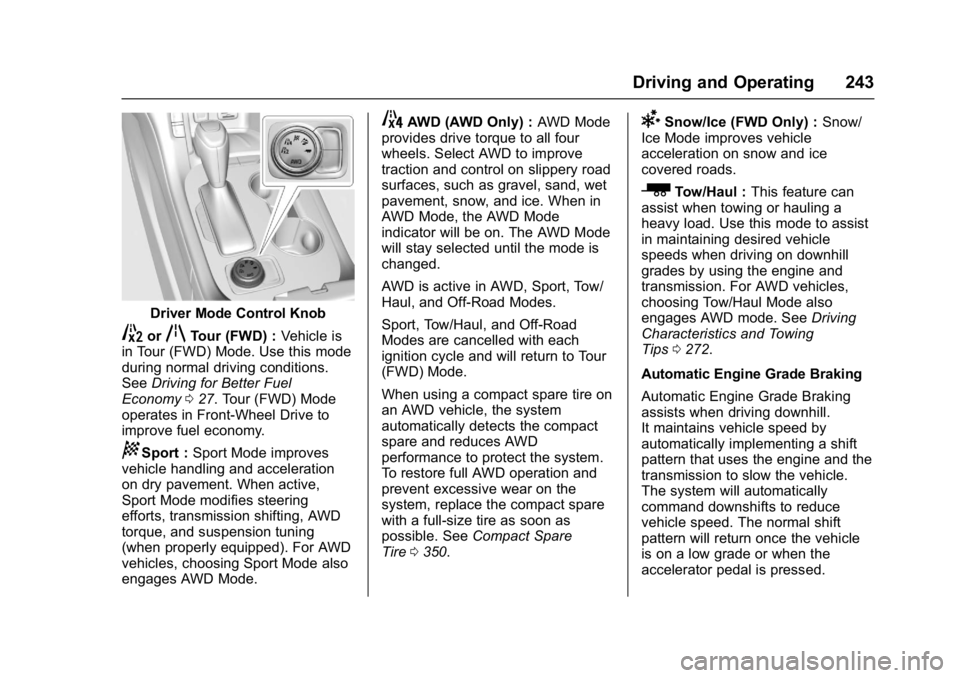
Driver Mode Control Knob
5orqTour (FWD) :Vehicle is
in Tour (FWD) Mode. Use this mode
during normal driving conditions.
See Driving for Better Fuel
Economy 027. Tour (FWD) Mode
operates in Front-Wheel Drive to
improve fuel economy.
8Sport : Sport Mode improves
vehicle handling and acceleration
on dry pavement. When active,
Sport Mode modifies steering
efforts, transmission shifting, AWD
torque, and suspension tuning
(when properly equipped). For AWD
vehicles, choosing Sport Mode also
engages AWD Mode.
4AWD (AWD Only) : AWD Mode
provides drive torque to all four
wheels. Select AWD to improve
traction and control on slippery road
surfaces, such as gravel, sand, wet
pavement, snow, and ice. When in
AWD Mode, the AWD Mode
indicator will be on. The AWD Mode
will stay selected until the mode is
changed.
AWD is active in AWD, Sport, Tow/
Haul, and Off-Road Modes.
Sport, Tow/Haul, and Off-Road
Modes are cancelled with each
ignition cycle and will return to Tour
(FWD) Mode.
When using a compact spare tire on
an AWD vehicle, the system
automatically detects the compact
spare and reduces AWD
performance to protect the system.
To restore full AWD operation and
prevent excessive wear on the
system, replace the compact spare
with a full-size tire as soon as
possible. See Compact Spare
Tire 0350.6Snow/Ice (FWD Only) : Snow/
Ice Mode improves vehicle
acceleration on snow and ice
covered roads.
_Tow/Haul : This feature can
assist when towing or hauling a
heavy load. Use this mode to assist
in maintaining desired vehicle
speeds when driving on downhill
grades by using the engine and
transmission. For AWD vehicles,
choosing Tow/Haul Mode also
engages AWD mode. See Driving
Characteristics and Towing
Tips 0272.
Automatic Engine Grade Braking
Automatic Engine Grade Braking
assists when driving downhill.
It maintains vehicle speed by
automatically implementing a shift
pattern that uses the engine and the
transmission to slow the vehicle.
The system will automatically
command downshifts to reduce
vehicle speed. The normal shift
pattern will return once the vehicle
is on a low grade or when the
accelerator pedal is pressed.
Page 274 of 419
GMC Acadia/Acadia Denali Owner Manual (GMNA-Localizing-U.S./Canada/
Mexico-9803770) - 2017 - crc - 7/12/16
Driving and Operating 273
.Do not tow a trailer during the
first 800 km (500 mi), to prevent
damage to the engine, axle or
other parts.
. Then, during the first 800 km
(500 mi) trailer towing, do not
drive over 80 km/h (50 mph) and
do not make starts at full throttle.
. The vehicle can tow in D (Drive)
but Manual Mode is
recommended. See Manual
Mode 0235. Use a lower gear if
the transmission shifts too often.
. Turn off Parking Assist and Rear
Cross Traffic Alert (RCTA) when
towing.
. Turn off Lane Keep Assist (LKA)
when towing.
. Do not use Adaptive Cruise
Control (ACC) when towing a
trailer.{Warning
When towing a trailer, exhaust
gases may collect at the rear of
the vehicle and enter if the
liftgate, trunk/hatch, or rear-most
window is open.
When towing a trailer:
. Do not drive with the
liftgate, trunk/hatch,
or rear-most window open.
. Fully open the air outlets on
or under the instrument
panel.
. Also adjust the climate
control system to a setting
that brings in only outside
air. See “Climate Control
Systems” in the Index.
For information about carbon
monoxide, see Engine
Exhaust 0232.
Towing a trailer requires a certain
amount of experience. The
combination you are driving is
longer and not as responsive as the vehicle itself. Get acquainted with
the handling and braking of the rig
before setting out for the open road.
Before starting, check all trailer hitch
parts and attachments, safety
chains, electrical connectors, lamps,
tires, and mirrors. If the trailer has
electric brakes, start the
combination moving and then apply
the trailer brake controller by hand
to be sure the brakes work.
During the trip, check occasionally
to be sure that the load is secure
and the lamps and any trailer
brakes still work.
Towing with a Stability Control
System
When towing, the sound of the
stability control system might be
heard. The system is reacting to the
vehicle movement caused by the
trailer, which mainly occurs during
cornering. This is normal when
towing heavier trailers.
Page 280 of 419
GMC Acadia/Acadia Denali Owner Manual (GMNA-Localizing-U.S./Canada/
Mexico-9803770) - 2017 - crc - 7/12/16
Driving and Operating 279
Safety Chains
Always attach chains between the
vehicle and the trailer. Cross the
safety chains under the tongue of
the trailer to help prevent the tongue
from contacting the road if it
becomes separated from the hitch.
Always leave just enough slack so
the rig can turn. Never allow safety
chains to drag on the ground.
Trailer Brakes
A loaded trailer that weighs more
than 450 kg (1,000 lb) needs to have
its own brake system that is
adequate for the weight of the
trailer. Be sure to read and follow
the instructions for the trailer brakes
so they are installed, adjusted, and
maintained properly.
Because the vehicle has antilock
brakes, do not try to tap into the
vehicle's hydraulic brake system.
If you do, both brake systems will
not work well, or at all.
Trailer Wiring Harness
Basic Trailer Wiring
The trailer wiring harness, with a
seven-pin connector, is located at
the rear of the vehicle and is tied to
the vehicle's frame. The harness
connector can be plugged into a
seven-pin universal heavy-duty
trailer connector available through
your dealer.
Use only a round, seven-wire
connector with flat blade terminals
meeting SAE J2863 specifications
for proper electrical connectivity.
The seven-wire harness contains
the following trailer circuits:
.Yellow/Gray: Stop/Turn
Signal Left
. Green/Violet: Stop/Turn Signal
Right
. Gray/Brown: Parking Lamps
. White/Green: Back-up Lamps
. Red/Green: Back-up Lamps
. Black: Ground
. Blue: Electric Brake* *The fuse for this circuit is installed
in the underhood electrical center,
but the wires are not connected.
They should be connected by your
dealer or a qualified service center.
If the back-up lamp circuit is not
functional, contact your dealer.
If a remote (non-vehicle) battery is
being charged, turn the Tow/Haul
Mode knob on the center console.
This will boost the vehicle system
voltage and properly charge the
battery. If the trailer is too light for
Tow/Haul Mode, turn on the
headlamps (non-HID only) as a
second way to boost the vehicle
system and charge the battery.
Page 329 of 419
GMC Acadia/Acadia Denali Owner Manual (GMNA-Localizing-U.S./Canada/
Mexico-9803770) - 2017 - crc - 7/12/16
328 Vehicle Care
There are two minutes to match the
first tire/wheel position, and
five minutes overall to match all four
tire/wheel positions. If it takes
longer, the matching process stops
and must be restarted.
The TPMS sensor matching
process is:1. Set the parking brake.
2. Place the vehicle in ON/RUN/ START. See Ignition
Positions 0225.
3. Make sure the Tire Pressure info page option is turned on.
The info pages on the DIC can
be turned on and off through
the Settings menu. See Driver
Information Center (DIC) (Base
and Midlevel) 0141 orDriver
Information Center (DIC)
(Uplevel) 0144.
4. Use the DIC controls on the right side of the steering wheel
to scroll to the Tire Pressure
screen under the DIC
info page.
5. Press and hold
Vin the center
of the DIC controls. The horn sounds twice to
signal the receiver is in relearn
mode and the TIRE
LEARNING ACTIVE message
displays on the DIC screen.
6. Start with the driver side front tire.
7. Place the relearn tool against the tire sidewall, near the valve
stem. Then press the button to
activate the TPMS sensor.
A horn chirp confirms that the
sensor identification code has
been matched to this tire and
wheel position.
8. Proceed to the passenger side front tire, and repeat the
procedure in Step 7.
9. Proceed to the passenger side rear tire, and repeat the
procedure in Step 7.
10. Proceed to the driver side rear tire, and repeat the procedure
in Step 7. The horn sounds two
times to indicate the sensor
identification code has been
matched to the driver side rear
tire, and the TPMS sensor matching process is no longer
active. The TIRE LEARNING
ACTIVE message on the DIC
display screen goes off.
11. Turn the ignition off.
12. Set all four tires to the recommended air pressure
level as indicated on the Tire
and Loading Information label.
Tire Inspection
We recommend that the tires,
including the spare tire, if the
vehicle has one, be inspected
for signs of wear or damage at
least once a month.
Replace the tire if:
.The indicators at three or
more places around the tire
can be seen.
.There is cord or fabric
showing through the tire's
rubber.
Page 394 of 419
GMC Acadia/Acadia Denali Owner Manual (GMNA-Localizing-U.S./Canada/
Mexico-9803770) - 2017 - crc - 7/12/16
Customer Information 393
.Vehicle make, model, and
model year.
. Vehicle Identification
Number (VIN).
. Insurance company and policy
number.
. General description of the
damage to the other vehicle.
Choose a reputable repair facility
that uses quality replacement parts.
See “Collision Parts” earlier in this
section.
If the airbag has inflated, see What
Will You See after an Airbag
Inflates? 080.
Managing the Vehicle Damage
Repair Process
In the event that the vehicle requires
damage repairs, GM recommends
that you take an active role in its
repair. If you have a pre-determined
repair facility of choice, take the
vehicle there, or have it towed there.
Specify to the facility that any
required replacement collision parts
be original equipment parts, either
new Genuine GM parts or recycled original GM parts. Remember,
recycled parts will not be covered by
the GM vehicle warranty.
Insurance pays the bill for the repair,
but you must live with the repair.
Depending on your policy limits,
your insurance company may
initially value the repair using
aftermarket parts. Discuss this with
the repair professional, and insist on
Genuine GM parts. Remember,
if the vehicle is leased, you may be
obligated to have the vehicle
repaired with Genuine GM parts,
even if your insurance coverage
does not pay the full cost.
If another party's insurance
company is paying for the repairs,
you are not obligated to accept a
repair valuation based on that
insurance company's collision policy
repair limits, as you have no
contractual limits with that company.
In such cases, you can have control
of the repair and parts choices as
long as the cost stays within
reasonable limits.
Service Publications
Ordering Information
Service Manuals
Service Manuals have the diagnosis
and repair information on the
engines, transmission, axle,
suspension, brakes, electrical,
steering, body, etc.
Owner Information
Owner publications are written
specifically for owners and intended
to provide basic operational
information about the vehicle. The
Owner Manual includes the
Maintenance Schedule for all
models.
In-Portfolio: Includes a Portfolio,
Owner Manual, and Warranty
Manual.
RETAIL SELL PRICE: $35.00
–
$40.00 (U.S.) plus handling and
shipping fees.
Without Pouch: Owner Manual only.
RETAIL SELL PRICE:
$25.00 (U.S.) plus handling and
shipping fees.
Page 395 of 419
GMC Acadia/Acadia Denali Owner Manual (GMNA-Localizing-U.S./Canada/
Mexico-9803770) - 2017 - crc - 7/12/16
394 Customer Information
Current and Past Models
Service and Owner publications are
available for many current and past
model year GM vehicles.
ORDER TOLL FREE:
1-800-551-4123 Monday–Friday
8:00 AM –6:00 PM Eastern Time
For Credit Card Orders Only
(VISA-MasterCard-Discover), see
Helm, Inc. at: www.helminc.com.
Or write to:
Helm, Incorporated
Attention: Customer Service
47911 Halyard Drive
Plymouth, MI 48170
Prices are subject to change without
notice and without incurring
obligation. Allow ample time for
delivery.
All listed prices are quoted in U.S.
funds. Make checks payable in U.S.
funds.
Radio Frequency
Statement
This vehicle has systems that
operate on a radio frequency that
complies with Part 15/Part 18 of the
Federal Communications
Commission (FCC) rules and with
Industry Canada Standards
RSS-GEN/210/216/220/251/310,
ICES‐001.
Operation is subject to the following
two conditions:
1. The device may not cause harmful interference.
2. The device must accept any interference received, including
interference that may cause
undesired operation of the
device.
Changes or modifications to any of
these systems by other than an
authorized service facility could void
authorization to use this equipment.
Reporting Safety
Defects
Reporting Safety Defects
to the United States
Government
If you believe that your vehicle
has a defect which could cause
a crash or could cause injury or
death, you should immediately
inform the National Highway
Traffic Safety Administration
(NHTSA) in addition to notifying
General Motors.
If NHTSA receives similar
complaints, it may open an
investigation, and if it finds that
a safety defect exists in a group
of vehicles, it may order a recall
and remedy campaign.
However, NHTSA cannot
become involved in individual
problems between you, your
dealer, or General Motors.
Page 411 of 419

GMC Acadia/Acadia Denali Owner Manual (GMNA-Localizing-U.S./Canada/
Mexico-9803770) - 2017 - crc - 7/12/16
410 Index
Drive SystemsAll-Wheel Drive . . . . . . . . . . 236, 302
Driver Assistance Systems . . . . . 254
Driver Information Center (DIC) . . . . . . . . . . . . . 141, 144
Driver Mode Control . . . . . . . . . . . . 242
Driving Assistance Systems . . . . . . . . . . 259
Characteristics andTowing Tips . . . . . . . . . . . . . . . . . 272
Defensive . . . . . . . . . . . . . . . . . . . . . .211
Drunk . . . . . . . . . . . . . . . . . . . . . . . . . .211
For Better Fuel Economy . . . . . . . 27
Hill and Mountain Roads . . . . . . 218
If the Vehicle is Stuck . . . . . . . . . 220
Loss of Control . . . . . . . . . . . . . . . 213
Off-Road . . . . . . . . . . . . . . . . . . . . . 213
Off-Road Recovery . . . . . . . . . . . 212
Vehicle Load Limits . . . . . . . . . . . 221
Wet Roads . . . . . . . . . . . . . . . . . . . 218
Winter . . . . . . . . . . . . . . . . . . . . . . . . 219
Dual Automatic Climate Control System . . . . . . . . . . . . . . . . 202
E
Electric Parking Brake . . . . . . . . . . 237
Electric Parking Brake Light . . . . 135
Electrical Equipment,Add-On . . . . . . . . . . . . . . . . . . . . . . . 280 Electrical System
Engine Compartment Fuse
Block . . . . . . . . . . . . . . . . . . . . . . . . 307
Fuses and Circuit Breakers . . . 307
Instrument Panel Fuse Block . . . . . . . . . . . . . . . . . . . . . . . . .311
Overload . . . . . . . . . . . . . . . . . . . . . 306
Rear Compartment Fuse
Block . . . . . . . . . . . . . . . . . . . . . . . . 313
Emergency OnStar
®. . . . . . . . . . . . . . . . . . . . . . 398
Engine Air Cleaner/Filter . . . . . . . . . . . . . 292
Check and Service EngineSoon Light . . . . . . . . . . . . . . . . . . 132
Compartment Overview . . . . . . . 285
Coolant . . . . . . . . . . . . . . . . . . . . . . . 294
Coolant Temperature
Gauge . . . . . . . . . . . . . . . . . . . . . . 129
Cooling System . . . . . . . . . . . . . . . 293
Cooling System Messages . . . 150
Drive Belt Routing . . . . . . . . . . . . 383
Exhaust . . . . . . . . . . . . . . . . . . . . . . 232
Heater . . . . . . . . . . . . . . . . . . . . . . . . 228
Oil Life System . . . . . . . . . . . . . . . 290
Oil Messages . . . . . . . . . . . . . . . . . 150
Oil Pressure Light . . . . . . . . . . . . 138
Overheating . . . . . . . . . . . . . . . . . . 297 Engine (cont'd)
Power Messages . . . . . . . . . . . . . 151
Running While Parked . . . . . . . . 233
Starting . . . . . . . . . . . . . . . . . . . . . . . 227
Entry Lighting . . . . . . . . . . . . . . . . . . . 175
Equipment, Towing . . . . . . . . . . . . . 278
Event Data Recorders . . . . . . . . . . 396
Exit Lighting . . . . . . . . . . . . . . . . . . . . 176
Extended Parking . . . . . . . . . . . . . . . 232
Extender, Safety Belt . . . . . . . . . . . . 74
Exterior Lamp Controls . . . . . . . . . 169
Exterior Lamps Off Reminder . . . 171
Exterior Lighting Battery Saver . . . . . . . . . . . . . . . . . . . . . . . . . 177
F
Features
Memory . . . . . . . . . . . . . . . . . . . . . . . . . 12
Filter,
Engine Air Cleaner . . . . . . . . . . . 292
Flash-to-Pass . . . . . . . . . . . . . . . . . . . 171
Flashers, Hazard Warning . . . . . . 173
Flat Tire . . . . . . . . . . . . . . . . . . . . . . . . 336 Changing . . . . . . . . . . . . . . . . . . . . . 344
Floor Mats . . . . . . . . . . . . . . . . . . . . . . 366
Fluid Automatic Transmission . . . . . . 291
Brakes . . . . . . . . . . . . . . . . . . . . . . . . 300
Washer . . . . . . . . . . . . . . . . . . . . . . . 298
Page 414 of 419

GMC Acadia/Acadia Denali Owner Manual (GMNA-Localizing-U.S./Canada/
Mexico-9803770) - 2017 - crc - 7/12/16
Index 413
Lights (cont'd)Low Fuel Warning . . . . . . . . . . . . 139
Safety Belt Reminders . . . . . . . . 130
Security . . . . . . . . . . . . . . . . . . . . . . 140
Service Electric Parking
Brake . . . . . . . . . . . . . . . . . . . . . . . 135
StabiliTrak
®OFF . . . . . . . . . . . . . 137
Tire Pressure . . . . . . . . . . . . . . . . . 138
Tow/Haul Mode . . . . . . . . . . . . . . . 136
Traction Control System (TCS)/StabiliTrak
®. . . . . . . . . . 138
Traction Off . . . . . . . . . . . . . . . . . . . 137
Locks Automatic Door . . . . . . . . . . . . . . . . . 39
Delayed Locking . . . . . . . . . . . . . . . . 39
Door . . . . . . . . . . . . . . . . . . . . . . . . . . . . 37
Lockout Protection . . . . . . . . . . . . . . 39
Power Door . . . . . . . . . . . . . . . . . . . . . 39
Safety . . . . . . . . . . . . . . . . . . . . . . . . . . 40
Loss of Control . . . . . . . . . . . . . . . . . 213
Low Fuel Warning Light . . . . . . . . . 139
Lower Anchors and Tethers for Children (LATCH
System) . . . . . . . . . . . . . . . . . . . . . . . . 94
Lumbar Adjustment . . . . . . . . . . . . . . 58 Front Seats . . . . . . . . . . . . . . . . . . . . . 58
M
MaintenanceRecords . . . . . . . . . . . . . . . . . . . . . . 380
Maintenance and Care Additional . . . . . . . . . . . . . . . . . . . . . 374
Maintenance Schedule . . . . . . . . . 368 Recommended Fluids andLubricants . . . . . . . . . . . . . . . . . . . 377
Malfunction Indicator Lamp . . . . . 132
Manual Mode . . . . . . . . . . . . . . . . . . . 235
Memory Features . . . . . . . . . . . . . . . . 12
Memory Seats . . . . . . . . . . . . . . . . . . . 60
Messages Airbag System . . . . . . . . . . . . . . . . 155
Battery Voltage and
Charging . . . . . . . . . . . . . . . . . . . . 147
Brake System . . . . . . . . . . . . . . . . 148
Compass . . . . . . . . . . . . . . . . . . . . . 149
Door Ajar . . . . . . . . . . . . . . . . . . . . . 149
Engine Cooling System . . . . . . . 150
Engine Oil . . . . . . . . . . . . . . . . . . . . 150
Engine Power . . . . . . . . . . . . . . . . 151
Fuel System . . . . . . . . . . . . . . . . . . 151
Key and Lock . . . . . . . . . . . . . . . . . 151
Lamp . . . . . . . . . . . . . . . . . . . . . . . . . 152
Object Detection System . . . . . 152
Ride Control System . . . . . . . . . . 154
Security . . . . . . . . . . . . . . . . . . . . . . 155 Messages (cont'd)
Service Vehicle . . . . . . . . . . . . . . . 155
Starting the Vehicle . . . . . . . . . . . 156
Steering System . . . . . . . . . . . . . . 155
Tire . . . . . . . . . . . . . . . . . . . . . . . . . . . 156
Transmission . . . . . . . . . . . . . . . . . 156
Vehicle . . . . . . . . . . . . . . . . . . . . . . . 147
Vehicle Reminder . . . . . . . . . . . . . 157
Vehicle Speed . . . . . . . . . . . . . . . . 157
Washer Fluid . . . . . . . . . . . . . . . . . 157
Mirrors Automatic Dimming . . . . . . . . . . . . . 49
Automatic DimmingRearview . . . . . . . . . . . . . . . . . . . . . . 49
Convex . . . . . . . . . . . . . . . . . . . . . . . . . 48
Folding . . . . . . . . . . . . . . . . . . . . . . . . . 49
Heated . . . . . . . . . . . . . . . . . . . . . . . . . 49
Manual Rearview . . . . . . . . . . . . . . . 49
Power . . . . . . . . . . . . . . . . . . . . . . . . . . 48
Tilt in Reverse . . . . . . . . . . . . . . . . . . 49
Mirrors, Interior Rearview . . . . . . . . 49
Mode . . . . . . . . . . . . . . . . . . . . . . . . . . . 242 Driver Control . . . . . . . . . . . . . . . . . 242
Monitor System, Tire Pressure . . . . . . . . . . . . . . . . . . . . . . 324
Multi-band Antenna . . . . . . . . . . . . . 185