Door GMC ACADIA 2017 Owner's Manual
[x] Cancel search | Manufacturer: GMC, Model Year: 2017, Model line: ACADIA, Model: GMC ACADIA 2017Pages: 419, PDF Size: 5.89 MB
Page 2 of 419

GMC Acadia/Acadia Denali Owner Manual (GMNA-Localizing-U.S./Canada/
Mexico-9803770) - 2017 - crc - 7/12/16
ContentsIntroduction . . . . . . . . . . . . . . . . . . . . . . 2
In Brief . . . . . . . . . . . . . . . . . . . . . . . . . . . 5
Keys, Doors, and Windows . . . . . 28
Seats and Restraints . . . . . . . . . . . 54
Storage . . . . . . . . . . . . . . . . . . . . . . . 107
Instruments and Controls . . . . . . 114
Lighting . . . . . . . . . . . . . . . . . . . . . . . 169
Infotainment System . . . . . . . . . . 178
Climate Controls . . . . . . . . . . . . . . 202
Driving and Operating . . . . . . . . . 209
Vehicle Care . . . . . . . . . . . . . . . . . . 281
Service and Maintenance . . . . . 367
Technical Data . . . . . . . . . . . . . . . . 381
Customer Information . . . . . . . . . 384
Reporting Safety Defects . . . . . . 394
OnStar . . . . . . . . . . . . . . . . . . . . . . . . 397
Index . . . . . . . . . . . . . . . . . . . . 407
Page 6 of 419
GMC Acadia/Acadia Denali Owner Manual (GMNA-Localizing-U.S./Canada/
Mexico-9803770) - 2017 - crc - 7/12/16
In Brief 5
In Brief
Instrument Panel
Instrument Panel . . . . . . . . . . . . . . . . 6
Initial Drive Information
Initial Drive Information . . . . . . . . . . 8
Stop/Start System . . . . . . . . . . . . . . . 8
Remote Keyless Entry (RKE)System . . . . . . . . . . . . . . . . . . . . . . . . 8
Remote Vehicle Start . . . . . . . . . . . 8
Door Locks . . . . . . . . . . . . . . . . . . . . . 9
Liftgate . . . . . . . . . . . . . . . . . . . . . . . . 10
Windows . . . . . . . . . . . . . . . . . . . . . . . 10
Seat Adjustment . . . . . . . . . . . . . . . 11
Memory Features . . . . . . . . . . . . . . 12
Second Row Seats . . . . . . . . . . . . 12
Third Row Seats . . . . . . . . . . . . . . . 13
Heated and Ventilated Seats . . . 13
Head Restraint Adjustment . . . . 14
Safety Belts . . . . . . . . . . . . . . . . . . . . 14
Passenger Sensing System . . . 14
Mirror Adjustment . . . . . . . . . . . . . . 15
Steering Wheel Adjustment . . . . 15
Interior Lighting . . . . . . . . . . . . . . . . 16
Exterior Lighting . . . . . . . . . . . . . . . 17
Windshield Wiper/Washer . . . . . . 17
Climate Controls . . . . . . . . . . . . . . . 18
Transmission . . . . . . . . . . . . . . . . . . 19
Vehicle Features
Infotainment System . . . . . . . . . . . 19
Radio(s) . . . . . . . . . . . . . . . . . . . . . . . 19
Satellite Radio . . . . . . . . . . . . . . . . . 20
Portable Audio Devices . . . . . . . . 20
Bluetooth
®. . . . . . . . . . . . . . . . . . . . . 20
Steering Wheel Controls . . . . . . . 20
Cruise Control . . . . . . . . . . . . . . . . . 21
Driver Information Center (DIC) . . . . . . . . . . . . . . . . . 22
Forward Collision Alert (FCA) System . . . . . . . . . . . . . . . . . . . . . . . 22
Forward Automatic Braking (FAB) . . . . . . . . . . . . . . . . 22
Front Pedestrian Braking (FPB) System . . . . . . . . . . . . . . . . . . . . . . . 22
Lane Keep Assist (LKA) . . . . . . . 23
Lane Change Alert (LCA) . . . . . . 23
Surround Vision . . . . . . . . . . . . . . . 23
Rear Vision Camera (RVC) . . . . 23
Rear Cross Traffic Alert (RCTA) System . . . . . . . . . . . . . . . . . . . . . . . 23
Parking Assist . . . . . . . . . . . . . . . . . 24
Power Outlets . . . . . . . . . . . . . . . . . 24
Universal Remote System . . . . . 24
Sunroof . . . . . . . . . . . . . . . . . . . . . . . . 24
Performance and Maintenance
Traction Control/Electronic Stability Control . . . . . . . . . . . . . . 25
Tire Pressure Monitor . . . . . . . . . . 26 Fuel . . . . . . . . . . . . . . . . . . . . . . . . . . . 26
E85 or FlexFuel . . . . . . . . . . . . . . . . 26
Engine Oil Life System . . . . . . . . 27
Driving for Better Fuel
Economy . . . . . . . . . . . . . . . . . . . . . 27
Roadside Assistance Program . . . . . . . . . . . . . . . . . . . . . . 27
Page 9 of 419
GMC Acadia/Acadia Denali Owner Manual (GMNA-Localizing-U.S./Canada/
Mexico-9803770) - 2017 - crc - 7/12/16
8 In Brief
Initial Drive
Information
This section provides a brief
overview about some of the
important features that may or may
not be on your specific vehicle.
For more detailed information, refer
to each of the features which can be
found later in this owner’s manual.
Stop/Start System
The vehicle may have a fuel saving
stop/start system to shut off the
engine and help conserve fuel.
When the brakes are applied and
the vehicle is at a complete stop,
the engine may turn off. When the
brake pedal is released or the
accelerator pedal is pressed, the
engine will restart. SeeStarting the
Engine 0227.
Remote Keyless Entry
(RKE) System
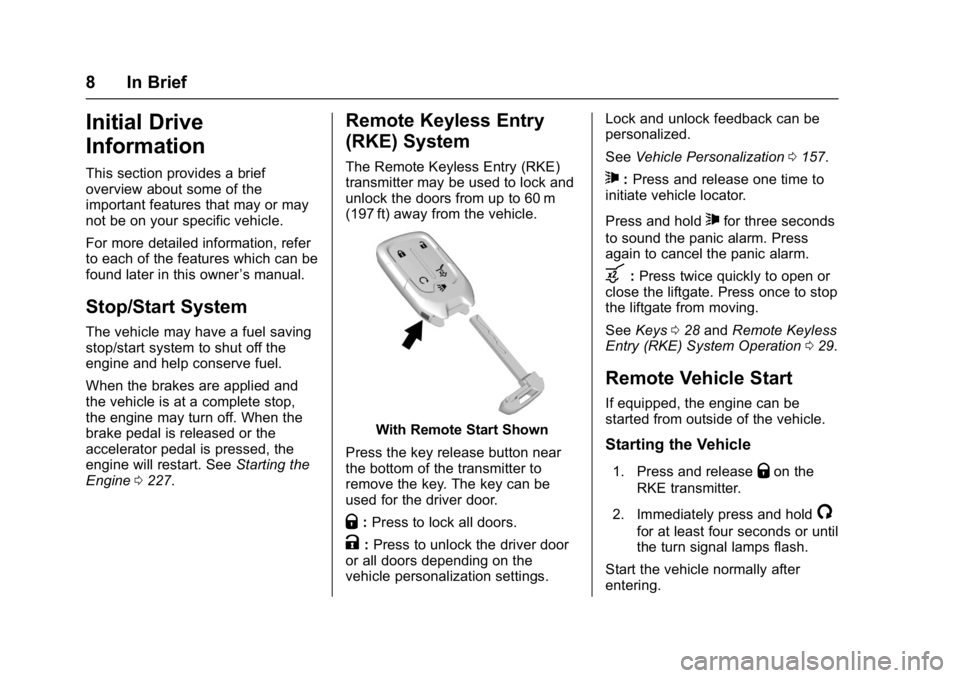
The Remote Keyless Entry (RKE)
transmitter may be used to lock and
unlock the doors from up to 60 m
(197 ft) away from the vehicle.
With Remote Start Shown
Press the key release button near
the bottom of the transmitter to
remove the key. The key can be
used for the driver door.
Q: Press to lock all doors.
K:Press to unlock the driver door
or all doors depending on the
vehicle personalization settings. Lock and unlock feedback can be
personalized.
See
Vehicle Personalization 0157.
7:Press and release one time to
initiate vehicle locator.
Press and hold
7for three seconds
to sound the panic alarm. Press
again to cancel the panic alarm.
b: Press twice quickly to open or
close the liftgate. Press once to stop
the liftgate from moving.
See Keys 028 and Remote Keyless
Entry (RKE) System Operation 029.
Remote Vehicle Start
If equipped, the engine can be
started from outside of the vehicle.
Starting the Vehicle
1. Press and releaseQon the
RKE transmitter.
2. Immediately press and hold
/
for at least four seconds or until
the turn signal lamps flash.
Start the vehicle normally after
entering.
Page 10 of 419
GMC Acadia/Acadia Denali Owner Manual (GMNA-Localizing-U.S./Canada/
Mexico-9803770) - 2017 - crc - 7/12/16
In Brief 9
When the vehicle starts, the parking
lamps will turn on.
Remote start can be extended.
Canceling a Remote Start
To cancel a remote start, do one of
the following:
.Press and hold
/until the
parking lamps turn off.
. Turn on the hazard warning
flashers.
. Turn the vehicle on and then off.
See Remote Vehicle Start 035.
Door Locks
To lock or unlock the vehicle from
the outside:
.
Use the key. The key lock
cylinder is covered with a cap.
See Door Locks 037.
. Press
QorKon the Remote
Keyless Entry (RKE) transmitter.
To lock or unlock the vehicle from
the inside, use the power door lock
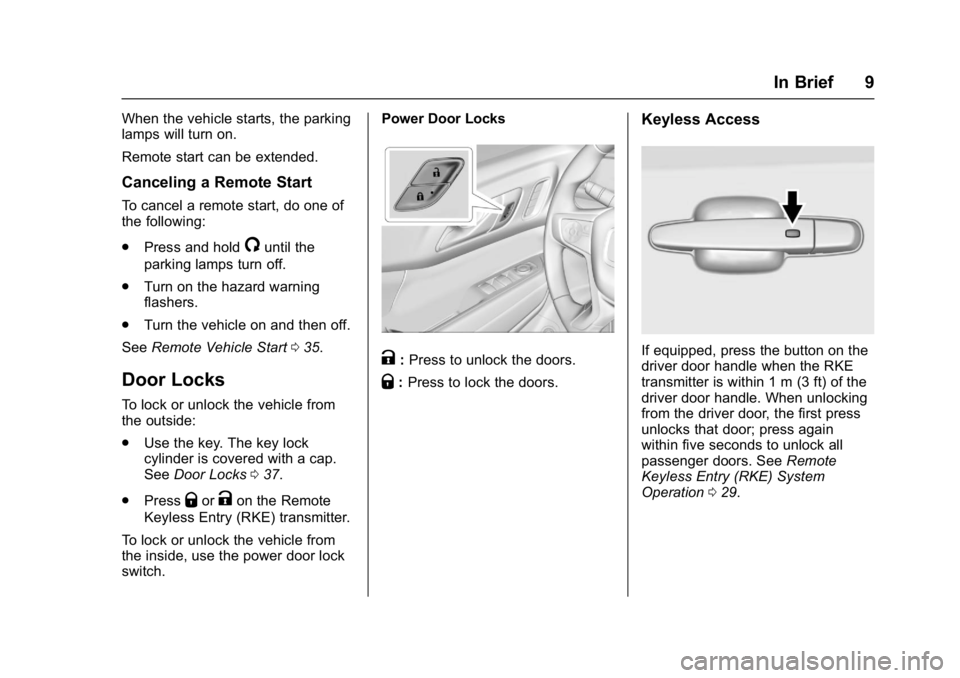
switch. Power Door Locks
K:
Press to unlock the doors.
Q: Press to lock the doors.
Keyless Access
If equipped, press the button on the
driver door handle when the RKE
transmitter is within 1 m (3 ft) of the
driver door handle. When unlocking
from the driver door, the first press
unlocks that door; press again
within five seconds to unlock all
passenger doors. See Remote
Keyless Entry (RKE) System
Operation 029.
Page 11 of 419
GMC Acadia/Acadia Denali Owner Manual (GMNA-Localizing-U.S./Canada/
Mexico-9803770) - 2017 - crc - 7/12/16
10 In Brief
Liftgate
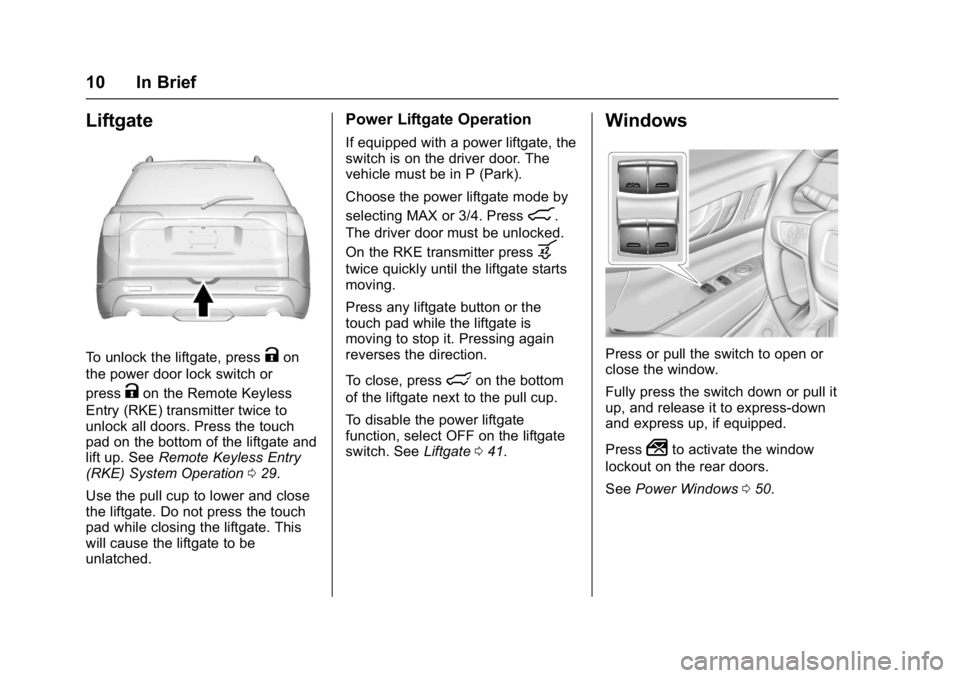
To unlock the liftgate, pressKon
the power door lock switch or
press
Kon the Remote Keyless
Entry (RKE) transmitter twice to
unlock all doors. Press the touch
pad on the bottom of the liftgate and
lift up. See Remote Keyless Entry
(RKE) System Operation 029.
Use the pull cup to lower and close
the liftgate. Do not press the touch
pad while closing the liftgate. This
will cause the liftgate to be
unlatched.
Power Liftgate Operation
If equipped with a power liftgate, the
switch is on the driver door. The
vehicle must be in P (Park).
Choose the power liftgate mode by
selecting MAX or 3/4. Press
8.
The driver door must be unlocked.
On the RKE transmitter press
b
twice quickly until the liftgate starts
moving.
Press any liftgate button or the
touch pad while the liftgate is
moving to stop it. Pressing again
reverses the direction.
To close, press
lon the bottom
of the liftgate next to the pull cup.
To disable the power liftgate
function, select OFF on the liftgate
switch. See Liftgate041.
Windows
Press or pull the switch to open or
close the window.
Fully press the switch down or pull it
up, and release it to express-down
and express up, if equipped.
Press
2to activate the window
lockout on the rear doors.
See Power Windows 050.
Page 13 of 419
GMC Acadia/Acadia Denali Owner Manual (GMNA-Localizing-U.S./Canada/
Mexico-9803770) - 2017 - crc - 7/12/16
12 In Brief
Memory Features
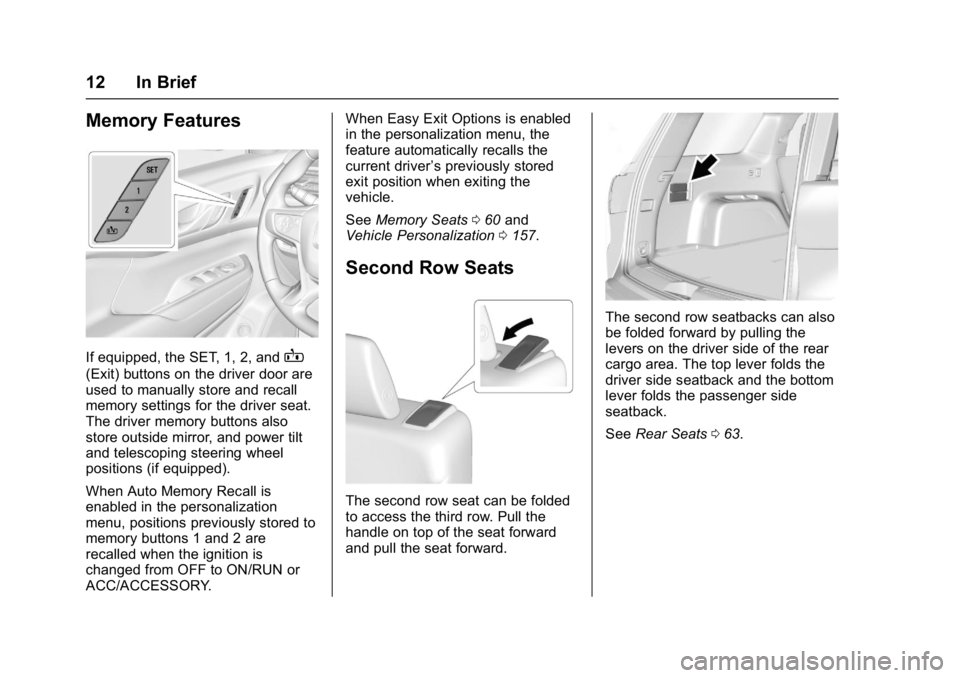
If equipped, the SET, 1, 2, andB
(Exit) buttons on the driver door are
used to manually store and recall
memory settings for the driver seat.
The driver memory buttons also
store outside mirror, and power tilt
and telescoping steering wheel
positions (if equipped).
When Auto Memory Recall is
enabled in the personalization
menu, positions previously stored to
memory buttons 1 and 2 are
recalled when the ignition is
changed from OFF to ON/RUN or
ACC/ACCESSORY.When Easy Exit Options is enabled
in the personalization menu, the
feature automatically recalls the
current driver
’s previously stored
exit position when exiting the
vehicle.
See Memory Seats 060 and
Vehicle Personalization 0157.
Second Row Seats
The second row seat can be folded
to access the third row. Pull the
handle on top of the seat forward
and pull the seat forward.
The second row seatbacks can also
be folded forward by pulling the
levers on the driver side of the rear
cargo area. The top lever folds the
driver side seatback and the bottom
lever folds the passenger side
seatback.
See Rear Seats 063.
Page 17 of 419
GMC Acadia/Acadia Denali Owner Manual (GMNA-Localizing-U.S./Canada/
Mexico-9803770) - 2017 - crc - 7/12/16
16 In Brief
Power Tilt and Telescoping
Steering Wheel
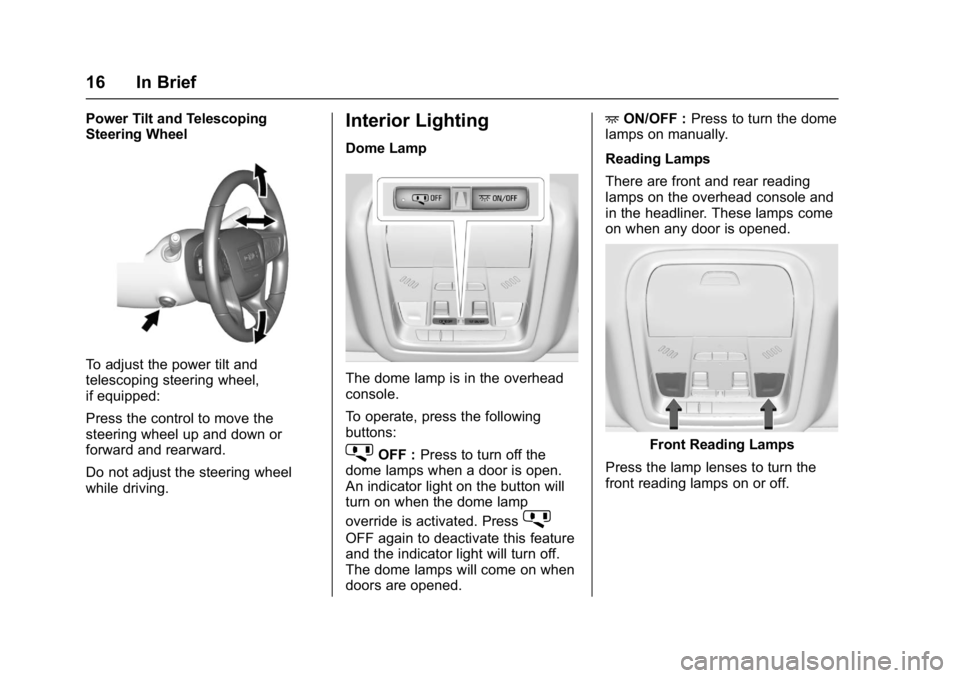
To adjust the power tilt and
telescoping steering wheel,
if equipped:
Press the control to move the
steering wheel up and down or
forward and rearward.
Do not adjust the steering wheel
while driving.
Interior Lighting
Dome Lamp
The dome lamp is in the overhead
console.
To operate, press the following
buttons:
jOFF :Press to turn off the
dome lamps when a door is open.
An indicator light on the button will
turn on when the dome lamp
override is activated. Press
j
OFF again to deactivate this feature
and the indicator light will turn off.
The dome lamps will come on when
doors are opened. +
ON/OFF : Press to turn the dome
lamps on manually.
Reading Lamps
There are front and rear reading
lamps on the overhead console and
in the headliner. These lamps come
on when any door is opened.
Front Reading Lamps
Press the lamp lenses to turn the
front reading lamps on or off.
Page 25 of 419
GMC Acadia/Acadia Denali Owner Manual (GMNA-Localizing-U.S./Canada/
Mexico-9803770) - 2017 - crc - 7/12/16
24 In Brief
Parking Assist
If equipped, Rear Parking
Assist (RPA) uses sensors on the
rear bumper to assist with parking
and avoiding objects while in
R (Reverse). It operates at speeds
less than 8 km/h (5 mph). RPA may
display a warning triangle on the
Rear Vision Camera screen and a
graphic on the instrument cluster to
provide the object distance. In
addition, multiple beeps or seat
pulses may occur if very close to an
object.
The vehicle may also have the Front
Parking Assist system.
SeeAssistance Systems for Parking
or Backing 0255.
Power Outlets
The vehicle has two 12-volt
accessory power outlets, which can
be used to plug in electrical
equipment, such as a cell phone or
MP3 player. The power outlets are located:
.
On the center stack below the
climate controls.
. In the rear cargo area.
To use the outlets, remove the
cover.
See Power Outlets 0121.
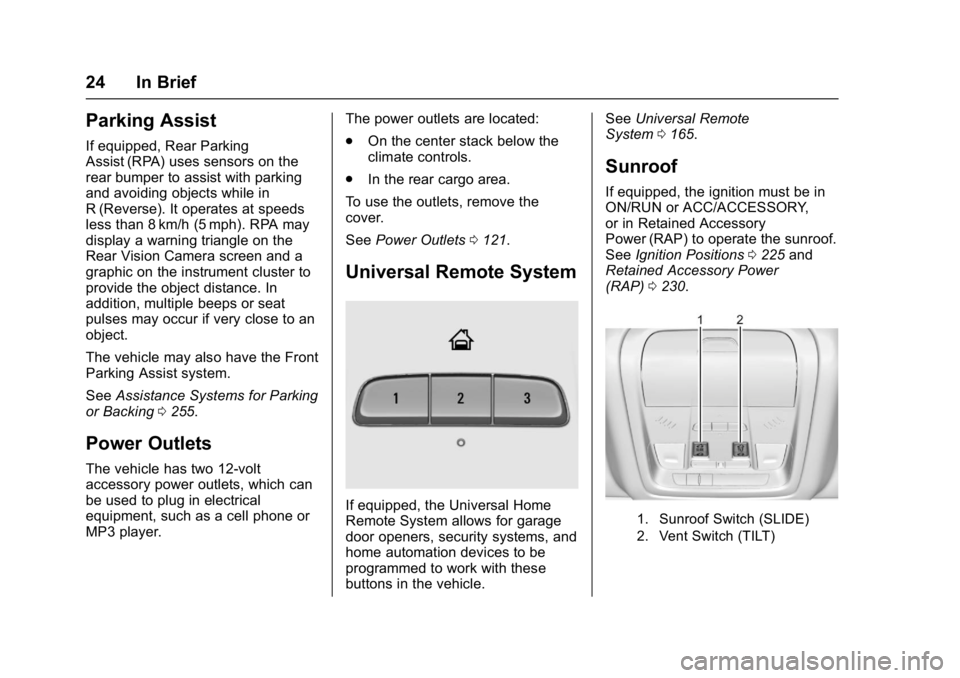
Universal Remote System
If equipped, the Universal Home
Remote System allows for garage
door openers, security systems, and
home automation devices to be
programmed to work with these
buttons in the vehicle. See
Universal Remote
System 0165.
Sunroof
If equipped, the ignition must be in
ON/RUN or ACC/ACCESSORY,
or in Retained Accessory
Power (RAP) to operate the sunroof.
See Ignition Positions 0225 and
Retained Accessory Power
(RAP) 0230.
1. Sunroof Switch (SLIDE)
2. Vent Switch (TILT)
Page 29 of 419
GMC Acadia/Acadia Denali Owner Manual (GMNA-Localizing-U.S./Canada/
Mexico-9803770) - 2017 - crc - 7/12/16
28 Keys, Doors, and Windows
Keys, Doors, and
Windows
Keys and Locks
Keys . . . . . . . . . . . . . . . . . . . . . . . . . . . 28
Remote Keyless Entry (RKE)System . . . . . . . . . . . . . . . . . . . . . . . 29
Remote Keyless Entry (RKE) System Operation . . . . . . . . . . . . 29
Remote Vehicle Start . . . . . . . . . . 35
Door Locks . . . . . . . . . . . . . . . . . . . . 37
Power Door Locks . . . . . . . . . . . . . 39
Delayed Locking . . . . . . . . . . . . . . . 39
Automatic Door Locks . . . . . . . . . 39
Lockout Protection . . . . . . . . . . . . . 39
Safety Locks . . . . . . . . . . . . . . . . . . . 40
Doors
Liftgate . . . . . . . . . . . . . . . . . . . . . . . . 41
Vehicle Security
Vehicle Security . . . . . . . . . . . . . . . . 45
Vehicle Alarm System . . . . . . . . . 45
Immobilizer . . . . . . . . . . . . . . . . . . . . 47
Immobilizer Operation . . . . . . . . . 47
Exterior Mirrors
Convex Mirrors . . . . . . . . . . . . . . . . 48
Power Mirrors . . . . . . . . . . . . . . . . . . 48 Folding Mirrors . . . . . . . . . . . . . . . . . 49
Heated Mirrors . . . . . . . . . . . . . . . . . 49
Automatic Dimming Mirror . . . . . 49
Reverse Tilt Mirrors . . . . . . . . . . . . 49
Interior Mirrors
Interior Rearview Mirrors . . . . . . . 49
Manual Rearview Mirror . . . . . . . . 49
Automatic Dimming Rearview
Mirror . . . . . . . . . . . . . . . . . . . . . . . . . 49
Windows
Windows . . . . . . . . . . . . . . . . . . . . . . . 50
Power Windows . . . . . . . . . . . . . . . 50
Sun Visors . . . . . . . . . . . . . . . . . . . . . 52
Roof
Sunroof . . . . . . . . . . . . . . . . . . . . . . . . 52
Keys and Locks
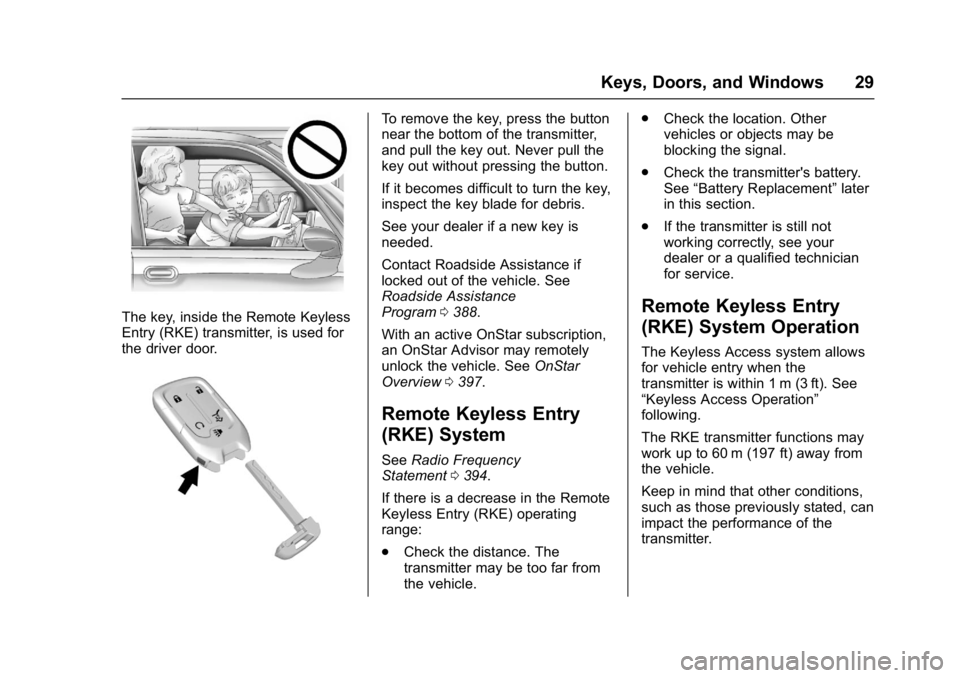
Keys
{Warning
Leaving children in a vehicle with
a Remote Keyless Entry (RKE)
transmitter is dangerous and
children or others could be
seriously injured or killed. They
could operate the power windows
or other controls or make the
vehicle move. The windows will
function with the RKE transmitter
in the vehicle, and children or
others could be caught in the path
of a closing window. Do not leave
children in a vehicle with an RKE
transmitter.
Page 30 of 419
GMC Acadia/Acadia Denali Owner Manual (GMNA-Localizing-U.S./Canada/
Mexico-9803770) - 2017 - crc - 7/12/16
Keys, Doors, and Windows 29
The key, inside the Remote Keyless
Entry (RKE) transmitter, is used for
the driver door.
To remove the key, press the button
near the bottom of the transmitter,
and pull the key out. Never pull the
key out without pressing the button.
If it becomes difficult to turn the key,
inspect the key blade for debris.
See your dealer if a new key is
needed.
Contact Roadside Assistance if
locked out of the vehicle. See
Roadside Assistance
Program0388.
With an active OnStar subscription,
an OnStar Advisor may remotely
unlock the vehicle. See OnStar
Overview 0397.
Remote Keyless Entry
(RKE) System
See Radio Frequency
Statement 0394.
If there is a decrease in the Remote
Keyless Entry (RKE) operating
range:
. Check the distance. The
transmitter may be too far from
the vehicle. .
Check the location. Other
vehicles or objects may be
blocking the signal.
. Check the transmitter's battery.
See “Battery Replacement” later
in this section.
. If the transmitter is still not
working correctly, see your
dealer or a qualified technician
for service.
Remote Keyless Entry
(RKE) System Operation
The Keyless Access system allows
for vehicle entry when the
transmitter is within 1 m (3 ft). See
“Keyless Access Operation”
following.
The RKE transmitter functions may
work up to 60 m (197 ft) away from
the vehicle.
Keep in mind that other conditions,
such as those previously stated, can
impact the performance of the
transmitter.