Parking GMC ACADIA 2017 Owner's Manual
[x] Cancel search | Manufacturer: GMC, Model Year: 2017, Model line: ACADIA, Model: GMC ACADIA 2017Pages: 419, PDF Size: 5.89 MB
Page 6 of 419
GMC Acadia/Acadia Denali Owner Manual (GMNA-Localizing-U.S./Canada/
Mexico-9803770) - 2017 - crc - 7/12/16
In Brief 5
In Brief
Instrument Panel
Instrument Panel . . . . . . . . . . . . . . . . 6
Initial Drive Information
Initial Drive Information . . . . . . . . . . 8
Stop/Start System . . . . . . . . . . . . . . . 8
Remote Keyless Entry (RKE)System . . . . . . . . . . . . . . . . . . . . . . . . 8
Remote Vehicle Start . . . . . . . . . . . 8
Door Locks . . . . . . . . . . . . . . . . . . . . . 9
Liftgate . . . . . . . . . . . . . . . . . . . . . . . . 10
Windows . . . . . . . . . . . . . . . . . . . . . . . 10
Seat Adjustment . . . . . . . . . . . . . . . 11
Memory Features . . . . . . . . . . . . . . 12
Second Row Seats . . . . . . . . . . . . 12
Third Row Seats . . . . . . . . . . . . . . . 13
Heated and Ventilated Seats . . . 13
Head Restraint Adjustment . . . . 14
Safety Belts . . . . . . . . . . . . . . . . . . . . 14
Passenger Sensing System . . . 14
Mirror Adjustment . . . . . . . . . . . . . . 15
Steering Wheel Adjustment . . . . 15
Interior Lighting . . . . . . . . . . . . . . . . 16
Exterior Lighting . . . . . . . . . . . . . . . 17
Windshield Wiper/Washer . . . . . . 17
Climate Controls . . . . . . . . . . . . . . . 18
Transmission . . . . . . . . . . . . . . . . . . 19
Vehicle Features
Infotainment System . . . . . . . . . . . 19
Radio(s) . . . . . . . . . . . . . . . . . . . . . . . 19
Satellite Radio . . . . . . . . . . . . . . . . . 20
Portable Audio Devices . . . . . . . . 20
Bluetooth
®. . . . . . . . . . . . . . . . . . . . . 20
Steering Wheel Controls . . . . . . . 20
Cruise Control . . . . . . . . . . . . . . . . . 21
Driver Information Center (DIC) . . . . . . . . . . . . . . . . . 22
Forward Collision Alert (FCA) System . . . . . . . . . . . . . . . . . . . . . . . 22
Forward Automatic Braking (FAB) . . . . . . . . . . . . . . . . 22
Front Pedestrian Braking (FPB) System . . . . . . . . . . . . . . . . . . . . . . . 22
Lane Keep Assist (LKA) . . . . . . . 23
Lane Change Alert (LCA) . . . . . . 23
Surround Vision . . . . . . . . . . . . . . . 23
Rear Vision Camera (RVC) . . . . 23
Rear Cross Traffic Alert (RCTA) System . . . . . . . . . . . . . . . . . . . . . . . 23
Parking Assist . . . . . . . . . . . . . . . . . 24
Power Outlets . . . . . . . . . . . . . . . . . 24
Universal Remote System . . . . . 24
Sunroof . . . . . . . . . . . . . . . . . . . . . . . . 24
Performance and Maintenance
Traction Control/Electronic Stability Control . . . . . . . . . . . . . . 25
Tire Pressure Monitor . . . . . . . . . . 26 Fuel . . . . . . . . . . . . . . . . . . . . . . . . . . . 26
E85 or FlexFuel . . . . . . . . . . . . . . . . 26
Engine Oil Life System . . . . . . . . 27
Driving for Better Fuel
Economy . . . . . . . . . . . . . . . . . . . . . 27
Roadside Assistance Program . . . . . . . . . . . . . . . . . . . . . . 27
Page 8 of 419

GMC Acadia/Acadia Denali Owner Manual (GMNA-Localizing-U.S./Canada/
Mexico-9803770) - 2017 - crc - 7/12/16
In Brief 7
1.Air Vents 0207.
2. Exterior Lamp Controls 0169.
Turn Signal Lever. See Turn
and Lane-Change
Signals 0173.
3. Instrument Cluster 0123.
4. Windshield Wiper/
Washer 0117.
Rear Window Wiper/
Washer 0118.
5. Light Sensor. See Automatic
Headlamp System 0172.
6. Infotainment 0178.
7. Dual Automatic Climate Control
System 0202.
8. Heated and Ventilated Front
Seats 061 (If Equipped).
9. USB Port 0186 (If Equipped).
Auxiliary Input Jack. See
Auxiliary Devices 0191. 10.
Hazard Warning
Flashers 0173.
Traction Control/Electronic
Stability Control 0240.
11. Power Outlets 0121.
12. Driver Mode Control 0242.
Assistance Systems for
Parking or Backing 0255 (If
Equipped).
Lane Keep Assist (LKA) 0267
(If Equipped).
13. Shift Lever. See Automatic
Transmission 0233.
14. ENGINE START/STOP Button. SeeStarting the Engine 0227.
15. Steering Wheel Controls 0116
(If Equipped).
Driver Information Center (DIC)
Buttons. See Driver Information
Center (DIC) (Base and
Midlevel) 0141 orDriver
Information Center (DIC)
(Uplevel) 0144. 16.
Horn 0116.
17. Steering Wheel
Adjustment 0115.
18. Cruise Control 0244.
Adaptive Cruise Control 0246
(If Equipped).
Forward Collision Alert (FCA)
System 0259 (If Equipped).
Heated Steering Wheel 0116
(If Equipped).
19. Hood Release. See Hood 0284.
20. Instrument Panel Illumination
Control 0174 (Out of View).
21. Data Link Connector (DLC) (Out of View). See Malfunction
Indicator Lamp (Check Engine
Light) 0132.
22. Electric Parking Brake 0237.
Page 10 of 419
GMC Acadia/Acadia Denali Owner Manual (GMNA-Localizing-U.S./Canada/
Mexico-9803770) - 2017 - crc - 7/12/16
In Brief 9
When the vehicle starts, the parking
lamps will turn on.
Remote start can be extended.
Canceling a Remote Start
To cancel a remote start, do one of
the following:
.Press and hold
/until the
parking lamps turn off.
. Turn on the hazard warning
flashers.
. Turn the vehicle on and then off.
See Remote Vehicle Start 035.
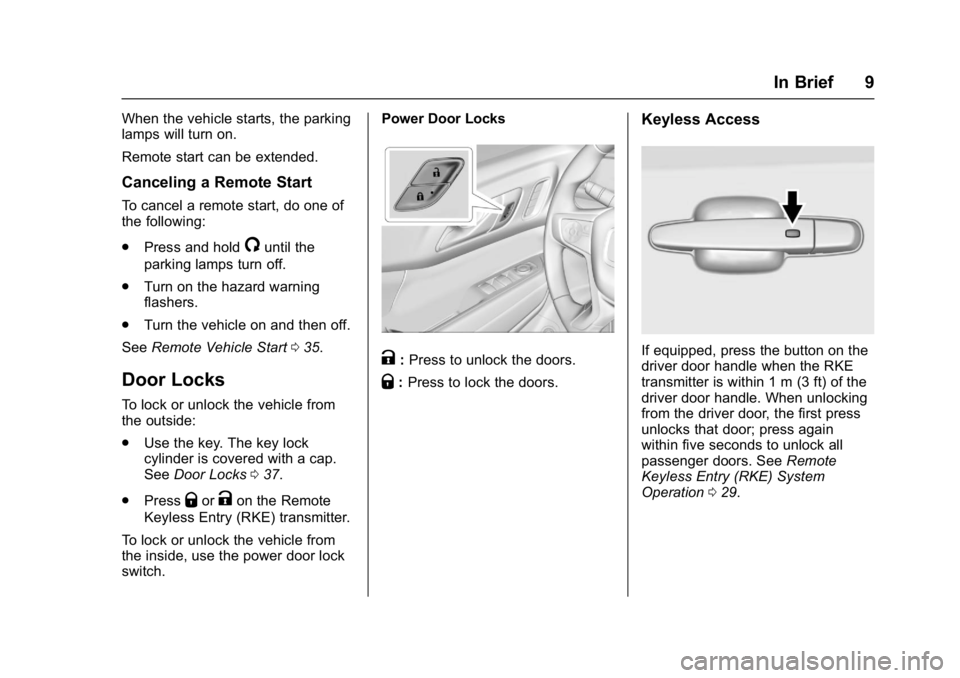
Door Locks
To lock or unlock the vehicle from
the outside:
.
Use the key. The key lock
cylinder is covered with a cap.
See Door Locks 037.
. Press
QorKon the Remote
Keyless Entry (RKE) transmitter.
To lock or unlock the vehicle from
the inside, use the power door lock
switch. Power Door Locks
K:
Press to unlock the doors.
Q: Press to lock the doors.
Keyless Access
If equipped, press the button on the
driver door handle when the RKE
transmitter is within 1 m (3 ft) of the
driver door handle. When unlocking
from the driver door, the first press
unlocks that door; press again
within five seconds to unlock all
passenger doors. See Remote
Keyless Entry (RKE) System
Operation 029.
Page 18 of 419
GMC Acadia/Acadia Denali Owner Manual (GMNA-Localizing-U.S./Canada/
Mexico-9803770) - 2017 - crc - 7/12/16
In Brief 17
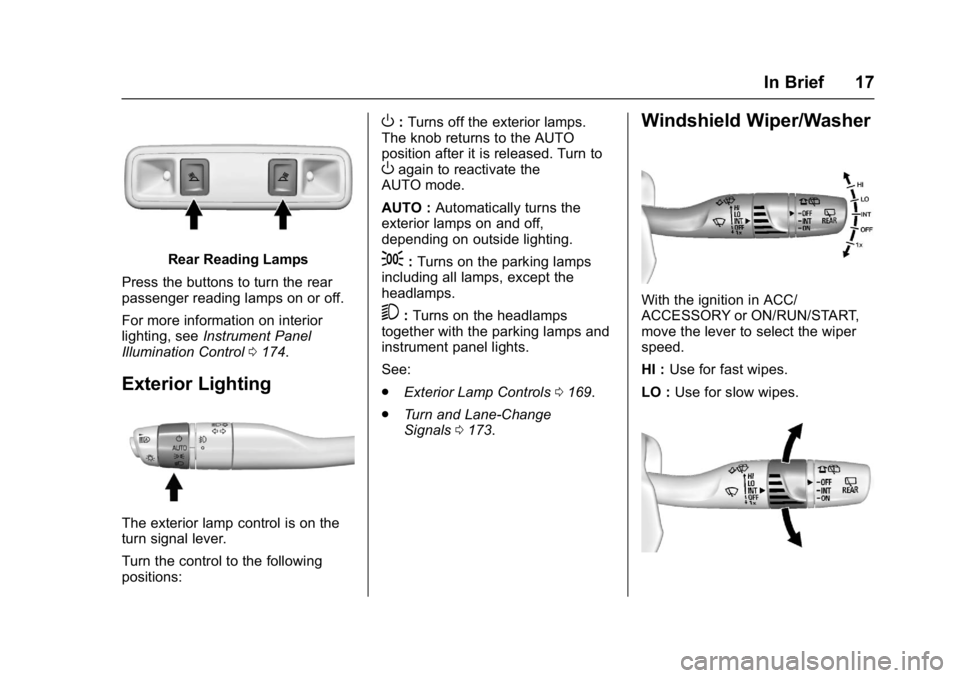
Rear Reading Lamps
Press the buttons to turn the rear
passenger reading lamps on or off.
For more information on interior
lighting, see Instrument Panel
Illumination Control 0174.
Exterior Lighting
The exterior lamp control is on the
turn signal lever.
Turn the control to the following
positions:
O:Turns off the exterior lamps.
The knob returns to the AUTO
position after it is released. Turn to
Oagain to reactivate the
AUTO mode.
AUTO : Automatically turns the
exterior lamps on and off,
depending on outside lighting.
;: Turns on the parking lamps
including all lamps, except the
headlamps.
5: Turns on the headlamps
together with the parking lamps and
instrument panel lights.
See:
. Exterior Lamp Controls 0169.
. Turn and Lane-Change
Signals 0173.
Windshield Wiper/Washer
With the ignition in ACC/
ACCESSORY or ON/RUN/START,
move the lever to select the wiper
speed.
HI : Use for fast wipes.
LO : Use for slow wipes.
Page 24 of 419
GMC Acadia/Acadia Denali Owner Manual (GMNA-Localizing-U.S./Canada/
Mexico-9803770) - 2017 - crc - 7/12/16
In Brief 23
Lane Keep Assist (LKA)
If equipped, LKA may help avoid
crashes due to unintentional lane
departures. It may assist by gently
turning the steering wheel if the
vehicle approaches a detected lane
marking without using a turn signal
in that direction. It may also provide
a Lane Departure Warning (LDW)
alert as the lane marking is crossed.
The system will not assist or alert if
it detects that you are actively
steering. Override LKA by turning
the steering wheel. LKA uses a
camera to detect lane markings
between 60 km/h (37 mph) and
180 km/h (112 mph).
SeeLane Departure Warning (LDW)
0 267 andLane Keep Assist
(LKA) 0267.
Lane Change Alert (LCA)
If equipped, the LCA system is a
lane-changing aid that assists
drivers with avoiding lane change
crashes that occur with moving
vehicles in the side blind zone (or
spot) areas or with vehicles rapidly
approaching these areas from behind. The LCA warning display
will light up in the corresponding
outside side mirror and will flash if
the turn signal is on. The Side Blind
Zone Alert (SBZA) system is
included as part of the LCA system.
See
Side Blind Zone Alert (SBZA)
0 264 andLane Change Alert
(LCA) 0265.
Surround Vision
If equipped, views around the
vehicle display in the infotainment
display to aid with parking and
low-speed maneuvers.
See “Surround Vision” under
Assistance Systems for Parking or
Backing 0255.
Front Vision Camera
If equipped, a view of the area in
front of the vehicle displays on the
infotainment display to aid with
parking and low-speed maneuvers.
See “Front Vision Camera” under
Assistance Systems for Parking or
Backing 0255.
Rear Vision
Camera (RVC)
If equipped, RVC displays a view of
the area behind the vehicle on the
infotainment display when the
vehicle is shifted into R (Reverse) to
aid with parking and low-speed
backing maneuvers.
See Assistance Systems for Parking
or Backing 0255.
Rear Cross Traffic Alert
(RCTA) System
If equipped, the RCTA system uses
a triangle with an arrow displayed
on the infotainment display to warn
of traffic behind your vehicle that
may cross your vehicle's path while
in R (Reverse). In addition, beeps
will sound, or the driver seat will
pulse.
See Assistance Systems for Parking
or Backing 0255.
Page 25 of 419
GMC Acadia/Acadia Denali Owner Manual (GMNA-Localizing-U.S./Canada/
Mexico-9803770) - 2017 - crc - 7/12/16
24 In Brief
Parking Assist
If equipped, Rear Parking
Assist (RPA) uses sensors on the
rear bumper to assist with parking
and avoiding objects while in
R (Reverse). It operates at speeds
less than 8 km/h (5 mph). RPA may
display a warning triangle on the
Rear Vision Camera screen and a
graphic on the instrument cluster to
provide the object distance. In
addition, multiple beeps or seat
pulses may occur if very close to an
object.
The vehicle may also have the Front
Parking Assist system.
SeeAssistance Systems for Parking
or Backing 0255.
Power Outlets
The vehicle has two 12-volt
accessory power outlets, which can
be used to plug in electrical
equipment, such as a cell phone or
MP3 player. The power outlets are located:
.
On the center stack below the
climate controls.
. In the rear cargo area.
To use the outlets, remove the
cover.
See Power Outlets 0121.
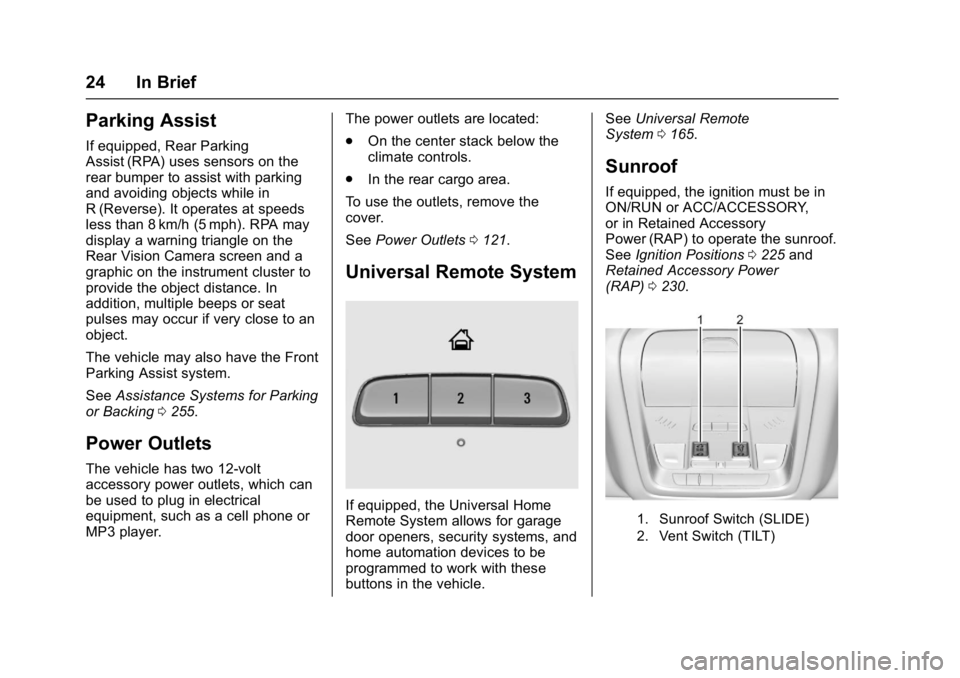
Universal Remote System
If equipped, the Universal Home
Remote System allows for garage
door openers, security systems, and
home automation devices to be
programmed to work with these
buttons in the vehicle. See
Universal Remote
System 0165.
Sunroof
If equipped, the ignition must be in
ON/RUN or ACC/ACCESSORY,
or in Retained Accessory
Power (RAP) to operate the sunroof.
See Ignition Positions 0225 and
Retained Accessory Power
(RAP) 0230.
1. Sunroof Switch (SLIDE)
2. Vent Switch (TILT)
Page 37 of 419
GMC Acadia/Acadia Denali Owner Manual (GMNA-Localizing-U.S./Canada/
Mexico-9803770) - 2017 - crc - 7/12/16
36 Keys, Doors, and Windows
Other conditions can affect the
performance of the transmitter. See
Remote Keyless Entry (RKE)
System029.
Starting the Engine Using Remote
Start
1. Press and release
Qon the
RKE transmitter.
2. Immediately press and hold
/
for at least four seconds or until
the turn signal lamps flash. The
turn signal lamps flashing
confirms the request to remote
start the vehicle has been
received.
During the remote start the
doors will be locked and the
parking lamps will remain on as
long as the engine is running.
The engine will shut off after
15 minutes unless a time
extension is done or the
ignition is put in ON/RUN/
START. 3. With the RKE transmitter in the
vehicle, press the brake pedal
and select the ON/RUN/START
ignition mode to drive.
Extending Engine Run Time
The engine run time can also be
extended by another 15 minutes,
if during the first 15 minutes
Steps 1 and 2 are repeated while
the engine is still running. An
extension can be requested
30 seconds after starting. This
provides a total of 30 minutes.
The remote start can only be
extended once.
When the remote start is extended,
the second 15-minute period is
added on to the first 15 minutes for
a total of 30 minutes.
A maximum of two remote starts,
or a remote start with an extension,
are allowed between ignition cycles.
The vehicle's ignition must be
changed to ON/RUN/START and
then back to OFF before the remote
start procedure can be used again. Canceling a Remote Start
To cancel a remote start, do any of
the following:
.
Press and hold
/until the
parking lamps turn off.
. Turn on the hazard warning
flashers.
. Turn the vehicle on and then off.
Conditions in Which Remote Start
Will Not Work
The remote start will not operate if
any of the following occur:
. A transmitter is in the vehicle.
. The hood is not closed.
. The hazard warning flashers
are on.
. There is an emission control
system malfunction.
. The engine coolant temperature
is too high.
. The oil pressure is low.
. Two remote vehicle starts or a
start with an extension have
already been used.
Page 50 of 419
GMC Acadia/Acadia Denali Owner Manual (GMNA-Localizing-U.S./Canada/
Mexico-9803770) - 2017 - crc - 7/12/16
Keys, Doors, and Windows 49
Folding Mirrors
Manual Folding Mirrors
The mirrors can be folded inward
toward the vehicle to prevent
damage when going through an
automatic car wash. Push the mirror
outward to return it to the original
position.
Memory Mirrors
The vehicle may have memory
mirrors. SeeMemory Seats 060.
Lane Change Alert (LCA)
The vehicle may have LCA. See
Lane Change Alert (LCA) 0265.
Side Blind Zone Alert
The vehicle may have Side Blind
Zone Alert. See Side Blind Zone
Alert (SBZA) 0264.
Heated Mirrors
K
:Press to heat the mirrors.
See “Rear Window Defogger” under
Dual Automatic Climate Control
System 0202.
Automatic Dimming
Mirror
If the vehicle has the automatic
dimming mirror, the driver outside
mirror automatically adjusts for the
glare of headlamps behind you.
Reverse Tilt Mirrors
If equipped with memory seats, the
passenger and/or driver mirror tilts
to a preselected position when the
vehicle is in R (Reverse). This
allows the curb to be seen when
parallel parking.
The mirror(s) return to the original
position when:
.
The vehicle is shifted out of
R (Reverse), or remains in
R (Reverse) for about
30 seconds.
. The ignition is turned off.
. The vehicle is driven in
R (Reverse) above a set speed.
To turn this feature on or off, see
Vehicle Personalization 0157.
Interior Mirrors
Interior Rearview Mirrors
Adjust the rearview mirror for a clear
view of the area behind the vehicle.
Do not spray glass cleaner directly
on the mirror. Use a soft towel
dampened with water.
Manual Rearview Mirror
If equipped, push the tab forward for
daytime use and pull it rearward for
nighttime use to avoid glare of the
headlamps from behind.
Automatic Dimming
Rearview Mirror
If equipped, automatic dimming
reduces the glare of headlamps
from behind. The dimming feature
comes on when the vehicle is
started.
Page 115 of 419
GMC Acadia/Acadia Denali Owner Manual (GMNA-Localizing-U.S./Canada/
Mexico-9803770) - 2017 - crc - 7/12/16
114 Instruments and Controls
Instruments and
Controls
Controls
Steering Wheel Adjustment . . . 115
Steering Wheel Controls . . . . . . 116
Heated Steering Wheel . . . . . . . 116
Horn . . . . . . . . . . . . . . . . . . . . . . . . . . 116
Windshield Wiper/Washer . . . . 117
Rear Window Wiper/Washer . . . . . . . . . . . . . . . . . . . . . . 118
Compass . . . . . . . . . . . . . . . . . . . . . 118
Clock . . . . . . . . . . . . . . . . . . . . . . . . . 119
Power Outlets . . . . . . . . . . . . . . . . 121
Warning Lights, Gauges, and
Indicators
Warning Lights, Gauges, and Indicators . . . . . . . . . . . . . . . . . . . 122
Instrument Cluster . . . . . . . . . . . . 123
Speedometer . . . . . . . . . . . . . . . . . 127
Odometer . . . . . . . . . . . . . . . . . . . . . 127
Trip Odometer . . . . . . . . . . . . . . . . 127
Tachometer . . . . . . . . . . . . . . . . . . . 127
Fuel Gauge . . . . . . . . . . . . . . . . . . . 128
Engine Coolant Temperature Gauge . . . . . . . . . . . . . . . . . . . . . . 129
Safety Belt Reminders . . . . . . . . 130
Airbag Readiness Light . . . . . . . 131 Passenger Airbag Status
Indicator . . . . . . . . . . . . . . . . . . . . 131
Charging System Light . . . . . . . 132
Malfunction Indicator Lamp (Check Engine Light) . . . . . . . . 132
Brake System Warning Light . . . . . . . . . . . . . . . . . . . . . . . . 134
Electric Parking Brake Light . . . . . . . . . . . . . . . . . . . . . . . . 135
Service Electric Parking Brake Light . . . . . . . . . . . . . . . . . . . . . . . . 135
Antilock Brake System (ABS) Warning Light . . . . . . . . . . . . . . . 135
Tow/Haul Mode Light . . . . . . . . . 136
Hill Descent Control Light . . . . 136
Lane Keep Assist (LKA) Light . . . . . . . . . . . . . . . . . . . . . . . . 136
Vehicle Ahead Indicator . . . . . . 136
Pedestrian Ahead Indicator . . . 137
Traction Off Light . . . . . . . . . . . . . 137
StabiliTrak®OFF Light . . . . . . . . 137
Traction Control System (TCS)/ StabiliTrak
®Light . . . . . . . . . . . 138
Tire Pressure Light . . . . . . . . . . . 138
Engine Oil Pressure Light . . . . 138
Low Fuel Warning Light (Base Level) . . . . . . . . . . . . . . . . . . . . . . . 139
Low Fuel Warning Light (Midlevel and Uplevel) . . . . . . 139
Security Light . . . . . . . . . . . . . . . . . 140
High-Beam On Light . . . . . . . . . . 140 Front Fog Lamp Light . . . . . . . . . 140
Lamps On Reminder . . . . . . . . . 140
Cruise Control Light . . . . . . . . . . 140
Door Ajar Light . . . . . . . . . . . . . . . 141
Information Displays
Driver Information Center (DIC)
(Base and Midlevel) . . . . . . . . . 141
Driver Information Center (DIC) (Uplevel) . . . . . . . . . . . . . . . . . . . . 144
Vehicle Messages
Vehicle Messages . . . . . . . . . . . . 147
Battery Voltage and ChargingMessages . . . . . . . . . . . . . . . . . . . 147
Brake System Messages . . . . . 148
Compass Messages . . . . . . . . . . 149
Cruise Control Messages . . . . . 149
Door Ajar Messages . . . . . . . . . . 149
Engine Cooling System Messages . . . . . . . . . . . . . . . . . . . 150
Engine Oil Messages . . . . . . . . . 150
Engine Power Messages . . . . . 151
Fuel System Messages . . . . . . . 151
Key and Lock Messages . . . . . 151
Lamp Messages . . . . . . . . . . . . . . 152
Object Detection System Messages . . . . . . . . . . . . . . . . . . . 152
Ride Control System
Messages . . . . . . . . . . . . . . . . . . . 154
Airbag System Messages . . . . 155
Page 118 of 419
GMC Acadia/Acadia Denali Owner Manual (GMNA-Localizing-U.S./Canada/
Mexico-9803770) - 2017 - crc - 7/12/16
Instruments and Controls 117
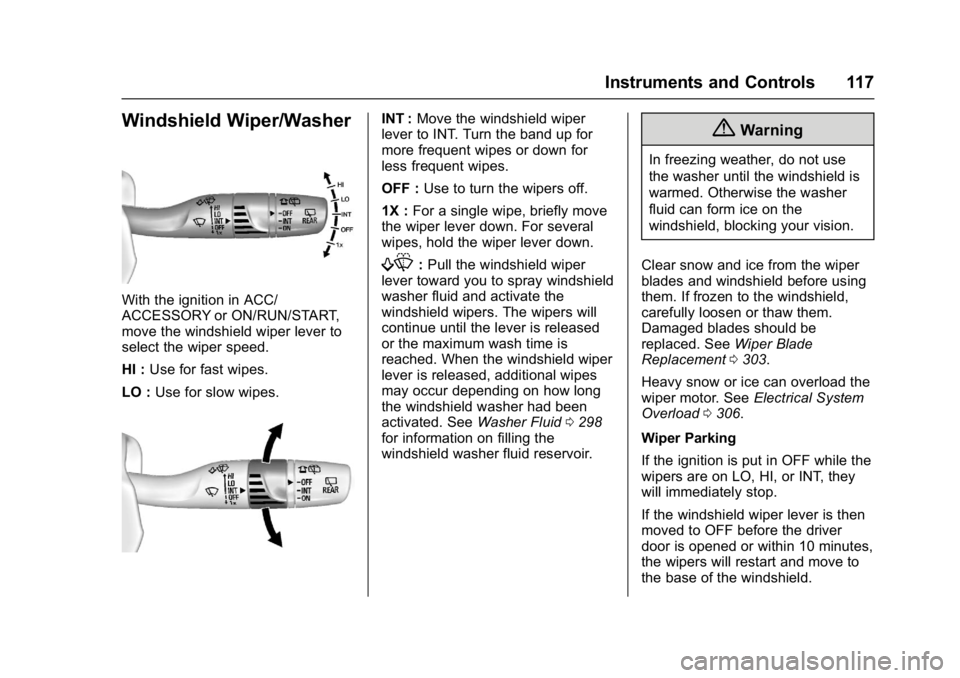
Windshield Wiper/Washer
With the ignition in ACC/
ACCESSORY or ON/RUN/START,
move the windshield wiper lever to
select the wiper speed.
HI :Use for fast wipes.
LO : Use for slow wipes.
INT : Move the windshield wiper
lever to INT. Turn the band up for
more frequent wipes or down for
less frequent wipes.
OFF : Use to turn the wipers off.
1X : For a single wipe, briefly move
the wiper lever down. For several
wipes, hold the wiper lever down.
f: Pull the windshield wiper
lever toward you to spray windshield
washer fluid and activate the
windshield wipers. The wipers will
continue until the lever is released
or the maximum wash time is
reached. When the windshield wiper
lever is released, additional wipes
may occur depending on how long
the windshield washer had been
activated. See Washer Fluid0298
for information on filling the
windshield washer fluid reservoir.
{Warning
In freezing weather, do not use
the washer until the windshield is
warmed. Otherwise the washer
fluid can form ice on the
windshield, blocking your vision.
Clear snow and ice from the wiper
blades and windshield before using
them. If frozen to the windshield,
carefully loosen or thaw them.
Damaged blades should be
replaced. See Wiper Blade
Replacement 0303.
Heavy snow or ice can overload the
wiper motor. See Electrical System
Overload 0306.
Wiper Parking
If the ignition is put in OFF while the
wipers are on LO, HI, or INT, they
will immediately stop.
If the windshield wiper lever is then
moved to OFF before the driver
door is opened or within 10 minutes,
the wipers will restart and move to
the base of the windshield.