car seat GMC ACADIA 2017 Owner's Manual
[x] Cancel search | Manufacturer: GMC, Model Year: 2017, Model line: ACADIA, Model: GMC ACADIA 2017Pages: 419, PDF Size: 5.89 MB
Page 2 of 419
GMC Acadia/Acadia Denali Owner Manual (GMNA-Localizing-U.S./Canada/
Mexico-9803770) - 2017 - crc - 7/12/16
ContentsIntroduction . . . . . . . . . . . . . . . . . . . . . . 2
In Brief . . . . . . . . . . . . . . . . . . . . . . . . . . . 5
Keys, Doors, and Windows . . . . . 28
Seats and Restraints . . . . . . . . . . . 54
Storage . . . . . . . . . . . . . . . . . . . . . . . 107
Instruments and Controls . . . . . . 114
Lighting . . . . . . . . . . . . . . . . . . . . . . . 169
Infotainment System . . . . . . . . . . 178
Climate Controls . . . . . . . . . . . . . . 202
Driving and Operating . . . . . . . . . 209
Vehicle Care . . . . . . . . . . . . . . . . . . 281
Service and Maintenance . . . . . 367
Technical Data . . . . . . . . . . . . . . . . 381
Customer Information . . . . . . . . . 384
Reporting Safety Defects . . . . . . 394
OnStar . . . . . . . . . . . . . . . . . . . . . . . . 397
Index . . . . . . . . . . . . . . . . . . . . 407
Page 13 of 419
GMC Acadia/Acadia Denali Owner Manual (GMNA-Localizing-U.S./Canada/
Mexico-9803770) - 2017 - crc - 7/12/16
12 In Brief
Memory Features
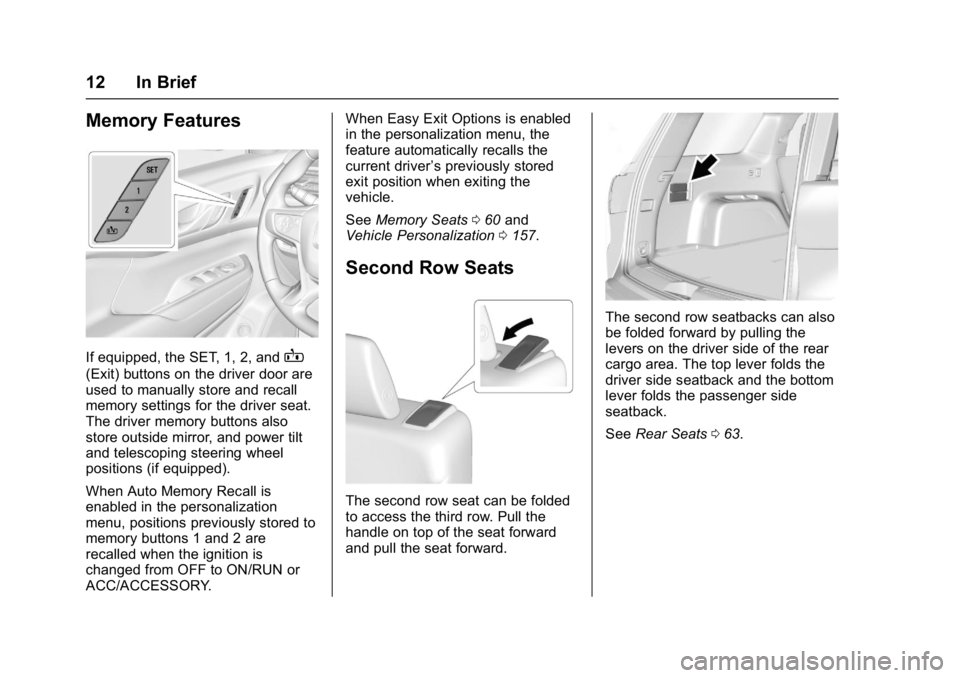
If equipped, the SET, 1, 2, andB
(Exit) buttons on the driver door are
used to manually store and recall
memory settings for the driver seat.
The driver memory buttons also
store outside mirror, and power tilt
and telescoping steering wheel
positions (if equipped).
When Auto Memory Recall is
enabled in the personalization
menu, positions previously stored to
memory buttons 1 and 2 are
recalled when the ignition is
changed from OFF to ON/RUN or
ACC/ACCESSORY.When Easy Exit Options is enabled
in the personalization menu, the
feature automatically recalls the
current driver
’s previously stored
exit position when exiting the
vehicle.
See Memory Seats 060 and
Vehicle Personalization 0157.
Second Row Seats
The second row seat can be folded
to access the third row. Pull the
handle on top of the seat forward
and pull the seat forward.
The second row seatbacks can also
be folded forward by pulling the
levers on the driver side of the rear
cargo area. The top lever folds the
driver side seatback and the bottom
lever folds the passenger side
seatback.
See Rear Seats 063.
Page 25 of 419
GMC Acadia/Acadia Denali Owner Manual (GMNA-Localizing-U.S./Canada/
Mexico-9803770) - 2017 - crc - 7/12/16
24 In Brief
Parking Assist
If equipped, Rear Parking
Assist (RPA) uses sensors on the
rear bumper to assist with parking
and avoiding objects while in
R (Reverse). It operates at speeds
less than 8 km/h (5 mph). RPA may
display a warning triangle on the
Rear Vision Camera screen and a
graphic on the instrument cluster to
provide the object distance. In
addition, multiple beeps or seat
pulses may occur if very close to an
object.
The vehicle may also have the Front
Parking Assist system.
SeeAssistance Systems for Parking
or Backing 0255.
Power Outlets
The vehicle has two 12-volt
accessory power outlets, which can
be used to plug in electrical
equipment, such as a cell phone or
MP3 player. The power outlets are located:
.
On the center stack below the
climate controls.
. In the rear cargo area.
To use the outlets, remove the
cover.
See Power Outlets 0121.
Universal Remote System
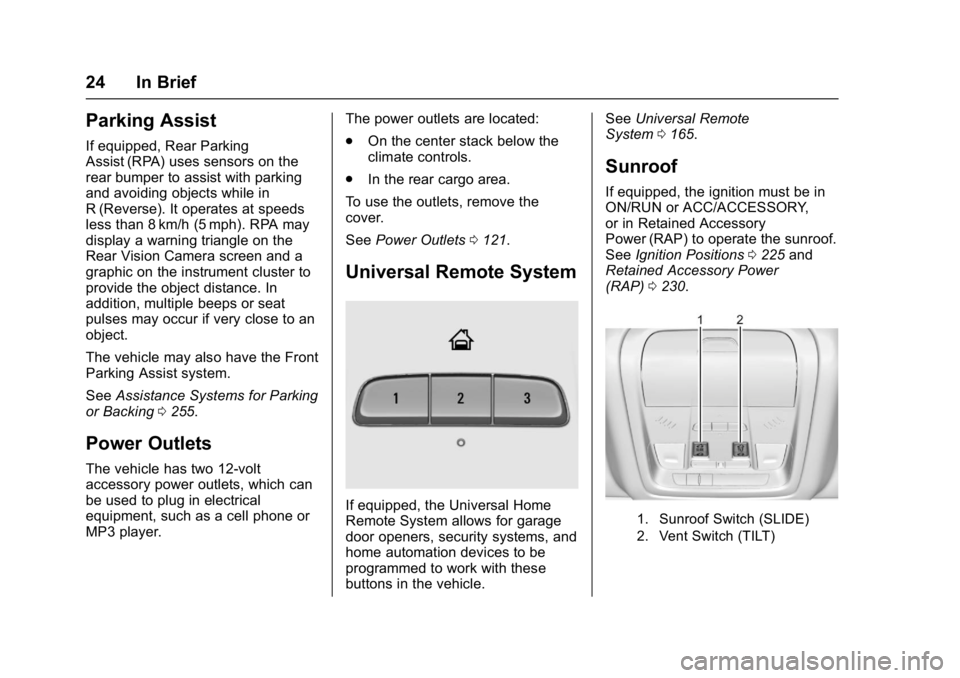
If equipped, the Universal Home
Remote System allows for garage
door openers, security systems, and
home automation devices to be
programmed to work with these
buttons in the vehicle. See
Universal Remote
System 0165.
Sunroof
If equipped, the ignition must be in
ON/RUN or ACC/ACCESSORY,
or in Retained Accessory
Power (RAP) to operate the sunroof.
See Ignition Positions 0225 and
Retained Accessory Power
(RAP) 0230.
1. Sunroof Switch (SLIDE)
2. Vent Switch (TILT)
Page 50 of 419
GMC Acadia/Acadia Denali Owner Manual (GMNA-Localizing-U.S./Canada/
Mexico-9803770) - 2017 - crc - 7/12/16
Keys, Doors, and Windows 49
Folding Mirrors
Manual Folding Mirrors
The mirrors can be folded inward
toward the vehicle to prevent
damage when going through an
automatic car wash. Push the mirror
outward to return it to the original
position.
Memory Mirrors
The vehicle may have memory
mirrors. SeeMemory Seats 060.
Lane Change Alert (LCA)
The vehicle may have LCA. See
Lane Change Alert (LCA) 0265.
Side Blind Zone Alert
The vehicle may have Side Blind
Zone Alert. See Side Blind Zone
Alert (SBZA) 0264.
Heated Mirrors
K
:Press to heat the mirrors.
See “Rear Window Defogger” under
Dual Automatic Climate Control
System 0202.
Automatic Dimming
Mirror
If the vehicle has the automatic
dimming mirror, the driver outside
mirror automatically adjusts for the
glare of headlamps behind you.
Reverse Tilt Mirrors
If equipped with memory seats, the
passenger and/or driver mirror tilts
to a preselected position when the
vehicle is in R (Reverse). This
allows the curb to be seen when
parallel parking.
The mirror(s) return to the original
position when:
.
The vehicle is shifted out of
R (Reverse), or remains in
R (Reverse) for about
30 seconds.
. The ignition is turned off.
. The vehicle is driven in
R (Reverse) above a set speed.
To turn this feature on or off, see
Vehicle Personalization 0157.
Interior Mirrors
Interior Rearview Mirrors
Adjust the rearview mirror for a clear
view of the area behind the vehicle.
Do not spray glass cleaner directly
on the mirror. Use a soft towel
dampened with water.
Manual Rearview Mirror
If equipped, push the tab forward for
daytime use and pull it rearward for
nighttime use to avoid glare of the
headlamps from behind.
Automatic Dimming
Rearview Mirror
If equipped, automatic dimming
reduces the glare of headlamps
from behind. The dimming feature
comes on when the vehicle is
started.
Page 55 of 419
GMC Acadia/Acadia Denali Owner Manual (GMNA-Localizing-U.S./Canada/
Mexico-9803770) - 2017 - crc - 7/12/16
54 Seats and Restraints
Seats and
Restraints
Head Restraints
Head Restraints . . . . . . . . . . . . . . . 55
Front Seats
Seat Adjustment . . . . . . . . . . . . . . . 57
Power Seat Adjustment . . . . . . . . 57
Lumbar Adjustment . . . . . . . . . . . . 58
Reclining Seatbacks . . . . . . . . . . . 58
Memory Seats . . . . . . . . . . . . . . . . . 60
Heated and Ventilated FrontSeats . . . . . . . . . . . . . . . . . . . . . . . . . 61
Rear Seats
Rear Seats . . . . . . . . . . . . . . . . . . . . 63
Heated Rear Seats . . . . . . . . . . . . 66
Third Row Seats . . . . . . . . . . . . . . . 66
Safety Belts
Safety Belts . . . . . . . . . . . . . . . . . . . . 68
How to Wear Safety BeltsProperly . . . . . . . . . . . . . . . . . . . . . . 69
Lap-Shoulder Belt . . . . . . . . . . . . . 70
Safety Belt Use During Pregnancy . . . . . . . . . . . . . . . . . . . . 73
Safety Belt Extender . . . . . . . . . . . 74
Safety System Check . . . . . . . . . . 74 Safety Belt Care . . . . . . . . . . . . . . . 74
Replacing Safety Belt System
Parts after a Crash . . . . . . . . . . . 74
Airbag System
Airbag System . . . . . . . . . . . . . . . . . 75
Where Are the Airbags? . . . . . . . 77
When Should an AirbagInflate? . . . . . . . . . . . . . . . . . . . . . . . 78
What Makes an Airbag Inflate? . . . . . . . . . . . . . . . . . . . . . . . 79
How Does an Airbag Restrain? . . . . . . . . . . . . . . . . . . . . . 80
What Will You See after an Airbag Inflates? . . . . . . . . . . . . . . 80
Passenger Sensing System . . . 81
Servicing the Airbag-Equipped Vehicle . . . . . . . . . . . . . . . . . . . . . . . 85
Adding Equipment to the Airbag-Equipped Vehicle . . . . . 86
Airbag System Check . . . . . . . . . . 86
Replacing Airbag System Parts after a Crash . . . . . . . . . . . . . . . . . 87
Child Restraints
Older Children . . . . . . . . . . . . . . . . . 87
Infants and Young Children . . . . 89
Child Restraint Systems . . . . . . . 91
Where to Put the Restraint . . . . . 93
Lower Anchors and Tethers forChildren (LATCH System) . . . . 94 Replacing LATCH System
Parts After a Crash . . . . . . . . . 101
Securing Child Restraints (With the Safety Belt in the
Rear Seat) . . . . . . . . . . . . . . . . . . 102
Securing Child Restraints (With the Safety Belt in the
Front Seat) . . . . . . . . . . . . . . . . . . 104
Page 62 of 419
GMC Acadia/Acadia Denali Owner Manual (GMNA-Localizing-U.S./Canada/
Mexico-9803770) - 2017 - crc - 7/12/16
Seats and Restraints 61
recalling, then store your positions
to the other button or switch RKE
transmitters with the other driver.
If the vehicle’s driver has changed,
in some vehicles the Driver ID may
be displayed for the next few
ignition cycles.
Easy Exit Recall
If programmed on in vehicle
personalization, the easy exit
feature automatically recalls the
previously stored exit positions
when leaving the vehicle. See
“Storing Memory Positions”earlier in
this section. See also Vehicle
Personalization 0157.
Easy exit recall automatically
activates when one of the following
occurs:
. The vehicle is turned off and the
driver door is opened within a
short time.
. The vehicle is turned off with the
driver door open.
RKE transmitters are not labeled
with a number. If your memory seat
position is stored to 1 or 2 but this position is not automatically
recalling, then store your positions
to the other button or switch RKE
transmitters with the other driver.
To stop recall movement, press one
of the memory, power mirror,
or power seat controls; or press the
power tilt and telescoping steering
wheel control, if equipped.
Obstructions
If something has blocked the driver
seat while recalling a memory
position, the recall may stop.
Remove the obstruction. Then do
one of the following:
.
If automatically or manually
recalling the stored memory
position, press and hold the
appropriate manual control for
two seconds. Try recalling again
by pressing the appropriate
memory button. If automatically
recalling the position, try
recalling again by opening the
driver door and pressing
Kon
the RKE transmitter. .
If recalling the exit position,
press and hold the appropriate
manual control for the exit
feature not recalling for
two seconds. Then try recalling
the exit position again.
If the memory position is still not
recalling, see your dealer for
service.
Heated and Ventilated
Front Seats
{Warning
If you cannot feel temperature
change or pain to the skin, the
seat heater may cause burns. To
reduce the risk of burns, people
with such a condition should use
care when using the seat heater,
especially for long periods of
time. Do not place anything on
the seat that insulates against
heat, such as a blanket, cushion,
cover, or similar item. This may
cause the seat heater to (Continued)
Page 66 of 419
GMC Acadia/Acadia Denali Owner Manual (GMNA-Localizing-U.S./Canada/
Mexico-9803770) - 2017 - crc - 7/12/16
Seats and Restraints 65
4. Check that the safety belt isnot under the seat cushion.
Reclining the Seatbacks
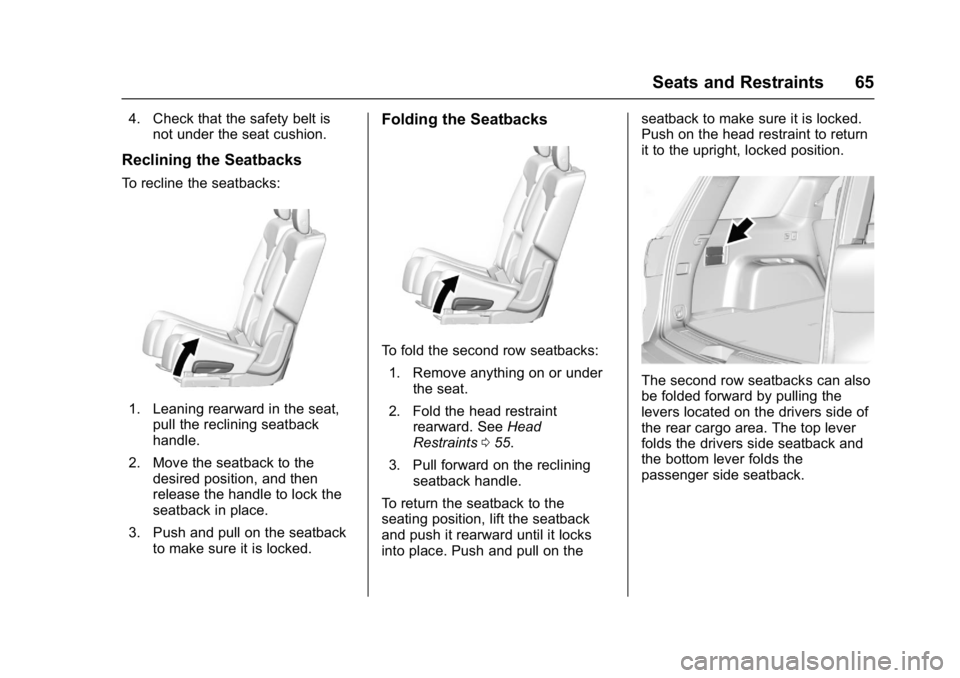
To recline the seatbacks:
1. Leaning rearward in the seat,pull the reclining seatback
handle.
2. Move the seatback to the desired position, and then
release the handle to lock the
seatback in place.
3. Push and pull on the seatback to make sure it is locked.
Folding the Seatbacks
To fold the second row seatbacks:
1. Remove anything on or under the seat.
2. Fold the head restraint rearward. See Head
Restraints 055.
3. Pull forward on the reclining seatback handle.
To return the seatback to the
seating position, lift the seatback
and push it rearward until it locks
into place. Push and pull on the seatback to make sure it is locked.
Push on the head restraint to return
it to the upright, locked position.
The second row seatbacks can also
be folded forward by pulling the
levers located on the drivers side of
the rear cargo area. The top lever
folds the drivers side seatback and
the bottom lever folds the
passenger side seatback.
Page 69 of 419
GMC Acadia/Acadia Denali Owner Manual (GMNA-Localizing-U.S./Canada/
Mexico-9803770) - 2017 - crc - 7/12/16
68 Seats and Restraints
Safety Belts
This section describes how to use
safety belts properly, and some
things not to do.
{Warning
Do not let anyone ride where a
safety belt cannot be worn
properly. In a crash, if you or your
passenger(s) are not wearing
safety belts, injuries can be much
worse than if you are wearing
safety belts. You can be seriously
injured or killed by hitting things
inside the vehicle harder or by
being ejected from the vehicle. In
addition, anyone who is not
buckled up can strike other
passengers in the vehicle.
It is extremely dangerous to ride
in a cargo area, inside or outside
of a vehicle. In a collision,
passengers riding in these areas
are more likely to be seriously
injured or killed. Do not allow(Continued)
Warning (Continued)
passengers to ride in any area of
the vehicle that is not equipped
with seats and safety belts.
Always wear a safety belt, and
check that all passenger(s) are
restrained properly too.
This vehicle has indicators as a
reminder to buckle the safety belts.
See Safety Belt Reminders 0130.
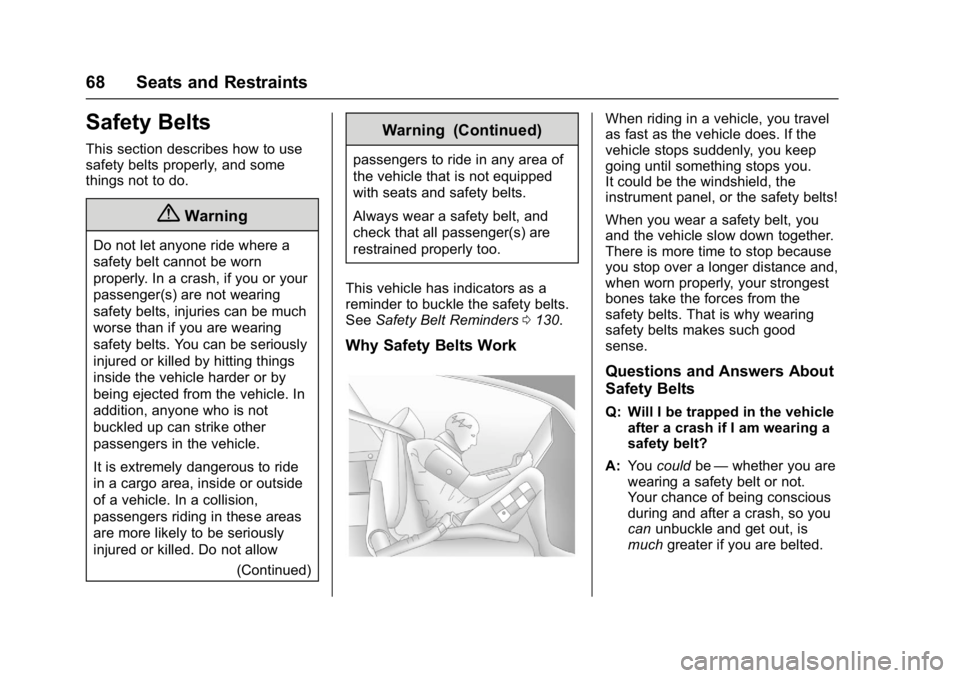
Why Safety Belts Work
When riding in a vehicle, you travel
as fast as the vehicle does. If the
vehicle stops suddenly, you keep
going until something stops you.
It could be the windshield, the
instrument panel, or the safety belts!
When you wear a safety belt, you
and the vehicle slow down together.
There is more time to stop because
you stop over a longer distance and,
when worn properly, your strongest
bones take the forces from the
safety belts. That is why wearing
safety belts makes such good
sense.
Questions and Answers About
Safety Belts
Q: Will I be trapped in the vehicle
after a crash if I am wearing a
safety belt?
A: You could be—whether you are
wearing a safety belt or not.
Your chance of being conscious
during and after a crash, so you
can unbuckle and get out, is
much greater if you are belted.
Page 75 of 419
GMC Acadia/Acadia Denali Owner Manual (GMNA-Localizing-U.S./Canada/
Mexico-9803770) - 2017 - crc - 7/12/16
74 Seats and Restraints
Safety Belt Extender
If the vehicle's safety belt will fasten
around you, you should use it.
But if a safety belt is not long
enough, your dealer will order you
an extender. When you go in to
order it, take the heaviest coat you
will wear, so the extender will be
long enough for you. To help avoid
personal injury, do not let someone
else use it, and use it only for the
seat it is made to fit. The extender
has been designed for adults. Never
use it for securing child restraints.
To wear it, attach it to the regular
safety belt. For more information,
see the instruction sheet that comes
with the extender.
Safety System Check
Check that the safety belt reminder,
safety belts, buckles, latch plates,
and retractors, are all working
properly. Look for any other loose or
damaged safety belt system parts
that might keep a safety belt system
from performing properly. See your
dealer to have it repaired. Torn or
frayed safety belts may not protectyou in a crash. They can rip apart
under impact forces. If a belt is torn
or frayed, have it replaced
immediately.
Make sure the safety belt reminder
light is working. See
Safety Belt
Reminders 0130.
Keep safety belts clean and dry.
See Safety Belt Care 074.
Safety Belt Care
Keep belts clean and dry.
{Warning
Do not bleach or dye safety belt
webbing. It may severely weaken
the webbing. In a crash, they
might not be able to provide
adequate protection. Clean and
rinse safety belt webbing only
with mild soap and lukewarm
water. Allow the webbing to dry.
Safety belts should be properly
cared for and maintained. Safety belt hardware should be kept
dry and free of dust or debris. As
necessary exterior hard surfaces
and safety belt webbing may be
lightly cleaned with mild soap and
water. Ensure there is not excessive
dust or debris in the mechanism.
If dust or debris exists in the system
please see the dealer. Parts may
need to be replaced to ensure
proper functionality of the system.
Replacing Safety Belt
System Parts after a
Crash
{Warning
A crash can damage the safety
belt system in the vehicle.
A damaged safety belt system
may not properly protect the
person using it, resulting in
serious injury or even death in a
crash. To help make sure the
safety belt systems are working
properly after a crash, have them
(Continued)
Page 92 of 419
GMC Acadia/Acadia Denali Owner Manual (GMNA-Localizing-U.S./Canada/
Mexico-9803770) - 2017 - crc - 7/12/16
Seats and Restraints 91
Child restraints are devices used to
restrain, seat, or position children in
the vehicle and are sometimes
called child seats or car seats.
There are three basic types of
child restraints:
.Forward-facing child restraints
. Rearward-facing child restraints
. Belt-positioning booster seats
The proper child restraint for your
child depends on their size, weight,
and age, and also on whether the
child restraint is compatible with the
vehicle in which it will be used.
For each type of child restraint,
there are many different models
available. When purchasing a child
restraint, be sure it is designed to be
used in a motor vehicle. If it is, the
restraint will have a label saying that
it meets federal motor vehicle safety
standards. The restraint
manufacturer's instructions that
come with the restraint state the
weight and height limitations for a
particular child restraint. In addition, there are many kinds of restraints
available for children with special
needs.
{Warning
To reduce the risk of neck and
head injury in a crash, infants and
toddlers should be secured in a
rear-facing child restraint until age
two, or until they reach the
maximum height and weight limits
of their child restraint.
{Warning
A young child's hip bones are still
so small that the vehicle's regular
safety belt may not remain low on
the hip bones, as it should.
Instead, it may settle up around
the child's abdomen. In a crash,
the belt would apply force on a
body area that is unprotected by
any bony structure. This alone
could cause serious or fatal
(Continued)
Warning (Continued)
injuries. To reduce the risk of
serious or fatal injuries during a
crash, young children should
always be secured in appropriate
child restraints.
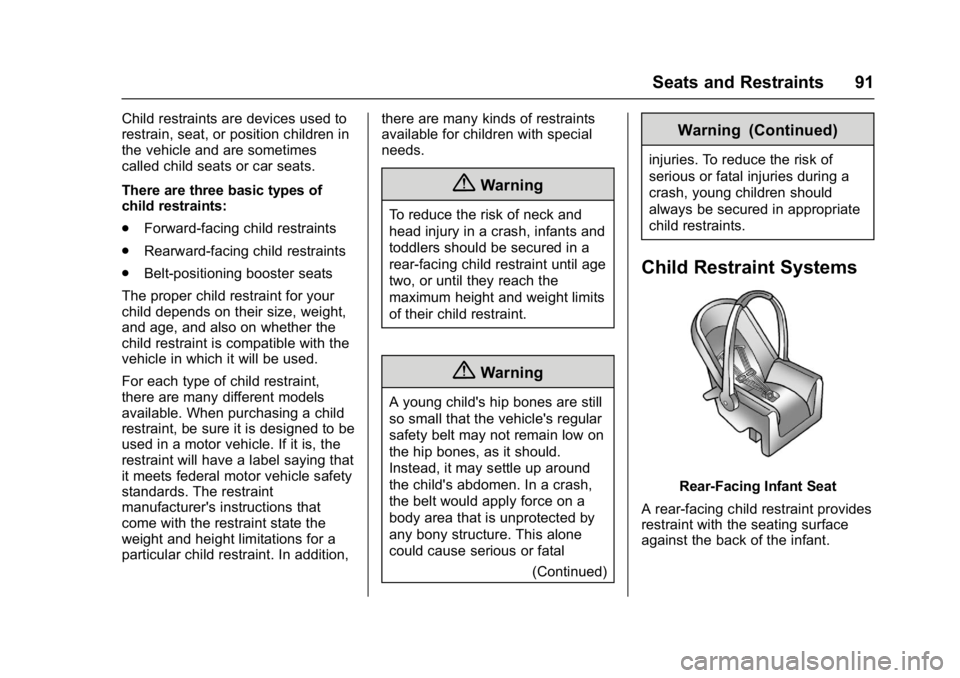
Child Restraint Systems
Rear-Facing Infant Seat
A rear-facing child restraint provides
restraint with the seating surface
against the back of the infant.