sim GMC ACADIA 2017 Owner's Manual
[x] Cancel search | Manufacturer: GMC, Model Year: 2017, Model line: ACADIA, Model: GMC ACADIA 2017Pages: 419, PDF Size: 5.89 MB
Page 14 of 419
GMC Acadia/Acadia Denali Owner Manual (GMNA-Localizing-U.S./Canada/
Mexico-9803770) - 2017 - crc - 7/12/16
In Brief 13
Third Row Seats
The third row seatbacks can be
folded forward.
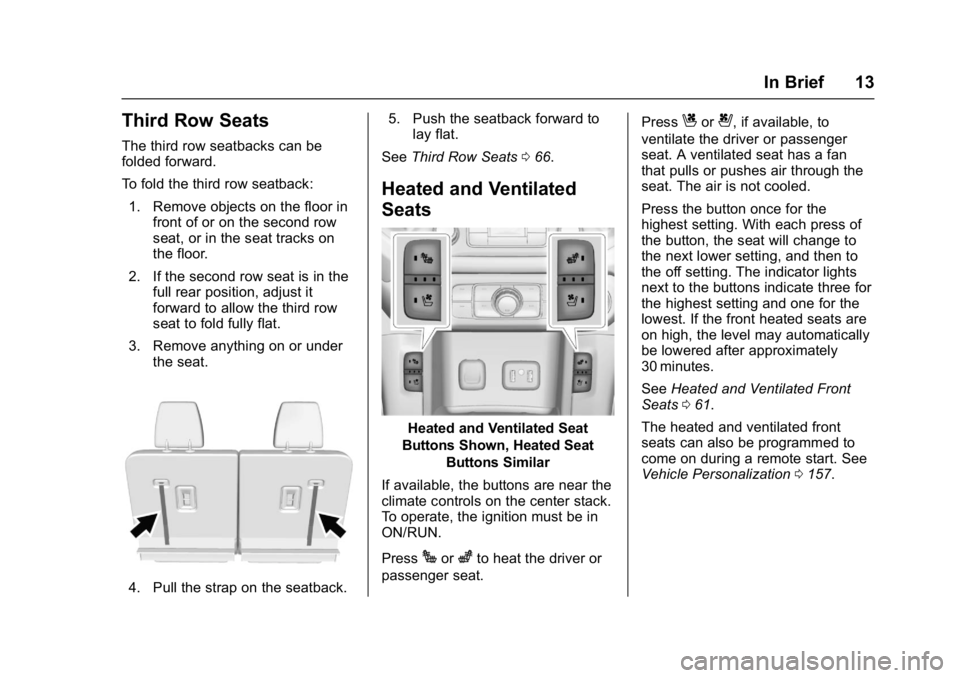
To fold the third row seatback:1. Remove objects on the floor in front of or on the second row
seat, or in the seat tracks on
the floor.
2. If the second row seat is in the full rear position, adjust it
forward to allow the third row
seat to fold fully flat.
3. Remove anything on or under the seat.
4. Pull the strap on the seatback. 5. Push the seatback forward to
lay flat.
See Third Row Seats 066.
Heated and Ventilated
Seats
Heated and Ventilated Seat
Buttons Shown, Heated Seat Buttons Similar
If available, the buttons are near the
climate controls on the center stack.
To operate, the ignition must be in
ON/RUN.
Press
Jorzto heat the driver or
passenger seat. Press
Cor{, if available, to
ventilate the driver or passenger
seat. A ventilated seat has a fan
that pulls or pushes air through the
seat. The air is not cooled.
Press the button once for the
highest setting. With each press of
the button, the seat will change to
the next lower setting, and then to
the off setting. The indicator lights
next to the buttons indicate three for
the highest setting and one for the
lowest. If the front heated seats are
on high, the level may automatically
be lowered after approximately
30 minutes.
See Heated and Ventilated Front
Seats 061.
The heated and ventilated front
seats can also be programmed to
come on during a remote start. See
Vehicle Personalization 0157.
Page 31 of 419
GMC Acadia/Acadia Denali Owner Manual (GMNA-Localizing-U.S./Canada/
Mexico-9803770) - 2017 - crc - 7/12/16
30 Keys, Doors, and Windows
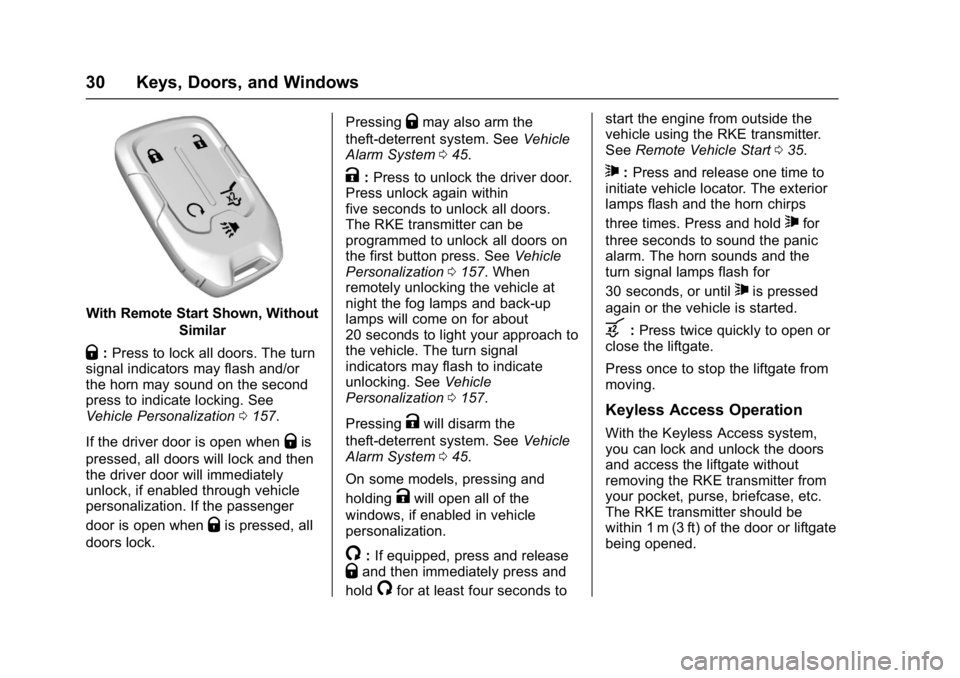
With Remote Start Shown, WithoutSimilar
Q:Press to lock all doors. The turn
signal indicators may flash and/or
the horn may sound on the second
press to indicate locking. See
Vehicle Personalization 0157.
If the driver door is open when
Qis
pressed, all doors will lock and then
the driver door will immediately
unlock, if enabled through vehicle
personalization. If the passenger
door is open when
Qis pressed, all
doors lock. Pressing
Qmay also arm the
theft-deterrent system. See Vehicle
Alarm System 045.
K:Press to unlock the driver door.
Press unlock again within
five seconds to unlock all doors.
The RKE transmitter can be
programmed to unlock all doors on
the first button press. See Vehicle
Personalization 0157. When
remotely unlocking the vehicle at
night the fog lamps and back-up
lamps will come on for about
20 seconds to light your approach to
the vehicle. The turn signal
indicators may flash to indicate
unlocking. See Vehicle
Personalization 0157.
Pressing
Kwill disarm the
theft-deterrent system. See Vehicle
Alarm System 045.
On some models, pressing and
holding
Kwill open all of the
windows, if enabled in vehicle
personalization.
/: If equipped, press and releaseQand then immediately press and
hold
/for at least four seconds to start the engine from outside the
vehicle using the RKE transmitter.
See
Remote Vehicle Start 035.
7:Press and release one time to
initiate vehicle locator. The exterior
lamps flash and the horn chirps
three times. Press and hold
7for
three seconds to sound the panic
alarm. The horn sounds and the
turn signal lamps flash for
30 seconds, or until
7is pressed
again or the vehicle is started.
b: Press twice quickly to open or
close the liftgate.
Press once to stop the liftgate from
moving.
Keyless Access Operation
With the Keyless Access system,
you can lock and unlock the doors
and access the liftgate without
removing the RKE transmitter from
your pocket, purse, briefcase, etc.
The RKE transmitter should be
within 1 m (3 ft) of the door or liftgate
being opened.
Page 32 of 419
GMC Acadia/Acadia Denali Owner Manual (GMNA-Localizing-U.S./Canada/
Mexico-9803770) - 2017 - crc - 7/12/16
Keys, Doors, and Windows 31
Keyless Access can be
programmed to unlock all doors on
the first lock/unlock press from the
driver door. SeeVehicle
Personalization 0157.
Keyless Unlocking/Locking from
the Driver Door
When the doors are locked and the
RKE transmitter is within 1 m (3 ft) of
the driver door handle, pressing the
lock/unlock button on the driver door
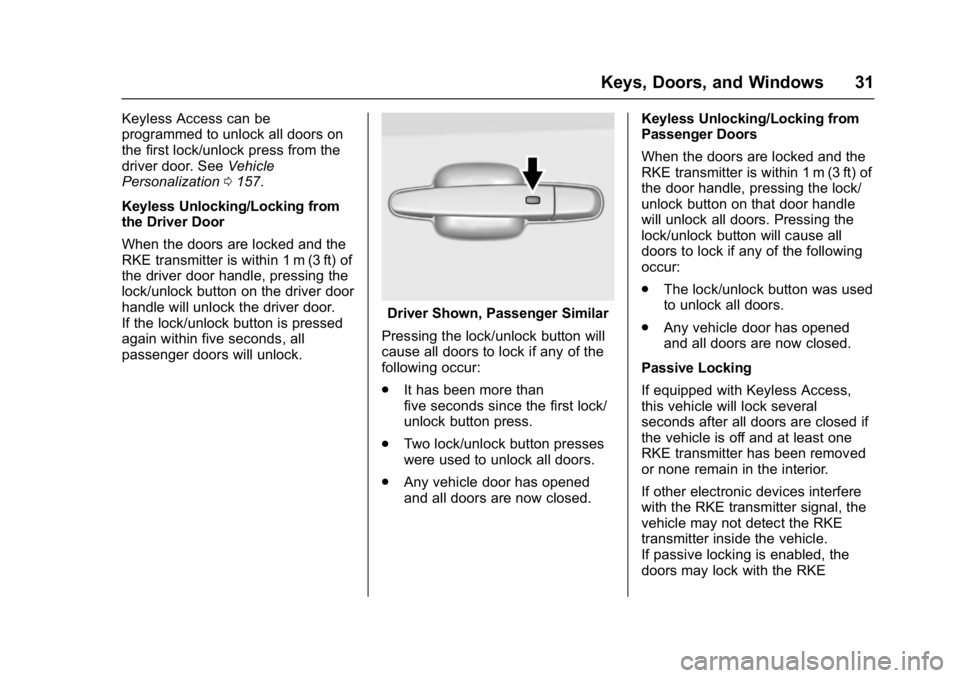
handle will unlock the driver door.
If the lock/unlock button is pressed
again within five seconds, all
passenger doors will unlock.
Driver Shown, Passenger Similar
Pressing the lock/unlock button will
cause all doors to lock if any of the
following occur:
. It has been more than
five seconds since the first lock/
unlock button press.
. Two lock/unlock button presses
were used to unlock all doors.
. Any vehicle door has opened
and all doors are now closed. Keyless Unlocking/Locking from
Passenger Doors
When the doors are locked and the
RKE transmitter is within 1 m (3 ft) of
the door handle, pressing the lock/
unlock button on that door handle
will unlock all doors. Pressing the
lock/unlock button will cause all
doors to lock if any of the following
occur:
.
The lock/unlock button was used
to unlock all doors.
. Any vehicle door has opened
and all doors are now closed.
Passive Locking
If equipped with Keyless Access,
this vehicle will lock several
seconds after all doors are closed if
the vehicle is off and at least one
RKE transmitter has been removed
or none remain in the interior.
If other electronic devices interfere
with the RKE transmitter signal, the
vehicle may not detect the RKE
transmitter inside the vehicle.
If passive locking is enabled, the
doors may lock with the RKE
Page 62 of 419
GMC Acadia/Acadia Denali Owner Manual (GMNA-Localizing-U.S./Canada/
Mexico-9803770) - 2017 - crc - 7/12/16
Seats and Restraints 61
recalling, then store your positions
to the other button or switch RKE
transmitters with the other driver.
If the vehicle’s driver has changed,
in some vehicles the Driver ID may
be displayed for the next few
ignition cycles.
Easy Exit Recall
If programmed on in vehicle
personalization, the easy exit
feature automatically recalls the
previously stored exit positions
when leaving the vehicle. See
“Storing Memory Positions”earlier in
this section. See also Vehicle
Personalization 0157.
Easy exit recall automatically
activates when one of the following
occurs:
. The vehicle is turned off and the
driver door is opened within a
short time.
. The vehicle is turned off with the
driver door open.
RKE transmitters are not labeled
with a number. If your memory seat
position is stored to 1 or 2 but this position is not automatically
recalling, then store your positions
to the other button or switch RKE
transmitters with the other driver.
To stop recall movement, press one
of the memory, power mirror,
or power seat controls; or press the
power tilt and telescoping steering
wheel control, if equipped.
Obstructions
If something has blocked the driver
seat while recalling a memory
position, the recall may stop.
Remove the obstruction. Then do
one of the following:
.
If automatically or manually
recalling the stored memory
position, press and hold the
appropriate manual control for
two seconds. Try recalling again
by pressing the appropriate
memory button. If automatically
recalling the position, try
recalling again by opening the
driver door and pressing
Kon
the RKE transmitter. .
If recalling the exit position,
press and hold the appropriate
manual control for the exit
feature not recalling for
two seconds. Then try recalling
the exit position again.
If the memory position is still not
recalling, see your dealer for
service.
Heated and Ventilated
Front Seats
{Warning
If you cannot feel temperature
change or pain to the skin, the
seat heater may cause burns. To
reduce the risk of burns, people
with such a condition should use
care when using the seat heater,
especially for long periods of
time. Do not place anything on
the seat that insulates against
heat, such as a blanket, cushion,
cover, or similar item. This may
cause the seat heater to (Continued)
Page 63 of 419
GMC Acadia/Acadia Denali Owner Manual (GMNA-Localizing-U.S./Canada/
Mexico-9803770) - 2017 - crc - 7/12/16
62 Seats and Restraints
Warning (Continued)
overheat. An overheated seat
heater may cause a burn or may
damage the seat.
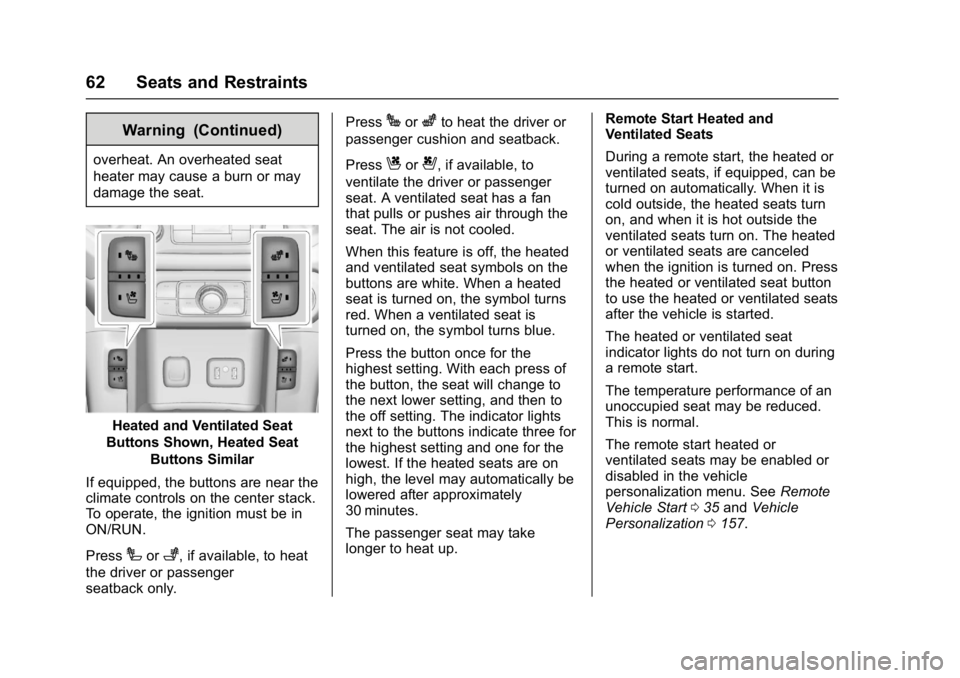
Heated and Ventilated Seat
Buttons Shown, Heated Seat
Buttons Similar
If equipped, the buttons are near the
climate controls on the center stack.
To operate, the ignition must be in
ON/RUN.
Press
Ior+, if available, to heat
the driver or passenger
seatback only. Press
Jorzto heat the driver or
passenger cushion and seatback.
Press
Cor{, if available, to
ventilate the driver or passenger
seat. A ventilated seat has a fan
that pulls or pushes air through the
seat. The air is not cooled.
When this feature is off, the heated
and ventilated seat symbols on the
buttons are white. When a heated
seat is turned on, the symbol turns
red. When a ventilated seat is
turned on, the symbol turns blue.
Press the button once for the
highest setting. With each press of
the button, the seat will change to
the next lower setting, and then to
the off setting. The indicator lights
next to the buttons indicate three for
the highest setting and one for the
lowest. If the heated seats are on
high, the level may automatically be
lowered after approximately
30 minutes.
The passenger seat may take
longer to heat up. Remote Start Heated and
Ventilated Seats
During a remote start, the heated or
ventilated seats, if equipped, can be
turned on automatically. When it is
cold outside, the heated seats turn
on, and when it is hot outside the
ventilated seats turn on. The heated
or ventilated seats are canceled
when the ignition is turned on. Press
the heated or ventilated seat button
to use the heated or ventilated seats
after the vehicle is started.
The heated or ventilated seat
indicator lights do not turn on during
a remote start.
The temperature performance of an
unoccupied seat may be reduced.
This is normal.
The remote start heated or
ventilated seats may be enabled or
disabled in the vehicle
personalization menu. See
Remote
Vehicle Start 035 and Vehicle
Personalization 0157.
Page 78 of 419
GMC Acadia/Acadia Denali Owner Manual (GMNA-Localizing-U.S./Canada/
Mexico-9803770) - 2017 - crc - 7/12/16
Seats and Restraints 77
There is an airbag readiness light
on the instrument cluster, which
shows the airbag symbol.
The system checks the airbag
electrical system for malfunctions.
The light tells you if there is an
electrical problem. SeeAirbag
Readiness Light 0131 for more
information.
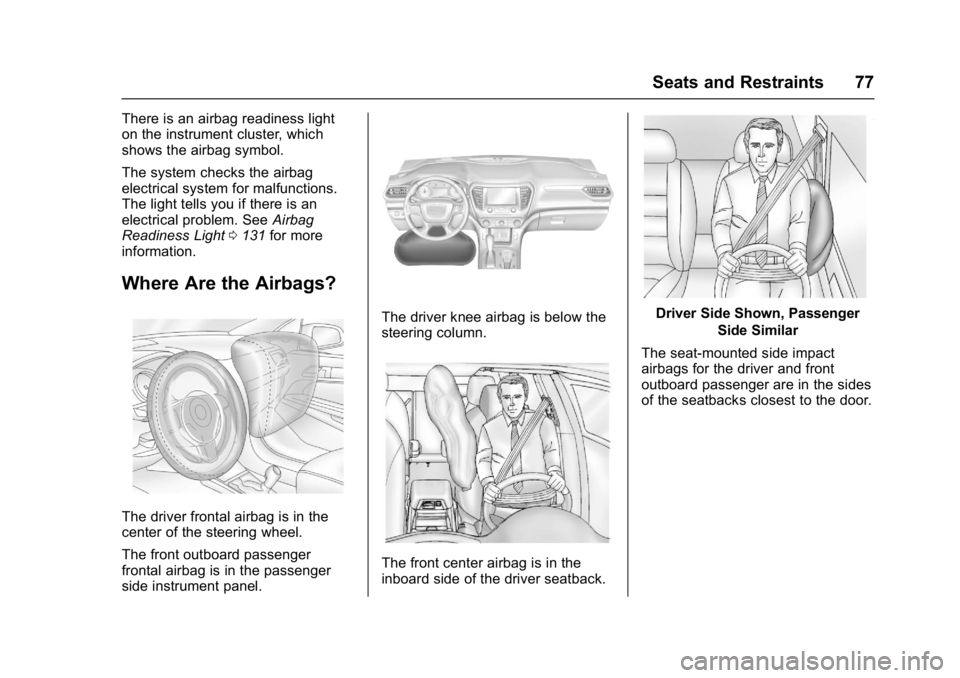
Where Are the Airbags?
The driver frontal airbag is in the
center of the steering wheel.
The front outboard passenger
frontal airbag is in the passenger
side instrument panel.
The driver knee airbag is below the
steering column.
The front center airbag is in the
inboard side of the driver seatback.
Driver Side Shown, Passenger
Side Similar
The seat-mounted side impact
airbags for the driver and front
outboard passenger are in the sides
of the seatbacks closest to the door.
Page 79 of 419
GMC Acadia/Acadia Denali Owner Manual (GMNA-Localizing-U.S./Canada/
Mexico-9803770) - 2017 - crc - 7/12/16
78 Seats and Restraints
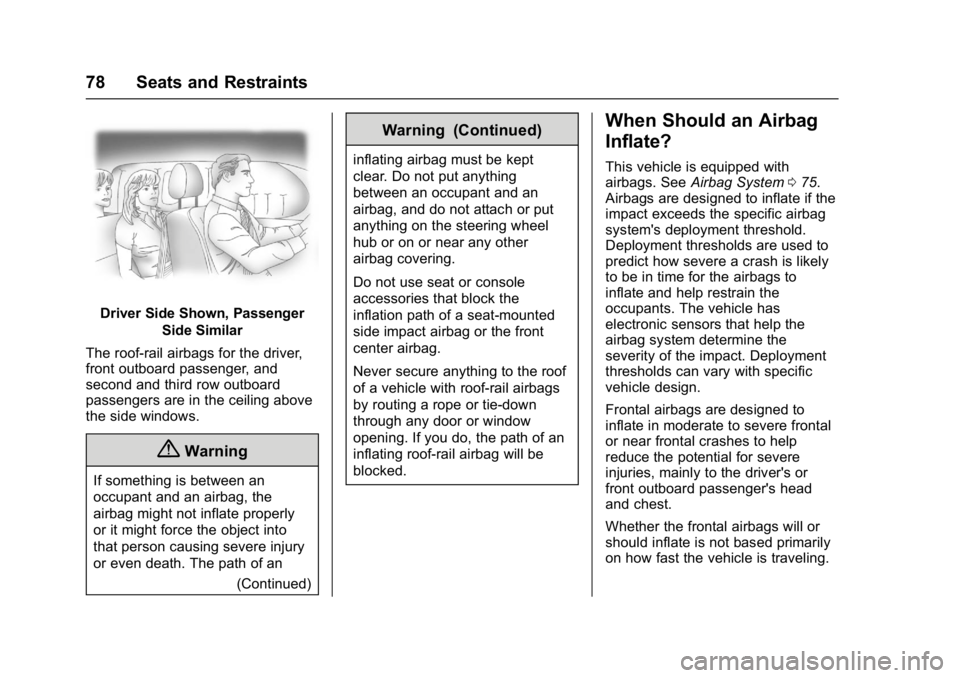
Driver Side Shown, PassengerSide Similar
The roof-rail airbags for the driver,
front outboard passenger, and
second and third row outboard
passengers are in the ceiling above
the side windows.
{Warning
If something is between an
occupant and an airbag, the
airbag might not inflate properly
or it might force the object into
that person causing severe injury
or even death. The path of an (Continued)
Warning (Continued)
inflating airbag must be kept
clear. Do not put anything
between an occupant and an
airbag, and do not attach or put
anything on the steering wheel
hub or on or near any other
airbag covering.
Do not use seat or console
accessories that block the
inflation path of a seat-mounted
side impact airbag or the front
center airbag.
Never secure anything to the roof
of a vehicle with roof-rail airbags
by routing a rope or tie-down
through any door or window
opening. If you do, the path of an
inflating roof-rail airbag will be
blocked.
When Should an Airbag
Inflate?
This vehicle is equipped with
airbags. SeeAirbag System 075.
Airbags are designed to inflate if the
impact exceeds the specific airbag
system's deployment threshold.
Deployment thresholds are used to
predict how severe a crash is likely
to be in time for the airbags to
inflate and help restrain the
occupants. The vehicle has
electronic sensors that help the
airbag system determine the
severity of the impact. Deployment
thresholds can vary with specific
vehicle design.
Frontal airbags are designed to
inflate in moderate to severe frontal
or near frontal crashes to help
reduce the potential for severe
injuries, mainly to the driver's or
front outboard passenger's head
and chest.
Whether the frontal airbags will or
should inflate is not based primarily
on how fast the vehicle is traveling.
Page 80 of 419
GMC Acadia/Acadia Denali Owner Manual (GMNA-Localizing-U.S./Canada/
Mexico-9803770) - 2017 - crc - 7/12/16
Seats and Restraints 79
It depends on what is hit, the
direction of the impact, and how
quickly the vehicle slows down.
Frontal airbags may inflate at
different crash speeds depending on
whether the vehicle hits an object
straight on or at an angle, and
whether the object is fixed or
moving, rigid or deformable, narrow
or wide.
Frontal airbags are not intended to
inflate during vehicle rollovers, in
rear impacts, or in many side
impacts.
In addition, the vehicle has
advanced technology frontal
airbags. Advanced technology
frontal airbags adjust the restraint
according to crash severity.
Knee airbags are designed to inflate
in moderate to severe frontal or
near frontal impacts. Knee airbags
are not designed to inflate during
vehicle rollovers, in rear impacts,
or in many side impacts.
The front center airbag is designed
to inflate in moderate to severe side
crashes depending upon thelocation of the impact, when either
side of the vehicle is struck. In
addition, the front center airbag is
designed to inflate when the
sensing system predicts that the
vehicle is about to roll over on its
side. The front center airbag is not
designed to inflate in frontal
impacts, near frontal impacts,
or rear impacts.
Seat-mounted side impact airbags
are designed to inflate in moderate
to severe side crashes depending
on the location of the impact.
Seat-mounted side impact airbags
are not designed to inflate in frontal
impacts, near frontal impacts,
rollovers, or rear impacts.
A seat-mounted side impact airbag
is designed to inflate on the side of
the vehicle that is struck.
Roof-rail airbags are designed to
inflate in moderate to severe side
crashes depending on the location
of the impact. In addition, these
roof-rail airbags are designed to
inflate during a rollover or in a
severe frontal impact. Roof-rail
airbags are not designed to inflate in
rear impacts. Both roof-rail airbagswill inflate when either side of the
vehicle is struck, if the sensing
system predicts that the vehicle is
about to roll over on its side, or in a
severe frontal impact.
In any particular crash, no one can
say whether an airbag should have
inflated simply because of the
vehicle damage or repair costs.
What Makes an Airbag
Inflate?
In a deployment event, the sensing
system sends an electrical signal
triggering a release of gas from the
inflator. Gas from the inflator fills the
airbag causing the bag to break out
of the cover. The inflator, the airbag,
and related hardware are all part of
the airbag module.
For airbag locations, see
Where Are
the Airbags? 077.
Page 98 of 419
GMC Acadia/Acadia Denali Owner Manual (GMNA-Localizing-U.S./Canada/
Mexico-9803770) - 2017 - crc - 7/12/16
Seats and Restraints 97
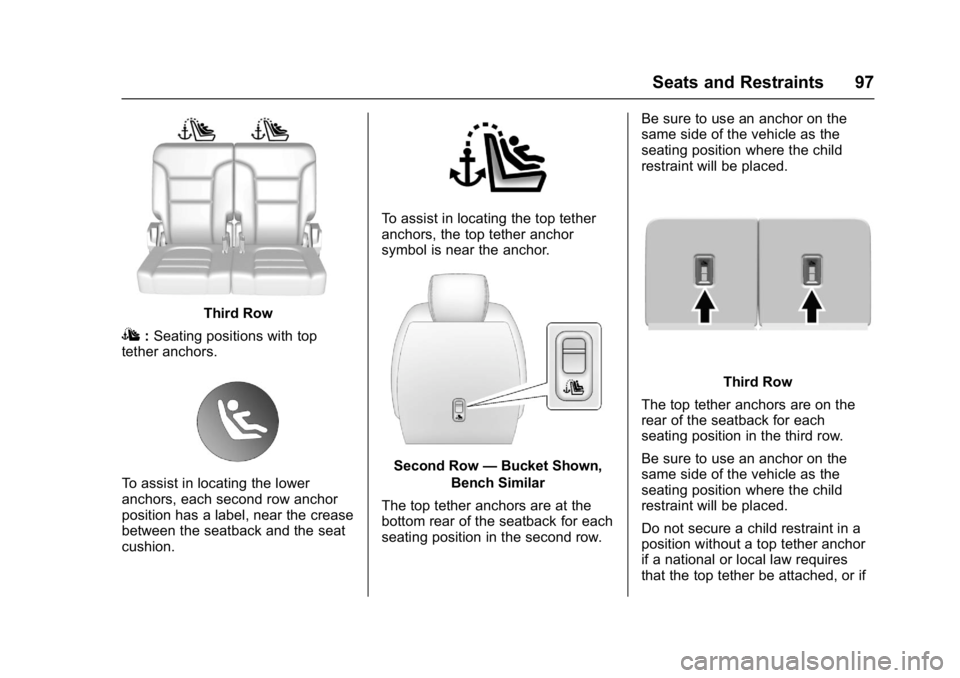
Third Row
I:Seating positions with top
tether anchors.
To assist in locating the lower
anchors, each second row anchor
position has a label, near the crease
between the seatback and the seat
cushion.
To assist in locating the top tether
anchors, the top tether anchor
symbol is near the anchor.
Second Row —Bucket Shown,
Bench Similar
The top tether anchors are at the
bottom rear of the seatback for each
seating position in the second row. Be sure to use an anchor on the
same side of the vehicle as the
seating position where the child
restraint will be placed.
Third Row
The top tether anchors are on the
rear of the seatback for each
seating position in the third row.
Be sure to use an anchor on the
same side of the vehicle as the
seating position where the child
restraint will be placed.
Do not secure a child restraint in a
position without a top tether anchor
if a national or local law requires
that the top tether be attached, or if
Page 124 of 419
GMC Acadia/Acadia Denali Owner Manual (GMNA-Localizing-U.S./Canada/
Mexico-9803770) - 2017 - crc - 7/12/16
Instruments and Controls 123
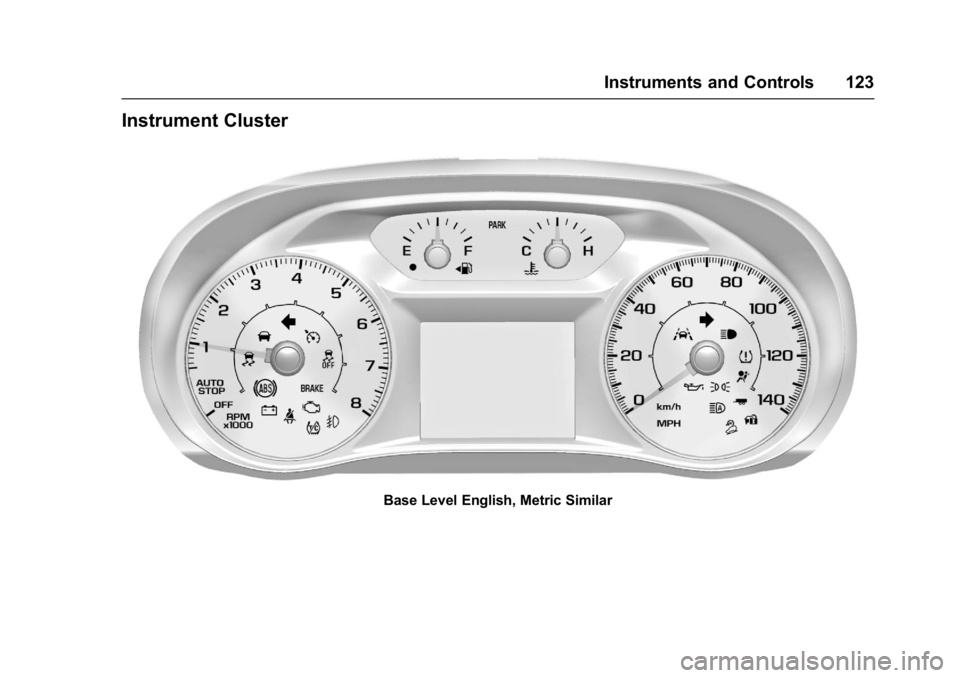
Instrument Cluster
Base Level English, Metric Similar