service GMC ACADIA 2018 Workshop Manual
[x] Cancel search | Manufacturer: GMC, Model Year: 2018, Model line: ACADIA, Model: GMC ACADIA 2018Pages: 423, PDF Size: 7.26 MB
Page 279 of 423
GMC Acadia/Acadia Denali Owner Manual (GMNA-Localizing-U.S./Canada/
Mexico-11349114) - 2018 - crc - 9/21/17
278 Driving and Operating
the trailer wiring package. The
instrument panel contains blunt cut
wires above the parking brake
assembly for the electric trailer
brake controller. The harness
contains the following wires:
.Blue: “To Trailer”
. Red/Black or Red/Blue:
Battery Feed
. White/Blue: Brake Apply Signal
. Black: Ground
The electric trailer brake controller
should be installed by your dealer or
a qualified service center.Conversions and
Add-Ons
Add-On Electrical
Equipment
{Warning
The Data Link Connector (DLC)
is used for vehicle service
and Emission Inspection/
Maintenance testing. See
Malfunction Indicator Lamp
(Check Engine Light) 0136.
A device connected to the DLC —
such as an aftermarket fleet or
driver-behavior tracking device —
may interfere with vehicle
systems. This could affect vehicle
operation and cause a crash.
Such devices may also access
information stored in the vehicle’s
systems.
Caution
Some electrical equipment can
damage the vehicle or cause
components to not work and
would not be covered by the
vehicle warranty. Always check
with your dealer before adding
electrical equipment.
Add-on equipment can drain the
vehicle's 12-volt battery, even if the
vehicle is not operating.
The vehicle has an airbag system.
Before attempting to add anything
electrical to the vehicle, see
Servicing the Airbag-Equipped
Vehicle 089 and Adding Equipment
to the Airbag-Equipped Vehicle
0 90.
Page 280 of 423
GMC Acadia/Acadia Denali Owner Manual (GMNA-Localizing-U.S./Canada/
Mexico-11349114) - 2018 - crc - 9/21/17
Vehicle Care 279
Vehicle Care
General Information
General Information . . . . . . . . . . 280
California Proposition65 Warning . . . . . . . . . . . . . . . . . 280
California Perchlorate Materials Requirements . . . . . 281
Accessories and Modifications . . . . . . . . . . . . . . . . 281
Vehicle Checks
Doing Your OwnService Work . . . . . . . . . . . . . . . 281
Hood . . . . . . . . . . . . . . . . . . . . . . . . . 282
Engine Compartment Overview . . . . . . . . . . . . . . . . . . . . 283
Engine Oil . . . . . . . . . . . . . . . . . . . . 286
Engine Oil Life System . . . . . . . 288
Automatic Transmission Fluid . . . . . . . . . . . . . . . . . . . . . . . . 289
Engine Air Cleaner/Filter . . . . . . 290
Cooling System . . . . . . . . . . . . . . 291
Engine Overheating . . . . . . . . . . 295
Washer Fluid . . . . . . . . . . . . . . . . . 296
Brakes . . . . . . . . . . . . . . . . . . . . . . . 297
Brake Fluid . . . . . . . . . . . . . . . . . . . 298
Battery - North America . . . . . . 299
All-Wheel Drive . . . . . . . . . . . . . . . 300 Starter Switch Check . . . . . . . . . 300
Automatic Transmission Shift
Lock Control Function
Check . . . . . . . . . . . . . . . . . . . . . . . 300
Park Brake and P (Park)
Mechanism Check . . . . . . . . . . 300
Wiper Blade Replacement . . . . 301
Windshield Replacement . . . . . 302
Gas Strut(s) . . . . . . . . . . . . . . . . . . 302
Headlamp Aiming
Headlamp Aiming . . . . . . . . . . . . 303
Bulb Replacement
Bulb Replacement . . . . . . . . . . . . 304
Halogen Bulbs . . . . . . . . . . . . . . . . 304
LED Lighting . . . . . . . . . . . . . . . . . 304
License Plate Lamp . . . . . . . . . . 304
Electrical System
High Voltage Devices and Wiring . . . . . . . . . . . . . . . . . . . . . . . 305
Electrical System Overload . . . 305
Fuses and Circuit Breakers . . . 306
Engine Compartment Fuse Block . . . . . . . . . . . . . . . . . . . . . . . . 306
Instrument Panel Fuse Block . . . . . . . . . . . . . . . . . . . . . . . . 309
Rear Compartment Fuse Block . . . . . . . . . . . . . . . . . . . . . . . . 311
Wheels and Tires
Tires . . . . . . . . . . . . . . . . . . . . . . . . . . 314
All-Season Tires . . . . . . . . . . . . . . 315
Winter Tires . . . . . . . . . . . . . . . . . . 315
Summer Tires . . . . . . . . . . . . . . . . 315
Tire Sidewall Labeling . . . . . . . . 316
Tire Designations . . . . . . . . . . . . . 318
Tire Terminology andDefinitions . . . . . . . . . . . . . . . . . . 319
Tire Pressure . . . . . . . . . . . . . . . . . 321
Tire Pressure for High-Speed Operation . . . . . . . . . . . . . . . . . . . 323
Tire Pressure Monitor System . . . . . . . . . . . . . . . . . . . . . . 323
Tire Pressure Monitor Operation . . . . . . . . . . . . . . . . . . . 324
Tire Inspection . . . . . . . . . . . . . . . . 328
Tire Rotation . . . . . . . . . . . . . . . . . 328
When It Is Time for New Tires . . . . . . . . . . . . . . . . . . . . . . . . 329
Buying New Tires . . . . . . . . . . . . . 330
Different Size Tires and Wheels . . . . . . . . . . . . . . . . . . . . . . 332
Uniform Tire Quality Grading . . . . . . . . . . . . . . . . . . . . . 332
Wheel Alignment and Tire Balance . . . . . . . . . . . . . . . . . . . . . 333
Wheel Replacement . . . . . . . . . . 334
Tire Chains . . . . . . . . . . . . . . . . . . . 334
If a Tire Goes Flat . . . . . . . . . . . . 335
Page 281 of 423
GMC Acadia/Acadia Denali Owner Manual (GMNA-Localizing-U.S./Canada/
Mexico-11349114) - 2018 - crc - 9/21/17
280 Vehicle Care
Tire Sealant andCompressor Kit . . . . . . . . . . . . . 337
Storing the Tire Sealant and Compressor Kit . . . . . . . . . . . . . 343
Tire Changing . . . . . . . . . . . . . . . . 344
Compact Spare Tire . . . . . . . . . . 350
Jump Starting
Jump Starting - North
America . . . . . . . . . . . . . . . . . . . . . 351
Towing the Vehicle
Towing the Vehicle . . . . . . . . . . . 354
Recreational VehicleTowing . . . . . . . . . . . . . . . . . . . . . . 354
Appearance Care
Exterior Care . . . . . . . . . . . . . . . . . 358
Interior Care . . . . . . . . . . . . . . . . . . 362
Floor Mats . . . . . . . . . . . . . . . . . . . . 366
General Information
For service and parts needs, visit
your dealer. You will receive
genuine GM parts and GM-trained
and supported service people.
Genuine GM parts have one of
these marks:
California Proposition
65 Warning
{Warning
Most motor vehicles, including
this one, as well as many of its
service parts and fluids, contain
and/or emit chemicals known to
the State of California to cause
cancer and birth defects or other
reproductive harm. Engine
exhaust, many parts and
systems, many fluids, and some
component wear by-products
contain and/or emit these
chemicals. For more information
go to www.P65Warnings.ca.gov/
passenger-vehicle.
See Battery - North America 0299
and Jump Starting - North America
0 351 and the back cover.
Page 282 of 423
GMC Acadia/Acadia Denali Owner Manual (GMNA-Localizing-U.S./Canada/
Mexico-11349114) - 2018 - crc - 9/21/17
Vehicle Care 281
California Perchlorate
Materials Requirements
Certain types of automotive
applications, such as airbag
initiators, seat belt pretensioners,
and lithium batteries contained in
Remote Keyless Entry transmitters,
may contain perchlorate materials.
Special handling may be necessary.
For additional information, see
www.dtsc.ca.gov/hazardouswaste/
perchlorate.
Accessories and
Modifications
Adding non-dealer accessories or
making modifications to the vehicle
can affect vehicle performance and
safety, including such things as
airbags, braking, stability, ride and
handling, emissions systems,
aerodynamics, durability, and
electronic systems like antilock
brakes, traction control, and stability
control. These accessories or
modifications could even cause
malfunction or damage not covered
by the vehicle warranty.Damage to suspension components
caused by modifying vehicle height
outside of factory settings will not be
covered by the vehicle warranty.
Damage to vehicle components
resulting from modifications or the
installation or use of non-GM
certified parts, including control
module or software modifications, is
not covered under the terms of the
vehicle warranty and may affect
remaining warranty coverage for
affected parts.
GM Accessories are designed to
complement and function with other
systems on the vehicle. See your
dealer to accessorize the vehicle
using genuine GM Accessories
installed by a dealer technician.
Also, see
Adding Equipment to the
Airbag-Equipped Vehicle 090.
Vehicle Checks
Doing Your Own
Service Work
{Warning
It can be dangerous to work on
your vehicle if you do not have
the proper knowledge, service
manual, tools, or parts. Always
follow owner ’s manual procedures
and consult the service manual
for your vehicle before doing any
service work.
If doing some of your own service
work, use the proper service
manual. It tells you much more
about how to service the vehicle
than this manual can. To order the
proper service manual, see Service
Publications Ordering Information
0 393.
This vehicle has an airbag system.
Before attempting to do your own
service work, see Servicing the
Airbag-Equipped Vehicle 089.
Page 283 of 423
GMC Acadia/Acadia Denali Owner Manual (GMNA-Localizing-U.S./Canada/
Mexico-11349114) - 2018 - crc - 9/21/17
282 Vehicle Care
Keep a record with all parts receipts
and list the mileage and the date of
any service work performed. See
Maintenance Records0379.
Caution
Even small amounts of
contamination can cause damage
to vehicle systems. Do not allow
contaminants to contact the fluids,
reservoir caps, or dipsticks.
Hood
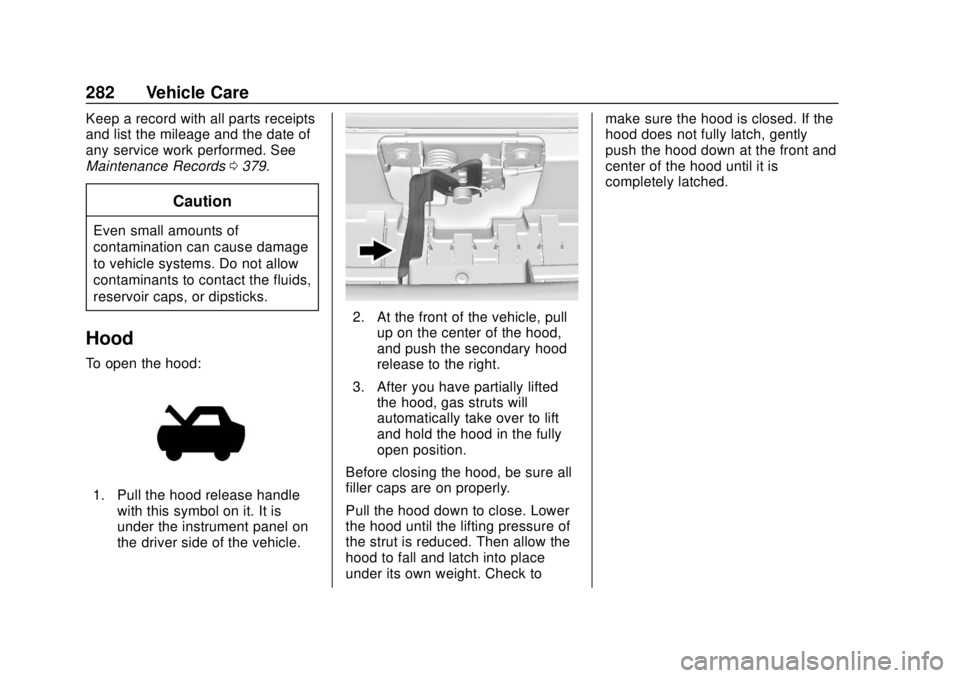
To open the hood:
1. Pull the hood release handle
with this symbol on it. It is
under the instrument panel on
the driver side of the vehicle.
2. At the front of the vehicle, pullup on the center of the hood,
and push the secondary hood
release to the right.
3. After you have partially lifted the hood, gas struts will
automatically take over to lift
and hold the hood in the fully
open position.
Before closing the hood, be sure all
filler caps are on properly.
Pull the hood down to close. Lower
the hood until the lifting pressure of
the strut is reduced. Then allow the
hood to fall and latch into place
under its own weight. Check to make sure the hood is closed. If the
hood does not fully latch, gently
push the hood down at the front and
center of the hood until it is
completely latched.
Page 288 of 423
GMC Acadia/Acadia Denali Owner Manual (GMNA-Localizing-U.S./Canada/
Mexico-11349114) - 2018 - crc - 9/21/17
Vehicle Care 287
checking a cold engine prior to
starting. Remove the dipstick
and check the level.
. If unable to wait two hours, the
engine must be off for at least
15 minutes if the engine is
warm, or at least 30 minutes if
the engine is not warm. Pull out
the dipstick, wipe it with a clean
paper towel or cloth, then push it
back in all the way. Remove it
again, keeping the tip down, and
check the level.
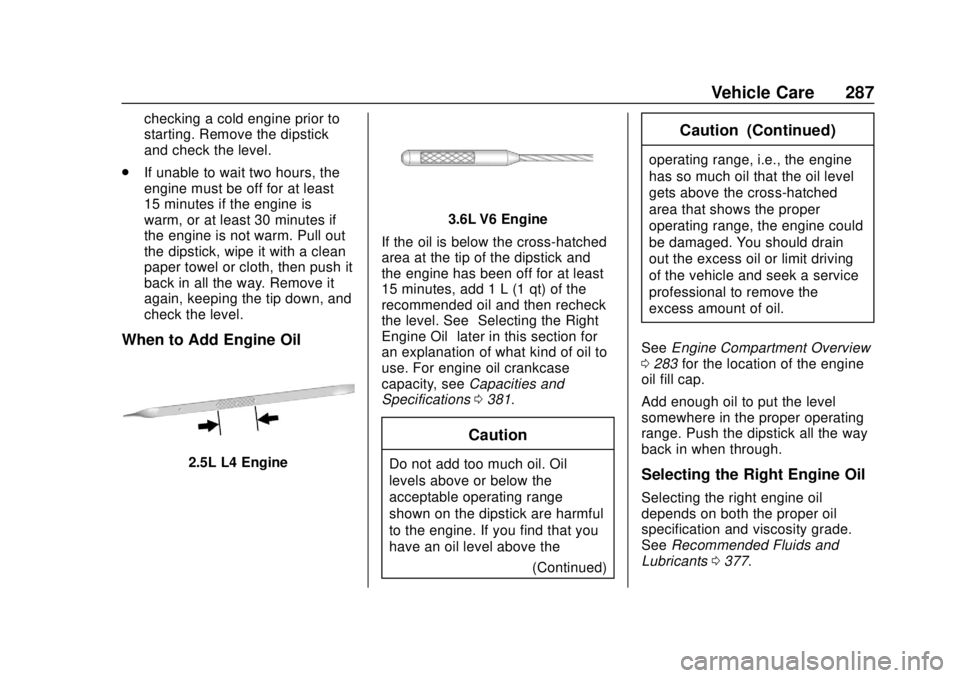
When to Add Engine Oil
2.5L L4 Engine
3.6L V6 Engine
If the oil is below the cross-hatched
area at the tip of the dipstick and
the engine has been off for at least
15 minutes, add 1 L (1 qt) of the
recommended oil and then recheck
the level. See “Selecting the Right
Engine Oil” later in this section for
an explanation of what kind of oil to
use. For engine oil crankcase
capacity, see Capacities and
Specifications 0381.
Caution
Do not add too much oil. Oil
levels above or below the
acceptable operating range
shown on the dipstick are harmful
to the engine. If you find that you
have an oil level above the
(Continued)
Caution (Continued)
operating range, i.e., the engine
has so much oil that the oil level
gets above the cross-hatched
area that shows the proper
operating range, the engine could
be damaged. You should drain
out the excess oil or limit driving
of the vehicle and seek a service
professional to remove the
excess amount of oil.
See Engine Compartment Overview
0 283 for the location of the engine
oil fill cap.
Add enough oil to put the level
somewhere in the proper operating
range. Push the dipstick all the way
back in when through.
Selecting the Right Engine Oil
Selecting the right engine oil
depends on both the proper oil
specification and viscosity grade.
See Recommended Fluids and
Lubricants 0377.
Page 290 of 423
GMC Acadia/Acadia Denali Owner Manual (GMNA-Localizing-U.S./Canada/
Mexico-11349114) - 2018 - crc - 9/21/17
Vehicle Care 289
include engine revolutions, engine
temperature, and miles driven.
Based on driving conditions, the
mileage at which an oil change is
indicated can vary considerably. For
the oil life system to work properly,
the system must be reset every time
the oil is changed.
When the system has calculated
that oil life has been diminished, it
indicates that an oil change is
necessary. A CHANGE ENGINE
OIL SOON message comes on.
Change the oil as soon as possible
within the next 1 000 km (600 mi).
It is possible that, if driving under
the best conditions, the oil life
system might indicate that an oil
change is not necessary for up to a
year. The engine oil and filter must
be changed at least once a year
and, at this time, the system must
be reset. Your dealer has trained
service people who will perform this
work and reset the system. It is also
important to check the oil regularly
over the course of an oil drain
interval and keep it at the proper
level.If the system is ever reset
accidentally, the oil must be
changed at 5 000 km (3,000 mi)
since the last oil change.
Remember to reset the oil life
system whenever the oil is changed.
How to Reset the Engine Oil
Life System
Reset the system whenever the
engine oil is changed so that the
system can calculate the next
engine oil change. To reset the
system:
1. Display the REMAINING OIL LIFE on the DIC.
See Driver Information Center
(DIC) (Base and Midlevel)
0 145 orDriver Information
Center (DIC) (Uplevel) 0148.
2. Press and hold
Von the DIC
while the Oil Life display is
active. The oil life will change
to 100%. If the CHANGE ENGINE OIL SOON
message comes back on when the
vehicle is started, the engine oil life
system has not been reset. Repeat
the procedure.
Automatic Transmission
Fluid
It is not necessary to check the
transmission fluid level.
A transmission fluid leak is the only
reason for fluid loss. If a leak
occurs, take the vehicle to the
dealer and have it repaired as soon
as possible.
Change the fluid at the intervals
listed in
Maintenance Schedule
0 369, and be sure to use the
transmission fluid listed in
Recommended Fluids and
Lubricants 0377.
Caution
Use of the incorrect automatic
transmission fluid may damage
the vehicle, and the damage may
(Continued)
Page 294 of 423
GMC Acadia/Acadia Denali Owner Manual (GMNA-Localizing-U.S./Canada/
Mexico-11349114) - 2018 - crc - 9/21/17
Vehicle Care 293
.Helps keep the proper engine
temperature.
Caution
Do not use anything other than a
mix of DEX-COOL coolant that
meets GM Standard
GMW3420 and clean, drinkable
water. Anything else can cause
damage to the engine cooling
system and the vehicle, which
would not be covered by the
vehicle warranty.
Never dispose of engine coolant by
putting it in the trash, pouring it on
the ground, or into sewers, streams,
or bodies of water. Have the coolant
changed by an authorized service
center, familiar with legal
requirements regarding used
coolant disposal. This will help
protect the environment and your
health.
Checking Coolant
The vehicle must be on a level
surface when checking the coolant
level.
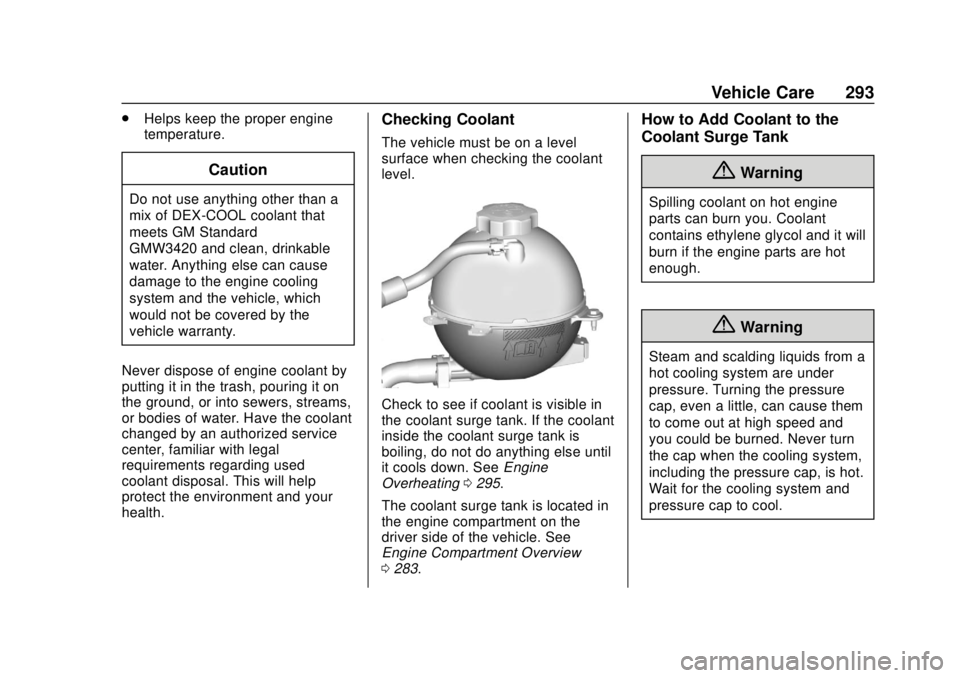
Check to see if coolant is visible in
the coolant surge tank. If the coolant
inside the coolant surge tank is
boiling, do not do anything else until
it cools down. See Engine
Overheating 0295.
The coolant surge tank is located in
the engine compartment on the
driver side of the vehicle. See
Engine Compartment Overview
0 283.
How to Add Coolant to the
Coolant Surge Tank
{Warning
Spilling coolant on hot engine
parts can burn you. Coolant
contains ethylene glycol and it will
burn if the engine parts are hot
enough.
{Warning
Steam and scalding liquids from a
hot cooling system are under
pressure. Turning the pressure
cap, even a little, can cause them
to come out at high speed and
you could be burned. Never turn
the cap when the cooling system,
including the pressure cap, is hot.
Wait for the cooling system and
pressure cap to cool.
Page 296 of 423
GMC Acadia/Acadia Denali Owner Manual (GMNA-Localizing-U.S./Canada/
Mexico-11349114) - 2018 - crc - 9/21/17
Vehicle Care 295
5. Replace the pressure captightly.
6. Verify coolant level after the engine is shut off and the
coolant is cold. If necessary,
repeat coolant fill procedure
Steps 1–6.
If the coolant still is not at the
proper level when the system
cools down again, see your
dealer.
Caution
If the pressure cap is not tightly
installed, coolant loss and engine
damage may occur. Be sure the
cap is properly and tightly
secured.
Engine Overheating
The vehicle has several indicators
to warn of the engine overheating.
There is an engine coolant
temperature gauge on the
instrument cluster. See Engine
Coolant Temperature Gauge 0133. The vehicle may also display a
message on the Driver Information
Center (DIC).
If the decision is made not to lift the
hood when this warning appears,
get service help right away. See
Roadside Assistance Program
0
388.
If the decision is made to lift the
hood, make sure the vehicle is
parked on a level surface. Then
check to see if the engine cooling
fan is running. If the engine is
overheating, the fan should be
running. If it is not, do not continue
to run the engine. Have the vehicle
serviced.
Caution
Do not run the engine if there is a
leak in the engine cooling system.
This can cause a loss of all
coolant and can damage the
system and vehicle. Have any
leaks fixed right away.
If Steam Is Coming from the
Engine Compartment
{Warning
Steam and scalding liquids from a
hot cooling system are under
pressure. Turning the pressure
cap, even a little, can cause them
to come out at high speed and
you could be burned. Never turn
the cap when the cooling system,
including the pressure cap, is hot.
Wait for the cooling system and
pressure cap to cool.
If No Steam Is Coming from
the Engine Compartment
If an engine overheat warning is
displayed but no steam can be seen
or heard, the problem may not be
too serious. Sometimes the engine
can get a little too hot when the
vehicle:
. Climbs a long hill on a hot day.
. Stops after high-speed driving.
. Idles for long periods in traffic.
Page 298 of 423
GMC Acadia/Acadia Denali Owner Manual (GMNA-Localizing-U.S./Canada/
Mexico-11349114) - 2018 - crc - 9/21/17
Vehicle Care 297
Caution (Continued)
.When using concentrated
washer fluid, follow the
manufacturer instructions for
adding water.
. Fill the washer fluid tank
only three-quarters full when
it is very cold. This allows
for fluid expansion if
freezing occurs, which could
damage the tank if it is
completely full.
Brakes
Disc brake pads have built-in wear
indicators that make a high-pitched
warning sound when the brake pads
are worn and new pads are needed.
The sound can come and go or can
be heard all the time when the
vehicle is moving, except when
applying the brake pedal firmly.
{Warning
The brake wear warning sound
means that soon the brakes will
not work well. That could lead to
a crash. When the brake wear
warning sound is heard, have the
vehicle serviced.
Caution
Continuing to drive with worn-out
brake pads could result in costly
brake repair.
Some driving conditions or climates
can cause a brake squeal when the
brakes are first applied or lightly
applied. This does not mean
something is wrong with the brakes.
Properly torqued wheel nuts are
necessary to help prevent brake
pulsation. When tires are rotated,
inspect brake pads for wear and
evenly tighten wheel nuts in the proper sequence to torque
specifications. See
Capacities and
Specifications 0381.
Brake pads should be replaced as
complete sets.
Brake Pedal Travel
See your dealer if the brake pedal
does not return to normal height,
or if there is a rapid increase in
pedal travel. This could be a sign
that brake service may be required.
Replacing Brake System Parts
Always replace brake system parts
with new, approved replacement
parts. If this is not done, the brakes
may not work properly. The braking
performance expected can change
in many other ways if the wrong
replacement brake parts are
installed or if parts are improperly
installed.