outlets GMC ACADIA 2019 User Guide
[x] Cancel search | Manufacturer: GMC, Model Year: 2019, Model line: ACADIA, Model: GMC ACADIA 2019Pages: 429, PDF Size: 6.38 MB
Page 204 of 429
GMC Acadia/Acadia Denali Owner Manual (GMNA-Localizing-U.S./Canada/
Mexico-12146149) - 2019 - crc - 7/30/18
Climate Controls 203
The display only indicates climate
control functions when the system is
in rear independent mode. When
SYNC is active the display is not
shown.
Manual Operation
9:Turn the knob clockwise or
counterclockwise, or touch and hold
the fan control on the display to
increase or decrease the fan speed.
TEMP : Turn the knob clockwise or
counterclockwise, or touch and hold
the temperature controls on the
display to adjust the rear passenger
temperature. If SYNC is lit, the rear
climate temperature is linked to the
driver temperature setting.
Y/\/Yor MODE : Touch the
desired mode button on the display
or press MODE on the rear climate
controls to change the direction of
the airflow in the rear seating area.
Repeatedly touch MODE until the
desired mode appears on the
display.
MorL: If equipped, pressMorLto heat the left or right outboard
seat. See Heated Rear Seats 069.
Air Vents
To adjust the center and side air
outlets on the instrument panel, use
the slider switch in the center of the
outlet to change the direction of the
airflow and also to shut off the
airflow.
There may be outlets overhead in
the rear passenger area; adjust as
needed.
Keep all outlets open whenever
possible for best system
performance.
Operation Tips
.
Clear away any ice, snow,
or leaves from the air inlets at
the base of the windshield that
can block the flow of air into the
vehicle.
. Clear snow off the hood to
improve visibility and help
decrease moisture drawn into
the vehicle. .
Use of non-GM approved hood
deflectors can adversely affect
the performance of the system.
. Keep the path under all seats
clear of objects to help circulate
the air inside the vehicle more
effectively.
. If fogging reoccurs while in
Yor
\modes with mild temperature
throughout the vehicle, turn on
the air conditioner to reduce
windshield fogging.
Page 217 of 429
GMC Acadia/Acadia Denali Owner Manual (GMNA-Localizing-U.S./Canada/
Mexico-12146149) - 2019 - crc - 7/30/18
216 Driving and Operating
.Allow greater following distance
and watch for slippery spots. Icy
patches can occur on otherwise
clear roads in shaded areas.
The surface of a curve or an
overpass can remain icy when
the surrounding roads are clear.
Avoid sudden steering
maneuvers and braking while
on ice.
. Turn off cruise control.
. Select All-Wheel Drive (AWD)
Mode for vehicles equipped with
AWD. Select Snow/Ice Mode for
FWD only vehicles.
See Driver Mode Control 0239
and All-Wheel Drive 0233.
Blizzard Conditions
Stop the vehicle in a safe place and
signal for help. Stay with the vehicle
unless there is help nearby.
If possible, use Roadside
Assistance. See Roadside
Assistance Program 0394. To get
help and keep everyone in the
vehicle safe:
. Turn on the hazard warning
flashers. .
Tie a red cloth to an outside
mirror.
{Warning
Snow can trap engine exhaust
under the vehicle. This may
cause exhaust gases to get
inside. Engine exhaust contains
carbon monoxide (CO), which
cannot be seen or smelled. It can
cause unconsciousness and even
death.
If the vehicle is stuck in snow:
. Clear snow from the base of
the vehicle, especially any
blocking the exhaust pipe.
. Open a window about 5 cm
(2 in) on the vehicle side
that is away from the wind,
to bring in fresh air.
. Fully open the air outlets on
or under the instrument
panel.
(Continued)
Warning (Continued)
.Adjust the climate control
system to circulate the air
inside the vehicle and set
the fan speed to the highest
setting. See “Climate
Control Systems.”
For more information about CO,
see Engine Exhaust 0229.
To save fuel, run the engine for
short periods to warm the vehicle
and then shut the engine off and
partially close the window. Moving
about to keep warm also helps.
If it takes time for help to arrive,
when running the engine, push the
accelerator pedal slightly so the
engine runs faster than the idle
speed. This keeps the battery
charged to restart the vehicle and to
signal for help with the headlamps.
Do this as little as possible, to
save fuel.
Page 274 of 429
GMC Acadia/Acadia Denali Owner Manual (GMNA-Localizing-U.S./Canada/
Mexico-12146149) - 2019 - crc - 7/30/18
Driving and Operating 273
Warning (Continued)
.Fully open the air outlets on
or under the instrument
panel.
. Adjust the climate control
system to a setting that
brings in only outside air.
See “Climate Control
Systems” in the Index.
For more information about
carbon monoxide, see Engine
Exhaust 0229.
Towing a trailer requires experience.
The combination of the vehicle and
trailer is longer and not as
responsive as the vehicle itself. Get
used to the handling and braking of
the combination by driving on a
level road surface before driving on
public roads.
The trailer structure, the tires, and
the brakes must be all be rated to
carry the intended cargo.
Inadequate trailer equipment can
cause the combination to operate in an unexpected or unsafe manner.
Before driving, inspect all trailer
hitch parts and attachments, safety
chains, electrical connectors, lamps,
tires, and mirrors. See
Towing
Equipment 0278. If the trailer has
electric brakes, start the
combination moving and then
manually apply the trailer brake
controller to check the trailer brakes
work. During the trip, occasionally
check that the cargo and trailer are
secure and that the lamps and any
trailer brakes are working.
Towing with a Stability Control
System
When towing, the stability control
system might be heard. The system
reacts to vehicle movement caused
by the trailer, which mainly occurs
during cornering. This is normal
when towing heavier trailers.
Following Distance
Stay at least twice as far behind the
vehicle ahead as you would when
driving without a trailer. This can
help to avoid heavy braking and
sudden turns.
Passing
More passing distance is needed
when towing a trailer. The
combination of the vehicle and
trailer will not accelerate as quickly
and is much longer than the vehicle
alone. It is necessary to go much
farther beyond the passed vehicle
before returning to the lane. Pass
on level roadways. Avoid passing
on hills if possible.
Backing Up
Hold the bottom of the steering
wheel with one hand. To move the
trailer to the left, move that hand to
the left. To move the trailer to the
right, move that hand to the right.
Always back up slowly and,
if possible, have someone
guide you.
Page 346 of 429
GMC Acadia/Acadia Denali Owner Manual (GMNA-Localizing-U.S./Canada/
Mexico-12146149) - 2019 - crc - 7/30/18
Vehicle Care 345
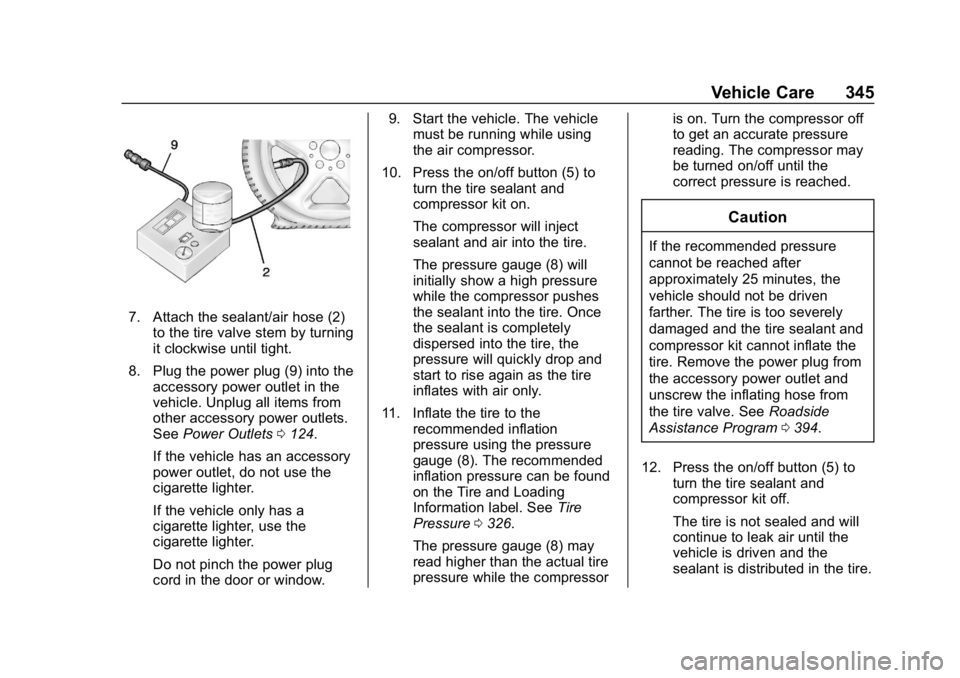
7. Attach the sealant/air hose (2)to the tire valve stem by turning
it clockwise until tight.
8. Plug the power plug (9) into the accessory power outlet in the
vehicle. Unplug all items from
other accessory power outlets.
See Power Outlets 0124.
If the vehicle has an accessory
power outlet, do not use the
cigarette lighter.
If the vehicle only has a
cigarette lighter, use the
cigarette lighter.
Do not pinch the power plug
cord in the door or window. 9. Start the vehicle. The vehicle
must be running while using
the air compressor.
10. Press the on/off button (5) to turn the tire sealant and
compressor kit on.
The compressor will inject
sealant and air into the tire.
The pressure gauge (8) will
initially show a high pressure
while the compressor pushes
the sealant into the tire. Once
the sealant is completely
dispersed into the tire, the
pressure will quickly drop and
start to rise again as the tire
inflates with air only.
11. Inflate the tire to the recommended inflation
pressure using the pressure
gauge (8). The recommended
inflation pressure can be found
on the Tire and Loading
Information label. See Tire
Pressure 0326.
The pressure gauge (8) may
read higher than the actual tire
pressure while the compressor is on. Turn the compressor off
to get an accurate pressure
reading. The compressor may
be turned on/off until the
correct pressure is reached.
Caution
If the recommended pressure
cannot be reached after
approximately 25 minutes, the
vehicle should not be driven
farther. The tire is too severely
damaged and the tire sealant and
compressor kit cannot inflate the
tire. Remove the power plug from
the accessory power outlet and
unscrew the inflating hose from
the tire valve. See
Roadside
Assistance Program 0394.
12. Press the on/off button (5) to turn the tire sealant and
compressor kit off.
The tire is not sealed and will
continue to leak air until the
vehicle is driven and the
sealant is distributed in the tire.
Page 348 of 429
GMC Acadia/Acadia Denali Owner Manual (GMNA-Localizing-U.S./Canada/
Mexico-12146149) - 2019 - crc - 7/30/18
Vehicle Care 347
27. After temporarily sealing a tireusing the tire sealant and
compressor kit, take the
vehicle to an authorized dealer
within 161 km (100 mi) of
driving to have the tire repaired
or replaced.
Using the Tire Sealant and
Compressor Kit without
Sealant to Inflate a Tire (Not
Punctured)
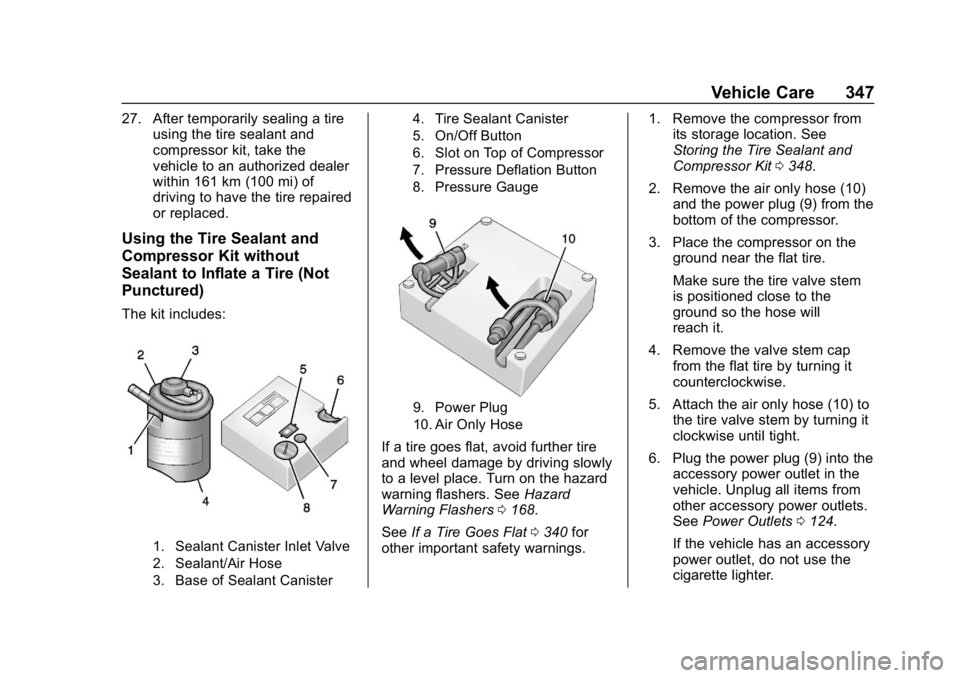
The kit includes:
1. Sealant Canister Inlet Valve
2. Sealant/Air Hose
3. Base of Sealant Canister 4. Tire Sealant Canister
5. On/Off Button
6. Slot on Top of Compressor
7. Pressure Deflation Button
8. Pressure Gauge
9. Power Plug
10. Air Only Hose
If a tire goes flat, avoid further tire
and wheel damage by driving slowly
to a level place. Turn on the hazard
warning flashers. See
Hazard
Warning Flashers 0168.
See If a Tire Goes Flat 0340 for
other important safety warnings. 1. Remove the compressor from
its storage location. See
Storing the Tire Sealant and
Compressor Kit 0348.
2. Remove the air only hose (10) and the power plug (9) from the
bottom of the compressor.
3. Place the compressor on the ground near the flat tire.
Make sure the tire valve stem
is positioned close to the
ground so the hose will
reach it.
4. Remove the valve stem cap from the flat tire by turning it
counterclockwise.
5. Attach the air only hose (10) to the tire valve stem by turning it
clockwise until tight.
6. Plug the power plug (9) into the accessory power outlet in the
vehicle. Unplug all items from
other accessory power outlets.
See Power Outlets 0124.
If the vehicle has an accessory
power outlet, do not use the
cigarette lighter.
Page 424 of 429

GMC Acadia/Acadia Denali Owner Manual (GMNA-Localizing-U.S./Canada/-
Mexico-12146149) - 2019 - crc - 7/30/18
Index 423
OnStar Emergency . . . . . . . . . . . . . 405
OnStar Overview . . . . . . . . . . . . . . . 404
OnStar Security . . . . . . . . . . . . . . . . 406
OperationFog Lamps . . . . . . . . . . . . . . . . . . . 168
Infotainment System . . . . . . . . . . 176
Outlets
Power . . . . . . . . . . . . . . . . . . . . . . . . 124
Overheating, Engine . . . . . . . . . . . . 300
Overview . . . . . . . . . . . . . . . . . . . . . . . 175
P
Park Shifting Into . . . . . . . . . . . . . . . . . . . 226
Shifting Out of . . . . . . . . . . . . . . . . 227
Park Assist . . . . . . . . . . . . . . . . . . . . . 253
Parking Brake and P (Park)Mechanism Check . . . . . . . . . . 305
Extended . . . . . . . . . . . . . . . . . . . . . 228
Over Things That Burn . . . . . . . 228
Parking or Backing Assistance Systems . . . . . . . . . . 253
Passenger Airbag Status Indicator . . . . . . . . . . . . . . . . . . . . . . 135
Passenger Compartment Air
Filter . . . . . . . . . . . . . . . . . . . . . . . . . . 204
Passenger Sensing System . . . . . 85 Pedestrian Ahead Indicator . . . . . 141
Perchlorate Materials
Requirements, California . . . . . . 286
Personalization Vehicle . . . . . . . . . . . . . . . . . . . . . . . 152
Phone Apple CarPlay and
Android Auto . . . . . . . . . . . . . . . . 193
Bluetooth . . . . . . . . . . . . . . . . 188, 189
Hands-Free . . . . . . . . . . . . . . . . . . . 194
Port
USB . . . . . . . . . . . . . . . . . . . . . . . . . . 181
Power Door Locks . . . . . . . . . . . . . . . . . . . . . 39
Mirrors . . . . . . . . . . . . . . . . . . . . . . . . . . 49
Outlets . . . . . . . . . . . . . . . . . . . . . . . 124
Protection, Battery . . . . . . . . . . . . 171
Retained Accessory (RAP) . . . 226
Seat Adjustment . . . . . . . . . . . . . . . . 59
Windows . . . . . . . . . . . . . . . . . . . . . . . 51
Pregnancy, Using Seat Belts . . . . 76
Privacy
Vehicle Data Recording . . . . . . . 402
Program Courtesy Transportation . . . . . . 396
Prohibited Fuels . . . . . . . . . . . . . . . . 268 Proposition
65 Warning,
California . . . . . . . . . . . .285, 304, 356,
Back Cover
Publication Ordering Information . . . . . . . . . . . . . . . . . . . . 399
R
Radio Frequency Statement . . . . 400
Radio Reception . . . . . . . . . . . . . . . . 180
RadiosAM-FM Radio . . . . . . . . . . . . . . . . . 178
Satellite . . . . . . . . . . . . . . . . . . . . . . . 179
Reading Lamps . . . . . . . . . . . . . . . . . 170
Rear Climate Control System . . . 201
Rear Seats . . . . . . . . . . . . . . . . . . . . . . 66 Heated . . . . . . . . . . . . . . . . . . . . . . . . . 69
Rear Storage . . . . . . . . . . . . . . . . . . . 112
Rear Vision Camera (RVC) . . . . . 253
Rear Window Washer/Wiper . . . . 121
Rearview Mirrors . . . . . . . . . . . . . . . . 50 Automatic Dimming . . . . . . . . . . . . . 50
Reclining Seatbacks . . . . . . . . . . . . . 59
Recommended Fuel . . . . . . . . . . . . . . . . . . . . . . . . . . 268
Recommended Fluids and
Lubricants . . . . . . . . . . . . . . . . . . . . . 383