warning light GMC ACADIA 2019 Workshop Manual
[x] Cancel search | Manufacturer: GMC, Model Year: 2019, Model line: ACADIA, Model: GMC ACADIA 2019Pages: 429, PDF Size: 6.38 MB
Page 331 of 429
GMC Acadia/Acadia Denali Owner Manual (GMNA-Localizing-U.S./Canada/
Mexico-12146149) - 2019 - crc - 7/30/18
330 Vehicle Care
additional information and details
about the DIC operation and
displays seeDriver Information
Center (DIC) (Base and Midlevel)
0 145 orDriver Information Center
(DIC) (Uplevel) 0148.
The low tire pressure warning light
may come on in cool weather when
the vehicle is first started, and then
turn off as the vehicle is driven. This
could be an early indicator that the
air pressure is getting low and
needs to be inflated to the proper
pressure.
A Tire and Loading Information
label, attached to your vehicle,
shows the size of the original
equipment tires and the correct
inflation pressure for the tires when
they are cold. See Vehicle Load
Limits 0217, for an example of the
Tire and Loading Information label
and its location. Also see Tire
Pressure 0326.
The TPMS can warn about a low
tire pressure condition but it does
not replace normal tire maintenance. See
Tire Inspection
0 333, Tire Rotation 0334 andTires
0 319.
Caution
Tire sealant materials are not all
the same. A non-approved tire
sealant could damage the TPMS
sensors. TPMS sensor damage
caused by using an incorrect tire
sealant is not covered by the
vehicle warranty. Always use only
the GM approved tire sealant
available through your dealer or
included in the vehicle.
Factory-installed Tire Inflator Kits
use a GM-approved liquid tire
sealant. Using non-approved tire
sealants could damage the TPMS
sensors. See Tire Sealant and
Compressor Kit 0342 for
information regarding the inflator kit
materials and instructions.
TPMS Malfunction Light and
Message
The TPMS will not function properly
if one or more of the TPMS sensors
are missing or inoperable. When the
system detects a malfunction, the
low tire pressure warning light
flashes for about one minute and
then stays on for the remainder of
the ignition cycle. A DIC warning
message also displays. The
malfunction light and DIC warning
message come on at each ignition
cycle until the problem is corrected.
Some of the conditions that can
cause these to come on are:
. One of the road tires has been
replaced with the spare tire. The
spare tire does not have a
TPMS sensor. The malfunction
light and DIC message should
go off after the road tire is
replaced and the sensor
matching process is performed
successfully. See “TPMS Sensor
Matching Process” later in this
section.
Page 332 of 429
GMC Acadia/Acadia Denali Owner Manual (GMNA-Localizing-U.S./Canada/
Mexico-12146149) - 2019 - crc - 7/30/18
Vehicle Care 331
.The TPMS sensor matching
process was not done or not
completed successfully after
rotating the tires. The
malfunction light and the DIC
message should go off after
successfully completing the
sensor matching process. See
"TPMS Sensor Matching
Process" later in this section.
. One or more TPMS sensors are
missing or damaged. The
malfunction light and the DIC
message should go off when the
TPMS sensors are installed and
the sensor matching process is
performed successfully. See
your dealer for service.
. Replacement tires or wheels do
not match the original equipment
tires or wheels. Tires and wheels
other than those recommended
could prevent the TPMS from
functioning properly. See Buying
New Tires 0335. .
Operating electronic devices or
being near facilities using radio
wave frequencies similar to the
TPMS could cause the TPMS
sensors to malfunction.
If the TPMS is not functioning
properly it cannot detect or signal a
low tire pressure condition. See
your dealer for service if the TPMS
malfunction light and DIC message
come on and stay on.
Tire Fill Alert (If Equipped)
This feature provides visual and
audible alerts outside the vehicle to
help when inflating an underinflated
tire to the recommended cold tire
pressure.
When the low tire pressure warning
light comes on:
1. Park the vehicle in a safe, level place.
2. Set the parking brake firmly.
3. Place the vehicle in P (Park).
4. Add air to the tire that is underinflated. The turn signal
lamp will flash. When the recommended
pressure is reached, the horn
sounds once and the turn
signal lamp will stop flashing
and briefly turn solid.
Repeat these steps for all
underinflated tires that have
illuminated the low tire pressure
warning light.
{Warning
Overinflating a tire could cause
the tire to rupture and you or
others could be injured. Do not
exceed the maximum pressure
listed on the tire sidewall.
See Tire Sidewall Labeling 0321
and Vehicle Load Limits 0217.
If the tire is overinflated by more
than 35 kPa (5 psi), the horn will
sound multiple times and the turn
signal lamp will continue to flash for
several seconds after filling stops.
To release and correct the pressure,
while the turn signal lamp is still
flashing, briefly press the center of
Page 333 of 429
GMC Acadia/Acadia Denali Owner Manual (GMNA-Localizing-U.S./Canada/
Mexico-12146149) - 2019 - crc - 7/30/18
332 Vehicle Care
the valve stem. When the
recommended pressure is reached,
the horn sounds once.
If the turn signal lamp does not flash
within 15 seconds after starting to
inflate the tire, the tire fill alert has
not been activated or is not working.
If the hazard warning flashers are
on, the tire fill alert visual feedback
will not work properly.
The TPMS will not activate the tire
fill alert properly under the following
conditions:
.There is interference from an
external device or transmitter.
. The air pressure from the
inflation device is not sufficient
to inflate the tire.
. There is a malfunction in
the TPMS.
. There is a malfunction in the
horn or turn signal lamps.
. The identification code of the
TPMS sensor is not registered to
the system. .
The battery of the TPMS sensor
is low.
If the tire fill alert does not operate
due to TPMS interference, move the
vehicle about 1 m (3 ft) back or
forward and try again. If the tire fill
alert feature is not working, use a
tire pressure gauge.
TPMS Sensor Matching
Process
Each TPMS sensor has a unique
identification code. The identification
code needs to be matched to a new
tire/wheel position after rotating the
vehicle’s tires or replacing one or
more of the TPMS sensors. The
TPMS sensor matching process
should also be performed after
replacing a spare tire with a road
tire containing the TPMS sensor.
The malfunction light and the DIC
message should go off at the next
ignition cycle. The sensors are
matched to the tire/wheel positions,
using a TPMS relearn tool, in the
following order: driver side front tire,
passenger side front tire, passenger
side rear tire, and driver side rear tire. See your dealer for service or
to purchase a relearn tool. A TPMS
relearn tool can also be purchased.
See Tire Pressure Monitor Sensor
Activation Tool at
www.gmtoolsandequipment.com or
call 1-800-GM TOOLS
(1-800-468-6657).
There are two minutes to match the
first tire/wheel position, and
five minutes overall to match all four
tire/wheel positions. If it takes
longer, the matching process stops
and must be restarted.
The TPMS sensor matching
process is:
1. Set the parking brake.
2. Place the vehicle in Service Mode. See Ignition Positions
0 221.
3. Make sure the Tire Pressure info page option is turned on.
The info pages on the DIC can
be turned on and off through
the Options menu.
Page 335 of 429
GMC Acadia/Acadia Denali Owner Manual (GMNA-Localizing-U.S./Canada/
Mexico-12146149) - 2019 - crc - 7/30/18
334 Vehicle Care
Tire Rotation
Tires should be rotated every
12 000 km (7,500 mi). See
Maintenance Schedule0375.
Tires are rotated to achieve a
uniform wear for all tires. The
first rotation is the most
important.
Anytime unusual wear is
noticed, rotate the tires as soon
as possible, check for proper tire
inflation pressure, and check for
damaged tires or wheels. If the
unusual wear continues after the
rotation, check the wheel
alignment.
See When It Is Time for New
Tires 0335 andWheel
Replacement 0339.
Use this rotation pattern when
rotating the tires.
If the vehicle has a compact
spare tire, do not include it in the
tire rotation.
Adjust the front and rear tires to
the recommended inflation
pressure on the Tire and
Loading Information label after
the tires have been rotated.
See Tire Pressure 0326 and
Vehicle Load Limits 0217.
Reset the Tire Pressure Monitor
System. See Tire Pressure
Monitor Operation 0329. Check that all wheel nuts are
properly tightened. See
“Wheel
Nut Torque” underCapacities
and Specifications 0387.
{Warning
Rust or dirt on a wheel, or on the
parts to which it is fastened, can
make wheel nuts become loose
after time. The wheel could come
off and cause a crash. When
changing a wheel, remove any
rust or dirt from places where the
wheel attaches to the vehicle. In
an emergency, a cloth or a paper
towel can be used; however, use
a scraper or wire brush later to
remove all rust or dirt.
Lightly coat the center of the
wheel hub with wheel bearing
grease after a wheel change or
tire rotation to prevent corrosion
or rust build-up. Do not get
grease on the flat wheel
mounting surface or on the
wheel nuts or bolts.
Page 338 of 429
GMC Acadia/Acadia Denali Owner Manual (GMNA-Localizing-U.S./Canada/
Mexico-12146149) - 2019 - crc - 7/30/18
Vehicle Care 337
load range, speed rating, and
construction (radial) as the
original tires.
Vehicles that have a tire
pressure monitoring system
could give an inaccurate
low-pressure warning if non-TPC
Spec rated tires are installed.
SeeTire Pressure Monitor
System 0328.
The Tire and Loading
Information label indicates the
original equipment tires on the
vehicle. See Vehicle Load Limits
0 217.
Different Size Tires and
Wheels
If wheels or tires are installed that
are a different size than the original
equipment wheels and tires, vehicle
performance, including its braking,
ride and handling characteristics,
stability, and resistance to rollover
may be affected. If the vehicle has
electronic systems such as antilock
brakes, rollover airbags, traction control, electronic stability control,
or All-Wheel Drive, the performance
of these systems can also be
affected.
{Warning
If different sized wheels are used,
there may not be an acceptable
level of performance and safety if
tires not recommended for those
wheels are selected. This
increases the chance of a crash
and serious injury. Only use GM
specific wheel and tire systems
developed for the vehicle, and
have them properly installed by a
GM certified technician.
See Buying New Tires 0335 and
Accessories and Modifications
0 286.
Uniform Tire Quality
Grading
The following information relates
to the system developed by the
United States National Highway Traffic Safety Administration
(NHTSA), which grades tires by
treadwear, traction, and
temperature performance. This
applies only to vehicles sold in
the United States. The grades
are molded on the sidewalls of
most passenger car tires. The
Uniform Tire Quality Grading
(UTQG) system does not apply
to deep tread, winter tires,
compact spare tires, tires with
nominal rim diameters of
10 to 12 inches (25 to 30 cm),
or to some limited-production
tires.
While the tires available on
General Motors passenger cars
and light trucks may vary with
respect to these grades, they
must also conform to federal
safety requirements and
additional General Motors Tire
Performance Criteria (TPC)
standards.
Page 340 of 429
GMC Acadia/Acadia Denali Owner Manual (GMNA-Localizing-U.S./Canada/
Mexico-12146149) - 2019 - crc - 7/30/18
Vehicle Care 339
underinflation, or excessive
loading, either separately or in
combination, can cause heat
buildup and possible tire failure.
Wheel Alignment and Tire
Balance
The tires and wheels were aligned
and balanced at the factory to
provide the longest tire life and best
overall performance. Adjustments to
wheel alignment and tire balancing
are not necessary on a regular
basis. Consider an alignment check
if there is unusual tire wear or the
vehicle is significantly pulling to one
side or the other. Some slight pull to
the left or right, depending on the
crown of the road and/or other road
surface variations such as troughs
or ruts, is normal. If the vehicle is
vibrating when driving on a smooth
road, the tires and wheels may need
to be rebalanced. See your dealer
for proper diagnosis.
Wheel Replacement
Replace any wheel that is bent,
cracked, or badly rusted or
corroded. If wheel nuts keep coming
loose, the wheel, wheel bolts, and
wheel nuts should be replaced.
If the wheel leaks air, replace it.
Some aluminum wheels can be
repaired. See your dealer if any of
these conditions exist.
Your dealer will know the kind of
wheel that is needed.
Each new wheel should have the
same load-carrying capacity,
diameter, width, offset, and be
mounted the same way as the one it
replaces.
Replace wheels, wheel bolts, wheel
nuts, or Tire Pressure Monitor
System (TPMS) sensors with new
GM original equipment parts.{Warning
Using the wrong replacement
wheels, wheel bolts, or wheel
nuts can be dangerous. It could
affect the braking and handling of
the vehicle. Tires can lose air,
and cause loss of control, causing
a crash. Always use the correct
wheel, wheel bolts, and wheel
nuts for replacement.
Caution
The wrong wheel can also cause
problems with bearing life, brake
cooling, speedometer or
odometer calibration, headlamp
aim, bumper height, vehicle
ground clearance, and tire or tire
chain clearance to the body and
chassis.
Page 348 of 429
GMC Acadia/Acadia Denali Owner Manual (GMNA-Localizing-U.S./Canada/
Mexico-12146149) - 2019 - crc - 7/30/18
Vehicle Care 347
27. After temporarily sealing a tireusing the tire sealant and
compressor kit, take the
vehicle to an authorized dealer
within 161 km (100 mi) of
driving to have the tire repaired
or replaced.
Using the Tire Sealant and
Compressor Kit without
Sealant to Inflate a Tire (Not
Punctured)
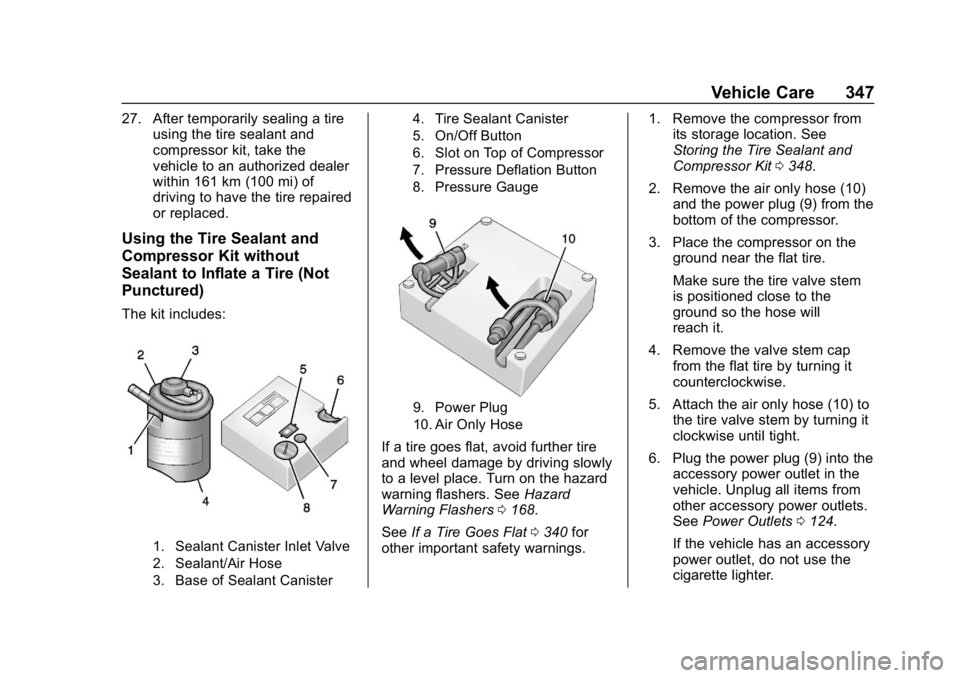
The kit includes:
1. Sealant Canister Inlet Valve
2. Sealant/Air Hose
3. Base of Sealant Canister 4. Tire Sealant Canister
5. On/Off Button
6. Slot on Top of Compressor
7. Pressure Deflation Button
8. Pressure Gauge
9. Power Plug
10. Air Only Hose
If a tire goes flat, avoid further tire
and wheel damage by driving slowly
to a level place. Turn on the hazard
warning flashers. See
Hazard
Warning Flashers 0168.
See If a Tire Goes Flat 0340 for
other important safety warnings. 1. Remove the compressor from
its storage location. See
Storing the Tire Sealant and
Compressor Kit 0348.
2. Remove the air only hose (10) and the power plug (9) from the
bottom of the compressor.
3. Place the compressor on the ground near the flat tire.
Make sure the tire valve stem
is positioned close to the
ground so the hose will
reach it.
4. Remove the valve stem cap from the flat tire by turning it
counterclockwise.
5. Attach the air only hose (10) to the tire valve stem by turning it
clockwise until tight.
6. Plug the power plug (9) into the accessory power outlet in the
vehicle. Unplug all items from
other accessory power outlets.
See Power Outlets 0124.
If the vehicle has an accessory
power outlet, do not use the
cigarette lighter.
Page 359 of 429
GMC Acadia/Acadia Denali Owner Manual (GMNA-Localizing-U.S./Canada/
Mexico-12146149) - 2019 - crc - 7/30/18
358 Vehicle Care
3. Set the parking brake firmlyand put the shift lever in
P (Park) with an automatic
transmission, or Neutral with a
manual transmission. See
Shifting Into Park 0226.
Caution
If any accessories are left on or
plugged in during the jump
starting procedure, they could be
damaged. The repairs would not
be covered by the vehicle
warranty. Whenever possible, turn
off or unplug all accessories on
either vehicle when jump starting.
4. Turn the ignition off. Turn off all lights and accessories in both
vehicles, except the hazard
warning flashers if needed.
{Warning
An electric fan can start up even
when the engine is not running
and can injure you. Keep hands,
clothing, and tools away from any
underhood electric fan.
{Warning
Using a match near a battery can
cause battery gas to explode.
People have been hurt doing this,
and some have been blinded.
Use a flashlight if you need more
light.
Battery fluid contains acid that
can burn you. Do not get it on
you. If you accidentally get it in
your eyes or on your skin, flush
the place with water and get
medical help immediately.
{Warning
Fans or other moving engine
parts can injure you badly. Keep
your hands away from moving
parts once the engine is running.
5. Connect one end of the red positive (+) cable to the
positive (+) terminal on the
discharged battery.
6. Connect the other end of the red positive (+) cable to the
positive (+) terminal of the good
battery.
7. Connect one end of the black negative (–) cable to the
negative (–) terminal of the
good battery.
8. Connect the other end of the black negative (–) cable to the
remote negative (–) terminal for
the discharged battery.
9. Start the engine in the vehicle with the good battery and run
the engine at idle speed for at
least four minutes.
Page 417 of 429

GMC Acadia/Acadia Denali Owner Manual (GMNA-Localizing-U.S./Canada/-
Mexico-12146149) - 2019 - crc - 7/30/18
416 Index
IndexA
Accessories andModifications . . . . . . . . . . . . . . . . . . 286
Accessory Power . . . . . . . . . . . . . . . 226
Active Fuel Management . . . . . . . 228
Adaptive Cruise Control . . . . . . . . 243
Add-On Electrical Equipment . . . 283
Additional Information OnStar . . . . . . . . . . . . . . . . . . . . . . . 406
Additional Maintenance
and Care . . . . . . . . . . . . . . . . . . . . . . 380
Adjustments Lumbar, Front Seats . . . . . . . . . . . . 59
Agreements
Trademarks and License . . . . . 196
Air Cleaner/Filter, Engine . . . . . . . 295
Air Conditioning . . . . . . . . . . . 198, 201
Air Filter, Passenger Compartment . . . . . . . . . . . . . . . . . 204
Air Vents . . . . . . . . . . . . . . . . . . . . . . . 203
Airbag System Check . . . . . . . . . . . . . . . . . . . . . . . . . . 91
How Does an AirbagRestrain? . . . . . . . . . . . . . . . . . . . . . 83
Passenger Sensing System . . . . 85
What Makes an Airbag Inflate? . . . . . . . . . . . . . . . . . . . . . . . . 83 Airbag System (cont'd)
What Will You See after an
Airbag Inflates? . . . . . . . . . . . . . . . 84
When Should an Airbag
Inflate? . . . . . . . . . . . . . . . . . . . . . . . . 82
Where Are the Airbags? . . . . . . . . 80
Airbags Adding Equipment to theVehicle . . . . . . . . . . . . . . . . . . . . . . . . 90
Passenger Status Indicator . . . 135
Readiness Light . . . . . . . . . . . . . . 135
Servicing Airbag-Equipped Vehicles . . . . . . . . . . . . . . . . . . . . . . . 89
System Check . . . . . . . . . . . . . . . . . . 78
Alarm Vehicle Security . . . . . . . . . . . . . . . . 46
Alert Lane Change . . . . . . . . . . . . . . . . . 264
Side Blind Zone (SBZA) . . . . . . 263
All-Season Tires . . . . . . . . . . . . . . . . 320
All-Wheel Drive . . . . . . . . . . . . 233, 305
AM-FM Radio . . . . . . . . . . . . . . . . . . . 178
Antenna Multi-band . . . . . . . . . . . . . . . . . . . . 181
Antilock Brake System (ABS) . . . 233 Warning Light . . . . . . . . . . . . . . . . . 139
Appearance Care Exterior . . . . . . . . . . . . . . . . . . . . . . . 363
Page 418 of 429

GMC Acadia/Acadia Denali Owner Manual (GMNA-Localizing-U.S./Canada/-
Mexico-12146149) - 2019 - crc - 7/30/18
Index 417
Appearance Care (cont'd)Interior . . . . . . . . . . . . . . . . . . . . . . . . 368
Apple CarPlay and Android Auto . . . . . . . . . . . . . . . . . . 193
Armrest Storage . . . . . . . . . . . . . . . . 112
Assistance Program, Roadside . . . . . . . . . . . . . . . . . . . . . . 394
Assistance Systems for Driving . . . . . . . . . . . . . . . . . . . . . . . . 257
Assistance Systems for Parking and Backing . . . . . . . . . . 253
Audio Theft-Deterrent Feature . . . . . . . 174
Auto Stop
Stop/Start System . . . . . . . . . . . . 224
Automatic Dimming Mirrors . . . . . . . . . . . . . . . . 50
Door Locks . . . . . . . . . . . . . . . . . . . . . 39
Forward Braking . . . . . . . . . . . . . . 259
Headlamp System . . . . . . . . . . . . 167
Transmission . . . . . . . . . . . . . . . . . 230
Transmission Fluid . . . . . . . . . . . 294
Automatic Transmission
Manual Mode . . . . . . . . . . . . . . . . . 232
Shift Lock Control FunctionCheck . . . . . . . . . . . . . . . . . . . . . . . 305
Auxiliary Devices . . . . . . . . . . . . . . . . . . . . . . . 187B
Battery
Exterior Lighting BatterySaver . . . . . . . . . . . . . . . . . . . . . . . 172
Load Management . . . . . . . . . . . . 171
Power Protection . . . . . . . . . . . . . 171
Battery - North America . . . . 304, 356
Blade Replacement, Wiper . . . . . 306
Bluetooth Overview . . . . . . . . . . . . . . . . 188, 189
Brake Parking, Electric . . . . . . . . . . . . . . 234
System Warning Light . . . . . . . . 138
Brakes . . . . . . . . . . . . . . . . . . . . . . . . . . 302
Antilock . . . . . . . . . . . . . . . . . . . . . . . 233
Assist . . . . . . . . . . . . . . . . . . . . . . . . . 235
Fluid . . . . . . . . . . . . . . . . . . . . . . . . . . 303
Braking . . . . . . . . . . . . . . . . . . . . . . . . . 207 Automatic Forward . . . . . . . . . . . 259
Braking System Front Pedestrian (FPB) . . . . . . . 261
Break-In, New Vehicle . . . . . . . . . . 221
Bulb Replacement Halogen Bulbs . . . . . . . . . . . . . . . . 309
Headlamp Aiming . . . . . . . . . . . . . 308
Headlamps . . . . . . . . . . . . . . . . . . . 309
License Plate Lamps . . . . . . . . . 309
Buying New Tires . . . . . . . . . . . . . . . 335
C
Calibration . . . . . . . . . . . . . . . . . . . . . . 122
California
Perchlorate MaterialsRequirements . . . . . . . . . . . . . . . 286
California Proposition
65 Warning . . . . . . . . . .285, 304, 356, Back Cover
Canadian Vehicle Owners . . . . . . . . 2
Capacities and
Specifications . . . . . . . . . . . . . . . . . 387
Carbon Monoxide Engine Exhaust . . . . . . . . . . . . . . . 229
Liftgate . . . . . . . . . . . . . . . . . . . . . . . . . 41
Winter Driving . . . . . . . . . . . . . . . . 215
Cargo Cover . . . . . . . . . . . . . . . . . . . . . . . . . .113
Management System . . . . . . . . . .114
Tie-Downs . . . . . . . . . . . . . . . . . . . . .113
Caution, Danger, and Warning . . . . 2
Center Console Storage . . . . . . . . 112
Chains, Tire . . . . . . . . . . . . . . . . . . . . 340
Charging System Light . . . . . . . . . 136
Check Engine Light (MalfunctionIndicator) . . . . . . . . . . . . . . . . . . . . 136