heated seats GMC ACADIA 2019 Owner's Manual
[x] Cancel search | Manufacturer: GMC, Model Year: 2019, Model line: ACADIA, Model: GMC ACADIA 2019Pages: 429, PDF Size: 6.38 MB
Page 6 of 429
GMC Acadia/Acadia Denali Owner Manual (GMNA-Localizing-U.S./Canada/
Mexico-12146149) - 2019 - crc - 7/30/18
In Brief 5
In Brief
Instrument Panel
Instrument Panel . . . . . . . . . . . . . . . . 6
Initial Drive Information
Initial Drive Information . . . . . . . . . . 8
Stop/Start System . . . . . . . . . . . . . . . 8
Remote Keyless Entry (RKE)System . . . . . . . . . . . . . . . . . . . . . . . . 8
Remote Vehicle Start . . . . . . . . . . . 8
Door Locks . . . . . . . . . . . . . . . . . . . . . 9
Liftgate . . . . . . . . . . . . . . . . . . . . . . . . 10
Windows . . . . . . . . . . . . . . . . . . . . . . . 10
Seat Adjustment . . . . . . . . . . . . . . . 11
Memory Features . . . . . . . . . . . . . . 12
Second Row Seats . . . . . . . . . . . . 12
Third Row Seats . . . . . . . . . . . . . . . 12
Heated and Ventilated Seats . . . 13
Head Restraint Adjustment . . . . 13
Seat Belts . . . . . . . . . . . . . . . . . . . . . 14
Passenger Sensing System . . . 14
Mirror Adjustment . . . . . . . . . . . . . . 14
Steering Wheel Adjustment . . . . 15
Interior Lighting . . . . . . . . . . . . . . . . 16
Exterior Lighting . . . . . . . . . . . . . . . 16
Windshield Wiper/Washer . . . . . . 17
Climate Controls . . . . . . . . . . . . . . . 18
Transmission . . . . . . . . . . . . . . . . . . 18
Vehicle Features
Infotainment System . . . . . . . . . . . 19
Radio(s) . . . . . . . . . . . . . . . . . . . . . . . 19
Satellite Radio . . . . . . . . . . . . . . . . . 19
Portable Audio Devices . . . . . . . . 19
Bluetooth . . . . . . . . . . . . . . . . . . . . . . 20
Steering Wheel Controls . . . . . . . 20
Cruise Control . . . . . . . . . . . . . . . . . 21
Driver Information Center (DIC) . . . . . . . . . . . . . . . . . 21
Forward Collision Alert (FCA) System . . . . . . . . . . . . . . . . . . . . . . . 22
Forward Automatic Braking (FAB) . . . . . . . . . . . . . . . . 22
Front Pedestrian Braking (FPB) System . . . . . . . . . . . . . . . . . . . . . . . 22
Lane Keep Assist (LKA) . . . . . . . 22
Lane Change Alert (LCA) . . . . . . 22
Surround Vision . . . . . . . . . . . . . . . 23
Rear Vision Camera (RVC) . . . . 23
Rear Cross Traffic Alert (RCTA) System . . . . . . . . . . . . . . . . . . . . . . . 23
Park Assist . . . . . . . . . . . . . . . . . . . . 23
Power Outlets . . . . . . . . . . . . . . . . . 23
Universal Remote System . . . . . 24
Sunroof . . . . . . . . . . . . . . . . . . . . . . . . 24
Performance and Maintenance
Traction Control/Electronic Stability Control . . . . . . . . . . . . . . 25 Tire Pressure Monitor . . . . . . . . . . 25
Fuel . . . . . . . . . . . . . . . . . . . . . . . . . . . 26
E85 or FlexFuel . . . . . . . . . . . . . . . . 26
Engine Oil Life System . . . . . . . . 26
Driving for Better Fuel
Economy . . . . . . . . . . . . . . . . . . . . . 26
Roadside Assistance Program . . . . . . . . . . . . . . . . . . . . . . 27
Page 8 of 429

GMC Acadia/Acadia Denali Owner Manual (GMNA-Localizing-U.S./Canada/
Mexico-12146149) - 2019 - crc - 7/30/18
In Brief 7
1.Air Vents 0203.
2. Exterior Lamp Controls 0164.
Turn Signal Lever. See Turn
and Lane-Change Signals
0 168.
3. Instrument Cluster 0127.
4. Windshield Wiper/Washer
0120.
Rear Window Wiper/Washer
0 121.
5. Light Sensor. See Automatic
Headlamp System 0167.
6. Infotainment 0173.
7. Dual Automatic Climate Control
System 0198.
8. Heated and Ventilated Front
Seats 064 (If Equipped).
9. USB Port 0181 (If Equipped).
Auxiliary Input Jack. See
Auxiliary Devices 0187.
10. Hazard Warning Flashers
0168.
Traction Control/Electronic
Stability Control 0236. 11.
Power Outlets 0124.
12. Driver Mode Control 0239.
Assistance Systems for
Parking or Backing 0253 (If
Equipped).
Lane Keep Assist (LKA) 0266
(If Equipped).
13. Shift Lever. See Automatic
Transmission 0230.
14. ENGINE START/STOP Button. SeeStarting the Engine 0223.
15. Steering Wheel Controls 0119
(If Equipped).
Driver Information Center (DIC)
Buttons.
See Driver Information Center
(DIC) (Base and Midlevel)
0 145 orDriver Information
Center (DIC) (Uplevel) 0148.
16. Horn 0120.
17. Steering Wheel Adjustment
0119.
18. Cruise Control 0240.
Adaptive Cruise Control 0243
(If Equipped). Forward Collision Alert (FCA)
System
0257 (If Equipped).
Heated Steering Wheel 0120
(If Equipped).
19. Hood Release. See Hood
0 287.
20. Instrument Panel Illumination
Control 0169 (Out of View).
21. Data Link Connector (DLC) (Out of View). See Malfunction
Indicator Lamp (Check Engine
Light) 0136.
22. Electric Parking Brake 0234.
Page 14 of 429
GMC Acadia/Acadia Denali Owner Manual (GMNA-Localizing-U.S./Canada/
Mexico-12146149) - 2019 - crc - 7/30/18
In Brief 13
Heated and Ventilated
Seats
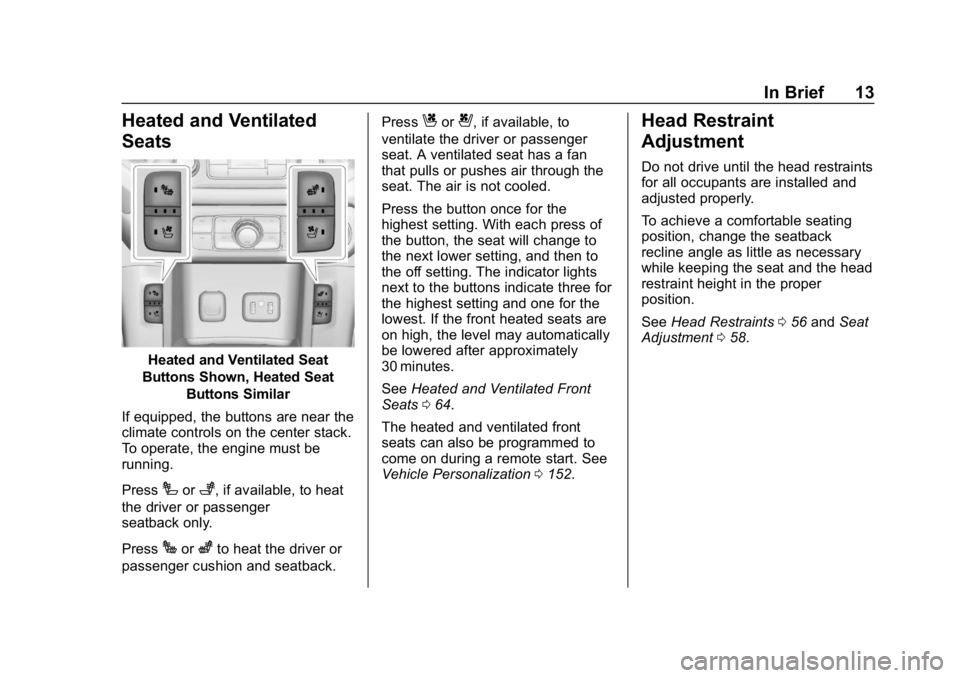
Heated and Ventilated Seat
Buttons Shown, Heated Seat Buttons Similar
If equipped, the buttons are near the
climate controls on the center stack.
To operate, the engine must be
running.
Press
Ior+, if available, to heat
the driver or passenger
seatback only.
Press
Jorzto heat the driver or
passenger cushion and seatback. Press
Cor{, if available, to
ventilate the driver or passenger
seat. A ventilated seat has a fan
that pulls or pushes air through the
seat. The air is not cooled.
Press the button once for the
highest setting. With each press of
the button, the seat will change to
the next lower setting, and then to
the off setting. The indicator lights
next to the buttons indicate three for
the highest setting and one for the
lowest. If the front heated seats are
on high, the level may automatically
be lowered after approximately
30 minutes.
See Heated and Ventilated Front
Seats 064.
The heated and ventilated front
seats can also be programmed to
come on during a remote start. See
Vehicle Personalization 0152.Head Restraint
Adjustment
Do not drive until the head restraints
for all occupants are installed and
adjusted properly.
To achieve a comfortable seating
position, change the seatback
recline angle as little as necessary
while keeping the seat and the head
restraint height in the proper
position.
See Head Restraints 056 and Seat
Adjustment 058.
Page 36 of 429
GMC Acadia/Acadia Denali Owner Manual (GMNA-Localizing-U.S./Canada/
Mexico-12146149) - 2019 - crc - 7/30/18
Keys, Doors, and Windows 35
Battery Replacement
Replace the battery in the
transmitter soon if the DIC displays
REPLACE BATTERY IN
REMOTE KEY.
Caution
When replacing the battery, do
not touch any of the circuitry on
the transmitter. Static from your
body could damage the
transmitter.
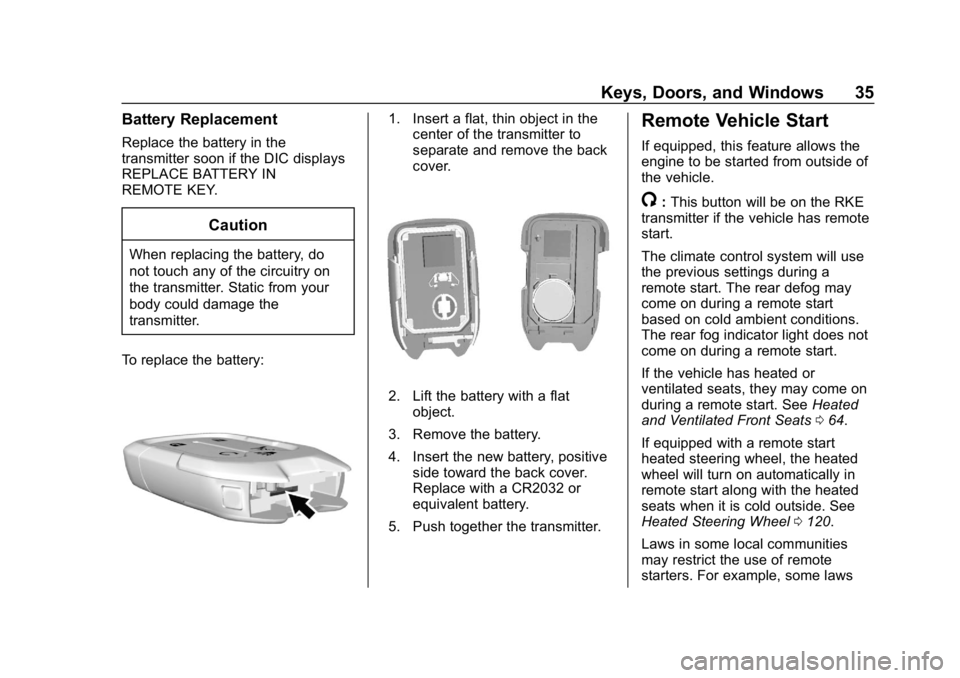
To replace the battery:
1. Insert a flat, thin object in the center of the transmitter to
separate and remove the back
cover.
2. Lift the battery with a flat
object.
3. Remove the battery.
4. Insert the new battery, positive side toward the back cover.
Replace with a CR2032 or
equivalent battery.
5. Push together the transmitter.
Remote Vehicle Start
If equipped, this feature allows the
engine to be started from outside of
the vehicle.
/: This button will be on the RKE
transmitter if the vehicle has remote
start.
The climate control system will use
the previous settings during a
remote start. The rear defog may
come on during a remote start
based on cold ambient conditions.
The rear fog indicator light does not
come on during a remote start.
If the vehicle has heated or
ventilated seats, they may come on
during a remote start. See Heated
and Ventilated Front Seats 064.
If equipped with a remote start
heated steering wheel, the heated
wheel will turn on automatically in
remote start along with the heated
seats when it is cold outside. See
Heated Steering Wheel 0120.
Laws in some local communities
may restrict the use of remote
starters. For example, some laws
Page 50 of 429
GMC Acadia/Acadia Denali Owner Manual (GMNA-Localizing-U.S./Canada/
Mexico-12146149) - 2019 - crc - 7/30/18
Keys, Doors, and Windows 49
Exterior Mirrors
Convex Mirrors
{Warning
A convex mirror can make things,
like other vehicles, look farther
away than they really are. If you
cut too sharply into the right lane,
you could hit a vehicle on the
right. Check the inside mirror or
glance over your shoulder before
changing lanes.
The passenger side mirror is convex
shaped. A convex mirror's surface is
curved so more can be seen from
the driver seat.
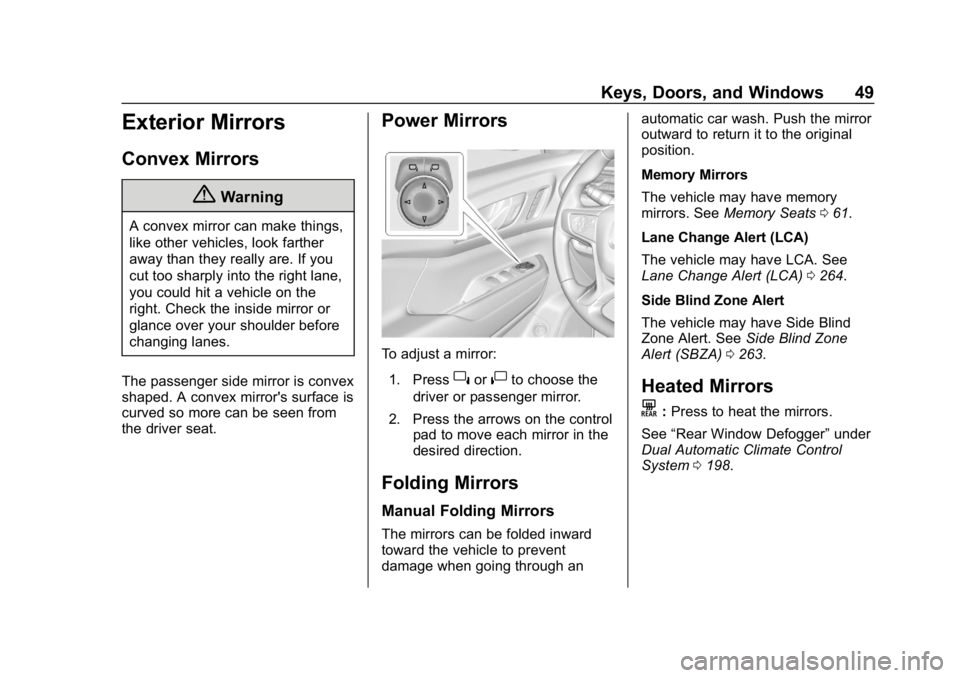
Power Mirrors
To adjust a mirror: 1. Press
}or|to choose the
driver or passenger mirror.
2. Press the arrows on the control pad to move each mirror in the
desired direction.
Folding Mirrors
Manual Folding Mirrors
The mirrors can be folded inward
toward the vehicle to prevent
damage when going through an automatic car wash. Push the mirror
outward to return it to the original
position.
Memory Mirrors
The vehicle may have memory
mirrors. See
Memory Seats 061.
Lane Change Alert (LCA)
The vehicle may have LCA. See
Lane Change Alert (LCA) 0264.
Side Blind Zone Alert
The vehicle may have Side Blind
Zone Alert. See Side Blind Zone
Alert (SBZA) 0263.
Heated Mirrors
K
:Press to heat the mirrors.
See “Rear Window Defogger” under
Dual Automatic Climate Control
System 0198.
Page 56 of 429
GMC Acadia/Acadia Denali Owner Manual (GMNA-Localizing-U.S./Canada/
Mexico-12146149) - 2019 - crc - 7/30/18
Seats and Restraints 55
Seats and
Restraints
Head Restraints
Head Restraints . . . . . . . . . . . . . . . 56
Front Seats
Seat Adjustment . . . . . . . . . . . . . . . 58
Power Seat Adjustment . . . . . . . . 59
Lumbar Adjustment . . . . . . . . . . . . 59
Reclining Seatbacks . . . . . . . . . . . 59
Memory Seats . . . . . . . . . . . . . . . . . 61
Heated and Ventilated FrontSeats . . . . . . . . . . . . . . . . . . . . . . . . . 64
Rear Seats
Rear Seats . . . . . . . . . . . . . . . . . . . . 66
Heated Rear Seats . . . . . . . . . . . . 69
Third Row Seats . . . . . . . . . . . . . . . 70
Seat Belts
Seat Belts . . . . . . . . . . . . . . . . . . . . . 71
How to Wear Seat BeltsProperly . . . . . . . . . . . . . . . . . . . . . . 72
Lap-Shoulder Belt . . . . . . . . . . . . . 74
Seat Belt Use During Pregnancy . . . . . . . . . . . . . . . . . . . . 76
Seat Belt Extender . . . . . . . . . . . . . 77
Safety System Check . . . . . . . . . . 77 Seat Belt Care . . . . . . . . . . . . . . . . . 77
Replacing Seat Belt System
Parts after a Crash . . . . . . . . . . . 78
Airbag System
Airbag System . . . . . . . . . . . . . . . . . 78
Where Are the Airbags? . . . . . . . 80
When Should an AirbagInflate? . . . . . . . . . . . . . . . . . . . . . . . 82
What Makes an Airbag Inflate? . . . . . . . . . . . . . . . . . . . . . . . 83
How Does an Airbag Restrain? . . . . . . . . . . . . . . . . . . . . . 83
What Will You See after an Airbag Inflates? . . . . . . . . . . . . . . 84
Passenger Sensing System . . . 85
Servicing the Airbag-Equipped Vehicle . . . . . . . . . . . . . . . . . . . . . . . 89
Adding Equipment to the Airbag-Equipped Vehicle . . . . . 90
Airbag System Check . . . . . . . . . . 91
Replacing Airbag System Parts after a Crash . . . . . . . . . . . . . . . . . 91
Child Restraints
Older Children . . . . . . . . . . . . . . . . . 91
Infants and Young Children . . . . 93
Child Restraint Systems . . . . . . . 96
Where to Put the Restraint . . . . . 97
Lower Anchors and Tethers forChildren (LATCH System) . . . . 99 Replacing LATCH System
Parts After a Crash . . . . . . . . . 105
Securing Child Restraints (With the Seat Belt in the
Rear Seat) . . . . . . . . . . . . . . . . . . 106
Securing Child Restraints (With the Seat Belt in the
Front Seat) . . . . . . . . . . . . . . . . . . 108
Page 65 of 429
GMC Acadia/Acadia Denali Owner Manual (GMNA-Localizing-U.S./Canada/
Mexico-12146149) - 2019 - crc - 7/30/18
64 Seats and Restraints
To stop Easy Exit Recall movement,
press any of the following memory
controls:
.Power seat
. Memory SET, 1, 2, or
B
.Power mirror, with the driver or
passenger side mirror selected
. Power steering wheel,
if equipped
Obstructions
If something has blocked the driver
seat and/or power steering wheel
while recalling a memory position,
the recall may stop. Remove the
obstruction and try the recall again.
If the memory position still does not
recall, see your dealer for service.
Heated and Ventilated
Front Seats
{Warning
If temperature change or pain to
the skin cannot be felt, the seat
heater may cause burns. To
reduce the risk of burns, use care
when using the seat heater,
especially for long periods of
time. Do not place anything on
the seat that insulates against
heat, such as a blanket, cushion,
cover, or similar item. This may
cause the seat heater to
overheat. An overheated seat
heater may cause a burn or may
damage the seat.
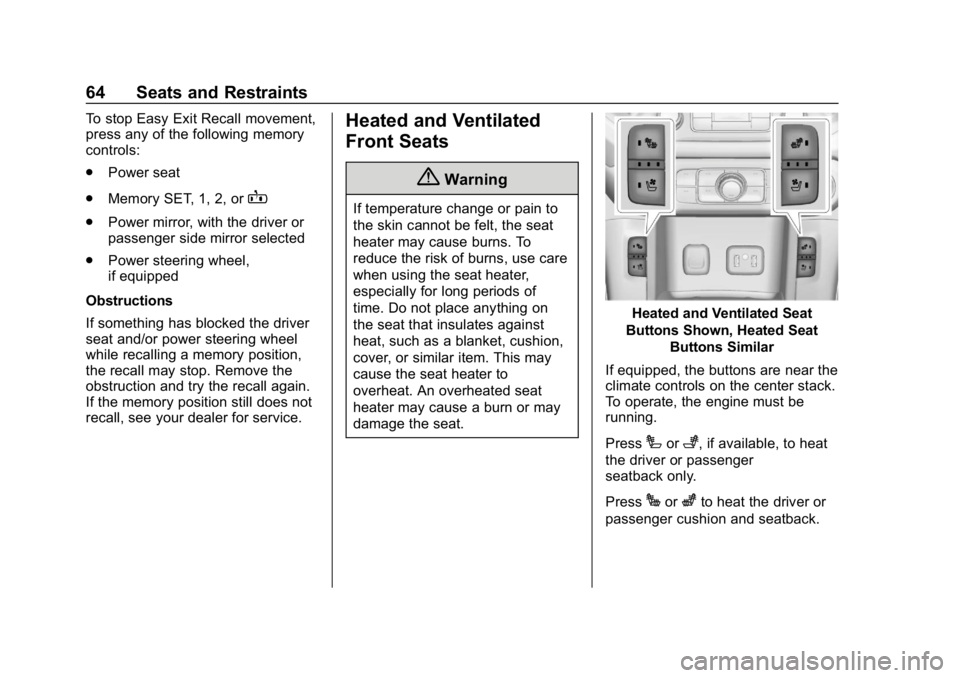
Heated and Ventilated Seat
Buttons Shown, Heated Seat Buttons Similar
If equipped, the buttons are near the
climate controls on the center stack.
To operate, the engine must be
running.
Press
Ior+, if available, to heat
the driver or passenger
seatback only.
Press
Jorzto heat the driver or
passenger cushion and seatback.
Page 66 of 429
GMC Acadia/Acadia Denali Owner Manual (GMNA-Localizing-U.S./Canada/
Mexico-12146149) - 2019 - crc - 7/30/18
Seats and Restraints 65
PressCor{, if available, to
ventilate the driver or passenger
seat. A ventilated seat has a fan
that pulls or pushes air through the
seat. The air is not cooled.
When a heated seat is turned on,
the indicator on button turns red.
When a ventilated seat is turned on,
the indicator on button turns blue.
Press the button once for the
highest setting. With each press of
the button, the seat will change to
the next lower setting, and then to
the off setting. The indicator lights
next to the buttons indicate three for
the highest setting and one for the
lowest. If the front heated seats are
on high, the level may automatically
be lowered after approximately
30 minutes.
The passenger seat may take
longer to heat up.
Auto Heated and Ventilated Seats
If the vehicle is equipped with auto
heated or ventilated seats, and the
ignition is on, this feature will automatically activate the heated or
ventilated seats at the level required
by the vehicle's interior temperature.
The active high, medium, low, or off
heated or ventilated seat level will
be indicated by the manual heated
and ventilated seat buttons on the
center stack. Use the manual
heated and ventilated seat buttons
on the center stack to turn auto
heated or ventilated seats off. If the
passenger seat is unoccupied, the
auto heated or ventilated seats
feature will not activate that seat.
The auto heated and ventilated
seats feature can be programmed to
always be enabled when the vehicle
is on. If equipped with a heated
steering wheel, the auto heated
steering wheel activation will follow
the heated seat auto activation and
the heated wheel indicator will
follow the state of the steering
wheel heat.
See
Vehicle Personalization 0152. Remote Start Heated and
Ventilated Seats
During a remote start, the heated or
ventilated seats, if equipped, can be
turned on automatically. When it is
cold outside, the heated seats will
turn on followed by the heated
steering wheel, if equipped. When it
is hot outside, the ventilated seats
turn on. The heated or ventilated
seats are canceled when the
ignition is turned on. Press the
heated or ventilated seat button to
use the heated or ventilated seats
after the vehicle is started.
The heated or ventilated seat
indicator lights do not turn on during
a remote start.
The temperature performance of an
unoccupied seat may be reduced.
This is normal.
The remote start heated or
ventilated seats may be enabled or
disabled in the vehicle
personalization menu.
See
Remote Vehicle Start 035 and
Vehicle Personalization 0152.
Page 70 of 429
GMC Acadia/Acadia Denali Owner Manual (GMNA-Localizing-U.S./Canada/
Mexico-12146149) - 2019 - crc - 7/30/18
Seats and Restraints 69
seatback to make sure it is locked.
Push on the head restraint to return
it to the upright, locked position.
The second row seatbacks can also
be folded forward by pulling the
levers on the driver side of the rear
cargo area. The top lever folds the
driver side seatback and the bottom
lever folds the passenger side
seatback.
Heated Rear Seats
{Warning
If temperature change or pain to
the skin cannot be felt, the seat
heater may cause burns. See the
Warning underHeated and
Ventilated Front Seats 064.
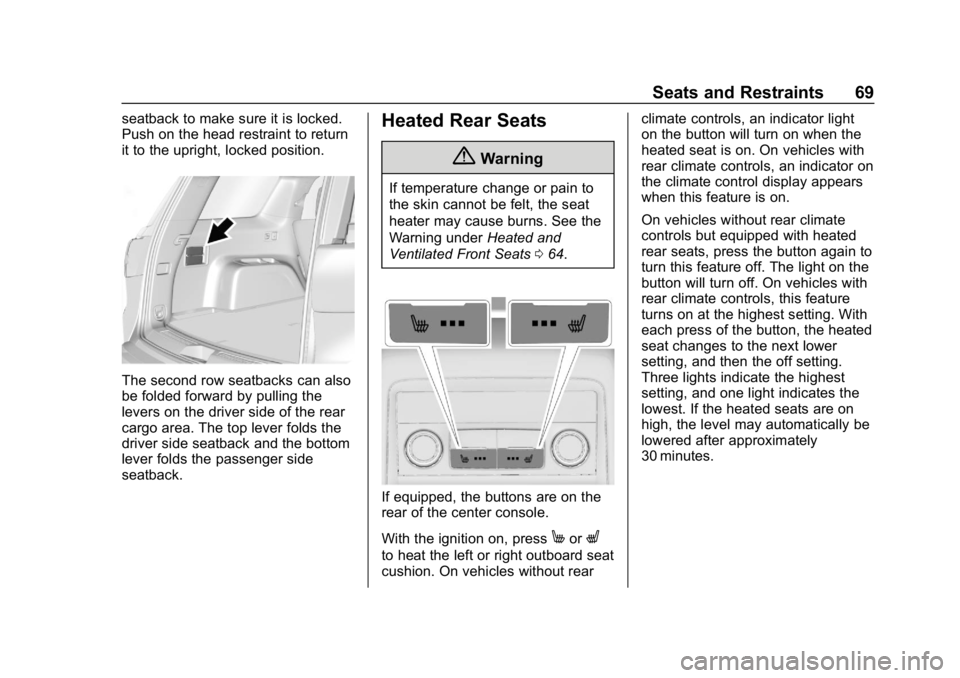
If equipped, the buttons are on the
rear of the center console.
With the ignition on, press
MorL
to heat the left or right outboard seat
cushion. On vehicles without rear climate controls, an indicator light
on the button will turn on when the
heated seat is on. On vehicles with
rear climate controls, an indicator on
the climate control display appears
when this feature is on.
On vehicles without rear climate
controls but equipped with heated
rear seats, press the button again to
turn this feature off. The light on the
button will turn off. On vehicles with
rear climate controls, this feature
turns on at the highest setting. With
each press of the button, the heated
seat changes to the next lower
setting, and then the off setting.
Three lights indicate the highest
setting, and one light indicates the
lowest. If the heated seats are on
high, the level may automatically be
lowered after approximately
30 minutes.
Page 121 of 429
GMC Acadia/Acadia Denali Owner Manual (GMNA-Localizing-U.S./Canada/
Mexico-12146149) - 2019 - crc - 7/30/18
120 Instruments and Controls
oorp:Press to go to the
previous or next menu option.
worx: Press to go to the next or
previous selection.
V: Press to select a highlighted
menu option.
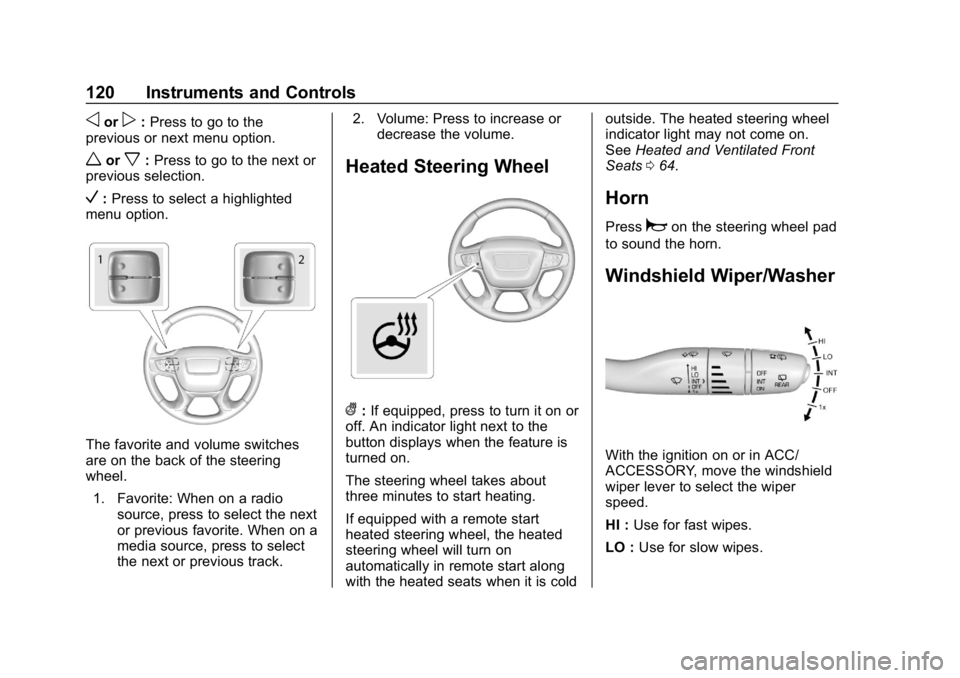
The favorite and volume switches
are on the back of the steering
wheel.
1. Favorite: When on a radio source, press to select the next
or previous favorite. When on a
media source, press to select
the next or previous track. 2. Volume: Press to increase or
decrease the volume.
Heated Steering Wheel
(:If equipped, press to turn it on or
off. An indicator light next to the
button displays when the feature is
turned on.
The steering wheel takes about
three minutes to start heating.
If equipped with a remote start
heated steering wheel, the heated
steering wheel will turn on
automatically in remote start along
with the heated seats when it is cold outside. The heated steering wheel
indicator light may not come on.
See
Heated and Ventilated Front
Seats 064.
Horn
Pressaon the steering wheel pad
to sound the horn.
Windshield Wiper/Washer
With the ignition on or in ACC/
ACCESSORY, move the windshield
wiper lever to select the wiper
speed.
HI : Use for fast wipes.
LO : Use for slow wipes.