transmission GMC ACADIA 2022 Owner's Guide
[x] Cancel search | Manufacturer: GMC, Model Year: 2022, Model line: ACADIA, Model: GMC ACADIA 2022Pages: 397, PDF Size: 6.98 MB
Page 233 of 397
GMC Acadia/Acadia Denali Owner Manual (GMNA-Localizing-U.S./Canada/
Mexico-15170041) - 2022 - CRC - 10/6/21
232 Driving and Operating
The speedometer reading can be displayed
in either English or metric units. See
Instrument Cluster (Base and Midlevel)098
or
Instrument Cluster (Uplevel) 0101. The
increment value used depends on the units
displayed.
Passing Another Vehicle While Using Cruise
Control
Use the accelerator pedal to increase the
vehicle speed. When you take your foot off
the pedal, the vehicle will slow down to the
previous set cruise speed.
While pressing the accelerator pedal or
shortly following the release to override
cruise, briefly applying SET− will result in
cruise set to the current vehicle speed.
Using Cruise Control on Hills
How well the cruise control will work on
hills depends upon the vehicle speed, load,
and the steepness of the hills. When going
up steep hills, you might have to step on
the accelerator pedal to maintain your
speed. When going downhill, you may have
to brake or shift to a lower gear to keep
your speed down. If the brake pedal is
applied, cruise control disengages. Ending Cruise Control
There are four ways to end cruise control:
.Step lightly on the brake pedal.
.Press*.
.Shift the transmission to N (Neutral).
.PressJ.
Erasing Speed Memory
The cruise control set speed is erased from
memory if
Jis pressed or if the ignition is
turned off.
Adaptive Cruise Control
(Advanced)
If equipped with Adaptive Cruise Control
(ACC), it allows the driver to select the
cruise control set speed and following gap.
Read this entire section before using this
system. The following gap is the following
time between your vehicle and a vehicle
detected directly ahead in your path,
moving in the same direction. If no vehicle
is detected in your path, ACC works like
regular cruise control. ACC uses camera and
radar sensors. See Radio Frequency
Statement 0373. If a vehicle is detected in your path, ACC can
apply acceleration or limited, moderate
braking to maintain the selected following
gap. To disengage ACC, apply the brake.
If ACC is controlling your vehicle speed
when the Traction Control System (TCS) or
StabiliTrak/Electronic Stability Control (ESC)
system activates, the ACC may automatically
disengage. See
Traction Control/Electronic
Stability Control 0227. When road
conditions allow ACC to be safely used, the
ACC can be turned back on.
Disabling the TCS or StabiliTrak/ESC system
will disengage and prevent engagement
of ACC.
ACC can reduce the need for you to
frequently brake and accelerate, especially
when used on expressways, freeways, and
interstate highways. When used on other
roads, you may need to take over the
control of braking or acceleration more
often.
{Warning
ACC has limited braking ability and may
not have time to slow the vehicle down
enough to avoid a collision with another
vehicle you are following. This can occur
(Continued)
Page 259 of 397
GMC Acadia/Acadia Denali Owner Manual (GMNA-Localizing-U.S./Canada/
Mexico-15170041) - 2022 - CRC - 10/6/21
258 Driving and Operating
Trailer Towing
General Towing Information
Only use towing equipment that has been
designed for the vehicle. Contact your dealer
or trailering dealer for assistance with
preparing the vehicle to tow a trailer. Read
the entire section before towing a trailer.
To tow a disabled vehicle, seeTowing the
Vehicle 0334. To tow the vehicle behind
another vehicle such as a motor home, see
Recreational Vehicle Towing 0336.
Driving Characteristics and
Towing Tips
{Warning
You can lose control when towing a
trailer if the correct equipment is not
used or the vehicle is not driven properly.
For example, if the trailer is too heavy or
the trailer brakes are inadequate for the
load, the vehicle may not stop as
expected. You and others could be
seriously injured. The vehicle may also be
damaged, and the repairs would not be
covered by the vehicle warranty. Pull a
(Continued)
Warning (Continued)
trailer only if all the steps in this section
have been followed. Ask your dealer for
advice and information about towing a
trailer with the vehicle.
Driving with a Trailer
Trailering is different than just driving the
vehicle by itself. Trailering means changes in
handling, acceleration, braking, durability,
and fuel economy. Successful, safe trailering
takes correct equipment, and it has to be
used properly.
The following information has many
time-tested, important trailering tips and
safety rules. Many of these are important
for your safety and that of your passengers.
Read this section carefully before pulling a
trailer.
When towing a trailer:
.Become familiar with and follow all state
and local laws that apply to trailer
towing. These requirements vary from
state to state.
.State laws may require the use of
extended side view mirrors. Even if not
required, you should install extended side
view mirrors if your visibility is limited or
restricted while towing.
.Do not tow a trailer during the first
800 km (500 mi) of vehicle use to prevent
damage to the engine, axle, or other
parts.
.It is recommended to perform the first oil
change before heavy towing.
.During the first 800 km (500 mi) of trailer
towing, do not drive over 80 km/h
(50 mph) and do not make starts at full
throttle.
.Vehicles can tow in D (Drive). Tow/Haul
Mode is recommended for heavier trailers.
SeeDriver Mode Control 0229. If the
transmission downshifts too often, a
lower gear may be selected using Manual
Mode. See Manual Mode 0223.
If equipped, the following driver assistance
features should be turned off when towing
a trailer:
.Adaptive Cruise Control (ACC)
.Super Cruise Control
Page 261 of 397
GMC Acadia/Acadia Denali Owner Manual (GMNA-Localizing-U.S./Canada/
Mexico-15170041) - 2022 - CRC - 10/6/21
260 Driving and Operating
beyond the passed vehicle before returning
to the lane. Pass on level roadways. Avoid
passing on hills if possible.
Backing Up
Hold the bottom of the steering wheel with
one hand. To move the trailer to the left,
move that hand to the left. To move the
trailer to the right, move that hand to the
right. Always back up slowly and, if possible,
have someone guide you.
Making TurnsCaution
Turn more slowly and make wider arcs
when towing a trailer to prevent damage
to your vehicle. Making very sharp turns
could cause the trailer to contact the
vehicle.
Make wider turns than normal when towing,
so the trailer will not go over soft shoulders,
over curbs, or strike road signs, trees,
or other objects. Always signal turns well in
advance. Do not steer or brake suddenly.
Driving on Grades
Reduce speed and shift to a lower gear
before starting down a long or steep
downhill grade. If the transmission is not
shifted down, the brakes may overheat and
result in reduced braking efficiency.
The vehicle can tow in D (Drive). Shift the
transmission to a lower gear if the
transmission shifts too often under heavy
loads and/or hilly conditions.
When towing at higher altitudes, engine
coolant will boil at a lower temperature
than at lower altitudes. If the engine is
turned off immediately after towing at high
altitude on steep uphill grades, the vehicle
could show signs similar to engine
overheating. To avoid this, let the engine
run, preferably on level ground, with the
transmission in P (Park) for a few minutes
before turning the engine off. If the
overheat warning comes on, see Engine
Overheating 0284.
Viewing Systems
If equipped, the viewing systems on the
vehicle can improve visibility while hitching,
backing, and driving with a trailer. See
Driver Assistance Systems 0240 and
Assistance Systems for Parking or Backing
0 241.
Parking on Hills
{Warning
To prevent serious injury or death,
always park your vehicle and trailer on a
level surface when possible.
When parking your vehicle and your trailer
on a hill: 1. Press the brake pedal, but do not shift into P (Park) yet. Turn the wheels into
the curb if facing downhill or into traffic
if facing uphill.
2. Have someone place chocks under the trailer wheels.
3. When the wheel chocks are in place, gradually release the brake pedal to
allow the chocks to absorb the load of
the trailer.
Page 268 of 397
GMC Acadia/Acadia Denali Owner Manual (GMNA-Localizing-U.S./Canada/
Mexico-15170041) - 2022 - CRC - 10/6/21
Driving and Operating 267
arrows on the instrument cluster will
illuminate even if the trailer is not properly
connected or the bulbs are burned out.
Tow/Haul Mode
For instructions on how to enter Tow/Haul
mode, seeDriver Mode Control 0229.
Tow/Haul assists when pulling a heavy
trailer or a large or heavy load.
Tow/Haul Mode is designed to be most
effective when the vehicle and trailer
combined weight is at least 75% of the
vehicle's Gross Combined Weight Rating
(GCWR). See “Weight of the Trailer” under
Trailer Towing 0261.
Tow/Haul Mode is most useful when towing
a heavy trailer or carrying a large or
heavy load:
.through rolling terrain
.in stop-and-go traffic
.in busy parking lots
Operating the vehicle in Tow/Haul Mode
when lightly loaded or not towing will not
cause damage; however, it is not
recommended and may result in unpleasant
engine and transmission driving
characteristics and reduced fuel economy.
Trailer Sway Control (TSC)
Vehicles with StabiliTrak/Electronic Stability
Control (ESC) have a Trailer Sway Control
(TSC) feature. Trailer sway is unintended
side-to-side motion of a trailer while towing.
If the vehicle is towing a trailer and the TSC
detects that sway is increasing, the vehicle
brakes are selectively applied at each wheel,
to help reduce excessive trailer sway.
If equipped with the Integrated Trailer Brake
Control (ITBC) system, and the trailer has an
electric brake system, StabiliTrak/ESC may
also apply the trailer brakes.
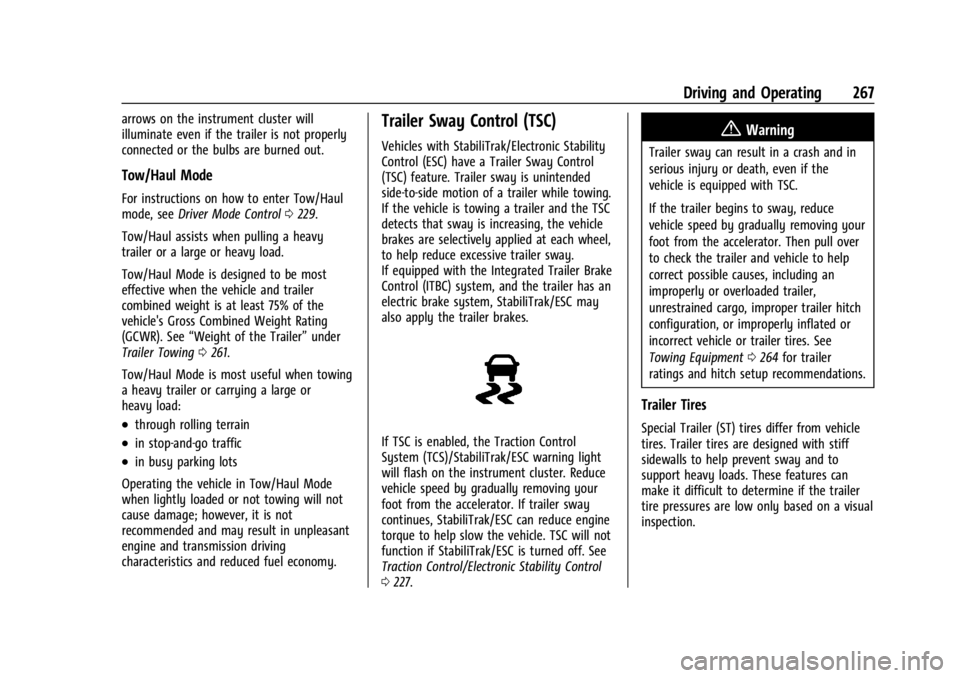
If TSC is enabled, the Traction Control
System (TCS)/StabiliTrak/ESC warning light
will flash on the instrument cluster. Reduce
vehicle speed by gradually removing your
foot from the accelerator. If trailer sway
continues, StabiliTrak/ESC can reduce engine
torque to help slow the vehicle. TSC will not
function if StabiliTrak/ESC is turned off. See
Traction Control/Electronic Stability Control
0 227.
{Warning
Trailer sway can result in a crash and in
serious injury or death, even if the
vehicle is equipped with TSC.
If the trailer begins to sway, reduce
vehicle speed by gradually removing your
foot from the accelerator. Then pull over
to check the trailer and vehicle to help
correct possible causes, including an
improperly or overloaded trailer,
unrestrained cargo, improper trailer hitch
configuration, or improperly inflated or
incorrect vehicle or trailer tires. See
Towing Equipment 0264 for trailer
ratings and hitch setup recommendations.
Trailer Tires
Special Trailer (ST) tires differ from vehicle
tires. Trailer tires are designed with stiff
sidewalls to help prevent sway and to
support heavy loads. These features can
make it difficult to determine if the trailer
tire pressures are low only based on a visual
inspection.
Page 270 of 397
GMC Acadia/Acadia Denali Owner Manual (GMNA-Localizing-U.S./Canada/
Mexico-15170041) - 2022 - CRC - 10/6/21
Vehicle Care 269
Vehicle Care
General Information
General Information . . . . . . . . . . . . . . . . . . . 270
California Perchlorate MaterialsRequirements . . . . . . . . . . . . . . . . . . . . . . . . 270
Accessories and Modifications . . . . . . . . . 270
Vehicle Checks
Doing Your Own Service Work . . . . . . . . 270
Hood . . . . . . . . . . . . . . . . . . . . . . . . . . . . . . . . . . 271
Engine Compartment Overview . . . . . . . . 272
Engine Oil . . . . . . . . . . . . . . . . . . . . . . . . . . . . . 275
Engine Oil Life System . . . . . . . . . . . . . . . . . 277
Automatic Transmission Fluid . . . . . . . . . 278
Engine Air Filter Life System . . . . . . . . . . 278
Engine Air Cleaner/Filter . . . . . . . . . . . . . . . 278
Cooling System . . . . . . . . . . . . . . . . . . . . . . . 280
Engine Overheating . . . . . . . . . . . . . . . . . . . 284
Washer Fluid . . . . . . . . . . . . . . . . . . . . . . . . . . 285
Brakes . . . . . . . . . . . . . . . . . . . . . . . . . . . . . . . . . 285
Brake Fluid . . . . . . . . . . . . . . . . . . . . . . . . . . . . 286
Battery - North America . . . . . . . . . . . . . . . 287
All-Wheel Drive . . . . . . . . . . . . . . . . . . . . . . . . 287
Park Brake and P (Park) Mechanism Check . . . . . . . . . . . . . . . . . . . . . . . . . . . . . . . . 288
Wiper Blade Replacement . . . . . . . . . . . . . 288
Windshield Replacement . . . . . . . . . . . . . . 289
Gas Strut(s) . . . . . . . . . . . . . . . . . . . . . . . . . . . 289
Headlamp Aiming
Front Headlamp Aiming . . . . . . . . . . . . . . . 290
Bulb Replacement
Bulb Replacement . . . . . . . . . . . . . . . . . . . . . 290
Halogen Bulbs . . . . . . . . . . . . . . . . . . . . . . . . 290
LED Lighting . . . . . . . . . . . . . . . . . . . . . . . . . . . 291
Electrical System
Electrical System Overload . . . . . . . . . . . . . 291
Fuses and Circuit Breakers . . . . . . . . . . . . . 292
Engine Compartment Fuse Block . . . . . . 293
Instrument Panel Fuse Block . . . . . . . . . . 296
Rear Compartment Fuse Block . . . . . . . . . 298
Wheels and Tires
Tires . . . . . . . . . . . . . . . . . . . . . . . . . . . . . . . . . . 300
All-Season Tires . . . . . . . . . . . . . . . . . . . . . . . . 301
Winter Tires . . . . . . . . . . . . . . . . . . . . . . . . . . . 301
Summer Tires . . . . . . . . . . . . . . . . . . . . . . . . . 302
All-Terrain Tires . . . . . . . . . . . . . . . . . . . . . . . 302
Tire Sidewall Labeling . . . . . . . . . . . . . . . . . 302
Tire Designations . . . . . . . . . . . . . . . . . . . . . . 304
Tire Terminology and Definitions . . . . . . 305
Tire Pressure . . . . . . . . . . . . . . . . . . . . . . . . . . 307
Tire Pressure for High-Speed Operation . . . . . . . . . . . . . . . . . . . . . . . . . . . 308
Tire Pressure Monitor System . . . . . . . . . 309
Tire Pressure Monitor Operation . . . . . . . 310
Tire Inspection . . . . . . . . . . . . . . . . . . . . . . . . . 313
Tire Rotation . . . . . . . . . . . . . . . . . . . . . . . . . . . 313 When It Is Time for New Tires . . . . . . . . . 314
Buying New Tires . . . . . . . . . . . . . . . . . . . . . . 315
Different Size Tires and Wheels . . . . . . . . 316
Uniform Tire Quality Grading . . . . . . . . . . 317
Wheel Alignment and Tire Balance . . . . 318
Wheel Replacement . . . . . . . . . . . . . . . . . . . 318
Tire Chains . . . . . . . . . . . . . . . . . . . . . . . . . . . . 319
If a Tire Goes Flat . . . . . . . . . . . . . . . . . . . . . 319
Tire Sealant and Compressor Kit . . . . . . . 321
Storing the Tire Sealant and
Compressor Kit . . . . . . . . . . . . . . . . . . . . . . 326
Tire Changing . . . . . . . . . . . . . . . . . . . . . . . . . . 327
Compact Spare Tire . . . . . . . . . . . . . . . . . . . . 332
Jump Starting
Jump Starting - North America . . . . . . . . 332
Towing the Vehicle
Towing the Vehicle . . . . . . . . . . . . . . . . . . . . 334
Recreational Vehicle Towing . . . . . . . . . . . 336
Appearance Care
Exterior Care . . . . . . . . . . . . . . . . . . . . . . . . . . 338
Interior Care . . . . . . . . . . . . . . . . . . . . . . . . . . . 342
Floor Mats . . . . . . . . . . . . . . . . . . . . . . . . . . . . 345
Page 279 of 397
GMC Acadia/Acadia Denali Owner Manual (GMNA-Localizing-U.S./Canada/
Mexico-15170041) - 2022 - CRC - 10/6/21
278 Vehicle Care
If the CHANGE ENGINE OIL SOON message
comes back on when the vehicle is started,
the engine oil life system has not been
reset. Repeat the procedure.
Automatic Transmission Fluid
It is not necessary to check the transmission
fluid level. A transmission fluid leak is the
only reason for fluid loss. If a leak occurs,
take the vehicle to the dealer and have it
repaired as soon as possible.
Change the fluid at the intervals listed in
Maintenance Schedule0348, and be sure to
use the transmission fluid listed in
Recommended Fluids and Lubricants 0356.
Caution
Use of the incorrect automatic
transmission fluid may damage the
vehicle, and the damage may not be
covered by the vehicle warranty. Always
use the correct automatic transmission
fluid. See Recommended Fluids and
Lubricants 0356.
If you need to check the transmission fluid
level, take the vehicle to your dealer.
Engine Air Filter Life System
If equipped, this feature provides the engine
air filter’s remaining life and best timing for
a change. The timing to change an engine
air filter depends on driving and
environmental conditions.
When to Change Engine Air Filter
When the Driver Information Center (DIC)
displays a message to replace the engine air
filter at the next oil change, follow this
timing.
When the DIC displays a message to replace
the engine air filter soon, replace the engine
air filter at the earliest convenience.
The system must be reset after the engine
air filter is changed.
If the DIC displays a message to check the
engine air filter system, see your dealer.
How to Reset Engine Air Filter Life
System
To reset: 1. Place the vehicle in P (Park). 2. Display the Air Filter Life on the DIC. See
Driver Information Center (DIC) (Base
Level) 0116 or
Driver Information Center (DIC) (Midlevel
and Uplevel) 0118.
3. Press
pto move to the Reset/Disable
display area. Select Reset then press
V.
4. Press
Vto confirm to reset.
Engine Air Cleaner/Filter
The engine air cleaner/filter is in the engine
compartment on the passenger side of the
vehicle. See Engine Compartment Overview
0 272 for location.
When to Inspect the Engine Air Cleaner/
Filter
If the vehicle is not equipped with the
engine air filter life system, see
Maintenance Schedule 0348 for intervals on
inspecting and replacing the engine air
cleaner/filter.
If equipped with the engine air filter life
system, see Engine Air Filter Life System
0 278.
Page 284 of 397
GMC Acadia/Acadia Denali Owner Manual (GMNA-Localizing-U.S./Canada/
Mexico-15170041) - 2022 - CRC - 10/6/21
Vehicle Care 283
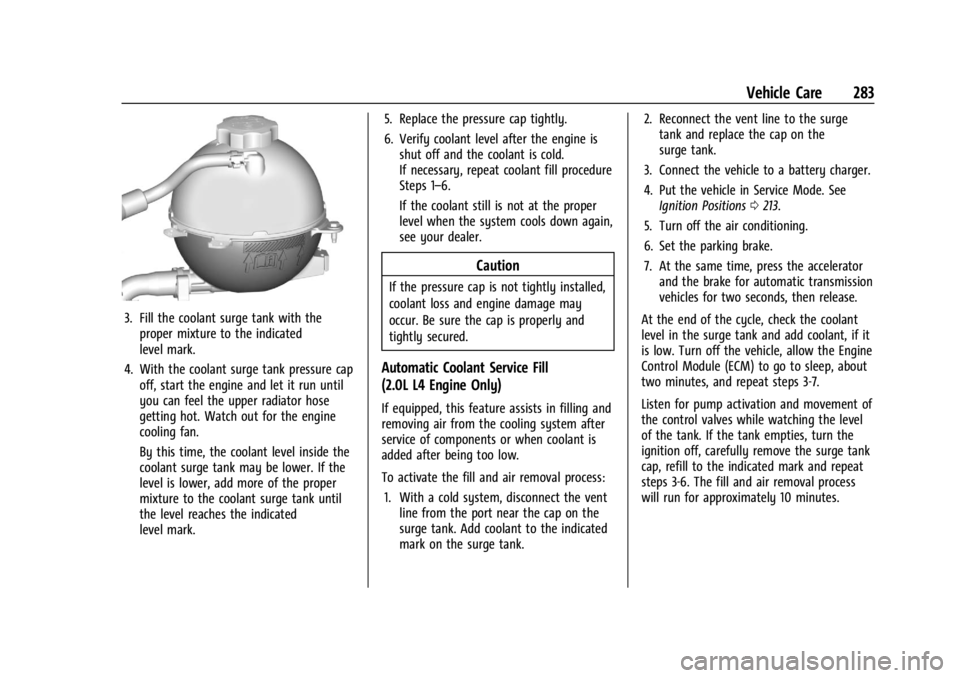
3. Fill the coolant surge tank with theproper mixture to the indicated
level mark.
4. With the coolant surge tank pressure cap off, start the engine and let it run until
you can feel the upper radiator hose
getting hot. Watch out for the engine
cooling fan.
By this time, the coolant level inside the
coolant surge tank may be lower. If the
level is lower, add more of the proper
mixture to the coolant surge tank until
the level reaches the indicated
level mark. 5. Replace the pressure cap tightly.
6. Verify coolant level after the engine is
shut off and the coolant is cold.
If necessary, repeat coolant fill procedure
Steps 1–6.
If the coolant still is not at the proper
level when the system cools down again,
see your dealer.
Caution
If the pressure cap is not tightly installed,
coolant loss and engine damage may
occur. Be sure the cap is properly and
tightly secured.
Automatic Coolant Service Fill
(2.0L L4 Engine Only)
If equipped, this feature assists in filling and
removing air from the cooling system after
service of components or when coolant is
added after being too low.
To activate the fill and air removal process:
1. With a cold system, disconnect the vent line from the port near the cap on the
surge tank. Add coolant to the indicated
mark on the surge tank. 2. Reconnect the vent line to the surge
tank and replace the cap on the
surge tank.
3. Connect the vehicle to a battery charger.
4. Put the vehicle in Service Mode. See Ignition Positions 0213.
5. Turn off the air conditioning.
6. Set the parking brake.
7. At the same time, press the accelerator and the brake for automatic transmission
vehicles for two seconds, then release.
At the end of the cycle, check the coolant
level in the surge tank and add coolant, if it
is low. Turn off the vehicle, allow the Engine
Control Module (ECM) to go to sleep, about
two minutes, and repeat steps 3-7.
Listen for pump activation and movement of
the control valves while watching the level
of the tank. If the tank empties, turn the
ignition off, carefully remove the surge tank
cap, refill to the indicated mark and repeat
steps 3-6. The fill and air removal process
will run for approximately 10 minutes.
Page 289 of 397
GMC Acadia/Acadia Denali Owner Manual (GMNA-Localizing-U.S./Canada/
Mexico-15170041) - 2022 - CRC - 10/6/21
288 Vehicle Care
Park Brake and P (Park)
Mechanism Check
{Warning
When you are doing this check, the
vehicle could begin to move. You or
others could be injured and property
could be damaged. Make sure there is
room in front of the vehicle in case it
begins to roll. Be ready to apply the
regular brake at once should the vehicle
begin to move.
Park on a fairly steep hill, with the vehicle
facing downhill. Keeping your foot on the
regular brake, set the parking brake.
.To check the parking brake's holding
ability: With the engine running and the
transmission in N (Neutral), slowly remove
foot pressure from the regular brake
pedal. Do this until the vehicle is held by
the parking brake only.
.To check the P (Park) mechanism's holding
ability: With the engine running, shift to
P (Park). Then release the parking brake
followed by the regular brake.
Contact your dealer if service is required.
Wiper Blade Replacement
Windshield wiper blades should be inspected
for wear or cracking.
It is a good idea to clean or replace the
wiper blade assembly on a regular basis or
when worn. For proper windshield wiper
blade length and type, see Maintenance
Replacement Parts 0357.
Caution
Allowing the wiper arm to touch the
windshield when no wiper blade is
installed could damage the windshield.
Any damage that occurs would not be
covered by the vehicle warranty. Do not
allow the wiper arm to touch the
windshield.
Front Wiper Blade Replacement
To replace the wiper blade assembly:
1. Pull the windshield wiper assembly away from the windshield.
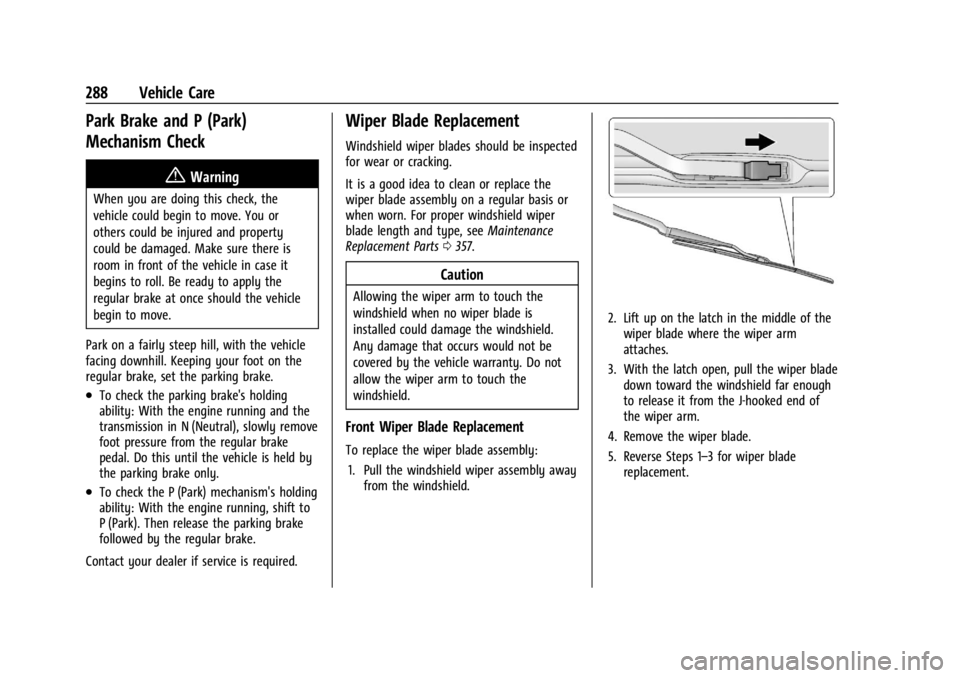
2. Lift up on the latch in the middle of the
wiper blade where the wiper arm
attaches.
3. With the latch open, pull the wiper blade down toward the windshield far enough
to release it from the J-hooked end of
the wiper arm.
4. Remove the wiper blade.
5. Reverse Steps 1–3 for wiper blade replacement.
Page 296 of 397
GMC Acadia/Acadia Denali Owner Manual (GMNA-Localizing-U.S./Canada/
Mexico-15170041) - 2022 - CRC - 10/6/21
Vehicle Care 295
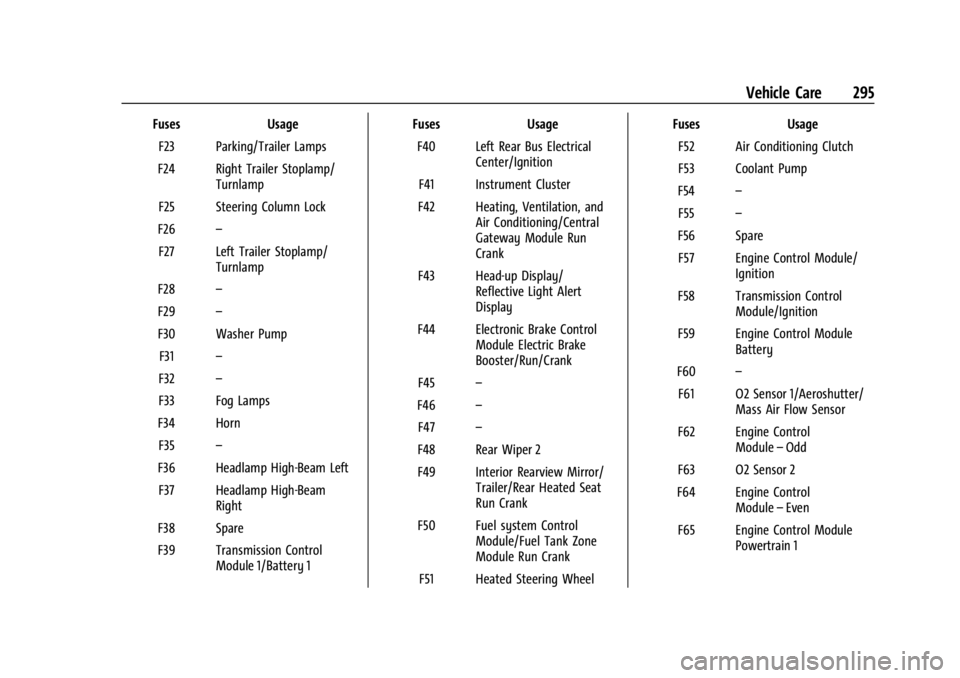
FusesUsage
F23 Parking/Trailer Lamps
F24 Right Trailer Stoplamp/ Turnlamp
F25 Steering Column Lock
F26 –
F27 Left Trailer Stoplamp/ Turnlamp
F28 –
F29 –
F30 Washer Pump F31 –
F32 –
F33 Fog Lamps
F34 Horn F35 –
F36 Headlamp High-Beam Left F37 Headlamp High-Beam Right
F38 Spare
F39 Transmission Control Module 1/Battery 1 Fuses
Usage
F40 Left Rear Bus Electrical Center/Ignition
F41 Instrument Cluster
F42 Heating, Ventilation, and Air Conditioning/Central
Gateway Module Run
Crank
F43 Head-up Display/ Reflective Light Alert
Display
F44 Electronic Brake Control Module Electric Brake
Booster/Run/Crank
F45 –
F46 –
F47 –
F48 Rear Wiper 2
F49 Interior Rearview Mirror/ Trailer/Rear Heated Seat
Run Crank
F50 Fuel system Control Module/Fuel Tank Zone
Module Run Crank
F51 Heated Steering Wheel Fuses
Usage
F52 Air Conditioning Clutch
F53 Coolant Pump
F54 –
F55 –
F56 Spare F57 Engine Control Module/ Ignition
F58 Transmission Control Module/Ignition
F59 Engine Control Module Battery
F60 –
F61 O2 Sensor 1/Aeroshutter/ Mass Air Flow Sensor
F62 Engine Control Module–Odd
F63 O2 Sensor 2
F64 Engine Control Module–Even
F65 Engine Control Module Powertrain 1
Page 298 of 397
GMC Acadia/Acadia Denali Owner Manual (GMNA-Localizing-U.S./Canada/
Mexico-15170041) - 2022 - CRC - 10/6/21
Vehicle Care 297
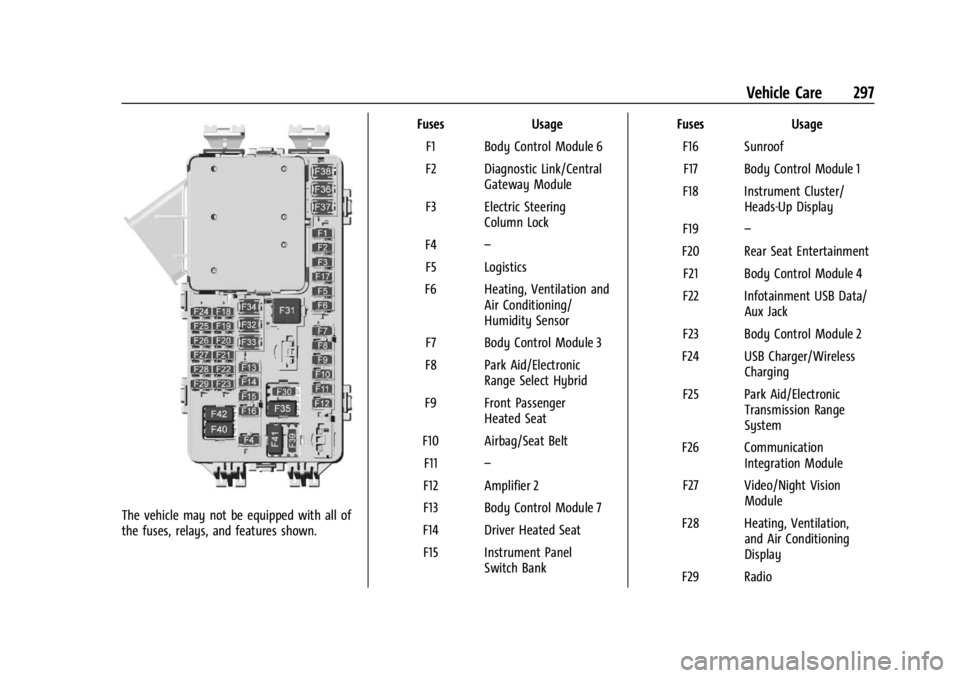
The vehicle may not be equipped with all of
the fuses, relays, and features shown.Fuses Usage
F1 Body Control Module 6
F2 Diagnostic Link/Central Gateway Module
F3 Electric Steering Column Lock
F4 –
F5 Logistics
F6 Heating, Ventilation and Air Conditioning/
Humidity Sensor
F7 Body Control Module 3
F8 Park Aid/Electronic Range Select Hybrid
F9 Front Passenger Heated Seat
F10 Airbag/Seat Belt F11 –
F12 Amplifier 2
F13 Body Control Module 7
F14 Driver Heated Seat F15 Instrument Panel Switch Bank Fuses Usage
F16 SunroofF17 Body Control Module 1
F18 Instrument Cluster/ Heads-Up Display
F19 –
F20 Rear Seat Entertainment F21 Body Control Module 4
F22 Infotainment USB Data/ Aux Jack
F23 Body Control Module 2
F24 USB Charger/Wireless Charging
F25 Park Aid/Electronic Transmission Range
System
F26 Communication Integration Module
F27 Video/Night Vision Module
F28 Heating, Ventilation, and Air Conditioning
Display
F29 Radio